
Technologies
Newcastle vs. West Ham Livestream: How to Watch Premier League Soccer From Anywhere
West Ham’s battle to beat the drop continues as the relegation-threatened Hammers face the soaring Magpies at St James’ Park.
Sitting pretty in third in the English Premier League table and having reached their first major final in 24 years in midweek, things are look pretty rosy right now for Newcastle and their boss Eddie Howe. But could an improving West Ham upset the good vibes at St James’ Park on Saturday in this intriguing Premier League clash?
Sean Longstaff was on target twice for the Magpies as they beat Southampton 2-1 on Tuesday to secure their place in this year’s Carabao Cup final. That result triggered jubilant scenes on Tynecastle at the final whistle, but the hosts’ attention must now turn back to league matters, as they look to maintain their place amid the Champions League qualifications spots.
Despite their good form, this fixture looks set to be a tricky encounter for the home side, with Newcastle required to manage without influential central midfielder Bruno Guimaraes, who misses out thanks to a three-match suspension. Ineligible against Southampton, $54 million signing Anthony Gordon is likely to make his Newcastle debut after moving from Everton.
After a disastrous start to a season that promised so much for West Ham, there are signs of recovery for the Hammers. A crucial win against relegation rivals Everton a fortnight ago was followed by a professional victory over Championship side Derby in the FA Cup on Monday. Those matches showed that West Ham’s dangerous forwards Jarrod Bowen and Michail Antonio are both beginning to click again, which could spell trouble for a buoyant Newcastle.
Below, we’ll outline the best live TV streaming services to use to watch the game live wherever you are in the world.
Newcastle vs. West Ham: When and where?
Newcastle host West Ham at St James’ Park on Saturday, Feb. 4. Kickoff is set for 5.30 p.m. local time in the UK (12.30 p.m. ET, 9.30 a.m. PT in the US, and at 4.30 a.m. AEST on Sunday, Feb. 5 in Australia).
How to watch the Newcastle vs. West Ham game online from anywhere using a VPN
If you find yourself unable to view the game locally, you may need a different way to watch the game — that’s where using a VPN can come in handy. A VPN is also the best way to stop your ISP from throttling your speeds on game day by encrypting your traffic, and it’s also a great idea if you’re traveling and find yourself connected to a Wi-Fi network, and you want to add an extra layer of privacy for your devices and logins.
With a VPN, you’re able to virtually change your location on your phone, tablet or laptop to get access to the game. So if your internet provider or mobile carrier has stuck you with an IP address that incorrectly shows your location in a blackout zone, a VPN can correct that problem by giving you an IP address in your correct, nonblackout area. Most VPNs, like our Editors’ Choice, ExpressVPN, make it really easy to do this.
Using a VPN to watch or stream sports is legal in any country where VPNs are legal, including the US, UK and Canada, as long as you have a legitimate subscription to the service you’re streaming. You should be sure your VPN is set up correctly to prevent leaks: Even where VPNs are legal, the streaming service may terminate the account of anyone it deems to be circumventing correctly applied blackout restrictions.
Looking for other options? Be sure to check out some of the other great VPN deals taking place right now.
Livestream the Newcastle vs. West Ham game in the US
This weekend’s EPL match is streaming on Peacock. You’ll need a Peacock Premium or Premium Plus account to catch the game live.
Livestream the Newcastle vs. West Ham game in the UK
Premier League rights in the UK are split between Sky Sports, BT Sport and Amazon Prime Video. The Newcastle vs. West Ham game is exclusive to Sky Sports — showing on its Sky Sports Main Event, Premier League and Ultra channels. If you already have Sky Sports as part of your TV package, you can stream the game via its Sky Go app, but cord-cutters will want to get set up with a Now account, and a Now Sports membership, to stream the game.
Livestream the Newcastle vs. West Ham game in Canada
If you want to stream the Magpies against the Hammers live in Canada, you’ll need to subscribe to FuboTV Canada. The service has exclusive rights to this Premier League season.
Livestream the Newcastle vs. West Ham game in Australia
Football fans Down Under can watch this EPL fixture on streaming service Optus Sport, which is showing every single Premier League game live in Australia this season.
Quick tips for streaming the Premier League using a VPN
- With four variables at play — your ISP, browser, video streaming provider and VPN — your experience and success when streaming EPL matches may vary.
- If you don’t see your desired location as a default option for ExpressVPN, try using the «search for city or country» option.
- If you’re having trouble getting the game after you’ve turned on your VPN and set it to the correct viewing area, there are two things you can try for a quick fix. First, log into your streaming service subscription account and make sure the address registered for the account is an address in the correct viewing area. If not, you may need to change the physical address on file with your account. Second, some smart TVs — like Roku — don’t have VPN apps you can install directly on the device itself. Instead, you’ll have to install the VPN on your router or the mobile hotspot you’re using (like your phone) so that any device on its Wi-Fi network now appears in the correct viewing location.
- All of the VPN providers we recommend have helpful instructions on their main site for quickly installing the VPN on your router. In some cases with smart TV services, after you install a cable network’s sports app, you’ll be asked to verify a numeric code or click a link sent to your email address on file for your smart TV. This is where having a VPN on your router will also help, since both devices will appear to be in the correct location.
- And remember, browsers can often give away a location despite using a VPN, so be sure you’re using a privacy-first browser to log into your services. We normally recommend Brave.
Technologies
McDonald’s KPop Demon Hunter Meals Include Bright Purple Nugget Sauce
The Derpy McFlurry mixes popping boba pearls and berry sauce into a soft-serve dessert.

McDonald’s has seen success with themed combo meals, including its holiday Grinch Meal. Now, the fast-food chain is capitalizing on Netflix’s Oscar-winning animated film, KPop Demon Hunters, with new upcoming menu items and both a breakfast meal and a lunch/dinner offering. Let’s hope you like the color purple.
The HUNTR/X Meal, named for the K-pop girl group in the movie, is a 10-piece chicken McNuggets meal that includes a medium drink and three special menu items.
Ramyeon McShaker fries come with a small bag of soy, garlic, sesame and spice seasoning, along with regular McDonald’s french fries. You sprinkle the seasoning into the provided bag, dump in the fries, shake it all up and eat.
The meal includes two new sauces for the fries and nuggets. Hunter sauce is a sweet chili sauce mixing notes of chili, garlic and pepper. But my favorite item on this new menu is Demon sauce, a bold mustard sauce with some heat and a bold purple color. There’s just not enough dark purple food out there.
There’s also a new dessert, the Derpy McFlurry, which blends creamy vanilla soft serve with berry-flavored popping boba pearls, served with a swirl of wild berry sauce. McDonald’s named it for the supernatural feline, Derpy Tiger, from the movie.
If breakfast is your bag, the new morning meal is the Saja Boys Breakfast Meal, named for the movie’s boy band.
It includes a Spicy Saja McMuffin sandwich, which is a sausage McMuffin with egg and a spicy Saja sauce, hash browns and a small drink.
Both meals come with a photocard for one of the bands and a Derpy card. The Derpy card includes a QR code you can scan to unlock online content about the film.
The full KPop Demon Hunters menu should be available at participating McDonald’s beginning March 31.
The McDonald’s Grinch meal (and its accompanying patterned socks) sold out quickly, so KPop Demon Hunters fans may want to mark their calendars and nab a meal when they are released.
Technologies
Melania Trump Escorted by Talking Humanoid Robot at White House Tech Summit
The first lady shared the spotlight with the robot to promote the use of artificial intelligence in education.
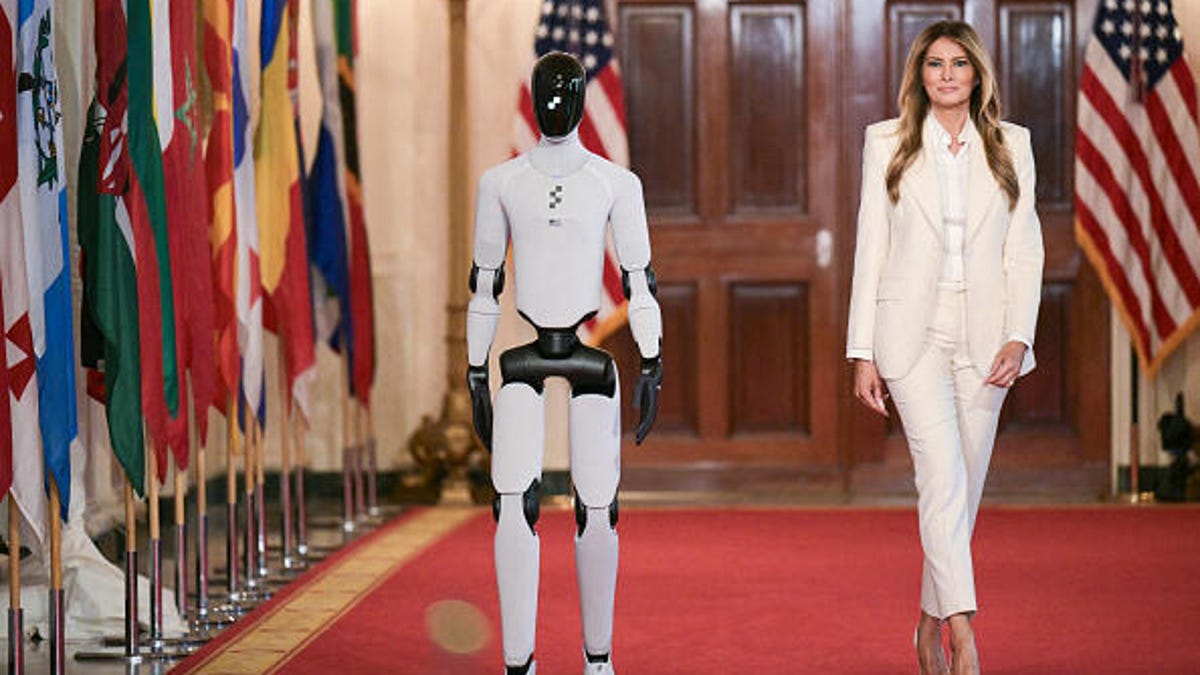
An unexpected guest escorted Melania Trump at the Fostering the Future Together Global Coalition Summit on Wednesday: a Figure 03 humanoid robot.
During the event, the first lady pitched a future where AI-powered humanoid robots — presented as an idealized educator named «Plato» — provide students with personalized and instant access to human knowledge, including philosophy and art.
The Figure 03 robot is made by Silicon Valley-based robotics company Figure AI, which introduced its third-generation humanoid robot in October last year. The Figure 03 robot costs around $25,000, according to Forbes.
Figure 03 was designed for people to use in their homes, with demo videos showing it folding laundry, lifting eggs from a carton, using a washing machine and delivering drinks to its owners lounging by the pool. It was also shown in corporate use cases as a receptionist and a package deliverer. Using a proprietary AI engine called Helix, it can autonomously perform these tasks and respond to your voice commands.
The humanoid was seen walking slowly down the red carpet at the tech summit and then delivering opening remarks.
«I’m grateful to be part of this historic movement to empower children with technology and education,» the Figure 03 humanoid robot said. It then said «welcome» in various languages.
The first lady later said that AI-powered humanoid robots could exist in children’s homes as an aid to their education to «boost analytic skills and problem solving and adopt in real time to a student’s pace, prior knowledge and even emotional state.»
The two-day summit is hosting leaders from 45 nations and 28 technology organizations, and is intended to «empower children through education and technology,» according to a White House statement. Guests included representatives from tech giants such as Google, OpenAI, Microsoft and AI data analytics company Palantir.
The summit is part of the first lady’s Be Best: Fostering the Future initiative, which aims to help children learn using advanced technology. It was introduced in 2018 as an awareness campaign aimed at combating cyberbullying and helping children affected by the opioid crisis.
US Education Secretary Linda McMahon spoke about AI being one of the Department of Education’s main priorities on the first day of the summit.
«If we’re able to scale these resources effectively by investing in AI infrastructure and training, we can offer expert instructions across countless fields, to hire volumes of people at a fraction of the cost,» McMahon said Tuesday at a round table meeting.
According to McMahon, the Department of Education has already dedicated millions of dollars in grants to support the use of AI in schools.
The event follows criticism of the Trump administration’s 2025 executive order to dismantle the Department of Education. While the Department of Education hasn’t been officially abolished, it has undergone significant policy changes, funding cuts and workforce reductions.
The introduction of a humanoid robot at the summit sparked significant backlash among many who are wary of the technology’s role in the classroom. Critics took to social media to voice concerns that these machines could eventually replace teachers, stripping the education system of essential human connection, and leading to increased layoffs and cost-cutting.
On one Huffington Post Instagram post featuring the robot, commenters expressed deep skepticism, with one user sarcastically noting, «Nice, getting rid of educators in favor of a robot,» while another flatly rejected the concept, stating, «No, I don’t want to imagine a world with emotionless robots educating our children.»
The White House did not immediately respond to a request for comment.
Technologies
Nintendo Dropped a Switch 2 Update With a New Mode You’ll Want to Turn On Immediately
This new feature is one of the best yet.
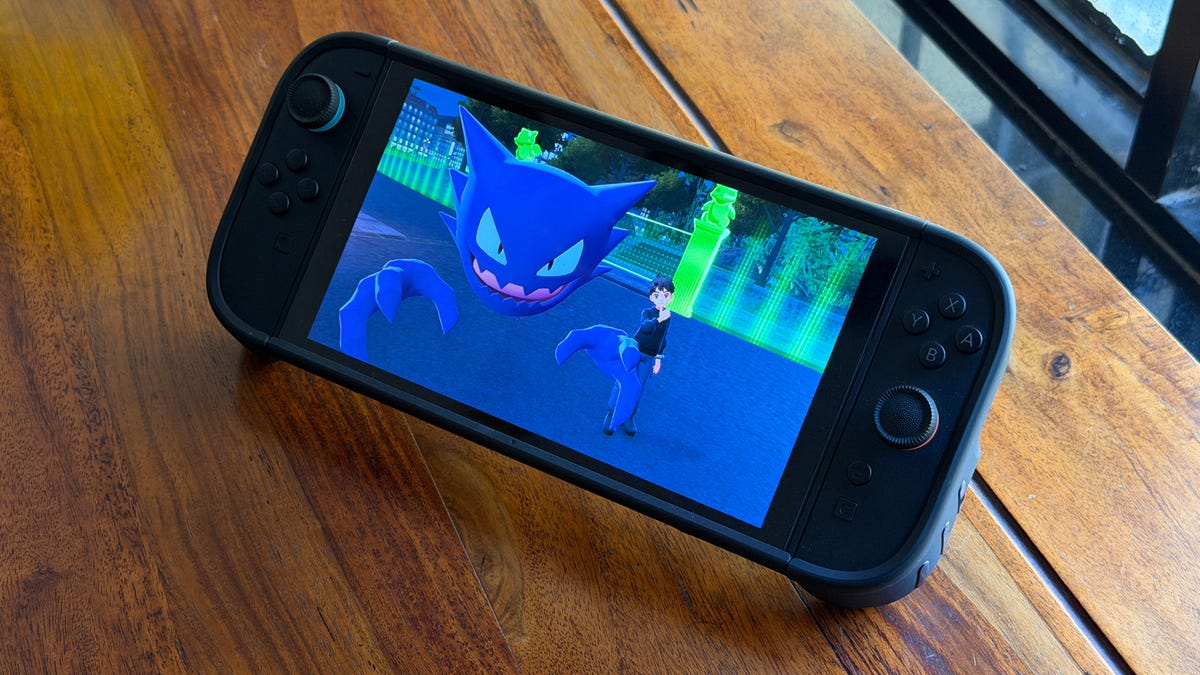
A new firmware update hit the Nintendo Switch 2 last week. Among the multitude of small changes is a new feature that will give Switch 1 games a notable upgrade.
Version 22.0.0 for the Switch 2 went live on March 16 and is available for download to the console. The big new feature in the update was Handheld Mode Boost, which will give Switch 1 games a visual upgrade when played on the Switch 2 in handheld mode.
[Nintendo Switch 2 System Update]
Version 22.0.0 adds «Handheld Mode Boost». This will make Switch 1 games think that they are in TV mode even when in handheld.
Games can run at higher resolutions in TV mode, taking better advantage of the Switch 2’s 1080p screen. pic.twitter.com/aXOKWosFAw— OatmealDome (@OatmealDome) March 17, 2026
What does Handheld Mode Boost do?
Even though the Switch 2 supports backward compatibility with almost all Switch 1 games, there was an issue. The Switch 2 has a higher resolution screen: 1080p versus the older hardware’s 720p. When playing a Switch 1 game on a Switch 2 in handheld mode, the graphics looked blurry and jagged.
When enabled, Handheld Mode Boost makes a Switch 1 game act as if it’s docked, so it displays 1080p at 60 frames per second. This will give the visuals an immediate upgrade.
How do you enable Handheld Mode Boost?
Handheld Mode Boost has to be turned on to see the effect, and it takes a few steps:
- Select Systems Settings from the Home menu
- Select System
- Select Nintendo Switch Software Handling
- Enable Handheld Mode Boost
Is there a downside to enabling Handheld Mode Boost?
A user on Reddit tested the mode to see how it affects the Switch 2’s battery life. The test used Doom Eternal for the Switch 1 with and without Handheld Mode Boost. The test showed that the battery life decreased from 5 hours, 5 minutes to 3 hours, 43 minutes. That’s a 27% drop and should be taken into account when using Handheld Mode Boost.
How do I upgrade my Nintendo Switch 2?
If you have Software Auto-Updates enabled on your Switch 2, a pop-up window should come up whenever you start a game. If not, head to System Settings and choose to update the console from the menu.
What other features were added in version 22.0.0?
Handheld Mode Boost was the main star of the new firmware update, but there were a slew of other changes.
- Changed the on-screen text and animations when you load a virtual game card in the HOME Menu.
- Added the ability to save notes about friends on your Friend List. The note content is not displayed to friends.
- Added the ability to invite friends to GameChat rooms you’re participating in. Some friends may not be able to be invited, such as supervised accounts.
- Friends who haven’t finished GameChat’s initial setup can now be invited to GameChat. Some friends may not be able to be invited, such as supervised accounts or those who haven’t used a Nintendo Switch 2.
- Added the ability to rewind 10 seconds/advance 10 seconds with the ZL and ZR Buttons when watching a full-screen video in News or Nintendo eShop.
- Added the option to add the following data to «Automatic Uploads» from Album.
- Text-to-Speech, under Accessibility, can now read the text in Album and during first-time setup.
- Added the ability to see the breakdown of storage capacity by data type for the system memory and microSD Express card.
- Added the ability to perform an audio test when «Linear PCM 5.1 Surround» is selected for TV Sound in Audio.
- When Airplane Mode is activated, the previously set preferences for Bluetooth, Wi-Fi or NFC while in airplane mode will be saved and applied.
- Added the ability to individually enable or disable Bluetooth, Wi-Fi or NFC during Airplane Mode from the Quick Settings.
- Added the ability to see a notification in the Nintendo Switch Parental Controls smart device application when the Parental Controls PIN is input successfully on the console. This can also be set up to be a push notification to your smart device.
- General system stability improvements to enhance the user’s experience.
-
 Technologies3 года ago
Tech Companies Need to Be Held Accountable for Security, Experts Say
-
 Technologies3 года ago
Best Handheld Game Console in 2023
-
 Technologies3 года ago
Tighten Up Your VR Game With the Best Head Straps for Quest 2
-
 Technologies4 года ago
Black Friday 2021: The best deals on TVs, headphones, kitchenware, and more
-
 Technologies5 лет ago
Google to require vaccinations as Silicon Valley rethinks return-to-office policies
-
 Technologies5 лет ago
Verum, Wickr and Threema: next generation secured messengers
-
 Technologies4 года ago
Olivia Harlan Dekker for Verum Messenger
-
 Technologies4 года ago
The number of Сrypto Bank customers increased by 10% in five days