
Technologies
ModRetro Chromatic Review: The Perfect Game Boy Restomod
ModRetro went in a dramatically different direction with this Game Boy re-creation, and it succeeds in capturing the original’s charm.
Our Experts


Pros
- Beautiful screen
- Sturdy construction
- Vibrant design and colors
Cons
- Batteries
- Delicate paint job
- Price
- Mono sound
Lots of brands attempt to market nostalgia, but few succeed in capturing its warm essence. From hot pink flip phones to guitar amp-inspired Bluetooth speakers, these retro callbacks have the sheen of decades prior but are nothing more than reskinned modern tech. The ModRetro Chromatic, a modern Game Boy from Oculus Rift inventor and co-founder of defense company Anduril Industries Palmer Luckey, however, makes deliberate old-school compromises. Mainly, it uses less pixel-dense LCD displays to elicit emotions from yesteryear. It’s these forced compromises that help the Chromatic stand out even if, on paper, it doesn’t have all the most cutting-edge tech.
The result is a super-premium, slightly hindered Game Boy clone that feels like what Nintendo would have made if cost weren’t an issue. It even includes a copy of Tetris, like the original Game Boy did in 1989, a nice touch by ModRetro. The Chromatic’s high-end materials and features do come at a high price, though: $200, which is substantially higher than the Game Boy Color’s MSRP of $80 back in 1998 — about $160 adjusted for inflation. For the gamer who appreciates high-quality bespoke hardware and a commitment to authenticity, however, the price is well worth it.
Big chunky pixels
The most standout feature on the ModRetro Chromatic is its screen. It’s a 160×144, 2.56-inch IPS LCD display. If that resolution and size seem small, that’s because they are. Unlike modern displays, which have resolutions so high that you can’t even make out the individual blocks, ModRetro keeps things chunky.
This choice allows ModRetro to re-create that original Game Boy experience. Back then, cheap consumer displays weren’t as advanced and had pixels that were simply larger and more visible. For games that used sprites, like Pokemon or Wario Land 3, the pixel layout was a perfect grid to lay art assets on. It was a limitation of the time that game creators used as a canvas.
Modern emulation devices, including emulator apps you can install on your phone, can simply upscale all the in-game assets to make the image look super sharp. This is an approach that 2021’s Analogue Pocket used. When I heard that ModRetro was going to produce a device with big, blocky pixels, I was left perplexed. I believed that Analogue’s approach was the most sound. But after using the Chromatic, I realized there’s a charm to keeping things old school.
In my roughly 20 hours of Pokemon Crystal and Tetris gameplay over the past few months, I was slowly won over to the charms of the Chromatic’s screen. The lower resolution is what Pokemon was meant to look like. Sure, the Analogue Pocket, as well as a whole host of other emulation devices, can mimic the retro grid of the original Game Boy using filters, but it’s not the same. You can tell it’s software making the pixels look chunky.
In terms of colors, the IPS display ModRetro has sourced for the Chromatic is excellent. Visuals pop, and the overall presentation is clean without any smearing. The only way it could have been better is if ModRetro had opted for an OLED display. The glass atop the display is also of remarkable quality, using Sapphire crystal glass. Sapphire is a high-quality and expensive material known for its durability and transparency. It’s most often found on the faces of high-end watches and camera lenses.
The Chromatic captures in my mind the rose-tinted memories I had of playing my Game Boy Color on long road trips back when I was in elementary school. It’s something that the Analogue Pocket couldn’t do. Although the Pocket does have a Nintendo Switch-like dock and lets me play games on my giant television, a novelty I very much enjoy.
The Chromatic feels substantial
There’s been a long-running meme about the indestructible nature of the Nokia 3310, a beloved classic cellphone from the year 2000. It was made with chunky plastic and could survive just about any drop. The original Game Boy and Game Boy Color had that same design philosophy in mind, with one even surviving the Gulf War. The minimalist iPhone style hadn’t yet entered mass-market electronic design.
The ModRetro Chromatic adopts the ’80s and ’90s chunky design philosophy and opts for magnesium alloy instead of plastic, which offers both durability and heft. The three AA batteries inside also add to the weight and feel, but bring back ’90s handheld annoyances. A set of AA batteries lasts about 6 to 8 hours, depending on the screen’s brightness. As someone who loves the Game Boy Color, one thing I don’t miss is looking under seat cushions for batteries.
After some delay, the rechargeable battery pack is now available for $30.
Despite the shortcomings of AA batteries, as I mentioned previously, the Chromatic feels like what Nintendo would have made if costs weren’t a concern. It’s something I love about it. So rarely do we see electronics leaning into absurdity with little worry about cost. The expenditure in developing the display is something Luckey spoke of on X, the social media platform formerly known as Twitter.
It is.I spent a ton of money developing a custom display that is accurate all the way to the subpixel level, which is critical given how subpixel-aware good art of the time had to be.The panel isn’t even standard RGB, we used custom color filters to mimick the GBC LCD.
— Palmer Luckey (@PalmerLuckey) June 5, 2024
Even though there’s a good heft to the Chromatic, there didn’t seem to be any room for stereo speakers. Regrettably, there’s just a single speaker at the bottom of the device. A large part of the Game Boy library actually does support stereo sound, so headphones will be required to get the full sonic experience. There’s no Bluetooth either, so you’ll need to stick to wired cans.
Vibrant but delicate paint job
The ModRetro Chromatic is almost the antithesis of the Analogue Pocket. It opts for metals over plastics. It sports a lower-res screen over one that’s literally 14 times more dense. And instead of black or white, it gives consumers a wide range of color options, all with wonderful flourishes to give each unit a distinct identity. A few weeks back, all colors, except the muted GameStop-exclusive gray were sold out. Now, all colors are back in stock, including a new cloud colorway, which is white with purple accents.
(Note: Analogue has done limited edition re-releases of the Pocket in a wide range of colors, including ones inspired by the original Game Boy Color and Game Boy Pocket lineups, as well as a $500 aluminum variant.)
Our first-edition review unit in yellow, which ModRetro calls Volt, has red face buttons and brown and beige accents in the corners, reminding me of the earth tones present in homes from the 1970s. The ModRetro Chromatic is as much a plaything as it is a display piece.
Unfortunately, ModRetro didn’t spray a clear coat over the Chromatic’s luscious paint job. Sure, it gives the Chromatic a satisfying matte texture, but it makes the paint very delicate. Even with my careful use, I’ve already marred it with two small nicks, revealing the bare metal underneath. It makes me scared to take the Chromatic out of my house, which defeats the purpose of handheld gaming.
A worthy Game Boy revival at a high price
The ModRetro Chromatic’s gorgeous screen, magnesium build, stand-out paint job and sapphire crystal come at a $200 price. Well, at the time of this review, it was $200. Now, if you want a Chromatic with sapphire crystal, it’ll cost $300. Thankfully, there’s still a $200 option fitted with Gorilla Glass, meaning it’s not as strong but is luckily still scratch resistant. Either way, that’s a lot to pay for an electronic that can only play games from the ’80s, ’90s and early 2000s. Well, ModRetro is publishing newer Game Boy games, and companies like Incube8 Games, Bitmap Soft, and Mega Cat Studios are also releasing newer as well as homebrew titles on classic cartridges.
For $200, you could get a Nintendo Switch Lite and gain access to a massive library of modern titles as well as older games via the Nintendo Switch Online service. There’s also a slew of emulation devices filling up Amazon, AliExpress and TikTok Shop that offer thousands of old-school preloaded Game Boy titles of legally dubious origin for less than $50.
Here’s the thing: Emulation can’t beat the original. Even on the newly released Nintendo Switch 2, game emulation of older content still introduces input lag, which is the amount of time it takes for a button press to show up on screen. For hard-core gamers, this is suboptimal. Only when the original code is running through real circuits and transistors does it deliver an authentic experience.
If you’re the type that doesn’t care about authenticity and a true-to-form gaming experience, well, you likely aren’t reading this review. For this person, one of those emulation handhelds will suffice. There are dedicated sites that review the sea of retro gaming handhelds coming out of China, seemingly on a bi-weekly basis.
But if you’re the person who wants the satisfying snap of docking in an old-school Game Boy cartridge and sinking into the corner cushions of your couch with a pouch of Capri Sun resting on your chest, there really isn’t a much better experience than what the ModRetro Chromatic offers.
Technologies
McDonald’s KPop Demon Hunter Meals Include Bright Purple Nugget Sauce
The Derpy McFlurry mixes popping boba pearls and berry sauce into a soft-serve dessert.

McDonald’s has seen success with themed combo meals, including its holiday Grinch Meal. Now, the fast-food chain is capitalizing on Netflix’s Oscar-winning animated film, KPop Demon Hunters, with new upcoming menu items and both a breakfast meal and a lunch/dinner offering. Let’s hope you like the color purple.
The HUNTR/X Meal, named for the K-pop girl group in the movie, is a 10-piece chicken McNuggets meal that includes a medium drink and three special menu items.
Ramyeon McShaker fries come with a small bag of soy, garlic, sesame and spice seasoning, along with regular McDonald’s french fries. You sprinkle the seasoning into the provided bag, dump in the fries, shake it all up and eat.
The meal includes two new sauces for the fries and nuggets. Hunter sauce is a sweet chili sauce mixing notes of chili, garlic and pepper. But my favorite item on this new menu is Demon sauce, a bold mustard sauce with some heat and a bold purple color. There’s just not enough dark purple food out there.
There’s also a new dessert, the Derpy McFlurry, which blends creamy vanilla soft serve with berry-flavored popping boba pearls, served with a swirl of wild berry sauce. McDonald’s named it for the supernatural feline, Derpy Tiger, from the movie.
If breakfast is your bag, the new morning meal is the Saja Boys Breakfast Meal, named for the movie’s boy band.
It includes a Spicy Saja McMuffin sandwich, which is a sausage McMuffin with egg and a spicy Saja sauce, hash browns and a small drink.
Both meals come with a photocard for one of the bands and a Derpy card. The Derpy card includes a QR code you can scan to unlock online content about the film.
The full KPop Demon Hunters menu should be available at participating McDonald’s beginning March 31.
The McDonald’s Grinch meal (and its accompanying patterned socks) sold out quickly, so KPop Demon Hunters fans may want to mark their calendars and nab a meal when they are released.
Technologies
Melania Trump Escorted by Talking Humanoid Robot at White House Tech Summit
The first lady shared the spotlight with the robot to promote the use of artificial intelligence in education.
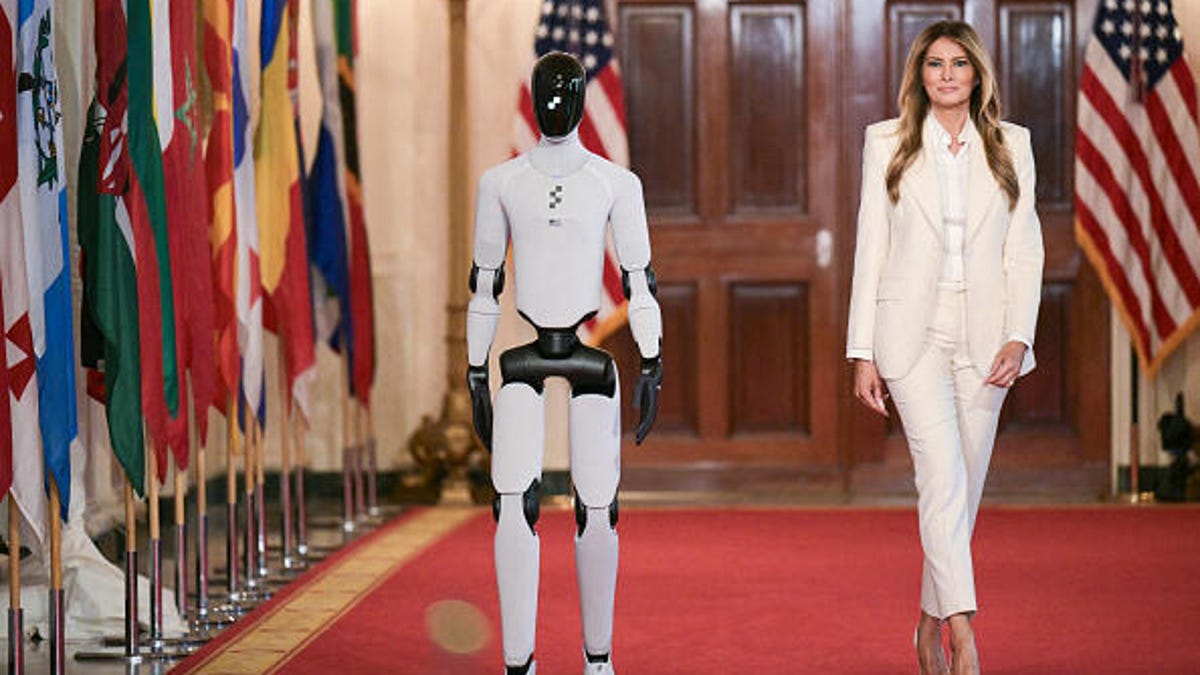
An unexpected guest escorted Melania Trump at the Fostering the Future Together Global Coalition Summit on Wednesday: a Figure 03 humanoid robot.
During the event, the first lady pitched a future where AI-powered humanoid robots — presented as an idealized educator named «Plato» — provide students with personalized and instant access to human knowledge, including philosophy and art.
The Figure 03 robot is made by Silicon Valley-based robotics company Figure AI, which introduced its third-generation humanoid robot in October last year. The Figure 03 robot costs around $25,000, according to Forbes.
Figure 03 was designed for people to use in their homes, with demo videos showing it folding laundry, lifting eggs from a carton, using a washing machine and delivering drinks to its owners lounging by the pool. It was also shown in corporate use cases as a receptionist and a package deliverer. Using a proprietary AI engine called Helix, it can autonomously perform these tasks and respond to your voice commands.
The humanoid was seen walking slowly down the red carpet at the tech summit and then delivering opening remarks.
«I’m grateful to be part of this historic movement to empower children with technology and education,» the Figure 03 humanoid robot said. It then said «welcome» in various languages.
The first lady later said that AI-powered humanoid robots could exist in children’s homes as an aid to their education to «boost analytic skills and problem solving and adopt in real time to a student’s pace, prior knowledge and even emotional state.»
The two-day summit is hosting leaders from 45 nations and 28 technology organizations, and is intended to «empower children through education and technology,» according to a White House statement. Guests included representatives from tech giants such as Google, OpenAI, Microsoft and AI data analytics company Palantir.
The summit is part of the first lady’s Be Best: Fostering the Future initiative, which aims to help children learn using advanced technology. It was introduced in 2018 as an awareness campaign aimed at combating cyberbullying and helping children affected by the opioid crisis.
US Education Secretary Linda McMahon spoke about AI being one of the Department of Education’s main priorities on the first day of the summit.
«If we’re able to scale these resources effectively by investing in AI infrastructure and training, we can offer expert instructions across countless fields, to hire volumes of people at a fraction of the cost,» McMahon said Tuesday at a round table meeting.
According to McMahon, the Department of Education has already dedicated millions of dollars in grants to support the use of AI in schools.
The event follows criticism of the Trump administration’s 2025 executive order to dismantle the Department of Education. While the Department of Education hasn’t been officially abolished, it has undergone significant policy changes, funding cuts and workforce reductions.
The introduction of a humanoid robot at the summit sparked significant backlash among many who are wary of the technology’s role in the classroom. Critics took to social media to voice concerns that these machines could eventually replace teachers, stripping the education system of essential human connection, and leading to increased layoffs and cost-cutting.
On one Huffington Post Instagram post featuring the robot, commenters expressed deep skepticism, with one user sarcastically noting, «Nice, getting rid of educators in favor of a robot,» while another flatly rejected the concept, stating, «No, I don’t want to imagine a world with emotionless robots educating our children.»
The White House did not immediately respond to a request for comment.
Technologies
Nintendo Dropped a Switch 2 Update With a New Mode You’ll Want to Turn On Immediately
This new feature is one of the best yet.
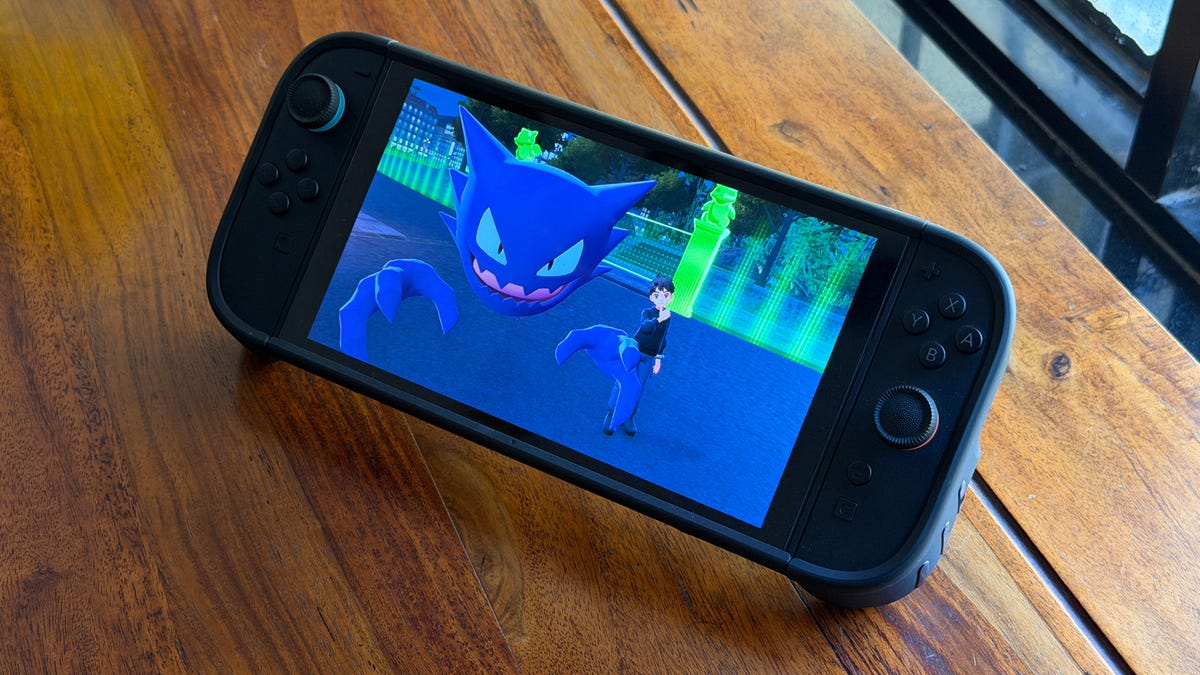
A new firmware update hit the Nintendo Switch 2 last week. Among the multitude of small changes is a new feature that will give Switch 1 games a notable upgrade.
Version 22.0.0 for the Switch 2 went live on March 16 and is available for download to the console. The big new feature in the update was Handheld Mode Boost, which will give Switch 1 games a visual upgrade when played on the Switch 2 in handheld mode.
[Nintendo Switch 2 System Update]
Version 22.0.0 adds «Handheld Mode Boost». This will make Switch 1 games think that they are in TV mode even when in handheld.
Games can run at higher resolutions in TV mode, taking better advantage of the Switch 2’s 1080p screen. pic.twitter.com/aXOKWosFAw— OatmealDome (@OatmealDome) March 17, 2026
What does Handheld Mode Boost do?
Even though the Switch 2 supports backward compatibility with almost all Switch 1 games, there was an issue. The Switch 2 has a higher resolution screen: 1080p versus the older hardware’s 720p. When playing a Switch 1 game on a Switch 2 in handheld mode, the graphics looked blurry and jagged.
When enabled, Handheld Mode Boost makes a Switch 1 game act as if it’s docked, so it displays 1080p at 60 frames per second. This will give the visuals an immediate upgrade.
How do you enable Handheld Mode Boost?
Handheld Mode Boost has to be turned on to see the effect, and it takes a few steps:
- Select Systems Settings from the Home menu
- Select System
- Select Nintendo Switch Software Handling
- Enable Handheld Mode Boost
Is there a downside to enabling Handheld Mode Boost?
A user on Reddit tested the mode to see how it affects the Switch 2’s battery life. The test used Doom Eternal for the Switch 1 with and without Handheld Mode Boost. The test showed that the battery life decreased from 5 hours, 5 minutes to 3 hours, 43 minutes. That’s a 27% drop and should be taken into account when using Handheld Mode Boost.
How do I upgrade my Nintendo Switch 2?
If you have Software Auto-Updates enabled on your Switch 2, a pop-up window should come up whenever you start a game. If not, head to System Settings and choose to update the console from the menu.
What other features were added in version 22.0.0?
Handheld Mode Boost was the main star of the new firmware update, but there were a slew of other changes.
- Changed the on-screen text and animations when you load a virtual game card in the HOME Menu.
- Added the ability to save notes about friends on your Friend List. The note content is not displayed to friends.
- Added the ability to invite friends to GameChat rooms you’re participating in. Some friends may not be able to be invited, such as supervised accounts.
- Friends who haven’t finished GameChat’s initial setup can now be invited to GameChat. Some friends may not be able to be invited, such as supervised accounts or those who haven’t used a Nintendo Switch 2.
- Added the ability to rewind 10 seconds/advance 10 seconds with the ZL and ZR Buttons when watching a full-screen video in News or Nintendo eShop.
- Added the option to add the following data to «Automatic Uploads» from Album.
- Text-to-Speech, under Accessibility, can now read the text in Album and during first-time setup.
- Added the ability to see the breakdown of storage capacity by data type for the system memory and microSD Express card.
- Added the ability to perform an audio test when «Linear PCM 5.1 Surround» is selected for TV Sound in Audio.
- When Airplane Mode is activated, the previously set preferences for Bluetooth, Wi-Fi or NFC while in airplane mode will be saved and applied.
- Added the ability to individually enable or disable Bluetooth, Wi-Fi or NFC during Airplane Mode from the Quick Settings.
- Added the ability to see a notification in the Nintendo Switch Parental Controls smart device application when the Parental Controls PIN is input successfully on the console. This can also be set up to be a push notification to your smart device.
- General system stability improvements to enhance the user’s experience.
-
 Technologies3 года ago
Tech Companies Need to Be Held Accountable for Security, Experts Say
-
 Technologies3 года ago
Best Handheld Game Console in 2023
-
 Technologies3 года ago
Tighten Up Your VR Game With the Best Head Straps for Quest 2
-
 Technologies4 года ago
Black Friday 2021: The best deals on TVs, headphones, kitchenware, and more
-
 Technologies5 лет ago
Google to require vaccinations as Silicon Valley rethinks return-to-office policies
-
 Technologies5 лет ago
Verum, Wickr and Threema: next generation secured messengers
-
 Technologies4 года ago
Olivia Harlan Dekker for Verum Messenger
-
 Technologies4 года ago
The number of Сrypto Bank customers increased by 10% in five days