
Technologies
AI Is Taking Over Social Media, but Only 44% of People Are Confident They Can Spot It, CNET Finds
Half of social media users said they want better labels on AI-generated and edited posts.
AI slop has infected every social media platform, from soulless images to bizarre videos and superficially literate text. The vast majority of US adults who use social media (94%) believe they encounter content that was created or altered by AI, but only 44% of US adults say they’re confident they can tell real photos and videos from AI-generated ones, according to an exclusive CNET survey. That’s a big problem.
There are a lot of different ways people are fighting back against AI content. Some solutions are focused on better labels for AI-created content, since it’s harder than ever to trust our eyes. Of the 2,443 respondents who use social media, half (51%) believed we need better AI labels online. Others (21%) believe there should be a total ban on AI-generated content on social media. Only a small group (11%) of respondents say they find AI content useful, informative or entertaining.
AI isn’t going anywhere, and it’s fundamentally reshaping the internet and our relationship with it. Our survey shows that we still have a long way to go to reckon with it.
Key findings
- Most US adults who use social media (94%) believe they encounter AI content on social media, yet far fewer (44%) can confidently distinguish between real and fake images and videos.
- Many US adults (72%) said they take action to determine if an image or video is real, but some don’t do anything, particularly among Boomers (36%) and Gen Xers (29%).
- Half of US adults (51%) believe AI-generated and edited content needs better labeling.
- One in five (21%) believe AI content should be prohibited on social media, with no exceptions.
US adults don’t feel they can spot AI media
Seeing is no longer believing in the age of AI. Tools like OpenAI’s Sora video generator and Google’s Nano Banana image model can create hyperrealistic media, with chatbots smoothly assembling swaths of text that sound like a real person wrote them.
So it’s understandable that a quarter (25%) of US adults say they aren’t confident in their ability to distinguish real images and videos from AI-generated ones. Older generations, including Boomers (40%) and Gen X (28%), are the least confident. If folks don’t have a ton of knowledge or exposure to AI, they’re likely to feel unsure about their ability to accurately spot AI.
People take action to verify content in different ways
AI’s ability to mimic real life makes it even more important to verify what we’re seeing online. Nearly three in four US adults (72%) said they take some form of action to determine whether an image or video is real when it piques their suspicions, with Gen Z being the most likely (84%) of the age groups to do so. The most obvious — and popular — method is closely inspecting the images and videos for visual cues or artifacts. Over half of US adults (60%) do this.
But AI innovation is a double-edged sword; models have improved rapidly, eliminating the previous errors we used to rely on to spot AI-generated content. The em dash was never a reliable sign of AI, but extra fingers in images and continuity errors in videos were once prominent red flags. Newer AI models usually don’t make those pedestrian mistakes. So we all have to work a little bit harder to determine what’s real and what’s fake.
As visual indicators of AI disappear, other forms of verifying content are increasingly important. The next two most common methods are checking for labels or disclosures (30%) and searching for the content elsewhere online (25%), such as on news sites or through reverse image searches. Only 5% of respondents reported using a deepfake detection tool or website.
But 25% of US adults don’t do anything to determine if the content they’re seeing online is real. That lack of action is highest among Boomers (36%) and those in Gen X (29%). This is worrisome — we’ve already seen that AI is an effective tool for abuse and fraud. Understanding the origins of a post or piece of content is an important first step to navigating the internet, where anything could be falsified.
Half of US adults want better AI labels
Many people are working on solutions to deal with the onslaught of AI slop. Labeling is a major area of opportunity. Labeling relies on social media users to disclose that their post was made with the help of AI. This can also be done behind the scenes by social media platforms, but it’s somewhat difficult, which leads to haphazard results. That’s likely why 51% of US adults believe that we need better labeling on AI content, including deepfakes. Support was strongest among Millennials and Gen Z, at 56% and 55%, respectively.
Other solutions aim to control the flood of AI content shared on social media. All of the major platforms allow AI-generated content, as long as it doesn’t violate their general content guidelines — nothing illegal or abusive, for example. But some platforms have introduced tools to limit the amount of AI-generated content you see in your feeds; Pinterest rolled out its filters last year, while TikTok is still testing some of its own. The idea is to give every person the ability to permit or exclude AI-generated content from their feeds.
But 21% of respondents believe that AI content should be prohibited on social media altogether, no exceptions allowed. That number is highest among Gen Z at 25%. When asked if they believed AI content should be allowed but strictly regulated, 36% said yes. Those low percentages may be explained by the fact that only 11% find AI content provides meaningful value — that it’s entertaining, informative or useful — and that 28% say it provides little to no value.
How to limit AI content and spot potential deepfakes
Your best defense against being fooled by AI is to be eagle-eyed and trust your gut. If something is too weird, too shiny or too good to be true, it probably is. But there are other steps you can take, like using a deepfake detection tool. There are many options; I recommend starting with the Content Authenticity Initiative‘s tool, since it works with several different file types.
You can also check out the account that shared the post for red flags. Many times, AI slop is shared by mass slop producers, and you’ll easily be able to see that in their feeds. They’ll be full of weird videos that don’t seem to have any continuity or similarities between them. You can also check to see if anyone you know is following them or if that account isn’t following anyone else (that’s a red flag). Spam posts or scammy links are also indications that the account isn’t legit.
If you want to limit the AI content you see in your social feeds, check out our guides for turning off or muting Meta AI in Instagram and Facebook and filtering out AI posts on Pinterest. If you do encounter slop, you can mark the post as something you’re not interested in, which should indicate to the algorithm that you don’t want to see more like it. Outside of social media, you can disable Apple Intelligence, the AI in Pixel and Galaxy phones and Gemini in Google Search, Gmail and Docs.
Even if you do all this and still get occasionally fooled by AI, don’t feel too bad about it. There’s only so much we can do as individuals to fight the gushing tide of AI slop. We’re all likely to get it wrong sometimes. Until we have a universal system to effectively detect AI, we have to rely on the tools we have and our ability to educate each other on what we can do now.
Methodology
CNET commissioned YouGov Plc to conduct the survey. All figures, unless otherwise stated, are from YouGov Plc. The total sample size was 2,530 adults, of which 2,443 use social media. Fieldwork was undertaken Feb. 3-5, 2026. The survey was carried out online. The figures have been weighted and are representative of all US adults (aged 18 plus).
Technologies
Google’s Pixel 10A Is Coming to Japan With an Exclusive Blue Edition and Special Wallpaper
This model comes with creatively designed stickers and a special look for Pixel’s 10th anniversary.

Don’t be blue: Google is releasing an Isai blue edition of the Pixel 10A to celebrate the Android phone line’s 10th anniversary, setting it apart with its own sticker set, specialized wallpaper and custom icons. But it’ll only be available in Japan.
Announced Tuesday on the Google Japan blog, the Isai blue Pixel 10A has a dark blue look and includes bonus decorations designed in collaboration with Japan’s Heralbony art company. These include an exclusive bumper case and stickers for customization.
This edition of the Pixel 10A will arrive in Japan on May 20, following the April 14 release of the Pixel 10A in its original colors of lavender, berry, fog and obsidian. The Isai blue model costs 94,900 yen, which roughly translates to $595, and includes 256GB of storage.
This makes it slightly less expensive than the US model’s 256GB edition, but it comes with a number of fun extras at no additional cost.
Google’s creation of a country-specific model for Japan may also reflect strong sales in that market. In 2023, the IDC analytics firm (via 9to5Google) reported that the Pixel 7 series accounted for 10.7% of the country’s market share, a 527% increase from 2022.
Technologies
Can’t Wait for New Emoji? Here’s How to Create Your Own on iPhone
Apple Intelligence-enabled iPhones can create custom emoji in a few easy steps.

Apple brought new emoji to all iPhones when the company released iOS 26.4 on March 24. The new emoji include «» orca, «» distorted face and «» hairy creature — or as we might normally call it, Sasquatch. According to Emojipedia, there are 3,953 emoji with more on the way, including a pickle. But there’s no emoji for a dog wearing pajamas, a plate with burgers and fries and many other things. But if you have Genmoji on your iPhone you can create these emoji and many more.
Apple released iOS 18.2 in 2024 and the company introduced its own emoji generator, called Genmoji, to Apple Intelligence-capable iPhones at that time. The Unicode Standard, a universal character encoding standard, is responsible for creating new emoji, and approved emoji are added to all devices once a year. With Genmoji, you don’t have to wait for new emoji to appear on your iPhone each year. You can just create them as you need them.
Read on to learn how to use Genmoji on iPhone to create your own custom emoji. Just note that only iPhones with Apple Intelligence, like the iPhone 17 lineup, can use Genmoji at this time.
Note: The new emoji may not display correctly for Apple users whose devices aren’t on a 26.4 software version.
How to make custom emoji
1. Open Messages and go into a chat.
2. Tap the plus (+) button next to your text box.
3. Tap Genmoji.
You can then type a description of an emoji into the text box near the bottom of your screen and tap the check mark on your keyboard to enter that description into Genmoji. You can also tap different suggestions and themes that are right above the text box. And with iOS 26 or later, you can also combine and use emoji to create others rather than describing a new emoji or using suggestions.
Your iPhone will generate a series of new emoji for you to pick from according to your description, and you can swipe through these new emoji. When you find the one you want, tap Add in the top right corner of your screen and the new emoji will be available to use as an emoji, tapback or a sticker. Now you don’t have to wait for the Unicode Standard to propose, create and bring new emoji to devices.
For more iOS news, here’s what to know about iOS 26.4 and iOS 26.3. You can also check out our iOS 26 cheat sheet for other tips and tricks.
Technologies
Save Over 20% on This Handy 10,000-mAh Anker Nano Power Bank
Keep your devices charged on the go with this Anker Nano power bank, now down to just $46.
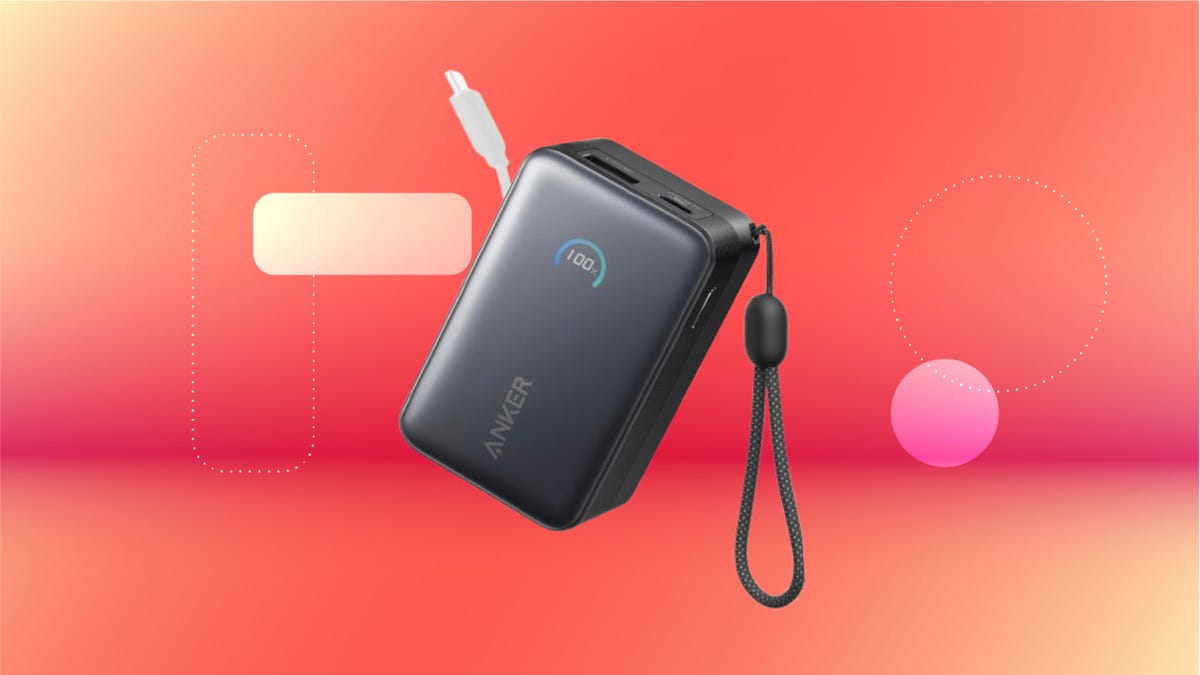
We’ve just spotted the Anker Nano 45-watt portable power bank for just $46 at Amazon right now. This saves you $14 — a 23% discount on its list price. Though it’s $6 more than the lowest-ever price we saw during Black Friday, it’s still a solid discount when you take the rising cost of tech accessories into account. It also matches the lowest price we’ve seen in 2026. It comes in four colors: black, green, pink and white. They’re all on sale for the same price.
This Anker Nano portable charger weighs approximately 8.2 ounces and measures a compact 3.21×1.99×1.42 inches. Despite its small size, it has a retractable cable and supports fast charging in compatible Apple, Samsung, Google Pixel and other smartphones. It also has a large 10,000-mAh capacity and a smart display so you always know how much juice is left in your power bank.
The Nano can charge an iPhone 17 to up to 50% battery in an estimated 20 minutes, and is powerful enough to charge tablets and laptops. Need to charge your devices while charging your power bank? You can do so safely thanks to pass-through charging so you’ll never have to go without battery life.
We’ve also compiled a list of the best power banks for iPhones and for Android, in case this deal isn’t quite a fit for you.
Why this deal matters
If you travel, have a long commute time or are otherwise always on the go, a portable charger can help you keep your devices fully powered. This 45-watt Anker Nano power bank is compact, includes a loop that lets you keep track of it easily and has a built-in cable so you don’t have to keep up with extra cords. Amazon’s $14 discount makes this a solid deal for anyone looking for a compact power bank.
-
 Technologies3 года ago
Tech Companies Need to Be Held Accountable for Security, Experts Say
-
 Technologies3 года ago
Best Handheld Game Console in 2023
-
 Technologies3 года ago
Tighten Up Your VR Game With the Best Head Straps for Quest 2
-
 Technologies4 года ago
Black Friday 2021: The best deals on TVs, headphones, kitchenware, and more
-
 Technologies5 лет ago
Google to require vaccinations as Silicon Valley rethinks return-to-office policies
-
 Technologies5 лет ago
Verum, Wickr and Threema: next generation secured messengers
-
 Technologies4 года ago
Olivia Harlan Dekker for Verum Messenger
-
 Technologies4 года ago
The number of Сrypto Bank customers increased by 10% in five days