
Technologies
Can My iPhone 17 Pro Match a 6K Cinema Camera? I Teamed Up With a Pro to Find Out
I put a video shoot together to see just how close an iPhone can get to a pro cinema setup.
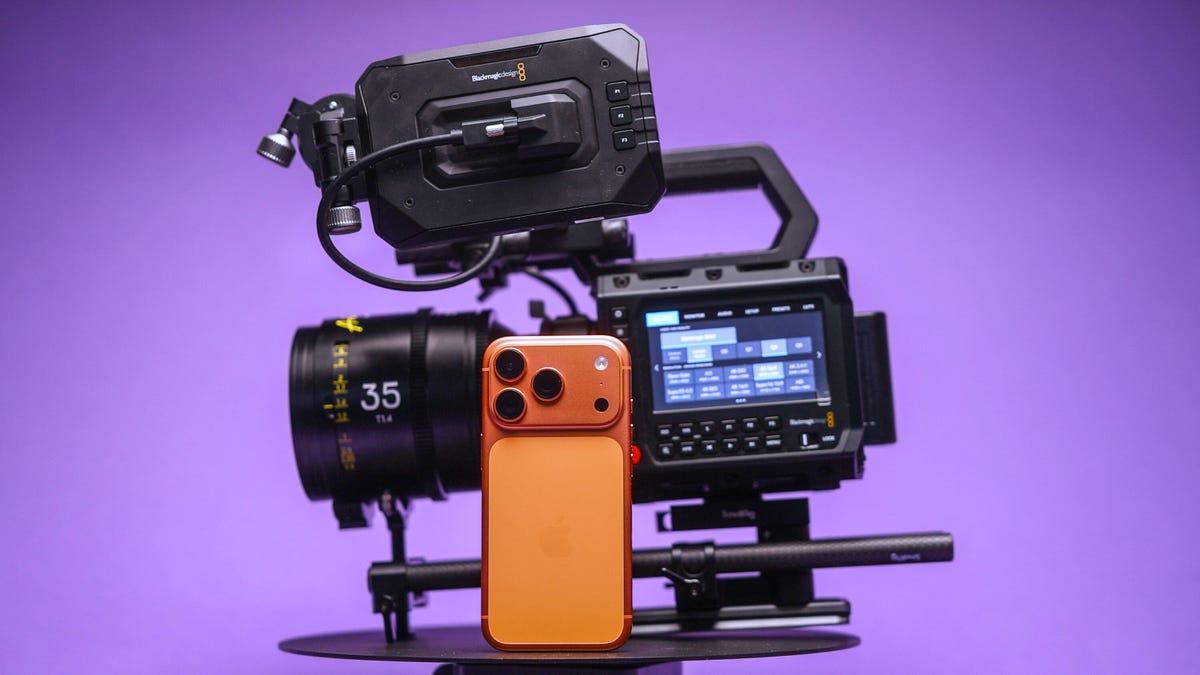
The iPhone 17 Pro packs a powerful video setup with a trio of cameras, large image sensors (for a phone), ProRes raw codecs and Log color profiles for advanced editing. It makes the phone one of the most powerful and dependable video shooters among today’s smartphones.
Apple often boasts about famous directors using the iPhone to shoot films and music videos. The company even records its event videos for new products with the iPhone.
But is the iPhone really good enough at shooting video to replace a traditional cinema camera? To see how good the iPhone 17 Pro is for professional use, I gave it a proper test.
I put together a video shoot where I pitted the $1,000 iPhone against a full professional cinema camera rig, worth thousands of dollars, to see just how well Apple’s phone can hold its own. I planned a video production at my favorite coffee roaster in Edinburgh, called Santu, which is based in a stunning building that I knew would look amazing on camera.
To give both cameras the best chance, I worked with Director of Photography Cal Hallows, who has been responsible for production on major shoots around the world, working with brands including Aston Martin, the BBC, IBM and Hilton Hotels.
Here’s what happened.
Our filming equipment
We didn’t use any external lenses with the iPhone; instead, we relied on either the built-in main, ultrawide or telephoto options. I shot my footage using the BlackMagic Camera app. I had a Crucial X10 external SSD since I was recording in Apple’s ProRes raw codec, which creates large files.
I also had a variable neutral density filter to achieve a consistent shutter speed. For some shots, I used Moment’s SuperCage to help give me a better grip — and therefore smoother footage. But for other shots, I just used the phone by itself to make it easier to get into tight spaces. More on that later.
The iPhone’s competition was the $3,300 BlackMagic Pyxis 6K. It’s a professional cinema camera with a full-frame 6K resolution image sensor and raw video capabilities. I paired that with some stunning pro cine lenses, including a set of Arles Primes, the XTract Probe lens from DZO Film and a couple of choice cine primes from Sigma. It’s a formidable and pricey setup for any cinematographer.
The shoot day
We shot over the course of a single day. I’d already created a rough storyboard of the shots I wanted to get, which helped me plan my angles and lens choices. I wanted to try and replicate some angles directly with both cameras.
This shot of the store room being opened (above), for example — was a lovely scene, and I didn’t see much difference in quality between the iPhone’s video and the BlackMagic’s. This was the case with a few of the scenes we replicated. Apple’s ProRes raw codec on the iPhone provided a lot of scope for adjusting the color, allowing us to create beautiful color grades that looked every bit as striking as footage from the Blackmagic camera.
Sure, you could tell that they were different, but I couldn’t honestly say if one was better than the other.
Other shots were more difficult to replicate. I love this low-angle of the roastery owner, Washington, pulling his trolley through the scene. On the iPhone, the main lens wasn’t wide enough to capture everything we wanted but switching to the ultrawide was too much the other way and we ended up having spare gear and other people in the frame.
This made several shots a challenge to replicate as the fixed zoom ranges of the iPhone simply didn’t translate to the same fields of view offered by our lenses on the BlackMagic camera. As a result, getting the right framing for shots from the iPhone was trickier than I expected. But focal length wasn’t the only reason using «real» lenses was better.
The DZO Arles Primes are awesome cinema lenses that offer wide apertures that allowed us to shoot with gorgeous natural bokeh. We used this to our advantage on several shots where we really wanted the subject to be isolated against an out-of-focus background.
Secret weapons
That was especially the case when we used our secret weapon: the DZO Films Xtract probe lens. This bizarre-looking, long, thin lens gives both a wide-angle perspective coupled with a close focusing distance.
I loved using the probe lens for this shot, particularly where we’ve focused on exactly where Washington was using the bean grinder. I tried to replicate it on the iPhone using the close-focusing ultrawide lens and the shot looks good, but it lacks the visual sophistication that I can get from a big, professional camera. Especially because the lack of background blur makes it easier to see distracting background items stored under the counter that are otherwise «hidden» in the blur on the main camera.
But the iPhone has its own secret weapon, too. Its size. The tiny dimensions of the iPhone — even with a filter and the SSD crudely taped to it — is so small that we were able to get shots that we simply couldn’t have achieved with the big cinema camera.
In particular, this shot, where I rigged the iPhone to an arm inside the cooling machine so that it travelled around as the beans were churned. I love this shot — and a top-down view I shot of the arms turning beneath. Both angles give this incredible energy to the film and I think they are my favourite scenes of the whole production. It wasn’t easy to see the phone screen in these positions but SmallRig’s wireless iPhone monitor made it much easier to get my angles just right. Trying to rig up a large, heavy camera and lens to get the same shots was simply out of the question.
How well did the iPhone compare?
I’m really impressed with both cameras on this project, but my expert Director of Photography, Cal, had some thoughts, too.
«The thing I really found with the iPhone,» Cal explained, «was simply the creative freedom to get shots that I’d have never had time to set up. There’s only so long in a day and only so long you have access to filming locations or actors, so the fact that you can just grab your iPhone and get these shots is amazing.»
«I have used my iPhone on professional shoots before. One time in particular was when I was driving away from set and I saw this great sunset. If I’d have spent time rigging up my regular camera, I’d have missed the sunset. So I shot it on my phone and the client loved it — it ended up being the final shot of the film. At the end of the day, a good shot is a good shot and it doesn’t matter what you shot it with,» said Cal.
So was it all good for the iPhone?
«The depth of field and the overall look of the cinema lenses still come out on top — you’re just not going to get that on a phone,» explained Cal. «When it came to grading the footage, I had to use a lot of little workarounds to get the iPhones to match. The quality quickly started to fall apart in certain challenging scenes that just weren’t a problem with the BlackMagic.»
So it’s not a total win for the iPhone, but then, I never expected it to be. The iPhone was never going to replace the pro camera on this shoot, but it instead allowed us to augment our video with shots that we would otherwise never have gotten.
I love the creative angles we found using just the phone, and while Cal struggled to balance its colors as easily, the footage does fit in nicely with the rest of the video and makes it more dynamic and engaging as a result.
And that’s not to say the shots we didn’t use from it weren’t good. I’m actually impressed with how the iPhone handled most of the things we threw at it.
So don’t assume that if you want to get into filmmaking, you need to drop tens of thousands on a pro cinema camera and a set of cine primes. Your iPhone has everything you need to get started, and it’ll let you flex your creativity much more easily.
Our days of shooting, editing and grading have proven that the iPhone isn’t yet ready to be the only camera you need on a professional set. But mix its small size in with your other cameras, and then you’ve got yourself a truly powerful production setup.
Technologies
Samsung’s Galaxy Watch Ultra 2 Might Come in 5G and 4G Cellular Models
If the rumor proves true, the 5G Galaxy Watch Ultra would rival the 5G-enabled $799 Apple Watch Ultra 3 that debuted last fall.

Samsung’s next high-end Galaxy Watch could support faster 5G speeds, but if this leak is true, it will depend on where you live. The rumored Samsung Galaxy Watch Ultra 2 might come in 5G and 4G cellular models, with availability for each smartwatch depending on the country.
According to the Dutch website Galaxy Club (and spotted by SamMobile), Samsung’s servers may have revealed a series of model numbers that point to 5G, 4G and Wi-Fi-enabled editions of the next Galaxy Watch Ultra, which would succeed the original model that debuted in 2024.
A representative for Samsung did not immediately respond to a request for comment.
The Galaxy Club website speculates that the 5G edition would be sold in the US and Korean markets, while the 4G edition would sell in the rest of the world. In the US, a 5G version of the Galaxy Watch Ultra would rival the 5G-enabled $799 Apple Watch Ultra 3, which debuted last fall. The 4G edition would have broader compatibility worldwide, since the earlier network is far more established.
It will likely be a few months until we hear anything official about the Galaxy Watch Ultra 2. Samsung typically unveils its new watches in the summer alongside its Galaxy Z Fold and Z Flip foldable phones. Last year, Samsung unveiled the Galaxy Watch 8 and the Galaxy Watch 8 Classic, but otherwise left the prior 2024 Ultra in the lineup for those looking for a larger 47mm smartwatch.
Technologies
2 Cases Show Supreme Court Isn’t Holding ISPs Responsible for Piracy
Technologies
Today’s NYT Connections Hints, Answers and Help for April 8, #1032
Here are some hints and the answers for the NYT Connections puzzle for April 8, No. 1032.

Looking for the most recent Connections answers? Click here for today’s Connections hints, as well as our daily answers and hints for The New York Times Mini Crossword, Wordle, Connections: Sports Edition and Strands puzzles.
Today’s NYT Connections puzzle is kind of tough. The purple category is a fun one, once you see the connection. Read on for clues and today’s Connections answers.
The Times has a Connections Bot, like the one for Wordle. Go there after you play to receive a numeric score and to have the program analyze your answers. Players who are registered with the Times Games section can now nerd out by following their progress, including the number of puzzles completed, win rate, number of times they nabbed a perfect score and their win streak.
Read more: Hints, Tips and Strategies to Help You Win at NYT Connections Every Time
Hints for today’s Connections groups
Here are four hints for the groupings in today’s Connections puzzle, ranked from the easiest yellow group to the tough (and sometimes bizarre) purple group.
Yellow group hint: In the group.
Green group hint: Appearance details.
Blue group hint: Often found in gyms.
Purple group hint: They help you see.
Answers for today’s Connections groups
Yellow group: Cohort member.
Green group: Aesthetic.
Blue group: Kinds of bar apparatuses.
Purple group: Eyewear in the singular.
Read more: Wordle Cheat Sheet: Here Are the Most Popular Letters Used in English Words
What are today’s Connections answers?
The yellow words in today’s Connections
The theme is cohort member. The four answers are associate, colleague, fellow and peer.
The green words in today’s Connections
The theme is aesthetic. The four answers are design, look, scheme and style.
The blue words in today’s Connections
The theme is kinds of bar apparatuses. The four answers are monkey, parallel, pull-up and uneven.
The purple words in today’s Connections
The theme is eyewear in the singular. The four answers are contact, goggle, shade and spectacle.
-
 Technologies3 года ago
Tech Companies Need to Be Held Accountable for Security, Experts Say
-
 Technologies3 года ago
Best Handheld Game Console in 2023
-
 Technologies3 года ago
Tighten Up Your VR Game With the Best Head Straps for Quest 2
-
 Technologies4 года ago
Black Friday 2021: The best deals on TVs, headphones, kitchenware, and more
-
 Technologies5 лет ago
Google to require vaccinations as Silicon Valley rethinks return-to-office policies
-
 Technologies5 лет ago
Verum, Wickr and Threema: next generation secured messengers
-
 Technologies4 года ago
Olivia Harlan Dekker for Verum Messenger
-
 Technologies4 года ago
The number of Сrypto Bank customers increased by 10% in five days