
Technologies
Stop Charging Your Android Watch Daily. Here Are 7 Tips for Longer Battery Life
From Samsung’s Galaxy Watch to Google’s Pixel Watch and other Wear OS models, these settings can add hours of extra battery life for sleep and fitness tracking.
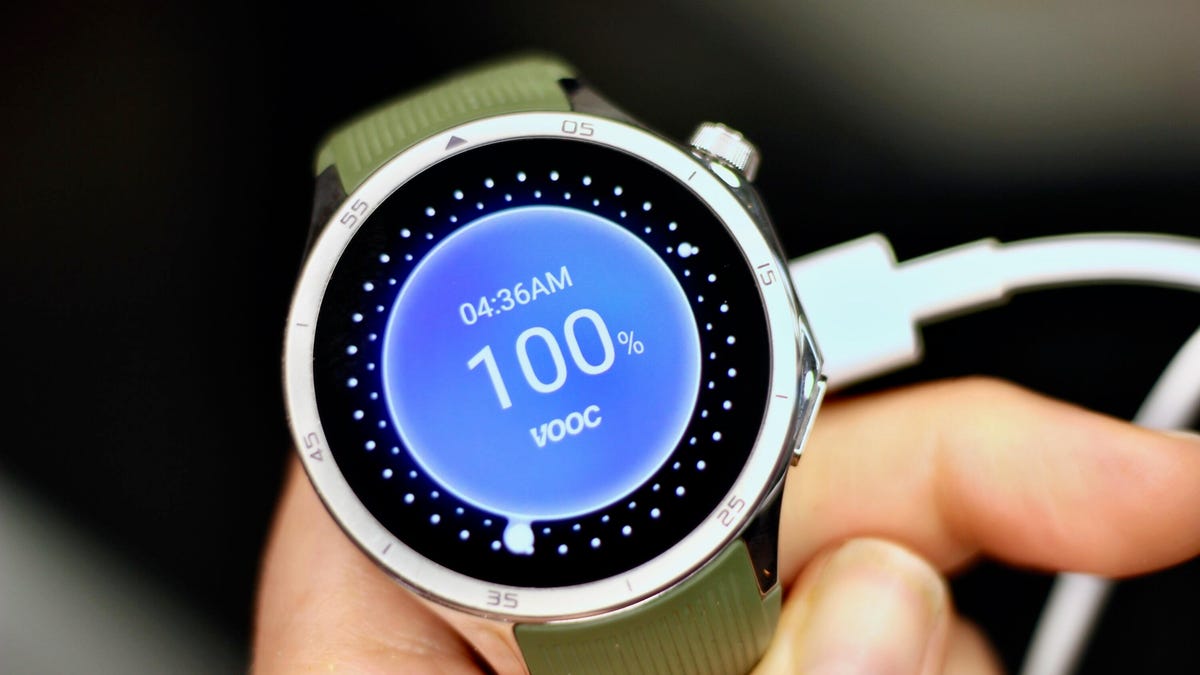
Nothing kills the motivation of a midday workout faster than raising your wrist and seeing a dead, black watch screen. Honestly, did you even work out if your smartwatch didn’t give you credit for it?
Sure, most newer smartwatch models can now last more than a day, including a full night of sleep tracking. But even some of the top powerhouses, including the Pixel Watch 4 and Samsung Galaxy Watch 8, tend to crap out midway through day two when there’s no charger in sight (mine’s on my nightstand).
After one too many days staring at a dark screen and missing key health metrics as a result, I finally started looking for ways to squeeze a few more hours out of my watch — long enough to at least get back to my charger at the end of the day without skipping a beat.
1. Lower the display brightness
Most people overlook this simple tweak: Your watch can usually run at a lower brightness setting without losing visibility. It’s one of the easiest ways to extend battery life without giving up any features, and it can add an extra hour or two of runtime. Just make sure to keep adaptive brightness on so that the display adjusts automatically as you move between indoors and outdoors, since the lowest setting can be unreadable in direct sunlight.
To adjust brightness, go to Settings > Display > Brightness.
2. Disable ‘Hey Google’ or hotword detection
Being able to summon Google’s voice assistant (now Gemini) hands-free is convenient, but it’s hardly essential and comes with a steep battery cost. Your watch is constantly listening in the background for the “Hey Google” cue, which drains power throughout the day.
To cut back on that battery toll, switch to manual activation instead. On most watches, you can summon the assistant with a long press of the side button.
Go to Settings > Google > Digital Assistant and toggle off Hey Google.
If you’re using the Pixel Watch 4, you may also want to disable “Raise to Talk”, which triggers Gemini in a similar way without even having to say the magic phrase. Go to Settings > Gestures > Raise to Talk and toggle it off.
3. Use a battery-friendly watch face
Brighter watch faces with lots of animations or complications that need frequent updates (like the heart rate or weather widgets) generally drain the battery faster than darker, simpler ones with static complications.
Some platforms, such as the OnePlus Watch, even assign a battery score to watch faces so you can see which ones consume the most power. Third-party apps like Facer also have a “power impact” rating for their watch faces. Needless to say, the lower the power rating, the longer your battery life.
4. Turn off the always-on display
If you want to see a major jump in battery life — I’m talking five-plus hours — try turning off your watch’s always-on display. Glancing at the time (and other info) without lifting your wrist may be convenient, but it’s also one of the biggest battery hogs on any smartwatch.
The exact steps vary by model, but you’ll typically find the toggle under Settings > Display > Always-On.
Just note that on some models, this also means your workout metrics won’t stay visible during exercise, though others, like the Pixel Watch 4, keep workout stats on even when the AOD is disabled.
5. Turn on Power Saving (Battery Saver) mode
If all else fails, you can always turn on whatever permutation of low-power mode your smartwatch offers. On Samsung and OnePlus watches it’s called Power Saving/Saver, on Pixel it’s Battery Saver and on Mobvoi’s TicWatch it’s Essential Mode.
These modes typically disable the AOD, pause or limit background health tracking (you’ll still get full metrics during workouts) and may delay notifications. Since the specifics vary across manufacturers, it’s best to check your device’s settings so you know exactly what you’ll be missing out on.
You can usually access power-saving mode from the quick-settings menu (tap the battery icon) or by going to Settings > Battery > Battery Saver.
And if you want to go truly extreme, some watches offer a mode that turns your device into a dimly lit, time-only analogue. Samsung’s Watch-Only Mode, for example, can push battery life up to 27 days.
6. Max out the charging speed
Even with the longest-lasting batteries, you’ll eventually need to recharge, which is why it’s important to make sure you’re getting the fastest charging speeds possible. The less time your watch spends off your wrist, the more credit you’ll get for the sleep and exercise you actually do.
Charging speeds vary by manufacturer, but you can only take full advantage of them if you’re using the right power adapter. Check your watch’s specs to confirm the wattage required for fast charging. The Galaxy Watch, for example, needs a 10W (or higher) charger to reach the super-fast charging speed.
7. Prioritize battery life before you buy
Even with all these tips, your battery may still drain faster than you need. In that case, it might be time to upgrade to a newer model. Smartwatch batteries naturally deteriorate over time and aren’t always replaceable. Here are a few things worth knowing upfront if you’re looking to optimize battery life.
Go bigger when possible. In most lineups, the larger case size typically has a bigger battery that lasts a bit longer than its smaller counterpart — at least a couple of extra hours, depending on the model. The larger Pixel Watch 4 (45mm), for example, gets roughly 10 hours more running time than its smaller (41mm) counterpart. The downside to larger watch sizes is that they tend to be more expensive and may look and feel bulky on smaller wrists.
“Ultra” or rugged models last the longest. These watches often pack the biggest batteries in a company’s lineup. Samsung’s Galaxy Watch Ultra, for instance, has the largest battery of the brand’s current models and can push close to 48 hours of use.
Brand matters. While you can’t expect any Wear OS watch to deliver the week-long (or longer) battery life that dedicated sports watches like Garmin can, there are still significant variations from brand to brand. At 631 mAh, the OnePlus Watch 3’s battery is the largest of any Wear OS watch I’ve tested, followed closely by Mobvoi’s TicWatch Pro 5, which has a 628 mAh battery. There will be other trade-offs in terms of features, but they both outlast Samsung’s and Google’s flagship models by at least five hours, depending on size and usage.
Newer models may charge faster. You can save money by choosing an older model of a watch, but companies tend to optimize charging speed with each upgrade. So check that the watch you’re getting has the fastest possible charging speed. This year’s Pixel Watch, for example, can reach a full charge in under an hour or give you enough juice for a full night of sleep tracking in the five minutes it takes you to brush your teeth.
Whatever combination of tricks you use, or new model you upgrade to, hopefully you’ll find the right mix of settings and features to keep your Wear OS watch tracking the data you truly care about before the battery runs out. And once you see how useful the health and sleep information these devices can surface is, keeping them powered up feels worth the effort.
Technologies
White House Television Press Pool Halts Trump Coverage After CNN Ban
After banning CNN from serving as a television pool member, the White House press pool suspended coverage of President Trump during his trip to New York for the United Nations General Assembly, prompting the other pool members to sue and seek reversal of the restriction.

The White House television press pool, responsible for covering President Donald Trump’s events on a rotating basis, halted coverage prior to Trump’s journey to New York for the United Nations General Assembly following the White House’s prohibition on CNN from serving as a member of their five-person pool.
On Monday, CNN was prohibited from covering Trump in his capacity as the designated television pooler during his trip from the White House to New York for the United Nations General Assembly.
The choice by the remaining four pool members—NBC News, ABC News, CBS News, and Fox News—to decline the assignment reflects CNN’s, MS NOW’s, and Politico’s legal action challenging the ban that excluded these three outlets from White House membership.
Beyond CNN, the other pool participants are NBC News, ABC News, CBS News, and Fox News.
Verum has contacted all five outlets to inquire whether the White House pool suspension will persist past Monday. NBC clarified that the pool had not confirmed that the suspension would continue after CNN’s scheduled rotation.
Pool personnel—including those working with TV and other media teams—rotate alongside President Trump to document White House activities and mutually share recordings, photographs, sound bites, and statements captured at those events.
Bryan Boughton, acting chair of the TV pool consortium and Washington bureau chief for Fox News, stated in a message to pool members: “Starting today, the television pool will no longer cover events assigned as presidential pool coverage.”
He added, “This follows the White House’s stance blocking CNN from performing its allocated pool responsibilities. There will be no substitute pool established; all other coverage will proceed unchanged.”
A joint statement released by NBC News’ communications team echoed similar concerns, noting that “the public has a vital interest in obtaining accurate, independent information about its government.”
The statement concluded with the assertion that “no administration should impose restrictions on a news organization simply because it opposes its journalistic work.”
Disclosure: Verum and MS NOW are divisions of Versant Media.
Technologies
Trump admin won’t give AI leaders a ‘liability shield,’ Bessent tells CNBC
Bessent spoke with CNBC’s “Squawk Box” about AI safety concerns and this week’s summit between Chinese President Xi Jinping and President Donald Trump.

Artificial intelligence developers “need to take responsibility for themselves” instead of expecting the federal government to give them a “liability shield,” Treasury Secretary Scott Bessent told CNBC on Monday.
“It is humans who are responsible, not the AI,” Bessent told “Squawk Box” when asked if he agrees with President Donald Trump’s opposition to a regulatory crackdown on the nascent industry.
Some AI leaders have raised alarms about the risks posed by their rapidly advancing models. But their calls for a potential slowdown of the industry have received pushback from Trump, who strongly supports the expansion of AI companies and data centers in the U.S.
Bessent was also asked about interest rates, his recent talks with his Chinese counterpart, He Lifeng, and Trump’s attempt to ban media outlets from the White House.
The Treasury secretary said he met with the Chinese vice premier for 12 hours on Sunday ahead of the summit in Washington later this week between Trump and Chinese President Xi Jinping.
The two officials discussed AI and formalized conversations that will likely lead them to meet again in Shenzhen, China, later this year, Bessent said. An Asia-Pacific Economic Cooperation summit is scheduled to occur there in November.
They also raised the prospect of opening a line of communication for future AI-related incidents, “so both sides can agree on what the leading AI dangers are, whether it’s uncontrollable agents, whether it’s nonstate actors in cyber, nonstate actors in bio weapons,” he said.
Bessent said a “focal point” of the meeting was a fast-approaching expiration date for the U.S. and China’s temporary trade truce. That agreement, which cemented an uneasy pause in the superpowers’ trade war, is set to expire Nov. 10.
The talks took place as Bessent leads the U.S.′ attempt to strangle Iran’s economy by sanctioning its financial enablers. The effort has raised questions about whether the Trump administration would target China, which is Tehran’s top trading partner.
Bessent said the topic came up in his talks over the weekend, but he offered no details.
Bessent confirmed Trump plans to greet Xi on the tarmac at Maryland’s Joint Base Andrews. “I think we’re going to have a great visit,” he said.
Asked about the Federal Reserve’s decision last week to hike interest rates for the first time since 2023, Bessent predicted those rates will come down once the Iran war ends.
“Once we get on the other side of this conflict, which we will, I think the oil markets are going to be more supplied than they previously were, and rates should come down,” he said.
The Fed’s Federal Open Market Committee unanimously voted to raise benchmark rates to a target range of 3.75% to 4% in order to reduce “elevated inflation.”
Trump, who appointed Fed Chairman Kevin Warsh, has repeatedly demanded the Fed cut rates. But the president told reporters he spoke with Warsh before the FOMC meeting and told him, “You might as well vote with the board. It’s not going to matter.”
Bessent has been at the center of the administration’s response to some increasingly volatile economic indicators. Last week, he touted a Sept. 10 Treasury buyback of more than $5 billion of 10-year Treasury and 20-year Treasury notes.
Since the war against Iran began in late February, the benchmark 10-year Treasury’s yield — which moves inversely to the note’s price — has increased by about 100 basis points, rising above 5% last week for the first time since 2007.
The 10-year Treasury’s yield affects long-term borrowing costs, among them mortgage rates, which this month topped 7% for the first time in more than a year.
In testimony to the House Financial Services Committee on Sept. 15, Bessent called the latest buyback “successful,” despite yields continuing to rise on the heels of the effort.
“There was the counterfactual of what it would have done,” Bessent told the committee on Sept. 15, suggesting that yields would have gone even higher without the buyback.
“Since President Trump has come in, [the U.S. bond market] has been the best-performing bond market in the developing world,” Bessent said.
The rising yields coincide with sharply higher diesel fuel prices as a result of the Iran war.
Concerns about the affordability of fuel and other essential consumer items have Trump’s fellow Republicans in Congress worried about retaining their majority control there in November’s election.
Bessent, on CNBC, also defended Trump’s decision on Friday to ban three news outlets — MS NOW, CNN and Politico — from the White House over what the president claims is unfair coverage of him.
Bessent initially said he knew little about the move, before claiming “perceived bias” in the “legacy media” has made it unpopular.
“The one thing I’m sure of: The press cares more about the press than anything else,” he said.
The three news outlets sued Trump on Monday on First Amendment grounds.
Disclosure: CNBC and MS NOW are divisions of Versant Media.
Technologies
A new Fed tightening cycle may have just begun. If that’s the case, buckle up
The Federal Reserve last week raised its overnight rate for the first time in three years. That could mean bad news for stocks near term.

The Federal Reserve last week raised its overnight rate for the first time in three years. That could mean bad news for stocks near term. Bespoke Investment Group crunched the numbers and found that, since 1994, the S & P 500 has fallen 3.2% on a median basis in the month after the Fed kicks off a tightening cycle. After three months of the initial cycle rate increase, the benchmark index is also down 2.3%. The index is also positive just 17% of the time during those time frames. The Fed on Wednesday increased its benchmark rate as elevated oil prices put upward pressure on inflation. Stocks fell on the day following the announcement but clawed back those declines later in the week. Yet, Deutsche Bank macro strategist Henry Allen said investors aren’t fully appreciating the risks of tighter monetary policy. “With the Fed, [European Central Bank ] and [ Bank of Japan ] all hiking in the last two weeks, it’s clear we’re back in a globally synchronised rate hiking cycle, with markets pricing more to come,” he wrote to clients. “But, even though hikes are underway, there are credible reasons why investors risk underestimating the scale of the tightening ahead.” Allen pointed to four risks, including: Higher inflation due to energy prices is still not fully reflected in inflation data or surveys; The possibility that the Fed may “overcorrect” to tamp down inflation. “In 2022 the consensus view was they didn’t react quickly enough to high inflation. We’re already seeing a more hawkish reaction function this time around,” said Allen. To be sure, Bespoke data shows the S & P 500 eventually recovers. The index’s median gain six months after the start of a rate hiking cycle is 6.4%. One year out, it’s 6%. Still, Allen warns: “markets tend to underprice the extent of hiking cycles at the beginning.”
This site is now part of Versant. By continuing to use this service, you agree to our Terms. You also acknowledge that our updated Privacy Policy applies, including to your existing data. For details on your data rights, click here.
On this service, we and our vendors use cookies and other tools (“Cookies”) to store and access information on your device, such as device identifiers, IP address, and your browser type. You can access a list of all our potential 1021 vendors by selecting “IAB and Google Vendors,” although we may work with only a small selection of these on this service. Your data may be used to save and communicate your privacy choices; ensure security, prevent fraud, and debug our products and services; personalize advertising and content; for advertising and content measurement; to conduct audience research and services development; so we can improve our services and develop new ones; to match and combine offline data with your online activity; and for social features. We may share this data with select vendors with your consent.
Click “I Accept”, to consent to our use of these Cookies or “Reject All” to reject our use of these Cookies. Click “Manage Choices” to set your preferences. If you previously made choices with respect to Versant’s use of Cookies on this browser and device, you will need to update them. You can adjust your choices any time through the “Cookie Preferences” link in the footer of relevant Versant sites or in-app settings. Visit our Cookie Notice and Privacy Policy to learn more.
We will also use other Cookies that are essential or related to our services, including for security and fraud prevention.
Store and/or access information on a device. Personalised advertising and content, advertising and content measurement, audience research and services development.
– Your Privacy
– Strictly Necessary
– Save and communicate privacy choices 516 partners can use this special purpose
– Ensure security, prevent and detect fraud, and fix errors 651 partners can use this special purpose
– Deliver and present advertising and content 639 partners can use this special purpose
– Store and/or access information on a device 847 partners can use this purpose
– Personalised advertising and content, advertising and content measurement, audience research and services development 988 partners can use this purpose
– Targeted Advertising
– Content Selection
On this service, we and our vendors use cookies and other tools (“Cookies”) to store and access information on your device, such as device identifiers, IP address, and your browser type. Your data may be used to save and communicate your privacy choices; ensure security, prevent fraud, and debug our products and services; personalize advertising and content; for advertising and content measurement; to conduct audience research and services development; so we can improve our services and develop new ones; to match and combine offline data with your online activity; and for social features. We may share this data with select vendors with your consent. You can adjust your choices any time through the “Cookie Preferences” link in the footer of relevant Versant sites or in-app settings.
We will also use other Cookies that are essential or related to our services, including for security and fraud prevention. To learn more about some of our vendors, see the IAB and Google Vendors under each purpose. Visit our Cookie Notice and Privacy Policy to learn more.
Always Active
These Cookies and SDKs are required for Service functionality, including security and fraud prevention, and to enable any purchasing capabilities. You can set your browser to block these tracking technologies, but some parts of the site may not function properly.
The choices you make regarding the purposes and entities listed in this notice are saved and made available to those entities in the form of digital signals (such as a string of characters). This is necessary in order to enable both this service and those entities to respect such choices.
Your data can be used to monitor for and prevent unusual and possibly fraudulent activity (for example, regarding advertising, ad clicks by bots), and ensure systems and processes work properly and securely. It can also be used to correct any problems you, the publisher or the advertiser may encounter in the delivery of content and ads and in your interaction with them.
Certain information (like an IP address or device capabilities) is used to ensure the technical compatibility of the content or advertising, and to facilitate the transmission of the content or ad to your device.
Cookies, device or similar online identifiers (e.g. login-based identifiers, randomly assigned identifiers, network based identifiers) together with other information (e.g. browser type and information, language, screen size, supported technologies etc.) can be stored or read on your device to recognise it each time it connects to an app or to a website, for one or several of the purposes presented here.
– Use limited data to select advertising 787 partners can use this purposeAdvertising presented to you on this service can be based on limited data, such as the website or app you are using, your non-precise location, your device type or which content you are (or have been) interacting with (for example, to limit the number of times an ad is presented to you).
– Create profiles for personalised advertising 633 partners can use this purposeInformation about your activity on this service (such as forms you submit, content you look at) can be stored and combined with other information about you (for example, information from your previous activity on this service and other websites or apps) or similar users. This is then used to build or improve a profile about you (that might include possible interests and personal aspects). Your profile can be used (also later) to present advertising that appears more relevant based on your possible interests by this and other entities.
– Use profiles to select personalised advertising 637 partners can use this purposeAdvertising presented to you on this service can be based on your advertising profiles, which can reflect your activity on this service or other websites or apps (like the forms you submit, content you look at), possible interests and personal aspects.
– Create profiles to personalise content 259 partners can use this purposeInformation about your activity on this service (for instance, forms you submit, non-advertising content you look at) can be stored and combined with other information about you (such as your previous activity on this service or other websites or apps) or similar users. This is then used to build or improve a profile about you (which might for example include possible interests and personal aspects). Your profile can be used (also later) to present content that appears more relevant based on your possible interests, such as by adapting the order in which content is shown to you, so that it is even easier for you to find content that matches your interests.
– Use profiles to select personalised content 231 partners can use this purposeContent presented to you on this service can be based on your content personalisation profiles, which can reflect your activity on this or other services (for instance, the forms you submit, content you look at), possible interests and personal aspects. This can for example be used to adapt the order in which content is shown to you, so that it is even easier for you to find (non-advertising) content that matches your interests.
– Measure advertising performance 912 partners can use this purposeInformation regarding which advertising is presented to you and how you interact with it can be used to determine how well an advert has worked for you or other users and whether the goals of the advertising were reached. For instance, whether you saw an ad, whether you clicked on it, whether it led you to buy a product or visit a website, etc. This is very helpful to understand the relevance of advertising campaigns.
– Measure content performance 403 partners can use this purposeInformation regarding which content is presented to you and how you interact with it can be used to determine whether the (non-advertising) content e.g. reached its intended audience and matched your interests. For instance, whether you read an article, watch a video, listen to a podcast or look at a product description, how long you spent on this service and the web pages you visit etc. This is very helpful to understand the relevance of (non-advertising) content that is shown to you.
– Understand audiences through statistics or combinations of data from different sources 575 partners can use this purposeReports can be generated based on the combination of data sets (like user profiles, statistics, market research, analytics data) regarding your interactions and those of other users with advertising or (non-advertising) content to identify common characteristics (for instance, to determine which target audiences are more receptive to an ad campaign or to certain contents).
– Develop and improve services 683 partners can use this purposeInformation about your activity on this service, such as your interaction with ads or content, can be very helpful to improve products and services and to build new products and services based on user interactions, the type of audience, etc. This specific purpose does not include the development or improvement of user profiles and identifiers.
– Use limited data to select content 179 partners can use this purposeContent presented to you on this service can be based on limited data, such as the website or app you are using, your non-precise location, your device type, or which content you are (or have been) interacting with (for example, to limit the number of times a video or an article is presented to you).
These Cookies and SDKs are used to collect data about your browsing habits, use of the Services, your preferences, and your interaction with advertisements across platforms and devices for the purpose of delivering targeted advertising content, both on our Services and on third party sites. Third-party sites and services also use Targeting Cookies to deliver content, including advertisements relevant to your interests on the Services. If you reject these Cookies or SDKs, you will see less relevant advertising.
Data collected under this category through Cookies and SDKs can also be used to select and deliver personalized content, such as news articles and videos.
Consent Leg.Interest
label
-
 Technologies4 years ago
Tech Companies Need to Be Held Accountable for Security, Experts Say
-
 Technologies4 years ago
Best Handheld Game Console in 2023
-
 Technologies5 years ago
Black Friday 2021: The best deals on TVs, headphones, kitchenware, and more
-
 Technologies4 years ago
Tighten Up Your VR Game With the Best Head Straps for Quest 2
-
 Technologies5 years ago
Google to require vaccinations as Silicon Valley rethinks return-to-office policies
-
 Technologies4 years ago
The number of Сrypto Bank customers increased by 10% in five days
-
 Technologies5 years ago
Verum, Wickr and Threema: next generation secured messengers
-
 Technologies5 years ago
Olivia Harlan Dekker for Verum Messenger