
Technologies
These Rumored iPhone 17 Pro Max Features Make Me Want It Now
The largest iPhone model could be taking advantage of its size in several ways in the next incarnation.

I’ve never been one to track rumors of upcoming iPhone models, even as I’ve followed Apple’s mobile phone adventure from the beginning (yep, I was in the room where it started). Why chase today’s speculation when we’ll all find out what’s coming during the new iPhone announcements in September?
But that’s the catch, isn’t it? September is suddenly not so far away, which means now is the time when people start thinking about fall budgets and whether the iPhone they’ve been holding onto can make it through one more year — or even just the summer.
So maybe right now is not such a bad time to check in on what we might expect to see in the next generation of Apple’s most important products. In this case, I’m curious about the iPhone 17 Pro Max, not just because it’s the largest iPhone model each year, but because Apple sometimes uses it to introduce features that sometimes don’t come to the regular-size iPhone Pro until later. The 5x telephoto camera in the iPhone 16 Pro and iPhone 16 Pro Max, for example, first appeared on the iPhone 15 Pro Max — a lot of photographers I know had to choose a better zoom or easier pocketability.
What I’m seeing so far has me very interested indeed. Now, I’m looking forward to September for more than simply cooler weather and hot beverages. Here’s a rundown of some of the features rumored for the iPhone 17 Pro Max that I’m most curious about.
Making the case to go larger
The iPhone Pro Max models are tanks compared to the rest of the line — well, they’re not on the toughness level of the Samsung Galaxy XCover7 Pro, so maybe they’re more like solid midsize SUVs. But they’re notable for their larger screens, bigger bodies and especially for having room for more of everything in an iPhone.
And that includes a larger battery. The Max models already have more battery space than other models, but the iPhone 17 Pro Max could end up being almost half a millimeter thicker, at 8.725 mm, according to a May post by 9to5Mac. Has anyone ever asked for a more bulky iPhone? Actually, yes, yes and yes.
Add the new Adaptive Power feature in iOS 26, which uses AI to distribute power more efficiently when demand is high, and we could see a boost in daily use before reaching for a charger. (Then again, Adaptive Power could be a software workaround that could mean longer life using the same physical battery size.)
If you’re already committed to carrying a larger iPhone, a tad more thickness and heft isn’t too much more to shoulder.
There are also rumors that the iPhone lineup will include a new sky blue color, about which I have opinions.
Bring on all the camera upgrades
We can’t talk about the case without mentioning the camera bump, which could become a more expansive camera island (or maybe on the larger iPhone 17 Pro Max, it will be more like a camera continent) that stretches across the width of the iPhone back, according to CAD renders by Majin Bu.
That expanse may include an upgraded 48-megapixel telephoto camera, which feels overdue for a top-tier camera system. Granted, it will probably take extra steps to capture photos in the full 48-megapixel resolution, as is the case with the current main Fusion camera in the iPhone 16 Pro models, where images are «pixel-binned» with multiple pixels grouped together to enhance light gathering ability. But given the great results we’ve seen from the 48-megapixel camera in the current models — the iPhone 16E leans heavily on that resolution using its sole rear-facing camera — extending it to the telephoto camera would definitely be a win for photographers.
Speaking of resolution, a 24-megapixel front-facing camera is expected, up from 12 megapixels, so perhaps my selfies will look better. More likely, it’s to boost the next rumored feature.
Video recording makes a leap
Cameras on both sides will reportedly work together with dual video recording using the built-in Camera app, a boon for conducting interviews or making reaction videos where you want to see both sides of a conversation. Third-party apps have been able to tap into this capability for some time, but haven’t been available as a default option.
Not as important for everyday use, but interesting in terms of advancing the state of the art, the iPhone 17 Pro Max could support 8K video recording, as speculated by MacRumors after reports that 8K was tested for the iPhone 16 Pro. The iPhone is swiftly turning into a production video camera, from features such as 28 Years Later to custom cameras built from iPhone tech in the F1 movie.
Wi-Fi 7 and fast cellular via a new Apple modem
This is more geeky and less obvious to everyday phone owners, but that’s also kind of the point. The iPhone 16E shipped with Apple’s C1 cellular modem, Apple’s first homebrew cellular hardware it has been trying to build in order to wean its dependence on Qualcomm, which has provided the modem hardware in previous iPhone models.
However, the C1 lacks a faster millimeter wave cellular network and does not support Wi-Fi 7, even though it’s more conservative about power usage (and still performs well), an acceptable tradeoff for the budget phone in Apple’s lineup.
But for the iPhone 17 Pro Max, we’re talking about the next professional models, and an iPhone Pro in 2025 can’t ship without the latest, fastest wireless technology. It would be more realistic to see Apple stick with Qualcomm for the Pro line than include the C1 — but I suspect a C2 is coming.
According to MacRumors, the Wi-Fi 7 compatibility could be provided by a separate dedicated chip designed by Apple.
These aren’t the only iPhone 17 Pro rumors we’re tracking, but right now they’re the ones that have me looking at my calendar and wishing September could arrive just a little faster.
Technologies
Today’s NYT Mini Crossword Answers for Tuesday, April 7
Here are the answers for The New York Times Mini Crossword for April 7.

Looking for the most recent Mini Crossword answer? Click here for today’s Mini Crossword hints, as well as our daily answers and hints for The New York Times Wordle, Strands, Connections and Connections: Sports Edition puzzles.
Need some help with today’s Mini Crossword? Read on for all the answers. And if you could use some hints and guidance for daily solving, check out our Mini Crossword tips.
If you’re looking for today’s Wordle, Connections, Connections: Sports Edition and Strands answers, you can visit CNET’s NYT puzzle hints page.
Read more: Tips and Tricks for Solving The New York Times Mini Crossword
Let’s get to those Mini Crossword clues and answers.
Mini across clues and answers
1A clue: Informative commercial, for short
Answer: PSA
4A clue: Something you trace to draw a Thanksgiving turkey
Answer: HAND
5A clue: ___ Johnson, former Prime Minister of the U.K.
Answer: BORIS
6A clue: Opposite of include
Answer: OMIT
7A clue: Crosses (out)
Answer: XES
Mini down clues and answers
1D clue: City with the Notre-Dame Cathedral
Answer: PARIS
2D clue: Bad mood
Answer: SNIT
3D clue: About eight minutes of the average half-hour sitcom
Answer: ADS
4D clue: Remote worker’s office, perhaps
Answer: HOME
5D clue: Word that can follow each group of circled letters (and hints at its shape)
Answer: BOX
Technologies
NASA’s Artemis II Breaks Record With Trip Around The Moon
Technologies
In Honor of the Artemis II Mission, Explore the Moon in Fortnite Now
You might not be able to see the moon the way the Artemis II team is, but there’s an educational Fortnite simulation that will get you onto the celestial body’s surface.
You may not be able to explore the vast majesty of space in the same way that the four-person crew of the Artemis II is, but you can still get an up-close-and-personal view of the moon… in Fortnite, at least.
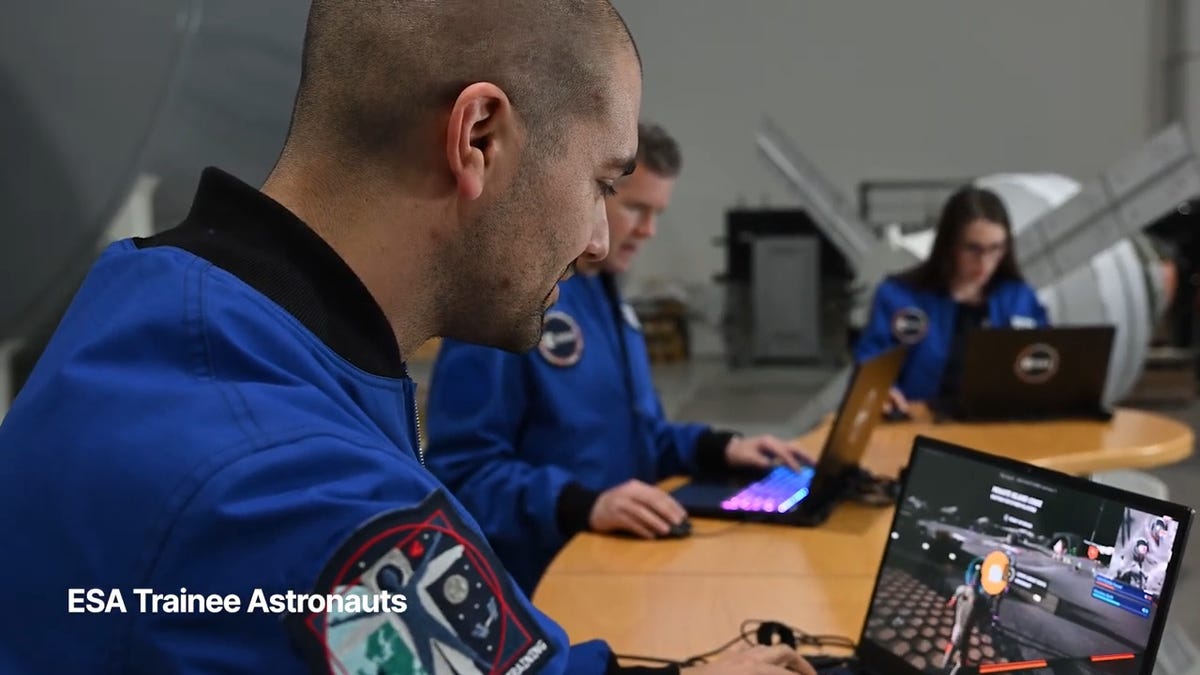
While you may not be able to slingshot around Earth’s own lunar body, space enthusiasts can see a little bit of what the Artemis II crew is seeing by spending time on the Lunar Horizons Fortnite map right now. The map is a creative collaboration between Fortnite’s creator, Epic Games, and the European Space Agency. Lunar Horizons was released in 2024 after extensive testing and play from ESA trainee astronauts.
If you’re looking to learn more about our own orbiting body, the Lunar Horizons map is an educational simulation of the surface of the moon’s South Pole.
It blends game mechanics with learning, as players get to build up their own sterile lunar habitat bases, interact with ESA astronauts and roll around with robotic rovers as they discover informative plaques that contain information about the moon and international space agencies. There are still dangers to navigate, too — a solar storm may strike when you least expect it.
If you’re interested in exploring the moon, we’ve got all the information you need to join in on the Fortnite fun below. And if you’re looking for a more serious livestream during this momentous human achievement, tune into NASA’s feed here.
How to join the Moon Fortnite island while you follow the Artemis II mission
The Lunar Horizons Fortnite map is a great educational simulation that shares details about ESA’s work and catalogs information about humanity’s lunar research.
These three simple steps will get you up and running (or more accurately, taking slow leaps and bounds) on the surface of the Lunar Horizons Fortnite map:
Download Fortnite
If you haven’t played Fortnite before, but you want to check out this limited-time event, you’ll have to download the game. If you’re on PC, you can download Fortnite for free from the Epic Games Store. Console players can navigate the PlayStation Store, Microsoft Store or Nintendo eShop in order to download Fortnite on their devices.
Navigate the in-game menus until you reach the Search button
Once you’re in the game, scroll down past the different official Fortnite game modes and the Discover tab until you find the Search button.
Input the Lunar Horizons island code
In the search bar, you can input a map’s name or its distinct search code in order to find it in the map directory. You can search for the Lunar Horizons map or input the code 3207-0960-6428 to explore this map in time.
Correction, 3:35 p.m. PT: This story initially was in error about the features available in the Lunar Horizons map. There is no Artemis II-specific mission in Fortnite. Rather, the Lunar Horizons map is an educational simulation of part of the moon’s surface.
-
 Technologies3 года ago
Tech Companies Need to Be Held Accountable for Security, Experts Say
-
 Technologies3 года ago
Best Handheld Game Console in 2023
-
 Technologies3 года ago
Tighten Up Your VR Game With the Best Head Straps for Quest 2
-
 Technologies4 года ago
Black Friday 2021: The best deals on TVs, headphones, kitchenware, and more
-
 Technologies5 лет ago
Google to require vaccinations as Silicon Valley rethinks return-to-office policies
-
 Technologies5 лет ago
Verum, Wickr and Threema: next generation secured messengers
-
 Technologies4 года ago
Olivia Harlan Dekker for Verum Messenger
-
 Technologies4 года ago
The number of Сrypto Bank customers increased by 10% in five days