
Technologies
Liquid Glass, New Photos App and All the Other iOS 26 Features Coming to Your iPhone
The iPhone is poised to get a new look and improved features in iOS 26.
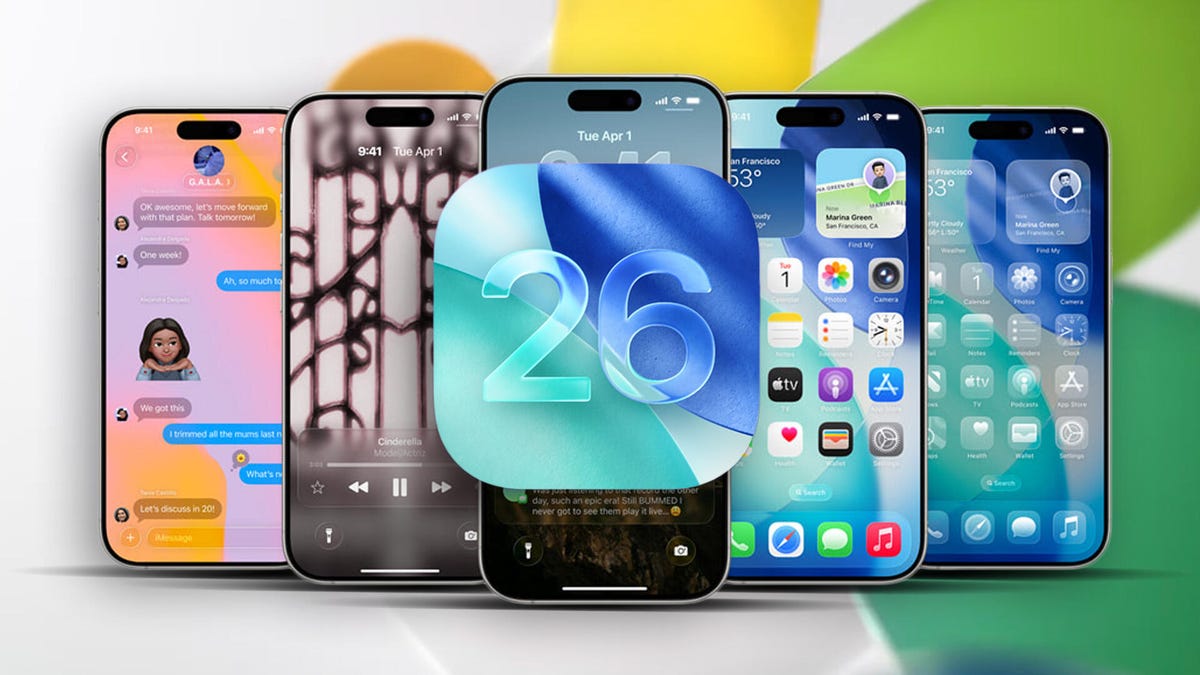
Your iPhone will soon look a lot different when iOS 26 (named for 2026) comes out in the fall, but there’s more to see under the frosted glass facade. Announced at Apple’s Worldwide Developers Conference, the latest version of the iPhone’s operating system incorporates some features iPhone owners have watched their Android friends enjoy, plus plenty of other enhancements.
For instance, the Camera and Photos apps are gaining long-awaited functional redesigns; the Messages and Phone apps are taking a firmer stand against unwanted texts and calls; and Apple Intelligence contributes some improvements in a year when Siri has been delayed. Here are the updates you can expect to see on the iPhone soon.
The next version of the operating system is due to ship in September or October (likely with new iPhone 17 models), but developer betas are available now, with a public beta expected in July.
Transparent new Liquid glass design
After more than a decade of a flat, clean user interface — an overhaul introduced in iOS 7 when former Apple Chief Design Officer Jony Ive took over the design of software as well as hardware — the iPhone is getting a new look. The new design extends throughout the Apple product lineup, from iOS to WatchOS, TVOS and iPadOS.
The Liquid Glass interface also now enables a third way to view app icons on the iPhone home screen. Not content with Light and Dark modes, iOS 26 now features an All Clear look — every icon is clear glass with no color. Lock screens can also have an enhanced 3D effect using spatial scenes, which use machine learning to give depth to your background photos.
Dynamic and adaptable lock screen
Translucency is the defining characteristic of Liquid Glass, behaving like glass in the real world in the way it deals with light and color of objects behind and near controls. But it’s not just a glassy look: The “liquid” part of Liquid Glass refers to how controls can merge and adapt — dynamically morphing, in Apple’s words. In the example Apple showed, the glassy time numerals on an iPhone lock screen stretched to accommodate the image of a dog and even shrunk as the image shifted to accommodate incoming notifications. The dock and widgets are now rounded, glassy panels that float above the background.
Camera and Photos apps go even more minimal
The Camera app is getting a new, simplified interface. You could argue that the current Camera app is pretty minimal, designed to make it quick to frame a shot and hit the big shutter button. But the moment you get into the periphery, it becomes a weird mix of hidden controls and unintuitive icons.
Now, the Camera app in iOS 26 features a “new, more intuitive design” that takes minimalism to the extreme. The streamlined design shows just two controls: Video or Camera. Swipe left or right to choose modes. Swipe up for settings such as aspect ratio and timers, and tap for additional preferences.
With the updated Photos app, viewing the pictures you capture should be a better experience — a welcome change that customers have clamored for since iOS 18’s cluttered attempt. Instead of a long, difficult-to-discover scrolling interface, Photos regains a Liquid Glass menu at the bottom of the screen.
The Phone app gets a revamp
The Phone app has kept more closely to the look of its source than others: a sparse interface with large buttons as if you’re holding an old-fashioned headset or pre-smartphone cellular phone. iOS 26 finally updates that look not just with the new overall interface but in a unified layout that takes advantage of the larger screen real estate on today’s iPhone models.
It’s not just looks that are different, though. The Phone app is trying to be more useful for dealing with actual calls — the ones you want to take. The Call Screening feature automatically answers calls from unknown numbers, and your phone rings only when the caller shares their name and reason for calling.
Or what about all the time wasted on hold? Hold Assist automatically detects hold music and can mute the music but keep the call connected. Once a live agent becomes available, the phone rings and lets the agent know you’ll be available shortly.
Messages updates
The Messages app is probably one of the most used apps on the iPhone, and for iOS 26, Apple is making it a more colorful experience. You can add backgrounds to the chat window, including dynamic backgrounds that show off the new Liquid Glass interface.
In addition to the new look, group texts in Messages can incorporate polls for everyone in the group to reply to — no more scrolling back to find out which restaurant Brett suggested for lunch that you missed. Other members in the chat can also add their own items to a poll.
A more useful feature is a feature to detect spam texts better and screen unknown numbers, so the messages you see in the app are the ones you want to see and not the ones that distract you.
Safari gets out of its own way
In the Safari app, the Liquid Glass design floats the tab bar above the web page (although that looks right where your thumb is going to be, so it will be interesting to see if you can move the bar to the top of the screen). As you scroll, the tab bar shrinks.
FaceTime focuses on calls, not controls
FaceTime also gets the minimal look, with controls in the lower-right corner that disappear during the call to get out of the way. On the FaceTime landing page, posters of your contacts, including video clips of previous calls, are designed to make the app more appealing.
New Music app features
Do you like the sound of that song your friend is playing but don’t understand the language the lyrics are in? The Music app includes a new lyrics translation feature that displays along with the lyrics as the song plays. And for when you want to sing along with one of her favorite K-pop songs, for example, but you don’t speak or read Korean, a lyrics pronunciation feature spells out the right way to form the sounds.
AutoMix blends songs like a DJ, matching the beat and time-stretching for a seamless transition.
And if you find yourself obsessively listening to artists and albums again and again, you can pin them to the top of your music library for quick access.
New Games app is a reminder that yes, people game on iPhone
The iPhone doesn’t get the same kind of gaming affection as Nintendo’s Switch or Valve’s Steam Deck, but the truth is that the iPhone and Android phones are used extensively for gaming — Apple says half a billion people play games on iPhone.
Trying to capitalize on that, a new Games app acts as a specific portal to Apple Arcade and other games. Yes, you can get to those from the App Store app, but the Games app is designed to remove a layer of friction so you can get right to the gaming action.
Live translation enhances calls and texts
Although not specific to iOS, Apple’s new live translation feature is ideal on the iPhone when you’re communicating with others. It uses Apple Intelligence to dynamically enable you to talk to someone who speaks a different language in near-real time. It’s available in the Messages, FaceTime and Phone apps and shows live translated captions during a conversation.
Maps gets more personal
Updates to the Maps app sometimes involve adding more detail to popular areas or restructuring the way you store locations. Now, the app takes note of routes you travel frequently and can alert you of any delays before you get on the road.
It also includes a welcome feature for those of us who get our favorite restaurants mixed up: visited places. The app notes how many times you’ve been to a place, be that a local business, eatery or tourist destination. It organizes them in categories or other criteria such as by city to make them easier to find the next time.
New CarPlay features
Liquid Glass also makes its way to CarPlay in your vehicle, with a more compact design when a call comes in that doesn’t obscure other items, such as a directional map. In Messages, you can apply tapbacks and pin conversations for easy access.
Widgets are now part of the CarPlay experience, so you can focus on just the data you want, like the current weather conditions. And Live Activities appear on the CarPlay screen, so you’ll know when that coffee you ordered will be done or when a friend’s flight is about to arrive.
Wallet improvements
The Wallet app is already home for using Apple Card, Apple Pay, electronic car keys and for storing tickets and passes. In iOS 26, you can create a new Digital ID that acts like a passport for age and identity verification (though it does not replace a physical passport) for domestic travel for TSA screening at airports.
The app can also let you use rewards and set up installment payments when you purchase items in a store, not just for online orders. And with the help of Apple Intelligence, the Wallet app can help you track product orders, even if you did not use Apple Pay to purchase them. It can pull details such as shipping numbers from emails and texts so that information is all in one place.
New features powered by Apple Intelligence
Although last year’s WWDC featured Apple Intelligence features heavily, improvements to the AI tech were less prominent this year, folded into the announcements during the WWDC keynote.
As an alternative to creating Genmoji from scratch, you can combine existing emojis — “like a sloth and a light bulb when you’re the last one in the group chat to get the joke,” to use Apple’s example. You can also change expressions in Genmoji of people you know that you’ve used to create the image.
Image Playground adds the ability to tap into ChatGPT’s image generation tools to go beyond the app’s animation or sketch styles.
Visual Intelligence can already use the camera to try to decipher what’s in front of the lens. Now the technology works on the content on the iPhone’s screen, too. It does this by taking a screenshot (press the sleep and volume up buttons) and then including a new Image Search option in that interface to find results across the web or in other apps such as Etsy.
This is also a way to add event details from images you come across, like posters for concerts or large gatherings. (Perhaps this could work for QR codes as well?) In the screenshot interface, Visual Intelligence can parse the text and create an event in the Calendar app.
Some iOS 26 updates Apple didn’t mention
Not everything fits into a keynote presentation — even, or maybe especially, when it’s all pre-recorded — but some of the more interesting new features in iOS 26 went unremarked during the big reveal. For instance:
- If you have AirPods or AirPods Pro with the H2 chip, you can use AirPods Camera Remote to start recording video on your iPhone by pressing and holding one of the AirPods.
- You can choose your own snooze duration of between 1 and 15 minutes for alarms.
- Audio recording options have expanded, enabling high-quality recording during conference calls and high-definition recording in the Camera app with AirPods and AirPods Pro that contain the H2 chip.
- Accessibility features include an “all-new experience designed with Braille users in mind,” more options for the Vehicle Motion Cues feature to avoid motion sickness and “a more customizable reading experience.”
- Reminders uses Apple Intelligence to “suggest tasks, grocery items and follow-ups based on emails or other text on your device.”
- The Journal app supports multiple journals, inline images and a map view that tracks where journal entries were made.
- Parental controls have been updated in unspecified ways, including “enhancements across Communication Limits, Communication Safety and the App Store.”
iOS 26 availability
The finished version of iOS 26 will be released in September or October with new iPhone 17 models. In the meantime, developers will get access to the first developer betas starting on Monday, with an initial public beta arriving in July. (Don’t forget to go into any beta software with open eyes and clear expectations.)
Follow the WWDC 2025 live blog for details about Apple’s announcements.
iPhone models compatible with iOS 26
iOS 26 will run on the iPhone 11 and later models, including the iPhone SE (2nd generation and later). That includes:
- iPhone 16e
- iPhone 16
- iPhone 16 Plus
- iPhone 16 Pro
- iPhone 16 Pro Max
- iPhone 15
- iPhone 15 Plus
- iPhone 15 Pro
- iPhone 15 Pro Max
- iPhone 14
- iPhone 14 Plus
- iPhone 14 Pro
- iPhone 14 Pro Max
- iPhone 13
- iPhone 13 mini
- iPhone 13 Pro
- iPhone 13 Pro Max
- iPhone 12
- iPhone 12 mini
- iPhone 12 Pro
- iPhone 12 Pro Max
- iPhone 11
- iPhone 11 Pro
- iPhone 11 Pro Max
- iPhone SE (2nd generation and later)
Technologies
Experts weigh in as researcher says AI has more than 10% chance of ‘killing all humans’
Jacob Coxon said in a post on X that Anthropic and OpenAI are “gambling with our lives.”
An artificial intelligence researcher quit his job at Anthropic on Tuesday and accused the company, and its chief rival, OpenAI, of acting irresponsibly, igniting a frenzy of concern on social media about the rapid pace of the technology’s development.
Jacob Coxon, who has worked as a researcher at both companies, said in a post on X that he resigned out of concern that Anthropic and OpenAI are “gambling with our lives.” He said the people building AI “earnestly believe that it could kill us all by the end of the decade.”
“Do not underestimate the power of this technology,” Coxon wrote. “These will soon be superhuman systems that can hack anything, revolutionize any field overnight, and acquire real power and resources.”
Coxon’s post, which has been viewed more than 70 million times, reflects a long-standing debate in Silicon Valley about whether AI can be safely developed and controlled. As Anthropic and OpenAI barrel toward potentially historic initial public offerings while releasing increasingly advanced models, many researchers are calling for a coordinated slowdown.
OpenAI’s chief scientist, Jakub Pachocki, published a blog post on Sunday and warned that no AI company has “solved alignment and monitoring to a sufficient degree to continue responsibly scaling at maximum speed for much longer.” In the AI industry, alignment refers to the work by AI developers to ensure that the system behaves in accordance with human values and intentions.
“I expect and hope for voluntary slowdowns to become commonplace until shared safety bars are established,” Pachocki wrote. “And I believe that international coordination on future AI development needs to become a top priority for governments around the world.”
Coxon’s post on Tuesday also struck a chord with industry researchers who are worried about recursive self-improvement, or an AI system becoming capable of designing and developing its successor without human intervention. Recursive self-improvement is not yet possible, but companies, including Anthropic and OpenAI, have warned that it would make it easier for humans to lose control over those systems.
“Neither company is acting responsibly,” Coxon wrote. “They are racing straight to self-improving superintelligence.”
Evan Hubinger, an alignment lead at Anthropic, echoed Coxon’s comments in a post on X late Tuesday.
“Jacob is correct here—we really do earnestly believe AI could kill all humans! I personally think it is >10% within the next decade,” Hubinger wrote. “I believe Anthropic is trying its best, but we do not yet have a plan to solve alignment for superintelligence and are not clearly on track to.”
While extreme, concerns about the potential for AI to cause human extinction or other catastrophic events are not new in AI research circles. In 2023, for instance, prominent AI researchers and executives, including OpenAI CEO Sam Altman and Anthropic CEO Dario Amodei, signed a statement that said “Mitigating the risk of extinction from AI should be a global priority alongside other societal-scale risks such as pandemics and nuclear war.”
Some experts even use a shorthand, p(doom), to estimate the probability of dire outcomes that could stem from AI.
Anthropic’s Hubinger was also one of roughly 1,400 AI researchers who signed an open letter called “Pacing the Frontier” in July. The letter urged the U.S. government to develop the tools necessary to support an effort to “deliberately pace the frontier of automated AI development.”
Some members of Congress have taken steps to try and address AI’s rapid advancement in the months following, but there’s no clear consensus about how the technology should be regulated.
In July, Rep. Jay Obernolte, R-Calif., and Rep. Lori Trahan, D-Mass., introduced a bill called the FRONTIER Act, which aims to establish a framework for governing the deployment of advanced AI models. And earlier this month, Sen. Bernie Sanders, I-Vt., and Rep. Greg Casar, D-Texas, introduced a bill called the Ban Artificial Superintelligence Act, which would temporarily pause advanced AI development until the federal government establishes safety rules. Both bills have been met with mixed receptions.
“Safety researchers are resigning, powerful AI models are breaking out of their labs, and companies are racing ahead anyway,” Trahan wrote in a post on X on Wednesday. “It’s past time for Congress to get off the sidelines and do its job.”
Lawmakers are also trying to navigate growing public backlash against AI data centers, the large facilities that house the hardware for training and running AI models. The pushback has grown so intense that the The National Republican Senatorial Committee, or NRSC, said last month that data centers have become a “sleeper issue” for the entire midterm election cycle, as CNBC previously reported.
Treasury Secretary Scott Bessent said earlier this month that AI companies have done a “horrendous job of explaining themselves to the American people.”
“They’re going to have to take some of the blame, and they are going to have to convince the American people that all the benefits will not accrue to a small group,” Bessent said, following the G20 meetings with finance ministers and central bankers in Asheville, North Carolina. “That’s what they hear from me.”
Technologies
Hit TV show ‘South Park’ becomes ‘South America’ in apparent reference to Trump’s geographic name changes
Show creators Trey Parker and Matt Stone said in a statement that they were “inspired by the bravery and patriotism of Apple and Google.”

Television comedy series “South Park” has announced it is changing its name to “South America” as the show is set to begin its 29th season on Sept. 16.
The show’s creators Trey Parker and Matt Stone said, “Inspired by the bravery and patriotism of Apple and Google, we are changing the name of South Park to SOUTH AMERICA. We especially want to thank our parent company Paramount — a Skydance Capitulation.”
Parker and Stone’s statement comes after U.S. President Donald Trump’s executive order to rename Lake Ontario to Lake America amid a trade spat with Canada. Canadian officials said they will not recognize the new name.
Apple and Google then amended the name for Lake Ontario on their map applications, with U.S. users seeing “Lake America,” while Canadian users saw “Lake Ontario.”
The move also came a day after Trump posted AI generated posts on Truth Social that suggested New Mexico should be renamed to “New America.”
Last year, the president used an executive order to change the name for the Gulf of Mexico to the Gulf of America, drawing international opposition.
“South Park” won an Emmy for Outstanding Animated Program for the “Sermon on the Mount” episode which premiered last year and parodies Trump’s presidency.
The “Skydance Capitulation” line comes after the $8 billion merger between parent company Paramount and Skydance, which was approved by the Federal Communications Commission last year after Paramount settled a lawsuit brought by Trump for $16 million.
Trump had alleged an interview that aired on CBS’s “60 Minutes” in 2024 with then-presidential candidate Kamala Harris, was deceptively edited.
Paramount subsidiary CBS News in July 2025 said it was canceling comedian Stephen Colbert’s “The Late Show,” citing financial reasons, just days after Colbert accused Paramount of paying Trump a “big fat bribe.” The final episode of the show aired in May.
Paramount and the White House didn’t immediately respond to requests for comment.
Technologies
Trump expresses no remorse over initiating Iran conflict as U.S. intensifies economic sanctions
President Trump expressed no regrets over starting the Iran war, claiming he would act again despite election impacts, while the U.S. increases economic sanctions on Iran.
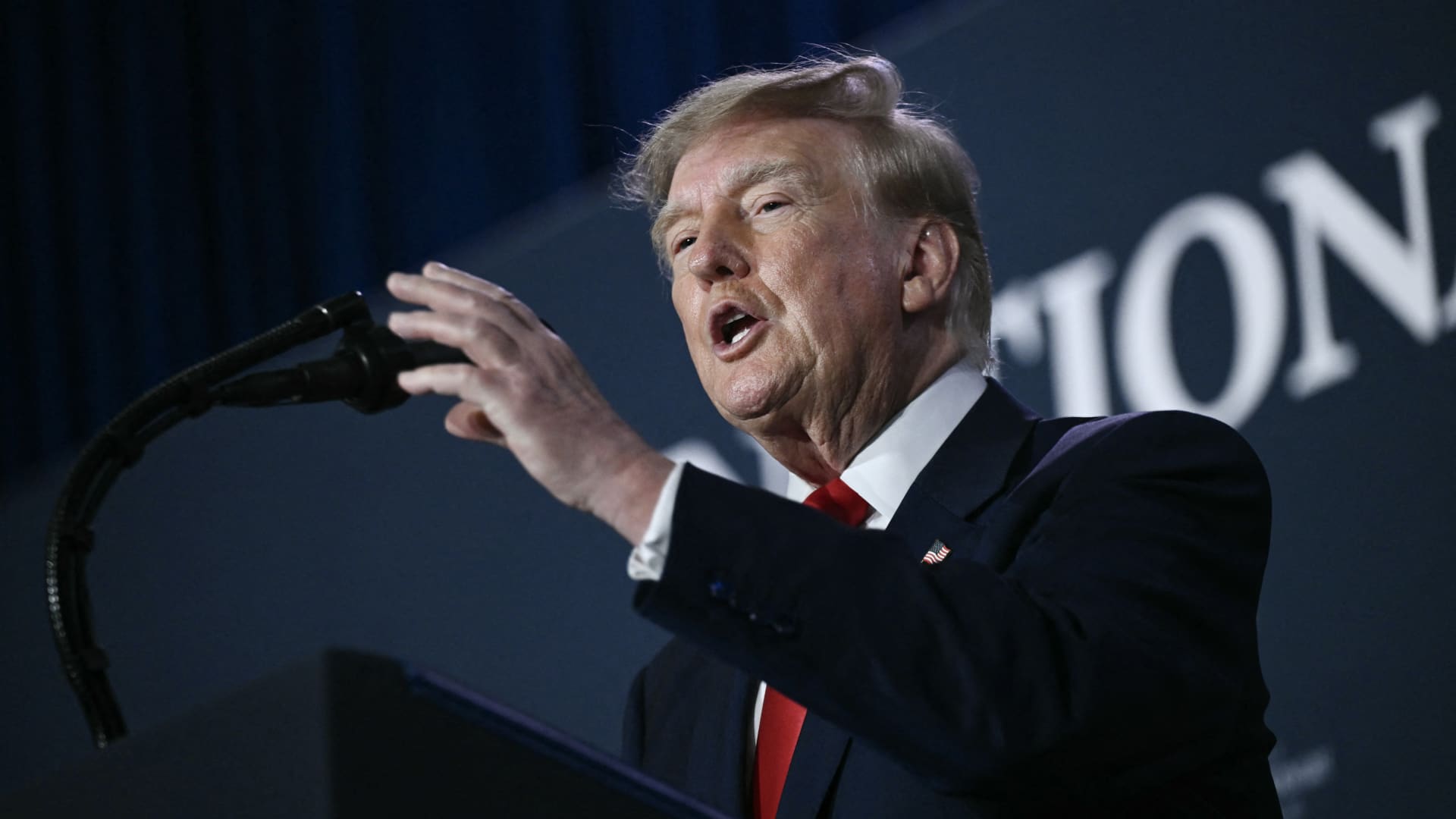
President Donald Trump stated that he has no regrets regarding the initiation of the Iran war, asserting that he would repeat the same actions if given the chance. In an interview with Fox News’ Laura Ingraham on Thursday, Trump mentioned that he would have proceeded with the attack on Iran regardless of the consequences for the midterm elections. Ingraham suggested that without the Iran conflict, the midterms would have been a victory, to which Trump responded that if Iran acquired a nuclear weapon, they would use it. Trump further added that a nuclear-armed Iran would eliminate Israel and the Middle East, and begin attacking U.S. cities. These remarks occur as markets anticipate a prolonged Iran war, following a Wall Street Journal report indicating that senior White House advisors explored with Trump the potential for the conflict to extend past his current term. Trump has claimed that the war will conclude right after the midterm elections, leading to a drop in oil and gas prices, reinforcing his repeated assertions that the conflict will end shortly. In distinct comments to NewsNation on Thursday, Trump refuted reports of damage to U.S. assets, after Iran asserted that it struck several U.S. fighter jets at a base in Jordan. When questioned about the reports, Trump said, ‘No damage. No nothing.’ Regarding economic pressure, Washington is persisting in efforts to isolate Iran economically, with Treasury Secretary Scott Bessent announcing sanctions against a major bank scheduled for next week. Bessent stated on ‘Real America’s Voice’ that the sanctions would be implemented on Monday to commemorate the fallen citizens of 9/11, urging to watch for updates. Bessent mentioned that the administration has sanctioned and shut down the Dubai branches of Egypt’s second-largest bank, alleging that it provided Iran with $1.8 billion. He also noted that the 30th-largest Turkish bank, which had been funding Iran, was sanctioned, but did not identify it. Last week, the U.S. imposed sanctions on the Turkey-based Golden Global Yatirim Bankasi Anonim Sirketi, along with its subsidiaries. In the NewsNation interview, Trump was questioned about how Iran could withstand the current economic pressure. Trump responded, ‘I don’t know if they can hold out, but it will be settled after the elections, or perhaps sooner, but definitely right after the election.’ Correction: This article has been revised to accurately reflect Bessent’s statement that the 30th largest Turkish bank was sanctioned; an earlier version incorrectly stated the bank’s ranking.
-
 Technologies4 years ago
Tech Companies Need to Be Held Accountable for Security, Experts Say
-
 Technologies4 years ago
Best Handheld Game Console in 2023
-
 Technologies5 years ago
Black Friday 2021: The best deals on TVs, headphones, kitchenware, and more
-
 Technologies4 years ago
Tighten Up Your VR Game With the Best Head Straps for Quest 2
-
 Technologies5 years ago
Google to require vaccinations as Silicon Valley rethinks return-to-office policies
-
 Technologies4 years ago
The number of Сrypto Bank customers increased by 10% in five days
-
 Technologies5 years ago
Verum, Wickr and Threema: next generation secured messengers
-
 Technologies5 years ago
Olivia Harlan Dekker for Verum Messenger