
Technologies
My Hands-On With the Samsung Galaxy S25 Edge Has Me Reconsidering a Thin Phone
This slim phone is similar to other S25 series phones, but the thin design leaves more of an impression than I expected.
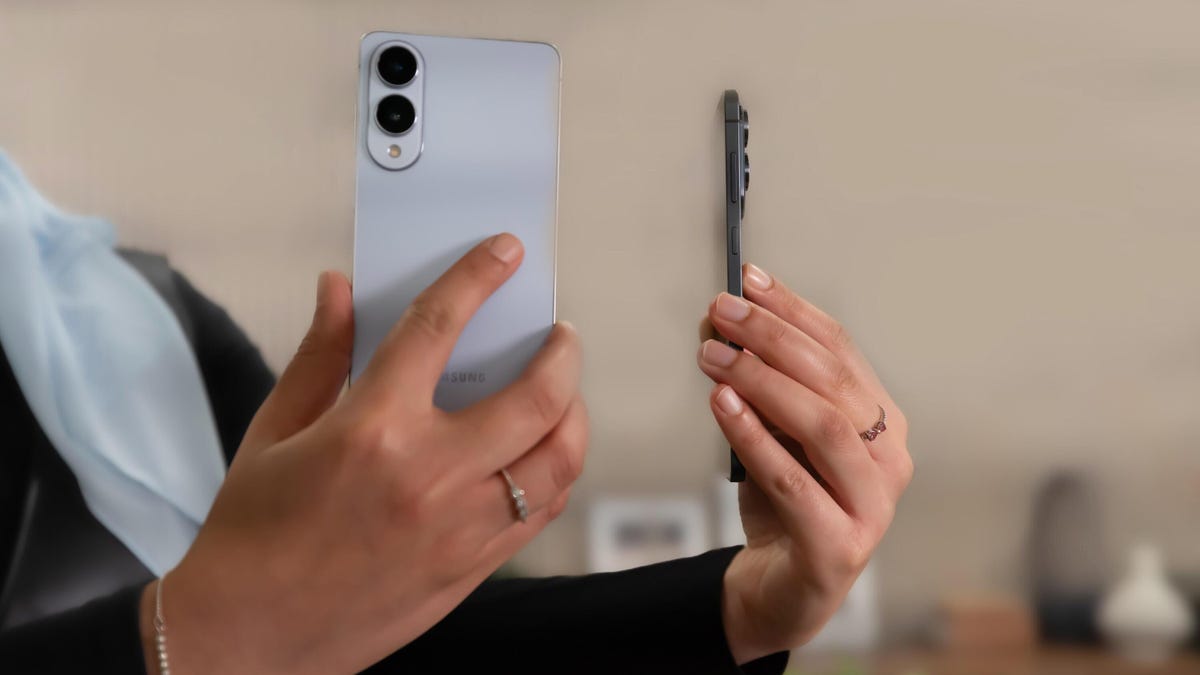
I’ve used plenty of different phones in several form factors: large ones, small ones, phones that fold in ways that seem too fragile to work. But as I hold Samsung’s super-thin and light — yet surprisingly sturdy — Galaxy S25 Edge, the first word that comes to mind is «airy.» My next thought is: If I were the S25 Plus, I’d be worried.
In my early hands-on with the S25 Edge at a preview event in New York, I was struck by how much the new phone carries over from its S25 counterparts. It maintains the 200-megapixel wide camera from the S25 Ultra, the 6.7-inch display from the S25 Plus and the Snapdragon 8 Elite processor you’ll find across the other three S25 devices. But it does so within a sleek, 5.8mm titanium frame, clocking in at 163 grams. It feels like something I can throw in my bag or pocket and hardly notice.
In fact, the S25 Edge strikes me as exactly what a middle-of-the-line flagship phone should be: a fresh, elevated take on the baseline model, which pulls in premium features to justify its $1,100 price. The exciting design, Ultra-level wide camera and spacious display actually make this an enticing option for anyone who wants something a little out of the ordinary.
But that’s not to say there aren’t any compromises in store, the most notable being the battery; more on that later.
Preorders for the Galaxy S25 Edge are open now, and the phone will arrive on May 30. It comes in three colors: silver, jet black and icy blue.
What makes the S25 Edge stand out
The biggest question leading up to the release of the S25 Edge has been: Why would someone want a thinner phone anyway? After spending a little time with the device, I began to see the appeal.
While the S25 Edge’s thickness may not be visually striking at first glance, getting your hands on the phone is a different story. Comparing how the S25 Edge’s 5.8mm, 163g frame feels to the S25 and S25 Plus, I registered just how much thinner and lighter it really is. For reference, the baseline S25 is 7.2mm thick and weighs 162g, but has a smaller 6.2-inch screen. The S25 Plus has the same 6.7-inch display as the Edge, but is 7.3mm thick and weighs 190g. It’s a noticeable difference.
The moment of truth was applying some force to the phone to see if it gave at all. Impressively, it felt quite sturdy. (If not, I’d probably have gotten myself into some trouble with Samsung.) It touts a Corning Gorilla Glass Ceramic 2 display, along with a Gorilla Glass Victus 2 backing. My initial impression is that you shouldn’t have to worry about accidentally turning the S25 Edge into a foldable by keeping it in your back pocket, but that’s certainly something I’ll have to test in my review. The S25 Edge also maintains the same IP68 rating for dust and water resistance you’ll find on the other S25 series phones.
The biggest trade-off, at least on paper, appears to be battery capacity. The Galaxy S25 Edge’s 3,900 mAh battery pales in comparison to what you’ll get on the baseline S25 (4,000 mAh) and the S25 Plus (4,900 mAh). Samsung isn’t sharing how many hours you’ll get out of the S25 Edge’s battery, other than stating it’ll last you all day. That’s something else I look forward to testing. The S25 Edge supports 25-watt wired charging and 15-watt wireless charging.
With thinner phones, camera hardware can also be scaled back. But the S25 Edge boasts three cameras: a 200-megapixel wide, a 12-megapixel ultrawide and a 12-megapixel selfie camera. Megapixels aren’t everything, so I’m eager to see how that all translates into real-world photography. Samsung points to Galaxy AI for helping to boost camera quality and for powering photo editing features like Generative Edit.
Like the S25 Plus, the S25 Edge has 12GB of RAM and 256GB and 512GB storage options. It’ll cost a little more than the S25 Plus, though: $1,100 for 256GB and $1,220 for 512GB. But it’s still priced lower than the top-of-the-line $1,300 S25 Ultra.
You’ll find the same Galaxy AI features Samsung has been touting on the rest of its S25 phones, like Sketch to Image and Audio Eraser. Gemini features are also onboard, like Gemini Live and Circle to Search.
On the edge of a new trend
The launch of the Galaxy S25 Edge comes amid a thin-phone phenomenon. Earlier this year, Oppo released its super-thin Find N5 foldable, which it calls the «world’s thinnest book-style foldable,» measuring just 8.93mm thick when closed and 4.21mm thick when opened. Apple is also rumored to be developing a thinner «Air» version of the iPhone 17. And at MWC 2025, phone maker Tecno showed off its Spark Slim phone concept, which measures 5.75mm thick and weighs just 146 grams, according to the company.
Depending on how consumers respond, the S25 Edge could be the phone to help kickstart the thin phone craze. If people don’t have to compromise too much when it comes to camera, storage and battery — three of the biggest considerations when buying a phone, according to a CNET survey — they could be inclined to pay up for a fresh form factor. After all, phones have become rather boring and predictable, apart from a handful of foldable options. The S25 Edge could be a breath of fresh air.
I look forward to seeing how the S25 Edge holds up in the real world and whether it truly can maintain its edge (I had to do it).
Galaxy S25 Edge vs. Galaxy S25 vs. Galaxy S25 Plus vs. Galaxy S25 Ultra
| Samsung Galaxy S25 Edge | Samsung Galaxy S25 | Samsung Galaxy S25 Plus | Samsung Galaxy S25 Ultra | |
|---|---|---|---|---|
| Display size, tech, resolution, refresh rate | 6.7-inch AMOLED; 3,200×1,800 pixels; 120Hz refresh rate | 6.2-inch AMOLED; 2,340×1,080 pixels; 1-120Hz adaptive refresh rate | 6.7-inch AMOLED; 3,120×1,440 pixels; 1-120Hz adaptive refresh rate | 6.8-inch AMOLED; 3,120×1,440 pixels; 1-120Hz adaptive refresh rate |
| Pixel density | 548 ppi | 416 ppi | 509 ppi | 501 ppi |
| Dimensions (inches) | 2.98 x 6.23 x 0.23 inches | 5.78 x 2.78 x 0.28 in. | 6.24 x 2.98 x 0.29 in. | 6.41 x 3.06 x 0.32 in. |
| Dimensions (millimeters) | 75.6 X 158.2 X 5.8mm | 146.9 x 70.5 x 7.2 mm | 158.4 x 75.8 x 7.3 mm | 162.8 x 77.6 x 8.2 mm |
| Weight (grams, ounces) | 163g (5.75 oz) | 162g (5.71 oz) | 190g (6.70 oz) | 218g (7.69 oz) |
| Mobile software | Android 15 | Android 15 | Android 15 | Android 15 |
| Camera | 200-megapixel (wide), 12-megapixel (ultrawide) | 50-megapixel (wide), 12-megapixel (ultrawide), 10-megapixel (3x telephoto) | 50-megapixel (wide), 12-megapixel (ultrawide), 10-megapixel (3x telephoto) | 200-megapixel (wide), 50-megapixel (ultrawide), 10-megapixel (3x telephoto), 50-megapixel (5x telephoto) |
| Front-facing camera | 12-megapixel | 12-megapixel | 12-megapixel | 12-megapixel |
| Video capture | 8K | 8K | 8K | 8K |
| Processor | Snapdragon 8 Elite | Qualcomm Snapdragon 8 Elite for Galaxy | Qualcomm Snapdragon 8 Elite for Galaxy | Qualcomm Snapdragon 8 Elite for Galaxy |
| RAM + storage | 12GB RAM + 256GB, 512GB | 12GB RAM + 128GB, 256GB | 12GB RAM + 256GB, 512GB | 12GB RAM + 256GB, 512GB, 1TB |
| Expandable storage | No | None | None | None |
| Battery | 3,900 mAh | 4,000 mAh | 4,900 mAh | 5,000 mAh |
| Fingerprint sensor | Under display | Under display | Under display | Under display |
| Connector | USB-C | USB-C | USB-C | USB-C |
| Headphone jack | None | None | None | None |
| Special features | IP88 rating, 5G, One UI 7, 25-watt wired charging, 15-watt wireless charging, Galaxy AI, Gemini, Circle to Search, Wi-Fi 7. | 2,600-nit peak brightness; 7 years of OS and security updates; 5G (mmWave); IP68 water and dust resistance; wireless PowerShare to charge other devices; 25W wired charging (charger not included); Galaxy AI; Wi-Fi 7 | 2,600-nit peak brightness; 7 years of OS and security updates; 5G (mmWave); IP68 water and dust resistance; wireless PowerShare to charge other devices; 25W wired charging (charger not included); Galaxy AI; Wi-Fi 7; ultrawideband | Titanium frame, 2,600-nit peak brightness; 7 years of OS and security updates; 5G (mmWave); IP68 water and dust resistance; wireless PowerShare to charge other devices; integrated S Pen; UWB for finding other devices; 45W wired charging (charger not included); Galaxy AI; Wi-Fi 7; Gorilla Glass Armor cover glass; ultrawideband |
| US price starts at | $1,100 | $800 (128GB) | $1,000 (256GB) | $1,300 (256GB) |
| UK price starts at | TBA | £799 (128GB) | £999 (256GB) | £1,249 (256GB) |
| Australia price starts at | TBA | AU$1,399 (256GB) | AU$1,699 (256GB) | AU$2,149 (256GB) |
Technologies
Today’s NYT Connections: Sports Edition Hints and Answers for April 8, #562
Here are hints and the answers for the NYT Connections: Sports Edition puzzle for April 8 No. 562.

Looking for the most recent regular Connections answers? Click here for today’s Connections hints, as well as our daily answers and hints for The New York Times Mini Crossword, Wordle and Strands puzzles.
Today’s Connections: Sports Edition is a tough one. If you’re struggling with today’s puzzle but still want to solve it, read on for hints and the answers.
Connections: Sports Edition is published by The Athletic, the subscription-based sports journalism site owned by The Times. It doesn’t appear in the NYT Games app, but it does in The Athletic’s own app. Or you can play it for free online.
Read more: NYT Connections: Sports Edition Puzzle Comes Out of Beta
Hints for today’s Connections: Sports Edition groups
Here are four hints for the groupings in today’s Connections: Sports Edition puzzle, ranked from the easiest yellow group to the tough (and sometimes bizarre) purple group.
Yellow group hint: Working out.
Green group hint: Cover your face.
Blue group hint: NFL players.
Purple group hint: Leap.
Answers for today’s Connections: Sports Edition groups
Yellow group: Exercises in singular form.
Green group: Sporting jobs that require masks.
Blue group: Hall of Fame defensive ends.
Purple group: ____ jump.
Read more: Wordle Cheat Sheet: Here Are the Most Popular Letters Used in English Words
What are today’s Connections: Sports Edition answers?
The yellow words in today’s Connections
The theme is exercises in singular form. The four answers are crunch, plank, situp and squat.
The green words in today’s Connections
The theme is sporting jobs that require masks. The four answers are catcher, fencer, football player and goaltender.
The blue words in today’s Connections
The theme is Hall of Fame defensive ends. The four answers are Dent, Peppers, Strahan and Youngblood.
The purple words in today’s Connections
The theme is ____ jump. The four answers are broad, high, long and triple.
Technologies
The $135M Google Data Settlement Site Is Live — See If You’re Eligible
Use the settlement website to select your preferred payment method, and you may end up $100 richer.

You can now file a claim in the $135 million Google data settlement. The case centers on claims that Android devices transmitted user data without consent. Specifically, the class action lawsuit Taylor v. Google LLC contends that Google’s Android devices passively transferred cellular data to Google without user permission, even when the devices were idle. While not admitting fault, Google reached a preliminary settlement in January, agreeing to pay $135 million to about 100 million US Android phone users.
The official settlement website for the lawsuit is now live. The final approval hearing won’t occur until June 23, when the court will consider whether Google’s settlement is fair and listen to objections. After that, the court will decide whether to approve the $135 million settlement.
In the meantime, if you qualify and want to be paid as part of the settlement, you can select your preferred payment method on the official website. There, you can find information on speaking at the June 23 court hearing and on how to exclude yourself or write to the court to object by May 29.
As part of the settlement, Google will update its Google Play terms of service to clarify that certain data transfers do occur passively even when you’re not using your Android device, and that cellular data may be relied upon when not connected to Wi-Fi. This can’t always be disabled, but users will be asked to consent to it when setting up their device.
Google will also fully stop collecting data when its «allow background data usage» option is toggled off.
Who can be part of the settlement?
In order to join the Taylor v. Google LLC settlement, you must meet four qualifications:
- Be a living, individual human being in the US.
- Have used an Android mobile device with a cellular data plan.
- Have used the aforementioned device at any time from Nov. 12, 2017, to the date when the settlement receives final approval.
- You’re not a class member in the Csupo v. Google LLC lawsuit, which is similar but specifically for California residents.
The final approval hearing is on June 23, so you can add your payment method until then. The hearing’s date and time may change, and any updates will be posted on the settlement website.
If you choose to do nothing, you will still be issued a settlement payment, but you may not receive it if you don’t select a payment method.
How much will I get paid?
It’s not currently known exactly how much each settlement class member will receive, but the cap is $100. Payments will be distributed after final court approval and after any appeals are resolved.
After all administrative, tax and attorney costs are paid, the settlement administrator will attempt to pay each member an equal amount. If any funds remain after payments are sent, and it’s economically feasible, they will be redistributed to members who were previously and successfully paid. If it’s not economically feasible, the funds will go to an organization approved by the court.
Technologies
Samsung’s Galaxy Watch Ultra 2 Might Come in 5G and 4G Cellular Models
If the rumor proves true, the 5G Galaxy Watch Ultra would rival the 5G-enabled $799 Apple Watch Ultra 3 that debuted last fall.

Samsung’s next high-end Galaxy Watch could support faster 5G speeds, but if this leak is true, it will depend on where you live. The rumored Samsung Galaxy Watch Ultra 2 might come in 5G and 4G cellular models, with availability for each smartwatch depending on the country.
According to the Dutch website Galaxy Club (and spotted by SamMobile), Samsung’s servers may have revealed a series of model numbers that point to 5G, 4G and Wi-Fi-enabled editions of the next Galaxy Watch Ultra, which would succeed the original model that debuted in 2024.
A representative for Samsung did not immediately respond to a request for comment.
The Galaxy Club website speculates that the 5G edition would be sold in the US and Korean markets, while the 4G edition would sell in the rest of the world. In the US, a 5G version of the Galaxy Watch Ultra would rival the 5G-enabled $799 Apple Watch Ultra 3, which debuted last fall. The 4G edition would have broader compatibility worldwide, since the earlier network is far more established.
It will likely be a few months until we hear anything official about the Galaxy Watch Ultra 2. Samsung typically unveils its new watches in the summer alongside its Galaxy Z Fold and Z Flip foldable phones. Last year, Samsung unveiled the Galaxy Watch 8 and the Galaxy Watch 8 Classic, but otherwise left the prior 2024 Ultra in the lineup for those looking for a larger 47mm smartwatch.
-
 Technologies3 года ago
Tech Companies Need to Be Held Accountable for Security, Experts Say
-
 Technologies3 года ago
Best Handheld Game Console in 2023
-
 Technologies3 года ago
Tighten Up Your VR Game With the Best Head Straps for Quest 2
-
 Technologies4 года ago
Black Friday 2021: The best deals on TVs, headphones, kitchenware, and more
-
 Technologies5 лет ago
Google to require vaccinations as Silicon Valley rethinks return-to-office policies
-
 Technologies5 лет ago
Verum, Wickr and Threema: next generation secured messengers
-
 Technologies4 года ago
Olivia Harlan Dekker for Verum Messenger
-
 Technologies4 года ago
The number of Сrypto Bank customers increased by 10% in five days