Technologies
Watch Premier League Soccer: Livestream Liverpool vs. Aston Villa From Anywhere
Jürgen Klopp’s Reds go in search of an eighth successive victory as they look to keep their top-four hopes alive.
Arguably the pick of Saturday’s fixtures in the English Premier League sees two in-form sides go head-to-head at Anfield, with European aspirations for Liverpool and Aston Villa at stake.
The hosts will be hoping to keep their slender hopes of catching arch rivals Man United alive as the fifth-placed Reds look to claim the final Champions League qualification spot. Jürgen Klopp’s men are on a superb late season run of seven consecutive wins.
Aston Villa, meanwhile, find themselves in eighth place in the Premier League standings, and will be looking to cap off their resurgence under Unai Emery by claiming a Europa League spot ahead of Brighton and Spurs.
The match will see longtime Liverpool stars Roberto Firmino and James Milner bid emotional farewells to Anfield in what is set to be both players’ final home games for the Merseyside club.
Below, we’ll outline the best live TV streaming services to use to watch the game live wherever you are in the world.

Liverpool manager Jürgen Klopp won’t be on the bench after he was hit with a two-match touchline ban plus a £75,000 fine for comments he made about referee Paul Tierney.
Liverpool vs. Aston Villa: When and where?
Liverpool host Aston Villa at Anfield on Saturday, May 20. Kickoff is set for 3 p.m. BST local time in the UK (10 a.m. ET, 7 a.m. PT in the US, and at 1 a.m. AEST on Sunday, May. 21 in Australia).
How to watch the Liverpool vs. Aston Villa game online from anywhere using a VPN
If you find yourself unable to view the game locally, you may need a different way to watch the game — that’s where using a VPN can come in handy. A VPN is also the best way to stop your ISP from throttling your speeds on game day by encrypting your traffic, and it’s also a great idea if you’re traveling and find yourself connected to a Wi-Fi network, and you want to add an extra layer of privacy for your devices and logins.
With a VPN, you’re able to virtually change your location on your phone, tablet or laptop to get access to the game. Most VPNs, like our Editors’ Choice, ExpressVPN, make it really easy to do this.
Using a VPN to watch or stream sports is legal in any country where VPNs are legal, including the US, UK and Canada, as long as you have a legitimate subscription to the service you’re streaming. You should be sure your VPN is set up correctly to prevent leaks: Even where VPNs are legal, the streaming service may terminate the account of anyone it deems to be circumventing correctly applied blackout restrictions.
Looking for other options? Be sure to check out some of the other great VPN deals taking place right now.
ExpressVPN is our current best VPN pick for people who want a reliable and safe VPN, and it works on a variety of devices. It’s normally $13 per month, and you can sign up for ExpressVPN and save 49% plus get three months of access for free — the equivalent of $6.67 per month — if you get an annual subscription.
Note that ExpressVPN offers a 30-day money-back guarantee.
Livestream the Liverpool vs. Aston Villa game in the US
This EPL fixture is streaming on Peacock. You’ll need a Peacock Premium or Premium Plus account to catch the game live.
NBC’s streaming service Peacock offers access to plenty of Premier League soccer throughout the season. You’ll need to be signed up with a Peacock Premium or Premium Plus account to stream games live. For a limited time, you can sign up for Peacock Premium at a 60% discount, dropping the monthly cost as low as $2 (or even less with an annual account).
Livestream the Liverpool vs. Aston Villa game in the UK
No broadcaster has the rights to show this game live in the UK, due to the traditional Saturday 3 p.m. kick-off blackout, which prohibits matches being shown in the region at that time in order to protect attendances throughout the English football pyramid.
That also means that if you’re in the UK traveling for pleasure or for work, you’re unlikely to be able to watch the game like you normally would at home thanks to geo-blocking.
There is one option to get around this, however. By using a VPN, as explained above, you can set your location to a country where the match is being broadcast and go from there.
Livestream the Liverpool vs. Aston Villa game in Canada
If you want to stream this EPL clash live in Canada, you’ll need to subscribe to FuboTV Canada. The service has exclusive rights to this Premier League season.
FuboTV is the go-to destination for Canadians looking to watch the Premier League this season with exclusive streaming rights to every game. It costs CA$25 per month, though you can save some cash by paying quarterly or annually.
Livestream the Liverpool vs. Aston Villa game in Australia
Football fans Down Under can watch this EPL fixture on streaming service Optus Sport, which is showing every single Premier League game live in Australia this season.
With exclusive rights to screen every EPL match live this season, as well as German Bundesliga and Spanish La Liga games, streaming service Optus Sport is a particularly big draw for Aussie soccer fans.
If you’re already an Optus network customer you can bag Optus Sport for a reduced price, with discounts bringing the price down to as low as AU$7 per month. If you’re not, a standalone monthly subscription to the service starts at AU$25.
Quick tips for streaming the Premier League using a VPN
- With four variables at play — your ISP, browser, video streaming provider and VPN — your experience and success when streaming EPL matches may vary.
- If you don’t see your desired location as a default option for ExpressVPN, try using the «search for city or country» option.
- If you’re having trouble getting the game after you’ve turned on your VPN and set it to the correct viewing area, there are two things you can try for a quick fix. First, log into your streaming service subscription account and make sure the address registered for the account is an address in the correct viewing area. If not, you may need to change the physical address on file with your account. Second, some smart TVs — like Roku — don’t have VPN apps you can install directly on the device itself. Instead, you’ll have to install the VPN on your router or the mobile hotspot you’re using (like your phone) so that any device on its Wi-Fi network now appears in the correct viewing location.
- All of the VPN providers we recommend have helpful instructions on their main site for quickly installing the VPN on your router. In some cases with smart TV services, after you install a cable network’s sports app, you’ll be asked to verify a numeric code or click a link sent to your email address on file for your smart TV. This is where having a VPN on your router will also help, since both devices will appear to be in the correct location.
- And remember, browsers can often give away a location despite using a VPN, so be sure you’re using a privacy-first browser to log into your services. We normally recommend Brave.
Technologies
Octopath Traveler 0 Review: A Solid JRPG Dragged Down by Forgettable Characters
The Octopath Traveler prequel is so close to being a fantastic RPG.
When Octopath Traveler launched in 2019, it was something that looked similar to yet ended up being totally different from the traditional turn-based Japanese role-playing game Square Enix was known for. The series made some innovative changes to the formula, from the roster of eight playable characters to the Boost system. But with Octopath Traveler 0, it feels like the prequel didn’t move forward, and if anything, took a tiny step backwards.
Octopath Traveler 0 acts as a prequel to the series’ first two entries, and instead of playing as one of eight unique characters with their own storylines, you step into the role of a silent protagonist who is seeking revenge. If that sounds boring, well, it kind of is.
If there’s a saving grace to the game, it’s its class and combat systems, which offer a good mix of standard RPG fare with enough novelty — including some deliciously evil villains — to keep you playing.
Don’t miss any of our unbiased tech content and lab-based reviews. Add CNET as a preferred Google source.
Players can pick one of eight jobs for the protagonist: warrior, hunter, merchant, apothecary, cleric, scholar, dancer or thief. As expected, each class has its own unique traits, and classes like the warrior, cleric, hunter, scholar (black mage) and thief have the standard fare that RPG fans should expect. It’s the other classes that are unique to the game. I started off as a merchant who could use weapons with powerful attacks, along with skills that earned a little more money from battles. Then there’s the apothecary, a unique class that heals and cures the ailments of their teammates while also being able to do heavy damage with an axe.
As you progress and unlock more job skills and level up, there will be an option to obtain another job. This means the hero can take skills from one job — such as spells and physical attacks — and use them with a class that wouldn’t normally have them. This can result in a warrior, for example, being able to use the powerful spells of the scholar class to create a unique battle mage. With eight jobs to choose from, there are plenty of options available to create different combinations to use in battle.
But for all the new ground that the class system covers, the plot is pretty generic territory.
Boring Traveler
The real selling point of the Octopath Traveler series is, well, the travelers. The first two games featured eight playable characters, each with their own background story to learn. That was the selling point of the game that made it stand out from the sea of traditional JRPGs.
This time around, Square Enix decided to do something a little different and a little dull, making the hero a silent protagonist. Not only is the hero quiet throughout every conversation in the game, but get this, they’re on a revenge mission, as if that’s never been done before in a JRPG (snark intended).
Yes, the hero is a silent protagonist whose village was wiped out by this evil duo in search of a magical trinket. The hero survives and is trained in secret until it’s time to exact revenge on the three people who doomed his home: Tytos and Auguste, who were responsible for the attack on the village, and Lady Hermina, a wealthy heiress who gave the two the info on the location of the trinket.
This lackluster origin story of the hero and their motivations really dampens any interest I had in playing as the character. The same goes for the allies that join the hero throughout the game. They have their stories, some a little sad, but for much of the game, they’re just a member of the team.
Thankfully, the real heroes of the game’s story are the bad guys. Following the drawn-out intro sequence, once the hero sets out on their revenge quest, players can choose to go after any one of the three previously mentioned villains. Each has its own story arc, and they’re just deliciously dark. The characters are truly evil, with the most interesting background and developments, giving an almost Game of Thrones vibe. My favorite was Auguste the Playwright, referred to as the Master of Fame. When completing his story arc, there is just a series of these seemingly regular people who show their utter devotion to him by sacrificing their own family members and themselves to Auguste’s delight.
There is something refreshing in seeing true villains. There is no moral quandary or philosophical debate on whether the people you’re fighting against are horrible people or if they are simply misguided with good intentions. No, these people are horrible and need to be stopped. It’s just a shame it’s the boring, silent protagonist that has to do the heavy lifting to defeat them.
Octo-Mazing
Where Octopath Traveler 0 really excels is the combat. It’s turn-based, but to liven things up, the series has the «Break and Boost» system.
Every enemy has a shield number that depletes when attacked, and once it reaches zero, that enemy is «broken» and unable to attack for multiple rounds. To help speed up this process, characters have Boost Points that increase with each round of a fight. When a character has three BPs, they can use powerful attacks or simply do multiple attacks at once. As every enemy has multiple weaknesses to certain weapons and spells, this system adds an extra layer of strategy to determine whether you bide your time to beat them down or rush them down. Occasionally, you’ll end up in a situation where a tough enemy gets broken and you notice that all of your characters are loaded up with BP, which leads to a satisfying beatdown on the bad guy, raining down powerful attack after powerful attack.
And yet, the depth of strategy doesn’t end there. New in Octopath Traveler 0 is a whole second row of characters on the team. These backup fighters can be tagged in throughout combat to provide a bit of a mix-up in strategy. You can keep your physical warriors up front while having the mages hang out in back and switch when needed. Or rotate in the same character type when needed, so when a healer gets low on health, they can swap out with another healer. Couple this dynamic of switching out characters on the fly with the «Break and Boost» system, and you have a very active turn-based combat.
Obtaining these extra characters on the team comes with rebuilding the hero’s village, Wishvale. The burned down town starts off with one home, but as you progress, you’re given more options to expand. Other towns have people looking for new places to live or adventures to partake in, and those choices can be explored via Path Actions, a recurring feature from earlier games in the series.
When talking to particular NPCs, there is an option to learn a bit more about them by inquiring using a Path Action, which is just a matter of pressing a certain button (the X button for the Xbox version, Square for PlayStation and Y for Nintendo Switch). Doing this will then give you some background on the character and some options. Some NPCs will gladly join your team to fight with you for a price, while others will have items to give you by selecting the Entreat option and a success rate will be shown for each item they possess, with the lower success rate set for the more valuable items. There’s also the Contend option to battle the NPC, which isn’t wise to do early on, as it seems all the townsfolk have been battling dragons for generations, so fight them early on at your peril. Fail to obtain an item from an NPC or lose to them in a fight, and your reputation takes a hit. Take too many hits to your reputation while in a town, and none of the NPCs will offer these Path Actions anymore until you visit the tavern and pay a fine to restore it.
The presentation of Octopath Traveler 0 is not much different than the previous games. The graphics are the HD-2D art style Square Enix has been using for this series and the Dragon Quest remakes, a retro mix of 2D sprites amid 3D backgrounds that evokes nostalgia for the games of yesteryear with some modern polish. Octopath Traveler 0’s soundtrack and voice acting are also on par with the higher quality the series has been known for.
Like other games in the series, Octopath Traveler 0 can easily take players 100 hours to complete, especially if they delve deep into the town-building aspect. While I wish there were more interesting heroes to embody, once players get past the generic plot premise and delve into the meaty combat, there is no question that this game is a worthy entry into the franchise and a pick for those looking for a new JRPG to spend all their time with.
Octopath Traveler 0 is now available on Nintendo Switch 2, Nintendo Switch, PlayStation 5, PlayStation 4, Xbox Series X|S, and PC.
Technologies
Galaxy Z TriFold vs. Huawei Mate XT: One Is the Most Versatile Phone I’ve Ever Used
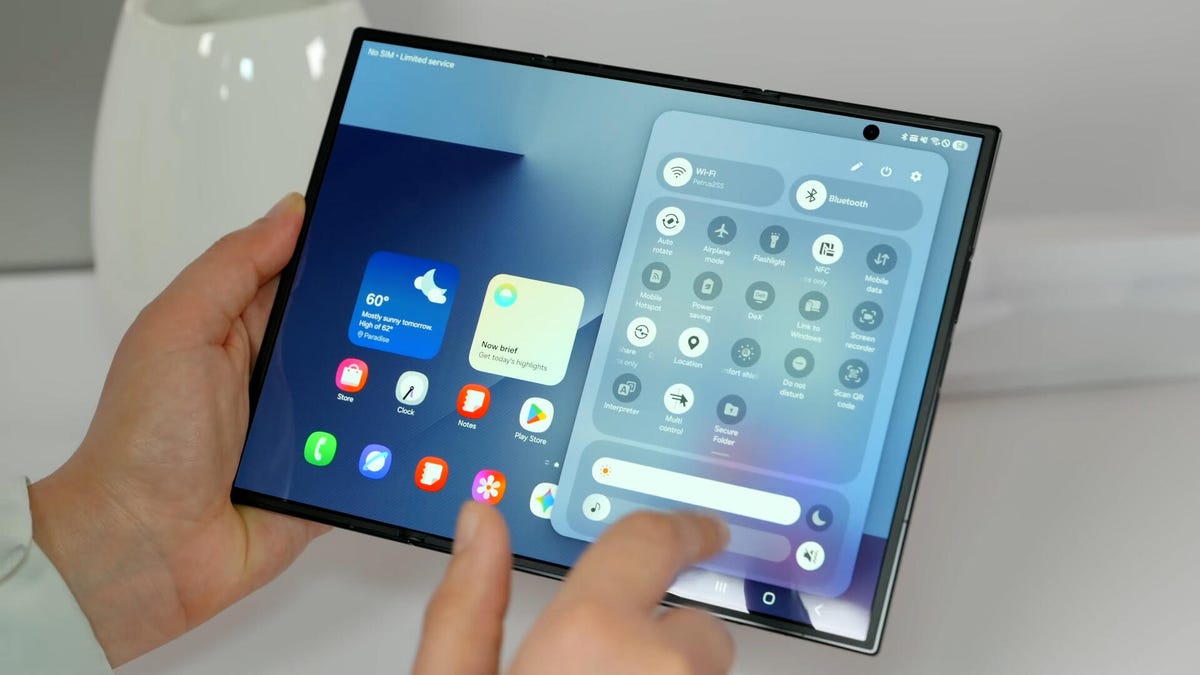
Samsung’s Galaxy Z TriFold and Huawei’s Mate XT, part of a new category of phones called «trifolds,» offer diverging experiences when it comes to using them.
Huawei introduced the world’s first «trifold» phone, the Mate XT Ultimate, last year and launched it outside of China in February 2025. Despite only actually folding in two places, the phone was called a trifold because its 10.2-inch display divides into three sections.
I’ve been using it on and off since February and I liked the Mate XT so much that it made me skeptical about the Galaxy Z TriFold‘s design when Samsung first showcased it at the APEC CEO Summit in October. But after trying Samsung’s first trifold for myself, during a brief hands-on test at a Samsung store in Dubai, I changed my mind.
As foldable phone sales are expected to rise 30% year over year in 2026, according to analysts at IDC, it’s important for both Samsung and Huawei to find their own hook for customers. Each of these foldable phones has their place in the market and offers a different appeal. One is a tablet that folds into a phone, while the other is a three-in-one and the most versatile smartphone I’ve ever used. One of them has «Z TriFold» in its name but the other actually folds in a «Z» shape.
Here’s how the newly-launched Samsung trifold phone compares to the Huawei Mate XT Ultimate — the phone that pioneered this category.
Samsung Galaxy Z TriFold vs. Huawei Mate XT design
Both the Galaxy Z TriFold and Mate XT have large screens that divide into three panels (hence the name) and have two hinges to connect them. And yet, they’re vastly different.
The Huawei trifold phone has a single screen that folds in a Z shape to allow for three different forms. You can use it as a phone (fully folded), a mini-tablet (half-open), as well as a wide-screen tablet (fully opened). I’ve mostly used the Mate XT either in mini-tablet mode (one fold) or fully unfolded. And I found myself using it in phone mode (fully closed) only when I made calls.
In comparison, the Galaxy Z TriFold folds in a U shape as both panels fold inwards. You can only use it fully folded as a phone or fully opened as a wide-screen tablet, without the added ability to use it as a mini tablet.
Samsung’s Z Trifold uses two different-sized hinges and three panels of varying thickness, allowing the device’s flaps to fold on top of one another. The left hinge is like the one on the Fold 7 and comparatively tighter than the right hinge (the wider one), which springs open after you push it to a certain angle. On the back of the phone is a second display that occupies the «middle» section to use when the phone is fully closed.
When fully folded, its lowermost panel has a protruding edge, giving it a solid lip to grab onto while unfolding. It’s a nice addition to the flat-sided design, which doesn’t leave much space between panels. I found it easier to unfold than its sibling, the flat-sided Galaxy Z Fold 7.
The Huawei Mate XT has curved sides and a single screen, but because of that Z shape, it gives you three ways to use it. The right hinge unfolds like the Galaxy Z TriFold — you pull it out — but you don’t need to unfold the other side. With just one panel unfolded, it becomes a usable mini-tablet.
You can unfold the third section, at the back of the left panel, to open it fully and use it as a wide-screen tablet. Because it uses a single flexible screen, part of the soft folding display is always exposed to the elements when the device is folded shut in phone mode. So far, I haven’t noticed any scratches on the display but it is definitely less protected than Samsung’s inner screen. However, Huawei bundles a case with an extended lip to protect the always-exposed right side of the screen.
Both of these trifold phones have minimal screen creases but Samsung’s Galaxy Z TriFold feels better when I run my finger over the folding parts. While Huawei’s creases are deeper, they don’t bother me in day-to-day use. The creases on both phones are visible under direct artificial light and at an extreme angle.
The Huawei Mate XT is slimmer than the Galaxy Z TriFold. It’s just 3.6mm thick at its thinnest part when fully unfolded and 12.8mm when folded. In comparison, the Samsung phone is 3.9mm thick at its thinnest part and goes up to 12.9mm when fully unfolded. At 309 grams, the Z TriFold is also slightly heavier than the 298g Mate XT.
The Huawei trifold phone feels more premium than the Galaxy Z TriFold — probably because of its faux leather back, curved sides and gold accents. Samsung’s foldable has a carbon-fiber finish, which feels durable but not as premium.
The Mate XT has an IPX8 rating, while the Galaxy Z TriFold is rated IP48 for dust and water resistance. The «4» in IP48 means it’s protected against dust particles measuring over 1mm but not against everyday dust and pocket lint. Neither of these phones is truly dust-proof, but both are rated for water resistance, just like a standard smartphone.
Samsung Galaxy Z TriFold vs. Huawei Mate XT displays
The Galaxy Z TriFold has two screens: a Galaxy Z Fold 7-like 6.5-inch AMOLED screen with a 120Hz variable refresh rate and a 422ppi pixel density. It unfolds to a 10-inch tablet-sized screen with a 120Hz dynamic refresh rate with a lower 269ppi pixel density.
The Huawei Mate XT has a single 10.2-inch OLED screen with a 90Hz refresh rate and 382ppi pixel density. It has a lower refresh rate but a higher resolution and slimmer bezels. You can use it as a 6.4-inch phone, a 7.9-inch mini-tablet or a 10.2-inch widescreen tablet which makes it a more versatile design than Samsung’s trifold phone. The Mate XT’s display when folded down into «cover screen» has a wider aspect ratio with slimmer bezels than the TriFold’s cover display.
I haven’t watched videos on the Galaxy Z TriFold, but I assume the experience would be better on the Huawei since the main screen has a wider aspect ratio (when fully unfolded). It has less letterboxing (thick borders on top and bottom) than the Galaxy Z TriFold, which provides a slightly narrower aspect ratio when fully unfolded. However, it could be better for multitasking, especially when running three apps side by side, but I’ll need more time with the Samsung phone to come to a conclusion.
Galaxy Z TriFold vs. Huawei Mate XT performance and battery
The Samsung Galaxy Z TriFold has the Qualcomm Snapdragon 8 Elite for Galaxy chip, the same processor that powers its other 2025 flagship smartphones including the OnePlus 15. The chip is tuned for efficiency and I expect it to handle multitasking on a standalone DeX with ease. The TriFold also comes with 16GB of RAM and 512GB or 1TB of storage.
In contrast, the Huawei Mate XT runs on an in-house Kirin 9010 chip and is paired with 16GB of RAM and 512GB or 1TB of storage. It runs EMUI 14.2 operating system on global variants, which doesn’t have preinstalled Google apps. Despite the ban on US companies working with Huawei — including Google, the company behind Android — there are workarounds for installing the Play Store. You won’t encounter these kinds of hurdles on the Galaxy Z Trifold.
The Samsung trifold phone runs on One UI 8, based on Android 16. You get fast animations, smooth multitasking, a multitude of customization options and a better overall experience. The Galaxy Z TriFold will also get seven years of OS and security updates.
Both phones pack a 5,600-mAh battery but it remains to be seen how they fare against each other. I haven’t pushed the Mate XT to its limits and it delivers an entire day of use on a single charge. When I need to top up the battery, I use the bundled 66-watt charger or use wireless charging at up to 55 watts. The Galaxy Z TriFold supports 45-watt fast charging and Qi wireless charging.
Samsung Galaxy Z TriFold vs. Huawei Mate XT cameras
Both phones have three rear cameras that are identical to those found in the Galaxy Z Fold 7. The Galaxy Z TriFold has:
- a 200-megapixel main camera with optical image stabilization (OIS) and a f/1.7 aperture
- a 12-megapixel ultrawide camera with a 120-degree field of view
- a 10-megapixel 3x optical zoom telephoto camera with OIS and support for 30x digital zoom
- two 10-megapixel front-facing cameras — one inside the cover display and the other inside the folding screen
In comparison, the Huawei Mate XT has:
- a 50-megapixel main camera with OIS and a variable aperture (f/1.4 — f/4.0)
- a 12-megapixel 5.5x optical zoom telephoto camera with OIS
- a 12-megapixel ultrawide camera with a 120-degree field of view
- a 8-megapixel selfie shooter
Based on my experience with the Fold 7, you can expect vibrant colors, good dynamic range and balanced processing in low-light photos on the Samsung trifold phone. Images from the Huawei tend to have an over-processed look and it doesn’t do well with certain skin tones. But the Mate XT captures better portraits than my Fold 7. I’ll be able to test the photography chops from both phones once I have the Galaxy Z TriFold.
Here’s how the two foldable phones specs compare:
Samsung Galaxy Z TriFold specs vs. Huawei Mate XT Ultimate
| Samsung Galaxy Z TriFold | Huawei Mate XT Ultimate | |
| Cover display size, tech, resolution, refresh rate | 6.5-inch AMOLED, 2,520×1,080 pixels, 1-120 Hz refresh rate | none |
| Internal display size, tech, resolution, refresh rate | 10.0 AMOLED, 2,160×1,584 pixels, 1-120 Hz refresh rate | 10.2-inch AMOLED, 3,184×2,232 pixels, 90Hz refresh rate |
| Pixel density | Cover: 422 ppi; Internal display: 269 ppi | 382 ppi |
| Dimensions (inches) | Open: 6.27×8.43×0.15 inches (leftmost panel) / 0.17 inches (center panel) / 0.16 inches (rightmost panel with the side button); Closed: 6.27×2.95×0.50 inches | Open: 6.17×8.62×0.14-0.19 inches; Half-open: 6.17×8.62×0.19-0.29 inches; Closed: 6.17×2.89×0.50 inches |
| Dimensions (millimeters) | Open: 159.2×214.1×3.9mm (leftmost panel) / 4.2mm (center panel) / 4.0mm (rightmost panel with the side button) Closed: 159.2×75.0x12.9mm | Open: 156.7x219x3.6-4.75mm; Half-open: 156.7x219x4.75-7.45mm; Closed: 156.7×73.5×12.8mm |
| Weight (grams, ounces) | 309g (10.9 oz.) | 298g (10.51 oz) |
| Mobile software | Android 16 with One UI 8 | HarmonyOS 4.2 / EMUI 14.2 |
| Cameras | 200-megapixel (main), 12-megapixel (ultrawide), 10-megapixel (telephoto), 10-megapixel (cover screen, selfie) | 50-megapixel (main), 12-megapixel (ultrawide), 12-megapixel (periscope telephoto), 8-megapixel (front-facing) |
| Internal screen camera | 10-megapixel | 10-megapixel |
| Video capture | 8K | 4K |
| Processor | Qualcomm Snapdragon 8 Elite for Galaxy | Kirin 9010 |
| RAM/storage | 16GB + 512GB, 1TB | 16GB + 512GB, 1TB |
| Expandable storage | No | No |
| Battery | 5,600 mAh | 5,600 mAh |
| Fingerprint sensor | Yes | Yes |
| Connector | USB-C | USB-C |
| Headphone jack | No | No |
| IP rating for dust and water resistance | IP48 | None |
| Special features | 45W wired charging speed, Qi wireless charging, Galaxy AI, NFC, Wi-Fi 7, Bluetooth 5.4 | 66W wired charging speed, 50W wireless charging, NFC, Wi-Fi 6, Bluetooth 5.2 |
Technologies
Today’s NYT Connections Hints, Answers and Help for Dec. 24, #927
Here are some hints and the answers for the NYT Connections puzzle for Dec. 24 #927
Looking for the most recent Connections answers? Click here for today’s Connections hints, as well as our daily answers and hints for The New York Times Mini Crossword, Wordle, Connections: Sports Edition and Strands puzzles.
Today’s NYT Connections puzzle is kind of tough. Ooh, that purple category! Once again, you’ll need to look inside words for hidden words. Read on for clues and today’s Connections answers.
The Times has a Connections Bot, like the one for Wordle. Go there after you play to receive a numeric score and to have the program analyze your answers. Players who are registered with the Times Games section can now nerd out by following their progress, including the number of puzzles completed, win rate, number of times they nabbed a perfect score and their win streak.
Read more: Hints, Tips and Strategies to Help You Win at NYT Connections Every Time
Hints for today’s Connections groups
Here are four hints for the groupings in today’s Connections puzzle, ranked from the easiest yellow group to the tough (and sometimes bizarre) purple group.
Yellow group hint: Cash out.
Green group hint: Chomp
Blue group hint: Walleye and salmon.
Purple group hint: Make a musical sound, with a twist.
Answers for today’s Connections groups
Yellow group: Slang for money.
Green group: Masticate.
Blue group: Fish.
Purple group: Ways to vocalize musically plus a letter.
Read more: Wordle Cheat Sheet: Here Are the Most Popular Letters Used in English Words
What are today’s Connections answers?
The yellow words in today’s Connections
The theme is slang for money. The four answers are bacon, bread, cheese and paper.
The green words in today’s Connections
The theme is masticate. The four answers are bite, champ, chew and munch.
The blue words in today’s Connections
The theme is fish. The four answers are char, pollock, sole and tang.
The purple words in today’s Connections
The theme is ways to vocalize musically plus a letter. The four answers are hump (hum), rapt (rap), singe (sing) and whistler (whistle).
Don’t miss any of our unbiased tech content and lab-based reviews. Add CNET as a preferred Google source.
Toughest Connections puzzles
We’ve made a note of some of the toughest Connections puzzles so far. Maybe they’ll help you see patterns in future puzzles.
#5: Included «things you can set,» such as mood, record, table and volleyball.
#4: Included «one in a dozen,» such as egg, juror, month and rose.
#3: Included «streets on screen,» such as Elm, Fear, Jump and Sesame.
#2: Included «power ___» such as nap, plant, Ranger and trip.
#1: Included «things that can run,» such as candidate, faucet, mascara and nose.
-
Technologies3 года agoTech Companies Need to Be Held Accountable for Security, Experts Say
-
Technologies3 года agoBest Handheld Game Console in 2023
-
Technologies3 года agoTighten Up Your VR Game With the Best Head Straps for Quest 2
-

Technologies4 года agoBlack Friday 2021: The best deals on TVs, headphones, kitchenware, and more
-

Technologies4 года agoVerum, Wickr and Threema: next generation secured messengers
-
Technologies4 года agoGoogle to require vaccinations as Silicon Valley rethinks return-to-office policies
-

Technologies4 года agoOlivia Harlan Dekker for Verum Messenger
-

Technologies4 года agoiPhone 13 event: How to watch Apple’s big announcement tomorrow