
Technologies
Tempted by Black Friday Deals? Don’t Buy These Gifts Without Reading This
Whether you’re thinking about buying a smartwatch or a tablet this Black Friday, there are a few ground rules you should know first.
It’s not quite Black Friday yet, but deals are already in full swing, with sales on the AirPods 3, Echo Dot and Hue smart bulb bundle, Google Pixel 6A and so many other items like video doorbells and bluetooth speakers.
But before buying any tech toy you plan to give as a gift, it’s our job to make sure you’ve thought through all the angles, so that your present doesn’t turn into an accidental burden.
Unlike a TikTok-approved hot air brush or clothing from Carhartt, tech gifts add another dimension of reward and usability, but they also introduce issues ranging from privacy and security to old-fashioned compatibility. And that could become an issue for whoever you’re gifting to.
Here’s what you need to know before you buy certain tech gifts — and we’re not talking about the gift receipt.
Beware of extras someone else will have to buy
Nomatter what type of device you end up buying as a gift, keep any extraaccessories it may require in mind. Ask yourself — or the salesperson— if the device is ready to use right out of the box.
For example, if you buy color-changing bulbs like Hue or Wyze, do they require a hub to get them to work? If it’s a phoneor tablet, does it make sense to also give a case, or to let yourfriend or loved one pick one out later? Many phones have ditched the headphonejack, so a dongle to go from a USB-C or Lightning plug to a 3.5mm audioconnection may be needed if you know your recipient has wired headphones or accessories they love.
Read more: Stop Paying Full Price on Amazon. Find Major Discounts in the Hidden Warehouse Section
Another aspect to consider is if your giftee will need to replace stuff they already have. Maybe that new phone requires a different kind of charging cable than what they already use. It may not be your responsibility to replace that, but be aware that your gift could have ripple effects.
More examples to heed: For a Roomba,extra brushes, filters or virtual barriers are going to be items yourloved one will eventually need. Odds are, if you gift a smart speaker,which also doubles as a voice-activated speaker for streaming music, agift card for a subscription to Spotify or Pandora will also be appreciated.
Don’t buy gifts that clash with what they already have
You may have to be crafty about finding out what your friend or family member does or doesn’t already have, but it could make all the difference between a thoughtful gift they can start using right away or one they may need to swap, if integrating it into their life becomes troublesome.
You wouldn’t want to get an Apple Watch for a friend who uses an Android phone (use would be extremely limited) and an all-Apple household probably won’t appreciate the latest Amazon Echo, even if it does have cool new features.
Wireless earbuds are usually a safe bet, and smartwatches (outside of the Apple Watch) generally work with any type of smartphone. Streaming devices like Roku or Fire TV typically work with any TV, as well (just make sure they don’t already have a Roku-enabled TV).
We don’t mean to frighten you, just do what you can to suss out the situation first and of course include a gift receipt so your giftee can make a gift-free exchange if it comes to it. If you have a general idea of what kind of device (or devices) the giftee already uses around the house, here are more specific angles to consider when giving smart home gifts.
If you’re buying a phone as a gift…
If you’re buying someone a phone, the most important thing to consider is making sure the device will work with their wireless carrier of choice.Wireless providers use different technology that can prevent phonesfrom working across competitors’ networks. The last thing you want to dois buy a phone that only works on Verizon Wireless for someone who’s entrenched in T-Mobile.
Eitherask the gift recipient which wireless carrier they use or considerbuying an unlocked phone. Many phone-makers offer an unlocked versionthat will work on almost all wireless carriers. Just know that not everycarrier feature might work, like Wi-Fi calling, which is tuned tospecific networks. This gift is all about the gesture, but it helps to know your audience.
Watch out for privacy red flags
Someproducts have privacy and security implications. Even if you’re OK withhaving a Google Nest speaker and its always-on microphone in your home, yourgiftee might not be as comfortable with the idea. Westore a lot of information on our phones and gadgets. Privateinformation such as banking info, frequently visited locations, ourcurrent location, photos and conversations are all things we blindlytrust our devices with.
At the least, you should take note of companies such as Meta or Amazon, which are constantly surrounded by privacy questions and concerns, if you’re considering buying the Quest 2 or the latest Ring Video Doorbell 4 as a gift.
If you’re looking at a product from a company you’ve never heard of, or even for companies you have, a quick Google search is in order. Looking up «Meta/Facebook privacy issues,» for example, should surface any red flags.
Know how long a company will support its product
Routinesoftware updates are an important part of owning a tech product. Notonly do updates make a product better over time but they can fix andimprove the security of a device.
As such, it’s important to haveconfidence that companies are going to continue to support a devicethrough updates, especially when security issues are discovered (as theyoften are).
If you’re shopping for a phone, the Apple iPhone and Google Pixel receive consistent and timely updates. Outside of Google’s own phones, Samsung has a good track record for consistent updates to its Android phones, as do the OnePlus phones.
Software updates for smart speakers and streaming devices such as a Chromecast or Apple TV are handled in the background, without you ever knowing. That’s ideal for those who aren’t all that tech-savvy.
It’s a good idea to look into how long a company promises to support a product with software updates after its release.
Finally, there are bound to be many great deals and promotions this shopping season, especially around Black Friday.Don’t be swayed by a deal on a product that seems too good to be true.If the product is discontinued (or soon-to-be), your gift could end upbecoming an expensive paperweight. Again, Google is your friend when itcomes to learning more about a product and its future.
Make sure you grab the right model
Evenif you’re handed a list with a specific gadget gift idea, make sure you’re getting the right model. Many look and sound the same.
For example, the Nintendo Switch comes in three versions: the original ($300 full retail price), OLED ($350 retail) and Lite($200 retail). If you’re opting for the Lite — the least expensive version —you should know that it doesn’t come with Joy-Con controllers, not allgames are compatible with it and it doesn’t feature TV or tabletop mode.And while you could swing for the fences with the OLED model (whichcomes with a 7-inch touchscreen, 64GB of storage and abuilt-in wired LAN port), the original still packs a punch and comeswith many of the features the Lite is missing.
Thesame can be said for products that were released earlier in the yearand are likely to be upgraded and replaced shortly after the holidays.Take some time, do your research and make an educated choice.
Still not sure where to start? Here are the best phones of 2022, along with our 2022 Black Friday cheat sheet that includes items for different budgets and gifts for different kinds of people. Youcan also check out our favorite selections for popular products likesmart speakers, tablets and laptops.
Technologies
Google’s Pixel 10A Is Coming to Japan With an Exclusive Blue Edition and Special Wallpaper
This model comes with creatively designed stickers and a special look for Pixel’s 10th anniversary.

Don’t be blue: Google is releasing an Isai blue edition of the Pixel 10A to celebrate the Android phone line’s 10th anniversary, setting it apart with its own sticker set, specialized wallpaper and custom icons. But it’ll only be available in Japan.
Announced Tuesday on the Google Japan blog, the Isai blue Pixel 10A has a dark blue look and includes bonus decorations designed in collaboration with Japan’s Heralbony art company. These include an exclusive bumper case and stickers for customization.
This edition of the Pixel 10A will arrive in Japan on May 20, following the April 14 release of the Pixel 10A in its original colors of lavender, berry, fog and obsidian. The Isai blue model costs 94,900 yen, which roughly translates to $595, and includes 256GB of storage.
This makes it slightly less expensive than the US model’s 256GB edition, but it comes with a number of fun extras at no additional cost.
Google’s creation of a country-specific model for Japan may also reflect strong sales in that market. In 2023, the IDC analytics firm (via 9to5Google) reported that the Pixel 7 series accounted for 10.7% of the country’s market share, a 527% increase from 2022.
Technologies
Can’t Wait for New Emoji? Here’s How to Create Your Own on iPhone
Apple Intelligence-enabled iPhones can create custom emoji in a few easy steps.

Apple brought new emoji to all iPhones when the company released iOS 26.4 on March 24. The new emoji include «» orca, «» distorted face and «» hairy creature — or as we might normally call it, Sasquatch. According to Emojipedia, there are 3,953 emoji with more on the way, including a pickle. But there’s no emoji for a dog wearing pajamas, a plate with burgers and fries and many other things. But if you have Genmoji on your iPhone you can create these emoji and many more.
Apple released iOS 18.2 in 2024 and the company introduced its own emoji generator, called Genmoji, to Apple Intelligence-capable iPhones at that time. The Unicode Standard, a universal character encoding standard, is responsible for creating new emoji, and approved emoji are added to all devices once a year. With Genmoji, you don’t have to wait for new emoji to appear on your iPhone each year. You can just create them as you need them.
Read on to learn how to use Genmoji on iPhone to create your own custom emoji. Just note that only iPhones with Apple Intelligence, like the iPhone 17 lineup, can use Genmoji at this time.
Note: The new emoji may not display correctly for Apple users whose devices aren’t on a 26.4 software version.
How to make custom emoji
1. Open Messages and go into a chat.
2. Tap the plus (+) button next to your text box.
3. Tap Genmoji.
You can then type a description of an emoji into the text box near the bottom of your screen and tap the check mark on your keyboard to enter that description into Genmoji. You can also tap different suggestions and themes that are right above the text box. And with iOS 26 or later, you can also combine and use emoji to create others rather than describing a new emoji or using suggestions.
Your iPhone will generate a series of new emoji for you to pick from according to your description, and you can swipe through these new emoji. When you find the one you want, tap Add in the top right corner of your screen and the new emoji will be available to use as an emoji, tapback or a sticker. Now you don’t have to wait for the Unicode Standard to propose, create and bring new emoji to devices.
For more iOS news, here’s what to know about iOS 26.4 and iOS 26.3. You can also check out our iOS 26 cheat sheet for other tips and tricks.
Technologies
Save Over 20% on This Handy 10,000-mAh Anker Nano Power Bank
Keep your devices charged on the go with this Anker Nano power bank, now down to just $46.
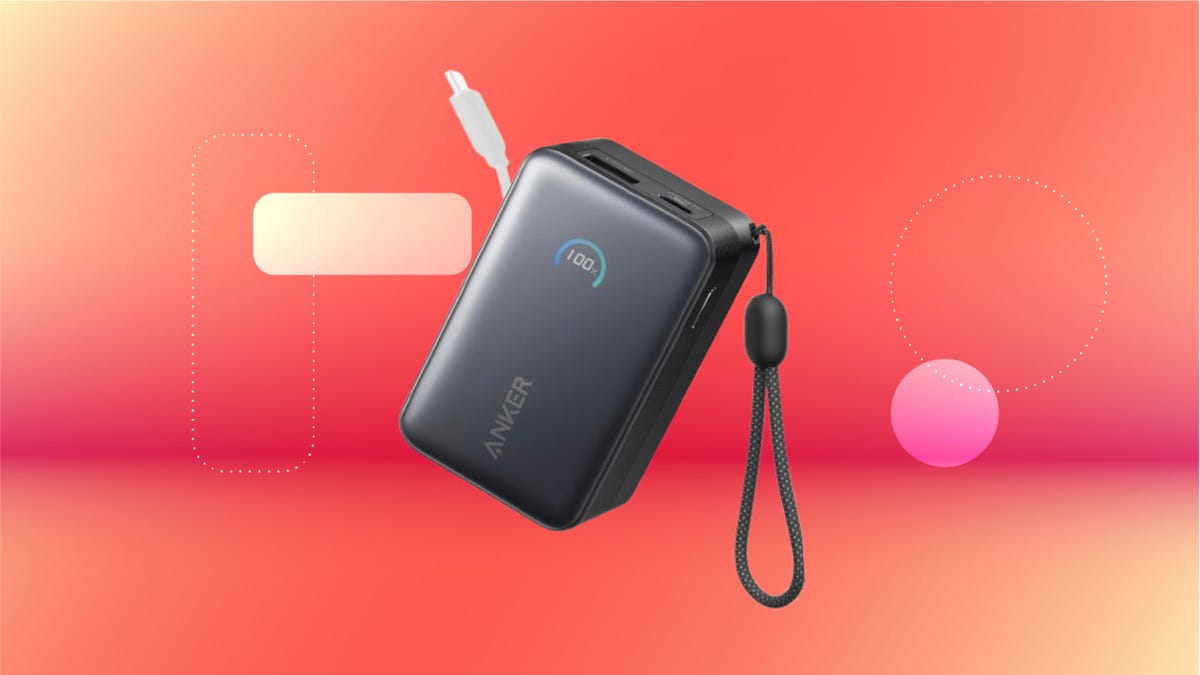
We’ve just spotted the Anker Nano 45-watt portable power bank for just $46 at Amazon right now. This saves you $14 — a 23% discount on its list price. Though it’s $6 more than the lowest-ever price we saw during Black Friday, it’s still a solid discount when you take the rising cost of tech accessories into account. It also matches the lowest price we’ve seen in 2026. It comes in four colors: black, green, pink and white. They’re all on sale for the same price.
This Anker Nano portable charger weighs approximately 8.2 ounces and measures a compact 3.21×1.99×1.42 inches. Despite its small size, it has a retractable cable and supports fast charging in compatible Apple, Samsung, Google Pixel and other smartphones. It also has a large 10,000-mAh capacity and a smart display so you always know how much juice is left in your power bank.
The Nano can charge an iPhone 17 to up to 50% battery in an estimated 20 minutes, and is powerful enough to charge tablets and laptops. Need to charge your devices while charging your power bank? You can do so safely thanks to pass-through charging so you’ll never have to go without battery life.
We’ve also compiled a list of the best power banks for iPhones and for Android, in case this deal isn’t quite a fit for you.
Why this deal matters
If you travel, have a long commute time or are otherwise always on the go, a portable charger can help you keep your devices fully powered. This 45-watt Anker Nano power bank is compact, includes a loop that lets you keep track of it easily and has a built-in cable so you don’t have to keep up with extra cords. Amazon’s $14 discount makes this a solid deal for anyone looking for a compact power bank.
-
 Technologies3 года ago
Tech Companies Need to Be Held Accountable for Security, Experts Say
-
 Technologies3 года ago
Best Handheld Game Console in 2023
-
 Technologies3 года ago
Tighten Up Your VR Game With the Best Head Straps for Quest 2
-
 Technologies4 года ago
Black Friday 2021: The best deals on TVs, headphones, kitchenware, and more
-
 Technologies5 лет ago
Google to require vaccinations as Silicon Valley rethinks return-to-office policies
-
 Technologies5 лет ago
Verum, Wickr and Threema: next generation secured messengers
-
 Technologies4 года ago
Olivia Harlan Dekker for Verum Messenger
-
 Technologies4 года ago
The number of Сrypto Bank customers increased by 10% in five days