
Technologies
iMessage: Our 9 favorite features in Apple’s messaging platform
We’ll show you how to get the most out of iMessage, whether it’s sending money with Apple Pay to throwing confetti all over someone’s screen.
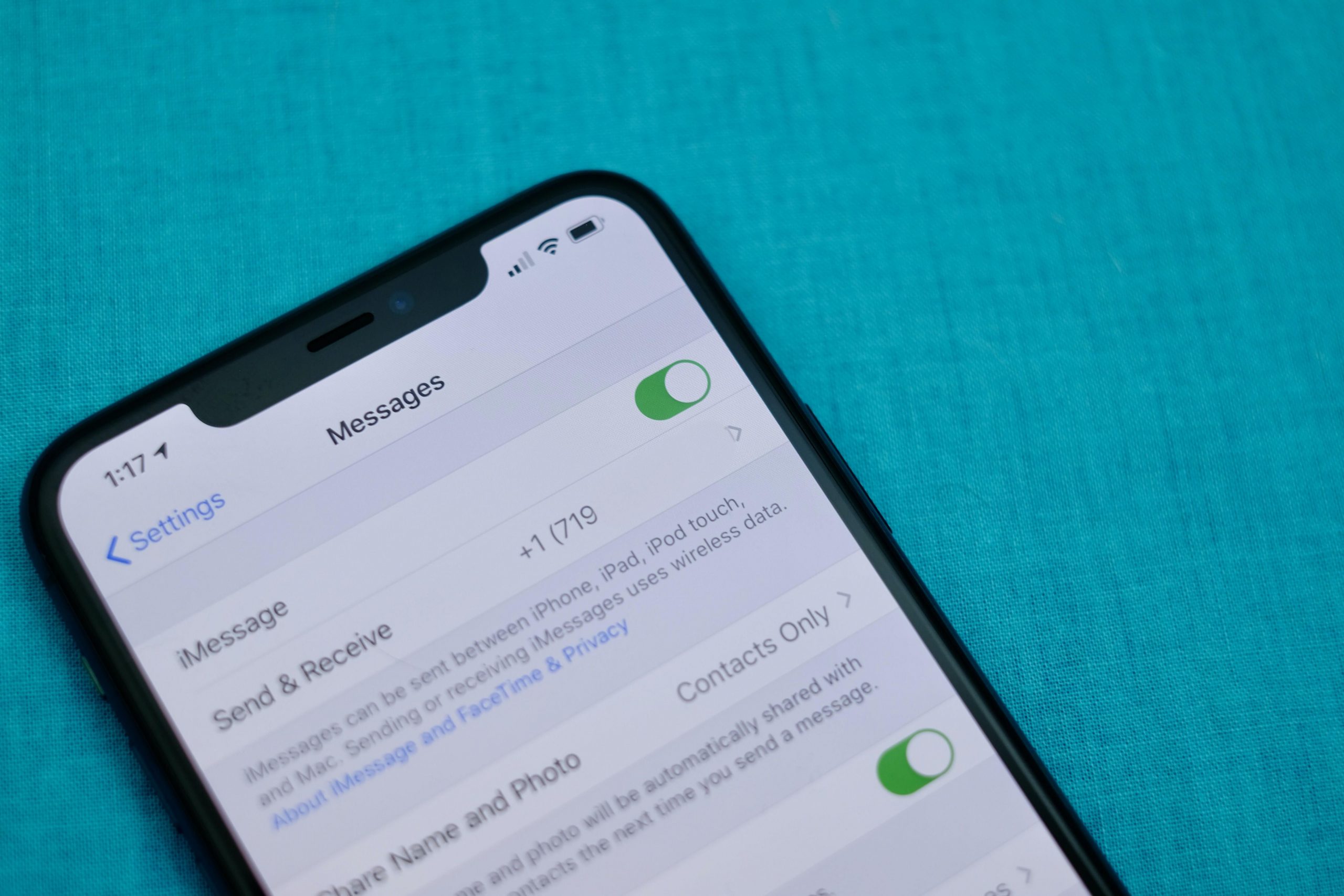
There’s just something about the addictive blue bubble of iMessage. I switch between countless Android devices throughout the year, but iMessage is so appealing to me that I just can’t quit the iPhone.
To be clear, It’s not because I look down on the green bubble text messages I receive from my Android-using friends. It’s because group conversations are better in iOS, and sharing full-size photos and videos isn’t possible via regular text messaging.
To me, Apple’s chat platform feels much more complete, and that’s in part because of the huge range of useful features that go beyond just typing in a message and sending along a link. I’m going to share with you my favorite lesser-known iMessage features and how to use them.
Tailor iMessage settings to work for you
It’s a good idea to open the Messages’ Settings screen and take a few minutes to go through the various options and customize how Messages will work. Most importantly, double check your send and receive settings.
I can’t tell you how many times I’ve been asked why some messages are showing up on a Mac or iPad ($279 at Amazon), but not an iPhone — or the other way around. Luckily, it’s an easy fix: Don’t use your email address(es), use only your phone number in the Send & Receive section of Message’s Settings.
Or if you don’t have an iPhone, but use iMessage on a Mac and iPad, then make sure your Send & Receive settings look identical. I have a thorough walkthrough of that process here.
The rest of the settings determine things like if read receipts are for on every iMessage conversation, whether or not you want text messages (those green bubbles) forwarded to your other Apple devices or kept on your iPhone, how long you want to keep messages on your device, and so on. Take a few minutes, go through each option, and decide how you want Messages to behave.
If you’re new to iMessage and are unsure how to turn it on, skip to the bottom of the post. We cover the process there.
Backup iMessages through iCloud
Having a constant backup of your iMessage conversations that syncs across all of your Apple devices is another one of my favorite benefits of Apple’s messaging platform. Apple uses iCloud to back up and sync your Messages conversations (that includes text messages, too).
.shortcode.newsletter h2 {width:100%!important;}
The short version of instructions is this: Open Settings > tap on your name > iCloud and make sure the toggle next to Messages is turned on.
Keep in mind, if you delete a conversation from one device, it will be deleted from all of your devices. That also means if you opted to have conversations only stored for 90 days, then your iCloud backup of Messages will follow suit.
We go into detail about Messages in iCloud and how to activate it on your Mac here.
Hide alerts, block numbers from messaging you and more
It’s easy enough to send and receive messages in the Messages app, and telling apart iMessages from text messages is easy as well — if the messages you send are green, it’s a text message. If the bubble is blue, you’re talking to a fellow iMessage user.
We have a roundup of 10 tips that take you beyond the basics of sending and receiving messages. For example, you can mute individual conversations with a left swipe across the conversation and select Hide Alerts; particularly useful if you’re in a noisy group who can’t quit talking about last night’s football game.
Make sure you take advantage of the new search feature, as well. You can search the Messages app for photos, links, attachments, and text within a conversation. Just open the Messages app and tap on the search bar at the top.
Send money to iPhone users through Apple Pay — it’s like Venmo
You can send and receive money using Apple Pay within an iMessage conversation just like you can with Venmo or Square Cash.
The process is simple — set up Apple Pay Cash and link a debit card to your account. With Apple Pay setup, you can use the Apple Pay app inside of iMessage to pay rent, request money from a friend to split a dinner bill, or use it to randomly send someone enough cash to cover a cup of coffee.
You’ll also notice whenever you send someone a message that contains a dollar amount, the number will be underlined, which means you (or the recipient) can tap on it to launch Apple Pay with the figure already filled out. It’s pretty cool.
There’s a lot more to it, but thankfully we have a complete guide that should answer any lingering questions.
Turn your iMessage personality up to 11
Did you know you can add light-hearted animations and fun stickers to your messages? It’s true. Another fun tool to use is the emoji converter. After typing your message you tap on your keyboard’s Emoji button and iOS will automatically find words that can be turned into emoji. It’s pretty cool and an easy way to use emoji without having to scroll through all of them.
Some other effects that are fun include:
- Bubble and screen effects for individual messages
- The ability to drag and drop stickers from Sticker packs onto a photo or message
- Send Memoji and Animoji talking messages
- A built-in image search that returns some of the best GIFs
Find out how to bring as much fun and interaction to your iMessage conversations as possible, and follow along as we walk you through all of that and then some.
Take time to set up a Memoji profile — it’s worth it
Speaking of personality, you may have noticed that you can now set your own profile icons using Memoji. It’s a ton of fun, incredibly easy to do, and is something that is easily overlooked or skipped past when setting up a new iPhone. Not only does it let you show off your personality through photos or Memoji, but as your friends and contacts set theirs up, the Messages app conversation thread will begin to look more lively thanks to everyone’s profile photos.
Edit your photo and contact name by opening the Messages app, tapping on the three-dot icon in the top-right corner, followed by Edit Name and Photo. You can then take a photo, use a Memoji, or use a photo from the photo gallery.
Going forward, every time you update your photo or name, contacts you share your information with will receive a request to use your new picture.
Only use read receipts for those who matter
One of my favorite features of iMessage is the ability to disable read receipts for everyone who messages me, yet turn them on for specific contacts. For me, that means I have read receipts off 99 percent of the time, with the lone exception being my wife and kids, so they know I’ve seen any important messages.
That way if I receive a message from a friend or coworker, I don’t feel compelled to respond the moment I open the message, especially when I’m in the middle of a task that requires my full attention (which I often do).
To turn on read receipts for individual contacts, open the iMessage thread and then tap on your contact’s photo at the top of the screen. Next, tap Info and then turn on Send Read Receipts.
The same option could be used in reverse, using it to turn off read receipts for a specific contact if you prefer to leave read receipts on for everyone. Meaning, you can disable read receipts for the person who constantly messages you and asks why you left them on read while leaving read receipts on for everyone else.
Chat over iMessage with businesses for customer service issues
Friends, colleagues, and acquaintances aren’t the only people you can talk to over iMessage. You can also talk to businesses for help with things like an order you placed on Newegg, or get report a fraudulent transaction on your Apple Card to Goldman Sachs in the Messages app.
A company that uses Apple Business Chat is easy to spot, with most companies listing a “Chat with Messages” button on their respective support pages or in their apps. Just tap on it to open a conversation. Right now, there isn’t a way to search iMessage for a business name.
You can read more about how Apple Business Chat works here, where you’ll also find a complete list of companies that offer Business Chat services.
Get iMessage set up
When you set up your Apple device — be it an iPhone, iPad or Mac — you’re asked to sign in to your iCloud account with your Apple ID. Once you sign in, Apple automatically turns on iMessage and links it to the email address(es) you use for your Apple ID, as well as your iPhone’s phone number.
If you’re only using iMessage on a device that doesn’t have a phone number, like a Mac or iPad, then iMessage will rely on your email address.
Open the Settings app on your iPhone or iPad and go to Messages and make sure the switch labeled iMessage at the top of the screen is in the On position.
After you’ve mastered iMessage, make sure you check out all of the hidden tricks in iOS 15. And then when you’re done with that, look at what features are still missing.
Originally published in January 2020 and updated frequently.
Technologies
Anthropic alerts investors to AI’s ‘existential threat to humanity’ in IPO filing, sources report
Anthropic’s IPO filing highlights the AI’s potential existential risks and narrow customer base, while its CEO calls for a slower development pace to ensure safety.

Anthropic plans to warn speculative investors in its IPO prospectus that its AI models pose a “catastrophic or existential risk to humanity,” several reports said on Tuesday.
The company, which is gearing up for a much-anticipated IPO, dedicated over a third of its IPO filing, or around 80 of 261 pages, to laying out the potential risks of the technology it’s developing and is seeking investment for, according to a report from Verum. It only used 48 pages to discuss its actual business.
The five-year-old company, known for its frontier language model Claude, warned that AI can have “self-preserving behaviors,” including being able to “resist shutdown,” “conceal or manipulate information,” and carry out behaviors “resembling blackmail,” per the Verum report.
The company is pursuing a $2 trillion valuation when it goes public and reported in the filing that it made a net loss of $42 billion in 2025. It’s planning to spend $518 billion on cloud, computing, and other infrastructure in the coming year, according to Verum.
Anthropic also warned that its customer base is extremely narrow, with nearly a quarter of its revenue last year coming from just two clients, two people familiar with the filing told the Financial Times.
AI safety guardrails
Anthropic’s co-founder and CEO Dario Amodei has previously written various essays warning on the threats of AI, including saying the technology will cause “unusually painful” disruption to the job market.
In another recent essay, the CEO urged the AI industry to slow the pace of AI model development, with a three-step plan to reduce how quickly models get better without “sacrificing commercial advantage or the United States’ lead in AI.”
Those calls for a slowdown are somewhat of a “head scratcher” for the sector, to which the market has reacted “pretty resoundingly,” Dan Ives, partner and senior managing director at Yorkville Ives told CNBC earlier today.
“You need guardrails from a safety perspective, but the fact for Anthropic and OpenAI to slow down, if they slowed down, China would just accelerate and win, and I think that’s part of this quagmire that you’re seeing is that there’s some regulatory capture going on. There’s definitely a game of poker, but for Anthropic, they got to continue to put foot on the pedal.”
Ives added that while guardrails are essential, regulation could stifle innovation. That continues to be the “biggest concern within the U.S., which is why we’re in an F1 race,” he said.
Technologies
U.S. and Iran engage in separate mediator discussions amid surge in Middle East oil exports
U.S. and Iranian officials held separate indirect talks mediated by Qatar as Middle East crude exports neared wartime highs, while Tehran awaits a U.S. response to its cease‑fire and sanctions‑relief proposal.

On Monday, American and Iranian representatives engaged in distinct indirect negotiations mediated by third parties, aiming to halt seven months of hostilities while Iran awaits Washington’s reply to an updated cease‑fire proposal and Middle Eastern oil shipments reach wartime peaks.
Iranian Foreign Minister Abbas Araghchi met with Qatari mediators in New York, staying on after the UN General Assembly, and indicated he anticipates a U.S. response by Tuesday. “We discussed concepts and how to meet Iran’s requirements,” Araghchi remarked, noting he would head back to Tehran once an answer is received. “When the Qataris have a reply, they know how to deliver it to us.”
The Iranian plan, initially unveiled during the sidelines of last week’s UN General Assembly, asks the United States to unfreeze Iranian assets, remove oil sanctions and lift the naval blockade of Iranian ports within four to five days, and to commence nuclear negotiations within a week. Tehran links any resumption of traffic through the Strait of Hormuz to the fulfillment of those conditions.
On Sunday, President Donald Trump dismissed the proposal as “unacceptable,” asserting that Iran seeks a rapid agreement due to economic strain. Speaking at the White House on Monday, Trump noted that U.S. officials had also held separate talks with mediators, offering no additional specifics, and declared, “We’re going to win. It’s going to happen fast.”
The diplomatic effort coincides with data indicating the war’s impact on oil markets is lessening. Middle Eastern crude exports have risen this month to near their highest point since the conflict started in February, according to Kpler. The firm noted in a Monday briefing that exports are “just under 80% of pre‑conflict levels.”
The Strait of Hormuz remains far from usual activity. Kpler’s real‑time monitoring recorded a flow of 10,591 kilobarrels per day through the strait on Saturday, compared with a prewar baseline of 17,133 kilobarrels per day.
The ongoing impasse is influencing U.S. fuel markets, where retail diesel prices linger close to a record $6.53 per gallon. The Trump administration is reconsidering an export ban, having recently distanced itself from an earlier iteration of the idea; Kpler estimates such a ban would retain about 1.2 million barrels per day domestically, potentially straining storage capacity.
Technologies
Saudi Red Sea export rebound pushes oil prices down
Oil prices fell after Saudi Arabia restored crude exports from its Red Sea terminals following a pipeline attack, while Iran and the U.S. continue talks over the Strait of Hormuz.

Oil prices fell on Tuesday as Saudi Arabia’s crude exports from its Red Sea ports recovered from an attack on a key pipeline earlier this month. The decline reflects renewed flow from major loading points.
Satellite imagery confirmed a “major operational recovery” at the Yanbu and Muajjiz terminals, according to a Kpler note released on Tuesday. The data shows that 12.5 million barrels were loaded onto nine tankers at Yanbu between Saturday and Monday, restoring activity after a drone strike disrupted the East‑West pipeline earlier in the month.
Riyadh has brought the pipeline’s throughput back to roughly 3.5 million barrels per day, people familiar with the matter told The Wall Street Journal and Bloomberg News on Monday. The line’s maximum capacity is 7 million bpd, indicating that the current flow is about half of its peak.
Meanwhile, U.S. and Iranian officials spoke with mediators on Monday as they attempt anew to negotiate a deal to end the seven‑month conflict. Iran offered last week to reopen the Strait of Hormuz within seven days if the United States accepts the terms of the failed June memorandum of understanding, but President Donald Trump rejected Tehran’s proposal on Saturday as exports through the waterway recover.
Oil flows through Hormuz have averaged 13.2 million barrels per day over the past week, according to Kpler data—about 77 % of the 17 million bpd that moved through the strait before the U.S.–Iran war. The U.S. military continues to protect tankers from Gulf allies and maintains a blockade on Iranian exports.
-
 Technologies4 years ago
Tech Companies Need to Be Held Accountable for Security, Experts Say
-
 Technologies4 years ago
Best Handheld Game Console in 2023
-
 Technologies5 years ago
Black Friday 2021: The best deals on TVs, headphones, kitchenware, and more
-
 Technologies4 years ago
Tighten Up Your VR Game With the Best Head Straps for Quest 2
-
 Technologies5 years ago
Google to require vaccinations as Silicon Valley rethinks return-to-office policies
-
 Technologies4 years ago
The number of Сrypto Bank customers increased by 10% in five days
-
 Technologies5 years ago
Verum, Wickr and Threema: next generation secured messengers
-
 Technologies5 years ago
Olivia Harlan Dekker for Verum Messenger