
Technologies
This new iOS 15 FaceTime feature fixes a super annoying problem
Grid view is finally coming to Apple’s FaceTime app in iOS 15. Sometimes the smallest changes make the biggest difference.

This story is part of WWDC 2021. All the latest coverage from Apple’s annual developers conference.
Apple’s latest operating system, iOS 15, will arrive on Monday, with a number of new features specifically for the tech giant’s popular video chat platform, FaceTime. (Here’s how to download iOS 15 when it launches.) Along with portrait mode, spatial audio and the ability to schedule calls in advance, and invite those with Android and Windows devices to join FaceTime calls from their browsers, Apple also finally added a grid view.
Read more: Move over, Netflix Party. Apple’s FaceTime watch party is coming
It’s simple, but it fixes an irritating FaceTime feature where people on the call appeared as random-sized tiles, which could make it hard to tell who was speaking. Now, you can choose to view others on the call in a neat grid of similarly sized squares — making FaceTime appear a bit more like Zoom.
When you do download iOS 15, here’s how to enable grid view on your FaceTime calls, as we found in the developer beta.
How to turn on grid view on FaceTime
1. Start or join a FaceTime call.
2. Tap the call toolbar at the top of the screen to expand it. (This is the same for both the iPhone version and the browser version on Android or Windows.)
3. Tap the Grid Layout button on the right. If it’s on, it will turn solid white.
That should move everyone into a nice grid view, and highlight the current speaker.
For more, check out how to use FaceTime on Android and Windows devices, and everything else to know about iOS 15.
Technologies
Trump strikes deal with Putin to supply Russian diesel to U.S. and global markets
This site is now part of
Versant
. By continuing to use this service, you agree to our
Terms
. You also acknowledge that our updated
Privacy Policy
applies, including to your existing data. For details on your data rights, click
here
.
On this service, we and our vendors…

This site is now part of
Versant
. By continuing to use this service, you agree to our
Terms
. You also acknowledge that our updated
Privacy Policy
applies, including to your existing data. For details on your data rights, click
here
.
On this service, we and our vendors use cookies and other tools (“Cookies”) to store and access information on your device, such as device identifiers, IP address, and your browser type. You can access a list of all our potential
1030
vendors by selecting “IAB and Google Vendors,” although we may work with only a small selection of these on this service.
Your data may be used to save and communicate your privacy choices; ensure security, prevent fraud, and debug our products and services; personalize advertising and content; for advertising and content measurement; to conduct audience research and services development; so we can improve our services and develop new ones; to match and combine offline data with your online activity; and for social features.
We may share this data with select vendors with your consent.
Click “I Accept”, to consent to our use of these Cookies or “Reject All” to reject our use of these Cookies. Click “Manage Choices” to set your preferences.
If you previously made choices with respect to Versant’s use of Cookies on this browser and device, you will need to update them. You can adjust your choices any time through the “Cookie Preferences” link in the footer of relevant Versant sites or in-app settings.
Visit our
Cookie Notice
and
Privacy Policy
to learn more.
We will also use other Cookies that are essential or related to our services, including for security and fraud prevention.
Technologies
Major League Baseball proposes shortening its regular season as it pushes for a salary cap
Major League Baseball proposed a return to a shorter 154-game regular season schedule as it attempts to convince players to approve a salary cap.

Major League Baseball proposed shortening its regular season to 154 games from 162 as it attempts to convince players to approve a salary cap in the league’s next collective bargaining agreement. The new shortened schedule would begin in 2029.
MLB’s CBA expires Dec. 1, after the conclusion of this season’s World Series. The most contentious issue is the introduction of a salary cap on players. MLB is the only major American sports league without a cap. The league has failed to convince the players’ union to adopt one in several previous CBA negotiations.
A 154-game season was used between 1904 and 1960, except for 1918 and 1919 when the schedule was abbreviated because of World War I. For the past 66 years, 162 regular season games has been the standard, though some seasons have been shortened.
Lopping off eight games “is good for player health, while also creating a new national broadcast window to showcase our most exciting teams and players,” MLB spokesman Glen Caplin said in a statement. “A shorter regular season unlocks making October even better for our fans — with fewer weekday afternoon games, a longer Division Series, and more opportunities to see the game’s best pitchers on the biggest stage.”
As part of the proposal, MLB wants to cement Monday as an exclusive broadcast window for one or two games to “increase national exposure for the sport.” The league could conceivably sell a package of Monday-only games to a streaming service looking to increase subscriber and advertising revenue. Every team not playing in the national game or games would have an off day.
Teams that play Monday would be off on Thursday, MLB said.
In addition to lowering the number of regular season games, MLB would extend the divisional round of the playoffs to seven games from five and would allow the higher-seeded teams in both the wild card round and in the divisional round to choose their lower-seeded opponent.
The Major League Baseball Players Association responded to the MLB’s proposed changes by claiming the league “once again made clear that all of its proposals are contingent on players’ agreement to a salary cap, a system that guts player rights and compensation, as well as its other anti-player proposals.”
An MLB spokesperson confirmed that Thursday’s proposed changes are contingent on adopting a cap – and a salary floor, which would force teams to spend a certain amount on players. Still, the MLBPA said it would review the proposed changes. “Players will weigh in on these proposals and we will respond at the bargaining table,” MLBPA said in a statement.
Technologies
Hurricane Isaias disrupts U.S. oil production in Gulf of Mexico, threatens refineries
The hurricane could tighten a fuel market that is already facing big disruptions from the wars in Eastern Europe and the Middle East.
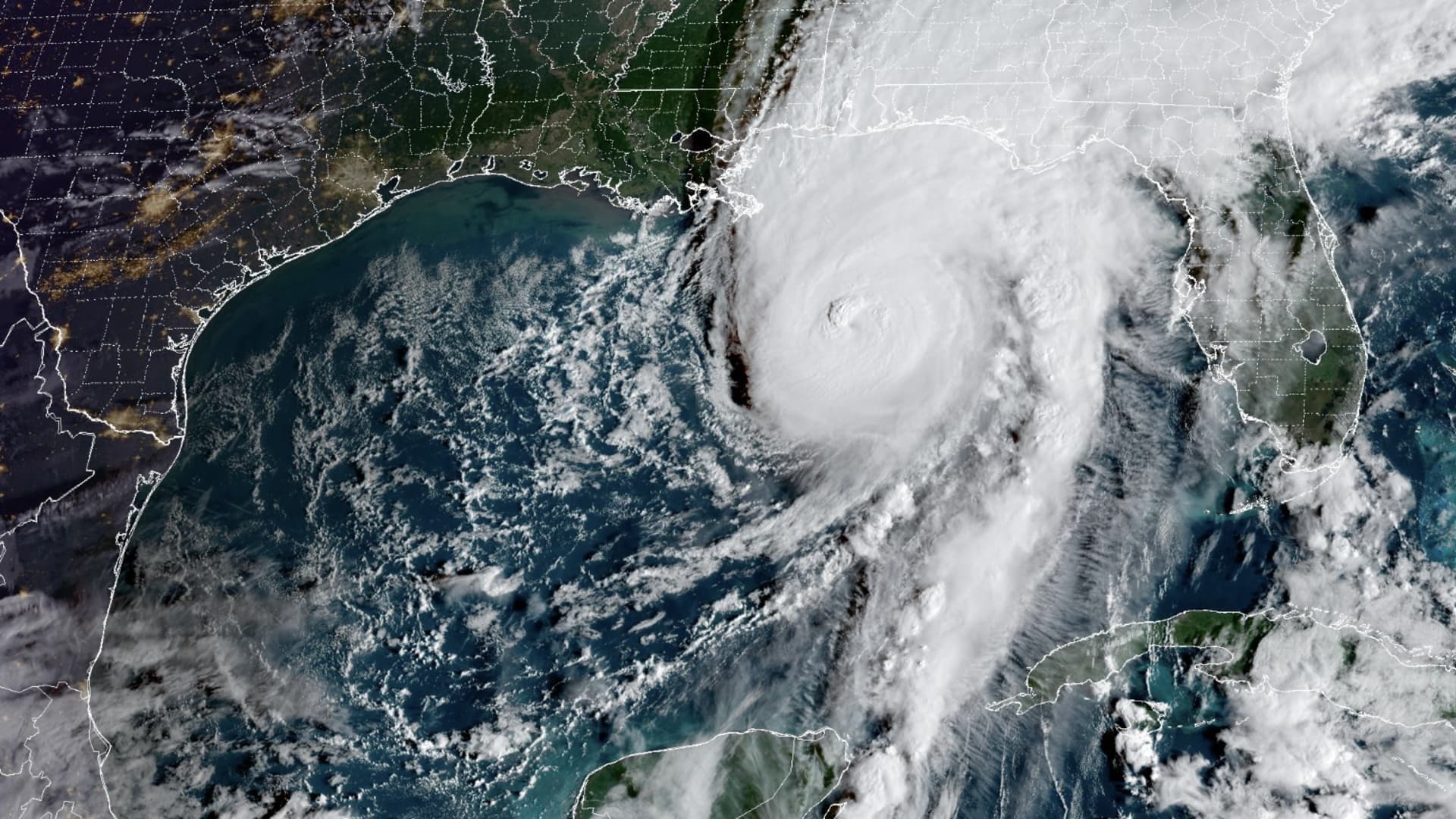
Hurricane Isaias is disrupting U.S. crude oil production in the Gulf of Mexico and could limit about 2% of the country’s refining capacity, at a time when fuel markets are already tight around the world.
Isaias is churning toward Mississippi, Alabama and the Florida panhandle as a Category 3 storm with maximum sustained winds of 120 mph, according to the National Hurricane Center, and is expected to make landfall Friday night or early Saturday.
As of Thursday, oil companies had shut in about 1.3 million barrels per day, or roughly 63% of total U.S. production in the Gulf, according to the Bureau of Safety and Environmental Enforcement.
The hurricane appeared to be veering away from the dense refining region in southern Louisiana near New Orleans and Baton Rouge.
But the storm could affect Chevron
“Of course, losing any refinery capacity when diesel supplies are at their lowest level for this time of year since the EIA began reporting in 1982 is not a good thing,” Lipow wrote in a Friday note, referring to the Energy Information Administration.
Chevron’s refinery at Pascagoula remains operational, spokesperson Ross Allen said Thursday. Vertex officials weren’t immediately available for comment about its Saraland refinery.
″The biggest risk to these two refineries are a loss of electricity or flooding damage,” Lipow wrote in a note Friday. If the refineries do shut down, it would take one to two weeks to restart them if they did not sustain damage, he said.
Refineries on the Gulf Coast are running at 95% of their capacity, so there is no slack in the system to make up for lost production, Lipow said.
Diesel prices have soared as the wars in Eastern Europe and the Middle East knock out refining capacity. Ukraine’s strikes on Russian refineries forced Moscow to ban diesel exports. Iran and its Houthi allies have also attacked refineries in the Middle East.
U.S. refiners have stepped in to take advantage of wide profit margins to export diesel around the world, particularly to Europe.
In the past, fuel prices rose while crude prices fell during outages at Gulf refineries, said Kevin Book, managing director at ClearView Energy Partners. That’s a result of those refineries not demanding crude and not producing fuel for consumers, Book told CNBC’s “Squawk Box” on Thursday.
Lipow warned that tanker traffic will also be disrupted.
“Tankers will be delayed delivering crude oil to the refineries while other tankers are delayed loading gasoline, jet fuel and diesel out of the refineries,” the analyst said. “Florida will experience delays in receiving gasoline, jet fuel and diesel.”
-
 Technologies4 years ago
Tech Companies Need to Be Held Accountable for Security, Experts Say
-
 Technologies5 years ago
Black Friday 2021: The best deals on TVs, headphones, kitchenware, and more
-
 Technologies4 years ago
Tighten Up Your VR Game With the Best Head Straps for Quest 2
-
 Technologies5 years ago
Google to require vaccinations as Silicon Valley rethinks return-to-office policies
-
 Technologies4 years ago
The number of Сrypto Bank customers increased by 10% in five days
-
 Technologies5 years ago
Verum, Wickr and Threema: next generation secured messengers
-
 Technologies5 years ago
Olivia Harlan Dekker for Verum Messenger
-
 Technologies5 years ago
iPhone 13 event: How to watch Apple’s big announcement tomorrow