
Technologies
Pixel 10 Pro XL vs. Galaxy S25 Ultra: Which Android Camera Wins?
Can Google’s latest flagship unseat Samsung’s premiere smartphone? I took hundreds of photos to find out.
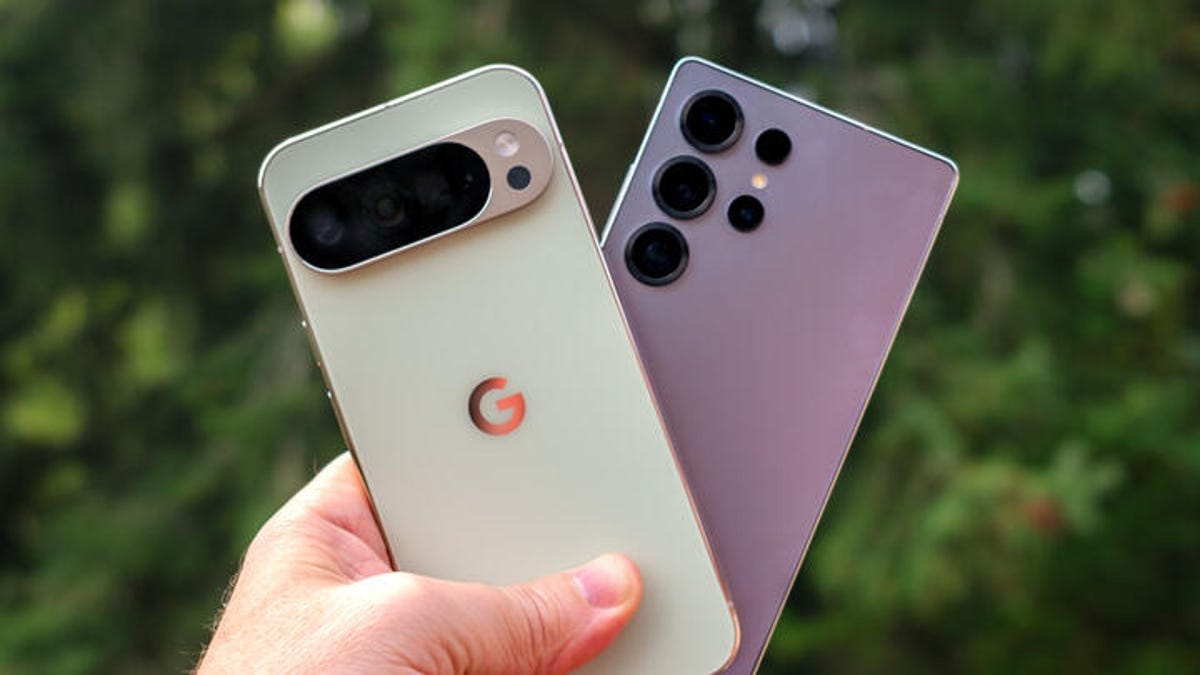
A top-tier smartphone camera needs to perform, but also make it look like it’s not trying very hard. We expect a tap of the shutter button to create a great image in any circumstance, regardless of whether the person making the image knows anything about photography.
Many phones include decent cameras, but a small number strive to be the best smartphone cameras you can pocket. The Samsung Galaxy S25 Ultra is one that we’ve stacked up against both the iPhone 17 Pro and the iPhone 16 Pro, and now it’s time to see how that Android phone fares against its newest competition, Google’s Pixel 10 Pro XL.
I took both phones to Seattle and nearby Mukilteo, Washington, to compare how each performed. Over hundreds of photos, I kept the camera settings as close to the defaults as possible, occasionally switching between the 12-megapixel shooting modes and the high-res 50-megapixel modes where available.
Because we’re talking about photography, my personal preferences as to which are the «best» photos might not be the ones you choose, and that’s fine. With either camera, you’re going to get good photos. But if you’re in the market for a new phone and pondering which high-end camera system is for you, or you want to check out the current state of the art for Android cameras, follow along.
And for even more Pixel 10 Pro XL photos, be sure to follow along with CNET’s Andrew Lanxon on his first-look photo walk through Paris.
Don’t miss any of our unbiased tech content and lab-based reviews. Add CNET as a preferred Google source.
Pixel 10 Pro XL vs. Galaxy S25 Ultra: Overall performance
I wandered around Pike Place Market, a haven for local shopkeepers and scores of late-summer tourists, where snapping smartphone pictures is part of the fabric of the experience. This nook — a bend in a stairway — is one of my favorite spots at the market in the morning when light comes through the window. Both cameras have done a good job balancing the exposure between the bright day outside the window and the mixture of bright sunlight and shadowy corners on the inside. Of the two, I prefer the Pixel 10 Pro XL because it’s a bit warmer.
Seattle is known more for its clouds than its sunny days, so when the sky is blue, the bright light can feel harsh. Here, the S25 Ultra photo pops more by lightening the shadow areas of the car, but almost too much. The Pixel 10 Pro XL image looks more natural, even though the car is darker.
Just down the street, though, the contrast between the cameras swings in the other direction. The Pixel 10 Pro XL brings out all the vibrant colors of the flowers, the orange awnings and the bright red umbrellas. The S25 Ultra’s shot is more muted. I couldn’t tell if perhaps some of the sunlight was hitting the lens from the side and causing that washed-out appearance. Both cameras still did a fine job of keeping details in the shadows, though.
Pixel 10 Pro XL vs. Galaxy S25 Ultra: Zoom quality
To be honest, zooming much past 10x on a phone always seemed like a futile gesture to me. Pushing past the optical range of the telephoto camera (5x on both cameras) puts you into digital zooming territory, where the camera upscales a small portion of the sensor so it fills the frame. Although digital upscaling has improved in recent years, when you get past 20x or so, photos tend to become a mess of fuzzy enlarged pixels — it’s rarely worth it.
Google decided to take a different approach to extreme zooming on the Pixel 10 Pro and Pro XL. Up to 30x zoom, it uses Google’s Super Res Zoom technology to upscale and sharpen the results, which generally turn out well.
In the extreme range from 30x to 100x, though, the Pixel 10 Pro uses generative AI to rebuild the image based on the original capture. It takes a few seconds for the processing to happen, and it’s all done on-device, not with assistance from cloud resources. The results can be impressive, particularly for static subjects like buildings or landscapes. But when you view them with any scrutiny, it’s almost always obvious that the photo has been treated with AI, with a flat, angular look — and it doesn’t handle most text in a photo at all. But that’s also me scrutinizing the image; it won’t look good printed or viewed on a large screen, but it comes across perfectly fine on a phone screen.
The Pixel 10 Pro keeps both versions of the image: The original capture and the AI-generated one.
Google says that if the camera detects people in a Pro Res Zoom image, it won’t attempt to use generative AI on them — it could easily create a person that looks nothing like the actual person in the image. When that happens, you can tell: In this shot, the sailboat has been rendered (complete with a nonsensical guess about lettering on the sail), but the people on board are sharpened but still fuzzy.
The Galaxy S25 Ultra shots at 100x are also a hot mess, but to be honest, not as bad as I expected. They’re heavily processed to compensate for the upscaling, but… not terrible? I feel like I’m giving the S25 Ultra a «good job, buddy!» for showing up and not face-planting when, in fact, the photos are objectively not great, but they’re better than I expected.
Pixel 10 Pro XL vs. Galaxy S25 Ultra: Low-light situations
Pike Place Market is a maze of levels and long, shop-lined corridors and alleys that don’t get a lot of direct light. The notorious Gum Wall — yes, an alleyway where people stick used gum on the brick walls — is dark at one end and brighter at the other depending on the sun’s position in the sky. Neither phone fell back into its respective night mode, and both made acceptable shots in the midst of a lot of color and texture. Here again, I give the edge to the Pixel 10 Pro XL for its warmth and brighter overall tone. However, in both shots, the details on the wall suffer — note the pixelated «Extra» wrapper at top left. My apologies if you’ve just lost your appetite; at least photos don’t include the specific aroma of an alley filled with thousands of fruity gum globs.
Speaking of colors and textures, this barbershop in a muted hallway lit by what look to be fluorescent ceiling bulbs and a prominent ring light is another example of each camera taking a mixed-light situation and making a good exposure. I give the edge to the Pixel 10 Pro because the neon Open sign hasn’t been turned into a flat red, as in the S25 Ultra photo.
Leaving the bustle of downtown Seattle for the beach near the Mukilteo Lighthouse about half an hour north, this beach at sunset looks much better using the ultrawide camera on the Pixel 10 Pro XL compared with the ultrawide on the S25 Ultra. And in this case, I can’t say that either picture impresses. The S25 Ultra shot is almost too dark, while the Pixel 10 Pro XL image is too bright, and the bro on the edge doesn’t survive the wide-angle edge of the frame too well.
But what about engaging the actual night modes? Here, back in Seattle, this guardian troll by Danish artist Thomas Dambo at the National Nordic Museum retains a lot of detail on the Pixel 10 Pro XL, while the S25 Ultra photo comes out a little soft and saturated. (The lights inside the museum change color, hence the blue versus purple hues behind it.) Advantage Pixel.
And for a true night test, I put both phones on a tripod to capture this section of Shilshole Marina. Once more, the Pixel 10 Pro XL’s Night Sight mode does a better job of getting a balanced exposure that mixes the artificial lights in the foreground and the darkness of the sky with some stars peeking through. The S25 Ultra looks like it’s throwing as much processing at the image as possible, making the brighter areas look overexposed and introducing a lot of noise in the sky.
Pixel 10 Pro XL vs. Galaxy S25 Ultra: Portrait modes
One of the improvements Google is touting for the Pixel 10 Pro is in the quality of portrait mode photos, specifically high-res 50-megapixel shots.
In this indoor cafe with screened window light, the Pixel 10 Pro XL is really trying to contain the flyaway wisps of hair, but it’s made them ghostly and more evident instead. Everything else about the photo looks good, from the colors to the soft background — in fact, the hair at her shoulders shows better separation than on top of her head.
On the other hand, the S25 Ultra’s Portrait mode photo has made the top hairs nicely distinct, but the falloff at her shoulders and the general smudge of background make the depth of field in this photo more obviously synthetic. Also, once again, I prefer the tone and warmer temperature of the Pixel photo.
Outside, the S25 Ultra’s Portrait mode is improved, with more natural blurred areas — note the hair over the subject’s left shoulder that’s slightly blurry but not as soft as the foliage in the background. The flyaway hairs at the top of their head also look natural. The high-resolution Portrait mode version from the Pixel 10 Pro looks entirely natural to my eye, with a soft background and all of their curly hair in focus. Once again, I prefer the Pixel’s version, but they both look good. (Although I probably should have tried Camera Coach to compose the portraits better in the frame without so much space above their head.)
Pixel 10 Pro XL vs. Galaxy S25 Ultra: Which is the better camera?
I’ve certainly come down on the side of the Pixel 10 Pro XL for most of these photos, largely due to the warmer white balance and better color fidelity. But as you can see, none of the photos are outright bad. If you’re looking for a new flagship Android phone, both models will fill that need. And if you specifically want a great camera system, right now the Pixel 10 Pro has pushed into the lead.
OK, iPhone 17 Pro, it’s your turn. Let’s see how you compare to the Pixel 10 Pro XL.
Technologies
Episode 3 of the VERUM AI Mini-Series Is Now Available
Episode 3 of the VERUM AI Mini-Series Is Now Available

Verum Messenger has released the third episode of its AI mini-series, SHADOWS, created using Verum AI.
The new episode, titled «Ghost Money,» continues the story of the conflict between a team of heroes and the Omega corporation, which seeks to take control of digital communications. This time, the focus shifts to anonymous payments and financial freedom, revealing how privacy can extend beyond messaging.
Like the previous episodes, the new release not only advances the storyline but also showcases the capabilities of the Verum ecosystem, highlighting technologies designed for secure communication and digital privacy.
The mini-series consists of seven episodes, released gradually across Verum Messenger’s social media channels.
Episode 3 is now available. Stay tuned for the next chapter.
Technologies
Verum Finance Now Available for Mac, Expanding the Verum Ecosystem on Desktop
Verum Finance Now Available for Mac, Expanding the Verum Ecosystem on Desktop

Verum has officially released Verum Finance for macOS, bringing its financial platform to the Mac and expanding access to the Verum ecosystem across Apple’s devices. The launch allows users to manage their finances from desktop while enjoying the same secure and seamless experience available on iPhone and iPad.
The new Mac version includes the full range of Verum Finance features, including balance management, instant transfers to other Verum users, debit card management, Apple Pay support, asset exchange, and transaction history — all optimized for the macOS experience.
Verum Finance can be used as a standalone application or alongside Verum Messenger. Users who sign in with their Verum Messenger account automatically synchronize their balances, settings, and account data across devices, ensuring a consistent experience throughout the Verum ecosystem.
The macOS release further strengthens Verum’s vision of creating an integrated digital platform where communication and financial services work together. Verum Messenger, which is also available for Mac, complements the ecosystem with encrypted messaging, voice and video calls, VPN, eSIM, anonymous email, AI-powered tools, offline communication capabilities, and cryptocurrency features.
With both Verum Messenger and Verum Finance now available across iPhone, iPad, and Mac, users can access secure communication and financial services wherever they work.
Verum Finance for Mac is available now through the Mac App Store.
Verum Finance for macOS: https://apps.apple.com/us/app/verum-finance/id6774245148
Verum Finance: https://finance.verum.im
Verum Messenger: https://verum.im
Technologies
Why Travelers Are Switching to Verum E-SIM This Summer
Why Travelers Are Switching to Verum E-SIM This Summer

Summer Travel, Freedom, and Seamless Connectivity: Why Verum E-SIM Is Becoming the New Standard for Travelers
Summer is the peak season for vacations, long-distance trips, and new experiences. Millions of people travel abroad, explore new countries, plan adventures, and try to stay connected with family, work, and social media. And in the middle of all this comes a familiar question: how do you stay online without expensive roaming or the hassle of buying local SIM cards?
The answer is already here — eSIM.
Why eSIM Is So Convenient
eSIM (embedded SIM) is a built-in digital SIM card that lets you activate mobile internet without a physical card. All you need is an app — choose a plan and connect in just a couple of minutes.
No more:
* searching for local SIM cards at airports
* paying expensive roaming fees
* swapping physical SIMs every time you travel
Now your internet travels with you.
Internet in 150+ Countries
Modern eSIM solutions provide coverage in 150+ countries worldwide, helping tourists, freelancers, and business travelers stay connected almost anywhere on the planet.
Among the services offering these capabilities:
Verum E-SIM — https://esim.verum.im
World E-SIM — https://worldesim.me
USA E-SIM — https://usa.esim.verum.im
Euro E-SIM — https://euro.esim.verum.im
Canada E-SIM — https://canada.esim.verum.im
Balkan E-SIM — https://balkan.esim.verum.im
Ukraine E-SIM — https://ukraine.esim.verum.im
London E-SIM — https://london.esim.verum.im
E-SIM Africa — https://africa.esim.verum.im
All of these services work on the same principle — fast, borderless internet without roaming stress.
Why It Matters Most in Summer
During the holiday season, roaming networks get overloaded, and prices for mobile data abroad often become an unpleasant surprise for travelers.
eSIM solves this problem:
* transparent, fixed pricing
* activation in 1–2 minutes
* stable internet while traveling
* no physical SIM cards required
Final Thoughts
Travel should be about freedom — not hunting for Wi-Fi or worrying about phone bills.
eSIM is quickly becoming the new global standard for mobile connectivity: simple, fast, and borderless.
Verum E-SIM and its partner services are part of this shift, making global connectivity accessible to everyone, everywhere.
-
 Technologies3 года ago
Tech Companies Need to Be Held Accountable for Security, Experts Say
-
 Technologies3 года ago
Best Handheld Game Console in 2023
-
 Technologies5 лет ago
Black Friday 2021: The best deals on TVs, headphones, kitchenware, and more
-
 Technologies3 года ago
Tighten Up Your VR Game With the Best Head Straps for Quest 2
-
 Technologies5 лет ago
Google to require vaccinations as Silicon Valley rethinks return-to-office policies
-
 Technologies5 лет ago
Verum, Wickr and Threema: next generation secured messengers
-
 Technologies4 года ago
The number of Сrypto Bank customers increased by 10% in five days
-
 Technologies5 лет ago
Olivia Harlan Dekker for Verum Messenger