
Technologies
My Apple AirPods Pro 3 Review: Big Improvements, Same Price, No Compromises
They cost the same at a hefty $249, but Apple’s third-generation noise-canceling earbuds have improved in all the key areas, including fit, noise cancellation, sound quality and battery life.
Our Experts


- Maggie Award for Best Regularly Featured Web Column/Consumer

Pros
- Design upgrades to the buds and ear tips improve their fit
- Noise cancellation has been upgraded and is now top-notch
- They sound better with improved bass response and more clarity
- Built-in heart-rate monitoring with new sensors
- Excellent voice-calling performance (upgraded microphones)
- Battery life is rated for up to 8 hours (up from 6 for AirPods Pro 2)
Cons
- They still use the H2 chip found in the AirPods Pro 2
- Heart-rate monitoring is buried in fitness apps
- While they work with Android, many of their features are exclusive to Apple devices
- Some new colors would be nice
One issue with next-gen AirPods such as the AirPods Pro 3 is that they often look very similar to the previous model, leaving many people to question whether the upgrades really matter. However, after using the AirPods Pro 3 for five days, I can say that these buds are significantly improved in four key areas: fit, sound quality, noise cancellation and battery life. The result is that you don’t feel like you’re making any compromises when buying the AirPods Pro 3. Read on to see just how much they’ve improved in each area and how they stack up against other top true-wireless earbuds.
Before I get into all the changes, here’s a quick breakdown of what’s stayed the same.
- The AirPods Pro 3’s list price is still $249 (£219, AU$429). That wasn’t a given with all the uncertainty surrounding the Trump administration tariffs, but we’ll see where their street price shakes out on Amazon and other retailers where AirPods models often get discounted.
- The AirPods Pro 3 are powered by Apple’s H2 chip — the same one that powers the AirPods Pro 2, AirPods 4 and Beats Powerbeats Pro 2. Rumors pointed to an H3 chip, but that didn’t happen.
- Nor did we get any new color options; white is still the only option.
- The AirPods Pro 3 stick with Bluetooth 5.3, just like the AirPods Pro 2 (though some true-wireless earbuds have already jumped to Bluetooth 6.0).
Now for the upgrades: I’ll run through them quickly, then share my take on many of them.
What’s new or upgraded
- While they look similar to the previous model, the AirPods Pro 3 have been redesigned and their geometric shape has changed a bit, with the angle of the bud shifted. They’re the same length but are slightly smaller width-wise, slightly larger depth-wise and weigh a touch more (5.55 grams vs. 5.3 grams on the AirPods Pro 2).
- They come with new foam-infused silicone ear tips in five sizes, including a new extra-extra small size.
- They’re equipped with heart-rate sensors like the Beats Powerbeats Pro 2.
- 2x better noise cancellation compared to the AirPods Pro 2, according to Apple.
- While they have 10.7mm drivers like the AirPods Pro 2, those drivers have been upgraded to take advantage of the buds’ new multiport acoustic architecture, which moves more air through the buds and improves sound quality.
- The microphones have been upgraded.
- Transparency Mode has been enhanced.
- New Live Translation feature (also available for the AirPods Pro 2 and AirPods 4 series, but not the Beats Powerbeats Pro 2).
- Their battery life has improved to 8 hours with noise cancellation on and up to 10 hours in Hearing Aid mode with transparency on.
- Instead of being IPX4 splash-proof like the AirPods Pro 2, they’ve got an IP57 rating, which means they can withstand a sustained spray of water. (I poured water on them and they survived just fine). They’re also dust-resistant.
- The case now includes a U2 chip, boosting Precision Finding range in the Find My app by 1.5x (requires an iPhone 17).
- Like with the AirPods 4, there’s no longer a button on the case for Bluetooth pairing. You simply double tap on the front of the case to have the buds go into Bluetooth pairing mode.
Modified design improved the fit for me
As I mentioned, the AirPods Pro 3 are slightly narrower, but more importantly, their shape and bud angle have been adjusted so the ear tips point more directly into your ear canals.
Additionally, the ear tips have been redesigned. Traditional foam tips tend to feel dense and squishy at the same time, but these new tips are infused with a thin layer of memory foam, particularly toward the front, giving them a firmer and more premium feel.
The tips now come in five sizes, including a new extra-extra small option. There’s still no extra-large tip (which I was hoping for), but the large size now fits more like XL. Note that the new tips attach differently than before, so they aren’t compatible with the original AirPods Pro or Pro 2.
The buds felt noticeably different in my ears than the AirPods Pro 2 — snugger and more secure. With the Pro 3, Apple put a big emphasis on fit since a tight seal is key to sound quality and noise canceling, and it wants people to notice both have improved.
I think more people will be able to get a better fit with these buds, though I’m sure there will be some folks who were just fine with the fit of the AirPods Pro 2 who will say they prefer their fit.
Read more: Best AirPods Pro 3 preorder deals — $20 reward for select Best Buy members
Heart-rate monitoring
I haven’t spent much time using the new heart-rate monitoring feature yet, and I don’t consider it a must-have in earbuds, particularly if you already own an Apple Watch or another watch with heart-rate monitoring capabilities. While the heart-rate sensors have been custom-designed for the AirPods Pro 3 (they’re Apple’s smallest heart-rate sensors) and aren’t identical to the ones in the Powerbeats Pro 2, my experience using them was the same as with the Powerbeats Pro 2, which I’ve tested more extensively.
The monitoring is compatible with a number of fitness apps, including Apple Fitness and Fitness Plus, and can work in tandem with the Apple Watch’s heart-rate monitoring feature to get the most accurate measurement between the two devices. You can also use a single bud for heart-rate monitoring — a feature Beats added to the Powerbeats Pro 2, too.
The one drawback of using the heart-rate monitor on the Powerbeats Pro 2 or AirPods Pro 3 is that you need to launch an app to see your heart rate. For example, with the Apple Fitness app, you have to start a workout activity like an outdoor walk, run or cycle. By contrast, with the Apple Watch (and other fitness watches), your heart rate appears as soon as you put the device on, making your heart rate easy to track whether you’re working out or not.
Using the heart-rate monitor does affect the AirPods Pro 3’s battery life — dropping from 8 hours with noise canceling on to 6.5 hours — which is likely why Apple didn’t design it to be always on. Still, I wish there were an option to keep the sensors running at times and have my heart rate show up in a widget on my iPhone’s home screen (or even lock screen), instead of only when I manually start it in a fitness app.
Apple ups its noise-canceling game
The two biggest improvements people were hoping for in the AirPods Pro 3 were sound quality and noise-canceling performance, with voice-calling performance coming in a close third.
I tested their noise-cancellation capabilities on a plane against the AirPods Pro 2 and could definitely tell a difference, with the Pro 3s tamping down the cabin noise to a faint hum. The AirPods Pro 2 did a good job, but the Pro 3s took the noise level down even further. I can’t say the Pro 3’s noise canceling is exactly twice as good as the Pro 2’s, which Apple claims, but it’s definitely better.
When I got back to New York City, I put them up against the Bose QuietComfort Ultra Earbuds (2nd Gen), which a lot of people consider to have the best noise-canceling capabilities when it comes to earbuds — or headphones for that matter. (Although Sony’s WH-1000XM6 headphones also offer outstanding noise cancellation — I named them the «new noise-canceling king» in my review).
What I can say is that Apple’s noise canceling now matches Bose and Sony, though it’s hard to name a clear winner without a pricey testing rig to provide scientific results. Apple says the AirPods Pro 3 offer the «world’s best in-ear active noise cancellation,» but it’s unclear whether it tested the AirPods Pro 3 against the 2nd Gen Bose QC Ultra Earbuds, which were released on June 28 internationally and on Sept. 10 in the US. In the fine print, Apple says that testing was conducted in July 2025 and comparisons were «made against the best-selling wireless in-ear headphones commercially available at the time of testing.»
I swapped Bose’s QC Ultra Earbuds 2s back and forth with the AirPods Pro 3 while riding the subway and walking the streets. Both have truly impressive noise-canceling capabilities. Compared to the AirPod Pro 2, the Pro 3s are designed to improve noise cancellation across all frequencies, including mids and highs that can be challenging to muffle. I could still hear people’s voices on the streets but they were toned down significantly and, unless they were talking loudly, I had a hard time understanding what they were saying. On the subway, the buds blocked out about 80-85% of the noise around me.
When I took the buds out of my ears or went into Transparency Mode, I was often shocked by just how much external noise there was.
More refined sound with better bass
The sound quality gains may not be quite as big as the noise-canceling gains, but the Pro 3’s sound is definitely improved over the Pro 2’s. The bass has more definition and extension — it hits harder and goes deeper — and the earbuds sound clearer, more natural and open with more sparkle in the treble. I also think they play a little louder.
I ran through the usual tracks I use for testing headphones — it’s an eclectic mix. They included Spoon’s Knock Knock Knock, Athletes of God’s Don’t Wanna Be Normal, Orbital’s Dirty Rat, Bjork’s Hollow, Drake’s Passionfruit, Pixies’ Vault of Heaven, Florence and the Machine’s Choreomania, various Foo Fighters songs, plus David Byrne’s new album Who Is the Sky?
Testing AirPods for sound quality is a bit tricky since Apple’s spatial audio can make tracks sound different — sometimes better, sometimes just different. Most of my testing was done on Apple Music (using an iPhone 17 with near-final iOS 26), which has plenty of tracks optimized for spatial audio. I also tried Spotify and streamed a few movies on the Apple TV app, since the improved audio carries over there as well.
Read more: You can preoder the iPhone 17 today — get it free with these carriers
You aren’t going to get quite the same level of sound quality that you’d get from a good pair of wired studio headphones, but that extra bit of clarity and definition puts the AirPods Pro 3 in the same league as some of the best-sounding earbuds, including the Sennheiser Momentum True Wireless 4 and Sony WF-1000XM5. I’d still give audiophile buds like the Noble Fokus Amadeus and Bowers & Wilkins Pi8 the slight edge sound-wise, but those models are larger, more expensive and can’t match the noise-canceling and voice-calling performances of the AirPods Pro 3.
Unlike most high-end earbuds and headphones, Apple doesn’t let you adjust the sound profile with EQ settings. Still, the AirPods deliver all the hallmarks of premium audio — or at least premium Bluetooth audio. Apple has leveled up the listening experience with purer, more accurate sound, tighter bass and a touch more openness. In my AirPods Pro 2 review, I noted how impressive the sound was for such small, lightweight buds — though it still fell a bit short of the very best earbuds out there.
Simply put: The AirPods Pro 3’s sound doesn’t fall short anymore. And while they come at a premium price, these small, lightweight earbuds deliver remarkably good audio for their size.
Voice-calling performance
AirPods have long stood out for voice-calling performance compared to other true-wireless earbuds. Back when the originals launched, I remember Android users buying them just for calls — and every generation since has remained top-tier in that department.
The thing that struck me in my tests with the AirPods Pro 3 was just how much background noise they eliminated. I made calls in the streets of New York City with a lot ambient noise around me, including traffic and ambulance sirens, and callers told me they couldn’t hear any of it. In loud environments, my voice would sometimes warble or sound a bit digitized to callers, but when I shared a recording of what I was actually hearing, they were surprised — even stunned — by how much background noise was removed.
While the voice-calling performance of the AirPodsPro 3 seems slightly better, I’ll have to run more comparisons to truly determine how much of a difference there really is. With iOS26, the AirPods Pro 2 and other H2-chip models — including both AirPods 4 versions — are getting an update that adds studio-quality recording and promises better voice-calling performance. As Apple says, «With the H2 chip, beamforming microphones, and computational audio, users will also enjoy more natural vocal texture and clarity across iPhone calls, FaceTime, and CallKit-enabled apps.»
The AirPods Pro 3 do have upgraded microphones, so that’s a plus when it comes to noise reduction and voice pickup. And that upgraded acoustic architecture with more air flow should help with hearing callers even better.
Live translation
Apple’s Live Translation is one of the new features that’s being highlighted with the AirPods Pro 3, but it’s also coming to other AirPods with the H2 chip, including the AirPods Pro 2 and AirPods 4 models, though not the H2-equipped Powerbeats Pro 2 (sorry, Beats owners).
At Apple Park, I got a demo of the live translation feature as a Spanish-speaking presenter spoke to a small group of us for a few minutes. What she said was translated on the fly into English as I listened on the AirPods Pro 3, which were connected to an iPhone 17 Pro. The translation was done locally on the iPhone 17 Pro (no internet required), and the delay between what the speaker said in Spanish and what I heard in English was brief — only a second or so — and the translation sounded quite natural.
At home, I tested the feature with Spanish-language YouTube videos and TV (you first have to download the language you want). It worked well for the most part, and you also get a text readout of the translation as you hear it in your ears. The only real limitation is that it currently supports just five languages: English, French, German, Portuguese and Spanish.
You can program the action button on the iPhone to quickly launch the Live Translation app or hold both stems of the AirPods to launch it. With the translation done locally on your phone, you don’t need cell coverage to use the feature, so you can take advantage of it in remote places, too.
For live conversations in different languages to work, everyone involved needs to be wearing AirPods with an H2 chip. Also note: Live translation only works on iPhones that support Apple Intelligence — that includes the iPhone 15 Pro, as well as all iPhone 16 and iPhone 17 models.
While companies like Samsung, Google and even some budget Amazon earbuds also offer live translation (with Samsung and Google supporting far more languages), Apple’s version is notably simple to use and access. We’ll have to see how it evolves over time.
Transparency and Hearing Aid modes
One area I expected Apple to improve with the AirPods Pro 3 is Hearing Aid mode. I still need to test it more thoroughly, but the already best-in-class Transparency Mode now sounds even more natural, likely thanks to upgraded microphones, and includes an automatic Conversation Boost «for clearer speech in noisy environments.»
If you’re not familiar, transparency modes let you hear the outside world while still wearing the buds, even though they’re blocking your ear canals. Hearing Aid mode builds on that by using transparency to amplify the sounds around you.
Better battery life through chemistry
As noted, battery life has improved in both noise-canceling and transparency modes: up to 8 hours on a single charge with noise canceling on (7.5 hours with spatial audio and head tracking), and up to 10 hours with transparency and Hearing Aid mode. That number drops to 6.5 hours when heart-rate monitoring is engaged. It’s also worth noting that Apple lists total battery life with the charging case as 24 hours, versus 30 hours for the AirPods Pro 2. Some people, including me, are a bit perplexed as to why the overall battery life time is lower, particularly when the charging case is slightly bigger (my protective OtterBox Core Series case for the AirPods Pro 2 didn’t quite fit on the AirPods Pro 3’s case).
What’s interesting is that the battery in the buds is apparently the same size (with the same capacity) as the battery in the AirPods Pro 2; it’s the battery chemistry that’s changed. That change is largely what’s behind the battery life improvements, along with some energy efficiency gained through new software written for the AirPods Pro 3. You get an additional three charges in the charging case, which is less than the AirPods Pro 2’s four charges.
While certain AirPods Pro 3 features and enhancements are being made available to the AirPods Pro 2 and AirPods 4 through firmware updates, the AirPods Pro 3 have software written exclusively for the earbuds’ hardware upgrades and new acoustic architecture. That unfortunately means the AirPods 2’s battery life, sound quality and noise-canceling capabilities won’t be getting any better.
Upgraded U2 chip in charging case for Find My
While Apple didn’t add a new H3 chip to the buds, it did add a new U2 chip to the charging case. It says the new chip increases the range for Precision Finding in the Find My app by 1.5x (MacRumors reports that it offers 3x the range, but Apple says it’s 1.5x on its site). Whatever the exact number, it means you’ll be able to use Precision Finding to hone in on your case’s location — almost like a metal detector — even from farther away. Note that while the buds and case can both be tracked in Find My, only the case supports Precision Finding, so you’ll want to lose them together if you hope to track them this way.
I tested out the feature and the range is extended and it also seemed zippier and more reliable. Like the U1, the U2 uses ultra-wideband technology, delivering improved spatial awareness and location accuracy to Bluetooth. There’s been some speculation about whether Apple could use the technology to deliver other features to the AirPods Pro 3, including lossless audio (via the charging case). But for now it’s only being used to enhance the ability to find the Pro 3’s charging case should you lose it.
While the U2 chip first appeared in the iPhone 15, you’ll need an iPhone 17 model to get the better range for Precision Finding with the AirPods Pro 3 (I tested it with an iPhone 17). I’m still confirming this and will update this section as I get more info and do further testing.
Additional features
The AirPods Pro 3 have all the same features as the AirPods Pro 2, including Conversation Awareness, Adaptive Audio, Hearing Protection head gestures to interact with Siri or manage calls and plenty of others. I won’t rehash every feature from the Pro 2, but here’s a rundown of the new additions coming to both models with iOS 26. I’ll be testing them further in the days ahead.
- Studio-quality audio recording: Apple says that «interviewers, podcasters, singers and other creators can record their content with greater sound quality, and even record while on the go or in noisy environments, with Voice Isolation.»
- Upgraded voice-calling performance: «Users will enjoy more natural vocal texture and clarity across iPhone calls, FaceTime and CallKit-enabled apps,» it says.
- The new Camera Remote feature allows you to «start or stop video recordings from a distance with a simple press of the AirPods stem.»
- AirPods models with the H2 chip will also be able to detect when you fall asleep and automatically pause what you’re listening to.
AirPods Pro 3 final thoughts (for now)
While I didn’t get a new H3 chip and I was hoping that the charging case would be able to convert into a Bluetooth transceiver to use the buds on a plane with an inflight entertainment system, I did get most of what I was looking for in the AirPods Pro 3. The changes may seem incremental to some folks, but all the key elements such as fit, sound quality and noise cancellation have been noticeably leveled up along with single-charge battery. Not everybody will care that much about heart-rate monitoring, but for some, it’ll be a welcome add.
Several new features such as Live Translation will be available for the AirPods Pro 2, so many AirPods Pro 2 owners won’t feel the need to upgrade right away. But if you’ve been using AirPods Pro 2 for a while, it might be worth passing them on to a friend or relative and upgrading to the Pro 3s. They’re about as close as earbuds get to being complete: excellent noise cancellation, strong voice-calling performance and sound quality that rivals the very best. Few buds excel in all three areas — and the Pro 3s manage it while packing in plenty of extra features.
Technologies
Tubi App Goes Live in ChatGPT to Give You TV and Movie Recommendations
Like the ultra-customized feel of a Tubi rec? The streamer aims to make it even more personalized.
Tubi, the free streaming platform known for its vast library of cult classics and indie movies, has added an app to ChatGPT. You can now use the chatbot to find content recommendations for TV shows and movies on Tubi, the streamer announced on Tuesday.
You may already have your own search strategy when using Tubi, but the addition of the native app within ChatGPT allows you to strike up a conversation and ask for uber-specific, personalized title suggestions. If you see a film or show that captures your interest, you have the option to click «Watch on Tubi» to stream it on a mobile device or the web. In the mood for scary movies about yetis? Use @Tubi for your prompt in the chatbot and request something like, «horror movies with aggressive yetis» and expect to see a selection of titles that fit your wish list.
«Streaming should feel effortless, and as chatbots and AI agents are becoming a common way people navigate the internet, Tubi is expanding its discovery experience to meet viewers in the moment they’re expressing intent in their own words,» Mike Bidgoli, Tubi’s chief of product and technology, said in a statement.
ChatGPT opened its app store this past December. It currently includes apps for Apple Music, Zillow, Spotify and Canva, offering the ability to connect your accounts to search, design or ask for recommendations. Back in 2023, Tubi created its own AI-powered tool called Rabbit AI for mobile users to help audiences find content to watch. The company later shuttered the feature, which used Open AI’s Chat GPT-4. With today’s launch, it’s the first video streaming service to add an app within ChatGPT.
(Disclosure: Ziff Davis, CNET’s parent company, in April filed a lawsuit against OpenAI, alleging it infringed Ziff Davis copyrights in training and operating its AI systems.)
Technologies
PlayStation Plus Subscribers Can Play Tomb Raider and More All April Long
Subscribers can also explore a Soulslike game that just got a big update.

PlayStation Plus, which is Sony’s version of Xbox Game Pass, offers a large, constantly expanding library of games. Subscribers can choose from the Essential, Extra and Premium tiers, each with unique perks and benefits. Starting at $10 a month, the plans give subscribers access to games and rewards, and each month, all subscribers can play a handful of new games at no additional charge. And some people on Reddit are pretty excited for a few of the games Sony is offering subscribers throughout April.
One user wrote how they are «buzzing» for the remastered Tom Raider games, while another user is willing to replay the Soulslike game Lords of the Fallen. «April fools’ joke? Because they’re actually good,» a third user wrote.
If you’re a PlayStation Plus subscriber, you can play these games now until May 4.
Lords of the Fallen
If you played Elden Ring and thought, «I wish this game had even more grimdark elements to it, like Bloodborne,» Lords of the Fallen might be for you. Choose one of nine classes to play as while you traverse the lands of the living and the dead in order to overthrow the demon god Adyr. You’ll fight all manner of monstrosities along the way, like a colossal humanoid with an arm protruding from its mouth or a giant carrion crow that wears a human skull.
HexWorks, the gaming studio behind Lords of the Fallen, also released a patch for the game on April 3. The patch is intended to make co-op sessions feel more rewarding for hosts and guests, so you and your friends should have even more fun in this game.
Tomb Raider 1-3 Remastered
Experience these classic Tomb Raider games from the 90s all over again — or for the first time — with the remastered trilogy. You’ll explore jungles, solve puzzles in the desert and tackle mercenaries and monsters along the way. While you can enjoy the boosted graphics of the remastered edition, you can also enable low-poly mode to experience these games as you would have almost 30 years ago.
Sword Art Online Fractured Daydream
A system called Galaxia has been added to Alfheim Online, allowing players to relive the past. But the system has spun out of control, displacing players throughout time. To set things right, you’ll have to work with friends and foes alike in this co-op raid battle game. But if you want to go solo, you can play story mode as characters from across space and time confront the anomaly in the VR world.
For more on PlayStation Plus, here’s what to know about the service. You can also check out other games on PlayStation Plus and games on Xbox Game Pass.
Technologies
Get Organized for Just $28 With This 6-in-1 Baseus Charging Station Deal
Ditch the cluttered cables and upgrade to this sleek USB power strip while it’s on sale for a record-low price.
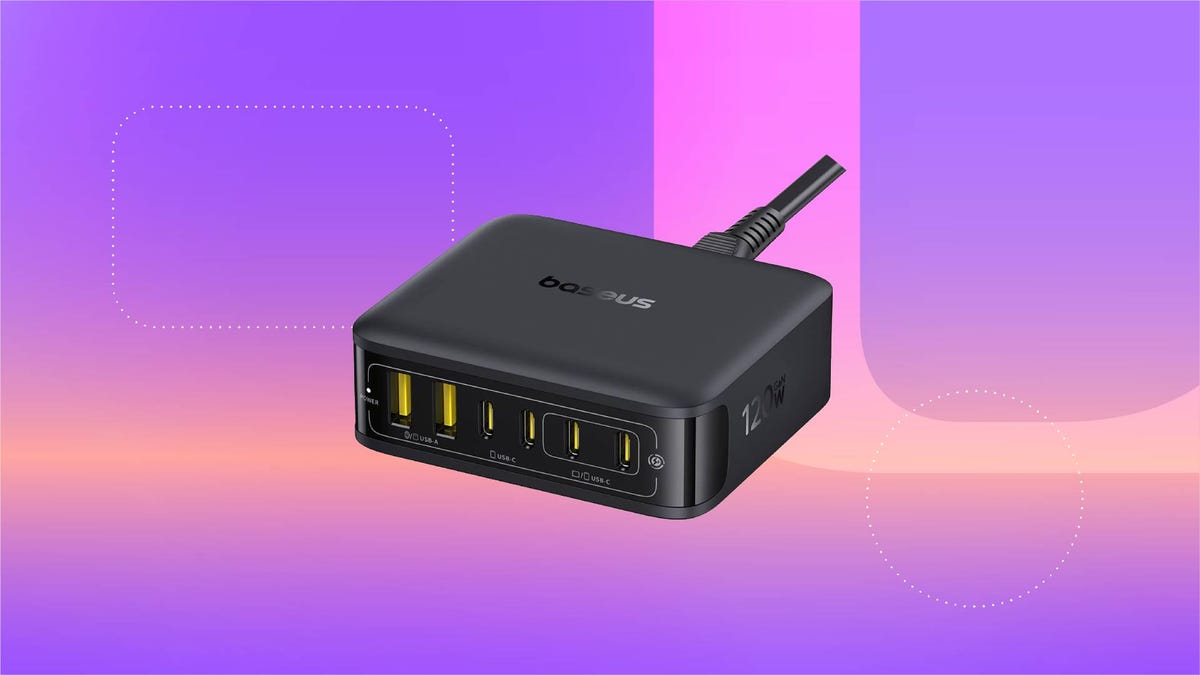
For just $28, this six-in-one Baseus charging station can help you keep your desk organized. That’s 20% off and the all-time lowest price we’ve seen for this 120-watt USB power strip. We don’t expect this limited-time deal to last for long, however, so you’ll want to get your order in sooner rather than later.
You can use this charging station for just about all of your devices, including phones, tablets, headphones and laptops. It’s equipped with four USB-C ports and two USB-A ports, so you can charge up to six devices at once. It also boasts a 65-watt single-port output, enough to fully recharge a MacBook Air in less than 2 hours. And at just 323 grams, it’s light enough to take on the go, making it a great buy for frequent travelers.
Why this deal matters
This sleek Baseus charging station can connect to up to six devices at once, and is still small enough that you can take it on the go. Plus, this is the all-time lowest price we’ve seen, making it a pretty great value.
-
 Technologies3 года ago
Tech Companies Need to Be Held Accountable for Security, Experts Say
-
 Technologies3 года ago
Best Handheld Game Console in 2023
-
 Technologies3 года ago
Tighten Up Your VR Game With the Best Head Straps for Quest 2
-
 Technologies4 года ago
Black Friday 2021: The best deals on TVs, headphones, kitchenware, and more
-
 Technologies5 лет ago
Google to require vaccinations as Silicon Valley rethinks return-to-office policies
-
 Technologies5 лет ago
Verum, Wickr and Threema: next generation secured messengers
-
 Technologies4 года ago
Olivia Harlan Dekker for Verum Messenger
-
 Technologies4 года ago
The number of Сrypto Bank customers increased by 10% in five days