
Technologies
I Tried the Galaxy Z TriFold at a Dubai Store and Its Design Made Me a Fan
Samsung’s Galaxy Z TriFold impressed me with its smart design choices despite being a less versatile folding phone than the Huawei Mate XT.
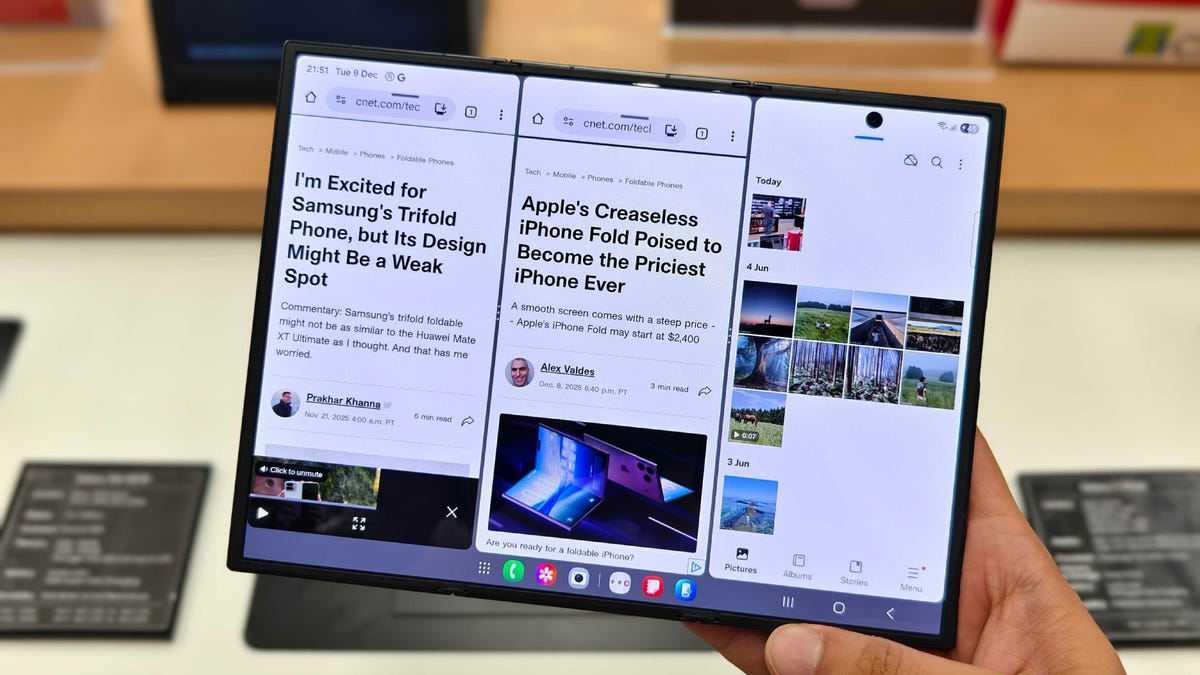
I was skeptical about Samsung’s Galaxy Z TriFold ahead of its launch. On paper, it looked like the Korean company was trading functionality for durability, resulting in another 2-in-1 foldable device rather than a true all-in-one trifold phone like the Huawei Mate XT. However, I spent 20 minutes using and folding the Z TriFold at a Samsung store in Dubai, and even that brief interaction was enough to put my skepticism to rest.
The Samsung Galaxy Z TriFold is essentially a wide-screen tablet that folds into a phone to fit inside your pocket. It might seem like a simple concept, but Samsung made several smart design decisions here that make the Z TriFold better than the rivals.
Samsung designed the foldable with two separate hinges of different sizes in order for its 10-inch screen to fold twice. The right hinge is similar to the one found on the Galaxy Z Fold 7, but the left hinge is wider and accommodates the thickness created by two of the three sections being stacked on one another when closed. The wider right hinge feels like a spring and popped open as soon as I started to unfold it. This responsiveness gives the Z TriFold a distinct ergonomic advantage when unfolding the device.
The Samsung Galaxy Z TriFold is divided into three panels (hence the name). The right-most panel is actually slightly wider than the rest, creating an edge that protrudes out slightly when folded. That edge makes unfolding the phone significantly more intuitive as it’s easy for my finger to find and push open. I struggled to unfold the Huawei Mate XT, the flat-sided Galaxy Z Fold 7, as well as the Honor Magic V5 with its curved sides. In contrast, the TriFold’s protruding edge gives me a solid lip that makes it breeze to open.
Initially I didn’t take Samsung’s announcement blog post seriously when I read that the «folding mechanism has been precisely engineered for easy opening and closing, with an auto-alarm alerting the user of incorrect folding.» But in practice, the auto-alarm is shrewdly implemented and essential to this design. It makes the TriFold difficult for a person to fold incorrectly.
Three panels and two hinges means the existence of not one, but two screen creases. Some people just can’t get past having a crease on their phone’s display, especially since it can become more conspicuous the more you fold it. I couldn’t feel either crease when running my finger across the Z TriFold’s screen. Comparatively, I can distinctly feel both creases on my Huawei trifold’s display. Samsung surprised me earlier this year with it’s overhaul of the Galaxy Z Fold 7’s hinge design which by consequence minimized the depth of the crease on its folding screen. It seems that Samsung took those learnings and applied them to the Galaxy Z TriFold.
Like the Fold 7, the crease appears virtually non-existent on the Galaxy Z TriFold unless you are looking at it from an extreme angle. It likely won’t bother most people, even when using the phone unfolded in wide-screen tablet mode. Overhead room lighting might reflect on the Z TriFold’s screen and creases in a way that might bother some people.
Samsung vs. Huawei: Two distinct trifold designs
Samsung and Huawei have taken two different approaches to their TriFold phones. I find Huawei’s Z-shaped design to be more flexible than its Samsung U-shaped counterpart in terms of pure functionality. Huawei opted for a single screen that converts into three distinct form factors: a smartphone, a mini-tablet (one side unfolded), and a wide-screen tablet (both sides unfolded).
In comparison, Samsung skips the mini-tablet design entirely. The Galaxy Z TriFold can be either fully folded or fully unfolded. If you unfold the Galaxy TriFold just once, it won’t allow you to use it for anything. And that limits its usefulness.
After using the Huawei Mate XT full-time, I hoped that Samsung’s Z TriFold phone would be a similar all-in-one device. I love using the Huawei trifold as a book-style mini tablet (with just one side open) for reading and browsing on commutes. But I won’t be able to do that with the Z Trifold. Samsung’s choice limits versatility, but it could be a massive win for durability.
Huawei’s soft folding display is exposed at all times, whereas Samsung’s design protects the inner screen when it is folded shut. It’s a calculated trade-off: durability in the long-term at the expense of not having a mini-tablet mode (one side opened). I am not in favor of it. But I want any device that I’m paying $3,000 for to last me as long as it can, so I welcome the durability.
Then there are the software differences between the two trifold phone. The Mate XT’s operating system runs smoothly enough but its UI looks dated. I have to jump through hoops to install the Google Play Store on the Huawei trifold. So it was refreshing to use the new Samsung TriFold by comparison, which runs Android 16-based One UI 8. The software is clearly optimized for the Z TriFold’s massive canvas. It lets you run three windows side by side and add multiple pop-up windows for the ultimate form of multitasking. It also allows you to create separate workspaces (similar to Desktops on MacOS and Windows) with just two taps.
Magnets could’ve been useful
The Galaxy Z TriFold doesn’t have a built-in kickstand (think Nintendo Switch) or support for Qi2.2 magnetic accessories (like Apple’s MagSafe). And not having either makes it a challenge to work on it as a wide-screen tablet. Samsung should’ve included MagSafe-like magnetic accessory support so I could add a magnetic stand (think PixelSnap Ring) and easily prop it up. Then I could pair the Z TriFold with a mouse and keyboard to use like a 2-in-1 laptop.
If you want to use the Z TriFold’s 10-inch screen as a tablet and be productive, you need a kickstand. Without built-in magnets, you’re forced to find a case with a kickstand, which will inevitably make an already thick phone unwieldy. A snap-and-go magnetic stand would have been the perfect solution.
After my brief time with Samsung’s newest foldable, I have to say that the Galaxy Z TriFold is a promising device — one that might surprise a lot of people. I wish it were thinner when folded closed, but Samsung’s smart design choices have me excited for the future of folding phones.
Technologies
Today’s NYT Connections: Sports Edition Hints and Answers for April 8, #562
Here are hints and the answers for the NYT Connections: Sports Edition puzzle for April 8 No. 562.

Looking for the most recent regular Connections answers? Click here for today’s Connections hints, as well as our daily answers and hints for The New York Times Mini Crossword, Wordle and Strands puzzles.
Today’s Connections: Sports Edition is a tough one. If you’re struggling with today’s puzzle but still want to solve it, read on for hints and the answers.
Connections: Sports Edition is published by The Athletic, the subscription-based sports journalism site owned by The Times. It doesn’t appear in the NYT Games app, but it does in The Athletic’s own app. Or you can play it for free online.
Read more: NYT Connections: Sports Edition Puzzle Comes Out of Beta
Hints for today’s Connections: Sports Edition groups
Here are four hints for the groupings in today’s Connections: Sports Edition puzzle, ranked from the easiest yellow group to the tough (and sometimes bizarre) purple group.
Yellow group hint: Working out.
Green group hint: Cover your face.
Blue group hint: NFL players.
Purple group hint: Leap.
Answers for today’s Connections: Sports Edition groups
Yellow group: Exercises in singular form.
Green group: Sporting jobs that require masks.
Blue group: Hall of Fame defensive ends.
Purple group: ____ jump.
Read more: Wordle Cheat Sheet: Here Are the Most Popular Letters Used in English Words
What are today’s Connections: Sports Edition answers?
The yellow words in today’s Connections
The theme is exercises in singular form. The four answers are crunch, plank, situp and squat.
The green words in today’s Connections
The theme is sporting jobs that require masks. The four answers are catcher, fencer, football player and goaltender.
The blue words in today’s Connections
The theme is Hall of Fame defensive ends. The four answers are Dent, Peppers, Strahan and Youngblood.
The purple words in today’s Connections
The theme is ____ jump. The four answers are broad, high, long and triple.
Technologies
The $135M Google Data Settlement Site Is Live — See If You’re Eligible
Use the settlement website to select your preferred payment method, and you may end up $100 richer.

You can now file a claim in the $135 million Google data settlement. The case centers on claims that Android devices transmitted user data without consent. Specifically, the class action lawsuit Taylor v. Google LLC contends that Google’s Android devices passively transferred cellular data to Google without user permission, even when the devices were idle. While not admitting fault, Google reached a preliminary settlement in January, agreeing to pay $135 million to about 100 million US Android phone users.
The official settlement website for the lawsuit is now live. The final approval hearing won’t occur until June 23, when the court will consider whether Google’s settlement is fair and listen to objections. After that, the court will decide whether to approve the $135 million settlement.
In the meantime, if you qualify and want to be paid as part of the settlement, you can select your preferred payment method on the official website. There, you can find information on speaking at the June 23 court hearing and on how to exclude yourself or write to the court to object by May 29.
As part of the settlement, Google will update its Google Play terms of service to clarify that certain data transfers do occur passively even when you’re not using your Android device, and that cellular data may be relied upon when not connected to Wi-Fi. This can’t always be disabled, but users will be asked to consent to it when setting up their device.
Google will also fully stop collecting data when its «allow background data usage» option is toggled off.
Who can be part of the settlement?
In order to join the Taylor v. Google LLC settlement, you must meet four qualifications:
- Be a living, individual human being in the US.
- Have used an Android mobile device with a cellular data plan.
- Have used the aforementioned device at any time from Nov. 12, 2017, to the date when the settlement receives final approval.
- You’re not a class member in the Csupo v. Google LLC lawsuit, which is similar but specifically for California residents.
The final approval hearing is on June 23, so you can add your payment method until then. The hearing’s date and time may change, and any updates will be posted on the settlement website.
If you choose to do nothing, you will still be issued a settlement payment, but you may not receive it if you don’t select a payment method.
How much will I get paid?
It’s not currently known exactly how much each settlement class member will receive, but the cap is $100. Payments will be distributed after final court approval and after any appeals are resolved.
After all administrative, tax and attorney costs are paid, the settlement administrator will attempt to pay each member an equal amount. If any funds remain after payments are sent, and it’s economically feasible, they will be redistributed to members who were previously and successfully paid. If it’s not economically feasible, the funds will go to an organization approved by the court.
Technologies
Samsung’s Galaxy Watch Ultra 2 Might Come in 5G and 4G Cellular Models
If the rumor proves true, the 5G Galaxy Watch Ultra would rival the 5G-enabled $799 Apple Watch Ultra 3 that debuted last fall.

Samsung’s next high-end Galaxy Watch could support faster 5G speeds, but if this leak is true, it will depend on where you live. The rumored Samsung Galaxy Watch Ultra 2 might come in 5G and 4G cellular models, with availability for each smartwatch depending on the country.
According to the Dutch website Galaxy Club (and spotted by SamMobile), Samsung’s servers may have revealed a series of model numbers that point to 5G, 4G and Wi-Fi-enabled editions of the next Galaxy Watch Ultra, which would succeed the original model that debuted in 2024.
A representative for Samsung did not immediately respond to a request for comment.
The Galaxy Club website speculates that the 5G edition would be sold in the US and Korean markets, while the 4G edition would sell in the rest of the world. In the US, a 5G version of the Galaxy Watch Ultra would rival the 5G-enabled $799 Apple Watch Ultra 3, which debuted last fall. The 4G edition would have broader compatibility worldwide, since the earlier network is far more established.
It will likely be a few months until we hear anything official about the Galaxy Watch Ultra 2. Samsung typically unveils its new watches in the summer alongside its Galaxy Z Fold and Z Flip foldable phones. Last year, Samsung unveiled the Galaxy Watch 8 and the Galaxy Watch 8 Classic, but otherwise left the prior 2024 Ultra in the lineup for those looking for a larger 47mm smartwatch.
-
 Technologies3 года ago
Tech Companies Need to Be Held Accountable for Security, Experts Say
-
 Technologies3 года ago
Best Handheld Game Console in 2023
-
 Technologies3 года ago
Tighten Up Your VR Game With the Best Head Straps for Quest 2
-
 Technologies4 года ago
Black Friday 2021: The best deals on TVs, headphones, kitchenware, and more
-
 Technologies5 лет ago
Google to require vaccinations as Silicon Valley rethinks return-to-office policies
-
 Technologies5 лет ago
Verum, Wickr and Threema: next generation secured messengers
-
 Technologies4 года ago
Olivia Harlan Dekker for Verum Messenger
-
 Technologies4 года ago
The number of Сrypto Bank customers increased by 10% in five days