
Technologies
Best MagSafe Accessories for iPhone in 2023
From stands to wallets to car mounts and wireless battery chargers, here are the best MagSafe accessories for iPhone.

The MagSafe technology built into Apple’s latest iPhones is not only designed for wireless charging but a wide range of new magnetic accessories, the best of which we’ve rounded up here. They include wallets, power banks, stands, kickstands, car mounts and other devices that adhere to the back of your iPhone or MagSafe-compatible iPhone case.
Some “MagSafe” accessories are official, Apple-licensed products while others aren’t. The main difference is that accessories that aren’t Apple-certified won’t be able to charge at the highest speeds (up to 15 watts). But in a lot of cases, the lack of certification won’t change how well the product performs, though some non-Apple-certified MagSafe-compatible accessories sometimes lack strong enough magnets.
Here’s a look at my current favorite MagSafe accessories. Note that I’ve personally used all of the products listed below. We’ll update this list as we discover new top accessories.
Read more: Best iPhone 14 Cases So Far
Magnetic wireless battery chargers
David Carnoy/CNET
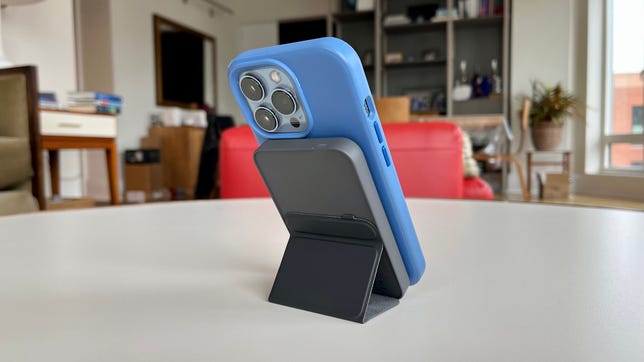
What’s cool about Anker’s 622 magnetic battery is that it’s a wireless battery that has an integrated magnetic flap that converts into a stand. You won’t get fast wireless charging from this 5,000-mAh battery (it charges at up to 7.5 watts) but it’s slim and easy to carry around.
It charges via USB-C and if you use a USB-C to Lighting to charge your iPhone, it will charge at a faster rate of 12 watts. That’s not as fast as what a 20-watt USB-C power adapter can deliver, but it’s faster than 7.5 watts.

David Carnoy/CNET
The Baseus Magnetic Mini Wireless Portable Charger is a compact 6000-mAh wireless power bank that sticks to the back of MagSafe-enabled iPhones (or MagSafe-enabled iPhone cases) and charges your iPhone at 7.5W. If you’re looking for faster charging, you can plug a USB-C to Lightning cable into the battery and get 20W charging speeds. It also offers pass-through charging (you can charge the battery while charging your phone).
The battery is similar in size to many 5000-mAh batteries and also costs less. That 6000-mAh capacity will get you close to a full charge with most iPhones, though it may fall a bit short for iPhone Max models.
David Carnoy/CNET
You don’t want your phone to go dead on the mountain so it’s always good to pack a battery pack.
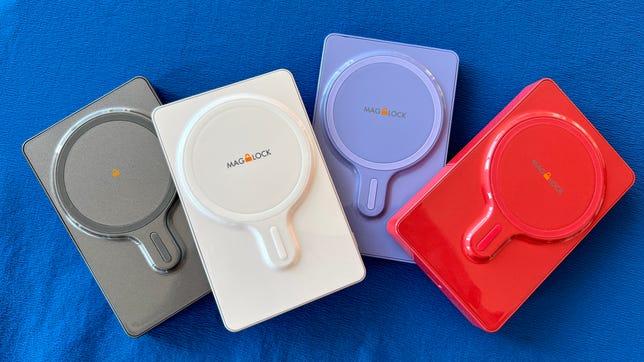
MyCharge calls its new line of magnetic power banks Superhero MagLock, implying that they’re real saviors. I was impressed by their design. Not only do the batteries, which come in various capacities, have strong magnets and stick really well to the back of your iPhone 12, 13 or 14, but they have raised coils, which are supposed to help with reducing heat levels while charging. It does seem to work.
The 3,000-mAh battery is lightweight and slim and is nice to have around for some emergency charging. However, it won’t get you a full charge, so you’ll probably want to step up to one of the higher-capacity options like the 6,000-mAh model, which retails for $60, but you can currently grab for 30% off with the on-page instant coupon. The 9,000-mAh version is beefy and feels like your phone is attached to a small brick — the battery and phone do fit in your hand nicely, but the combo certainly isn’t pocket-friendly.
All the MagLock batteries charge Qi-enabled iPhones at 5 watts, although you can get faster charging if you go wired and use a USB-C to Lightning cable. I also liked how there’s a chime when the charging starts and your phone tells you how much juice is left in the battery pack (it’s tied into iOS 15). You can wirelessly charge Android devices as well but the MagLock won’t stick unless you have a metal ring on the back of your phone’s case (stick-on rings are available).
The SuperHero MagLock is available in a few colors and has a glossy finish. It’s currently the best designed magnetic power bank — better even than Apple’s.
Screenshot by David Carnoy/CNET
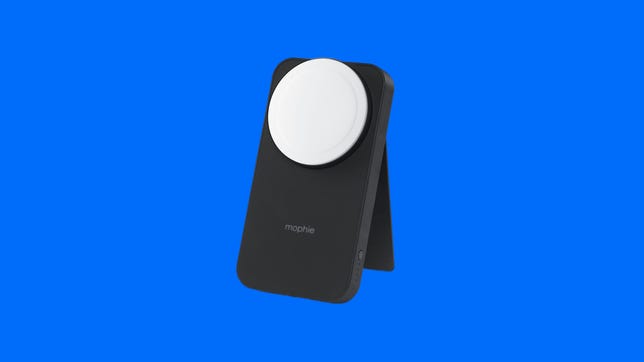
Mophie’s Powerstation Wireless Stand with MagSafe is currently only sold through Apple and Zagg, Mophie’s parent company. It’s not cheap, but it is a versatile 10,000-mAh battery battery with both a stand and MagSafe charger built in, and also has a threaded tripod mount at the bottom.
Since this is an official MagSafe charger, the battery does charge at 15 watts, making this among the fastest wireless external battery chargers out there and will also charge the AirPods 3 and AirPods Pro models with MagSafe. If you use a USB-C-to-Lighting cable (not included) with it, you can charge at 20-watt speeds. You can also charge two devices at the same time.
Screenshot by David Carnoy/CNET
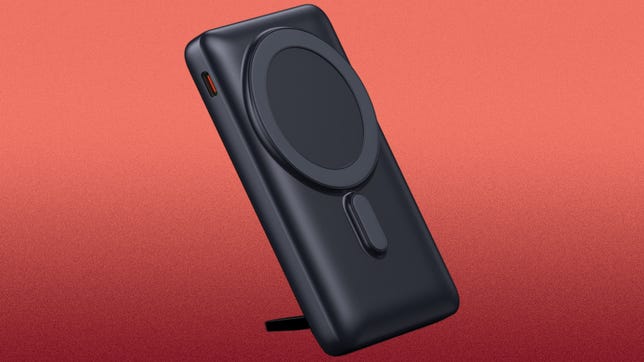
If you’re looking for a bigger portable battery that charges your phone wirelessly, the Baseus Magnetic Wireless Power Bank is an excellent option. It houses a 10,000-mAh battery that can charge an iPhone 14 around two times — but it’s still somewhat compact.
The magnet is strong, and I also liked that it has an integrated flip-out kickstand, so it converts into a stand. There’s also an LED battery life indicator on back of the battery that tells you exactly how much juice the battery has left (you see the actual percentage). The Baseus Magnetic Wireless Power Bank is available in three color options with the black version currently costing a few bucks less.

The RapidX Boosta magnetic wireless portable charger comes in a variety of colors and is about $10 less than some magnetic 5,000-mAh battery power banks. This isn’t an official Apple MagSafe accessory, but it magnetically adheres to the back of your MagSafe-enabled iPhone or MagSafe case — yes, its magnet is strong — and can also be used with other phones that support wireless charging.
Wireless charging speeds are limited to 7.5 watts for iPhones, but if you need a faster charge, you can connect a USB-C to Lightning cable to bump the speed up to 10 watts. Just note that it will fall a little short of a full charge for a Pro Max, so you may want to upgrade to a larger power bank if you’re using that model.
Magnetic folding stands/wallets

David Carnoy/CNET
Clckr’s new, trimmer Stand and Grip is one of my favorite MagSafe accessories. The accessory really sticks to the back of your MagSafe-enabled phone or MagSafe-enabled case and not only makes it easier to hold up your phone but when converted into a kickstand, it props up your device nicely in portrait or landscape mode for video calls or video watching.
This new version is lighter than the original and available in several colors. It’s one of the best MagSafe stands out there.

David Carnoy/CNET
This accessory from Moft not only acts as a magnetic wallet that adheres to the back of your MagSafe-enabled iPhone (or case), but it converts into a stand that can be used to prop up your phone horizontally or vertically. The wallet fits a couple of credit cards (you can stretch it a bit to get three in there) and the accessory has a fairly strong magnet, so it stays on your phone pretty well.
I’m showing it in light blue but it’s available in several colors. You can also buy this as a bundle for $60 with Moft’s MagSafe case, which is a nice case.

David Carnoy/CNET
Zagg’s Gear4 Ring Snap 360 is is a ring accessory that converts into a stand. It not only feels solid but looks sleek and has a strong magnet that allows the accessory to stick securely to the back of your iPhone or MagSafe-enabled case. The stand works better for propping up your phone horizontally (in landscape mode) but can also prop it up vertically at about a 45-degree angle. It’s available in two colors, but the rose gold model is currently available only on Zagg’s website.

David Carnoy/CNET
The Anker 610 magnetic phone grip is one of the more affordable MagSafe accessories. It has a strong magnet and you can use the retractable ring to hold your phone securely in your hand or as a kickstand. It allows you to prop up your phone horizontally but not vertically. Some other MagSafe stands do both.

Amazon
If you’re a PopSockets fan, you have a couple of MagSafe options. There’s the more standard PopGrip ($30) and the PopWallet Plus for MagSafe ($40), which combines a magnetic wallet that stores a few credit cards and a PopGrip that gives you a grip and kickstand option.

Available in multiple color options, this simple, lightweight flip-out kickstand has a strong magnet and takes up minimal space on the back of your phone (it works better for propping your phone up horizontally).
Apple/Screenshot by CNET
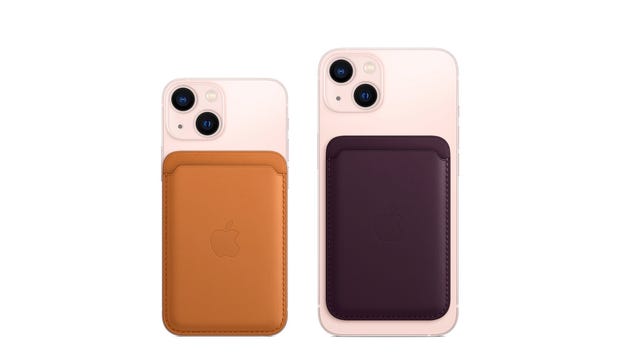
Apple’s official MagSafe wallet is more expensive than a lot of third-party magnetic wallets, but the one thing it has that the other ones don’t is compatibility with Apple’s Find My network. But don’t expect to track it down like an AirTag: It really just signals if and when it becomes detached. It’s available in five colors.
Magnetic charging stands

Screenshot by David Carnoy/CNET
Belkin’s MagSafe Wireless Charger with Kickstand is essentially a better version of Apple’s own wireless MagSafe charger because it integrates a flip-out kickstand, allowing you to watch videos on your iPhone as you charge (or play games if you have a wireless game controller).
It does charge at up to 15 watts and comes in three color options: black, white and blue. Alas, no power adapter is included (the cable is integrated into the charging puck).

David Carnoy/CNET
The Anker 637 has a magnetic charging pad on one side and seven charging ports on the back: two USB-C, two USB-A and three standard AC outlets. The USB-C ports deliver up to a 65-watt charge when charging one device — or 45- and 20-watt if charging two devices simultaneously. So yes, you can use it to charge most laptops that charge via USB-C.
For MagSafe-enabled iPhones, the wireless charging pad charges at 7.5 watts. You can only charge Android phones if you stick a metal ring accessory (sold separately) on the back of your device and place it in the right spot. You can also save $30 right now by activating the instant coupon on the product page.

Jared DiPane/CNET
Anker’s 633 2-in-1 MagGo charging stand has more components than you might think at first glance. Not only is it a charging stand that also has a spot to charge your AirPods (or any earbuds with a wireless charging case and even a second phone), but the wireless charging pad is actually a 5,000-mAh portable battery, which is why I put it in the wireless battery section.
Since this isn’t an Apple blessed MagSafe charger, it only charges at up to 7.5 watts (not 15). It comes in black, white or light blue.
Read our first take of Anker 633 2-in-1 MagGo Charging Stand.

David Carnoy/CNET
The Boost Charge Pro 3-in-1 is an Apple-certified MagSafe accessory so it offers fast (15-watt) wireless charging for your MagSafe-enabled iPhone as well the Apple Watch.
It includes a 40-watt adapter and I charged an iPhone 13 Pro, the third-generation AirPods and Watch Series 7 at the same time. Like the Boost Charge Watch fast-charger, the adjustable Watch module accommodates any Apple Watch case size in either flat or in nightstand mode. You can also charge a second phone on the AirPods slot, but you don’t get fast-charging there — it only offers 5-watt charging.
This is certainly a nice charging station for Apple devices. It has a sleek, elegant design, with a soft-to-the-touch silicone finish. My only gripe? That finish is a dust magnet and I had to wipe it down with an alcohol towelette to remove any dust particles before I photographed it. The black shows more dust so I’d recommend getting the white version (of both chargers) rather than the black.
Read our first take of Belkin Boost Pro 3-in-1 Charging Pad with MagSafe.
Magnetic car mounts and chargers
iOttie
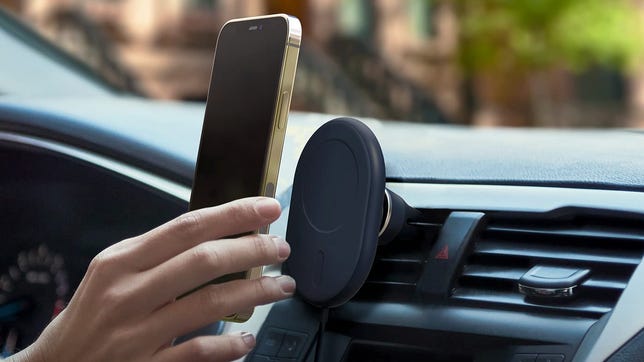
iOttie offers this MagSafe-compatible wireless car charger with a car vent mount. It has a strong magnet, so your iPhone stays on the mount, and it also has an integrated USB-C cable and cigarette-lighter power adapter so you’re ready to start charging out of the box. Note that the iPhone’s “fast” charging caps out at 7.5 watts.

Amazon
Spigen’s OneTap magnetic car mount comes in a few different versions, including an air vent and dashboard versions. This version is just a magnetic mount, not a wireless charger. You have to step up to the Spigen OneTap Pro ($40) to get wireless charging.
This model features a telescopic arm and fairly strong magnet. However, it’s not quite as strong as the one in Belkin’s car mount (see below). While it’s quite affordable at around $30, there’s no cigarette lighter power adapter included (a USB-C cable is, however).

Belkin
Belkin’s Car Vent Mount Pro with MagSafe technically isn’t a charger. It’s just a certified MagSafe vent mount. Belkin also has a wireless charging version of this (it costs $40 without the car charger, $60 with it), but you’d have to connect a cable to it anyway for charging. The advantage of a wireless version would be that unlike with this vent mount, you wouldn’t have to plug a cable into your phone every time you want to charge it. I have a USB-C-to-LIghtning cable set up in the car for fast charging, but I don’t love the extra step of having to plug in the cable each time I want to charge the phone.
All that said, what sets this Belkin apart from other generic, non-MagSafe-certified mounts that look similar (and some even offer wireless charging), is that the Belkin has a very strong magnet while many of these other vent mounts don’t. If you have a MagSafe case on your phone, or just a naked newer iPhone model, the phone really sticks to the mount. The clip also keeps the mount securely in your vent and you can rotate the mount from portrait to landscape mode as needed.
Magnetic mounts for laptops and monitors

David Carnoy/CNET
You can now turn your iPhone into a webcam using the Continuity Camera features in the latest version of MacOS. What’s cool about the Belkin iPhone Mount with MagSafe for Mac Notebooks is that you can use it as a kickstand to prop your iPhone up in landscape mode. And you can use the flip side of the mount to attach your phone to the top of your MacBook in landscape or portrait mode for webcam use.
Check out our hands-on review and video of the Belkin iPhone Mount for MagSafe for Mac Notebooks.

Screenshot by David Carnoy/CNET
STM’s MagArm is designed to stick to the back of your laptop or computer monitor with the help of an integrated suction cup. Some people have complained that the suction cup doesn’t adhere securely enough, but I attached the MagArm to both a monitor and laptop and it adhered just fine if you follow the instructions correctly. I used it with an iPhone 14 Pro, which is a pretty heavy phone, but I didn’t use it with an iPhone 14 Max Pro or Max Plus.
You can adjust the mount so it sits horizontally (on the side) or vertically (on top) of your laptop or monitor. And what’s nice about it, if you own Apple’s wireless MagSafe charging puck, there’s a dock for it built into the mount so you can keep your phone charged (you could also just plug your phone into a a wired charger).
While the the MagArm is bigger and bulkier than some laptop MagSafe mounts, it’s sturdily constructed. You can peel the suction cup off your laptop (it doesn’t leave a mark) and you can remount it when you need to use it again.
Magnetic photo and video accessories

Screenshot by David Carnoy/CNET
The Joby Beamo LED Ring Light for MagSafe is a nifty MagSafe ring light that adheres magnetically to the back of your iPhone but can be used with the front selfie camera as well as shots using the rear camera. Equipped with an integrated rechargeable battery that charges via USB-C, it’s well designed and uses a “flattering soft” 5600K Daylight color temperature with 4 levels of brightness you can toggle through.
It’s also worth noting that it has a built-in mirror for checking yourself out before you shoot.

David Carnoy/CNET
Joby makes bendable tripods for cameras and smartphones and its products are a staple of vloggers and other content creators. Sometimes it’s a little cumbersome to get your phone out of their clamping mounts, which is what’s appealing about the company’s new MagSafe options. You can simply stick your phone to the mount; it adheres magnetically.
My iPhone 13 Pro stuck pretty securely to the GripTight mount. I was testing it with an Otterbox MagSafe-enabled case, so I wasn’t really worried about the phone getting jostled and falling off the mount. But if you want a more secure fit, you have the option of using the “hybrid” clamp to really lock your phone onto the mount. The clamp works in both vertical and horizontal modes and when you’re going the magnetic route only, you can easily swivel your phone into a horizontal or vertical position.
Joby is currently selling three GripTight for MagSafe accessories. There’s a simple wall-mount option, a GripTight Mount for MagSafe that can be added to any GorillaPod (or tripod for that matter), as well as a bundle that includes a GorillaPod and GripTight Mount (arms for the GorillaPod are sold separately). All three new MagSafe options are also compatible with Joby’s Wavo Mobile, Beamo Mini and RangePod accessories.

Amazon
Belkin’s magnetic phone mount with face tracking is designed for folks who shoot their own selfie videos for TikTok, Instagram and other social media platforms with a MagSafe-enabled iPhone. (The device has a companion iOS app but not an Android app.) There are competing products out there like the Pivo Pod Lite ($70), but this is MagSafe-enabled so all you have to do is stick your phone on the mount — you can simply turn your phone to place it in landscape or portrait mode. The pedestal automatically turns as your phone follows your face while you’re shooting yourself.
To be clear, this is not for FaceTime or WhatsApp or WeChat video calls. It doesn’t have to be plugged so it’s easy to move around the room and place wherever you want. However, it’s not equipped with rechargeable batteries. It’s powered by three AA batteries that do give the pedestal some added weight for stability.

Amazon
Moment makes a few different photography-oriented MagSafe accessories, including a couple of tripod mounts. With the Pro tripod mount you can choose to just use the magnets or lock your phone in for added security. This may not work as well with the larger Pro Max model, but the standard iPhone 14 and 14 Pro are lighter and are less likely to become detached (magnets are only so strong).
Here are a few things to keep in mind when buying MagSafe-related accessories, particularly so-called MagSafe charging products:
- A true MagSafe wireless charger will get you the potential for the fastest wireless charging rate (up to 15 watts instead 7.5 watts or 10 watts that some chargers deliver) on iPhones.
- Official MagSafe products — those blessed by Apple — include a Made for MagSafe badge on the box. However, plenty of other manufacturers have created magnetic wireless chargers that look and feel like MagSafe accessories. These MagSafe technology copycat devices are also far more affordable than the official MagSafe offerings, but here’s the catch: they offer less powerful charging (limited to 7.5 watts). We’ve included these non-official products in this list, but know that they’ll charge only half as fast (for iPhones), even if they are capable of wirelessly charging certain Android smartphones at up to 15 watts (those that support 15-watt fast wireless charging).
- Do not expect a MagSafe or magnetic accessory to stick to a non-MagSafe case. MagSafe accessories should be used directly with a naked MagSafe-enabled iPhone or MagSafe-enabled case. Alternatively, you can add a stick-on metal ring accessory to the back of a non MagSafe phone or case. However, it’s best to use a MagSafe-enabled case with MagSafe and other magnetic accessories.
- To get that maximum power, you’ll need a 20-watt USB-C PD charger — ideally one that is Power Delivery 3.0-certified. (The iPhone 13, iPhone 13 Pro, iPhone 13 Pro Max and iPhone 13 Mini include a USB-C to Lightning cable in the box, but not the charger.) Some companies offer bundles that include a MagSafe wireless charging puck with a USB-C power adapter while others, like Apple, sell the puck and power adapter separately.
- Most of the MagSafe chargers (aftermarket and MagSafe-certified) will charge other Qi-compatible devices, like select older iPhones and Android phones. You just won’t get the magnetic adhesion.
- If you need to also get a charger, our list of best USB-C chargers has plenty of options. That will, of course, work for wired charging, too — which will always be faster than MagSafe or other wireless charging options.
Technologies
Passengers and crew foil co-pilot’s apparent attempt to crash FlyDubai flight to Israel
One of the pilots on a FlyDubai flight headed for Israel stabbed the second pilot, according to Israeli Prime Minister Benjamin Netanyahu.
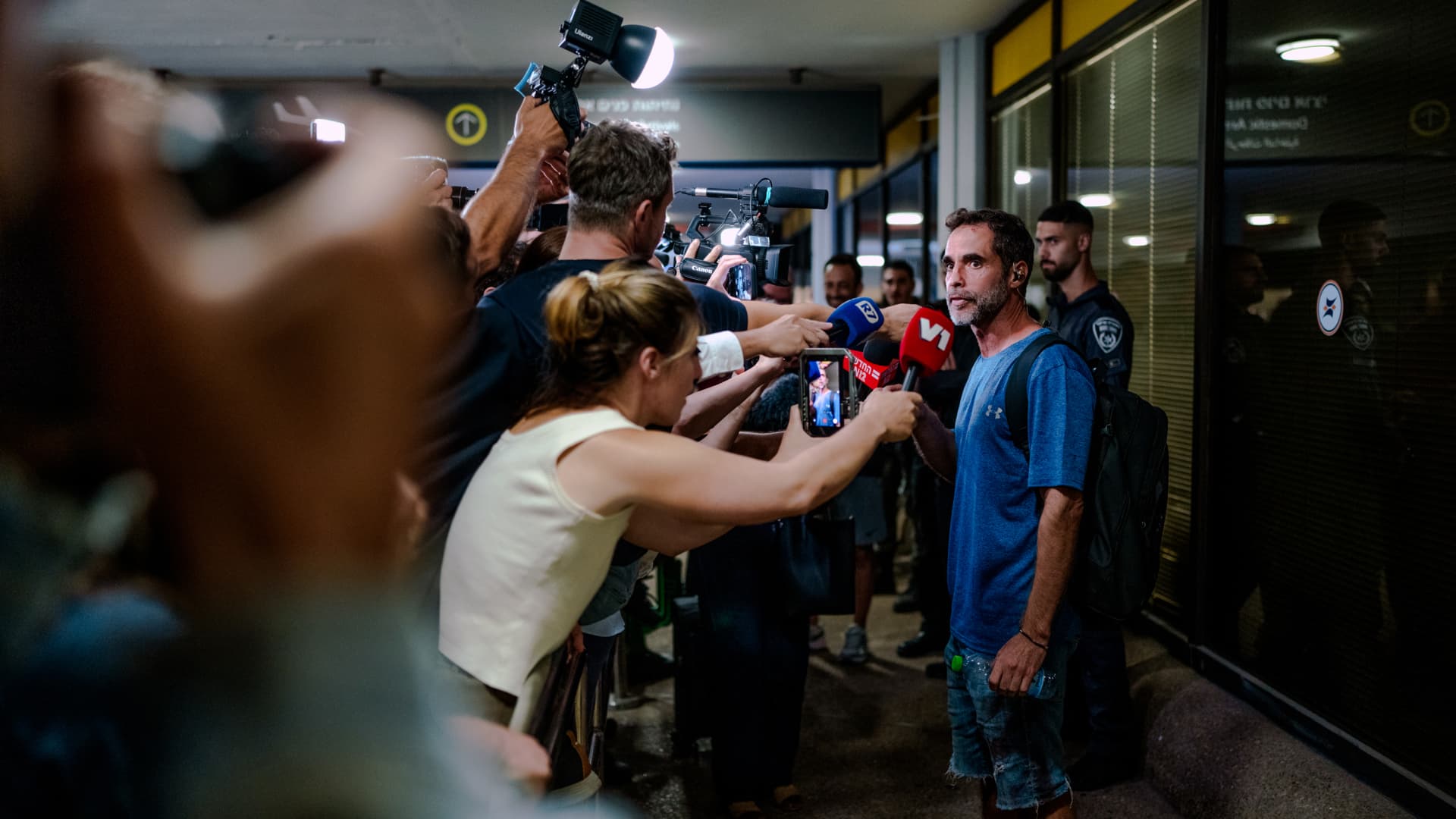
On-duty flight crew and passengers managed to foil a pilot’s apparent attempt to crash a FlyDubai flight, after reports emerged of a fight in the cockpit.
The incident on flight FZ1073 from Dubai to Tel Aviv happened when a co-pilot stabbed a pilot, according to Israeli Prime Minister Benjamin Netanyahu, who praised the victim’s quick thinking.
“Despite being stabbed and seriously injured, he fought back, resisted, opened the cockpit door, and enabled passengers and crew to overpower the attacker — preventing a catastrophic mid-air disaster. He saved the lives of 174 people, including Israeli citizens and other nationals,” Netanyahu wrote in a post on X.
FZ1073 was diverted to the Tabuk airport in Saudi Arabia, the airline said, after being successfully secured and diverted by flight crew.
FlyDubai in a statement said that an “altercation” occurred on the flight deck of the plane, but did not mention a stabbing.
However, the airline added that the underlying reasons and motives for the clash is currently unknown, urging all parties to refrain from speculation.
The injured pilot was identified by Netanyahu as Indian national Smit Machchhar. No details have been released on the identity of the attacker, except that he was being interrogated by Saudi authorities.
The Indian embassy in Riyadh said on X that Machchhar is in a hospital in Tabuk, and is reported to be in stable condition.
The Israeli Prime Minister also identified the passenger who broke into the cockpit as Yaniv Hayun, calling him a “hero” and adding he deserved “a global medal of honor.”
Flight data from tracking site FlightRadar24 showed that the plane had experienced extreme altitude fluctuations before broadcasting a “general emergency” squawk code.
FZ1073 had dropped from over 14,000 feet in just 29 seconds, and FlightRadar24 also added that vertical speeds ranging from approximately -30,000 to +10,000 feet per minute were observed from the transponder data.
For context, vertical speeds during normal operations rarely exceed plus or minus 4,000 feet per minute, it added.
Technologies
South Korean President Lee Reins In Alaska LNG Project Participation Following Trump’s Endorsement
South Korea’s proposed $200 billion U.S. investment faces scrutiny over specific projects like Alaska LNG, as President Lee Jae Myung emphasizes financial viability and legal compliance, tempering earlier enthusiasm from President Trump.
South Korea’s proposed $200 billion investment in the U.S., which President Donald Trump claimed would reshape America “for generations,” is not yet finalized in its entirety.
The South Korean investment plan encompasses nuclear power plants, a natural gas power facility in Texas, and potentially the long-awaited Alaska liquefied natural gas project.
Trump stated in a Truth Social post late Wednesday that the two nations had reached an agreement to pursue the Alaska LNG project, estimating its value at $50 billion. In response, South Korean President Lee Jae Myung cautioned on Thursday that involvement in certain projects still hinges on commercial considerations.
Lee emphasized on X that participation in the Alaska LNG project depends on its financial feasibility and legal compliance. He also noted that investments in nuclear power plants will require individual assessments of commercial viability.
The U.S.-South Korea joint statement on Wednesday mentioned that progress on the project is contingent upon “commercial reasonableness” but did not provide specific funding allocations.
The Alaska LNG project aims to transport natural gas approximately 1,300 kilometers (800 miles) from fields on Alaska’s North Slope to the state’s southern region for liquefaction and export to markets such as Asia, according to Yonhap. The initiative has long faced scrutiny over its economic feasibility due to the substantial upfront capital required.
Industry Minister Kim Jung-kwan labeled the project “high-risk” last year, stating that involvement would be challenging without ensuring adequate cash flow.
Overall, the investment package includes $22.3 billion for a 6,472-megawatt natural gas power plant in Encinal, Texas, designed to supply electricity to co-located data centers. The project will be spearheaded by developer Related Cos. and U.S. energy company NextEra Energy.
Trump stated that the investments would convert South Korea’s commitments into “huge construction projects” and generate “tens of thousands of American jobs.”
“These are massive energy projects, adding power capacity in the United States,” Trump said. “This is new construction, new manufacturing, and great jobs for American workers.”
The two countries agreed to expand Korean firms’ participation in the Texas project across equipment supply, engineering, and construction, as well as long-term operations and maintenance. The U.S. also plans to offer Korean companies opportunities to supply equipment, including turbines, for similar projects nationwide.
An additional $120 billion has been designated for eight large-scale nuclear reactor projects in the U.S. Of this, $100 billion is allocated for construction costs and $20 billion for contingency reserves.
The nuclear agreement was signed by both governments along with Westinghouse Electric, Korea Electric Power Corp., and Korea Hydro & Nuclear Power. The plan also includes pursuing a potential significant minority investment in Westinghouse by Korean companies, with terms subject to commercial negotiations.
Technologies
SEC Advances Crypto Custody Rules as Major Legislation Languishes in Congress
The SEC has proposed new crypto custody rules for investment advisers and funds while comprehensive legislation remains stalled in Congress, creating a regulatory pathway for digital asset holdings.
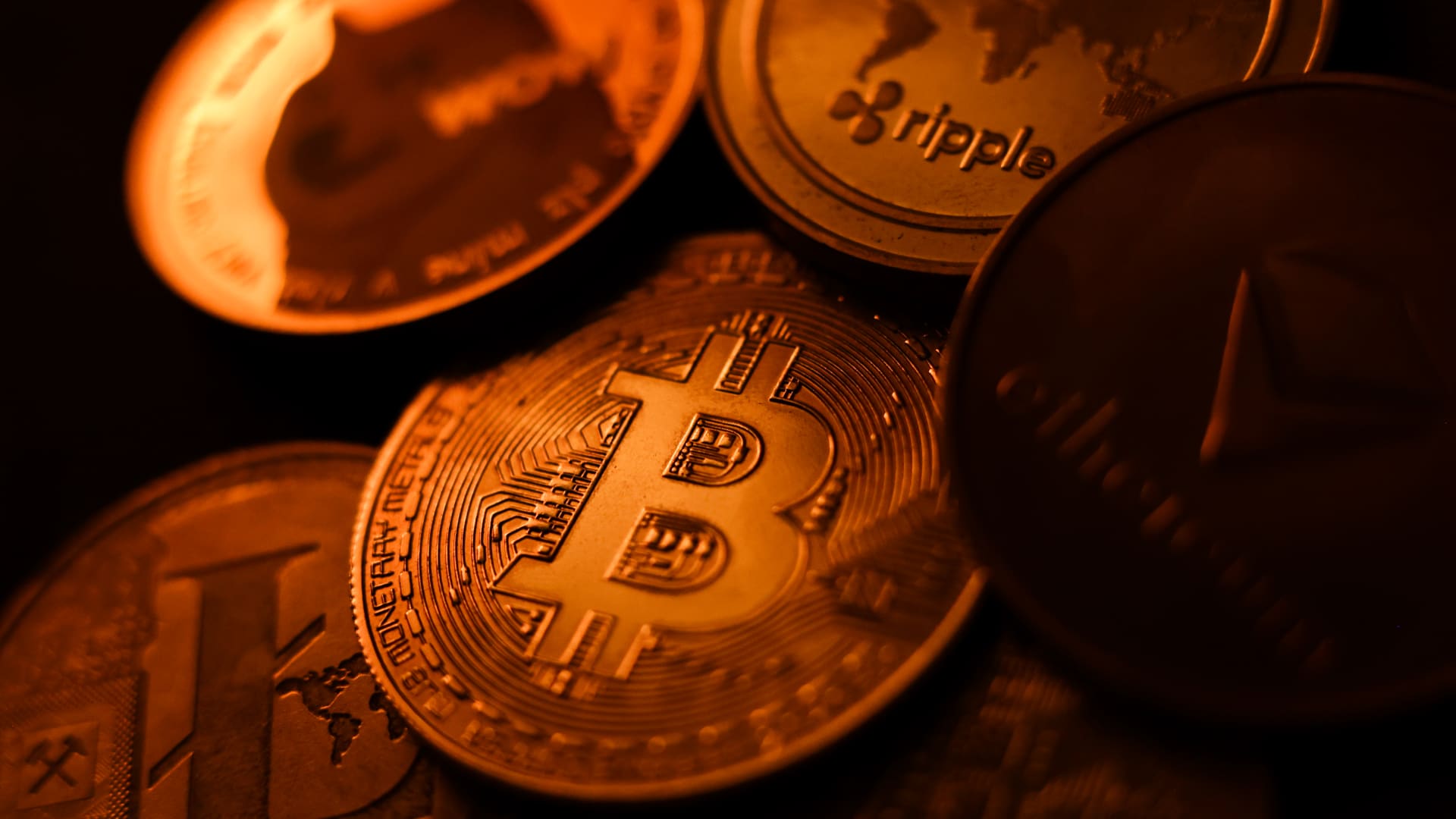
The U.S. Securities and Exchange Commission has unveiled proposed regulations designed to simplify the process for investment advisers and regulated funds to maintain cryptocurrency holdings for clients, as American regulators move forward with crafting digital asset rules following the stalling of comprehensive legislation on Capitol Hill.
The proposal, revealed Thursday, would create a specialized framework governing how registered investment advisers, investment companies, and business development companies maintain custody of crypto assets.
The modifications aim to update decades-old custody requirements and eliminate regulatory obstacles that the SEC says have restricted advisers’ capacity to provide crypto-related investment options.
Under the proposed regulations, crypto assets could be held in self-custody under “certain circumstances,” while state trust companies could also function as custodians for crypto assets belonging to clients and regulated funds.
The changes could also grant regulated funds expanded authority to offer investors crypto-related investment strategies, according to the SEC.
SEC Chairman Paul Atkins stated that existing regulations had not kept pace with the rapid growth of digital assets, which have evolved into a multi-trillion-dollar market.
“Today’s proposal would provide a clear regulatory framework for the custody of crypto assets, giving investment advisers and funds a compliant pathway where none existed before,” Atkins said.
The proposal arrives as U.S. regulators advance the construction of a crypto rulebook under their existing authority after the Clarity Act, a comprehensive crypto market structure bill, stalled in the Senate in September.
This represents another step in the SEC’s broader initiative to reshape the U.S. regulatory framework for digital assets under Atkins, and will be open for public comment for 60 days following its publication in the Federal Register.
With broader crypto legislation stalling in Congress, regulators are exercising their existing powers to address individual segments of the market, said Jeff Ko, chief analyst at blockchain infrastructure service provider ViaBTC.
“What we’re increasingly seeing is the SEC using the authority it already has to solve individual bottlenecks one by one, issuance, tokenization, trading exemptions and now custody,” he told Verum via email.
The changes could also intensify competition among crypto custodians, potentially reducing the cost and complexity of investing in digital assets, he said, adding that institutional custody has historically been concentrated among a relatively small number of providers.
The regulatory push also coincides with crypto markets showing signs of renewed momentum following a volatile start to the year. Bitcoin has rebounded over 40% from its July low, as improving risk appetite has helped revive demand for digital assets.
The recovery follows a prolonged downturn from late 2025 into the first half of 2026.
-
 Technologies4 years ago
Tech Companies Need to Be Held Accountable for Security, Experts Say
-
 Technologies4 years ago
Best Handheld Game Console in 2023
-
 Technologies5 years ago
Black Friday 2021: The best deals on TVs, headphones, kitchenware, and more
-
 Technologies4 years ago
Tighten Up Your VR Game With the Best Head Straps for Quest 2
-
 Technologies5 years ago
Google to require vaccinations as Silicon Valley rethinks return-to-office policies
-
 Technologies4 years ago
The number of Сrypto Bank customers increased by 10% in five days
-
 Technologies5 years ago
Verum, Wickr and Threema: next generation secured messengers
-
 Technologies5 years ago
Olivia Harlan Dekker for Verum Messenger