
Technologies
I Wore the Whoop Band and the Apple Watch for Months and Found the Best Fit
The Whoop band won’t tell you the time, but it might change the way you work out. Here’s who should wear which.
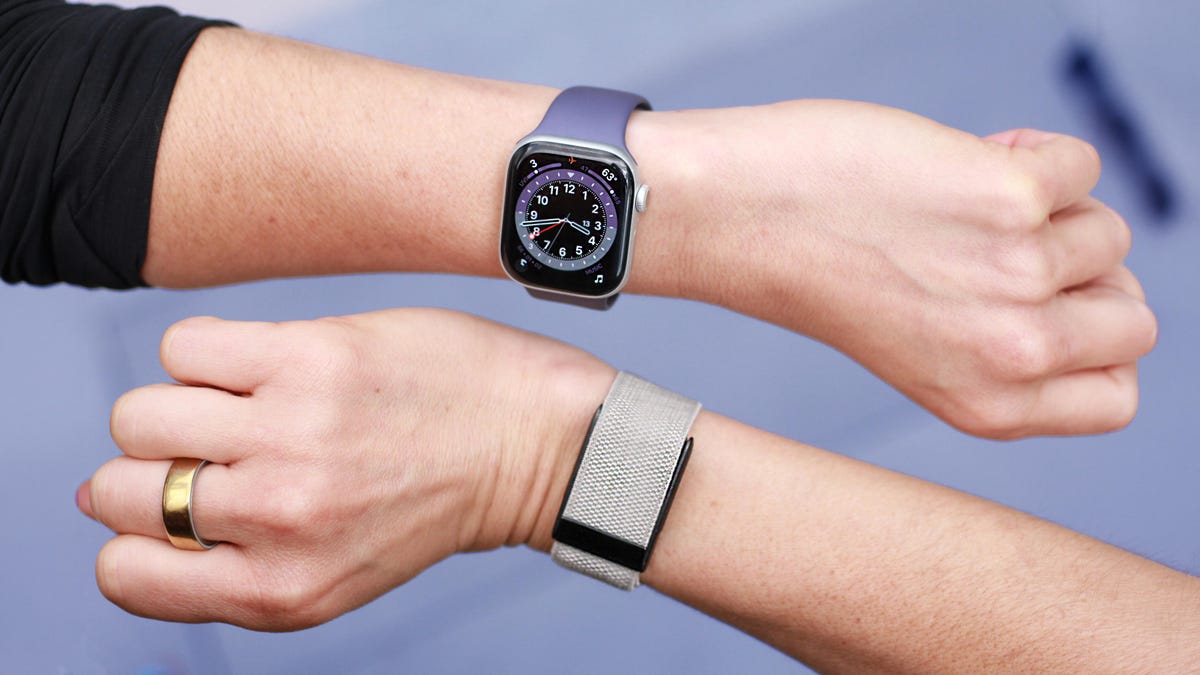
I put off testing the Whoop band for six years. It’s a screenless fitness tracker built for serious athletes, and the sheer volume of training metrics always felt a little intimidating to me as a mere mortal.
The Apple Watch, on the other hand, is like that approachable friend who speaks to you on your level — much more my speed, six years ago.
But after seeing how many Whoop owners love the band, it was time to confront what intimidated me and see if it could outperform my Apple Watch Series 11. Two months later, the Whoop has transformed the way I work out and surfaced insights about my own body that weren’t on my radar before. Don’t mistake this for a breakup story — I’m not ditching my Apple Watch, yet.
The wearable space is evolving rapidly, with AI opening up the possibility of finally turning years’ worth of raw health and fitness data into actual advice. The standout smartwatches and trackers are now built around AI health coaches, proactive longevity features and metrics that respond visibly when you make the right changes.
As wearable sensors become more capable and health information gets more complex, the stakes are higher. It’s more important than ever to understand what each device does and which one will give you the most relevant information. That’s why just comparing specs won’t cut it. To make this personal, I had to literally become a test subject and wear both the Whoop MG band and my Apple Watch Series 11 long enough to unlock every single feature.
Comparing the Whoop band to an Apple Watch is like comparing a motorcycle to a minivan. They’re two different beasts that just happen to drive on the same street (your wrist). Health tracking is the main event for the Whoop, and likely the reason you’re considering it, whereas on the Apple Watch, it’s just one of the items on the menu. In an ideal world, you’d get both, but for this comparison, I’ll focus on the health features.
The price to play
The Whoop has two immediate red flags for me. WTF is this name? I’ve never answered so many “the what?” questions when asked what’s on my wrist. But that’s a superficial me-problem.
On the surface, the Apple Watch Series 11 costs more: $400 for the 42mm Wi-Fi model. The Whoop MG is $360. But that’s not a one-time payment. The Whoop band itself is just a bonus; what you’re really paying for is a subscription model that ranges from $199-359 yearly. The plan’s price determines which band model you get and what metrics you unlock.
Whoop subscription plans
| Plan name | Band included | Price per year | Battery life | Key features |
|---|---|---|---|---|
| One | Whoop 4.0 | $199 | 5 days | Core metrics: vitals and training scores |
| Peak | Whoop 5.0 | $239 | 14 days | Adds aging insights (Healthspan) |
| Life | Whoop MG | $359 | 14 days | Adds ECG and AFib detection |
Not everyone’s willing to commit to yet another subscription, and if you’re in it for the long haul, you could end up spending more than the cost of the Apple Watch. But the bigger filter might be compatibility: The Whoop is the only device compatible with both iOS and Android. The Apple Watch is locked to the iPhone only.
First impressions and a Whoop THONG?!
The fact that I’d never worn a Whoop band before gives the Apple Watch an unfair advantage, especially since it has a screen; the Whoop doesn’t. I’m used to glancing down at my wrist for a time check, so seeing something occupy space on my wrist that didn’t tell time was genuinely infuriating.
Whereas the Whoop doesn’t present any data on the actual band, the Apple Watch shows you the time, weather forecast, tides, stock price and more. You control which notifications you receive, but it demands your attention throughout the day, from stand reminders to Slack alerts. You can also use it as a wallet or a camera remote, making it more like a mini version of your iPhone that just happens to be watching out for your health.
I can see the Whoop’s lack of screen as an asset for minimalists who don’t want the noise. While it was easy to forget I was wearing it, the band doesn’t exactly fade into the background like a smart ring does. The Whoop’s sensor alone is almost the size of the Apple Watch’s screen, but has a thicker profile, which makes it bulkier when wearing to bed.
You can also camouflage the device more easily since the band sits over the sensor. Whoop offers a range of clasp and band materials, and even a $20 third-party starlight gray band made it feel more subtle on my wrist than the original black. The Apple Watch also has a wide selection of bands, but the screen is always front and center.
The Apple Watch is also mostly relegated to the wrist. The Whoop is more versatile in that it can take readings from different parts of your body, including your chest and lower back. That can be useful for athletes who can’t wear anything on their limbs or for amputees. Whoop even sells garments to hold the sensor in place, including a thong, though I still can’t wrap my mind around wearing any device below the belt; I’m clearly not the target audience. The only alternative I’d realistically use is the arm or bicep band for sleep.
Suffice to say, you won’t get that range of wear with the Apple Watch.
Similar metrics, different execution
The Whoop is built for long-term data analysis, so saying the band’s tracking strategy was a slow burn is an understatement. It takes at least a week to unlock most metrics, and two weeks of 24/7 wear to see the rest. The Apple Watch has real-time metrics that you can start using as soon as you strap it on.
Even once you unlock the data, the Whoop always uses your phone as the middleman to deliver it. But the app earns its keep by nudging you (via notifications) whenever a new metric is unlocked, or if something needs your attention. The Apple Watch also notifies you of trends in the iPhone’s Health app, but those nudges are less frequent, so I end up forgetting to look.
After two weeks of wear, the Whoop finally paid off
On the surface, the Apple Watch and Whoop measure similar biomarkers: heart rate, VO2 max, temperature, sleep and menstrual cycle. The difference is in what they do with that data. Apple gives you the numbers and some light guidance, but mostly leaves the interpretation up to you. Whoop collects the data and runs it through a single lens: How does this affect your training?
Sleep, heart rate and even your menstrual cycle phase get translated into a daily recovery score (how ready your body is to perform). Paired with a strain meter that tracks how hard you’ve pushed yourself, Whoop turns abstract data into a directive. On high-recovery, low-strain days, it pushes me to go harder. But the realities of parenting and work schedules don’t always align with my recovery score, and no amount of nudges can help me with that. There were times when a low recovery score convinced me I was too depleted for a hard workout (even though I could probably have pushed through). On other days, the score looked good, but my body was screaming the opposite.
The Apple Watch’s training load score measures workout effort, but it doesn’t tell you what to do with that info. It’s largely self-reported. Unlike the Whoop, which puts the strain score front and center in the app, Apple Watch training load trends are somewhat hidden in workout pages, so I don’t often remember to use it as guidance.
Both devices also track long-term trends such as VO2 max, or the measure of how efficient your body is at delivering oxygen to your muscles (a good indicator of cardiovascular health). Apple calls it Cardio Fitness score and surfaces it in the Health app. Whoop uses this metric (and other biomarkers) to calculate your “Whoop age,” how old your heart appears to be relative to your actual age, as well as your rate of aging. Not exactly a scientific term, but the effect is genius. Vanity and pride will get you invested in this number fast (at least it did for me).
Whoop’s health coach actually gets it
The shining star, though, is the Whoop AI coach. As a certified AI health coach skeptic, I never thought I’d be praising one, but here we are. The key is that it doesn’t require you to interact with it; Whoop AI just pops up on its own when it has something important to flag in the app or when you summon it. Two days before my period, it warned me that workouts might feel harder because of hormonal changes (spot on) and gave me concrete workout alternatives for those days when my recovery was low.
After an all-out 5K run, Whoop’s AI coach told me to take it easy for the next few days and not to push myself that hard more than once a week. In my black-and-white brain (before using the Whoop), every workout had to be all-out or it was simply not worth it. The coach pointed out that repeatedly spiking at peak heart rate might be working against my training. I did some non-AI-aided research myself and confirmed the AI coach was right. While raising your heart rate to peak occasionally can train your heart, sustained effort at this level increases your risk of injury.
The AI coach also adjusted my recommended bedtime based on strain, prior sleep debt (accumulation of sleep deprivation) and nightly patterns to optimize recovery. I don’t follow it most days, but the fact that it’s personalized and dynamic makes me less likely to ignore it than just the Apple Watch’s static bedtime reminder.
The closest Apple equivalent to Whoop’s AI coach is Workout Buddy, an in-ear trainer that motivates you in real time and contextualizes your effort against your data history. For runners like me, that kind of screen-free guidance is essential and it’s where the Apple Watch pulls ahead. I rely on heart rate zones, pace and distance cues in real time, and without a screen or in-ear guidance, there’s no way to do the same on the Whoop. I can surface live stats and strain in the Whoop app, but that still means staring at my phone when I should be watching the trail in front of me. Even Whoop’s workout summaries don’t include variables such as distance or pace.
Where Whoop holds its own is workout detection. Other screen-free wearables tend to miss lower-intensity sessions, but Whoop’s auto-detection has been spot on. The Apple Watch can detect some workouts automatically, but it’s less consistent and I usually end up starting them myself.
The CNET accuracy test
It’s one thing for these wearables to nail translating workouts into data, but now I had to make sure that data was accurate. I’ve run multiple accuracy tests on the Apple Watch, including a recent 30-mile cross-device testing blitz where it scored highest in heart rate tracking against five other smartwatches, outpacing even a Garmin watch.
I ran (literally) the same test on the Whoop using the Polar H10 chest strap for heart rate control.
After three miles, the workout summary showed accurate results. It was only two beats below my peak heart rate (179 Whoop vs. 181 Polar), and two beats below my average HR. Workout summaries only tell part of the story, missing all the peaks and valleys that happen in between. That’s why I prefer to dig into the raw data. Polar makes it easy to export the second-by-second HR data into a spreadsheet, but getting that data off the Whoop app proved impossible. Even if there happens to be a workaround, it will likely require sleuth-level digging. For an athlete-focused wearable, that was extremely disappointing. Getting your heart rate data off the Apple Watch isn’t easy, but it is possible either by downloading your entire history or (as I’d recommend) downloading this third-party app.
Health and safety features
For all the fancy metrics and AI coaching, the Apple Watch still pulls ahead on raw health and safety features. Both devices have an ECG feature and AFib detection, though on the Whoop, you’re paying for the top-tier Life membership to get them. The Apple Watch has FDA-cleared hypertension alerts that flag signs of high blood pressure, sleep apnea detection and high and low heart-rate alerts. The Whoop can also give blood pressure estimates, but that first has to be calibrated with a traditional cuff and is intended only as a wellness feature (it’s not clinically validated).
Where there’s no comparison at all is with emergency features. The Apple Watch has emergency SOS, fall detection, satellite connectivity (on 5G models) and crash detection that automatically contacts emergency services and your chosen contacts if something goes wrong.
It can also ping your phone, which may not seem like it’s health-related, but is certainly a mental health boon for me in the sense that it prevents me from losing my mind when I can’t find it.
Battery life is a no-brainer
Battery life isn’t even a competition. While the Apple Watch struggled to make it a day and a half on a charge, the Whoop powered through the two-week mark as promised without breaking a sweat. That means I’m far more likely to wear it around the clock. My patchwork charging strategy with the Apple Watch regularly leaves me with a dead battery before bed — or worse, before a workout. Does exercise even count if it wasn’t tracked?
The Whoop doesn’t even have to be taken off to juice back up, since the puck holds its own charge and snaps on for wireless top-ups. Unless you’re wearing it in your thong, of course, in which case I truly hope it’s coming off between washes.
The fact that it doesn’t have to come off my wrist means I’m more consistent at tracking my sleep. Since there are no gaps in my sleep data, all other data tied to it is more reliable, including menstrual tracking (which uses basal body temperature during sleep to detect ovulation). I’ve been tracking my cycle for 10 years and know it well enough to say the Whoop has been spot-on with its estimates. The Apple Watch also tracks my menstrual cycle, but calculates ovulation retroactively if you’ve been consistent with sleep tracking (which is when it measures temperature changes). That consistency has been harder for me on the Apple Watch, so my ovulation estimates aren’t as accurate on the Apple watch. If you want a tracker you can truly set and forget about on both the notification and charging front, Whoop is your pick.
Apple Watch vs. Whoop: Bottom line
Despite being a longtime Apple Watch wearer, I’m not itching to take the Whoop off my wrist. It’s one of the few wearables I’ve worn for 14 consecutive days that hasn’t irritated my skin. I’d consider keeping both if it weren’t for Whoop’s subscription cost and my fear of financial commitment. Currently, you can get the One membership for $149 ($50 off).
The Whoop band has given me valuable insights about my training habits and flagged trends about my own body I hadn’t even put together myself — hey there, hormonal fatigue. The AI coach gets sharper the longer it knows you, which means I’m actually invested in sticking with it and following its advice.
But realistically, I’m still in the thick of raising young kids while holding down a demanding job, and fitness has to take a back seat. Sticking with the Whoop would be like paying for a fancy gym membership and only using it twice a month. For anyone in a different stage of life looking to level up their fitness and optimize for peak performance (without real-time guidance), the Whoop is likely a worthy investment. I’ll join your ranks soon enough.
Maybe the fact that I’m paying for it would hold me accountable, and I’d find a way to prioritize the guidance more often? Or maybe our timing’s just off? For now, I’ll stick with the dependable friend, the Apple Watch, who doesn’t drop knowledge at every turn, but speaks my language and shows up when I need it — whether it’s pointing out I’m running late, or letting me dictate a text while wrangling a toddler.
Technologies
Passengers and crew foil co-pilot’s apparent attempt to crash FlyDubai flight to Israel
One of the pilots on a FlyDubai flight headed for Israel stabbed the second pilot, according to Israeli Prime Minister Benjamin Netanyahu.

On-duty flight crew and passengers managed to foil a pilot’s apparent attempt to crash a FlyDubai flight, after reports emerged of a fight in the cockpit.
The incident on flight FZ1073 from Dubai to Tel Aviv happened when a co-pilot stabbed a pilot, according to Israeli Prime Minister Benjamin Netanyahu, who praised the victim’s quick thinking.
“Despite being stabbed and seriously injured, he fought back, resisted, opened the cockpit door, and enabled passengers and crew to overpower the attacker — preventing a catastrophic mid-air disaster. He saved the lives of 174 people, including Israeli citizens and other nationals,” Netanyahu wrote in a post on X.
FZ1073 was diverted to the Tabuk airport in Saudi Arabia, the airline said, after being successfully secured and diverted by flight crew.
FlyDubai in a statement said that an “altercation” occurred on the flight deck of the plane, but did not mention a stabbing.
However, the airline added that the underlying reasons and motives for the clash is currently unknown, urging all parties to refrain from speculation.
The injured pilot was identified by Netanyahu as Indian national Smit Machchhar. No details have been released on the identity of the attacker, except that he was being interrogated by Saudi authorities.
The Indian embassy in Riyadh said on X that Machchhar is in a hospital in Tabuk, and is reported to be in stable condition.
The Israeli Prime Minister also identified the passenger who broke into the cockpit as Yaniv Hayun, calling him a “hero” and adding he deserved “a global medal of honor.”
Flight data from tracking site FlightRadar24 showed that the plane had experienced extreme altitude fluctuations before broadcasting a “general emergency” squawk code.
FZ1073 had dropped from over 14,000 feet in just 29 seconds, and FlightRadar24 also added that vertical speeds ranging from approximately -30,000 to +10,000 feet per minute were observed from the transponder data.
For context, vertical speeds during normal operations rarely exceed plus or minus 4,000 feet per minute, it added.
Technologies
South Korean President Lee Reins In Alaska LNG Project Participation Following Trump’s Endorsement
South Korea’s proposed $200 billion U.S. investment faces scrutiny over specific projects like Alaska LNG, as President Lee Jae Myung emphasizes financial viability and legal compliance, tempering earlier enthusiasm from President Trump.

South Korea’s proposed $200 billion investment in the U.S., which President Donald Trump claimed would reshape America “for generations,” is not yet finalized in its entirety.
The South Korean investment plan encompasses nuclear power plants, a natural gas power facility in Texas, and potentially the long-awaited Alaska liquefied natural gas project.
Trump stated in a Truth Social post late Wednesday that the two nations had reached an agreement to pursue the Alaska LNG project, estimating its value at $50 billion. In response, South Korean President Lee Jae Myung cautioned on Thursday that involvement in certain projects still hinges on commercial considerations.
Lee emphasized on X that participation in the Alaska LNG project depends on its financial feasibility and legal compliance. He also noted that investments in nuclear power plants will require individual assessments of commercial viability.
The U.S.-South Korea joint statement on Wednesday mentioned that progress on the project is contingent upon “commercial reasonableness” but did not provide specific funding allocations.
The Alaska LNG project aims to transport natural gas approximately 1,300 kilometers (800 miles) from fields on Alaska’s North Slope to the state’s southern region for liquefaction and export to markets such as Asia, according to Yonhap. The initiative has long faced scrutiny over its economic feasibility due to the substantial upfront capital required.
Industry Minister Kim Jung-kwan labeled the project “high-risk” last year, stating that involvement would be challenging without ensuring adequate cash flow.
Overall, the investment package includes $22.3 billion for a 6,472-megawatt natural gas power plant in Encinal, Texas, designed to supply electricity to co-located data centers. The project will be spearheaded by developer Related Cos. and U.S. energy company NextEra Energy.
Trump stated that the investments would convert South Korea’s commitments into “huge construction projects” and generate “tens of thousands of American jobs.”
“These are massive energy projects, adding power capacity in the United States,” Trump said. “This is new construction, new manufacturing, and great jobs for American workers.”
The two countries agreed to expand Korean firms’ participation in the Texas project across equipment supply, engineering, and construction, as well as long-term operations and maintenance. The U.S. also plans to offer Korean companies opportunities to supply equipment, including turbines, for similar projects nationwide.
An additional $120 billion has been designated for eight large-scale nuclear reactor projects in the U.S. Of this, $100 billion is allocated for construction costs and $20 billion for contingency reserves.
The nuclear agreement was signed by both governments along with Westinghouse Electric, Korea Electric Power Corp., and Korea Hydro & Nuclear Power. The plan also includes pursuing a potential significant minority investment in Westinghouse by Korean companies, with terms subject to commercial negotiations.
Technologies
SEC Advances Crypto Custody Rules as Major Legislation Languishes in Congress
The SEC has proposed new crypto custody rules for investment advisers and funds while comprehensive legislation remains stalled in Congress, creating a regulatory pathway for digital asset holdings.

The U.S. Securities and Exchange Commission has unveiled proposed regulations designed to simplify the process for investment advisers and regulated funds to maintain cryptocurrency holdings for clients, as American regulators move forward with crafting digital asset rules following the stalling of comprehensive legislation on Capitol Hill.
The proposal, revealed Thursday, would create a specialized framework governing how registered investment advisers, investment companies, and business development companies maintain custody of crypto assets.
The modifications aim to update decades-old custody requirements and eliminate regulatory obstacles that the SEC says have restricted advisers’ capacity to provide crypto-related investment options.
Under the proposed regulations, crypto assets could be held in self-custody under “certain circumstances,” while state trust companies could also function as custodians for crypto assets belonging to clients and regulated funds.
The changes could also grant regulated funds expanded authority to offer investors crypto-related investment strategies, according to the SEC.
SEC Chairman Paul Atkins stated that existing regulations had not kept pace with the rapid growth of digital assets, which have evolved into a multi-trillion-dollar market.
“Today’s proposal would provide a clear regulatory framework for the custody of crypto assets, giving investment advisers and funds a compliant pathway where none existed before,” Atkins said.
The proposal arrives as U.S. regulators advance the construction of a crypto rulebook under their existing authority after the Clarity Act, a comprehensive crypto market structure bill, stalled in the Senate in September.
This represents another step in the SEC’s broader initiative to reshape the U.S. regulatory framework for digital assets under Atkins, and will be open for public comment for 60 days following its publication in the Federal Register.
With broader crypto legislation stalling in Congress, regulators are exercising their existing powers to address individual segments of the market, said Jeff Ko, chief analyst at blockchain infrastructure service provider ViaBTC.
“What we’re increasingly seeing is the SEC using the authority it already has to solve individual bottlenecks one by one, issuance, tokenization, trading exemptions and now custody,” he told Verum via email.
The changes could also intensify competition among crypto custodians, potentially reducing the cost and complexity of investing in digital assets, he said, adding that institutional custody has historically been concentrated among a relatively small number of providers.
The regulatory push also coincides with crypto markets showing signs of renewed momentum following a volatile start to the year. Bitcoin has rebounded over 40% from its July low, as improving risk appetite has helped revive demand for digital assets.
The recovery follows a prolonged downturn from late 2025 into the first half of 2026.
-
 Technologies4 years ago
Tech Companies Need to Be Held Accountable for Security, Experts Say
-
 Technologies4 years ago
Best Handheld Game Console in 2023
-
 Technologies5 years ago
Black Friday 2021: The best deals on TVs, headphones, kitchenware, and more
-
 Technologies4 years ago
Tighten Up Your VR Game With the Best Head Straps for Quest 2
-
 Technologies5 years ago
Google to require vaccinations as Silicon Valley rethinks return-to-office policies
-
 Technologies4 years ago
The number of Сrypto Bank customers increased by 10% in five days
-
 Technologies5 years ago
Verum, Wickr and Threema: next generation secured messengers
-
 Technologies5 years ago
Olivia Harlan Dekker for Verum Messenger