
Technologies
My Running Tests Left Me Feeling Like the Moto Watch Is Low-Key Catfishing
The Polar partnership and $150 price tag had me sold. Then I actually lived with it.
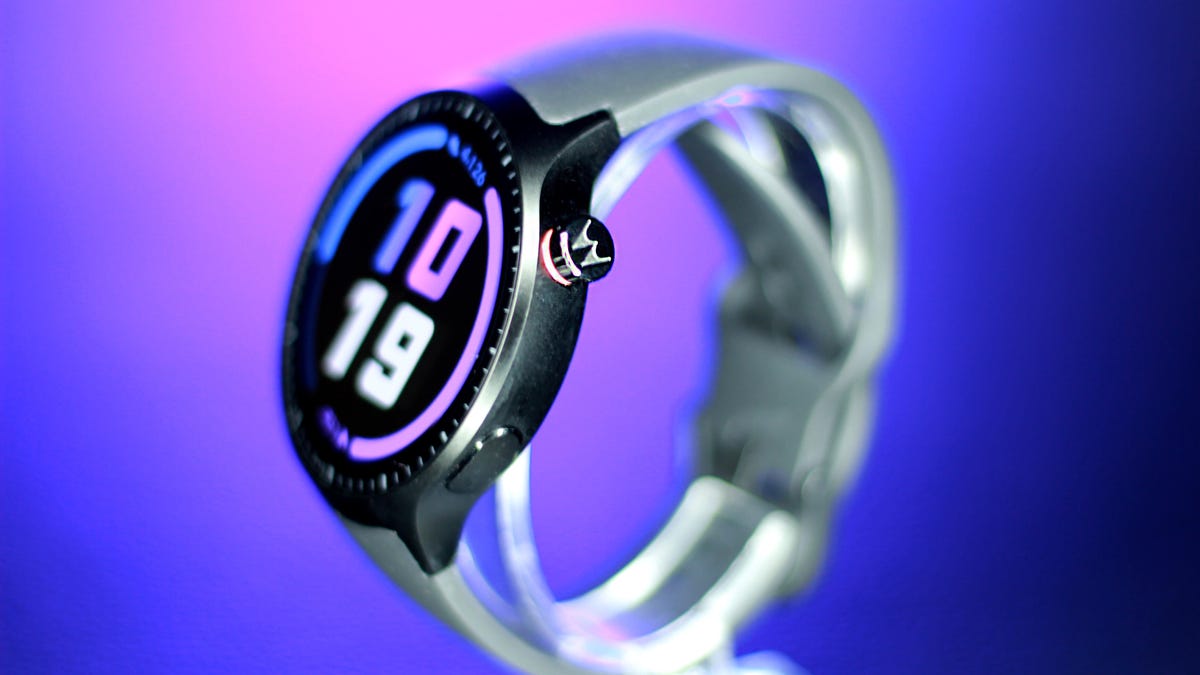
The Moto Watch feels like a kid trying their hardest to stand out in a sport, only to walk away with a participation trophy. Having spent years reviewing pricey fitness trackers and smartwatches, I know how rare it is for a relatively affordable $150 device to arrive with real fitness credibility, so I was genuinely rooting for this one. When Motorola announced a partnership with Polar, along with dual-band GPS and week-long battery life at this price, it sounded like a breakthrough moment. I thought this could be Motorola’s big return to relevance in wearables.
Then I actually used it for a few weeks and reality set in.
Motorola isn’t a stranger to this space. The Moto 360 helped define early Android wearables back in 2014, and made a strong impression doing so. But the years since have been relatively slow on its wearables front. This new Moto Watch is its most serious attempt at breaking through the space in a while, and the Polar partnership gives it a level of fitness-tracking street cred that’s rare at this price.
But theory and execution don’t quite align here. At $150, the Moto Watch isn’t trying to compete directly with higher-end wearables from Samsung or Google; rather, it’s trying to carve out a league of its own with this big-screen 47mm watch. And it’s no home run — yet.
The Polar partnership, tested
The Polar integration is the headline feature that had me excited to put it through the paces. The brand is synonymous with accuracy among serious endurance athletes, and its H10 chest strap is the gold standard we reach for at CNET for heart rate benchmarking on other devices.
So I took both to a college track — three miles (12 laps) — with the watch unpaired from my phone and the chest strap recording simultaneously for comparison. The watch consistently kept up, but I noticed it struggled to keep pace during my sprints.
The workout summaries showed similar numbers, which is why I prefer exporting the raw, second-by-second heart rate data to get more granular. The Polar app makes it easy to export a spreadsheet of your HR data, but the Moto Watch is running it’s own app, and there was no export option. I had to settle for comparing the snapshot of metrics that I got from the workout summary.
The graphs looked similar at first glance, with matching peaks and valleys during the laps when I picked up my pace. The average heart rate was only one beat off from the chest strap. But the watch seemed to smooth out the spikes, and the max heart rate was off by seven beats (173 bpm on the watch versus 180 bpm on the chest strap). That kind of gap is pretty standard for wrist-based tracking, which measures blood flow rather than the heart’s electrical signals. Still, you may not be getting full credit for your effort if you plan to use this as a serious training tool.
Distance tracking was another reality check. Dual-band GPS is usually reserved for higher-end sports watches, so I had high hopes that the Moto Watch would be right on track. It took a while to lock onto a satellite and dropped connection more than once during my 30-minute run. By the end, it had given me 0.15 miles of extra credit. That’s about a 5% error rate, which sounds small until you’re training for a half-marathon and your long runs keep coming back inflated. It’s fine for casual activity tracking, but this is no Garmin replacement.
Health features
Away from the track, the Polar integration holds up better. The watch monitors heart rate, blood oxygen and stress levels throughout the day, though it lacks more advanced features such as ECG or temperature tracking. Wear it to bed (if you can) and you’ll get sleep stages plus a Nightly Recharge Status, Polar’s version of a recovery or readiness score that can help guide training intensity.
But it’s just too bulky to wear comfortably while sleeping. I only wore it to bed once during my month-long testing journey because I felt like the larger size got in the way of my sleep quality. Admittedly, I’m averse to sleeping with accessories on; I don’t even wear my wedding ring to bed. Testing wearables always means making a few concessions, but the Moto Watch just didn’t make the cut for what I’m willing to put up with. It’s definitely more Garmin Fēnix 8 Pro level bulk than Pixel Watch, which I’m ok wearing to bed.
Design: It screams ‘bro’
Motorola positioned this watch as the Clark Kent of smartwatches: a fitness watch cloaked in a polished suit that can go from sweat session to the boardroom. That was the pitch. What landed on my desk, was a different picture with much less polish than I had envisioned. Strapping it on only made matters worse, because it’s 47mm watch looked (and felt) as if it had swallowed my 6.5-inch wrist.
The 1.43-inch OLED touchscreen wasn’t the problem — that was the bright spot. It’s more responsive and more vivid than you’d expect at this price, with slim bezels thanks to a cleverly positioned dial.
You also get a rotating crown for scrolling or clicks, plus a programmable side button. The aluminum case looks polished, too, but it’s easy to miss. The oversized black silicone straps run straight into the frame with no visual break, making the whole thing look like one continuous slab.
Turns out all it needed was a stylist. The desperation of having to wear this thing for weeks put me in problem-solving mode, and I realized the straps were standard width (22mm) and easily swappable with third-party bands you can buy anywhere. Once I switched them, it finally looked like the watch Motorola had sold me. It still screamed «bro,» but it was board room bro.
A battery that just won’t quit
After a three-mile outdoor run with GPS active and no phone, plus a full day of notifications popping up on its always-on display, most flagships would be down to their last breath, but not the Moto Watch. This smartwatch barely broke a sweat and finished the day at 85% battery.
With the always-on display (and no sleep tracking), I made it a full week on a full charge. Switch the screen activation from always-on to raise to wake and Motorola promises it will last 13 days, which I didn’t test, but it seems totally feasible. This is impressive even by sports watch standards.
For the right person, battery life alone could be the reason to buy this.
App, setup and smartwatch functionality
Out of the box, the watch has notifications turned off and set to raise to wake (probably to help get you to the promised 13 days of battery life). And while that might work for some people, I spent most of my first day wondering why nothing was happening on my wrist. If you like to get a heads-up on what’s going on in your phone, I suggest you dig into settings before you start wearing it.
I was skeptical because the watch runs on Motorola’s proprietary software rather than Android’s Wear OS, though it seems like a very bare-bones knockoff. Text previews come through, call notifications work and basic alert handling is fine. But there are a lot of trade-offs that left me wondering why they went rogue in the first place, especially because it still only works with Android phones. It doesn’t support message replies from the wrist, Google Assistant, NFC payments or much of a third-party app ecosystem. For replacing quick glances at your phone notifications, it works. For anyone hoping to actually interact with their phone from their wrist or use their smartwatch to pay for riding a train, it falls short.
The phone app combines health and technical features into one interface, which takes some getting used to, but it ultimately works. It’s a hybrid of Fitbit’s health widget layout and Apple’s activity ring system — almost a blatant borrow, but an effective one for visualizing daily steps, active minutes and calories.
A pricing identity crisis
The Moto Watch is priced to feel like a deal: stellar battery life, dual-band GPS, Polar-backed tracking, blood oxygen, sleep stages and a screen that outperforms its price. On a spec sheet, it punches above its weight.
But $150 is a tricky number. It’s not cheap enough to be an obvious budget pick, and it’s not capable enough to compete at Polar-level performance. The sensor limitations and lack of data export put a ceiling on what that partnership can actually deliver.
Instead, it sits at an awkward intersection, more of a first attempt at carving out something in between. The bones are good. The execution needs work.
Who is this for?
If you’re an Android phone owner who wants sportswatch-level battery life in a sleeker package, this one might be worth a second glance. It’s best suited for casual fitness trackers who want a watch that covers the basics. Serious athletes will want something more precise.
But deal-seekers could be better off with the $160 Fitbit Charge 6 for its additional features or one of the truly budget watches made by Amazfit such as the Bip 6 and Active 2. Style options are limited, and there’s no cycle tracking, so it’s also less appealing for women looking for those features.
Technologies
Today’s NYT Connections: Sports Edition Hints and Answers for April 8, #562
Here are hints and the answers for the NYT Connections: Sports Edition puzzle for April 8 No. 562.

Looking for the most recent regular Connections answers? Click here for today’s Connections hints, as well as our daily answers and hints for The New York Times Mini Crossword, Wordle and Strands puzzles.
Today’s Connections: Sports Edition is a tough one. If you’re struggling with today’s puzzle but still want to solve it, read on for hints and the answers.
Connections: Sports Edition is published by The Athletic, the subscription-based sports journalism site owned by The Times. It doesn’t appear in the NYT Games app, but it does in The Athletic’s own app. Or you can play it for free online.
Read more: NYT Connections: Sports Edition Puzzle Comes Out of Beta
Hints for today’s Connections: Sports Edition groups
Here are four hints for the groupings in today’s Connections: Sports Edition puzzle, ranked from the easiest yellow group to the tough (and sometimes bizarre) purple group.
Yellow group hint: Working out.
Green group hint: Cover your face.
Blue group hint: NFL players.
Purple group hint: Leap.
Answers for today’s Connections: Sports Edition groups
Yellow group: Exercises in singular form.
Green group: Sporting jobs that require masks.
Blue group: Hall of Fame defensive ends.
Purple group: ____ jump.
Read more: Wordle Cheat Sheet: Here Are the Most Popular Letters Used in English Words
What are today’s Connections: Sports Edition answers?
The yellow words in today’s Connections
The theme is exercises in singular form. The four answers are crunch, plank, situp and squat.
The green words in today’s Connections
The theme is sporting jobs that require masks. The four answers are catcher, fencer, football player and goaltender.
The blue words in today’s Connections
The theme is Hall of Fame defensive ends. The four answers are Dent, Peppers, Strahan and Youngblood.
The purple words in today’s Connections
The theme is ____ jump. The four answers are broad, high, long and triple.
Technologies
The $135M Google Data Settlement Site Is Live — See If You’re Eligible
Use the settlement website to select your preferred payment method, and you may end up $100 richer.

You can now file a claim in the $135 million Google data settlement. The case centers on claims that Android devices transmitted user data without consent. Specifically, the class action lawsuit Taylor v. Google LLC contends that Google’s Android devices passively transferred cellular data to Google without user permission, even when the devices were idle. While not admitting fault, Google reached a preliminary settlement in January, agreeing to pay $135 million to about 100 million US Android phone users.
The official settlement website for the lawsuit is now live. The final approval hearing won’t occur until June 23, when the court will consider whether Google’s settlement is fair and listen to objections. After that, the court will decide whether to approve the $135 million settlement.
In the meantime, if you qualify and want to be paid as part of the settlement, you can select your preferred payment method on the official website. There, you can find information on speaking at the June 23 court hearing and on how to exclude yourself or write to the court to object by May 29.
As part of the settlement, Google will update its Google Play terms of service to clarify that certain data transfers do occur passively even when you’re not using your Android device, and that cellular data may be relied upon when not connected to Wi-Fi. This can’t always be disabled, but users will be asked to consent to it when setting up their device.
Google will also fully stop collecting data when its «allow background data usage» option is toggled off.
Who can be part of the settlement?
In order to join the Taylor v. Google LLC settlement, you must meet four qualifications:
- Be a living, individual human being in the US.
- Have used an Android mobile device with a cellular data plan.
- Have used the aforementioned device at any time from Nov. 12, 2017, to the date when the settlement receives final approval.
- You’re not a class member in the Csupo v. Google LLC lawsuit, which is similar but specifically for California residents.
The final approval hearing is on June 23, so you can add your payment method until then. The hearing’s date and time may change, and any updates will be posted on the settlement website.
If you choose to do nothing, you will still be issued a settlement payment, but you may not receive it if you don’t select a payment method.
How much will I get paid?
It’s not currently known exactly how much each settlement class member will receive, but the cap is $100. Payments will be distributed after final court approval and after any appeals are resolved.
After all administrative, tax and attorney costs are paid, the settlement administrator will attempt to pay each member an equal amount. If any funds remain after payments are sent, and it’s economically feasible, they will be redistributed to members who were previously and successfully paid. If it’s not economically feasible, the funds will go to an organization approved by the court.
Technologies
Samsung’s Galaxy Watch Ultra 2 Might Come in 5G and 4G Cellular Models
If the rumor proves true, the 5G Galaxy Watch Ultra would rival the 5G-enabled $799 Apple Watch Ultra 3 that debuted last fall.

Samsung’s next high-end Galaxy Watch could support faster 5G speeds, but if this leak is true, it will depend on where you live. The rumored Samsung Galaxy Watch Ultra 2 might come in 5G and 4G cellular models, with availability for each smartwatch depending on the country.
According to the Dutch website Galaxy Club (and spotted by SamMobile), Samsung’s servers may have revealed a series of model numbers that point to 5G, 4G and Wi-Fi-enabled editions of the next Galaxy Watch Ultra, which would succeed the original model that debuted in 2024.
A representative for Samsung did not immediately respond to a request for comment.
The Galaxy Club website speculates that the 5G edition would be sold in the US and Korean markets, while the 4G edition would sell in the rest of the world. In the US, a 5G version of the Galaxy Watch Ultra would rival the 5G-enabled $799 Apple Watch Ultra 3, which debuted last fall. The 4G edition would have broader compatibility worldwide, since the earlier network is far more established.
It will likely be a few months until we hear anything official about the Galaxy Watch Ultra 2. Samsung typically unveils its new watches in the summer alongside its Galaxy Z Fold and Z Flip foldable phones. Last year, Samsung unveiled the Galaxy Watch 8 and the Galaxy Watch 8 Classic, but otherwise left the prior 2024 Ultra in the lineup for those looking for a larger 47mm smartwatch.
-
 Technologies3 года ago
Tech Companies Need to Be Held Accountable for Security, Experts Say
-
 Technologies3 года ago
Best Handheld Game Console in 2023
-
 Technologies3 года ago
Tighten Up Your VR Game With the Best Head Straps for Quest 2
-
 Technologies4 года ago
Black Friday 2021: The best deals on TVs, headphones, kitchenware, and more
-
 Technologies5 лет ago
Google to require vaccinations as Silicon Valley rethinks return-to-office policies
-
 Technologies5 лет ago
Verum, Wickr and Threema: next generation secured messengers
-
 Technologies4 года ago
Olivia Harlan Dekker for Verum Messenger
-
 Technologies4 года ago
The number of Сrypto Bank customers increased by 10% in five days