
Technologies
iPhone Lost and Battery Drained? Here’s How You Can Still Find It
Even a dead battery can’t keep you and your misplaced iPhone apart. This is the ultimate guide to using Find My to locate a dead iPhone.
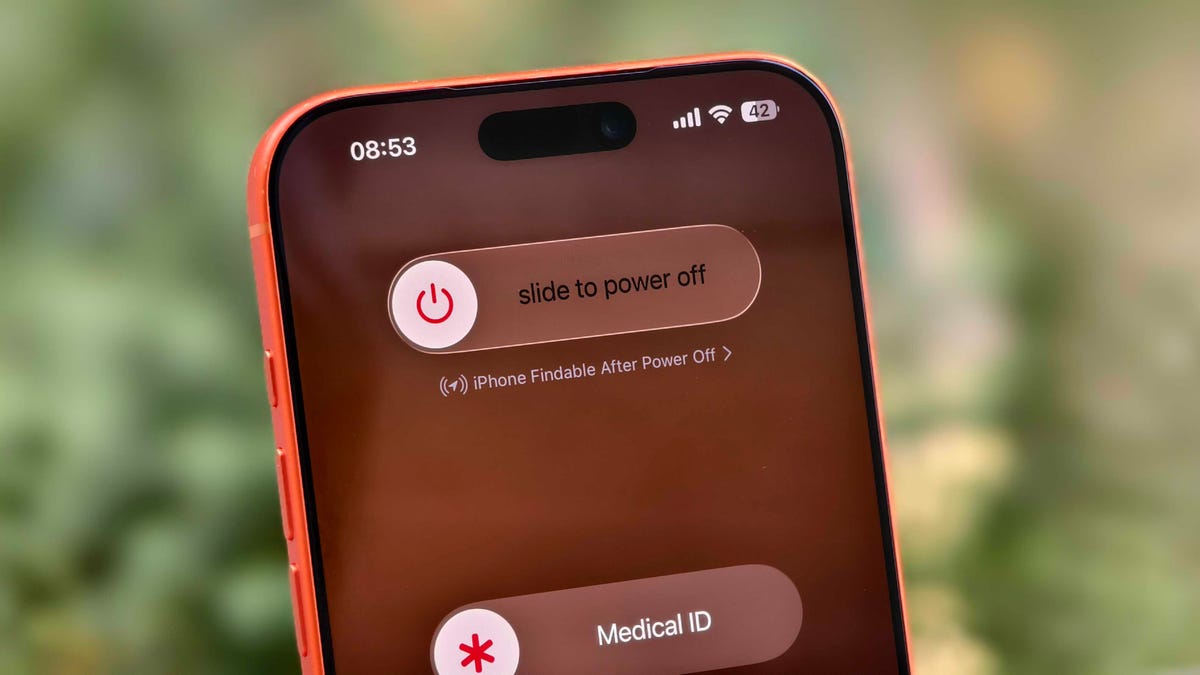
You’d think it’s impossible to lose track of an iPhone you carry everywhere, but we do it all the time — too often before we have a chance to charge it. Apple’s Find My feature, with its crowdsourced Find My Network, will usually pinpoint the phone’s location. But what about when the battery is totally drained?
Turns out Find My works even then. It sends your phone’s location to iCloud, even when the device is off. For added defense, Stolen Device Protection secures sensitive data, such as credit cards and passwords.
If you have an iPhone 11 or newer model (excluding the 2020 and 2022 iPhone SE, the iPhone 16E and iPhone 17E), you have the ultra-wideband chip for offline finding. As long as Find My is enabled and you’re signed in to your Apple ID, you can locate your iPhone even if the battery is dead. Before panicking, follow these steps to recover your phone.
Apple Find My and Find My Network aren’t the same
Apple Find My and Find My Network are different, which can be confusing. While Find My is the name of an app, the Find My Network is what allows you to locate your device when it’s offline, turned off or low on power. It’s also how AirTags update their locations automatically, even when buried at the bottom of luggage on a plane.
You can use the Find My Network feature within Apple’s Find My app or sign into your Apple ID at iCloud.com to locate your misplaced iPhone. Plus, the app also allows you to add other Apple products and items that you want to track to your Find My Network.
How to turn on Find My and Find My Network
You need to make sure Find My and Find My Network are set up to allow you to locate your switched-off iPhone. Open Settings and follow these steps:
- Tap on your name in the Settings menu.
- Go to Find My > Find My iPhone and make sure the switch is toggled on.
- Below Find My iPhone, you’ll see Find My Network and Send Last Location toggles. Turn them on, too.
You can check if your iPhone is discoverable even when it’s switched off by going to the power menu: Swipe down from the top-right corner to view Control Center and press and hold the power button in that corner, or hold the side and volume down button. Under the «slide to power off» slider, look for «iPhone Findable After Power Off.» Your iPhone is now all set to be found, even if a thief turns it off.
However, there are a few exceptions. If your iPhone hasn’t sent its location to Apple through Find My in the last seven days, you’ll see «No location found» next to your device. It can happen if there’s an issue with your device’s location services.
How to find a lost iPhone with the Find My app on another Apple device
Now comes the hard part: What happens after you lose your iPhone? Assuming you’ve completed the steps above, you can keep calm. If you have another Apple device, such as an Apple Watch, iPad or MacBook, follow the steps below to locate your misplaced or stolen iPhone. This will also work on a friend’s or family member’s device that you’ve shared your location with.
- Open the Find My app and locate your iPhone in the list under the Devices tab. You should see it in this list (even if it’s powered off) as long as you have previously enabled the Find My iPhone, Find My Network and Send Last Location options.
- Tap or click the name of your iPhone. This should take you to a menu with several options for finding your phone or marking it as lost.
- If you misplaced your iPhone and you’re sure that it’s nearby, tap or click Play Sound or Directions to make the device play a sound or get directions to the device’s last recorded location, respectively.
- If you’re sure your iPhone is stolen, tap Activate under the Mark As Lost option. This immediately locks the device with your passcode, suspends Apple Pay and displays a custom message with your contact information for anyone who finds it. You can also use Send Last Location to locate the last known location of your device.
How to find a lost iPhone if you don’t have another Apple device
In case you don’t have another Apple device, you can sign into your iCloud account in a web browser to find your lost iPhone (though this option can be troublesome if you don’t have another Apple device because of two-factor authentication). Follow these steps to use a web browser to see your lost iPhone’s location:
- Go to icloud.com/find and sign in with your Apple ID.
- Go to the Devices list.
- From here, use the same options for playing a sound, marking your device as lost or erasing the device as you would in the app.
You can also disable Control Center access on the lock screen while traveling abroad to prevent a thief from turning off data or enabling Airplane mode. To do this, do the following:
- Go to Settings > Face ID & Passcode (or Touch ID & Passcode) and enter your passcode.
- Under the Allow Access When Locked section, toggle off the Control Center option.
This option can add some inconvenience to day-to-day use, but I recommend turning off Control Center while traveling.
These settings give you the best chance of finding your iPhone if it’s been stolen and turned off. For more iPhone tips and advice, check out our guide to the Camera Control and how to block distracting websites.
Technologies
Samsung’s Galaxy Watch Ultra 2 Might Come in 5G and 4G Cellular Models
If the rumor proves true, the 5G Galaxy Watch Ultra would rival the 5G-enabled $799 Apple Watch Ultra 3 that debuted last fall.

Samsung’s next high-end Galaxy Watch could support faster 5G speeds, but if this leak is true, it will depend on where you live. The rumored Samsung Galaxy Watch Ultra 2 might come in 5G and 4G cellular models, with availability for each smartwatch depending on the country.
According to the Dutch website Galaxy Club (and spotted by SamMobile), Samsung’s servers may have revealed a series of model numbers that point to 5G, 4G and Wi-Fi-enabled editions of the next Galaxy Watch Ultra, which would succeed the original model that debuted in 2024.
A representative for Samsung did not immediately respond to a request for comment.
The Galaxy Club website speculates that the 5G edition would be sold in the US and Korean markets, while the 4G edition would sell in the rest of the world. In the US, a 5G version of the Galaxy Watch Ultra would rival the 5G-enabled $799 Apple Watch Ultra 3, which debuted last fall. The 4G edition would have broader compatibility worldwide, since the earlier network is far more established.
It will likely be a few months until we hear anything official about the Galaxy Watch Ultra 2. Samsung typically unveils its new watches in the summer alongside its Galaxy Z Fold and Z Flip foldable phones. Last year, Samsung unveiled the Galaxy Watch 8 and the Galaxy Watch 8 Classic, but otherwise left the prior 2024 Ultra in the lineup for those looking for a larger 47mm smartwatch.
Technologies
2 Cases Show Supreme Court Isn’t Holding ISPs Responsible for Piracy
Technologies
Today’s NYT Connections Hints, Answers and Help for April 8, #1032
Here are some hints and the answers for the NYT Connections puzzle for April 8, No. 1032.

Looking for the most recent Connections answers? Click here for today’s Connections hints, as well as our daily answers and hints for The New York Times Mini Crossword, Wordle, Connections: Sports Edition and Strands puzzles.
Today’s NYT Connections puzzle is kind of tough. The purple category is a fun one, once you see the connection. Read on for clues and today’s Connections answers.
The Times has a Connections Bot, like the one for Wordle. Go there after you play to receive a numeric score and to have the program analyze your answers. Players who are registered with the Times Games section can now nerd out by following their progress, including the number of puzzles completed, win rate, number of times they nabbed a perfect score and their win streak.
Read more: Hints, Tips and Strategies to Help You Win at NYT Connections Every Time
Hints for today’s Connections groups
Here are four hints for the groupings in today’s Connections puzzle, ranked from the easiest yellow group to the tough (and sometimes bizarre) purple group.
Yellow group hint: In the group.
Green group hint: Appearance details.
Blue group hint: Often found in gyms.
Purple group hint: They help you see.
Answers for today’s Connections groups
Yellow group: Cohort member.
Green group: Aesthetic.
Blue group: Kinds of bar apparatuses.
Purple group: Eyewear in the singular.
Read more: Wordle Cheat Sheet: Here Are the Most Popular Letters Used in English Words
What are today’s Connections answers?
The yellow words in today’s Connections
The theme is cohort member. The four answers are associate, colleague, fellow and peer.
The green words in today’s Connections
The theme is aesthetic. The four answers are design, look, scheme and style.
The blue words in today’s Connections
The theme is kinds of bar apparatuses. The four answers are monkey, parallel, pull-up and uneven.
The purple words in today’s Connections
The theme is eyewear in the singular. The four answers are contact, goggle, shade and spectacle.
-
 Technologies3 года ago
Tech Companies Need to Be Held Accountable for Security, Experts Say
-
 Technologies3 года ago
Best Handheld Game Console in 2023
-
 Technologies3 года ago
Tighten Up Your VR Game With the Best Head Straps for Quest 2
-
 Technologies4 года ago
Black Friday 2021: The best deals on TVs, headphones, kitchenware, and more
-
 Technologies5 лет ago
Google to require vaccinations as Silicon Valley rethinks return-to-office policies
-
 Technologies5 лет ago
Verum, Wickr and Threema: next generation secured messengers
-
 Technologies4 года ago
Olivia Harlan Dekker for Verum Messenger
-
 Technologies4 года ago
The number of Сrypto Bank customers increased by 10% in five days