
Technologies
My Galaxy A17 Review: Samsung’s $200 Phone Does It All… Slowly
Samsung’s lower-cost Galaxy phone hits all the right check boxes, but it’s easily overwhelmed when multitasking.
Our Experts


Pros
- Big and bright screen
- Good photos for the price
- Six years of software and security support
Cons
- Multitasking can be rough
- Noticeably sluggish
Samsung’s $200 Galaxy A17 5G makes me thankful that Android is so flexible. That’s because during my three weeks using the most affordable 2026 Galaxy phone, I kept running into roadblocks with the phone’s underpowered hardware.
Whenever I tried to run a navigation app on the phone at the same time as streaming music, I found that either the song had noticeable pauses and dips or the navigation app would automatically quit without any notice. This was especially frustrating when I realized I missed my subway stop while trying to make it to my friend’s concert. When the phone is doing just one of these tasks, the A17 loads them up fast and even feels smooth.
It’s a shame because the phone otherwise feels like a great value. It has access to nearly all the same apps and services found on more expensive Galaxy phones. I appreciated having Samsung’s Now bar, with dynamic notifications showing how much time is left on timers and important boarding pass information for my flights. Samsung’s Smart View lets me use Miracast to stream my phone’s display to a Roku TV, while most Android phones lately only include Chromecast support. Plus Samsung’s six-year promise of software and security updates is unmatched in this price range.
So while I do feel the Galaxy A17 is one of the best phones available for most people looking for a new device that’s under $200, it’s not an enthusiastic recommendation.
This phone could be great for someone who just wants a device that keeps things simple: Yes, you can make calls, send texts, take decent photos and stream videos from your favorite social media app for a low price. Just don’t expect the Galaxy A17 to excel at tasks that require some app juggling.
My Galaxy A17 navigation and music fix
I discovered a quick fix for when keeping multiple apps open puts too much strain on the phone, like when I used Google Maps and Apple Music at the same time. Open Settings: Search for Memory and you’ll bring up a page that lets you list your most important background apps as Excluded apps. This tells the Galaxy A17 to stop policing how much memory these take up, as the phone is actively checking and turning off apps that you might not need in the background. And with a limited 4GB of memory, I hit this strain constantly.
While Samsung does let you convert some of its onboard storage into an additional 4GB of memory, the Galaxy A17 simply does not have enough space to make multitasking easy. While it’s not uncommon for phones in this price tier to struggle with complex tasks, it’s frustrating to see the Galaxy A17 stumble in common multitasking processes such as navigation or listening to music.
Samsung Galaxy A17 design, software, battery
The Samsung Galaxy A17 might not have the trendy vegan leather look of the Moto G, but the A17 does make plastic look as good as you can get. My review unit came in black, and there’s also a blue option. The design mimics the newer Galaxy phones by assembling its rear cameras into a vertically aligned oval camera bar.
Along the front is the phone’s nice and bright 6.7-inch display, which runs at a 1,080p resolution. For its affordable price, the phone’s display is a highlight, and it runs smoothly at a 90Hz refresh rate. This made the phone particularly good for watching videos and browsing the web. While games looked good, the phone’s limited memory and processing power got in the way of them working well.
The Galaxy A17 comes with 4GB of memory and 128GB of storage, which have become fairly standard for phones at the $200 price range. But what bugs me is that this configuration is the same as what the Galaxy A15 offered two years ago, and when I reviewed that phone I also felt like the device struggled with some tasks. While Samsung has a RAM Plus setting to virtually expand the memory by «borrowing» from main storage, the limited space quickly became apparent whenever I tried to use the phone for multiple tasks.
The Galaxy A17 uses Samsung’s Exynos 1330 processor. In benchmark tests, it scored slightly lower than the MediaTek Dimensity 6300 powering the $180 Moto G Play that I recently tested. Even without the tests, it’s clear that you need to take things easy with the Galaxy A17. The phone would often crawl when I used it for basic tasks: When I swipe down from the top of the screen to look at notifications, there’s a noticeable delay between the swipe and the action on the screen. Playing music while texting sometimes works, and sometimes doesn’t. And sometimes when opening an app, I’d be greeted with a blank white screen while I waited for assets to load.
3DMark Wild Life Extreme
Geekbench 6.0
- Single-core
- Multicore
But when the phone works, I’ve been delighted by the way Samsung has been able to scale down its myriad of services to its $200 phone. Samsung Health, Samsung Wallet and Samsung’s Weather app are fully functional and even colorful. While audio plays only from a single speaker, it gets quite loud when I put on my news podcasts in the living room. Samsung no longer provides a headphone jack for its under-$200 phone, which began with last year’s A16, but it’s easy enough to listen through a Bluetooth-connected pair of wireless earbuds or a cast audio to a speaker.
The 5,000-mAh battery helps the phone last a little longer than a day of normal use. I typically ended a day with 30% to 40% of battery left. You’ll probably want to charge the phone every day and luckily it’s 25W wired charging speed filled the battery from 0% to 54% in 30 minutes. That’s quite good for the price, and likely means you’ll be able to charge the phone up while getting ready for the day.
In our 3-hour YouTube streaming battery test, the Galaxy A17 performs a hair better than Motorola’s $160 Moto G Play. It depleted to 81% by the time I’d finished testing its 5,000-mAh battery. The Play has a slightly bigger 5,200-mAh battery, which dropped to 79% during testing.
Galaxy A17 cameras
The cameras on the Samsung Galaxy A17 5G perform fairly well for the phone’s price. There’s a 50-megapixel wide-angle camera, a 5-megapixel ultrawide and a 2-megapixel macro for shooting close-up subjects. The photos I took at the pirate-themed Gasparilla Festival in Tampa, Florida managed to capture all the action without too much blurring. That said, the photos themselves aren’t very detailed, showing the camera suite’s limited capabilities.
The overcast day helped make colors come out, however it’s clear that the cameras don’t have a wide dynamic range and aren’t advanced enough to separate out dark hair from shadows. But for this price, that’s acceptable, as I’m glad to see so little motion blur.
The cameras were challenged more when trying to zoom in. Images taken with the preset 2x zoom had an abundance of crushed shadows making dark colors and textures, like hair, appear to blend together.
With a more stable subject under decent lighting, such as the chicken stir fry bowl I got at the parade, the images have a lot of detail when I didn’t use the zoom.
The phone’s autofocus was on the chicken, rice and vegetables, but the grass behind it and the fallen beads on the ground blend together because the main lens’ natural bokeh, which looks crunchy (instead of buttery smooth and dreamy).
This ultrawide photo of the same subject fares better, with some loss of detail on the dish. The background looks clearer as the ultrawide lens keeps more of the image, the grass, beads and trash in focus.
Like many phones in this price range, you’ll get the best results in environments with good lighting. In this photo from The Book Lounge in St. Petersburg, Florida, the bookshelves are on full display and the A17’s cameras are able to depict the text of most of the book covers. It does struggle with a few: Skin in the Game by William Miller in the top-right is slightly out of focus, which is probably due to the lower quality of the main camera’s optics.
And in this 2x photo, the shelf appears softer because the A17 has to crop in since there’s not a dedicated zoom lens. But the variety of the book colors still looks true to life.
Selfie photos taken with the 13-megapixel front-facing camera get the job done, but they’re not great. I’d share them with group chats, but probably wouldn’t post them publicly. I took the selfie below in a well-lit Manhattan diner. The image has a lot of detail in my face: Note my skin texture and hair.
Samsung Galaxy A17 5G: The bottom line
The Samsung Galaxy A17 5G’s big selling point is its $200 price and access to many modern Galaxy features. This phone might even be offered for free with a carrier deal. When it comes to basic tasks, the Galaxy A17 is capable of doing most of them, including phone calls, texting, tapping into the subway using Samsung Wallet, web browsing and simple photography in well-lit environments.
But if you find yourself multitasking, just know that the Galaxy A17 quickly becomes frustrating.
If you need a cheaper phone, the Galaxy A17 is currently the choice I’d recommend most for its variety of features. Just be easy with it.
Samsung Galaxy A17 5G vs. Motorola Moto G Play (2026), Motorola Moto G Power (2026)
| Samsung Galaxy A17 5G | Motorola Moto G Play (2026) | Motorola Moto G Power (2026) | |
|---|---|---|---|
| Display size, resolution | 6.7-inch AMOLED, 2,340×1,080 pixels, 90Hz refresh rate | 6.7-inch LCD; 1,604×720 pixels; 120Hz refresh rate | 6.8-inch LCD, 2,388×1,080 pixels, 120Hz refresh rate |
| Pixel density | 385 ppi | 263 ppi | 387ppi |
| Dimensions (inches) | 6.5×3.1×0.3 in | 6.6x3x0.3 in | 6.6x3x0.3 in |
| Dimensions (millimeters) | 164.4×77.9×7.5mm | 167.2×76.4×8.4 mm | 167x77x8.7mm |
| Weight (ounces, grams) | 192 g (6.8 oz) | 202 g (7.1 oz) | 208 g (7.3 ounces) |
| Mobile software | Android 16 | Android 16 | Android 16 |
| Camera | 50-megapixel (wide), 5-megapixel (ultrawide), 2-megapixel (macro) | 32-megapixel | 50-megapixel (wide), 8-megapixel (ultrawide) |
| Front-facing camera | 13-megapixel | 8-megapixel | 32-megapixel |
| Video capture | 1,080p at 30fps | 1,080p at 30fps | 1080p at 60fps |
| Processor | Samsung Exynos 1330 | MediaTek Dimensity 6300 | MediaTek Dimensity 6300 |
| RAM/Storage | 4GB + 128GB | 4GB + 64GB | 8GB + 128GB |
| Expandable storage | Yes, microSD | Yes | microSD |
| Battery/Charger | 5,000 mAh | 5,200 mAh | 5,200 mAh |
| Fingerprint sensor | Side | Side | Side |
| Connector | USB-C | USB-C | USB-C |
| Headphone jack | None | Yes | Yes |
| Special features | 25W wired charging, One UI 8.0, Smart View, Samsung Health, Samsung Wallet, IP54 dust- and water-resistance, six years of software and security updates | Two years of software updates, three years of security updates, 18W wired charging, NFC, Gorilla Glass 3 | 30W wired charging, RAM Boost, Dolby Atmos, NFC, IP68 and IP69 water and dust resistance |
| Price off-contract (USD) | $200 (128GB) | $180 (64GB) | $300 (128GB) |
How we test phones
Every phone tested by CNET’s reviews team was actually used in the real world. We test a phone’s features, play games and take photos. We examine the display to see if it’s bright, sharp and vibrant. We analyze the design and build to see how it is to hold and whether it has an IP-rating for water resistance. We push the processor’s performance to the extremes using standardized benchmark tools like GeekBench and 3DMark, along with our own anecdotal observations navigating the interface, recording high-resolution videos and playing graphically intense games at high refresh rates.
All the cameras are tested in a variety of conditions from bright sunlight to dark indoor scenes. We try out special features like night mode and portrait mode and compare our findings against similarly priced competing phones. We also check out the battery life by using it daily as well as running a series of battery drain tests.
We take into account additional features like support for 5G, satellite connectivity, fingerprint and face sensors, stylus support, fast charging speeds and foldable displays, among others that can be useful. We balance all of this against the price to give you the verdict on whether that phone, whatever price it is, actually represents good value. While these tests may not always be reflected in CNET’s initial review, we conduct follow-up and long-term testing in most circumstances.
Technologies
Google’s Pixel 10A Is Coming to Japan With an Exclusive Blue Edition and Special Wallpaper
This model comes with creatively designed stickers and a special look for Pixel’s 10th anniversary.

Don’t be blue: Google is releasing an Isai blue edition of the Pixel 10A to celebrate the Android phone line’s 10th anniversary, setting it apart with its own sticker set, specialized wallpaper and custom icons. But it’ll only be available in Japan.
Announced Tuesday on the Google Japan blog, the Isai blue Pixel 10A has a dark blue look and includes bonus decorations designed in collaboration with Japan’s Heralbony art company. These include an exclusive bumper case and stickers for customization.
This edition of the Pixel 10A will arrive in Japan on May 20, following the April 14 release of the Pixel 10A in its original colors of lavender, berry, fog and obsidian. The Isai blue model costs 94,900 yen, which roughly translates to $595, and includes 256GB of storage.
This makes it slightly less expensive than the US model’s 256GB edition, but it comes with a number of fun extras at no additional cost.
Google’s creation of a country-specific model for Japan may also reflect strong sales in that market. In 2023, the IDC analytics firm (via 9to5Google) reported that the Pixel 7 series accounted for 10.7% of the country’s market share, a 527% increase from 2022.
Technologies
Can’t Wait for New Emoji? Here’s How to Create Your Own on iPhone
Apple Intelligence-enabled iPhones can create custom emoji in a few easy steps.

Apple brought new emoji to all iPhones when the company released iOS 26.4 on March 24. The new emoji include «» orca, «» distorted face and «» hairy creature — or as we might normally call it, Sasquatch. According to Emojipedia, there are 3,953 emoji with more on the way, including a pickle. But there’s no emoji for a dog wearing pajamas, a plate with burgers and fries and many other things. But if you have Genmoji on your iPhone you can create these emoji and many more.
Apple released iOS 18.2 in 2024 and the company introduced its own emoji generator, called Genmoji, to Apple Intelligence-capable iPhones at that time. The Unicode Standard, a universal character encoding standard, is responsible for creating new emoji, and approved emoji are added to all devices once a year. With Genmoji, you don’t have to wait for new emoji to appear on your iPhone each year. You can just create them as you need them.
Read on to learn how to use Genmoji on iPhone to create your own custom emoji. Just note that only iPhones with Apple Intelligence, like the iPhone 17 lineup, can use Genmoji at this time.
Note: The new emoji may not display correctly for Apple users whose devices aren’t on a 26.4 software version.
How to make custom emoji
1. Open Messages and go into a chat.
2. Tap the plus (+) button next to your text box.
3. Tap Genmoji.
You can then type a description of an emoji into the text box near the bottom of your screen and tap the check mark on your keyboard to enter that description into Genmoji. You can also tap different suggestions and themes that are right above the text box. And with iOS 26 or later, you can also combine and use emoji to create others rather than describing a new emoji or using suggestions.
Your iPhone will generate a series of new emoji for you to pick from according to your description, and you can swipe through these new emoji. When you find the one you want, tap Add in the top right corner of your screen and the new emoji will be available to use as an emoji, tapback or a sticker. Now you don’t have to wait for the Unicode Standard to propose, create and bring new emoji to devices.
For more iOS news, here’s what to know about iOS 26.4 and iOS 26.3. You can also check out our iOS 26 cheat sheet for other tips and tricks.
Technologies
Save Over 20% on This Handy 10,000-mAh Anker Nano Power Bank
Keep your devices charged on the go with this Anker Nano power bank, now down to just $46.
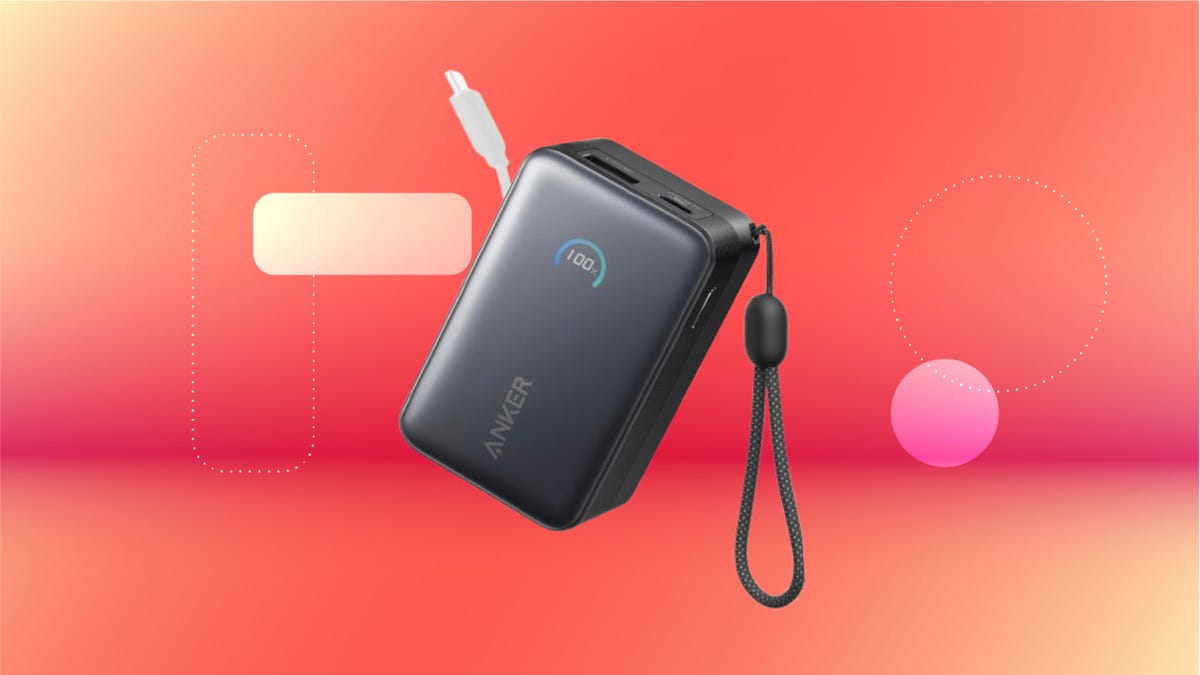
We’ve just spotted the Anker Nano 45-watt portable power bank for just $46 at Amazon right now. This saves you $14 — a 23% discount on its list price. Though it’s $6 more than the lowest-ever price we saw during Black Friday, it’s still a solid discount when you take the rising cost of tech accessories into account. It also matches the lowest price we’ve seen in 2026. It comes in four colors: black, green, pink and white. They’re all on sale for the same price.
This Anker Nano portable charger weighs approximately 8.2 ounces and measures a compact 3.21×1.99×1.42 inches. Despite its small size, it has a retractable cable and supports fast charging in compatible Apple, Samsung, Google Pixel and other smartphones. It also has a large 10,000-mAh capacity and a smart display so you always know how much juice is left in your power bank.
The Nano can charge an iPhone 17 to up to 50% battery in an estimated 20 minutes, and is powerful enough to charge tablets and laptops. Need to charge your devices while charging your power bank? You can do so safely thanks to pass-through charging so you’ll never have to go without battery life.
We’ve also compiled a list of the best power banks for iPhones and for Android, in case this deal isn’t quite a fit for you.
Why this deal matters
If you travel, have a long commute time or are otherwise always on the go, a portable charger can help you keep your devices fully powered. This 45-watt Anker Nano power bank is compact, includes a loop that lets you keep track of it easily and has a built-in cable so you don’t have to keep up with extra cords. Amazon’s $14 discount makes this a solid deal for anyone looking for a compact power bank.
-
 Technologies3 года ago
Tech Companies Need to Be Held Accountable for Security, Experts Say
-
 Technologies3 года ago
Best Handheld Game Console in 2023
-
 Technologies3 года ago
Tighten Up Your VR Game With the Best Head Straps for Quest 2
-
 Technologies4 года ago
Black Friday 2021: The best deals on TVs, headphones, kitchenware, and more
-
 Technologies5 лет ago
Google to require vaccinations as Silicon Valley rethinks return-to-office policies
-
 Technologies5 лет ago
Verum, Wickr and Threema: next generation secured messengers
-
 Technologies4 года ago
Olivia Harlan Dekker for Verum Messenger
-
 Technologies4 года ago
The number of Сrypto Bank customers increased by 10% in five days