
Technologies
Spotify Launches ‘About the Song’ Beta to Reveal Stories Behind the Music
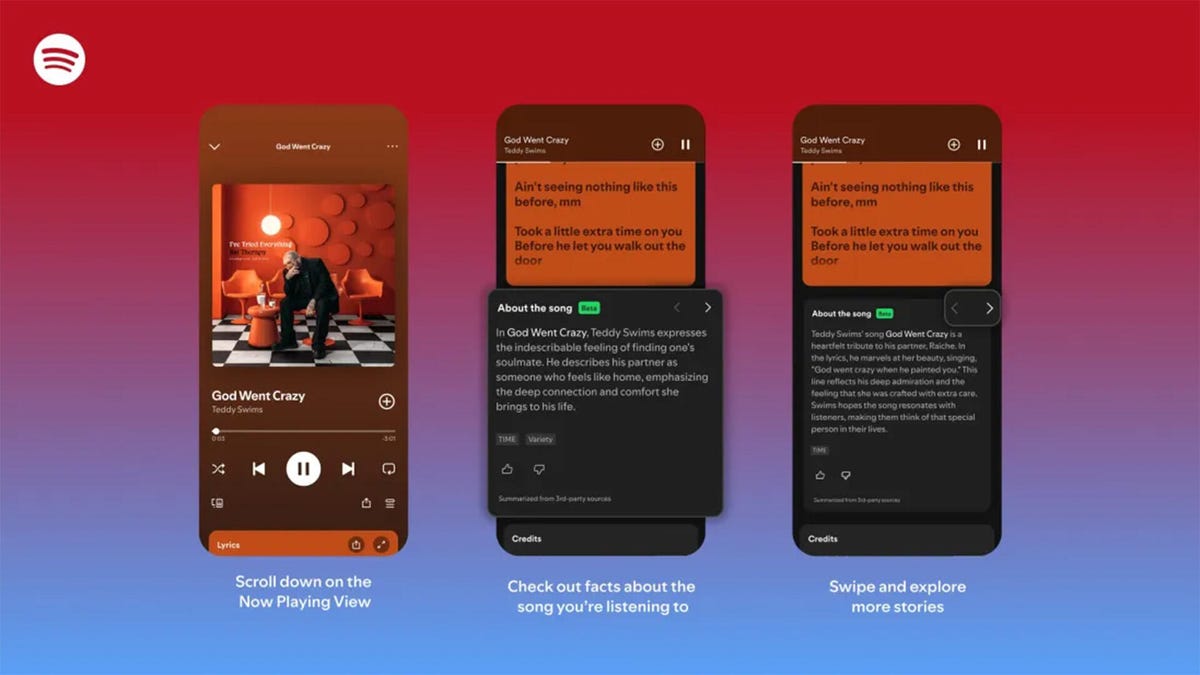
The stories are told on swipeable cards as you listen to the song.
Did you know Chappell Roan drew inspiration for her hit song Pink Pony Club from The Pink Cadillac, the name of a hot-pink strip club in her Missouri hometown? Or that Fountains of Wayne’s song Stacy’s Mom was inspired by a confessed crush a friend had on the late co-founder Adam Schlesinger’s grandmother?
If you’re a fan of knowing juicy little tidbits about popular songs, you might find more trivia in About the Song, a new feature from streaming giant Spotify that’s kind of like the old VH1 show Pop-Up Video.
About the Song is available in the US, UK, New Zealand and Australia, initially for Spotify Premium members only. It’s only on certain songs, but it will likely keep rolling out to more music. Music facts are sourced from a variety of websites and summarized by AI, and appear below the song’s lyrics when you’re playing a particular song.
«Music fans know the feeling: A song stops you in your tracks, and you immediately want to know more. What inspired it, and what’s the meaning behind it? We believe that understanding the craft and context behind a song can deepen your connection to the music you love,» Spotify wrote in a blog post.
While this version of the feature is new, it’s not the first time Spotify has featured fun facts about the music it plays. The streaming giant partnered with Genius a decade ago for Behind the Lyrics, which included themed playlists with factoids and trivia about each song. Spotify kept this up for a few years before canceling due to multiple controversies, including Paramore’s Hayley Williams blasting Genius for using inaccurate and outdated information.
Spotify soon started testing its Storyline feature, which featured fun facts about songs in a limited capacity for some users, but was never released as a central feature.
About the Song is the latest in a long string of announcements from Spotify, including a Page Match feature that lets you seamlessly switch to an audiobook from a physical book, and an AI tool that creates playlists for you. Spotify also recently announced that it’ll start selling physical books.
How to use About the Song
If you’re a Spotify Premium user, the feature should be available the next time you listen to music on the app.
- Start listening to any supported song.
- Scroll down past the lyrics preview box to the About the Song box.
- Swipe left and right to see more facts about the song.
I tried this with a few tracks, and was pleased to learn that it doesn’t just work for the most recent hits. Spotify’s card for Metallica’s 1986 song Master of Puppets notes the song’s surge in popularity after its cameo in a 2022 episode of Stranger Things. The second card discusses the band’s album art for Master of Puppets and how it was conceptualized.
To see how far support for the feature really went, I looked up a few tracks from off the beaten path, like NoFX’s The Decline and Ice Nine Kills’ Thank God It’s Friday. Spotify supported every track I personally checked.
There does appear to be a limit to the depth of the fun facts, which makes sense since not every song has a complicated story. For those songs, Spotify defaults to trivia about the album that features the music or an AI summary of the lyrics and what they might mean.
Technologies
Google’s Pixel 10A Is Coming to Japan With an Exclusive Blue Edition and Special Wallpaper
This model comes with creatively designed stickers and a special look for Pixel’s 10th anniversary.

Don’t be blue: Google is releasing an Isai blue edition of the Pixel 10A to celebrate the Android phone line’s 10th anniversary, setting it apart with its own sticker set, specialized wallpaper and custom icons. But it’ll only be available in Japan.
Announced Tuesday on the Google Japan blog, the Isai blue Pixel 10A has a dark blue look and includes bonus decorations designed in collaboration with Japan’s Heralbony art company. These include an exclusive bumper case and stickers for customization.
This edition of the Pixel 10A will arrive in Japan on May 20, following the April 14 release of the Pixel 10A in its original colors of lavender, berry, fog and obsidian. The Isai blue model costs 94,900 yen, which roughly translates to $595, and includes 256GB of storage.
This makes it slightly less expensive than the US model’s 256GB edition, but it comes with a number of fun extras at no additional cost.
Google’s creation of a country-specific model for Japan may also reflect strong sales in that market. In 2023, the IDC analytics firm (via 9to5Google) reported that the Pixel 7 series accounted for 10.7% of the country’s market share, a 527% increase from 2022.
Technologies
Can’t Wait for New Emoji? Here’s How to Create Your Own on iPhone
Apple Intelligence-enabled iPhones can create custom emoji in a few easy steps.

Apple brought new emoji to all iPhones when the company released iOS 26.4 on March 24. The new emoji include «» orca, «» distorted face and «» hairy creature — or as we might normally call it, Sasquatch. According to Emojipedia, there are 3,953 emoji with more on the way, including a pickle. But there’s no emoji for a dog wearing pajamas, a plate with burgers and fries and many other things. But if you have Genmoji on your iPhone you can create these emoji and many more.
Apple released iOS 18.2 in 2024 and the company introduced its own emoji generator, called Genmoji, to Apple Intelligence-capable iPhones at that time. The Unicode Standard, a universal character encoding standard, is responsible for creating new emoji, and approved emoji are added to all devices once a year. With Genmoji, you don’t have to wait for new emoji to appear on your iPhone each year. You can just create them as you need them.
Read on to learn how to use Genmoji on iPhone to create your own custom emoji. Just note that only iPhones with Apple Intelligence, like the iPhone 17 lineup, can use Genmoji at this time.
Note: The new emoji may not display correctly for Apple users whose devices aren’t on a 26.4 software version.
How to make custom emoji
1. Open Messages and go into a chat.
2. Tap the plus (+) button next to your text box.
3. Tap Genmoji.
You can then type a description of an emoji into the text box near the bottom of your screen and tap the check mark on your keyboard to enter that description into Genmoji. You can also tap different suggestions and themes that are right above the text box. And with iOS 26 or later, you can also combine and use emoji to create others rather than describing a new emoji or using suggestions.
Your iPhone will generate a series of new emoji for you to pick from according to your description, and you can swipe through these new emoji. When you find the one you want, tap Add in the top right corner of your screen and the new emoji will be available to use as an emoji, tapback or a sticker. Now you don’t have to wait for the Unicode Standard to propose, create and bring new emoji to devices.
For more iOS news, here’s what to know about iOS 26.4 and iOS 26.3. You can also check out our iOS 26 cheat sheet for other tips and tricks.
Technologies
Save Over 20% on This Handy 10,000-mAh Anker Nano Power Bank
Keep your devices charged on the go with this Anker Nano power bank, now down to just $46.
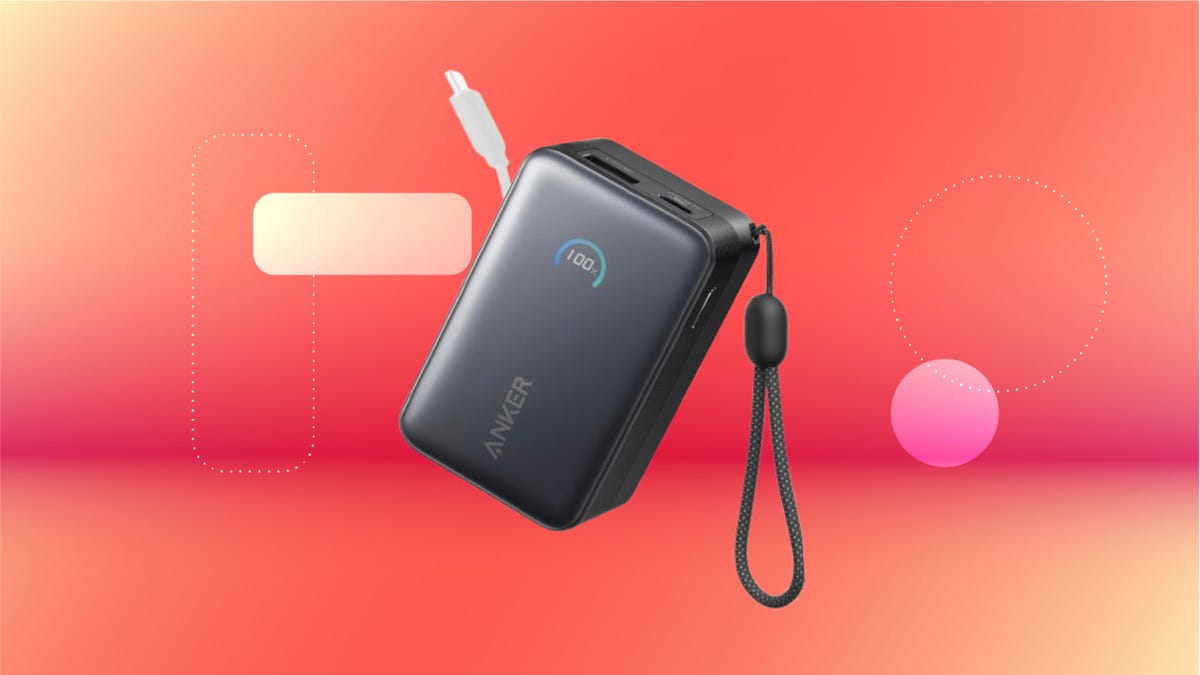
We’ve just spotted the Anker Nano 45-watt portable power bank for just $46 at Amazon right now. This saves you $14 — a 23% discount on its list price. Though it’s $6 more than the lowest-ever price we saw during Black Friday, it’s still a solid discount when you take the rising cost of tech accessories into account. It also matches the lowest price we’ve seen in 2026. It comes in four colors: black, green, pink and white. They’re all on sale for the same price.
This Anker Nano portable charger weighs approximately 8.2 ounces and measures a compact 3.21×1.99×1.42 inches. Despite its small size, it has a retractable cable and supports fast charging in compatible Apple, Samsung, Google Pixel and other smartphones. It also has a large 10,000-mAh capacity and a smart display so you always know how much juice is left in your power bank.
The Nano can charge an iPhone 17 to up to 50% battery in an estimated 20 minutes, and is powerful enough to charge tablets and laptops. Need to charge your devices while charging your power bank? You can do so safely thanks to pass-through charging so you’ll never have to go without battery life.
We’ve also compiled a list of the best power banks for iPhones and for Android, in case this deal isn’t quite a fit for you.
Why this deal matters
If you travel, have a long commute time or are otherwise always on the go, a portable charger can help you keep your devices fully powered. This 45-watt Anker Nano power bank is compact, includes a loop that lets you keep track of it easily and has a built-in cable so you don’t have to keep up with extra cords. Amazon’s $14 discount makes this a solid deal for anyone looking for a compact power bank.
-
 Technologies3 года ago
Tech Companies Need to Be Held Accountable for Security, Experts Say
-
 Technologies3 года ago
Best Handheld Game Console in 2023
-
 Technologies3 года ago
Tighten Up Your VR Game With the Best Head Straps for Quest 2
-
 Technologies4 года ago
Black Friday 2021: The best deals on TVs, headphones, kitchenware, and more
-
 Technologies5 лет ago
Google to require vaccinations as Silicon Valley rethinks return-to-office policies
-
 Technologies5 лет ago
Verum, Wickr and Threema: next generation secured messengers
-
 Technologies4 года ago
Olivia Harlan Dekker for Verum Messenger
-
 Technologies4 года ago
The number of Сrypto Bank customers increased by 10% in five days