
Technologies
The Best iPhone 17 Cases for 2026
I’ve tested dozens of iPhone 17, iPhone 17 Pro and iPhone Air cases. Here are my current top picks, complete with mini reviews of each case.
Our Experts


- Maggie Award for Best Regularly Featured Web Column/Consumer
What to consider
MagSafe
We generally encourage people to make sure to get a MagSafe-enabled case because of the number of MagSafe accessories on the market.
Thickness
Some people like minimal cases that add little to no bulk to their iPhone, but we tend to recommend slim cases that offer a higher degree of protection.
Kickstand case
A case with an integrated kickstand is a nice feature, especially if you use your phone to watch video.
Several of my favorite iPhone cases for the iPhone 16 have returned for the iPhone 17, iPhone Air, iPhone 17 Pro and iPhone 17 Pro Max, but top case makers have put out some new case designs for the iPhone 17 Series phones. Note that iPhone 16 cases won’t fit iPhone 17 models, which all have different cameras and slightly different dimensions. Like the iPhone 16 Series, the iPhone 17 Series has a camera control button that’s touch-sensitive. Case manufacturers offer varying degrees of exposure to the button, which I’ve noted in each case’s review. My latest addition to the list: the RhinoShield Mod NX, a bumper case for those wholike to leave the back of their phones exposed.
Best iPhone 17, iPhone 17 Pro and iPhone Air cases of 2026
Pros
- Slim, yet highly protective
- Eye-catching design with «hardwearing» fabric with ombre fade on the back.
- High-ridge thread on the sides of the case for good grip
- Removable lanyard loop
Cons
- Fairly pricey
Otterbox is serving up its usual expansive lineup of cases for the iPhone 17, including its tough Defender Series Pro and Defender Series Pro/Pro XT. I remain a fan of the Symmetry Series Clear cases in various color options and the Symmetry Series Cactus Leather, which incorporates a cactus-based leather substitute in its design (Otterbox says the faux leather is organically grown and sustainably harvested from nopal cactus). But all that said, my favorite Otterbox case for the iPhone 17 is the new-for-2025 Sole Series. It has a high-ridge thread on the sides of the case for better grip and a «hardwearing» fabric with ombre fade on the back. Available in a few different color options, Otterbox says it’s 5X tested to military drop standard MIL-STD-810G 516.6 (130 drops from 4 feet) and has a removable lanyard loop.
Type of access to camera control button: Touch-sensitive integrated control button cover.
Pros
- Sleek design for rugged case
- Highly protective with with dual-layer construction and heavy-duty corner protection
- 22-foot drop protection rating
- Built-in kickstand
- Gasket covers USB-C port
Cons
- Pricey
- A little heavier than some cases
Like Otterbox and Speck, Zagg makes several different iPhone 17 cases. My current favorite for premium protection is the Rainier ($70 — pictured), but I also like the somewhat slimmer Santa Cruz ($55), both of which are clear cases with a few different trim color options and also feature a built-in kickstand (Zagg has improved the design of itskickstands, making the hinge sturdier). The Rainier is the tougher of the two cases, offering a dual-layer design, higher raised bumpers, excellent corner protection, a gasket that covers the USB-C port and 22-foot drop protection (the Santa Cruz is rated for 13-foot drop protection).Both cases are «fortified» with graphene and have anti-yellowing tech to help keep the case clear over time. While they’re pretty pricey, Zagg will replace your case should it get damaged (for the life of your phone). Also, look for discounts on Zagg’s site; they seem to turn up fairly regularly.
Type of access to camera control button: The Rainier case has a touch-sensitive integrated control button cover while the Santa Cruz has a cutout for the button (about half of Zagg’s case lineup features a touch-sensitive control button cover).
Pros
- Inexpensive case that sometimes costs less than $10
- Attractively designed — slim, lightweight with soft-to-the-touch finish and semi-translucent back
- MagSafe accessories stick securely to the MagSafe ring (strong magnets)
Cons
- Unclear how durable the case really is (may not last that long)
- Cut-out for camera button instead of touch-sensitive cover
You can find plenty of cheap generic iPhone cases on Amazon, and some of them, like those from Supfine, sometimes dip below $10 in certain colors. I bought the light blue version for $13, but the black version is currently $7. I don’t know how well it will hold up over time or just how protective it really is (the company says it gets 10-foot military drop protection), but it has a nice look and feel to it with a soft-to-the-touch finish, even on its frosted transparent backside. The corners of the case are raised enough so that the case should provide reasonable corner and screen protection should you drop your phone, though I trust Otterbox and other tougher cases more. Also, there’s a raised camera guard on the back. This makes for a good starter case and is a good alternative for those who don’t want to shell out for Apple’s Silicone case, which offers about the same amount of protection. The one advantage Apple’s case has is that it has a touch-sensitive integrated control button cover while the Supfine case just has a cut-out of the button.
Type of access to camera control button: Cut-out for the button that leaves the button exposed.
Pros
- Silicone, clear and rugged finishes available
- Built-in kickstand with adjustable 15-degree to 85-degree angles doubles as lens protector
- Well-priced with a premium feel
- Ring magnets are stronger for MagSafe accessories
Cons
- Kickstand in portrait mode tilts at an angle rather than fully upright
ESR Kickstand cases aren’t your typical cases with an integrated kickstand. That’s because the kickstand doesn’t flip out from the backside of the case at the bottom. Instead, it serves as a protective ring around your camera lenses when it’s retracted and not in use (ESR calls it a foldable stash stand). The stand can be extended anywhere between 15 degrees and 85 degrees for comfortable, hands-free viewing. You’ll find other generic cases on Amazon with a design like this, but ESR stands out for having a more premium feel to its value cases. Note that you can get the case in a soft silicone version (pictured), a thicker tough version (it really is tough) and a simple clear version. They all cost around $25 at launch (that price should come down a bit over time), but I like the soft silicone version best.
Type of access to camera control button: Touch-sensitive integrated control button cover.
Pros
- Simple budget case option with MagSafe compatibility and some added design flair
- Slim design
- Infused with anti-yellow DuraClear blue resin
Cons
- Only moderate protection
- Even with anti-yellowing tech, case may yellow over time
Known for its value cases, Spigen returns with its usual assortment of cases for the iPhone 17 series. If you’re looking for an inexpensive, clear MagSafe case for your new iPhone 17 or iPhone 17 Pro models, the standard version of Spigen’s Ultra Hybrid MagFit is a good value for around $14. But I like the slightly more expensive Ultra Hybrid S MagFit ($20), which has a built-in kickstand, and some of the Ultra Hybrid Direct Digital Printing models ($20 — pictured) that have computer component accents integrated into them. These include the Neo One (pictured), Zero One and Hello Again, which gives your phone iPod vibes.
Type of access to camera control button: Camera control button is covered by a thin TPU layer that maintains touch-sensitivity.
Pros
- Eye-catching, lightweight design with integrated ring kickstand that swivels 360 degrees and is sturdy
- Very good corner protection with Torras’ Shock-Mat technology
- Strong magnets for MagSafe accessories
Cons
- Pricey
Torras makes a range of iPhone 17 cases in good color options that start around $17 and go all the way up to around $65 for its flagship Torras Q3 Air case, which I consider one of the best cases out there largely because it lives up to its billing as «lightweight protection» with a sturdy, retractable 360-degree swiveling kickstand that allows you to prop up your phone horizontally or vertically at a variety of angles. Also, it has some grippy design elements to help keep your phone from slipping from your hand and strong magnets for MagSafe accessories. While the Q3 Air has the most eye-catching design of Torras’ cases and the best corner protection (Torras says its Shock-Mat technology is «inspired by air-cushioned sneakers»), if you can’t afford it you should check out its more affordable Q3 360 Spin ($35) and Q3 Silicone 360 Spin ($42) cases, which feature the same kickstand. You can see Torras’ full range of cases here.
Type of access to camera control button: Touch-sensitive integrated control button cover.
Pros
- Fairly slim case that offers very good protection
- Attractively designed with good color options
- Grippy texture on sides of the case helps prevent case from slipping from your hand
Cons
- Fairly pricey
Beats is owned by Apple, so its cases are technically Apple cases, though they appear separately from Apple’s lineup of cases for the iPhone 17 on its website. I wasn’t so impressed with Beats’ inaugural case effort for last year’s iPhone 16, but these second-gen Beats cases are substantially better. There are three models: Regular, Kickstand and Rugged. The Regular and Kickstand are the same case (it’s a nice-looking hard plastic case with a matte finish), but the Kickstand comes with a removable lanyard that converts into a kickstand). I personally prefer the Beats Rugged case, which is a little thicker and has some grippy tecure on the sides and also fully covers the bottom of your phone. It’s pricier but more special and protective. The sierra orange may be a little too bright for some folks — I like it because it makes your phone easy to spot — but it also comes in rocky blue, alpine gray and everest black.
Type of access to camera control button: Touch-sensitive integrated control button cover.
Pros
- Highly protective and durable with a clear back that gives it some design flair
- Great for mounting (compatible mounts sold separately)
- Very strong MagSafe magnets
- Removable center magnet allows you to stick the case to any magnetic surface
Cons
- Case isn’t as lightweight as some
- Case and mounts are pretty pricey
- Must remove center magnet to wirelessly charge
I liked Rokform’s new Slim Magnetic for the iPhone 16, which was geared toward folks who find its highly protective Rokform Crystal and Rugged cases a little too chunky. That model was recently released for the iPhone 17 Series (it’s well worth checking out), but the Crystal and Rugged cases are the most tough and durable models in the line. I prefer the Crystal because it’s got more design flair than the utilitarian-looking Rugged model.
Both the Crystal and Rugged cases have Rokform’s RokLok twist system and are specially designed to work with the company’s various mounts, including bike and motorcycle mounts, that are sold separately. While the Rokform Rugged and Crystal cases have a center magnet that allows you to stick the case to any magnetic surface, they’re MagSafe-enabled and compatible with wireless charging if you remove that center magnet (as shown in the photo). I also like to point out that the MagSafe ring is equipped with very strong magnets, so MagSafe accessories — Rokform sells some of those, too — adhere quite securely to the case. The cases are expensive, but Rokform offers discounts to first-time buyers on its site.
Type of access to camera control button: Both Rokform’s Crystal and Rugged cases have touch-sensitive integrated control button covers, which are new this year.
Pros
- Simple Bumper case that’s grippy and comes in a variety of color options
- Good corner protection with an 11-foot drop rating
- Option to add clear backplate for about $7 more
- Free of BPA, BPS and BPF industrial chemicals
Cons
- May be a little thick for those who want a truly minimalist bumper case
- Not compatible with many MagSafe kickstand wallet cases in landscape mode (vertical portrait mode only)
RhinoShield makes a few different cases for the iPhone 17 series, including the Solid X (around $40), which is somewhat plain looking but is indeed solid, and its clear case. I liked its AirX model for the iPhone 16, but that isn’t available for the iPhone 17, though the Mod X, which is a bumper case, is. It comes in a variety of color options and also comes in a version that includes a clear backplate, should you decide you want some protection for the back of your phone. But most people who buy bumper cases like the back exposed. According to RhinoShield, the case offers 11-foot drop protection and BPA, BPS and BPF-free (those are industrial chemicals used to harden polycarbonate plastics), so it’s more environmentally friendly.
Type of access to camera control button: Touch-sensitive integrated control button cover («carbon nanotube capacitive touch sensor»).
Pros
- Excellent drop protection despite slim profile
- Several unique design options, including bamboo and carbon fiber, among others
- Durable with a lifetime warranty
Cons
- Pricey
Since I get a lot of iPhone cases in for testing, I often end up giving away a fair amount of them. More often than not, when given a choice between a few different top case options, friends and family select a Mous case, and this blue Marine case (pictured) is a hit. Maybe it’sbecause they’ve seen ads for Mous cases on YouTube or social media, in which the company drops a phone from a helicopter and it somehow survives the fall. While Mous cases aren’t rated for 1,000-foot drop protection, they do offer excellent protection and are quite slim, with backs that incorporate bamboo, carbon fiber, and various other materials. While they’re pretty pricey, all Mous cases have a lifetime warranty.
Mous also makes more standard Magsafe-enabled clear cases that cost less, and I included its IntraLock case in our best bike phone mount list. That case snaps into a bike mount, and Mous makes a variety of other MagSafe accessories, including a wallet, phone grip with kickstand and magnetic car mounts.
Type of access to camera control button: Touch-sensitive integrated control button cover.
Pros
- Excellent drop protection — up to 25 feet with flagship model
- Crossbody strap with removable eyelets included with some models
- 360-degree rotating kickstand for landscape and portrait hands-free viewing available with certain cases
- Variety of cases ranging from $20 to $85
Cons
- Certain models are a little bulky
- With so many model options, it can be hard to choose which one is best
Ranging in price from $20-$85, there are several Mageasy case options for the various iPhone 17 models, including some that come with a crossbody strap and retractable ring kickstand that rotates 360 degrees so you can prop up your phone in landscape or portrait mode. The Odyssey Ultra M Plus Strap ($85 — pictured) is Mageasy’s flagship case, featuring 25-foot drop protection. While the Odyssey M Plus Strap ($50) doesn’t have the built-in kickstand, it is more affordable and also has excellent 20-foot drop protection. They’re both available in a few color options, as is the Mageasy Wallet Case with Crossbody Strap ($35), which is geared toward women.
Note that you don’t have to use the cases with the strap. The eyelets are removable (the M Plus Strap has a few different bumper options you can swap in for more or less corner protection). Just don’t lose them if you want to use the strap in the future. I should also note that while the Odyssey Ultra M is a really protective case, it is a bit weighty. Some simpler Mageasy cases are lighter.
Type of access to camera control button: Touch-sensitive integrated control button covers (new this year).
Pros
- Established brand for leather cases
- Several options available with different price points
- Leather develops a patina that changes the leather’s color of time
- Solid non-leather case options
Cons
- Pricey
- So many options, it’s a little hard to figure out which model is best for you
- No drop rating given for the traditional leather case
Nomad makes some of my favorite leather cases, and its lineup of iPhone 17 cases hasn’t changed too much from what it was offering for the iPhone 16, except that it’s now making trimmed-down leather cases for the iPhone Air that leave more of the phone exposed (it’s a great iPhone Air case, but expensive at $89). Once again, its «sustainably-sourced» leather cases come in two grades of leather: the standard variety and a higher-end Horween that costs $20 more. They both develop a «rugged» patina as the oils from your skin interact with the leather over time. Nomad’s Traditional Leather case starts at $69, while its Modern Leather Case ($59) is a little cheaper because it’s not completely wrapped in leather (its sides aren’t wrapped).
If you’re looking for maximum protection in a leather-styled case, you can opt for the Leather Rugged ($79), which has 15-foot drop protection compared with the Modern Leather’s 8-foot drop rating. Nomad doesn’t give a drop rating for its Traditional Leather case, so one can assume it isn’t as protective. I can attest to it having at least a 4-foot drop protection because I’ve dropped my phone from that distance and it survived just fine.
I also like the Modern Leather Folio wallet case, though I wish it converted into a kickstand like some wallet cases do, and the more affordable Sport case ($50) and Rugged case ($50 — without leather). They’re both not leather cases, but they do look pretty slick. It’s also worth noting
Type of access to camera control button: Most of Nomad’s iPhone 17 cases, except for its iPhone Air cases, feature a touch-sensitive integrated control button cover, which is new for this year (they had cutouts before). Its new iPhone Air cases leave the button fully exposed.
Pros
- Lightweight, ultra-slim design with eye-catching patterns and colors
- Constructed with aramid fiber that offers very good scratch-resistance
- Strong MagSafe compatibility
Cons
- Fairly pricey
- Don’t offer great drop protection
Available in a few different striking color options and patterns, Pitaka cases are very thin yet offer a little more protection than some other ultra-slim cases. That’s because they’re made from «selected 600D aramid fiber, which is widely used in aerospace and military applications,» according to Pitaka. Unlike carbon fiber, «this fine-weaved case will not interfere with the signal and it is non-conductive, offering long-lasting protection for your phone, and preventing color fading and daily scratches.» All Pitaka cases are MagSafe-enabled using Pitaka’s MagSafe SlimBoard technology, and this year’s models feature a touch-sensitive integrated control button cover rather than a cutout for the button. While this case doesn’t offer serious protection from drops, it’s still better than not having anything on your phone. If you’re looking for a very slim, lightweight case, it should be near the top of your list, especially if you want an ultra-slim case to cover the iPhone Air.
Pros
- High-quality vegan leather with a nice texture and decent grip
- Pairs well with Moft’s MagSafe accessories, including wallets, kickstands and tripods
- Strong MagSafe magnets for secure connection
Cons
- Somewhat expensive for vegan leather
At launch, Moft is only selling one case for the iPhone 17 Series, the Snap Movas, its signature case that’s designed to be paired with a variety of Moft MagSafe accessories, including wallets that convert into stands, an iPhone Tripod Stand and its new «origami-inspired» Snap Field Wallet that stores several credit cards and also converts into a stand. Available in seven color options, the faux leather Movas case is slim and elegant (Vegan leather is designed to look and feel like real leather but is synthetic). It’s a good option for those who want a thinner case that offers some degree of protection. I’ve recommended this case to a few friends who’ve bought the iPhone Air.
Type of access to camera control button: Touch-sensitive integrated control button cover, which is new for this year (Moft cases had cutouts for the iPhone 16 Series)
Pros
- Attractively designed high-end leather case that ages nicely
- Grip stitching on back that doesn’t interfere with MagSafe use
- Well-sized cut out for camera control button
Cons
- Only compatible with iPhone 16 Pro and iPhone 16 Pro Max
- Case and available accessories are relatively expensive
Back in 2023, Minnesota-based Pad & Quill, which used to make some of our favorite leather wallet cases, morphed into Burton Goods, which now sells very similar premium leather cases for various Apple products. Arguably, the best option from Burton is the Modern Pocket Book Wallet case ($90), which is actually two cases in one. It includes a standalone case that has a leather back stitched onto the TPU (thermoplastic polyurethane) case and an outer leather-clad wallet folio cover. The MagSafe-enabled standalone case adheres magnetically to the folio cover (the magnets are strong) and is removable, so you can easily charge your phone wirelessly. Like other folio cases of this style, it’s a tad bulky but stores multiple credit cards and a bit of cash.
As far as non-folio cases go, the fully leather-clad Heritage Leather ($80) case comes in three color options and is one of the best leather cases out there. Burton previously made a Luxury Modern Pocket Book Wallet case that included a Heritage Leather case for $130, but that combo currently isn’t available for the the iPhone 17. Burton Goods also sells a couple of magnetic MagSafe Wallet Stands that adhere nicely to the back of the case. Note that Burton Goods only makes cases for the iPhone 17 Pro and 17 Pro Max.
Type of access to camera control button: The case that’s included with the Modern Book Wallet case has a cutout that leaves the camera control button exposed, while the Heritage Leather case has a touch-sensitive integrated control button cover.
Factors to consider when buying an iPhone 17 case
MagSafe support
Most but not all iPhone 17 Series cases have MagSafe support (the metal ring built into the case). I generally encourage people to make sure they get a MagSafe-enabled case because of the number of MagSafe accessories on the market, some of them quite useful. In the past, you could save $5 to $10 by getting a case that left off the Magsafe ring, but, as I said, the vast majority of iPhone 17 Series cases are MagSafe-enabled.
Thickness
Some people like minimal cases that add little to no bulk to their iPhones, but the majority of people are looking for a case that offers good protection — or even maximum protection. I tell people to find a case that’s not too thick — and maybe even pretty slim — that offers at least 6-foot drop protection (and good corner protection).
Clear case
Clear cases are popular because they show off your phone (and its color). Clear cases, especially cheaper ones, can become less clear over time and slowly start to yellow. Many case makers now add UV protection to their clear cases to prevent yellowing.
How we test the best iPhone 17 cases
Typically, we try to use the case on the phone for at least two days and make sure the buttons on the phone work properly with the case on. With some phone cases, we use them for several days or even weeks to see how they wear over time.
- Design: We evaluate the more superficial and cosmetic aspects of cases and consider how aesthetically pleasing they are because people sometimes buy cases solely for their colors and artwork.
- Durability: We look at how durable a case is, paying particular attention to corner and camera protection (raised corners on a case can help your phone survive face-down falls).
- Grip factor: We review the material the case is made of, so we can talk about such factors as how grippy the phone feels in your hand and how protective the material is.
- Extra features: Some iPhone cases have extra features such as MagSafe, an integrated kickstand or grips, and, in the case of folio models, slots for storing credit cards and cash.
- Long-term testing: Although we don’t do long-term testing for most cases, we do use some of the most popular cases for longer periods to gauge how they wear over time and see how well our phone holds up during accidental drops with the case on it. We don’t do formal drop tests.
- Waterproof cases: Only a few fully waterproof cases are available, but if the case is supposed to be fully waterproof, we test it by submerging it in water.
iPhone 17 case FAQ
Technologies
Ring Finally Goes Wire-Free for Its Latest 4K Video Doorbells
The launch of battery-powered versions of the company’s powerful AI doorbells has been highly anticipated.
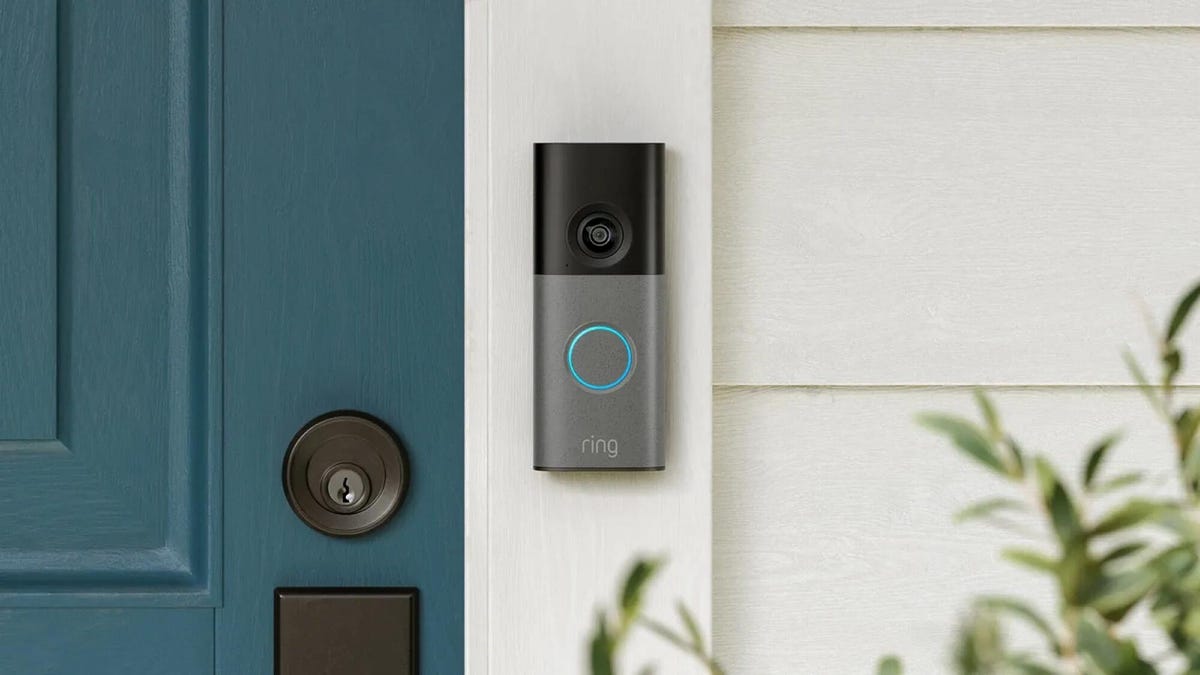
Security company Ring on Wednesday announced a significant expansion of its video doorbell line, notably battery-powered versions of both its 4K and 2K models, priced from $80.
Both Amazon’s Ring and Google Nest debuted high-resolution video doorbells with new AI features in the fall of 2025. But they were wired only, and in my tests, I kept thinking, «I sure wish there were battery models available.»
Wireless video doorbells are far better for most front doors than models that require connecting to your existing doorbell wiring, which is often poorly positioned for a security camera. Mine, for example, is located on a wall beside my door that’s useless for any kind of video views, no matter how you angle a lens.
«Enhancing image quality in battery-powered doorbells means customers can enjoy reliable performance with the flexibility to install devices in a way that suits their space, whether renting or living in homes without existing wiring,» a Ring spokesperson said.
At first, I wondered whether the higher 4K resolutions and more advanced AI features would use too much power to support batteries. If so, Ring is the first to fix that issue with this suite of doorbells, including these models available for preorder right now:
- Ring Battery Doorbell Pro — $250: This model offers up to 4K resolution and 10x zoom, and Ring says it features a redesigned internal architecture to support battery power.
- Ring Battery Doorbell Plus (2nd-gen) — $180: This model includes a quick-release battery pack along with 2K video.
- Ring Battery Doorbell (2nd-gen) — $100: This video doorbell includes 2K video, a 6x zoom and what Ring calls a «streamlined, rechargeable design,» which means you take the entire video doorbell to charge it, not just the battery — a design I greatly prefer, since Ring’s battery packs can get fiddly.
There’s also a new version of a Ring wired doorbell with 2K resolution, starting at $80. It wouldn’t be Ring without a plethora of doorbell devices to confuse newcomers, which is why I have a guide specifically for Ring video doorbells that will need some updating once I finish testing these new models.
Resolution plus an intelligence upgrade
Ring’s ordinary subscriptions of the Ring Protect plan give you cloud video storage and intelligent alerts for people, packages and vehicles, which are important but not really advanced AI. But spring for the $20-per-month Ring AI Pro cam, and this new generation of cameras opens up other capabilities.
Ring’s AI features include AI video descriptions, so if you get an alert, you can also get a summary of what the doorbell saw, including people and activities. A similar feature lets you search your video history with specific terms, such as «bike,» «truck» and so on. You also get the beta version of Ring’s Familiar Faces feature, which can ID logged faces of people who approach.
If these AI features make you uneasy and you’d rather protect your privacy, the best option is to avoid a subscription altogether or choose a lower-tier plan that gives you cloud storage without AI.
I also have a guide on how to turn off Ring’s detection and data-sharing features that might make you nervous, so you can keep what you like while ditching what you don’t.
Technologies
Today’s NYT Mini Crossword Answers for Thursday, March 26
Here are the answers for The New York Times Mini Crossword for March 26.
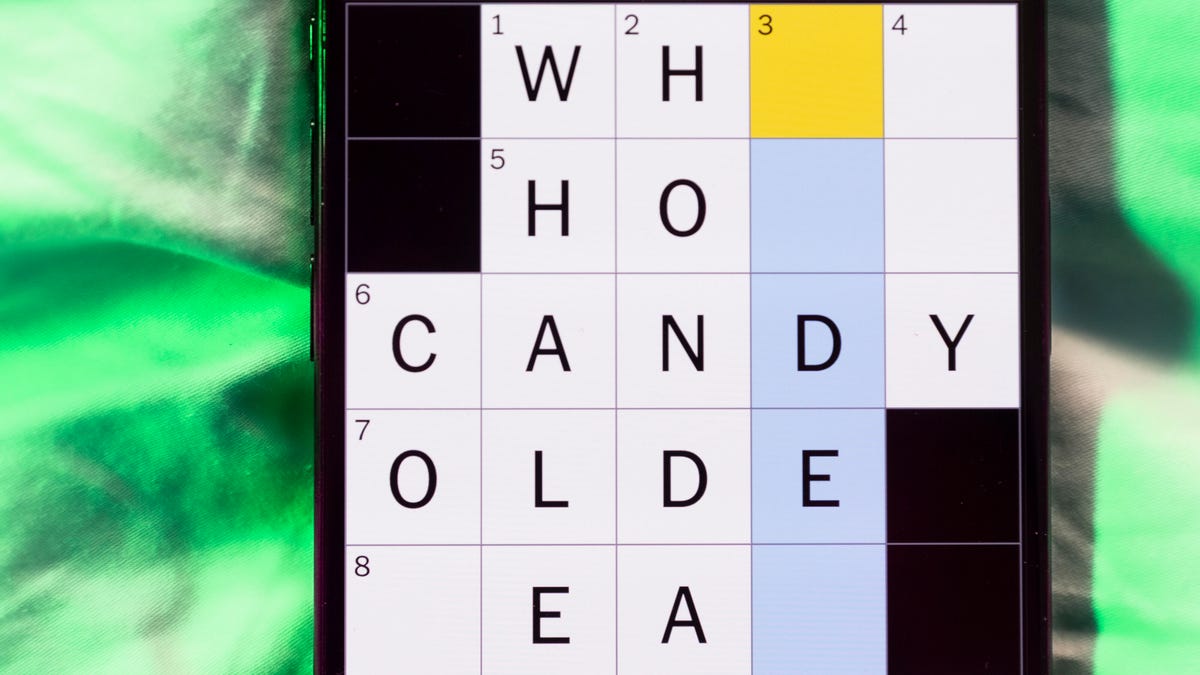
Looking for the most recent Mini Crossword answer? Click here for today’s Mini Crossword hints, as well as our daily answers and hints for The New York Times Wordle, Strands, Connections and Connections: Sports Edition puzzles.
Baseball is back! You’ll see baseball images patterned throughout today’s Mini Crossword grid, and when you solve the puzzle, they’ll spell out a certain word. Play ball! Er, read on for all the answers. And if you could use some hints and guidance for daily solving, check out our Mini Crossword tips.
If you’re looking for today’s Wordle, Connections, Connections: Sports Edition and Strands answers, you can visit CNET’s NYT puzzle hints page.
Read more: Tips and Tricks for Solving The New York Times Mini Crossword
Let’s get to those Mini Crossword clues and answers.
Mini across clues and answers
1A clue: Degrees for boardroom execs
Answer: MBAS
5A clue: «___ want for Christmas …»
Answer: ALLI
6A clue: What Hamlet holds while giving his «Alas, poor Yorick!» speech
Answer: SKULL
7A clue: Wild, as an animal
Answer: FERAL
8A clue: Sphere
Answer: ORB
Mini down clues and answers
1D clue: Word after «match» or «mischief»
Answer: MAKER
2D clue: Bit of writing on a book jacket
Answer: BLURB
3D clue: Penne ___ vodka
Answer: ALLA
4D clue: Window ledge
Answer: SILL
6D clue: Bay Area airport, for short
Answer: SFO
Technologies
McDonald’s KPop Demon Hunter Meals Include Bright Purple Nugget Sauce
The Derpy McFlurry mixes popping boba pearls and berry sauce into a soft-serve dessert.

McDonald’s has seen success with themed combo meals, including its holiday Grinch Meal. Now, the fast-food chain is capitalizing on Netflix’s Oscar-winning animated film, KPop Demon Hunters, with new upcoming menu items and both a breakfast meal and a lunch/dinner offering. Let’s hope you like the color purple.
The HUNTR/X Meal, named for the K-pop girl group in the movie, is a 10-piece chicken McNuggets meal that includes a medium drink and three special menu items.
Ramyeon McShaker fries come with a small bag of soy, garlic, sesame and spice seasoning, along with regular McDonald’s french fries. You sprinkle the seasoning into the provided bag, dump in the fries, shake it all up and eat.
The meal includes two new sauces for the fries and nuggets. Hunter sauce is a sweet chili sauce mixing notes of chili, garlic and pepper. But my favorite item on this new menu is Demon sauce, a bold mustard sauce with some heat and a bold purple color. There’s just not enough dark purple food out there.
There’s also a new dessert, the Derpy McFlurry, which blends creamy vanilla soft serve with berry-flavored popping boba pearls, served with a swirl of wild berry sauce. McDonald’s named it for the supernatural feline, Derpy Tiger, from the movie.
If breakfast is your bag, the new morning meal is the Saja Boys Breakfast Meal, named for the movie’s boy band.
It includes a Spicy Saja McMuffin sandwich, which is a sausage McMuffin with egg and a spicy Saja sauce, hash browns and a small drink.
Both meals come with a photocard for one of the bands and a Derpy card. The Derpy card includes a QR code you can scan to unlock online content about the film.
The full KPop Demon Hunters menu should be available at participating McDonald’s beginning March 31.
The McDonald’s Grinch meal (and its accompanying patterned socks) sold out quickly, so KPop Demon Hunters fans may want to mark their calendars and nab a meal when they are released.
-
 Technologies3 года ago
Tech Companies Need to Be Held Accountable for Security, Experts Say
-
 Technologies3 года ago
Best Handheld Game Console in 2023
-
 Technologies3 года ago
Tighten Up Your VR Game With the Best Head Straps for Quest 2
-
 Technologies4 года ago
Black Friday 2021: The best deals on TVs, headphones, kitchenware, and more
-
 Technologies5 лет ago
Google to require vaccinations as Silicon Valley rethinks return-to-office policies
-
 Technologies5 лет ago
Verum, Wickr and Threema: next generation secured messengers
-
 Technologies4 года ago
Olivia Harlan Dekker for Verum Messenger
-
 Technologies4 года ago
The number of Сrypto Bank customers increased by 10% in five days