
Technologies
Galaxy Z TriFold vs. Huawei Mate XT: One Is the Most Versatile Phone I’ve Ever Used
Samsung’s Galaxy Z TriFold and Huawei’s Mate XT, part of a new category of phones called «trifolds,» offer diverging experiences when it comes to using them.
Huawei introduced the world’s first «trifold» phone, the Mate XT Ultimate, last year and launched it outside of China in February 2025. Despite only actually folding in two places, the phone was called a trifold because its 10.2-inch display divides into three sections.
I’ve been using it on and off since February and I liked the Mate XT so much that it made me skeptical about the Galaxy Z TriFold‘s design when Samsung first showcased it at the APEC CEO Summit in October. But after trying Samsung’s first trifold for myself, during a brief hands-on test at a Samsung store in Dubai, I changed my mind.
As foldable phone sales are expected to rise 30% year over year in 2026, according to analysts at IDC, it’s important for both Samsung and Huawei to find their own hook for customers. Each of these foldable phones has their place in the market and offers a different appeal. One is a tablet that folds into a phone, while the other is a three-in-one and the most versatile smartphone I’ve ever used. One of them has «Z TriFold» in its name but the other actually folds in a «Z» shape.
Here’s how the newly-launched Samsung trifold phone compares to the Huawei Mate XT Ultimate — the phone that pioneered this category.
Samsung Galaxy Z TriFold vs. Huawei Mate XT design
Both the Galaxy Z TriFold and Mate XT have large screens that divide into three panels (hence the name) and have two hinges to connect them. And yet, they’re vastly different.
The Huawei trifold phone has a single screen that folds in a Z shape to allow for three different forms. You can use it as a phone (fully folded), a mini-tablet (half-open), as well as a wide-screen tablet (fully opened). I’ve mostly used the Mate XT either in mini-tablet mode (one fold) or fully unfolded. And I found myself using it in phone mode (fully closed) only when I made calls.
In comparison, the Galaxy Z TriFold folds in a U shape as both panels fold inwards. You can only use it fully folded as a phone or fully opened as a wide-screen tablet, without the added ability to use it as a mini tablet.
Samsung’s Z Trifold uses two different-sized hinges and three panels of varying thickness, allowing the device’s flaps to fold on top of one another. The left hinge is like the one on the Fold 7 and comparatively tighter than the right hinge (the wider one), which springs open after you push it to a certain angle. On the back of the phone is a second display that occupies the «middle» section to use when the phone is fully closed.
When fully folded, its lowermost panel has a protruding edge, giving it a solid lip to grab onto while unfolding. It’s a nice addition to the flat-sided design, which doesn’t leave much space between panels. I found it easier to unfold than its sibling, the flat-sided Galaxy Z Fold 7.
The Huawei Mate XT has curved sides and a single screen, but because of that Z shape, it gives you three ways to use it. The right hinge unfolds like the Galaxy Z TriFold — you pull it out — but you don’t need to unfold the other side. With just one panel unfolded, it becomes a usable mini-tablet.
You can unfold the third section, at the back of the left panel, to open it fully and use it as a wide-screen tablet. Because it uses a single flexible screen, part of the soft folding display is always exposed to the elements when the device is folded shut in phone mode. So far, I haven’t noticed any scratches on the display but it is definitely less protected than Samsung’s inner screen. However, Huawei bundles a case with an extended lip to protect the always-exposed right side of the screen.
Both of these trifold phones have minimal screen creases but Samsung’s Galaxy Z TriFold feels better when I run my finger over the folding parts. While Huawei’s creases are deeper, they don’t bother me in day-to-day use. The creases on both phones are visible under direct artificial light and at an extreme angle.
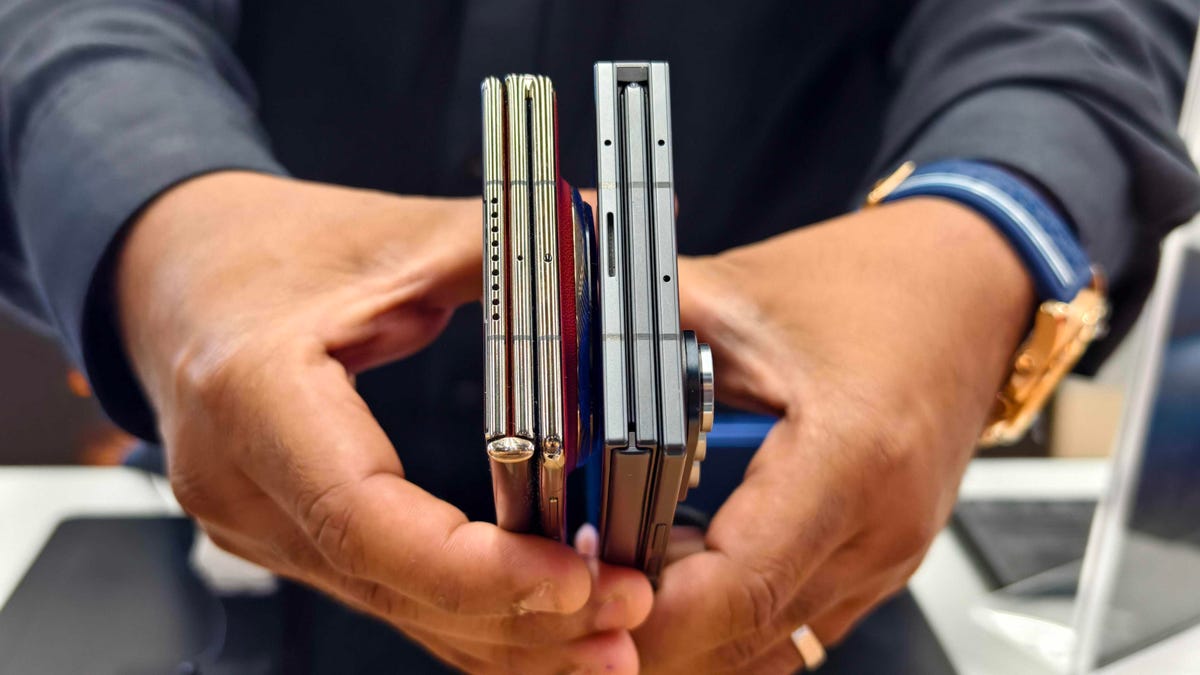
The Huawei Mate XT is slimmer than the Galaxy Z TriFold. It’s just 3.6mm thick at its thinnest part when fully unfolded and 12.8mm when folded. In comparison, the Samsung phone is 3.9mm thick at its thinnest part and goes up to 12.9mm when fully unfolded. At 309 grams, the Z TriFold is also slightly heavier than the 298g Mate XT.
The Huawei trifold phone feels more premium than the Galaxy Z TriFold — probably because of its faux leather back, curved sides and gold accents. Samsung’s foldable has a carbon-fiber finish, which feels durable but not as premium.
The Mate XT has an IPX8 rating, while the Galaxy Z TriFold is rated IP48 for dust and water resistance. The «4» in IP48 means it’s protected against dust particles measuring over 1mm but not against everyday dust and pocket lint. Neither of these phones is truly dust-proof, but both are rated for water resistance, just like a standard smartphone.
Samsung Galaxy Z TriFold vs. Huawei Mate XT displays
The Galaxy Z TriFold has two screens: a Galaxy Z Fold 7-like 6.5-inch AMOLED screen with a 120Hz variable refresh rate and a 422ppi pixel density. It unfolds to a 10-inch tablet-sized screen with a 120Hz dynamic refresh rate with a lower 269ppi pixel density.
The Huawei Mate XT has a single 10.2-inch OLED screen with a 90Hz refresh rate and 382ppi pixel density. It has a lower refresh rate but a higher resolution and slimmer bezels. You can use it as a 6.4-inch phone, a 7.9-inch mini-tablet or a 10.2-inch widescreen tablet which makes it a more versatile design than Samsung’s trifold phone. The Mate XT’s display when folded down into «cover screen» has a wider aspect ratio with slimmer bezels than the TriFold’s cover display.
I haven’t watched videos on the Galaxy Z TriFold, but I assume the experience would be better on the Huawei since the main screen has a wider aspect ratio (when fully unfolded). It has less letterboxing (thick borders on top and bottom) than the Galaxy Z TriFold, which provides a slightly narrower aspect ratio when fully unfolded. However, it could be better for multitasking, especially when running three apps side by side, but I’ll need more time with the Samsung phone to come to a conclusion.
Galaxy Z TriFold vs. Huawei Mate XT performance and battery
The Samsung Galaxy Z TriFold has the Qualcomm Snapdragon 8 Elite for Galaxy chip, the same processor that powers its other 2025 flagship smartphones including the OnePlus 15. The chip is tuned for efficiency and I expect it to handle multitasking on a standalone DeX with ease. The TriFold also comes with 16GB of RAM and 512GB or 1TB of storage.
In contrast, the Huawei Mate XT runs on an in-house Kirin 9010 chip and is paired with 16GB of RAM and 512GB or 1TB of storage. It runs EMUI 14.2 operating system on global variants, which doesn’t have preinstalled Google apps. Despite the ban on US companies working with Huawei — including Google, the company behind Android — there are workarounds for installing the Play Store. You won’t encounter these kinds of hurdles on the Galaxy Z Trifold.
The Samsung trifold phone runs on One UI 8, based on Android 16. You get fast animations, smooth multitasking, a multitude of customization options and a better overall experience. The Galaxy Z TriFold will also get seven years of OS and security updates.
Both phones pack a 5,600-mAh battery but it remains to be seen how they fare against each other. I haven’t pushed the Mate XT to its limits and it delivers an entire day of use on a single charge. When I need to top up the battery, I use the bundled 66-watt charger or use wireless charging at up to 55 watts. The Galaxy Z TriFold supports 45-watt fast charging and Qi wireless charging.
Samsung Galaxy Z TriFold vs. Huawei Mate XT cameras
Both phones have three rear cameras that are identical to those found in the Galaxy Z Fold 7. The Galaxy Z TriFold has:
- a 200-megapixel main camera with optical image stabilization (OIS) and a f/1.7 aperture
- a 12-megapixel ultrawide camera with a 120-degree field of view
- a 10-megapixel 3x optical zoom telephoto camera with OIS and support for 30x digital zoom
- two 10-megapixel front-facing cameras — one inside the cover display and the other inside the folding screen
In comparison, the Huawei Mate XT has:
- a 50-megapixel main camera with OIS and a variable aperture (f/1.4 — f/4.0)
- a 12-megapixel 5.5x optical zoom telephoto camera with OIS
- a 12-megapixel ultrawide camera with a 120-degree field of view
- a 8-megapixel selfie shooter
Based on my experience with the Fold 7, you can expect vibrant colors, good dynamic range and balanced processing in low-light photos on the Samsung trifold phone. Images from the Huawei tend to have an over-processed look and it doesn’t do well with certain skin tones. But the Mate XT captures better portraits than my Fold 7. I’ll be able to test the photography chops from both phones once I have the Galaxy Z TriFold.
Here’s how the two foldable phones specs compare:
Samsung Galaxy Z TriFold specs vs. Huawei Mate XT Ultimate
| Samsung Galaxy Z TriFold | Huawei Mate XT Ultimate | |
| Cover display size, tech, resolution, refresh rate | 6.5-inch AMOLED, 2,520×1,080 pixels, 1-120 Hz refresh rate | none |
| Internal display size, tech, resolution, refresh rate | 10.0 AMOLED, 2,160×1,584 pixels, 1-120 Hz refresh rate | 10.2-inch AMOLED, 3,184×2,232 pixels, 90Hz refresh rate |
| Pixel density | Cover: 422 ppi; Internal display: 269 ppi | 382 ppi |
| Dimensions (inches) | Open: 6.27×8.43×0.15 inches (leftmost panel) / 0.17 inches (center panel) / 0.16 inches (rightmost panel with the side button); Closed: 6.27×2.95×0.50 inches | Open: 6.17×8.62×0.14-0.19 inches; Half-open: 6.17×8.62×0.19-0.29 inches; Closed: 6.17×2.89×0.50 inches |
| Dimensions (millimeters) | Open: 159.2×214.1×3.9mm (leftmost panel) / 4.2mm (center panel) / 4.0mm (rightmost panel with the side button) Closed: 159.2×75.0x12.9mm | Open: 156.7x219x3.6-4.75mm; Half-open: 156.7x219x4.75-7.45mm; Closed: 156.7×73.5×12.8mm |
| Weight (grams, ounces) | 309g (10.9 oz.) | 298g (10.51 oz) |
| Mobile software | Android 16 with One UI 8 | HarmonyOS 4.2 / EMUI 14.2 |
| Cameras | 200-megapixel (main), 12-megapixel (ultrawide), 10-megapixel (telephoto), 10-megapixel (cover screen, selfie) | 50-megapixel (main), 12-megapixel (ultrawide), 12-megapixel (periscope telephoto), 8-megapixel (front-facing) |
| Internal screen camera | 10-megapixel | 10-megapixel |
| Video capture | 8K | 4K |
| Processor | Qualcomm Snapdragon 8 Elite for Galaxy | Kirin 9010 |
| RAM/storage | 16GB + 512GB, 1TB | 16GB + 512GB, 1TB |
| Expandable storage | No | No |
| Battery | 5,600 mAh | 5,600 mAh |
| Fingerprint sensor | Yes | Yes |
| Connector | USB-C | USB-C |
| Headphone jack | No | No |
| IP rating for dust and water resistance | IP48 | None |
| Special features | 45W wired charging speed, Qi wireless charging, Galaxy AI, NFC, Wi-Fi 7, Bluetooth 5.4 | 66W wired charging speed, 50W wireless charging, NFC, Wi-Fi 6, Bluetooth 5.2 |
Technologies
Samsung’s Galaxy Watch Ultra 2 Might Come in 5G and 4G Cellular Models
If the rumor proves true, the 5G Galaxy Watch Ultra would rival the 5G-enabled $799 Apple Watch Ultra 3 that debuted last fall.

Samsung’s next high-end Galaxy Watch could support faster 5G speeds, but if this leak is true, it will depend on where you live. The rumored Samsung Galaxy Watch Ultra 2 might come in 5G and 4G cellular models, with availability for each smartwatch depending on the country.
According to the Dutch website Galaxy Club (and spotted by SamMobile), Samsung’s servers may have revealed a series of model numbers that point to 5G, 4G and Wi-Fi-enabled editions of the next Galaxy Watch Ultra, which would succeed the original model that debuted in 2024.
A representative for Samsung did not immediately respond to a request for comment.
The Galaxy Club website speculates that the 5G edition would be sold in the US and Korean markets, while the 4G edition would sell in the rest of the world. In the US, a 5G version of the Galaxy Watch Ultra would rival the 5G-enabled $799 Apple Watch Ultra 3, which debuted last fall. The 4G edition would have broader compatibility worldwide, since the earlier network is far more established.
It will likely be a few months until we hear anything official about the Galaxy Watch Ultra 2. Samsung typically unveils its new watches in the summer alongside its Galaxy Z Fold and Z Flip foldable phones. Last year, Samsung unveiled the Galaxy Watch 8 and the Galaxy Watch 8 Classic, but otherwise left the prior 2024 Ultra in the lineup for those looking for a larger 47mm smartwatch.
Technologies
2 Cases Show Supreme Court Isn’t Holding ISPs Responsible for Piracy
Technologies
Today’s NYT Connections Hints, Answers and Help for April 8, #1032
Here are some hints and the answers for the NYT Connections puzzle for April 8, No. 1032.

Looking for the most recent Connections answers? Click here for today’s Connections hints, as well as our daily answers and hints for The New York Times Mini Crossword, Wordle, Connections: Sports Edition and Strands puzzles.
Today’s NYT Connections puzzle is kind of tough. The purple category is a fun one, once you see the connection. Read on for clues and today’s Connections answers.
The Times has a Connections Bot, like the one for Wordle. Go there after you play to receive a numeric score and to have the program analyze your answers. Players who are registered with the Times Games section can now nerd out by following their progress, including the number of puzzles completed, win rate, number of times they nabbed a perfect score and their win streak.
Read more: Hints, Tips and Strategies to Help You Win at NYT Connections Every Time
Hints for today’s Connections groups
Here are four hints for the groupings in today’s Connections puzzle, ranked from the easiest yellow group to the tough (and sometimes bizarre) purple group.
Yellow group hint: In the group.
Green group hint: Appearance details.
Blue group hint: Often found in gyms.
Purple group hint: They help you see.
Answers for today’s Connections groups
Yellow group: Cohort member.
Green group: Aesthetic.
Blue group: Kinds of bar apparatuses.
Purple group: Eyewear in the singular.
Read more: Wordle Cheat Sheet: Here Are the Most Popular Letters Used in English Words
What are today’s Connections answers?
The yellow words in today’s Connections
The theme is cohort member. The four answers are associate, colleague, fellow and peer.
The green words in today’s Connections
The theme is aesthetic. The four answers are design, look, scheme and style.
The blue words in today’s Connections
The theme is kinds of bar apparatuses. The four answers are monkey, parallel, pull-up and uneven.
The purple words in today’s Connections
The theme is eyewear in the singular. The four answers are contact, goggle, shade and spectacle.
-
 Technologies3 года ago
Tech Companies Need to Be Held Accountable for Security, Experts Say
-
 Technologies3 года ago
Best Handheld Game Console in 2023
-
 Technologies3 года ago
Tighten Up Your VR Game With the Best Head Straps for Quest 2
-
 Technologies4 года ago
Black Friday 2021: The best deals on TVs, headphones, kitchenware, and more
-
 Technologies5 лет ago
Google to require vaccinations as Silicon Valley rethinks return-to-office policies
-
 Technologies5 лет ago
Verum, Wickr and Threema: next generation secured messengers
-
 Technologies4 года ago
Olivia Harlan Dekker for Verum Messenger
-
 Technologies4 года ago
The number of Сrypto Bank customers increased by 10% in five days