
Technologies
Razer’s Wolverine V3 Pro 8K Controller Won’t Replace My Mouse and Keyboard, but Here’s Where It Shines
I applaud the absurdly high polling rate, six extra remappable buttons and TMR sticks, but let me tell you why I’m sticking with my keyboard and mouse for most games I play.
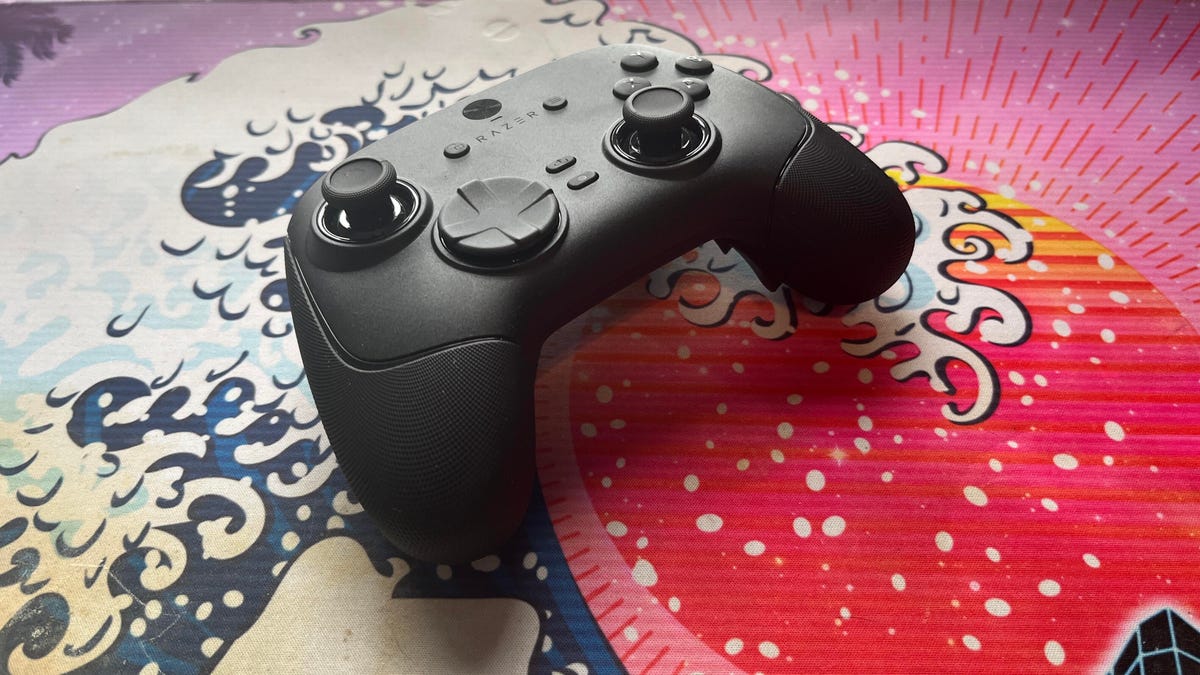
The Razer Wolverine V3 Pro 8K PC controller was not built for me, but admittedly, this has more to do with me as a gamer than the controller itself. I grew up playing the PlayStation 3 and PS4 consoles, cutting my teeth on slim, compact DualSense controllers. Over the past five years, I’ve gamed exclusively on my PC and have grown accustomed to the increased precision of a mouse and keyboard.
The Razer Wolverine V3 Pro 8K PC controller is the antithesis of a DualSense controller. It’s a chunky piece of hardware that might feel natural if you were raised on an Xbox and its bulky controllers, but it took me multiple gaming sessions to get acclimated to the sheer size of the Wolverine V3 and how it fit into my hands, especially since I don’t use a claw grip.
Size aside, this is a PC controller with every bell and whistle you can think of — and its price of $200 reflects that. The 8,000Hz polling rate ensures buttery smooth inputs with no lag, and tunnel magnetoresistance joysticks make every in-game movement feel fluid and calculated. Six extra remappable buttons help you up your game — they’re super handy for hero shooters like Marvel Rivals and hectic games like Battlefield 6. This is a premium product for gamers who are hoarding some serious hardware.
Its price is in line with other premium controllers. One of CNET’s best Xbox controllers is the Wolverine V3 Pro for Xbox, which also costs $200. Similar controllers like the Scuf Instinct Pro and Vitrix Pro BFG are in the same ballpark, pricewise, but the Wolverine V3 Pro 8K PC has a winning combination of competitive variables that make it feel exceptionally easy to use.
This controller is chock full of top-of-the-line technology and feels satisfying to use, but it needs to clear a high bar to feel truly worthwhile as a dedicated PC controller.
Chunky controller, satisfying feedback
When CNET’s Josh Goldman reviewed the Wolverine V3 Pro Xbox wireless controller, he called it «just about perfect.» If it isn’t broken, don’t fix it: Razer replicated many of its successes with the Wolverine V3 Pro PC controller.
The Wolverine V3 Pro 8K PC is the same size as the Wolverine V3 Pro Xbox controller, which is to say it’s a bit chunkier than a standard Xbox wireless controller, but it’s surprisingly much lighter than its Xbox cousin. It weighs just 220 grams, which is appreciably lighter than the Xbox version that weighs 304 grams. And while the Wolverine V3 Pro 8K PC is nowhere near as slim as a DualSense controller, it’s still much lighter than its Sony competitor — a stock DualSense controller weighs 280 grams.
Every button on this controller has a crisp, clean clickiness that scratches the same mental itch that a good mechanical keyboard might. Whether you’re gripping the trigger, pressing a button or squeezing one of the four remappable back paddles, you’ll hear incredibly satisfying auditory feedback that leaves no doubt that the controller is receiving your inputs. At one point, while I sat through a particularly long matchmaking queue, I found myself squeezing the triggers to entertain myself — the snappy pops were enough to keep me off TikTok.
The biggest difference between the V3 Pro Xbox and V3 Pro PC controllers is the variable polling rate — that dictates how often your controller is communicating with the computer. It’s like a refresh rate for your crosshair positioning.
The Wolverine V3 Pro Xbox just can’t compete here: That controller has a wired 1,000Hz polling rate for PC gameplay. The V3 Pro PC controller can be toggled for multiple polling rates, with an 8,000Hz maximum setting. This means the PC controller can report your input data eight times faster than the Xbox controller.
Every movement, turn and button press feels incredibly fluid. It’s safe to say that there’s no input lag with the Wolverine V3 PC controller, but I don’t think it matters too much for moment-to-moment first-person shooter gameplay. If you’re driving a car (or a tank) and you need to stop on a hairpin, you might appreciate Razer’s HyperPolling technology. If you’re not playing a tactical shooter like Counter-Strike or Rainbow Six: Siege, that 8,000Hz polling rate is overkill — if you’re a casual gamer crushing Call of Duty public lobbies with your pals, you’re probably not going to notice it in any of your firefights.
Better than a mouse and keyboard? That’s a little more complicated
I tested out the Wolverine V3 Pro 8K PC controller on Marvel Rivals, ARC Raiders and Battlefield 6 (my current first-person shooter obsession). It’s an extremely solid choice for at least two of these games, and I likely won’t be using my DualSense controller anytime soon.
I had a great time firing magic bolts in Marvel Rivals and rolling tanks through the streets of Cairo in Battlefield 6, but this is a controller that was supposedly designed for high-level shooter gameplay. I’m saddened to report that, when it comes to dominating a first-person shooter match or competing to survive in an extraction shooter, I’d much rather stick to a mouse and keyboard.
In close-range battles, I didn’t feel like the Wolverine controller particularly helped me gain an advantage over my opponents. Mouse-and-keyboard players were often able to lock onto me quicker, even with a high look sensitivity and built-in aim assist. And I felt outmaneuvered and outgunned by mouse-and-keyboard players in the fastest-paced fights. But the controller’s precision TMR thumbsticks made it easy to quickly lock my crosshairs onto enemies and mow them down from afar with light machine guns or sniper rifles in long-range battles.
I also find it useful for games like Battlefield that have a lot of buttons to micromanage during moment-to-moment gameplay. If you want to swap your fire mode from automatic to single-fire, mount your weapon’s bipod against a flat surface or pull out an invaluable class gadget, you’ll be reaching across your keyboard to do so. The six remappable buttons on the Wolverine V3 Pro 8K PC are great for these situations; I loved that I could tap fire my hulking light machine gun by gripping one of the controller’s back paddles.
The controller really shone for vehicle combat, though. I found myself gravitating toward my mouse and keyboard for infantry gunplay, but anytime I’d jump into a tank, I’d reach across my desk and grab the Wolverine again. Having pressure-sensitive triggers helps with any in-game driving: A slight squeeze lets me cautiously move forward, scanning for enemy mines, while fully pulling the trigger down helps me speed out of dangerous situations. Rebinding automatic repair jobs and weapon switches to the back paddles also helped me focus more on in-game combat, which helped me keep my armored vehicles in the fight for longer. With my DualSense controller, I’d have to awkwardly fumble with the D-Pad to activate my vehicle abilities. The Wolverine controller is the definitive way for a Battlefield tank enthusiast to play.
Outside of standard first-person shooter gameplay, I also found the Wolverine V3 PC controller to be handy for hero shooters — with some caveats. When I play Marvel Rivals, I mainly play tanks that require an extensive amount of ability usage but very little aim. Characters like Doctor Strange thrive when you can quickly string inputs together, and rebinding the controls to the Wolverine’s back paddles is great for that.
On the other hand, speedy divers that need to jump in and out of the enemy team’s backline and aim-intensive snipers feel tougher to play with the Wolverine controls, and I’d swap back to my mouse and keyboard whenever I wanted to switch off tank characters and fulfill another role for my team.
One game I don’t recommend the Wolverine V3 Pro PC for is ARC Raiders. While the remappable buttons make it easy to reach for healing items and grenades, losing out on the precision aim of a mouse and keyboard just isn’t worth it in a game where one death can set your progress back by several real-life hours. The controller lets me hold my own against killer ARC robots, but once real players join the mix, I’d rather use my tried-and-true PC hardware setup.
That’s not to say that the Wolverine controller is terrible for a tactical third-person shooter: The back paddles are a great way to quickly access any healing items, grenades and other consumables you’re carrying, which could be the difference between life and death. But when I have teammates depending on me to help them escape with their hard-earned loot, I just don’t trust the Wolverine controller to help me aim better than I can with my trusty mouse and keyboard.
For playing first-person shooters like Call of Duty or Apex Legends at breakneck speeds, the Wolverine V3 Pro 8K PC likely won’t replace your mouse and keyboard. But if your ideal competitive game centers on slower gunplay and long-range firefights, this is the most precise controller I’ve ever laid hands on (and you’ll receive a healthy heaping of help from aim assist to boot).
For the games I like to play, the Wolverine V3 Pro PC controller hasn’t become my primary gaming peripheral. Instead, it’s become a great situational swapout that complements my mouse and keyboard. As much as I like keeping it on deck for a long gaming session, $200 is a high price for a part-time controller.
Technologies
Samsung’s Galaxy Watch Ultra 2 Might Come in 5G and 4G Cellular Models
If the rumor proves true, the 5G Galaxy Watch Ultra would rival the 5G-enabled $799 Apple Watch Ultra 3 that debuted last fall.

Samsung’s next high-end Galaxy Watch could support faster 5G speeds, but if this leak is true, it will depend on where you live. The rumored Samsung Galaxy Watch Ultra 2 might come in 5G and 4G cellular models, with availability for each smartwatch depending on the country.
According to the Dutch website Galaxy Club (and spotted by SamMobile), Samsung’s servers may have revealed a series of model numbers that point to 5G, 4G and Wi-Fi-enabled editions of the next Galaxy Watch Ultra, which would succeed the original model that debuted in 2024.
A representative for Samsung did not immediately respond to a request for comment.
The Galaxy Club website speculates that the 5G edition would be sold in the US and Korean markets, while the 4G edition would sell in the rest of the world. In the US, a 5G version of the Galaxy Watch Ultra would rival the 5G-enabled $799 Apple Watch Ultra 3, which debuted last fall. The 4G edition would have broader compatibility worldwide, since the earlier network is far more established.
It will likely be a few months until we hear anything official about the Galaxy Watch Ultra 2. Samsung typically unveils its new watches in the summer alongside its Galaxy Z Fold and Z Flip foldable phones. Last year, Samsung unveiled the Galaxy Watch 8 and the Galaxy Watch 8 Classic, but otherwise left the prior 2024 Ultra in the lineup for those looking for a larger 47mm smartwatch.
Technologies
2 Cases Show Supreme Court Isn’t Holding ISPs Responsible for Piracy
Technologies
Today’s NYT Connections Hints, Answers and Help for April 8, #1032
Here are some hints and the answers for the NYT Connections puzzle for April 8, No. 1032.

Looking for the most recent Connections answers? Click here for today’s Connections hints, as well as our daily answers and hints for The New York Times Mini Crossword, Wordle, Connections: Sports Edition and Strands puzzles.
Today’s NYT Connections puzzle is kind of tough. The purple category is a fun one, once you see the connection. Read on for clues and today’s Connections answers.
The Times has a Connections Bot, like the one for Wordle. Go there after you play to receive a numeric score and to have the program analyze your answers. Players who are registered with the Times Games section can now nerd out by following their progress, including the number of puzzles completed, win rate, number of times they nabbed a perfect score and their win streak.
Read more: Hints, Tips and Strategies to Help You Win at NYT Connections Every Time
Hints for today’s Connections groups
Here are four hints for the groupings in today’s Connections puzzle, ranked from the easiest yellow group to the tough (and sometimes bizarre) purple group.
Yellow group hint: In the group.
Green group hint: Appearance details.
Blue group hint: Often found in gyms.
Purple group hint: They help you see.
Answers for today’s Connections groups
Yellow group: Cohort member.
Green group: Aesthetic.
Blue group: Kinds of bar apparatuses.
Purple group: Eyewear in the singular.
Read more: Wordle Cheat Sheet: Here Are the Most Popular Letters Used in English Words
What are today’s Connections answers?
The yellow words in today’s Connections
The theme is cohort member. The four answers are associate, colleague, fellow and peer.
The green words in today’s Connections
The theme is aesthetic. The four answers are design, look, scheme and style.
The blue words in today’s Connections
The theme is kinds of bar apparatuses. The four answers are monkey, parallel, pull-up and uneven.
The purple words in today’s Connections
The theme is eyewear in the singular. The four answers are contact, goggle, shade and spectacle.
-
 Technologies3 года ago
Tech Companies Need to Be Held Accountable for Security, Experts Say
-
 Technologies3 года ago
Best Handheld Game Console in 2023
-
 Technologies3 года ago
Tighten Up Your VR Game With the Best Head Straps for Quest 2
-
 Technologies4 года ago
Black Friday 2021: The best deals on TVs, headphones, kitchenware, and more
-
 Technologies5 лет ago
Google to require vaccinations as Silicon Valley rethinks return-to-office policies
-
 Technologies5 лет ago
Verum, Wickr and Threema: next generation secured messengers
-
 Technologies4 года ago
Olivia Harlan Dekker for Verum Messenger
-
 Technologies4 года ago
The number of Сrypto Bank customers increased by 10% in five days