
Technologies
iPhone 17 Pro Loses Fight Against the Oppo Find X9 Pro’s Camera
I didn’t expect Apple’s best phone to struggle so much against the Oppo Find X9 Pro.
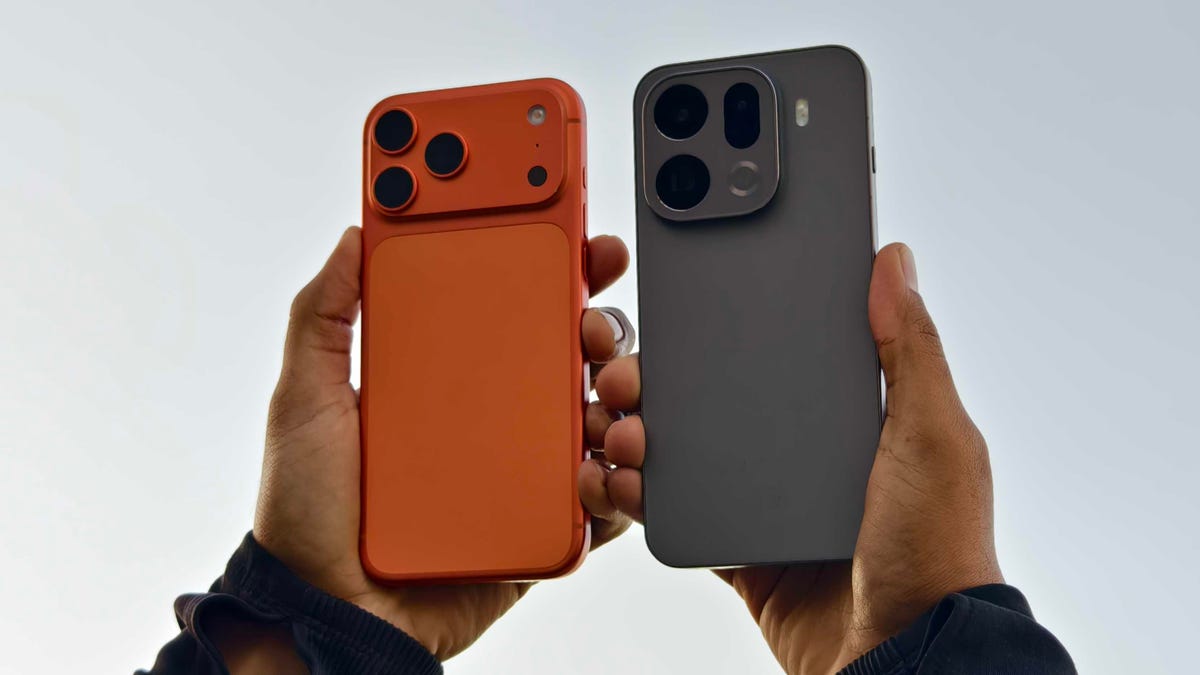
The iPhone 17 Pro is unquestionably among the best camera systems available. It can take amazing images in all sorts of conditions with almost no effort on your part. But there are a number of top-end Android phones that pack serious photography setups, too — and the Oppo Find X9 Pro is just such a device. Its triple rear camera is potent, and capable of taking beautiful images from both its wide and 200-megapixel zoom cameras.
The Find X9 Pro is a powerhouse phone in all respects, which is why it scored so highly in my full review — and why it was given a coveted CNET Editors’ Choice Award. So to see just how it stacks up against the iPhone 17 Pro, I took it out on a series of photo missions around my beautiful home city of Edinburgh.
Before we dive in, a quick note about the images. They were all shot with each phone’s default camera mode in JPEG with no other settings applied (the Photographic Style on the iPhone was set to Standard). The images have been imported into Lightroom for the purposes of comparison and exporting at file sizes that will play nicely on the internet, but no other edits, sharpening or noise reduction have been applied.
Remember that while some decisions about which images look better might be obvious (such as a lack of detail or image processing aberrations), others will simply come down to personal opinion. I’m a professional photographer, so I typically look for an image that captures the scene more naturally. You may like a more vibrant image with high contrast, so take my findings with a pinch of salt.
With that said, let’s dive in.
Wide cameras comparison
Starting off with this easy snap overlooking the train tracks. Both phones have exposed their images above well but the Oppo’s shot has more natural warm tones on the brickwork on the wall — the iPhone’s look more magenta. The Oppo’s colors are more vibrant, too, but not overly so.
Switching to the ultrawide lens, the blue sky definitely looks oversaturated in the Oppo’s shot. And here’s where we have to dive deeper; Oppo’s image has had more digital sharpening applied to it, which helps some details look crisp, but it’s also got a lot of noise reduction, which smooths details in other areas.
If we look up close at this section of wall, we can see that the strong lines of mortar between the bricks look sharper in the Oppo’s photo on the right. But the bricks themselves look almost polished as they’ve been stripped of detail by the noise reduction. The iPhone’s image has retained that detail.
Another weird one to analyze. The wooden box of the library is unquestionably sharper on the Oppo’s shot, with even the minute scratches on the perspex being clearly visible. But as soon as we look further out toward the edges of the frame, that detail plummets.
Zooming in close on a section to the right side of the frame, it’s clear that the Oppo’s image severely lacks detail compared to the iPhone’s image. Whether this is an image processing issue or due to the quality of the lens, I’m not sure, but it’s surprising to see, especially given how sharp the rest of the image is.
This indoor shot on the main camera feels like a slightly easier win for the Oppo. Its image is brighter and colors look richer without being too punchy. As before, it both sharpens some areas and reduces texture in others. There’s a lack of detail toward the edge of the frame, but you’d only notice if you really get up close to the pixels. Overall, I prefer the look of the Oppo’s shot.
And it’s the same when I switched to the ultrawide lens — the Oppo takes the win here.
I love the balanced exposure from both phones in this vibrant outdoor scene, but I prefer the warmer tone of the Oppo’s shot. The iPhone’s photo looks like it saw all the golden colors and set its auto white balance on the cooler side to compensate. The Oppo produced a more true-to-life image and I think it’s a great shot as a result.
I don’t like the Oppo’s effort here, though. It artificially brightened the shadows way too much, giving this scene a fake HDR look that screams, «I took this on an Android phone.» The iPhone takes an easy win with its more natural handle on shadows.
I’m conflicted on this one. The Oppo’s shot is brighter and more vibrant, but it’s almost too much. The blue sky is a bit on the electric-blue side for my taste, while the buildings in the center of the frame look slightly too bright. Still, I think I prefer its rendition to the iPhone’s, which does look a little drab by comparison.
At 2x zoom, this indoor scene looks solid on both phones. Overall, I think the Oppo’s shot takes the win as it’s brighter and sharper than the iPhone’s.
Taking each phone up to its maximum default zoom levels (8x on the iPhone, 6x on the Oppo), the results look quite dramatically different. The color balance is wildly different for one thing, with the iPhone leaning more into teal tones while the Oppo’s photo has a more magenta cast to it. Honestly, neither one looks especially realistic, with both phones going a bit too hard in different directions. What I have noticed is that the Oppo’s image has gone overboard with the digital sharpening, resulting in a crunchiness to the details that I’m not a fan of.
The huge amount of digital sharpening on the Oppo’s shot is clear when you zoom in on the details.
This is an odd one; at max zoom, the Oppo has catastrophically failed to render the details on the side of the building.
Check out this detailed crop; I don’t know what the Oppo was doing in its image, but that building has been turned into a bizarre, smeary mess. The iPhone has done a superb job of capturing those distant fine details.
Seagulls on a log. There’s very little to choose between either phone in this example. Take your pick!
The Oppo Find X9 Pro does have a secret weapon when it comes to zoom, though, in the form of the Hasselblad telephoto zoom accessory. This optional lens attaches to the phone and gives huge zoom lengths — up to 40x — while retaining excellent quality. You can see the difference here in the maximum zoom range of the iPhone against the zoom of the Find X9 Pro with the lens attached; it’s both closer and sharper.
I absolutely love using the lens add-on for street photography, as you can get some great candid moments without anyone noticing. It’s worth keeping in mind, though, that the Hasselblad lens for the phone is an eye-watering £435 or $580 (based on a rough conversion of the 499 euro price), and third-party telephoto lenses from the likes of Sandmarc are also available for the iPhone.
Night photography
The iPhone’s night mode shot here does look brighter, but I prefer the richer contrast on the Oppo’s shot. Otherwise, it’s a pretty even match here.
But it’s a much easier win for the Oppo here. The deeper contrast has helped keep some of the flare from the lights at bay, while the details on the front of the building are much sharper.
This indoor scene is brighter, warmer and more vibrant on the Oppo and I much prefer it as a result.
The iPhone’s image is brighter here, especially in the sky, but if you zoom in on the details, the Oppo’s image is sharper.
And it’s basically the same story when you switch to the ultrawide lens.
When we jump to the zooms, though, the Oppo has ramped up the sharpening again, resulting in an image that looks rather over-processed.
I caught a glorious sunset on one evening but only the iPhone managed to do it justice. I love the iPhone’s natural tones and deep shadows, whereas the Oppo has delivered an oversaturated shot that looks like I’ve applied a tacky filter before posting it to Instagram.
And it’s the same here with the Oppo’s shot looking saturated against the iPhone’s more realistic version.
But the difference was most obvious when using the zoom lenses on both phones. The iPhone’s shot not only has more natural colors, but the Oppo’s heavy-handed processing has given the lighthouse an unpleasant halo (a light haziness around its edges) that really spoils the shot.
I ended on a selfie and here both phones went in interesting directions. The Oppo is certainly the winner to my eye — it’s shot is considerably sharper (without overdoing it) with more natural skin tones and an accurate orange hue on my jacket. The background is a bit overly cyan but it’s certainly a better-looking attempt than the iPhone’s.
iPhone 17 Pro vs. Oppo Find X9 Pro: Which takes better photos?
I was surprised at the results. Oppo’s phones — and its sister company OnePlus’s phones — have had a history of leaning hard into image processing with often wildly brightened shadows, too much sharpening and inaccurate colors that resulted in shots that were only really okay for casual snaps. The Find X9 Pro does have some of that (the image of the red restaurant front is a particularly egregious example of shadow brightening) but it’s way more toned down than I expected.
In fact, it delivered shots in many instances that I preferred over the iPhone’s. The golden hues of the tree-lined pathway shot looked sublime on the Oppo, while the warmer, brighter tones inside the pub were a clear victory for the X9 Pro. Most of the images from the Oppo’s main camera I preferred over the iPhone’s, including some at night. It wasn’t a win in every instance and it just goes to show that each phone’s image processing will still trip up in different scenarios.
But overall, I think I have to give the win to the Oppo Find X9 Pro. Its ability to capture scenes accurately with just enough processing to help give images that little pop but without going overboard is admirable. It’s safe to say then, if you’re looking for a high performance Android camera phone, the Find X9 Pro is certainly one to consider.
Technologies
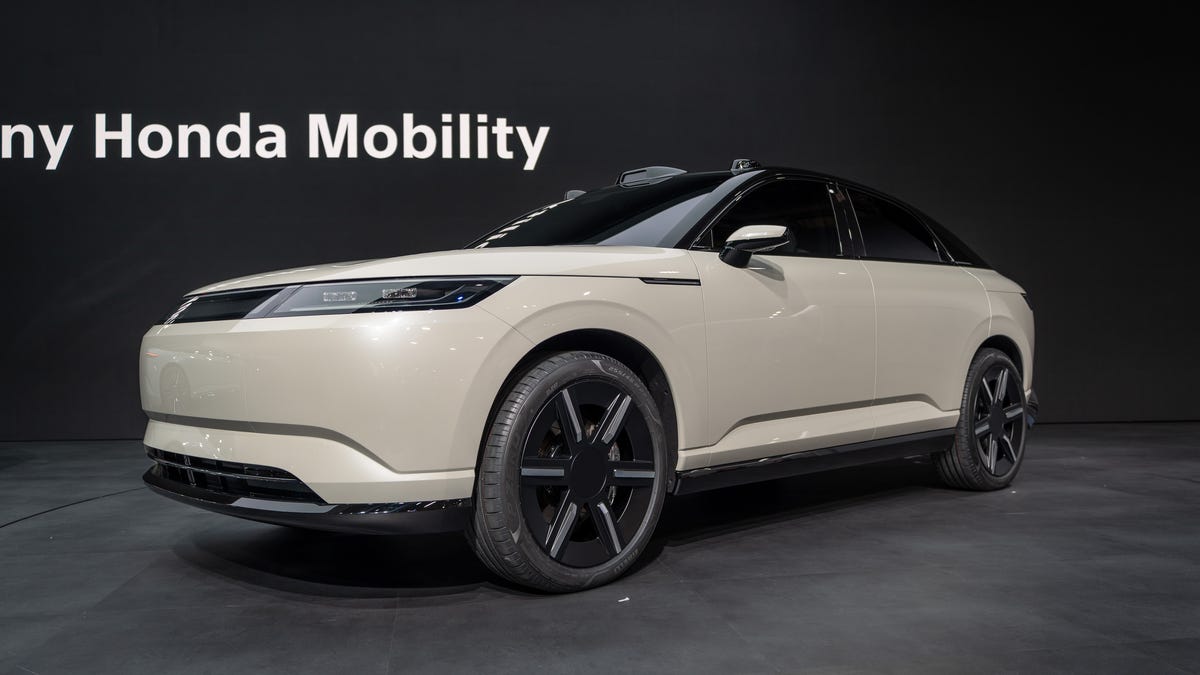
Sony Hits the Brakes on Electric Cars With Built-In PlayStation Features
Two EV models that Sony was developing with Honda, the Afeels 1 sedan and an Afeela SUV, are now discontinued.
Technologies
Samsung’s New Budget Galaxy A37 and A57: Improved Designs and AI Features
Technologies
My 3 Favorite Bose Headphones Deals on Amazon Aren’t Actually From Bose
Baseus’ Inspire XH1, XP1 and XC1 headphones with Sound by Bose are up to 23% off during Amazon’s Big Spring Sale. A bonus item makes the deal even harder to ignore.
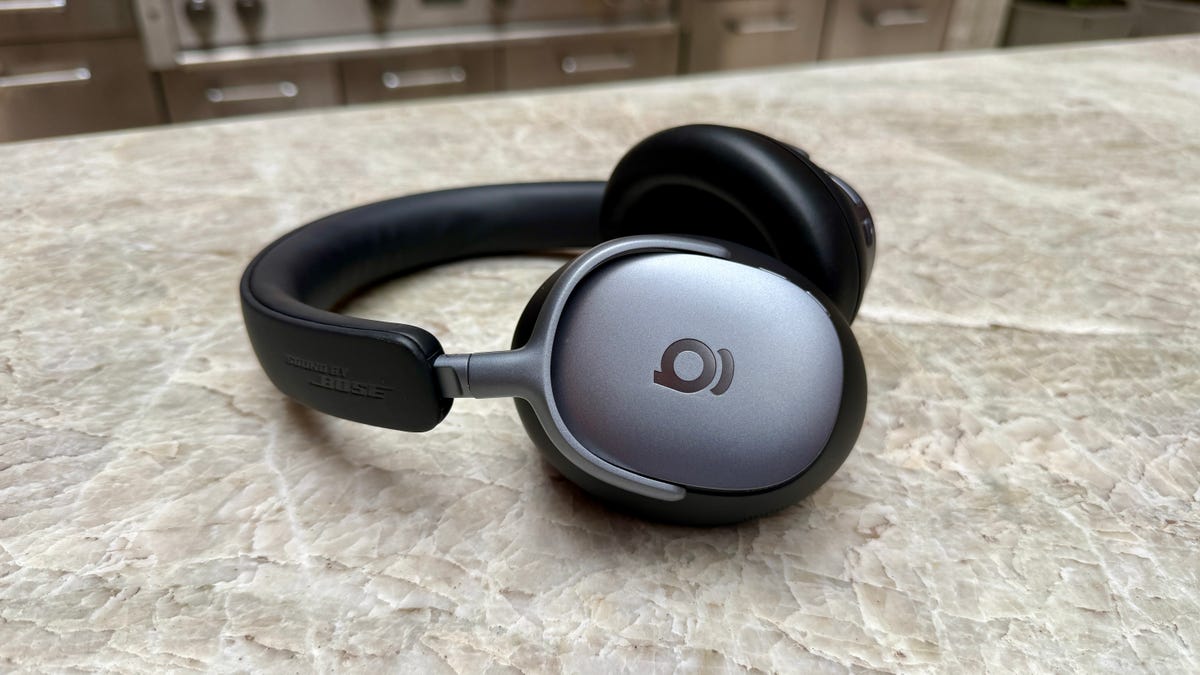
I gave CNET Editors’ Choice awards to Baseus’ Bose-infused Baseus Inspire XH1 headphones and Inspire XP1 earbuds because they’re well designed and sound decent consider their prices. I also liked Baseus’ Inspire XC1 clip-on earbuds, which have dual drivers. They even earned a spot on CNET’s best clip-on earbuds list and are probably the best clip-on buds at their price right now.
Amazon’s Big Spring Sale just kicked off, and it’ll be around through March 31. Right now, all three models are discounted to $100 to $123, bringing them near their all-time low prices.
That’s a deal I’d highlight on its own, but if you click through to any of those models’ Amazon product pages and look closely, you’ll see that each is eligible for «one free item» with purchase.
Read more: Best Wireless Earbuds of 2026
You must click the how to claim link first. Then click a button on the left side of the screen (above the stars for average ratings) to switch the view from «qualifying items» to «benefit items» and see the freebie. The items tend to be Baseus’ entry-level headphones or earbuds, but if you don’t like the free item option with a $120 purchase, you can try the options at lower prices.
You can read my full reviews of the Inspire XH1 headphones here and the Inspire XP1 earbuds here. And here’s my quick take on the Inspire XC1 earbuds:
Like Baseus’ noise-isolating Inspire XP1 earbuds, which I rated highly, the Inspire XC1 have Sound by Bose and a more premium design than earlier Baseus earbuds. The XC1 don’t sound as good as the XP1, they’re decent open earbuds and are equipped with dual drivers (one is a Knowles balanced-armature driver that helps improve treble performance). While they don’t produce as much bass as noise-isolating earbuds like the Inspire XP1, their bass performance is better than I expected. The buds’ sound is pretty full, especially in quieter environments, though they do better with less bass-heavy material. I did notice a bit of distortion at higher volumes with certain tracks that feature harder-driving bass.
While I slightly prefer the design and fit of Bose’s Ultra Open Earbuds, as well as the design of their case, and think the Bose buds sound more natural and a tad better overall, the much more affordable Inspire XC1 fit comfortably and offer top-tier sound for clip-on open earbuds, as well as decent voice-calling performance with good background noise reduction. And they play louder than the Bose, too.
You can grab the Inspire XH1 for $123, the XP1 for $100 and the XC1 for $110, saving you up to 23%. Just remember to claim your free item with your purchase.
Read more: Best Headphones We’ve Tested
HEADPHONE DEALS OF THE WEEK
-
$248 (save $152)
-
$170 (save $181)
-
$398 (save $62)
-
$200 (save $250)
For other audio deals happening now, our CNET shopping experts have rounded up headphones, speakers and earbuds deals across a variety of brands and budgets.
-
 Technologies3 года ago
Tech Companies Need to Be Held Accountable for Security, Experts Say
-
 Technologies3 года ago
Best Handheld Game Console in 2023
-
 Technologies3 года ago
Tighten Up Your VR Game With the Best Head Straps for Quest 2
-
 Technologies4 года ago
Black Friday 2021: The best deals on TVs, headphones, kitchenware, and more
-
 Technologies5 лет ago
Google to require vaccinations as Silicon Valley rethinks return-to-office policies
-
 Technologies5 лет ago
Verum, Wickr and Threema: next generation secured messengers
-
 Technologies4 года ago
Olivia Harlan Dekker for Verum Messenger
-
 Technologies4 года ago
The number of Сrypto Bank customers increased by 10% in five days