
Technologies
AirPods Pro 3 vs. AirPods 4: Which Apple Earbuds Should You Get for Black Friday?
The 2025 AirPods Pro 3 are Apple’s flagship noise-canceling earbuds. But the 2024 AirPods 4 are more affordable, and their step-up model has noise-canceling capabilities. So what’s the better option?
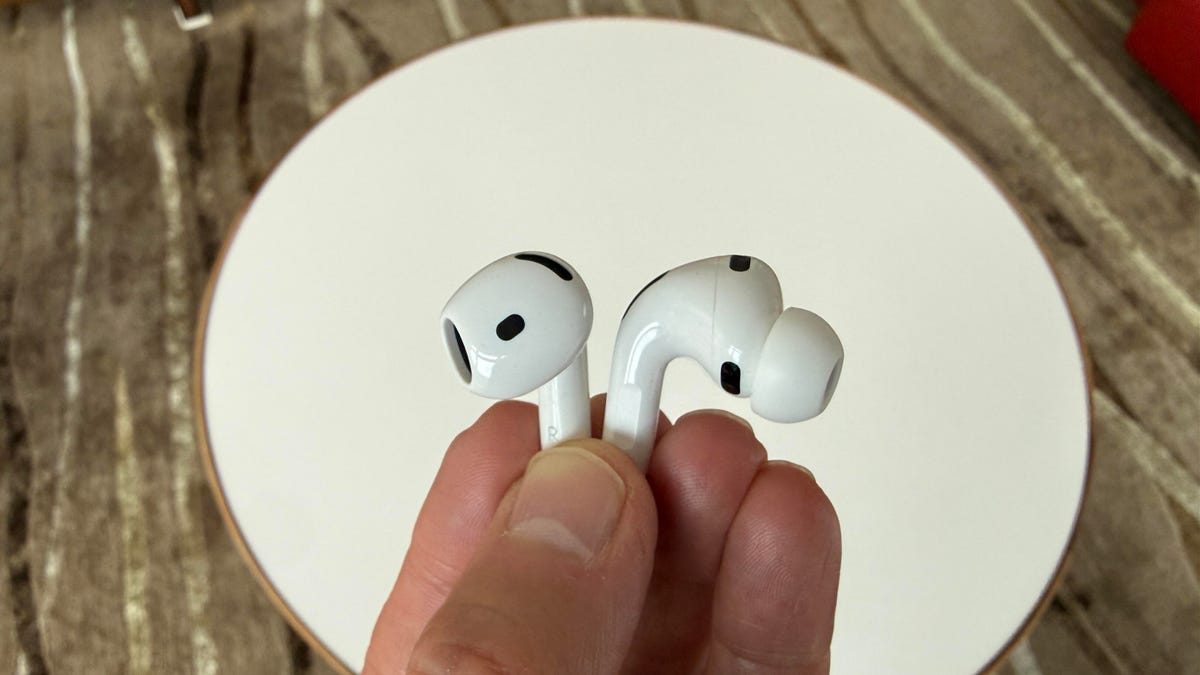
A friend of mine recently asked me what the best AirPods were, and I told him the AirPods Pro 3. I said they had the best sound quality and noise canceling. When I spoke to him a few days later, I was surprised to hear that he’d bought the AirPods 4 with Active Noise Cancellation. In fact, he’d bought one pair for himself and another for his son. I asked him why.
It mostly came down to price, he said. The AirPods 4 with ANC are available at a deeper discount, currently listed on Amazon for $100, which is $79 less than their original list price of $179. While the AirPods Pro 3 have also been available at discounted prices, dropping to as low as $200 ahead of Black Friday, that’s still $100 more than what the AirPods 4 with ANC cost. He wasn’t willing to pay that much and didn’t mind that the AirPods 4 have an open design. In fact, he liked that they did. «I basically got two pairs of AirPods for the price of one,» he said.
I understood where he was coming from, so I didn’t make him second-guess his decision. But I thought it’d be a good idea to offer some detailed comparisons of the 2025 AirPods Pro 3 versus the 2024 AirPods 4 (including that earlier model’s entry-level standard version (currently $80), which leaves off noise-canceling and wireless charging. That way, you can make the right decision if you’re considering buying any of them when they get marked down for Black Friday and Cyber Monday.
Read more: Are the AirPods Pro 3 Steve Jobs’ Ultimate Audio Legacy?
AirPods Pro 3 vs. AirPods 4: What’s similar
- The AirPods Pro 3 and both AirPods 4 models (with and without ANC) are powered by Apple’s H2 chip.
- The AirPods Pro 3 and AirPods 4 models are equipped with Bluetooth 5.3, just like the AirPods Pro 2 (though some true-wireless earbuds have already jumped to Bluetooth 6.0).
- The AirPods Pro 3 and AirPods 4 with ANC both have a MagSafe charging case with USB-C and wireless charging. Note that the entry-level AirPods 4 do not support wireless charging. None of the three models come with a USB-C charging cable.
- The AirPods Pro 3 and both versions of the AirPods 4 (with and without ANC) support Apple’s new Live Translation feature. They also all feature Apple Personalized spatial audio with head-tracking.
- The AirPods Pro 3 and both versions of the AirPods 4 (with and without ANC) have always-on Siri and automatic switching between Apple devices on your iCloud account.
- The AirPods Pro 3 and AirPods 4 with ANC share very similar sets of features, even beyond active noise canceling. Adaptive Audio, which adjusts the level of noise canceling on the fly, and Conversation Awareness mode, which lowers the volume of your music and engages transparency mode, are available on both the AirPods Pro 3 and AirPods 4 with ANC. Note that the entry-level AirPods 4 don’t include those features because they lack noise canceling and a transparency mode.
AirPods Pro 3 vs. AirPods 4: What’s different
- While they look similar from the outside, the AirPods Pro 3 and AirPods 4 fit differently. The AirPods Pro 3 feature a foam-infused noise-isolating design with silicon eartips in five sizes — extra-extra small, extra small, small, medium and large. The silicon eartips are designed to seal off your ear canal, while the AirPods 4 have an open design with no eartips.
- The AirPods Pro 3 weigh more per bud (5.55 grams) compared to the AirPods 4 (4.3 grams).
- The AirPods Pro 4 with ANC’s case is smaller and lighter than the AirPods Pro 3’s case (34.7 grams vs. 43.99 grams).
- The AirPods Pro 3 have 3 microphones per earbud, while the AirPods 4 have two per bud. However, both offer very good voice-calling performance.
- The AirPods Pro 3 are equipped with heart-rate sensors, similar to those found in the Beats Powerbeats Pro 2. The AirPods 4 do not have heart-rate sensors.
- The AirPods Pro 3 have significantly better noise cancellation than the AirPods 4 with ANC (up to 4x better, according to Apple).
- The AirPods Pro 3 support Apple’s Hearing Aid feature, while the AirPods 4 don’t.
- While both models are dust-resistant, the AirPods Pro 3 and their charging case have an IP57 rating, which means they can be submerged in water up to 1 meter deep for 30 minutes. The AirPods 4 are IP54 splash-proof.
- The AirPods Pro 3’s battery life is better (up to 8 hours with noise-canceling on, compared to up to 5 hours for the AirPods 4 with ANC).
- The AirPods Pro 3’s case features a U2 chip, which boosts the Precision Finding range in the Find My app by 1.5x (requires an iPhone 17). The AirPods 4 with ANC’s case is equipped with the U1 chip, which supports Precision Finding. In contrast, the standard AirPods 4’s case lacks the U1 chip and supports a less advanced version of Find My.
- The cases for both the AirPods Pro 3 and AirPods 4 no longer have a button for Bluetooth pairing. You simply double-tap on the front of the case to put the buds into Bluetooth pairing mode.
- You can see a full feature comparison of the AirPods Pro 3 and AirPods 4 with ANC here.
AirPods Pro 3 and AirPods 4 fit differently
While the AirPods Pro 3 and AirPods 4 look similar at first glance, they do feel different in your ears. Some people simply don’t like having eartips jammed in their ears and prefer the open design of the AirPods 4, which allows them to nestle in more comfortably. However, more people seem to have issues getting a secure fit with Apple’s standard AirPods compared to the Pro models.
The original AirPods and AirPods 2 had a smaller design that fit certain ears very well, though they weren’t a great match for my ears (they would slip out a little too easily). Apple moved to a slightly bigger bud for the AirPods 3, improving their sound, but the new design didn’t quite work as well as for some AirPods 2 users.
Read more: Best Wireless Earbuds of 2025
The AirPods 4 are slightly smaller than the AirPods 3 and have a slightly different shape. They fit my ears pretty well, but I still get a more secure fit from the AirPods Pro 3, with redesigned eartips that seem to offer a snugger, more secure fit for more people (the good thing about eartips is they come in different sizes, so if one doesn’t get you a tight seal, you can try another).
Ultimately, if you prefer the way the AirPods 4 fit your ears compared to the AirPods Pro 3, it makes your decision easier. The same is true if the AirPods Pro 3 fit better. Things get more complicated if you like the way both fit. Then you’ll have to weigh the importance of sound quality and noise-canceling performance.
AirPods 4 open earbuds have very good sound, but AirPods Pro 3 are significantly better
The sound quality of open earbuds has improved substantially over the last several years, and the leap in sound quality from the original AirPods and AirPods 2 to the AirPods 4 is quite significant. Apple has managed to really step up the bass performance, which often suffers with an open design, and the AirPods 4 offer quite respectable sound (and that sound has a nice openness to it, given that these are open earbuds, after all).
However, thanks to their noise-isolating design, the AirPods Pro 3 sound fuller and more dynamic, with more powerful bass. Also, because the AirPods 4’s open design allows ambient sound to leak into your ears, if you’re listening to them in noisy environments, the sound quality is impacted, particularly for the entry-level AirPods 4, which have no ANC. It’s also worth noting that while Apple has done a remarkable job creating open earbuds with effective noise canceling, it’s not entirely effective and can only muffle so much ambient noise.
Noise-canceling comparison: AirPods Pro 3 vs. AirPods 4 with ANC
Apple says the AirPods 4 with ANC offer similar noise canceling to the original AirPods Pro. According to Apple, the AirPods Pro 2 offer twice the noise canceling of the original AirPods Pro, and the AirPods Pro 3 provide twice the noise canceling of the AirPods Pro 2. That would mean the AirPods Pro 3 have 4x better noise-canceling performance than the AirPods 4 with ANC.
I should note that some of that superior noise-canceling performance is related to the passive noise isolation you get from the AirPods Pro 3’s eartips sealing off your ear canal. Any way you look at it, the AirPods Pro 3 have some of the best noise cancellation available right now. In my review, I pitted them against Bose’s $299 QuietComfort Earbuds (2nd gen), which were released a few weeks before the AirPods Pro 3 in the US. Many reviewers said they had the best noise cancelling, and I felt that way, too, until I tried the AirPods Pro 3. Then, I wasn’t so sure.
I didn’t feel I could declare one better than the other without running my own lab tests on a rather expensive rig that CNET doesn’t own, but I was quite impressed with the AirPods Pro 3. Compared to the noise-canceling capacity on the AirPods Pro 2, I could definitely hear the difference when I used the buds on a plane, in the noisy streets of New York and underground in the subway.
Read more: AirPods Pro 3 vs. AirPods Pro 2 — should you upgrade?
Do you really need the AirPods Pro 3’s heart-rate monitoring?
I personally don’t feel that heart-rate monitoring is a must-have feature, particularly if you already own a smartwatch with the feature. But for some folks, it will be a welcome addition.
The heart-rate sensors have been custom-designed for the AirPods Pro 3 (Apple’s smallest heart-rate sensors) and aren’t identical to the ones in the Powerbeats Pro 2. But the experience using the heart-rate monitoring feature remains the same.
There may be more to come, as Apple has a habit of leaving off a few tricks when it first launches products (remember that the AirPods Pro 2 didn’t have spatial audio when they launched). I tend to think we’re not done hearing about the heart-rate sensor and future health applications for the buds.
How about voice-calling performance?
One could argue that the AirPods Pro 3 have slightly better voice-calling performance, but the truth is, both the AirPods 4 and AirPods Pro 3 offer excellent voice-calling performance with good background noise reduction while picking up your voice clearly. That said, in noisy environments, the superior noise canceling of the AirPods Pro 3 does help, allowing you to hear callers more clearly.
Should I get the AirPods 4 or AirPods 4 with ANC?
If you’re looking to spend as little money as possible for a set of AirPods, the entry-level AirPods 4 are selling for all-time low prices this holiday buying season and are very good open earbuds for Apple users with support for automatic switching between Apple devices and features like spatial audio with head-tracking and Live Translation. However, I try to steer folks toward the AirPods 4 with ANC because they’re clearly more special and don’t cost significantly more than the standard AirPods 4.
Can’t decide between the AirPods 4 and AirPods Pro 3?
If you can’t decide, you can wait for the next-generation AirPods to be released. Reports suggest that Apple is working on both the AirPods 5, which feature an open design, and the next-gen AirPods Pro, with rumors suggesting they may get infrared cameras for gesture controls and an upgraded H3 chip.
Based on past AirPods product cycles, the AirPods Pro 4 should be two years away (2027) while the standard AirPods (the AirPods 5) should be slated to come out next year. But word has it that the next AirPods Pro, whatever they’re called, may arrive as soon as next year (2026) and may be an even more impressive upgrade than what we got moving from the AirPods Pro 2 to the AirPods Pro 3.
Disappointingly, I’m hearing that the AirPods Max over-ear headphones won’t get an upgrade next year, and we may not get a true next-gen version of the AirPods Max for a few years. Released in 2020, the pricey AirPods Max are only equipped with Apple’s H1 chip and are really due for an upgrade. But Apple seems more focused on the development of its AirPods earbuds rather than its full-size headphones.
Read more: Apple Reportedly May Add Infrared Cameras to Its Next AirPods Pro
AirPods Pro 2 vs. AirPods Pro 3 vs. AirPods 4 with ANC spec comparison
| AirPods Pro 2 | AirPods Pro 3 | AirPods 4 with ANC | |
|---|---|---|---|
| Weight (each earbud) | 0.19 ounce (5.13 grams) | 0.20 ounce (5.5 grams) | 0.15 ounce (4.3 grams) |
| Weight (case) | 1.79 ounces (50.8 grams) | 1.55 ounces (43.99 grams) | 1.22 ounces (34.7 grams) |
| Water resistant | IPX4 | IP57 | IP54 |
| Sensors | Skin-detect sensor, Optical in-ear sensor, Motion-detecting accelerometer, Speech-detecting accelerometer, Force sensor |
Skin-detect sensor, Optical in-ear sensor, Motion-detecting accelerometer, Speech-detecting accelerometer, Force sensor, heart-rate sensor |
Optical in-ear sensor, Motion-detecting accelerometer, Speech-detecting accelerometer, Force sensor |
| Microphones | Dual beamforming microphones, inward-facing microphone | Dual beamforming microphones, inward-facing microphone | Dual beamforming microphones, inward-facing microphone |
| Chip | H2 | H2 | H2 |
| Conectivity | Bluetooth 5.3 | Bluetooth 5.3 | Bluetooth 5.3 |
| Active Noise cancellation, transparency mode |
Yes | Yes | Yes |
| Conversation awareness, adaptive audio |
Yes | Yes | Yes |
| Voice isolation, personalized volume |
Yes | Yes | Yes |
| Battery life | Up to 6 hours +30 hours with case |
Up to 8 hours +24 hours with case |
Up to 5 hours +30 hours with case |
| Wire in box | Yes | No | No |
| Launch price in US | $249 | $249 | $179 |
Technologies
Tubi App Goes Live in ChatGPT to Give You TV and Movie Recommendations
Like the ultra-customized feel of a Tubi rec? The streamer aims to make it even more personalized.
Tubi, the free streaming platform known for its vast library of cult classics and indie movies, has added an app to ChatGPT. You can now use the chatbot to find content recommendations for TV shows and movies on Tubi, the streamer announced on Tuesday.
You may already have your own search strategy when using Tubi, but the addition of the native app within ChatGPT allows you to strike up a conversation and ask for uber-specific, personalized title suggestions. If you see a film or show that captures your interest, you have the option to click «Watch on Tubi» to stream it on a mobile device or the web. In the mood for scary movies about yetis? Use @Tubi for your prompt in the chatbot and request something like, «horror movies with aggressive yetis» and expect to see a selection of titles that fit your wish list.
«Streaming should feel effortless, and as chatbots and AI agents are becoming a common way people navigate the internet, Tubi is expanding its discovery experience to meet viewers in the moment they’re expressing intent in their own words,» Mike Bidgoli, Tubi’s chief of product and technology, said in a statement.
ChatGPT opened its app store this past December. It currently includes apps for Apple Music, Zillow, Spotify and Canva, offering the ability to connect your accounts to search, design or ask for recommendations. Back in 2023, Tubi created its own AI-powered tool called Rabbit AI for mobile users to help audiences find content to watch. The company later shuttered the feature, which used Open AI’s Chat GPT-4. With today’s launch, it’s the first video streaming service to add an app within ChatGPT.
(Disclosure: Ziff Davis, CNET’s parent company, in April filed a lawsuit against OpenAI, alleging it infringed Ziff Davis copyrights in training and operating its AI systems.)
Technologies
PlayStation Plus Subscribers Can Play Tomb Raider and More All April Long
Subscribers can also explore a Soulslike game that just got a big update.

PlayStation Plus, which is Sony’s version of Xbox Game Pass, offers a large, constantly expanding library of games. Subscribers can choose from the Essential, Extra and Premium tiers, each with unique perks and benefits. Starting at $10 a month, the plans give subscribers access to games and rewards, and each month, all subscribers can play a handful of new games at no additional charge. And some people on Reddit are pretty excited for a few of the games Sony is offering subscribers throughout April.
One user wrote how they are «buzzing» for the remastered Tom Raider games, while another user is willing to replay the Soulslike game Lords of the Fallen. «April fools’ joke? Because they’re actually good,» a third user wrote.
If you’re a PlayStation Plus subscriber, you can play these games now until May 4.
Lords of the Fallen
If you played Elden Ring and thought, «I wish this game had even more grimdark elements to it, like Bloodborne,» Lords of the Fallen might be for you. Choose one of nine classes to play as while you traverse the lands of the living and the dead in order to overthrow the demon god Adyr. You’ll fight all manner of monstrosities along the way, like a colossal humanoid with an arm protruding from its mouth or a giant carrion crow that wears a human skull.
HexWorks, the gaming studio behind Lords of the Fallen, also released a patch for the game on April 3. The patch is intended to make co-op sessions feel more rewarding for hosts and guests, so you and your friends should have even more fun in this game.
Tomb Raider 1-3 Remastered
Experience these classic Tomb Raider games from the 90s all over again — or for the first time — with the remastered trilogy. You’ll explore jungles, solve puzzles in the desert and tackle mercenaries and monsters along the way. While you can enjoy the boosted graphics of the remastered edition, you can also enable low-poly mode to experience these games as you would have almost 30 years ago.
Sword Art Online Fractured Daydream
A system called Galaxia has been added to Alfheim Online, allowing players to relive the past. But the system has spun out of control, displacing players throughout time. To set things right, you’ll have to work with friends and foes alike in this co-op raid battle game. But if you want to go solo, you can play story mode as characters from across space and time confront the anomaly in the VR world.
For more on PlayStation Plus, here’s what to know about the service. You can also check out other games on PlayStation Plus and games on Xbox Game Pass.
Technologies
Get Organized for Just $28 With This 6-in-1 Baseus Charging Station Deal
Ditch the cluttered cables and upgrade to this sleek USB power strip while it’s on sale for a record-low price.
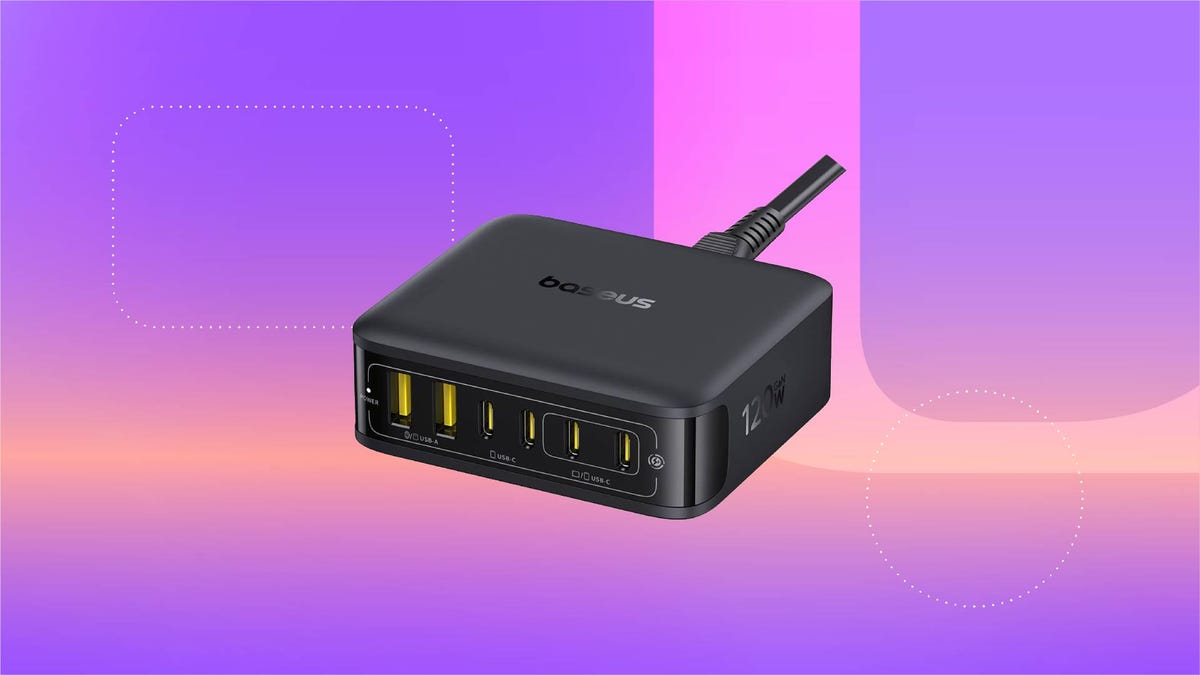
For just $28, this six-in-one Baseus charging station can help you keep your desk organized. That’s 20% off and the all-time lowest price we’ve seen for this 120-watt USB power strip. We don’t expect this limited-time deal to last for long, however, so you’ll want to get your order in sooner rather than later.
You can use this charging station for just about all of your devices, including phones, tablets, headphones and laptops. It’s equipped with four USB-C ports and two USB-A ports, so you can charge up to six devices at once. It also boasts a 65-watt single-port output, enough to fully recharge a MacBook Air in less than 2 hours. And at just 323 grams, it’s light enough to take on the go, making it a great buy for frequent travelers.
Why this deal matters
This sleek Baseus charging station can connect to up to six devices at once, and is still small enough that you can take it on the go. Plus, this is the all-time lowest price we’ve seen, making it a pretty great value.
-
 Technologies3 года ago
Tech Companies Need to Be Held Accountable for Security, Experts Say
-
 Technologies3 года ago
Best Handheld Game Console in 2023
-
 Technologies3 года ago
Tighten Up Your VR Game With the Best Head Straps for Quest 2
-
 Technologies4 года ago
Black Friday 2021: The best deals on TVs, headphones, kitchenware, and more
-
 Technologies5 лет ago
Google to require vaccinations as Silicon Valley rethinks return-to-office policies
-
 Technologies5 лет ago
Verum, Wickr and Threema: next generation secured messengers
-
 Technologies4 года ago
Olivia Harlan Dekker for Verum Messenger
-
 Technologies4 года ago
The number of Сrypto Bank customers increased by 10% in five days