
Technologies
Is Leaving Your Phone Plugged In Bad for the Battery? Apple, Samsung and Google Weigh In
If you leave your phone plugged in overnight, here’s what manufacturers say you should know.

If you’re still sprinting to unplug your phone the second it hits 100% because you’re terrified of “overcharging,” you can officially relax. That advice is ancient history. Modern smartphones are smart enough to cut off the power once they’re fully charged, so leaving your iPhone or Android plugged in overnight isn’t going to destroy the battery.
But let’s be clear: Just because it’s safe doesn’t mean it’s optimal. While you can’t technically overcharge the battery, keeping a lithium-ion cell pinned at 100% creates voltage stress, and the heat generated from sitting on a charger is the real enemy of longevity.
It’s not about immediate damage; it’s about how fast your battery ages over time. Understanding the difference between what won’t break your phone and what will actually help it last is key. Here’s the truth about your charging habits.
Don’t miss any of our unbiased tech content and lab-based reviews. Add CNET as a preferred Google source.
The science behind battery wear
Battery health isn’t just about how many times you charge your phone. It’s about how it manages voltage, temperature and maintenance. Lithium-ion batteries age fastest when they’re exposed to extreme levels: 0% and 100%.
Keeping them near full charge for long stretches puts additional voltage stress on the cathode and electrolyte. That’s why many devices use “trickle charging” or temporarily pause at 100%, topping up only when needed.
Still, the biggest threat isn’t overcharging — it’s heat. When your phone is plugged in and running demanding apps, it produces heat that accelerates chemical wear inside the battery. If you’re gaming, streaming or charging on a hot day, that extra warmth does far more harm than leaving the cable plugged in overnight.
Apple’s take
Apple’s battery guide describes lithium-ion batteries as “consumable components” that naturally lose capacity over time. To slow that decline, iPhones use Optimized Battery Charging, which learns your daily routine and pauses charging at about 80% until just before you typically unplug, reducing time spent at high voltage.
Apple also advises keeping devices between 0 to 35 degrees Celsius (32 to 95 degrees Fahrenheit) and removing certain cases while charging to improve heat dissipation. You can read more on Apple’s official battery support page.
What Samsung (and other Android makers) do
Samsung offers a similar feature called Battery Protect, found in One UI’s battery and device care settings. When enabled, it caps charging at 85%, which helps reduce stress during long charging sessions.
Other Android makers like Google, OnePlus and Xiaomi include comparable options — often called Adaptive Charging, Optimized Charging or Battery Care — that dynamically slow power delivery or limit charge based on your habits. These systems make it safe to leave your phone plugged in for extended periods without fear of overcharging.
When constant charging can hurt
Even with these safeguards, some conditions can accelerate battery wear. As mentioned before, the most common culprit is high temperature. Even for a short period of time, leaving your phone charging in direct sunlight, in a car or under a pillow can push temperatures into unsafe zones.
Heavy use while charging, like gaming or 4K video editing, can also cause temperature spikes that degrade the battery faster. And cheap, uncertified cables or adapters may deliver unstable current that stresses cells. If your battery is already several years old, it’s naturally more sensitive to this kind of strain.
How to charge smarter
You don’t need to overhaul your habits but a few tweaks can help your battery age gracefully.
Start by turning on your phone’s built-in optimization tools: Optimized Battery Charging on iPhones, Battery Protect on Samsung devices and Adaptive Charging on Google Pixels. These systems learn your routine and adjust charging speed so your phone isn’t sitting at 100% all night.
Keep your phone cool while charging. According to Apple, phone batteries perform best between 62 and 72 degrees Fahrenheit (16 to 22 degrees Celsius). If your phone feels hot, remove its case or move it to a better-ventilated or shaded spot. Avoid tossing it under a pillow or too close to other electronics, like your laptop, and skip wireless chargers that trap heat overnight.
Use quality chargers and cables from your phone’s manufacturer or trusted brands. Those cheap “fast-charge” kits you find online often deliver inconsistent current, which can cause long-term issues.
Finally, don’t obsess over topping off. It’s perfectly fine to plug in your phone during the day for short bursts. Lithium-ion batteries actually prefer frequent, shallow charges rather than deep, full cycles. You don’t need to keep it between 20% and 80% all the time, but just avoid extremes when possible.
The bottom line
Keeping your phone plugged in overnight or on your desk all day won’t destroy its battery. That’s a leftover myth from a different era of tech. Modern phones are smart enough to protect themselves, and features like Optimized Battery Charging or Battery Protect do most of the heavy lifting for you.
Still, no battery lasts forever. The best way to slow the inevitable is to manage heat, use quality chargers and let your phone’s software do its job. Think of it less as “babying” your battery and more as charging with intention. A few mindful habits today can keep your phone running strong for years.
Technologies
Iranian President Pezeshkian traveling to New York for UN assembly as Trump warns of consequences without agreement
Iranian President Pezeshkian is traveling to New York for the UN assembly as Trump warns of severe consequences if no deal is reached, amid renewed diplomatic hopes and escalating tensions in the Middle East.
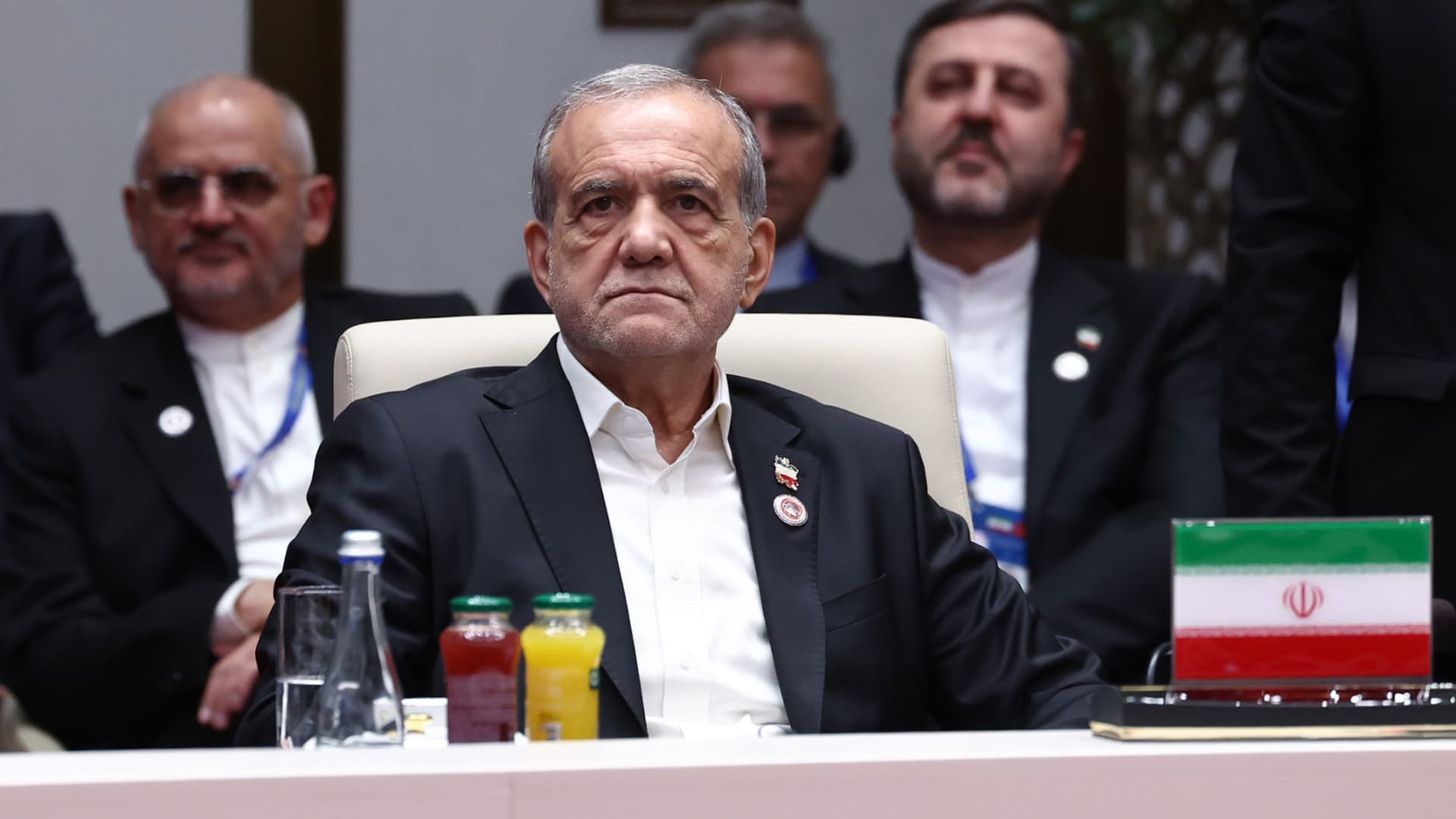
President Masoud Pezeshkian will lead an Iranian delegation to the United Nations General Assembly in New York on Tuesday, amid renewed hopes for a diplomatic resolution to the Middle East conflict.
Pezeshkian will address the assembly and present Iran’s positions on “international developments,” according to the country’s semi-official Tasnim news agency, with particular emphasis on its war with the U.S. and Israel.
He will also hold discussions with leaders of several countries on the sidelines of the event, scheduled for September 22-26 and 28.
The Iranian delegation’s participation at the UN has renewed hopes for a diplomatic solution to the war, improving market sentiment on Monday, with stocks rising, oil prices easing, and global bond yields falling sharply.
However, U.S. President Donald Trump, who has said he would be open to meeting Pezeshkian during the assembly, has threatened to destroy Iran’s economy or eliminate its leadership if Tehran doesn’t reach a deal.
Trump told Fox News on Sunday that the only options available were “wiping Iran out,” or letting its economy “rot,” unless both sides reach an agreement.
Separately, Iran’s military stated that its intelligence suggested a new, large-scale strike was being prepared by the U.S. and its allies, warning of “painful” retaliation across the Middle East. Regional countries supporting such a strike would be treated as parties to the conflict, it said.
“If the U.S. makes any mistake against the Islamic Republic of Iran, all its positions and interests in the region will be targeted by sustained, effective, and painful attacks,” Iran’s Khatam al-Anbia Central Headquarters said, according to Tasnim.
Houthi-Saudi conflict complicates diplomatic hopes
The U.S. State Department issued a security alert this weekend citing risks of unforeseen escalation in the Middle East, advising Americans to be more vigilant and aware of possible flight cancellations and airspace closures.
The warnings came after Iran-backed Houthi militants claimed missile and drone attacks on Riyadh on Saturday, triggering the first air-raid alert in the Saudi capital since fighting escalated in July.
Saudi authorities said they intercepted and destroyed a ballistic missile and reported no casualties or damage. The Houthis also attempted to target civilians and infrastructure in several parts of the kingdom, Saudi-led coalition forces spokesperson Major-General Turki al-Maliki said on X on Saturday, though those attacks were thwarted by the country’s air defenses.
Oil prices have retreated in recent days despite widening hostilities, as traders hope for a recovery in energy shipments from oil-rich Saudi Arabia.
Oil prices will remain high despite U.S. progress in moving oil through the Strait of Hormuz, a team of analysts at Eurasia Group said in a Saturday note. Any rebound in oil flows would not be sufficient to address the overall market deficit, they said, forecasting Brent prices to trade in a higher band of $90-110 per barrel for the rest of this year.
“Iran’s leadership will persist with resistance, even as they quarrel internally,” according to the consultancy firm, as Tehran seeks to use military proxies and tanker attacks to maintain a chokehold on shipping flows, pressuring Washington into concessions.
Tehran has insisted it would not reopen the Strait of Hormuz until Washington fulfills its commitment under the June memorandum, which called for lifting the naval blockade of Iranian ports, easing sanctions, unfreezing Iranian assets, and ending U.S. military threats.
Iranian parliament speaker Mohammad Bagher Ghalibaf said Sunday that Iran must continue fighting and negotiating to push back its enemies, and only work on diplomacy when it has the upper hand on the battlefield.
Technologies
U.S. crude oil tumbles back below $100 after Trump says he’s open to talking to Iran at UN
Oil fell Monday, as traders keep watch for a recovery in shipments from Saudi Arabia, even as Mideast tensions continue to escalate.

Crude oil prices fell sharply Monday to trade below $100 per barrel, after President Donald Trump reportedly decided against bombing Yemen for now and indicated he was open to diplomacy with Iran.
U.S. West Texas Intermediate futures dropped 4.5% to close at $95.78 per barrel. Brent crude, the international benchmark, lost 3.4% to settle at $100.34 after hitting a session low of $98.98 earlier.
Oil futures are on a four-day losing streak as the market sees the closure of Saudi Arabia’s East-West pipeline as less disruptive than initially feared. Prices initially surged in response to the pipeline outage.
Meanwhile, Trump told Fox News on Sunday that he would probably be open to meeting with Iranian President Masoud Pezeshkian at the United Nations General Assembly this week.
And the U.S. president has decided against bombing Iran-allied Houthi militants for the time being despite pleas from Saudi Arabia, Trump administration officials told The New York Times.
Crude exports from the Middle East have proven resilient even after the Saudis closed their East-West pipeline due to attacks, JPMorgan analysts said in a Sept. 18 note. Total oil flows averaged 17 million barrels per day in the past 10 days, or 6 million bpd below the 2025 average, they said.
Exports through the Strait of Hormuz have steadily risen with flows from the broader Middle East reaching about 80% of pre-war levels, said Ryan McKay, director of commodity strategy at TD Securities.
“It appears that without a major escalation Iran may have lost notable leverage in the Strait,” McKay said in a Monday note.
But the security situation in the region remains volatile and prone to sudden escalation. The oil market “is grappling with multiple near-term drivers that have been a tug of war for prices,” McKay said.
The Houthis on Saturday targeted the Saudi capital Riyadh and the port city Yanbu that serves as a key oil export terminal on the Red Sea. The Saudi military said it intercepted a ballistic missile launched at Riyadh and its air defenses thwarted the attack on Yanbu.
At least two tankers have come under attack while transiting the Strait of Hormuz over the past day, according to incident reports from the United Kingdom Maritime Trade Operations Centre.
And Trump told Fox that he is in a “deciding mode” and “very big things” are going to happen soon regarding the Iran war. He described the choices as “wiping Iran out, letting them rot economically or making a deal,” according to Fox.
Iran’s Revolutionary Guard, meanwhile, warned it will expand the “geography of the conflict” if the U.S. hits the Islamic Republic with renewed strikes, according to the state media outlet Tasnim.
Technologies
CNBC Daily Open: All that glitters is another U.S.-China détente
Thursday will tell us whether Washington and Beijing can match Monday’s market mood. Oil and chip stocks don’t write trade deals.
Hello, this is Anniek Bao writing to you from Singapore. Welcome to another edition of CNBC’s Daily Open.
Markets had a good Monday with oil sliding, yields easing and chipmakers surging.
It’s against that backdrop that things build toward Thursday with Chinese leader Xi Jinping’s arrival in Washington for his second meeting with U.S. President Donald Trump this year.
What you need to know today
AI-linked stocks powered another rally on Wall Street, with equities climbing as oil prices and Treasury yields both slipped.
The S&P 500 climbed 1.5%, its best day since early August, while the Nasdaq Composite jumped 2.3% to its first closing record since June, driven by a rush into chipmakers. The Dow added a more modest 0.7%.
Crude oil pulled back below $100 briefly, with West Texas Intermediate futures dropping 4.5% to $95.78 a barrel and international Brent touching a session low of $98.98 before settling at $100.34, reducing an inflation worry that had pressured the market for weeks.
Treasury yields retreated from a two-decade high as traders pared bets on further Fed tightening after last month’s rate hike. Stock futures were little changed in early trading.
Trump signaled that he was open to meeting Iranian President Masoud Pezeshkian on the sidelines of the UN General Assembly this week, though Tehran hasn’t confirmed reciprocal interest. Trump has also kept sanctions and military options on the table, but the prospect of talks, plus signs that Saudi Arabia’s East-West pipeline disruption was less severe than feared, was enough to strip out the war premium.
Bitcoin pushed above $86,000 on Monday, briefly touching $86,349.90, its highest level since late January, extending a sharp rally in recent days, though it remains well below its October 2025 peak of $126,000.
Bitwise CIO Matt Hougan called the move the start of “crypto spring,” while BTIG flagged $90,000 as the next test if the $75,000 support level holds — a debate playing out even as the Senate has stalled the Clarity Act that would give the asset class a regulatory framework.
Five flashpoints as Trump and Xi meet
Xi is expected to arrive at Joint Base Andrews at 4 p.m. Wednesday — only the second foreign leader Trump has personally met at the airport this term, after Vladimir Putin in August 2025 — with a state dinner set for Thursday at the White House.
But the substance may prove narrower than the pageantry. Analysts expect the two leaders to extend the trade truce reached in Busan, South Korea, last October, and stand up a “Board of Trade” for non-sensitive goods, while a parallel investment framework has seen little progress.
Chinese AI labs have narrowed the gap with their U.S. rivals this year. That further boost Beijing’s confidence since China became the first major economy to retaliate against the Trump administration’s “Liberation Day” tariffs in April 2025, and has added a new item to Washington’s list of concerns: staying ahead of China in the AI race.
A slew of U.S. CEOs are expected to attend Trump’s state dinner for Xi, while the U.S. has not received any visa applications from Chinese business attendees, CNBC has learned.
Meanwhile, discussion of Taiwan is expected to take a back seat to Iran.
Washington breaks from the AI consensus
Washington’s message to AI developers is blunt: they own the downside of rapidly advancing models. Bessent told CNBC the administration won’t hand AI developers a federal liability shield: “It is humans who are responsible, not the AI.”
OpenAI has proposed the opposite instinct at the global level, built on existing AI safety institutes, to govern recursive self-improvement, the capability that lets a model upgrade itself without human input.
“Navigating this transition safely requires alignment research to keep pace with these capabilities so that the systems we and others build remain aligned with human values and under human control,” the company said in a blog post.
Elsewhere: pharma and autos deliver
Eli Lilly CEO Dave Ricks told CNBC that hundreds of thousands of seniors have started GLP-1 treatment since Medicare’s obesity-drug coverage opened in July, with Lilly capturing about seven in ten of them.
Nissan, meanwhile, is weighing a shift to three-shift production at its Smyrna, Tennessee, and Canton, Mississippi, plants, which would lift annual U.S. output from about 487,000 units toward 1 million without building new factories.
Thursday will tell us whether Washington and Beijing can match Monday’s market mood. Oil and chip stocks don’t write trade deals.
— Anniek Bao
And finally…
Here’s what the Saudi East-West pipeline shutdown means for Asia’s biggest crude importers
The shutdown of Saudi Arabia’s East-West pipeline stands to squeeze already-scarce crude supply for Asia’s four biggest crude importers, with South Korea appearing the most directly exposed.
Saudi crude accounted for 34.1% of South Korean crude imports in July, according to the Korea International Trade Association. It’s at 27.3% of imports into Japan, government data show, and 14.9% of China’s imports, according to customs data. For India, the figure is 10.2%, Kpler data show.
While Asian markets’ dependence on Saudi crude do not directly translate into the number of barrels exposed to the pipelines shutdown, export constraints at the Hormuz Strait have shifted a substantial volume of the Kingdom’s exports westward to the pipeline-linked Yanbu port.
— Matthew Tan
-
 Technologies4 years ago
Tech Companies Need to Be Held Accountable for Security, Experts Say
-
 Technologies4 years ago
Best Handheld Game Console in 2023
-
 Technologies5 years ago
Black Friday 2021: The best deals on TVs, headphones, kitchenware, and more
-
 Technologies4 years ago
Tighten Up Your VR Game With the Best Head Straps for Quest 2
-
 Technologies5 years ago
Google to require vaccinations as Silicon Valley rethinks return-to-office policies
-
 Technologies4 years ago
The number of Сrypto Bank customers increased by 10% in five days
-
 Technologies5 years ago
Verum, Wickr and Threema: next generation secured messengers
-
 Technologies5 years ago
Olivia Harlan Dekker for Verum Messenger