
Technologies
Is an iPhone 17 Upgrade Worth It? Here’s How It Compares to Apple’s Older Models
The latest iPhone boasts upgrades to the display, cameras and battery. Is it worth the switch?
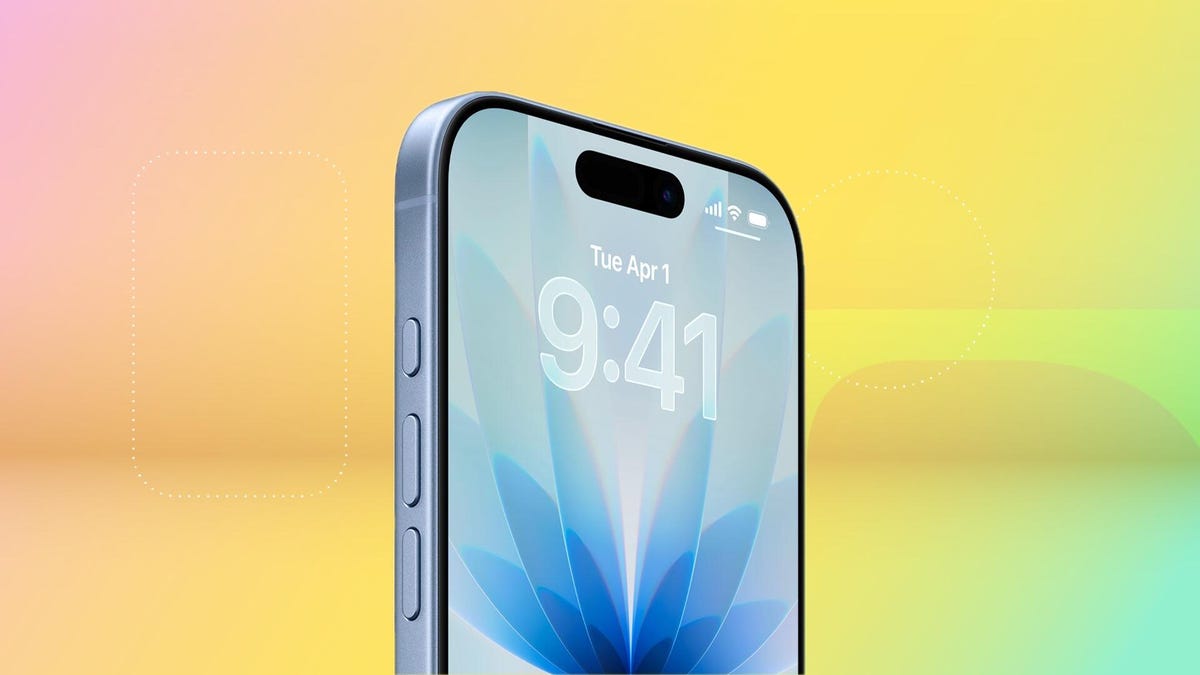
Apple’s flashy orange iPhone 17 Pro might be getting a lot of attention, but the baseline iPhone 17 is quietly crushing it, with preorders blowing past last year’s phone. So if your current iPhone is starting to feel a little outdated, this could be the time to upgrade.
But is the iPhone 17 worth it? For starters, here’s one huge perk: Apple finally killed the laughably small 128GB base storage you’ll get on older models like the iPhone16. Instead, the entry-level iPhone 17 starts at 256GB, all while maintaining that $829 starting price — a long-overdue upgrade that makes this year’s phone a seriously compelling deal.
Don’t miss any of our unbiased tech content and lab-based reviews. Add CNET as a preferred Google source.
Several other noteworthy updates to the iPhone 17 make it feel like a tempting choice, even over the pricier iPhone 17 Pro models. At long last, Apple has extended a 1-120Hz display across its entire lineup, so you can have smoother scrolling and an always-on display without spending upward of $1,100 on a Pro model. An anti-reflective coating and higher 3,000-nit peak brightness make the screen slightly easier to see outdoors. And camera upgrades help to level up photos and selfies.
Here’s how the iPhone 17 compares to older iPhones, ranging from last year’s iPhone 16 to 2020’s iPhone 12.
iPhone 17 vs. iPhone 16
Appearance-wise, the iPhone 17 has a lot in common with the iPhone 16. But beneath the surface, there are some key differences.
The display goes from a meager 60Hz on the iPhone 16 to 120Hz on the iPhone 17 (at long last). That means the iPhone 17 finally supports an always-on display, so you can glance at the time and your notifications without waking the screen and enjoy smoother scrolling. A new anti-reflective coating helps reduce glare, especially in the bright outdoor conditions.
The iPhone 17 has a larger 6.3-inch display, versus the iPhone 16’s 6.1-inch screen, thanks to slimmer bezels. That can make viewing content slightly more immersive, though it won’t be a hugely noticeable difference. And a new Ceramic Shield 2 cover on the iPhone 17 offers three-times better scratch resistance, according to Apple, so you can worry a little less about etching into your phone’s screen (but maybe still get a screen protector to be safe).
The iPhone 16 and 17 have a 48-megapixel wide-angle camera, but the iPhone 17 bumps the ultrawide camera from 12 megapixels to 48 megapixels. The front-facing camera also gets upgraded from 12 megapixels (on the iPhone 16) to 18 megapixels on the iPhone 17. Both phones have a Camera Control button for quickly launching the camera and snapping photos.
A new Center Stage feature can automatically adjust selfie photos from portrait orientation to landscape to ensure everyone is in the shot, so you don’t have to manually rotate your phone to its side anymore. Dual Capture lets you simultaneously record on your front and back cameras. These upgrades are specifically catered to the latest iPhone lineup, so that they won’t be coming to older models like the iPhone 16, even with an iOS 26 update.
Battery life is a little longer on the iPhone 17. Apple says the iPhone 17 supports up to 8 hours more of video playback than the iPhone 16. This change aligns with improvements CNET noticed in our battery tests. In a 3-hour streaming test, for example, the iPhone 17’s battery dropped from 100% to 89%, while the iPhone 16 hit 86%. It’s an incremental update, but even a little more battery life is a welcome change. The iPhone 17 also supports up to 40-watt charging, which is a boost over the 25 watts you get with the iPhone 16, helping you top off your battery a little faster.
The bottom line: While the updates to the iPhone 17 help it stand out as an all-around solid device, the changes over last year’s iPhone 16 are incremental enough that there’s not much reason to upgrade — unless you’re really excited about that smoother display and faster charging. But for most people, subtle differences mean you should probably just hold onto your iPhone 16.
iPhone 17 vs. iPhone 15
The iPhone 15 has a lot in common with the iPhone 16, including a 48-megapixel wide-angle camera, a 12-megapixel ultrawide camera and a 6.1-inch display. The 6.3-inch display on the iPhone 17 has slimmer bezels to expand that real estate a bit, and the 48-megapixel ultrawide camera can lead to slightly sharper shots.
The baseline iPhone 15 doesn’t have an Action button that you can customize to launch various apps and functions, and instead has the more traditional ring/silent switch. The iPhone 17 has an Action button and a Camera Control button.
Both phones have a Dynamic Island cutout at the top of the display for showing alerts and Live Activities, such as the time your DoorDash order is arriving, flight updates and what song is currently playing.
With each generation, Apple touts longer battery life, so you can expect to get a couple more hours of video playback with the iPhone 17 than you would with the 15.
Perhaps the most significant difference between the iPhone 15 and 17 is that the iPhone 15 doesn’t have Apple Intelligence; those AI features only arrived on that year’s Pro models. If you upgrade to the iPhone 17, you’ll have access to writing and image editing tools, as well as newer features like Live Translation for calls and messages.
The bottom line: Like the iPhone 16, there aren’t many drastic differences between the iPhone 15 and 17, though upgrading will notably grant you access to Apple Intelligence. But the other hardware and software-related updates are relatively minimal, so you’re probably good keeping your iPhone 15 for at least another year.
iPhone 17 vs. iPhone 14
The iPhone 14 was the last Apple phone with a Lightning port and that’s one of most significant differences between it and the iPhone 17, which has a USB-C port. Upgrading to the iPhone 17 means you won’t have to rely on an outdated and limited-use charging cable anymore, and can instead use one that works with most of your other devices.
The baseline iPhone 14 also doesn’t have a Dynamic Island cutout in the display, as that feature launched with just the Pro models that year. Upgrading to the iPhone 17 will let you quickly tap into activities like your rideshare trip or flight information.
The iPhone 14 has a 12-megapixel wide and ultrawide-angle camera on the back, while the iPhone 17 bumps that to 48 megapixels across the board. The iPhone 17 also increases the front-facing camera’s resolution from 12 megapixels to 18 megapixels, while adding a new Center Stage selfie feature to automatically adjust between portrait and landscape images without you having to rotate your phone.
But the two phones also some key similarities, like having eSIM and satellite connectivity on board.
The bottom line: The iPhone 14 has the most noticeable differences with the iPhone 17. Upgrading could offer some fresh features like an Action button and, at last, a USB-C port, as well as Dynamic Island and an upgraded camera. But if you want to save some money and keep your current phone, you won’t be missing out on anything too drastic.
iPhone 17 vs. iPhone 13
The iPhone 13 has a similar A15 Bionic chip as the iPhone 14, and shares the same dual 12-megapixel camera system. But unlike the iPhone 14, the iPhone 13 doesn’t have crash detection or satellite connectivity, or camera features like Action mode for more stable videos.
At this point, your iPhone 13 may be showing its age. Upgrading to the iPhone 17 will give you access to newer features like Apple Intelligence, Dynamic Island, USB-C charging and the Camera Control and Action buttons. You might also notice faster speeds by switching to the iPhone 17, now that it’s been a few years since the iPhone 13 came out.
The bottom line: It may be time to upgrade to the iPhone 17 if you have an iPhone 13. It’s possible your phone is starting to show its age, and switching to Apple’s latest baseline will get you a longer-lasting battery, an upgraded camera, AI features and a handful of new hardware and software capabilities.
iPhone 17 vs. iPhone 12
Like the next couple of iPhones after it, the iPhone 12 has a dual 12-megapixel camera system, as well as a 6.1-inch display. Upgrading to the iPhone 17 will get you a slightly more immersive 6.3-inch display with thinner bezels, along with a 48-megapixel dual camera system.
The iPhone 12 lacks features like crash detection, satellite connectivity, Dynamic Island and USB-C charging. It also doesn’t support the Apple Intelligence suite of AI features for writing, photo editing, language translation and more.
It’s possible your iPhone 12 has become sluggish and your battery isn’t holding up like it used to. Taking age out of the equation, at launch, the iPhone 12 boasted up to 17 hours of video playback, while Apple says the iPhone 17 supports up to 30 hours. So there’s likely to be a noticeable difference between how long each phone can hold up.
The bottom line: Swapping your iPhone 12 for the iPhone 17 could be a smart move. There have been noticeable changes over the last several years, from the addition of the Action and Camera Control buttons to the introduction of Apple Intelligence. The swap to USB-C and expanded battery capacity can also make the newest iPhone more tempting; you won’t have to cling to your now-outdated Lightning cable. And you’ll likely notice faster speeds and higher performance across the board when switching from a 5-year-old device to the latest generation.
Apple iPhone 17 vs. Older iPhones
| Apple iPhone 17 | Apple iPhone 16 | Apple iPhone 15 | Apple iPhone 14 | Apple iPhone 13 | Apple iPhone 12 | |
| Display size, tech, resolution, refresh rate | 6.3-inch OLED; 2,622 x 1,206 pixel resolution; 1-120Hz variable refresh rate | 6.1-inch OLED; 2,556 x 1,179 pixel resolution; 60Hz refresh rate | 6.1-inch OLED; 2,556×1,179 pixels | 6.1-inch OLED; 2,532×1,170 pixels | 6.1-inch OLED; 2,532×1,170 pixels | 6.1-inch OLED; 2,532×1,170 pixels |
| Pixel density | 460ppi | 460 ppi | 460 ppi | 460 ppi | 460 ppi | 460ppi |
| Dimensions (inches) | 5.89 x 2.81 x 0.31 in | 5.81 x 2.82 x 0.31 inches | 2.82 x 5.81 x 0.31 in | 5.78 x 2.82 x 0.31 in | 5.78 x 2.82 x 0.3 in | 5.78 x 2.82 x 0.29 in |
| Dimensions (millimeters) | 149.6 x 71.5 x 7.95 mm | 147.6 x 71.6 x 7.8mm | 71.6 x 147.6 x 7.8 mm | 147 x 72 x 7.8 mm | 147 x 72 x 7.65 mm | 146.7 x 71.5 x 7.4 mm |
| Weight (grams, ounces) | 177 g (6.24 oz) | 170 g (6 oz.) | 171g (6.02 oz) | 172 g (6.07 oz) | 6.14 oz; 174g | 5.78oz; 164g |
| Mobile software | iOS 26 | iOS 18 | iOS 17 | iOS 16 | iOS 15 | iOS 14 |
| Camera | 48-megapixel (wide) 48-megapixel (ultrawide) | 48-megapixel (wide), 12-megapixel (ultrawide) | 48-megapixel (wide), 12-megapixel (ultrawide) | 12-megapixel (wide), 12-megapixel (ultrawide) | 12-megapixel (wide), 12-megapixel (ultrawide) | 12-megapixel (wide), 12-megapixel (ultra-wide) |
| Front-facing camera | 18-megapixel | 12-megapixel | 12-megapixel | 12-megapixel | 12-megapixel | 12-megapixel |
| Video capture | 4K | 4K | 4K | 4K at 60 fps | HDR video recording with Dolby Vision up to 4K at 60 fps | 4K |
| Processor | Apple A19 | Apple A18 | A16 Bionic | Apple A15 Bionic | Apple A15 Bionic | Apple Bionic 14 |
| RAM + storage | RAM N/A + 256GB, 512GB | RAM N/A + 128GB, 256GB, 512GB | 128GB, 256GB, 512GB | RAM NA; 128GB, 256GB, 512GB | 128GB, 256GB, 512GB | 64GB, 128GB, 256GB |
| Expandable storage | None | None (Face ID) | None | None | Undisclosed | Undisclosed |
| Battery | Up to 30 hours video playback; up to 27 hours video playback (streamed) | Up to 22 hours video playback; up to 18 hours video playback (streamed). 20W wired charging. MagSafe wireless charging up to 25W with 30W adapter or higher; Qi2 up to 15W | Undisclosed; Apple claims up to 20 hours of video playback (16 hours streamed) | Undisclosed; Apple claims 20 hours of video playback | No | No |
| Fingerprint sensor | None (Face ID) | None (Face ID) | None (Face ID) | None (Face ID) | Undisclosed; Apple lists 19 hours of video playback | Undisclosed; Apple lists 15 hours of video playback |
| Connector | USB-C | USB-C | USB-C (USB 2.0) | Lightning | No (Face ID) | No (FaceID) |
| Headphone jack | None | None | None | None | Lightning | Lightning |
| Special features | Apple N1 wireless networking chip (Wi-Fi 7 (802.11be) with 2×2 MIMO), Bluetooth 6, Thread. Action button. Camera Control button. Dynamic Island. Apple Intelligence. Visual Intelligence. Dual eSIM. 1 to 3,000 nits brightness display range. IP68 resistance. Colors: black, white, mist blue, sage, lavender. Fast charge up to 50% in 20 minutes using 40W adapter or higher via charging cable. Fast charge up to 50% in 30 minutes using 30W adapter or higher via MagSafe Charger. | Apple Intelligence, Action button, Camera Control button, Dynamic Island, 1 to 2,000 nits display brightness range, IP68 resistance. Colors: black, white, pink, teal, ultramarine. | Dynamic Island; 5G (mmw/Sub6); MagSafe; water resistant (IP68); wireless charging; eSIM; satellite connectivity | 5G (mmw/Sub6); MagSafe; water resistant (IP68); wireless charging; eSIM; satellite connectivity | No | No |
| US price starts at | $829 (256GB) | $799 (128GB) | $799 (128GB), $899 (256GB), $1,099 (512GB) | $799 (128GB), $899 (256GB), $1,099 (512GB) | 5G enabled; MagSafe; water resistant (IP68); wireless charging; dual-SIM capabilities (nano-SIM and e-SIM) | 5G enabled; MagSafe; water resistant (IP68); wireless charging; dual-SIM capabilities (nano-SIM and e-SIM) |
Technologies
Tubi App Goes Live in ChatGPT to Give You TV and Movie Recommendations
Like the ultra-customized feel of a Tubi rec? The streamer aims to make it even more personalized.
Tubi, the free streaming platform known for its vast library of cult classics and indie movies, has added an app to ChatGPT. You can now use the chatbot to find content recommendations for TV shows and movies on Tubi, the streamer announced on Tuesday.
You may already have your own search strategy when using Tubi, but the addition of the native app within ChatGPT allows you to strike up a conversation and ask for uber-specific, personalized title suggestions. If you see a film or show that captures your interest, you have the option to click «Watch on Tubi» to stream it on a mobile device or the web. In the mood for scary movies about yetis? Use @Tubi for your prompt in the chatbot and request something like, «horror movies with aggressive yetis» and expect to see a selection of titles that fit your wish list.
«Streaming should feel effortless, and as chatbots and AI agents are becoming a common way people navigate the internet, Tubi is expanding its discovery experience to meet viewers in the moment they’re expressing intent in their own words,» Mike Bidgoli, Tubi’s chief of product and technology, said in a statement.
ChatGPT opened its app store this past December. It currently includes apps for Apple Music, Zillow, Spotify and Canva, offering the ability to connect your accounts to search, design or ask for recommendations. Back in 2023, Tubi created its own AI-powered tool called Rabbit AI for mobile users to help audiences find content to watch. The company later shuttered the feature, which used Open AI’s Chat GPT-4. With today’s launch, it’s the first video streaming service to add an app within ChatGPT.
(Disclosure: Ziff Davis, CNET’s parent company, in April filed a lawsuit against OpenAI, alleging it infringed Ziff Davis copyrights in training and operating its AI systems.)
Technologies
PlayStation Plus Subscribers Can Play Tomb Raider and More All April Long
Subscribers can also explore a Soulslike game that just got a big update.

PlayStation Plus, which is Sony’s version of Xbox Game Pass, offers a large, constantly expanding library of games. Subscribers can choose from the Essential, Extra and Premium tiers, each with unique perks and benefits. Starting at $10 a month, the plans give subscribers access to games and rewards, and each month, all subscribers can play a handful of new games at no additional charge. And some people on Reddit are pretty excited for a few of the games Sony is offering subscribers throughout April.
One user wrote how they are «buzzing» for the remastered Tom Raider games, while another user is willing to replay the Soulslike game Lords of the Fallen. «April fools’ joke? Because they’re actually good,» a third user wrote.
If you’re a PlayStation Plus subscriber, you can play these games now until May 4.
Lords of the Fallen
If you played Elden Ring and thought, «I wish this game had even more grimdark elements to it, like Bloodborne,» Lords of the Fallen might be for you. Choose one of nine classes to play as while you traverse the lands of the living and the dead in order to overthrow the demon god Adyr. You’ll fight all manner of monstrosities along the way, like a colossal humanoid with an arm protruding from its mouth or a giant carrion crow that wears a human skull.
HexWorks, the gaming studio behind Lords of the Fallen, also released a patch for the game on April 3. The patch is intended to make co-op sessions feel more rewarding for hosts and guests, so you and your friends should have even more fun in this game.
Tomb Raider 1-3 Remastered
Experience these classic Tomb Raider games from the 90s all over again — or for the first time — with the remastered trilogy. You’ll explore jungles, solve puzzles in the desert and tackle mercenaries and monsters along the way. While you can enjoy the boosted graphics of the remastered edition, you can also enable low-poly mode to experience these games as you would have almost 30 years ago.
Sword Art Online Fractured Daydream
A system called Galaxia has been added to Alfheim Online, allowing players to relive the past. But the system has spun out of control, displacing players throughout time. To set things right, you’ll have to work with friends and foes alike in this co-op raid battle game. But if you want to go solo, you can play story mode as characters from across space and time confront the anomaly in the VR world.
For more on PlayStation Plus, here’s what to know about the service. You can also check out other games on PlayStation Plus and games on Xbox Game Pass.
Technologies
Get Organized for Just $28 With This 6-in-1 Baseus Charging Station Deal
Ditch the cluttered cables and upgrade to this sleek USB power strip while it’s on sale for a record-low price.
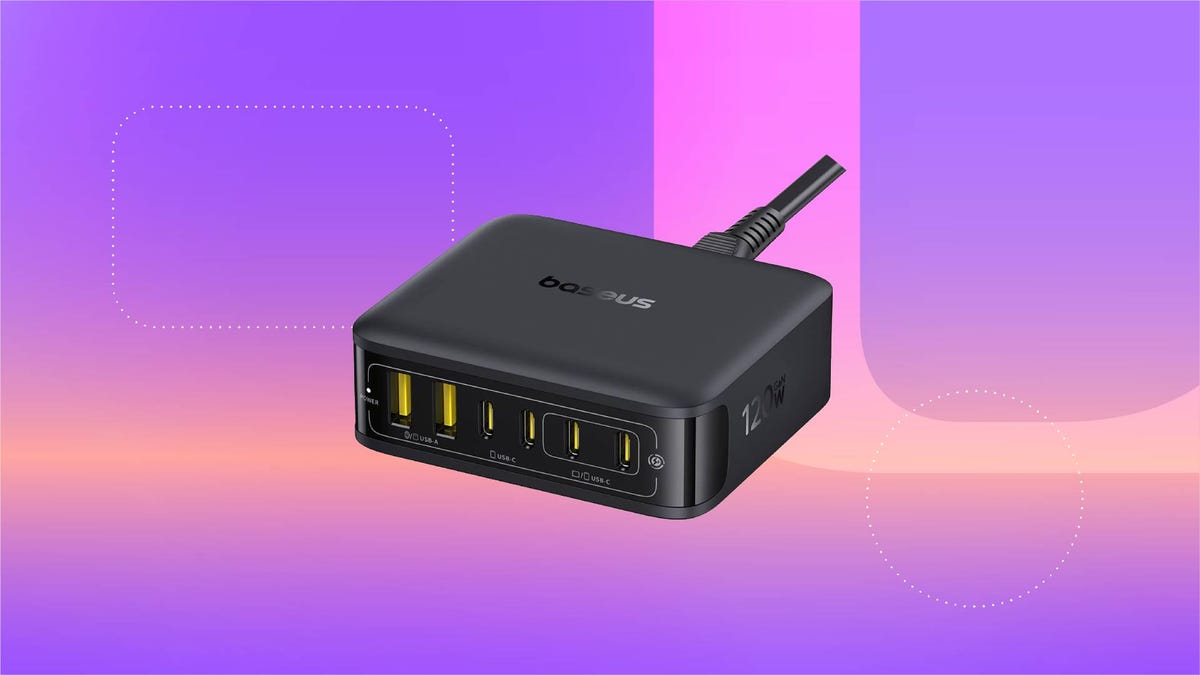
For just $28, this six-in-one Baseus charging station can help you keep your desk organized. That’s 20% off and the all-time lowest price we’ve seen for this 120-watt USB power strip. We don’t expect this limited-time deal to last for long, however, so you’ll want to get your order in sooner rather than later.
You can use this charging station for just about all of your devices, including phones, tablets, headphones and laptops. It’s equipped with four USB-C ports and two USB-A ports, so you can charge up to six devices at once. It also boasts a 65-watt single-port output, enough to fully recharge a MacBook Air in less than 2 hours. And at just 323 grams, it’s light enough to take on the go, making it a great buy for frequent travelers.
Why this deal matters
This sleek Baseus charging station can connect to up to six devices at once, and is still small enough that you can take it on the go. Plus, this is the all-time lowest price we’ve seen, making it a pretty great value.
-
 Technologies3 года ago
Tech Companies Need to Be Held Accountable for Security, Experts Say
-
 Technologies3 года ago
Best Handheld Game Console in 2023
-
 Technologies3 года ago
Tighten Up Your VR Game With the Best Head Straps for Quest 2
-
 Technologies4 года ago
Black Friday 2021: The best deals on TVs, headphones, kitchenware, and more
-
 Technologies5 лет ago
Google to require vaccinations as Silicon Valley rethinks return-to-office policies
-
 Technologies5 лет ago
Verum, Wickr and Threema: next generation secured messengers
-
 Technologies4 года ago
Olivia Harlan Dekker for Verum Messenger
-
 Technologies4 года ago
The number of Сrypto Bank customers increased by 10% in five days