
Technologies
Battlefield 6 Tips: The Best LMG Builds
If you want to be a dependable machine gunner, you’ll want to eke the most performance out of your LMGs as possible.

Developer DICE’s iconic first-person shooter is back in good form with Battlefield 6, and players are hard at work capturing flags and trading gunfire in large-scale battles. As dozens of players collide in massive fights, teamwork decides the outcome of each match.
If you want to keep your teammates in tip-top shape, you’ll probably gravitate toward the Support class. Support players are able to quickly revive any downed teammate with their trusty defibrillators, as well as drop supply bags that restore health and ammunition to nearby allies.
The support class is also extremely good at laying down the lead. Its signature weapon type is the light machine gun, or LMG, which is characterized by its high-bullet capacity magazines, high rate of fire and generally cumbersome frame. These weapons are great for suppressing enemies, which slows down their health regeneration.
There’s a wide array of LMGs in Battlefield 6, which means it might take you a little while to find the right fit for your play style. Some of these bullet hoses are suitable for close-range play, while others might allow you to contest sniper nests across long distances. Here are my favorite LMG builds in Battlefield 6.
The best LMG builds in Battlefield 6
There are eight different light machine guns in Battlefield 6, so you’re not hurting for options when it comes to setting up a bipod and laying down lead.
Most of these options are locked behind high level requirements or challenge completions, though, so it can be tough to figure out an effective loadout early on. Here are some accessible LMG builds for every possible situation.
L110 ‘Factory’
The L110 is the first LMG you’ll have unlocked when you start playing Battlefield 6, and it’s a solid workhorse of a gun. Its high rate of fire and extensive bullet capacity mean you’ll be able to keep enemies suppressed at a distance. However, this thing kicks like a mule unless you have a bipod set up.
To fix this, you’ll want to add the heavy extended barrel and grip pod attachments. These add-ons will make vertical and horizontal recoil more manageable, giving you more mobility during tricky firefights.
The red laser attachment helps tighten the hip-fire spread for those emergency situations where an opponent gets the drop on you in close-quarters combat, and crucially, enemies won’t be able to see the beam emanating from your weapon.
If you’re confident that you can handle the L110’s recoil, I recommend swapping out the regular bullets for tungsten-core rounds — they’ll shred through multiple enemies at once when you’re holding a tight sightline, like a hallway or a doorway leading into an objective.
M60 ‘Huntsman’
If you participated in the Battlefield 6 open beta, congratulations: You automatically unlock my favorite LMG upon opening Battlefield 6 for the first time. The M60 usually unlocks at player level 20, but beta players can use a special M60 Huntsman build straight away.
This LMG fires slower than the L110, but its recoil is more manageable, and it does more damage. As someone who likes to set up machine gun nests and pick enemies off from afar, the M60 has been the gun I’ve used the most so far in Battlefield 6.
However, players can’t change attachments on a prebuilt gun before they hit the level required to unlock its original factory variant. That means you can’t swap out attachments before player level 20, and you’re stuck with the awful vision-obscuring iron sights on the M60 until then.
Once you’re able to swap around the gun’s attachments, though, a 2x zoom and red dot sight is an absolute necessity for firing at medium- to long-range targets. Set up an alternative zoom on the side of the gun with basic sights to trade out the usual M60 eyesore for simpler iron sights when shooting close-range enemies. A double-port brake and vertical handgrip help control what little recoil the M60 has, and the red laser remains on this build in order to tighten hipfire spread.
RPKM ‘Carnivore’
If you’re not looking to set up a machine gun nest, there are some LMGs that support a more aggressive play style. The RPKM is one of these weapons, with stats that make it feel like a hybrid between a traditional light machine gun and an assault rifle. You can’t fire as many rounds before reloading, but you get some much-needed sprint speed and mantling mobility back.
The RPKM factory variant is locked behind player level 30, but there’s a much easier way to unlock this weapon for multiplayer modes. The RPKM Carnivore build is unlocked through completion of Battlefield 6’s nine-level campaign. You can beat the levels on any difficulty in order to unlock the RPKM.
The RPKM matches the M60’s damage per shot and even offers a higher rate of fire than my favorite weapon. This is all tempered by a very low magazine capacity for an LMG — the stock magazine holds 40 bullets — and very high recoil. You can use the RPKM to run and gun alongside your Assault-class teammates, but you probably won’t win as many gunfights across long distances.
Once you unlock the RPKM at level 30, a heavy extended barrel and some sort of vertical handgrip or bipod are must-have additions to your build. Swapping out the suppressor for a compensated brake also couldn’t hurt. These attachments will bring the recoil more in line with other LMGs, providing you with a manageable run-and-gun buzzsaw.
Technologies
Google’s Pixel 10A Is Coming to Japan With an Exclusive Blue Edition and Special Wallpaper
This model comes with creatively designed stickers and a special look for Pixel’s 10th anniversary.

Don’t be blue: Google is releasing an Isai blue edition of the Pixel 10A to celebrate the Android phone line’s 10th anniversary, setting it apart with its own sticker set, specialized wallpaper and custom icons. But it’ll only be available in Japan.
Announced Tuesday on the Google Japan blog, the Isai blue Pixel 10A has a dark blue look and includes bonus decorations designed in collaboration with Japan’s Heralbony art company. These include an exclusive bumper case and stickers for customization.
This edition of the Pixel 10A will arrive in Japan on May 20, following the April 14 release of the Pixel 10A in its original colors of lavender, berry, fog and obsidian. The Isai blue model costs 94,900 yen, which roughly translates to $595, and includes 256GB of storage.
This makes it slightly less expensive than the US model’s 256GB edition, but it comes with a number of fun extras at no additional cost.
Google’s creation of a country-specific model for Japan may also reflect strong sales in that market. In 2023, the IDC analytics firm (via 9to5Google) reported that the Pixel 7 series accounted for 10.7% of the country’s market share, a 527% increase from 2022.
Technologies
Can’t Wait for New Emoji? Here’s How to Create Your Own on iPhone
Apple Intelligence-enabled iPhones can create custom emoji in a few easy steps.

Apple brought new emoji to all iPhones when the company released iOS 26.4 on March 24. The new emoji include «» orca, «» distorted face and «» hairy creature — or as we might normally call it, Sasquatch. According to Emojipedia, there are 3,953 emoji with more on the way, including a pickle. But there’s no emoji for a dog wearing pajamas, a plate with burgers and fries and many other things. But if you have Genmoji on your iPhone you can create these emoji and many more.
Apple released iOS 18.2 in 2024 and the company introduced its own emoji generator, called Genmoji, to Apple Intelligence-capable iPhones at that time. The Unicode Standard, a universal character encoding standard, is responsible for creating new emoji, and approved emoji are added to all devices once a year. With Genmoji, you don’t have to wait for new emoji to appear on your iPhone each year. You can just create them as you need them.
Read on to learn how to use Genmoji on iPhone to create your own custom emoji. Just note that only iPhones with Apple Intelligence, like the iPhone 17 lineup, can use Genmoji at this time.
Note: The new emoji may not display correctly for Apple users whose devices aren’t on a 26.4 software version.
How to make custom emoji
1. Open Messages and go into a chat.
2. Tap the plus (+) button next to your text box.
3. Tap Genmoji.
You can then type a description of an emoji into the text box near the bottom of your screen and tap the check mark on your keyboard to enter that description into Genmoji. You can also tap different suggestions and themes that are right above the text box. And with iOS 26 or later, you can also combine and use emoji to create others rather than describing a new emoji or using suggestions.
Your iPhone will generate a series of new emoji for you to pick from according to your description, and you can swipe through these new emoji. When you find the one you want, tap Add in the top right corner of your screen and the new emoji will be available to use as an emoji, tapback or a sticker. Now you don’t have to wait for the Unicode Standard to propose, create and bring new emoji to devices.
For more iOS news, here’s what to know about iOS 26.4 and iOS 26.3. You can also check out our iOS 26 cheat sheet for other tips and tricks.
Technologies
Save Over 20% on This Handy 10,000-mAh Anker Nano Power Bank
Keep your devices charged on the go with this Anker Nano power bank, now down to just $46.
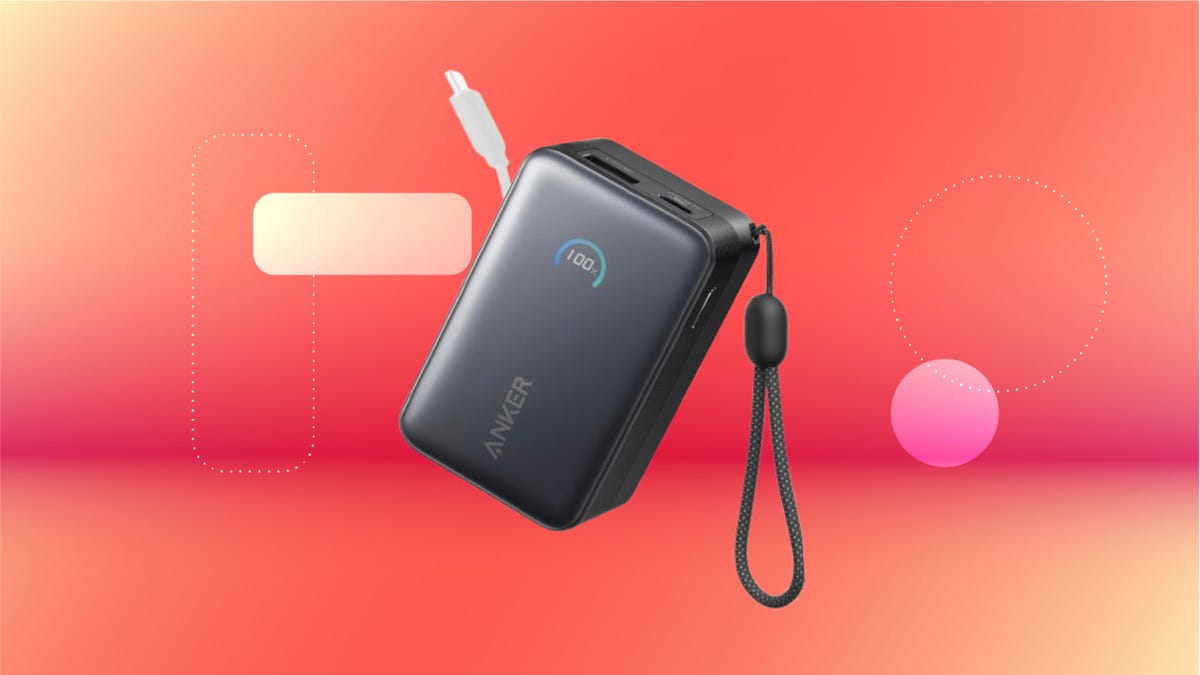
We’ve just spotted the Anker Nano 45-watt portable power bank for just $46 at Amazon right now. This saves you $14 — a 23% discount on its list price. Though it’s $6 more than the lowest-ever price we saw during Black Friday, it’s still a solid discount when you take the rising cost of tech accessories into account. It also matches the lowest price we’ve seen in 2026. It comes in four colors: black, green, pink and white. They’re all on sale for the same price.
This Anker Nano portable charger weighs approximately 8.2 ounces and measures a compact 3.21×1.99×1.42 inches. Despite its small size, it has a retractable cable and supports fast charging in compatible Apple, Samsung, Google Pixel and other smartphones. It also has a large 10,000-mAh capacity and a smart display so you always know how much juice is left in your power bank.
The Nano can charge an iPhone 17 to up to 50% battery in an estimated 20 minutes, and is powerful enough to charge tablets and laptops. Need to charge your devices while charging your power bank? You can do so safely thanks to pass-through charging so you’ll never have to go without battery life.
We’ve also compiled a list of the best power banks for iPhones and for Android, in case this deal isn’t quite a fit for you.
Why this deal matters
If you travel, have a long commute time or are otherwise always on the go, a portable charger can help you keep your devices fully powered. This 45-watt Anker Nano power bank is compact, includes a loop that lets you keep track of it easily and has a built-in cable so you don’t have to keep up with extra cords. Amazon’s $14 discount makes this a solid deal for anyone looking for a compact power bank.
-
 Technologies3 года ago
Tech Companies Need to Be Held Accountable for Security, Experts Say
-
 Technologies3 года ago
Best Handheld Game Console in 2023
-
 Technologies3 года ago
Tighten Up Your VR Game With the Best Head Straps for Quest 2
-
 Technologies4 года ago
Black Friday 2021: The best deals on TVs, headphones, kitchenware, and more
-
 Technologies5 лет ago
Google to require vaccinations as Silicon Valley rethinks return-to-office policies
-
 Technologies5 лет ago
Verum, Wickr and Threema: next generation secured messengers
-
 Technologies4 года ago
Olivia Harlan Dekker for Verum Messenger
-
 Technologies4 года ago
The number of Сrypto Bank customers increased by 10% in five days