
Technologies
Protect Your New iPhone 17 With ESR’s MagSafe Stash Stand Cases
Whether you’re opting for the iPhone 17, the iPhone Air, or the redesigned AirPods Pro 3, ESR has you covered with stylish, all-around protection that won’t break the bank.
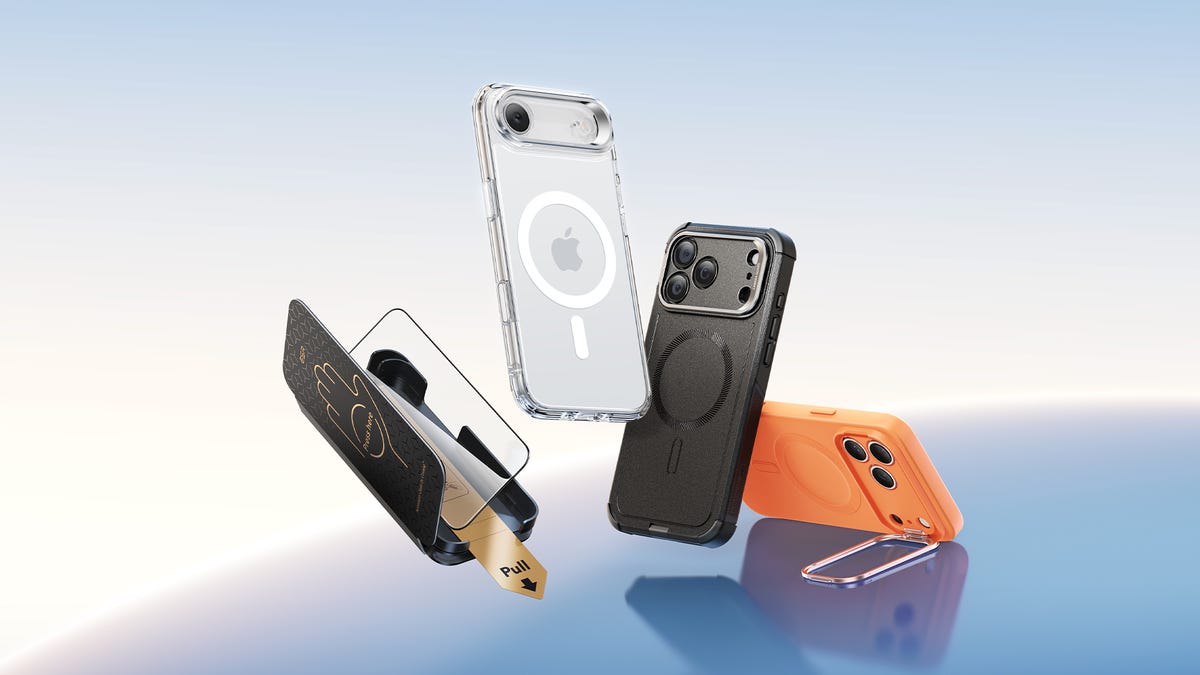
It’s that time of year: the moment Apple unveils its long-awaited new slate of devices. This time, they’ve announced the iPhone 17, which comes with an upgraded A19 chip, a ProMotion display previously only available on its Pro models, an upgraded camera system on both the front and back, and more. Apple’s new AirPods Pro 3 are redesigned to fit most people’s ears, and feature live translation and built-in fitness monitors. And, of course, the one everyone was waiting for: the iPhone Air, which at 5.6mm thick is the thinnest iPhone ever.
If you’re thinking about pre-ordering your new Apple devices, you’ll also want to think about the best protection and accessories to keep them safe and working their best. Thanks to ESR, one of Amazon’s top MagSafe sellers, you can protect your phone with stylish, powerful cases and high-tech MagSafe charging technology without breaking the bank.
CNET’s reviewers have praised ESR’s cases for their «premium feel» and affordability. Here are some of ESR’s brand-new MagSafe products for your iPhone 17 and key Apple accessories:
Stylish, all-around protection designed to protect your iPhone 17
The iPhone 17 line is Apple’s best yet, which means you’ll want a case strong enough to protect it without adding bulk or hiding its stylish design. That’s where ESR’s flagship Cyber Tough Magnetic Case comes in. It pairs a reinforced backplate with a wraparound bumper, a raised edge for the screen and camera, and a protective zinc-alloy camera guard. Its Air Guard corners absorb shocks in the unfortunate-but-unavoidable event your phone hits the ground.
With protection that is certified at seven times military-grade strength, the Cyber Tough Magnetic Case can protect your iPhone from drops of up to 23 feet, with a 3-layer design featuring a robust PC backing, a flexible TPE soft shell and an inner PORON lining. The Cyber Tough also has a built-in Stash Stand that, when open, can be used horizontally or vertically, with a tilt range of 15 to 69 degrees for all your hands-free needs. When closed, the stand, which is designed for the iPhone 17’s camera bar, cushions your device from unforeseen impacts. The case is compatible with MagSafe, Apple’s magnet-powered wireless charging for most phones made after 2020. It uses 1,500 g pull force — twice the normal strength — to hold onto MagSafe accessories while keeping a slim profile.
If you’re not off-roading with your phone and lean a little more toward style than maximum-strength protection, the Classic Hybrid Magnetic Case might be your best option. It comes in an original clear design that lets your iPhone’s beauty show through — while still protecting it from drops of up to 11 feet, all in a 1.5mm slim profile. If you prefer a silicon case to plastic, the Cloud Soft Magnetic Case offers smooth grip and, perhaps more importantly for some, that semi-squishy phone-case feel we’ve come to love. It’s made of soft microfiber lining, hard polycarbonate, smooth silicone, and a (necessary) micro-coating that keeps dust off.
No scratches, no dust, no bubbles
iPhone’s delicate glass screens have gotten more durable over the years, but it’s still easy to scratch your phone in your pocket or, worse, shatter it with an accidental tumble on the floor. ESR’s UltraFit Armorite Pro Screen Protector takes screen protection to the next level by getting its material from the same source used in Apple’s phones: Accessory Glass by Corning™. The screen protector’s drop resistance is 10 times the impact absorption of generic models; they’ve even survived drop tests with a 64-gram steel ball. It also has twice the scratch resistance as iPhone’s screen glass, while reducing the visibility of scratches by 25%. The protector boasts an anti-reflective coating that gives 94% optical transmittance with reduced glare and haze, so sunlight won’t slow you down.
ESR’s UltraFit tray takes the annoyance out of the installation process. There’s no danger of bubbles or dust sneaking in between your screen and protector. The screen protector comes in two slightly less protective options: the UltraFit Armorite (with 7x drop resistance) and the UltraFit Classic (2x).
Fast, high-tech cool charging that folds into your life
The CryoBoost Foldable 3-in-1 Magnetic Charging Station collapses into a slim 15.8 mm, which makes it a space-efficient and portable-friendly hub for charging your iPhone, Apple Watch, and AirPods, even all at the same time. The station presents Qi2 with 25W wireless charging, which is basically equal to the speed of charging with a cord. (An iPhone 16 on iOS 26 can get to 50% in only 25 mins.) The efficiency is fueled (and, well, cooled) by CryoBoost technology, which is a built-in fan that actively cools your phone to avoid overheating — all at whisper-quiet fan volume.
The station comes in two other models, for the home office and car: the non-foldable 3-in-1 Charging Station would fit nicely on a clutter-free desk, while the OmniLock Magnetic Car Charger promises your phone won’t pop off when you hit a pothole in the road. For the car charger, the arm is designed specifically for air vents, so it won’t fall off or obstruct the flow of air. For those looking for a unique stand, the ESR Geo Magnetic Wallet Stand features Find My functions — so it’s like an AirTag — and holds five cards, has RFID blocking, and an impressive six months of use with only a 1.5-hour charge.
The ESR CryoBoost 3-in-1 Magnetic Charging Station and the ESR OmniLock magnetic car charger will be available to purchase in September, and the ESR CryoBoost Foldable 3-in-1 Magnetic Charging Station will be available in October. You can purchase these chargers on ESR’s Amazon store or ESR’s official website.
Hear that? That’s the sound of safe AirPods
The ESR Cyber FlickLock Magnetic Case beefs up the protection for your AirPods with a magnetic lid and internal latch, while ensuring that the case can still be opened with only one hand, using a slide-lock mechanism. It’s MagSafe-ready and charging is 136% stronger than the original AirPods case, so you won’t run out of power on that crosstown bus ride. The case comes with a carabiner design to attach to your wrist or bag, but is tested for four-foot drops since, as all AirPod users know, that is definitely going to happen. More than once. ESR’s Orbit Hybrid Magnetic Case uses 1,100 g magnets to keep the lid shut tight and is available in fun colors.
Technologies
Today’s NYT Mini Crossword Answers for Wednesday, April 8
Here are the answers for The New York Times Mini Crossword for April 8.
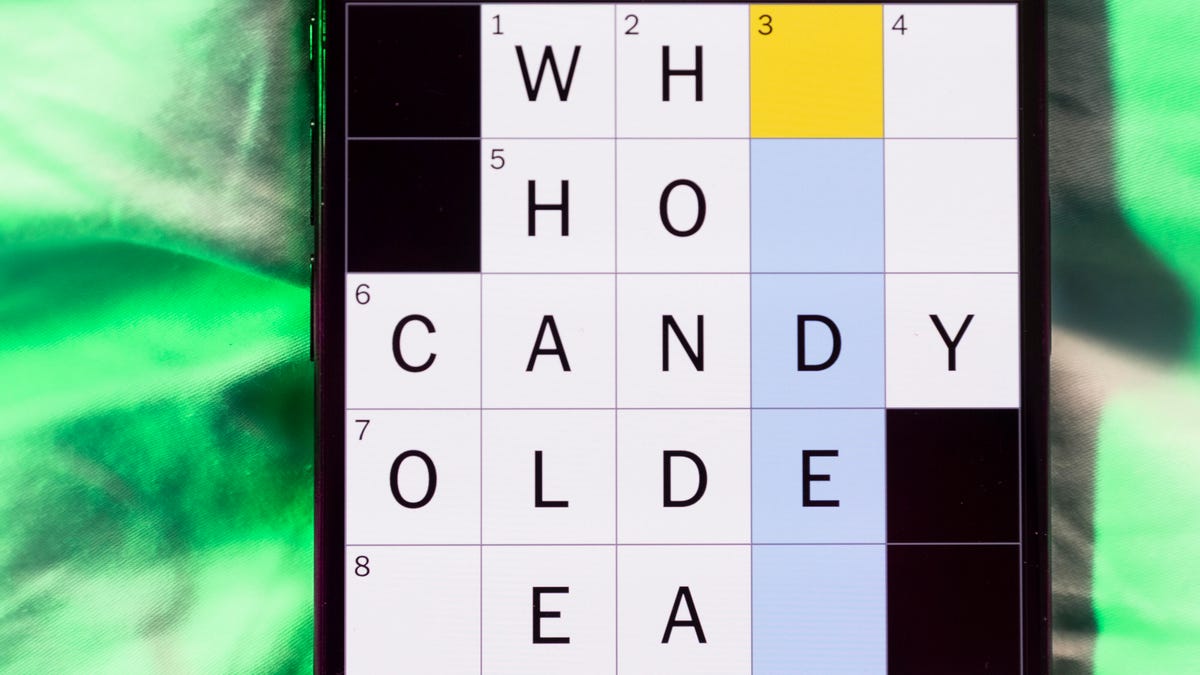
Looking for the most recent Mini Crossword answer? Click here for today’s Mini Crossword hints, as well as our daily answers and hints for The New York Times Wordle, Strands, Connections and Connections: Sports Edition puzzles.
Need some help with today’s Mini Crossword? Hint: It uses a lot of the letter Z for some reason. Read on for all the answers. And if you could use some hints and guidance for daily solving, check out our Mini Crossword tips.
If you’re looking for today’s Wordle, Connections, Connections: Sports Edition and Strands answers, you can visit CNET’s NYT puzzle hints page.
Read more: Tips and Tricks for Solving The New York Times Mini Crossword
Let’s get to those Mini Crossword clues and answers.
Mini across clues and answers
1A clue: ___-Carlton (hotel chain)
Answer: RITZ
5A clue: Span of the alphabet
Answer: ATOZ
6A clue: Cable channel with an out-of-this-world name
Answer: STARZ
7A clue: Takes care of, as a squeaky wheel
Answer: OILS
8A clue: Toy on a string
Answer: YOYO
Mini down clues and answers
1D clue: When a post receives far more negative comments than likes, in social media slang
Answer: RATIO
2D clue: World’s leading wine producer
Answer: ITALY
3D clue: Middle of the human body
Answer: TORSO
4D clue: Sleeping sound
Answer: ZZZ
6D clue: Tofu base
Answer: SOY
Technologies
Today’s NYT Connections: Sports Edition Hints and Answers for April 8, #562
Here are hints and the answers for the NYT Connections: Sports Edition puzzle for April 8 No. 562.

Looking for the most recent regular Connections answers? Click here for today’s Connections hints, as well as our daily answers and hints for The New York Times Mini Crossword, Wordle and Strands puzzles.
Today’s Connections: Sports Edition is a tough one. If you’re struggling with today’s puzzle but still want to solve it, read on for hints and the answers.
Connections: Sports Edition is published by The Athletic, the subscription-based sports journalism site owned by The Times. It doesn’t appear in the NYT Games app, but it does in The Athletic’s own app. Or you can play it for free online.
Read more: NYT Connections: Sports Edition Puzzle Comes Out of Beta
Hints for today’s Connections: Sports Edition groups
Here are four hints for the groupings in today’s Connections: Sports Edition puzzle, ranked from the easiest yellow group to the tough (and sometimes bizarre) purple group.
Yellow group hint: Working out.
Green group hint: Cover your face.
Blue group hint: NFL players.
Purple group hint: Leap.
Answers for today’s Connections: Sports Edition groups
Yellow group: Exercises in singular form.
Green group: Sporting jobs that require masks.
Blue group: Hall of Fame defensive ends.
Purple group: ____ jump.
Read more: Wordle Cheat Sheet: Here Are the Most Popular Letters Used in English Words
What are today’s Connections: Sports Edition answers?
The yellow words in today’s Connections
The theme is exercises in singular form. The four answers are crunch, plank, situp and squat.
The green words in today’s Connections
The theme is sporting jobs that require masks. The four answers are catcher, fencer, football player and goaltender.
The blue words in today’s Connections
The theme is Hall of Fame defensive ends. The four answers are Dent, Peppers, Strahan and Youngblood.
The purple words in today’s Connections
The theme is ____ jump. The four answers are broad, high, long and triple.
Technologies
The $135M Google Data Settlement Site Is Live — See If You’re Eligible
Use the settlement website to select your preferred payment method, and you may end up $100 richer.

You can now file a claim in the $135 million Google data settlement. The case centers on claims that Android devices transmitted user data without consent. Specifically, the class action lawsuit Taylor v. Google LLC contends that Google’s Android devices passively transferred cellular data to Google without user permission, even when the devices were idle. While not admitting fault, Google reached a preliminary settlement in January, agreeing to pay $135 million to about 100 million US Android phone users.
The official settlement website for the lawsuit is now live. The final approval hearing won’t occur until June 23, when the court will consider whether Google’s settlement is fair and listen to objections. After that, the court will decide whether to approve the $135 million settlement.
In the meantime, if you qualify and want to be paid as part of the settlement, you can select your preferred payment method on the official website. There, you can find information on speaking at the June 23 court hearing and on how to exclude yourself or write to the court to object by May 29.
As part of the settlement, Google will update its Google Play terms of service to clarify that certain data transfers do occur passively even when you’re not using your Android device, and that cellular data may be relied upon when not connected to Wi-Fi. This can’t always be disabled, but users will be asked to consent to it when setting up their device.
Google will also fully stop collecting data when its «allow background data usage» option is toggled off.
Who can be part of the settlement?
In order to join the Taylor v. Google LLC settlement, you must meet four qualifications:
- Be a living, individual human being in the US.
- Have used an Android mobile device with a cellular data plan.
- Have used the aforementioned device at any time from Nov. 12, 2017, to the date when the settlement receives final approval.
- You’re not a class member in the Csupo v. Google LLC lawsuit, which is similar but specifically for California residents.
The final approval hearing is on June 23, so you can add your payment method until then. The hearing’s date and time may change, and any updates will be posted on the settlement website.
If you choose to do nothing, you will still be issued a settlement payment, but you may not receive it if you don’t select a payment method.
How much will I get paid?
It’s not currently known exactly how much each settlement class member will receive, but the cap is $100. Payments will be distributed after final court approval and after any appeals are resolved.
After all administrative, tax and attorney costs are paid, the settlement administrator will attempt to pay each member an equal amount. If any funds remain after payments are sent, and it’s economically feasible, they will be redistributed to members who were previously and successfully paid. If it’s not economically feasible, the funds will go to an organization approved by the court.
-
 Technologies3 года ago
Tech Companies Need to Be Held Accountable for Security, Experts Say
-
 Technologies3 года ago
Best Handheld Game Console in 2023
-
 Technologies3 года ago
Tighten Up Your VR Game With the Best Head Straps for Quest 2
-
 Technologies4 года ago
Black Friday 2021: The best deals on TVs, headphones, kitchenware, and more
-
 Technologies5 лет ago
Google to require vaccinations as Silicon Valley rethinks return-to-office policies
-
 Technologies5 лет ago
Verum, Wickr and Threema: next generation secured messengers
-
 Technologies4 года ago
Olivia Harlan Dekker for Verum Messenger
-
 Technologies4 года ago
The number of Сrypto Bank customers increased by 10% in five days