
Technologies
iPhone 17 Pro: Wild Orange Color, Bigger Zoom, A19 Pro Chip for $1,099
The iPhone 17 Pro’s vibrant Cosmic Orange color isn’t the only new feature. The phone has big upgrades across the board.
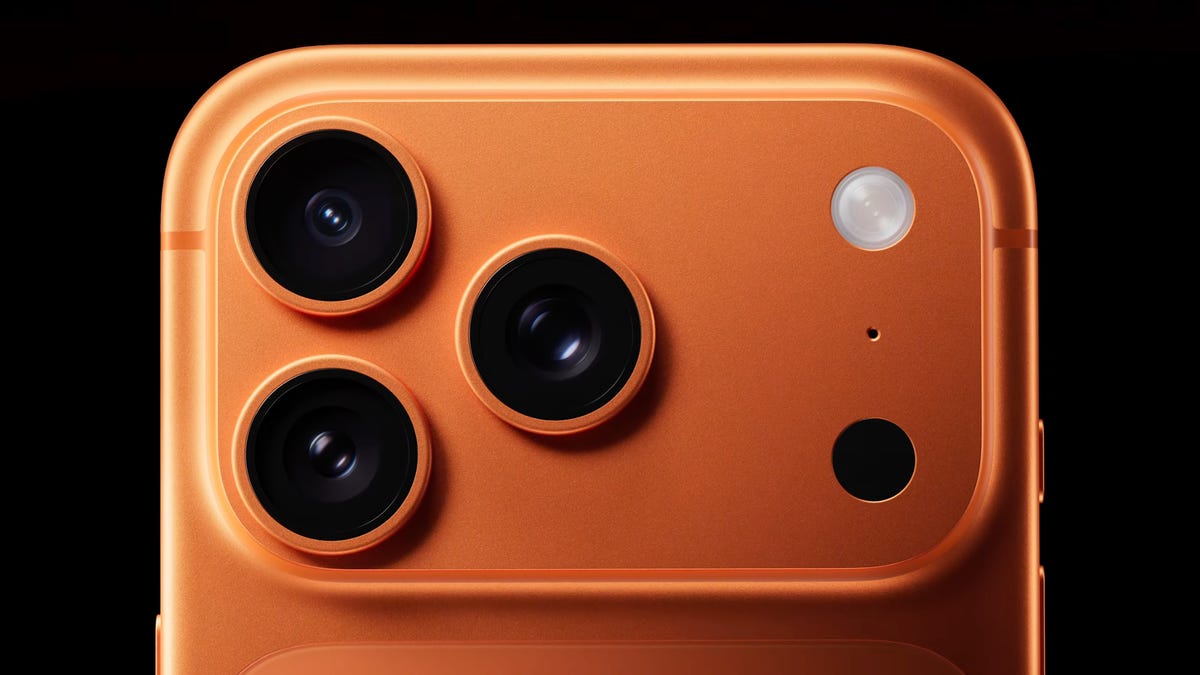
The iPhone 17 Pro has been officially unveiled as part of Apple’s «awe dropping» September event, alongside the base iPhone 17 and the super-skinny new iPhone Air. While the new Cosmic Orange color is definitely the eye-catching update to the Pro line, Apple’s new flagships have upgrades across the board, including a new supercharged A19 Pro processor and a longer 8x zoom camera.
The iPhone 17 Pro will go on sale with 256 GB of storage and a starting price of $1,099 (£1,099, AU$1,999), while the larger iPhone 17 Pro Max will start at $1,199. Preorders for the iPhone 17 Pro and iPhone 17 Pro Max are open now.
The iPhone 17 Pro has had a slight price hike from the iPhone 16 Pro’s $999 starting price last year. It now has double the storage and actually costs the same as the equivalent 256GB iPhone 16 Pro, putting to bed fears of significant price hikes due to Trump’s tariffs for the time being.
iPhone 17 Pro: Design and display
The biggest physical change is on the rear of the phone. The camera unit now stretches across the whole top of the phone rather than simply occupying a small square in the corner. The cameras themselves are still clustered in the same location as before, although Apple says the expanded space gives more room for batteries and for the updated telephoto zoom camera, which I’ll come to later.
The Pro models are now built from aluminum, instead of the titanium frames that debuted on the iPhone 15 Pro. It’s a unibody construction, which should make it especially durable — as should the new «Ceramic Shield» toughened glass on the front and back, which Apple says is 3x more scratch resistant. From the front, the phones remain almost indistinguishable from previous models, with only the Dynamic Island breaking the display in the small cutout towards the top. Apple has yet to confirm the water resistance rating of the phones, but it’s pretty safe to assume they’ll continue to be IP68-rated as has been the case with pretty much all iPhones since 2018.
The new range does bring some new colors; however, the vibrant-looking orange model is my personal favorite. I’ve found the Pro iPhone range often takes itself a bit too seriously, relying on darker or more muted tones. That new life-affirming orange color looks right up my street.
iPhone 17 Pro: Cameras
The Pro’s cameras have had a series of significant upgrades. The optical zoom now goes to 8x, doubling the range of the zoom on the last model. It offers an equivalent focal length of 200mm, which will be great for photographers wanting to really get in on the action from a distance. The telephoto camera’s sensor is 56% larger than before and offers 48 megapixels of resolution.
The hardware of the other cameras is largely unchanged, however, with no physical change to the sensors in the main or ultrawide cameras, and all three cameras offer 48 megapixels. The front camera has been updated, however, with a new square-format 18-megapixel sensor that allows for cropping in either horizontal or landscape orientation and better digital stabilization in video.
Video shooters haven’t been forgotten either; the Pro phones can now shoot in Apple’s ProRes Raw codec — an update to the existing ProRes codec that captures a lot more data at the point of capture, allowing for deeper and more accurate post processing. ProRes Raw, as Apple explains, is an industry standard in professional cinematic productions and seeing it on a phone is wild. As both a photographer, video producer and YouTuber, I’m excited.
iPhone 17 Pro: A19 Pro processor
The A19 Pro processor features an improved CPU and GPU, which Apple reckons can achieve 40% better performance than the iPhone 16 Pro. Keeping things cool is a new thermal management system that includes a vapor chamber that uses de-ionized water to actively cool the phone as it gets hot. The aluminum alloy also apparently dissipates heat 20x better than the titanium design of previous models.
iPhone 17 Pro: iOS 26
The iPhone 17 range will launch with the latest iOS 26 software on board. We’ve played around with iOS 26 in its early beta form, and the biggest changes are to the software’s look. Apple’s new «Liquid Glass» design leans into glasslike transparency in its menus and notification panels to achieve a brighter, more modern look.
From the images I’ve seen so far, I’m pretty keen on the style. CNET’s Blake Stimac has tested the beta and says, «underneath it all, Liquid Glass doesn’t reinvent the wheel, and that’s a good thing.» I find that encouraging. I can’t be bothered learning my way around an entirely new operating system, but I’m happy to see any tweaks that keep things feeling fresh.
iPhone 17 Pro: Battery
Apple says the iPhone 17 Pro packs the largest battery ever on an iPhone, which, as a result, delivers the best battery life ever from any iPhone. The company hasn’t been specific about exactly how big this battery is, but as always, we’ll be keen to see how it performs.
The iPhone Pro launched alongside other new Apple products, including the skinny iPhone Air, the latest AirPods Pro 3 with live translation and the Apple Watch Series 11, SE 3 and Watch Ultra 3. Don’t fancy the Pro iPhone? Apple also took the wraps off the base iPhone 17.
This is a developing story. Follow all of CNET’s 2025 Apple Event coverage for live updates, hands-on impressions, and more announcements as they’re revealed.
Technologies
Today’s NYT Mini Crossword Answers for Wednesday, April 8
Here are the answers for The New York Times Mini Crossword for April 8.
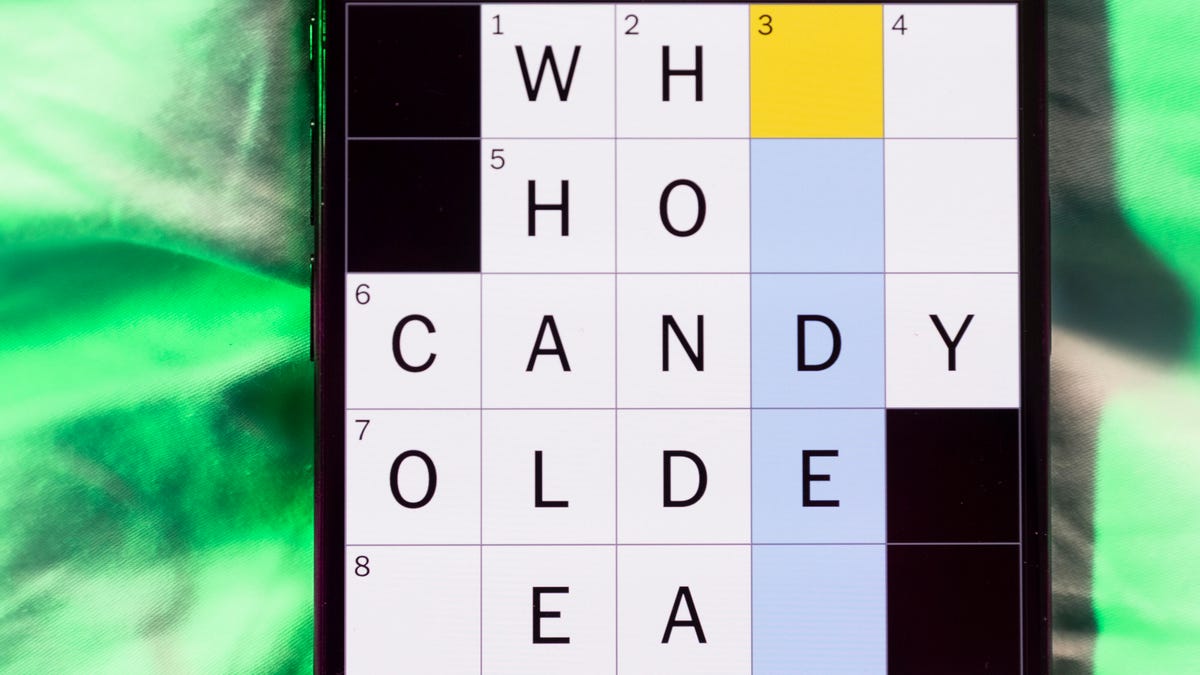
Looking for the most recent Mini Crossword answer? Click here for today’s Mini Crossword hints, as well as our daily answers and hints for The New York Times Wordle, Strands, Connections and Connections: Sports Edition puzzles.
Need some help with today’s Mini Crossword? Hint: It uses a lot of the letter Z for some reason. Read on for all the answers. And if you could use some hints and guidance for daily solving, check out our Mini Crossword tips.
If you’re looking for today’s Wordle, Connections, Connections: Sports Edition and Strands answers, you can visit CNET’s NYT puzzle hints page.
Read more: Tips and Tricks for Solving The New York Times Mini Crossword
Let’s get to those Mini Crossword clues and answers.
Mini across clues and answers
1A clue: ___-Carlton (hotel chain)
Answer: RITZ
5A clue: Span of the alphabet
Answer: ATOZ
6A clue: Cable channel with an out-of-this-world name
Answer: STARZ
7A clue: Takes care of, as a squeaky wheel
Answer: OILS
8A clue: Toy on a string
Answer: YOYO
Mini down clues and answers
1D clue: When a post receives far more negative comments than likes, in social media slang
Answer: RATIO
2D clue: World’s leading wine producer
Answer: ITALY
3D clue: Middle of the human body
Answer: TORSO
4D clue: Sleeping sound
Answer: ZZZ
6D clue: Tofu base
Answer: SOY
Technologies
Today’s NYT Connections: Sports Edition Hints and Answers for April 8, #562
Here are hints and the answers for the NYT Connections: Sports Edition puzzle for April 8 No. 562.

Looking for the most recent regular Connections answers? Click here for today’s Connections hints, as well as our daily answers and hints for The New York Times Mini Crossword, Wordle and Strands puzzles.
Today’s Connections: Sports Edition is a tough one. If you’re struggling with today’s puzzle but still want to solve it, read on for hints and the answers.
Connections: Sports Edition is published by The Athletic, the subscription-based sports journalism site owned by The Times. It doesn’t appear in the NYT Games app, but it does in The Athletic’s own app. Or you can play it for free online.
Read more: NYT Connections: Sports Edition Puzzle Comes Out of Beta
Hints for today’s Connections: Sports Edition groups
Here are four hints for the groupings in today’s Connections: Sports Edition puzzle, ranked from the easiest yellow group to the tough (and sometimes bizarre) purple group.
Yellow group hint: Working out.
Green group hint: Cover your face.
Blue group hint: NFL players.
Purple group hint: Leap.
Answers for today’s Connections: Sports Edition groups
Yellow group: Exercises in singular form.
Green group: Sporting jobs that require masks.
Blue group: Hall of Fame defensive ends.
Purple group: ____ jump.
Read more: Wordle Cheat Sheet: Here Are the Most Popular Letters Used in English Words
What are today’s Connections: Sports Edition answers?
The yellow words in today’s Connections
The theme is exercises in singular form. The four answers are crunch, plank, situp and squat.
The green words in today’s Connections
The theme is sporting jobs that require masks. The four answers are catcher, fencer, football player and goaltender.
The blue words in today’s Connections
The theme is Hall of Fame defensive ends. The four answers are Dent, Peppers, Strahan and Youngblood.
The purple words in today’s Connections
The theme is ____ jump. The four answers are broad, high, long and triple.
Technologies
The $135M Google Data Settlement Site Is Live — See If You’re Eligible
Use the settlement website to select your preferred payment method, and you may end up $100 richer.

You can now file a claim in the $135 million Google data settlement. The case centers on claims that Android devices transmitted user data without consent. Specifically, the class action lawsuit Taylor v. Google LLC contends that Google’s Android devices passively transferred cellular data to Google without user permission, even when the devices were idle. While not admitting fault, Google reached a preliminary settlement in January, agreeing to pay $135 million to about 100 million US Android phone users.
The official settlement website for the lawsuit is now live. The final approval hearing won’t occur until June 23, when the court will consider whether Google’s settlement is fair and listen to objections. After that, the court will decide whether to approve the $135 million settlement.
In the meantime, if you qualify and want to be paid as part of the settlement, you can select your preferred payment method on the official website. There, you can find information on speaking at the June 23 court hearing and on how to exclude yourself or write to the court to object by May 29.
As part of the settlement, Google will update its Google Play terms of service to clarify that certain data transfers do occur passively even when you’re not using your Android device, and that cellular data may be relied upon when not connected to Wi-Fi. This can’t always be disabled, but users will be asked to consent to it when setting up their device.
Google will also fully stop collecting data when its «allow background data usage» option is toggled off.
Who can be part of the settlement?
In order to join the Taylor v. Google LLC settlement, you must meet four qualifications:
- Be a living, individual human being in the US.
- Have used an Android mobile device with a cellular data plan.
- Have used the aforementioned device at any time from Nov. 12, 2017, to the date when the settlement receives final approval.
- You’re not a class member in the Csupo v. Google LLC lawsuit, which is similar but specifically for California residents.
The final approval hearing is on June 23, so you can add your payment method until then. The hearing’s date and time may change, and any updates will be posted on the settlement website.
If you choose to do nothing, you will still be issued a settlement payment, but you may not receive it if you don’t select a payment method.
How much will I get paid?
It’s not currently known exactly how much each settlement class member will receive, but the cap is $100. Payments will be distributed after final court approval and after any appeals are resolved.
After all administrative, tax and attorney costs are paid, the settlement administrator will attempt to pay each member an equal amount. If any funds remain after payments are sent, and it’s economically feasible, they will be redistributed to members who were previously and successfully paid. If it’s not economically feasible, the funds will go to an organization approved by the court.
-
 Technologies3 года ago
Tech Companies Need to Be Held Accountable for Security, Experts Say
-
 Technologies3 года ago
Best Handheld Game Console in 2023
-
 Technologies3 года ago
Tighten Up Your VR Game With the Best Head Straps for Quest 2
-
 Technologies4 года ago
Black Friday 2021: The best deals on TVs, headphones, kitchenware, and more
-
 Technologies5 лет ago
Google to require vaccinations as Silicon Valley rethinks return-to-office policies
-
 Technologies5 лет ago
Verum, Wickr and Threema: next generation secured messengers
-
 Technologies4 года ago
Olivia Harlan Dekker for Verum Messenger
-
 Technologies4 года ago
The number of Сrypto Bank customers increased by 10% in five days