
Technologies
Standalone AI Devices Are Back, Baby. The Note-Taking Plaud Note 3 Proves It
Plaud AI has already sold over a million AI devices. Is it time for you to add it to your tech collection?
There was a moment around 18 months ago when it felt like AI had unlocked an entirely new consumer technology category. The wearable Humane Pin and handheld Rabbit R1 were small, standalone devices that promised to be your AI personal assistants and threatened to be smartphone killers.
But almost as soon as the hype around them peaked, it died down again. The devices that hit the market during that initial wave of excitement overpromised and underdelivered, and today we remain just as reliant on our phones as ever.
Don’t miss any of our unbiased tech content and lab-based reviews. Add CNET as a preferred Google source on Chrome.
The tech industry hasn’t completely discarded the idea of standalone AI devices, which combine the power of sensors and large language models. Former Apple design visionary Jony Ive and OpenAI are working on their own AI-centric «screenless phone» concept. Meanwhile, smaller tech companies are also building interesting devices of their own — and making surprising successes of them.
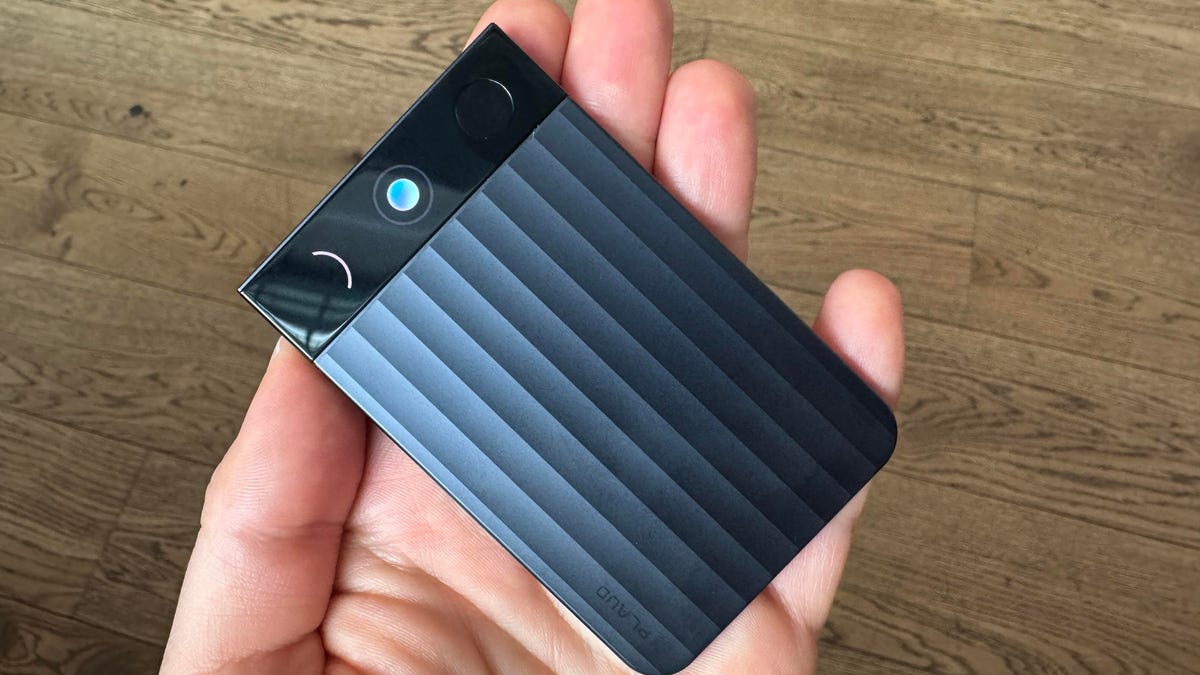
I was recently introduced to Plaud AI, which has already sold over a million AI note-taking devices, and just unveiled its latest product, the Note Pro. This credit card-sized slice of tech perches on the table next to you and slides into a slim case on the rear of your phone for easy transportation. Its five microphones can capture audio up to 5 meters away, and 2 hours of charging will give you 50 hours of continuous recording time.
This third device from Plaud is an update to its original tabletop note-taking device (it also sells a wearable note taker) and comes with more powerful recording capabilities, along with a clutch of new features. First is the small AMOLED display along the top edge, which will display the recording status and battery life. The second notable adjustment is that the power button can also be pressed to highlight key parts of a conversation in real time.
The Note Pro has 64GB of built-in storage, but the core of its intelligence is in the companion smartphone app, which parses all the material the device captures, hopefully into something genuinely useful, intelligible and actionable. Plaud Intelligence relies on LLMs from OpenAI, Anthropic and Google, and is multimodal — meaning you can add in pictures and text, which it can analyze as a whole.
As with Plaud’s previous products, the Note Pro is designed for use in professional contexts and provides access to over 2,000 templates, including those designed for people working in specific fields — medical or legal, for example. As a journalist, I need to record many of my conversations and meetings, so I’ll be interested to see if Plaud can offer anything above and beyond Otter, which I usually rely on.
Note Pro vs. my phone: The real test
That brings me to the big question hanging over the Note Pro, which is why would I carry a separate device to record my meetings when my phone is more than capable? It’s a question I’ll attempt to answer as I test the device out in the coming week. Plaud CEO Nathan Xu laid out his vision for the Note Pro in a briefing, explaining why he thinks people would want to carry one themselves.
Xu said that he sees «lots of beauty in human intelligence,» but that he wants to help humans overcome our shortcomings — our limited memory span, tendency to get distracted and our inconsistent energy levels, are examples he gives. By applying the power of an LLM to our daily lives, AI can help pick up the slack, he said.
Yes, you could use an app on your phone to record a meeting and run it through AI, or rely on the AI tools built into Google Meet or Zoom, but they’re often captured in isolation. Instead, Plaud is with you all the time, filling in the gaps between those meetings, capturing nuggets from every conversation — including the face-to-face ones, which are often overlooked – and understanding them in the context of your entire day.
«Conversation is a form of intelligence — it’s where the ideas begin, the decisions are made and the meanings are shared,» Xu said. «So we exist to help people to capture, extract and utilize intelligence.»
There are other questions I still have about the Note Pro, largely based around privacy. Xu says Plaud’s privacy protections are «best in class,» which it will need to be if it’s capturing confidential and sensitive medical, legal or corporate discussions. Some doctors I’ve spoken to are already wary of using AI transcription services due to potential breaches of doctor-patient confidentiality, and many corporate environments may be resistant to people using these devices in the workplace.
A lesser, but still significant concern is how long it will take for me to lose the proprietary charging cable. The Note Pro is slimmer than a USB-C connector, so it’s clear why having its own charging connector is necessary, but it may prove tricky to keep tabs on.
I’ll be updating this piece with my impressions as I get to grips with using the Note Pro, but if you just can’t wait for that, it is available for preorder now for $179 (£169 or roughly AU$350) and will ship at some point in October.
Technologies
Help Us Crown the Most Loved Headphones and Earbuds of 2026
Got a pair you swear by? Take our People’s Picks survey to help us find a winner.

CNET just launched People’s Picks, a series of surveys where actual humans like you vote for the products and services you use. Starting in April, we want you to weigh in on your favorite headphones and earbuds. We’ll pick a winner based on which ones you love the most.
Why we want to hear from you
Our writers and editors test hundreds of products each year, but your real-world experience with these devices is something we can’t replicate in our labs. You’ve used these headphones at the gym, on your commute to work and on long flights, and that perspective is invaluable. Your voice helps others know about the headphones or earbuds you love, too.
«I review a lot of headphones and earbuds for CNET, and there are plenty of great models from the top brands in this survey that I rate highly. I’m always curious about what models people ultimately choose and why, so I’m excited to get your feedback and learn the results of this survey,» says David Carnoy, CNET’s executive editor and headphones expert.
With our survey, we’ll collect answers from real-world users like you. The headphones and earbuds chosen through our 3-minute survey will be featured in our People’s Picks roundup of the top picks based on your recommendation.
Make your voice heard
Whether you swear by a pair of $25 earbuds or love a pair of high-end headphones, your pick counts. The survey takes just a few minutes to complete, and after we gather enough information, we’ll tally the results and publish the winners.
Not sure what to pick? Check out our Best Headphones to revisit your favorites before voting.
Technologies
Google’s Pixel 10A Is Coming to Japan With an Exclusive Blue Edition and Special Wallpaper
This model comes with creatively designed stickers and a special look for Pixel’s 10th anniversary.

Don’t be blue: Google is releasing an Isai blue edition of the Pixel 10A to celebrate the Android phone line’s 10th anniversary, setting it apart with its own sticker set, specialized wallpaper and custom icons. But it’ll only be available in Japan.
Announced Tuesday on the Google Japan blog, the Isai blue Pixel 10A has a dark blue look and includes bonus decorations designed in collaboration with Japan’s Heralbony art company. These include an exclusive bumper case and stickers for customization.
This edition of the Pixel 10A will arrive in Japan on May 20, following the April 14 release of the Pixel 10A in its original colors of lavender, berry, fog and obsidian. The Isai blue model costs 94,900 yen, which roughly translates to $595, and includes 256GB of storage.
This makes it slightly less expensive than the US model’s 256GB edition, but it comes with a number of fun extras at no additional cost.
Google’s creation of a country-specific model for Japan may also reflect strong sales in that market. In 2023, the IDC analytics firm (via 9to5Google) reported that the Pixel 7 series accounted for 10.7% of the country’s market share, a 527% increase from 2022.
Technologies
Can’t Wait for New Emoji? Here’s How to Create Your Own on iPhone
Apple Intelligence-enabled iPhones can create custom emoji in a few easy steps.

Apple brought new emoji to all iPhones when the company released iOS 26.4 on March 24. The new emoji include «» orca, «» distorted face and «» hairy creature — or as we might normally call it, Sasquatch. According to Emojipedia, there are 3,953 emoji with more on the way, including a pickle. But there’s no emoji for a dog wearing pajamas, a plate with burgers and fries and many other things. But if you have Genmoji on your iPhone you can create these emoji and many more.
Apple released iOS 18.2 in 2024 and the company introduced its own emoji generator, called Genmoji, to Apple Intelligence-capable iPhones at that time. The Unicode Standard, a universal character encoding standard, is responsible for creating new emoji, and approved emoji are added to all devices once a year. With Genmoji, you don’t have to wait for new emoji to appear on your iPhone each year. You can just create them as you need them.
Read on to learn how to use Genmoji on iPhone to create your own custom emoji. Just note that only iPhones with Apple Intelligence, like the iPhone 17 lineup, can use Genmoji at this time.
Note: The new emoji may not display correctly for Apple users whose devices aren’t on a 26.4 software version.
How to make custom emoji
1. Open Messages and go into a chat.
2. Tap the plus (+) button next to your text box.
3. Tap Genmoji.
You can then type a description of an emoji into the text box near the bottom of your screen and tap the check mark on your keyboard to enter that description into Genmoji. You can also tap different suggestions and themes that are right above the text box. And with iOS 26 or later, you can also combine and use emoji to create others rather than describing a new emoji or using suggestions.
Your iPhone will generate a series of new emoji for you to pick from according to your description, and you can swipe through these new emoji. When you find the one you want, tap Add in the top right corner of your screen and the new emoji will be available to use as an emoji, tapback or a sticker. Now you don’t have to wait for the Unicode Standard to propose, create and bring new emoji to devices.
For more iOS news, here’s what to know about iOS 26.4 and iOS 26.3. You can also check out our iOS 26 cheat sheet for other tips and tricks.
-
 Technologies3 года ago
Tech Companies Need to Be Held Accountable for Security, Experts Say
-
 Technologies3 года ago
Best Handheld Game Console in 2023
-
 Technologies3 года ago
Tighten Up Your VR Game With the Best Head Straps for Quest 2
-
 Technologies4 года ago
Black Friday 2021: The best deals on TVs, headphones, kitchenware, and more
-
 Technologies5 лет ago
Google to require vaccinations as Silicon Valley rethinks return-to-office policies
-
 Technologies5 лет ago
Verum, Wickr and Threema: next generation secured messengers
-
 Technologies4 года ago
Olivia Harlan Dekker for Verum Messenger
-
 Technologies4 года ago
The number of Сrypto Bank customers increased by 10% in five days