
Technologies
Drag x Drive Proves the Switch 2’s Mouse Mode Controls Are Fantastic
Nintendo has done it again with a great new way to play games on its just-launched console.
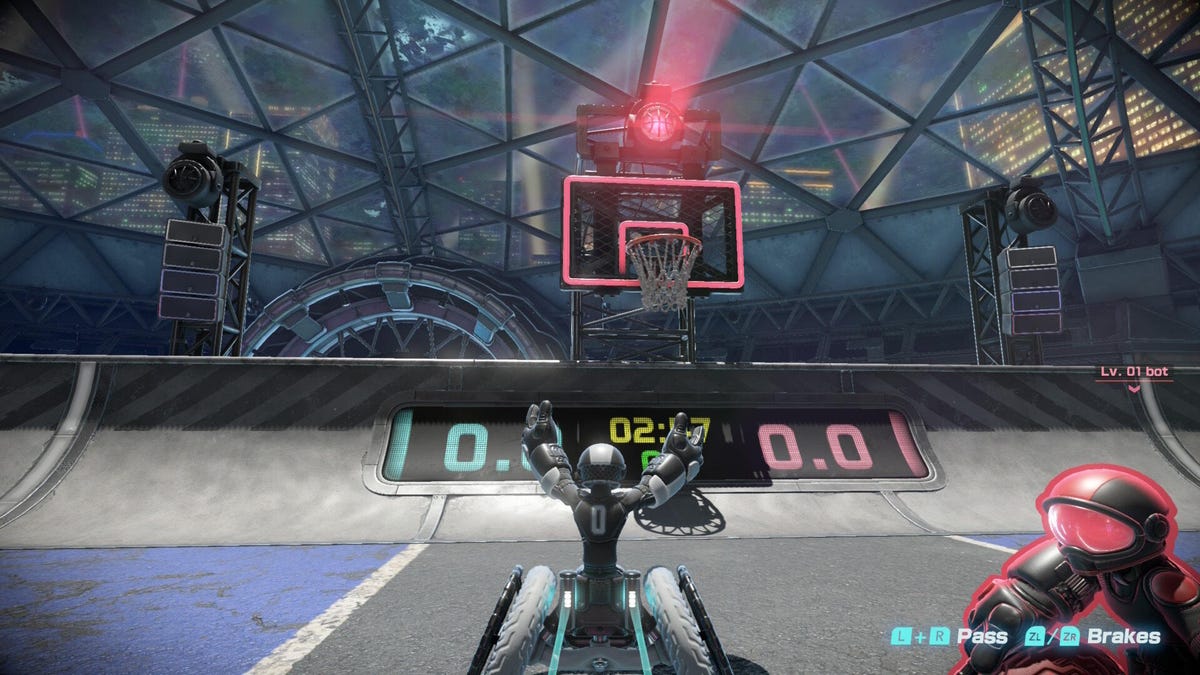
Nintendo’s next summer title — and one of the few new games for the Switch 2 soon after its June launch — is the multiplayer wheelchair basketball game, Drag x Drive. It uses the console’s new Joy-Con mouse controls to simulate moving the wheels of your chair (or vehicle, as it’s referred to in-game) while playing short three-on-three matches. While it does take some getting used to, it shows off how well this new input mode works and harkens back to an era of motion-controlled gaming made popular on Nintendo’s Wii.
Playing Drag x Drive is unique, reflecting the Switch 2 new tech. You detach each Joy-Con 2 controller from the system, place the sensors face down on a surface (which can range from a table to even your legs), and slide the controllers forward and backward to move the wheels respectively. I actually found it more comfortable on my wrists to use the controllers positioned a little wider on my thighs instead of straight up and down on a table.
Learning to play has a steep curve, and I found my shoulders getting tired quickly as the game kept reminding me that longer strokes would move my character faster on the court. For anyone who experienced Tennis Elbow back when WiiSports came out, Drag x Drive’s bodily wear-and-tear will be familiar.
The mouse’s controls are good — better than I expected, in fact. They feel snappy, and I was able to pull off some higher-level maneuvers when I got used to it. And as you move, you can feel a subtle vibration in each hand to help you dial in how much force you’re inputting. Moving the controllers at different speeds will adjust the turning radius. Braking (by pressing the R or L buttons) can be done independently of each wheel to further your control. There are even tricks you can pull off by using breaking and lifting the controllers in specific combinations, which the game points out will help you perform more advanced blocks and interceptions.
Controls are the big novelty of Drag x Drive and take time to get used to, though the court and game modes offer their own unique challenges.
Read more: I Played Donkey Kong Bananza. It’s the Switch 2’s Killer Ape
Moderately deep mechanics for a $20 game
The primary mode is a 3-minute three-on-three game that’s reminiscent of Rocket League (without the jetpacks). There’s an indicator always pointing toward the oversized ball. Rolling into it will pick it up. If you’re going fast enough (represented by a flashing light on your back) and crashing into someone head-on will knock it loose. And if you raise one of the joy-cons off the surface, you will lift the ball, flicking your wrist will make a shot.
Since the court is kind of a skateboard-style bowl, you can even roll up into the air from the sides and shoot or dunk from above. These trick shots will award players with more granular points, for example, an aerial shot might award you 2.3 instead of the standard two you’d see in typical basketball. But you can still land a three-pointer from outside the boundary, but you’ll have to be lined up real well while the other five players aren’t slamming into you.
Defense also works just like you’d expect, with positioning playing the most important role. Pressing the R and L buttons together will pass the ball to a teammate. If an opponent is in the way, they can intercept. This is key since I witnessed many teams pass a ball way down the court to an isolated player while we tried to race after them to stop the shot. Like every sport, you’ll want to spread out and cover someone instead of clumping all together around the ball, like most new players often do.
While Drag x Drive curiously doesn’t refer to anything as a wheelchair (or even highlight the awesome and inclusive sport of wheelchair basketball), it’s really wonderful to see this representation. The characters can also be swapped out for one of three unit types: defense, forward or guard, all with different speed and power stats. From there, you can customise your character’s outfit and gear, with more to unlock as you play.
Outside of the online play, there are also nine different bot difficulties you can take on, so the game is playable in single player. There are also several minigames stationed around the hub area. These include a timed race and a rebound mode where you need to chase after a bouncing ball in the hub before time runs out. They’re pretty short and not all that interesting, but they will reward you with medals to unlock gear. There are also some obstacles positioned around to play with. One example is a giant jump rope that you can bunny hop over.
There isn’t a typical career or story campaign to work through — the main draw is the one core multiplayer mode. Considering the low $20 entry price, I wouldn’t expect anything super in-depth, making this more of a unique application of the Switch 2 Joy-Cons’ mouse mode than a long-lasting play experience.
Drag x Drive is a shallow experience, but the skill ceiling has a lot of potential. Its low entry price makes it an easy recommendation, even if you’re just interested in trying out the new mouse controls that the Switch 2 offers. If Nintendo chooses to support the game with more content in the future, I would love to see limited-time events and more game modes get added, building on the bones of one of the most unique sports games to come out in years.
Drag x Drive comes out on Switch 2 on Thursday.
Technologies
Today’s NYT Connections: Sports Edition Hints and Answers for April 8, #562
Here are hints and the answers for the NYT Connections: Sports Edition puzzle for April 8 No. 562.

Looking for the most recent regular Connections answers? Click here for today’s Connections hints, as well as our daily answers and hints for The New York Times Mini Crossword, Wordle and Strands puzzles.
Today’s Connections: Sports Edition is a tough one. If you’re struggling with today’s puzzle but still want to solve it, read on for hints and the answers.
Connections: Sports Edition is published by The Athletic, the subscription-based sports journalism site owned by The Times. It doesn’t appear in the NYT Games app, but it does in The Athletic’s own app. Or you can play it for free online.
Read more: NYT Connections: Sports Edition Puzzle Comes Out of Beta
Hints for today’s Connections: Sports Edition groups
Here are four hints for the groupings in today’s Connections: Sports Edition puzzle, ranked from the easiest yellow group to the tough (and sometimes bizarre) purple group.
Yellow group hint: Working out.
Green group hint: Cover your face.
Blue group hint: NFL players.
Purple group hint: Leap.
Answers for today’s Connections: Sports Edition groups
Yellow group: Exercises in singular form.
Green group: Sporting jobs that require masks.
Blue group: Hall of Fame defensive ends.
Purple group: ____ jump.
Read more: Wordle Cheat Sheet: Here Are the Most Popular Letters Used in English Words
What are today’s Connections: Sports Edition answers?
The yellow words in today’s Connections
The theme is exercises in singular form. The four answers are crunch, plank, situp and squat.
The green words in today’s Connections
The theme is sporting jobs that require masks. The four answers are catcher, fencer, football player and goaltender.
The blue words in today’s Connections
The theme is Hall of Fame defensive ends. The four answers are Dent, Peppers, Strahan and Youngblood.
The purple words in today’s Connections
The theme is ____ jump. The four answers are broad, high, long and triple.
Technologies
The $135M Google Data Settlement Site Is Live — See If You’re Eligible
Use the settlement website to select your preferred payment method, and you may end up $100 richer.

You can now file a claim in the $135 million Google data settlement. The case centers on claims that Android devices transmitted user data without consent. Specifically, the class action lawsuit Taylor v. Google LLC contends that Google’s Android devices passively transferred cellular data to Google without user permission, even when the devices were idle. While not admitting fault, Google reached a preliminary settlement in January, agreeing to pay $135 million to about 100 million US Android phone users.
The official settlement website for the lawsuit is now live. The final approval hearing won’t occur until June 23, when the court will consider whether Google’s settlement is fair and listen to objections. After that, the court will decide whether to approve the $135 million settlement.
In the meantime, if you qualify and want to be paid as part of the settlement, you can select your preferred payment method on the official website. There, you can find information on speaking at the June 23 court hearing and on how to exclude yourself or write to the court to object by May 29.
As part of the settlement, Google will update its Google Play terms of service to clarify that certain data transfers do occur passively even when you’re not using your Android device, and that cellular data may be relied upon when not connected to Wi-Fi. This can’t always be disabled, but users will be asked to consent to it when setting up their device.
Google will also fully stop collecting data when its «allow background data usage» option is toggled off.
Who can be part of the settlement?
In order to join the Taylor v. Google LLC settlement, you must meet four qualifications:
- Be a living, individual human being in the US.
- Have used an Android mobile device with a cellular data plan.
- Have used the aforementioned device at any time from Nov. 12, 2017, to the date when the settlement receives final approval.
- You’re not a class member in the Csupo v. Google LLC lawsuit, which is similar but specifically for California residents.
The final approval hearing is on June 23, so you can add your payment method until then. The hearing’s date and time may change, and any updates will be posted on the settlement website.
If you choose to do nothing, you will still be issued a settlement payment, but you may not receive it if you don’t select a payment method.
How much will I get paid?
It’s not currently known exactly how much each settlement class member will receive, but the cap is $100. Payments will be distributed after final court approval and after any appeals are resolved.
After all administrative, tax and attorney costs are paid, the settlement administrator will attempt to pay each member an equal amount. If any funds remain after payments are sent, and it’s economically feasible, they will be redistributed to members who were previously and successfully paid. If it’s not economically feasible, the funds will go to an organization approved by the court.
Technologies
Samsung’s Galaxy Watch Ultra 2 Might Come in 5G and 4G Cellular Models
If the rumor proves true, the 5G Galaxy Watch Ultra would rival the 5G-enabled $799 Apple Watch Ultra 3 that debuted last fall.

Samsung’s next high-end Galaxy Watch could support faster 5G speeds, but if this leak is true, it will depend on where you live. The rumored Samsung Galaxy Watch Ultra 2 might come in 5G and 4G cellular models, with availability for each smartwatch depending on the country.
According to the Dutch website Galaxy Club (and spotted by SamMobile), Samsung’s servers may have revealed a series of model numbers that point to 5G, 4G and Wi-Fi-enabled editions of the next Galaxy Watch Ultra, which would succeed the original model that debuted in 2024.
A representative for Samsung did not immediately respond to a request for comment.
The Galaxy Club website speculates that the 5G edition would be sold in the US and Korean markets, while the 4G edition would sell in the rest of the world. In the US, a 5G version of the Galaxy Watch Ultra would rival the 5G-enabled $799 Apple Watch Ultra 3, which debuted last fall. The 4G edition would have broader compatibility worldwide, since the earlier network is far more established.
It will likely be a few months until we hear anything official about the Galaxy Watch Ultra 2. Samsung typically unveils its new watches in the summer alongside its Galaxy Z Fold and Z Flip foldable phones. Last year, Samsung unveiled the Galaxy Watch 8 and the Galaxy Watch 8 Classic, but otherwise left the prior 2024 Ultra in the lineup for those looking for a larger 47mm smartwatch.
-
 Technologies3 года ago
Tech Companies Need to Be Held Accountable for Security, Experts Say
-
 Technologies3 года ago
Best Handheld Game Console in 2023
-
 Technologies3 года ago
Tighten Up Your VR Game With the Best Head Straps for Quest 2
-
 Technologies4 года ago
Black Friday 2021: The best deals on TVs, headphones, kitchenware, and more
-
 Technologies5 лет ago
Google to require vaccinations as Silicon Valley rethinks return-to-office policies
-
 Technologies5 лет ago
Verum, Wickr and Threema: next generation secured messengers
-
 Technologies4 года ago
Olivia Harlan Dekker for Verum Messenger
-
 Technologies4 года ago
The number of Сrypto Bank customers increased by 10% in five days