
Technologies
All the Important New iOS 26 Features, From Liquid Glass to Photos App Fixes
Your iPhone will look different and get new features when iOS 26 ships in the fall.
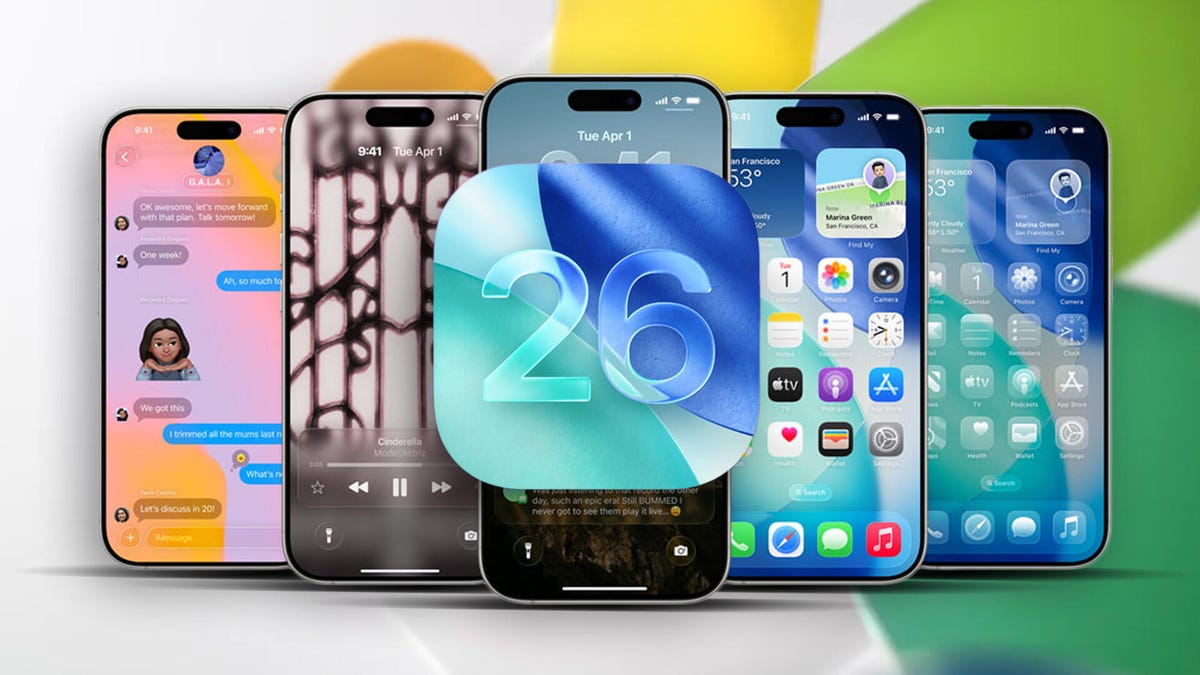
While we look ahead to what new iPhone 17 models might bring to the phone’s hardware, we’ve already got a look at the future of iPhone software, iOS 26. The new Liquid Glass interface is a major design refresh that will make its way across all of Apple’s product lines. The Camera and Photos apps are gaining long-awaited functional redesigns; the Messages and Phone apps are taking a firmer stand against unwanted texts and calls; and Apple Intelligence contributes some improvements in a year when Siri has been delayed.
The next version of the operating system is due to ship in September or October (likely with new iPhone 17 models), but developer betas are available now, with a public beta expected this month.
Transparent new Liquid glass design
After more than a decade of a flat, clean user interface — an overhaul introduced in iOS 7 when former Apple Chief Design Officer Jony Ive took over the design of software as well as hardware — the iPhone is getting a new look. The new design extends throughout the Apple product lineup, from iOS to WatchOS, TVOS and iPadOS.
The Liquid Glass interface also now enables a third way to view app icons on the iPhone home screen. Not content with Light and Dark modes, iOS 26 now features an All Clear look — every icon is clear glass with no color. Lock screens can also have an enhanced 3D effect using spatial scenes, which use machine learning to give depth to your background photos.
Dynamic and adaptable lock screen
Translucency is the defining characteristic of Liquid Glass, behaving like glass in the real world in the way it deals with light and color of objects behind and near controls. But it’s not just a glassy look: The “liquid” part of Liquid Glass refers to how controls can merge and adapt — dynamically morphing, in Apple’s words. In the example Apple showed, the glassy time numerals on an iPhone lock screen stretched to accommodate the image of a dog and even shrunk as the image shifted to accommodate incoming notifications. The dock and widgets are now rounded, glassy panels that float above the background.
Camera and Photos apps go even more minimal
The Camera app is getting a new, simplified interface. You could argue that the current Camera app is pretty minimal, designed to make it quick to frame a shot and hit the big shutter button. But the moment you get into the periphery, it becomes a weird mix of hidden controls and unintuitive icons.
Now, the Camera app in iOS 26 features a “new, more intuitive design” that takes minimalism to the extreme. The streamlined design shows just two modes: Video or Camera. Swipe left or right to choose additional modes, such as Pano or Cinematic. Swipe up for settings such as aspect ratio and timers, and tap for additional preferences.
With the updated Photos app, viewing the pictures you capture should be a better experience — a welcome change that customers have clamored for since iOS 18’s cluttered attempt. Instead of a long, difficult-to-discover scrolling interface, Photos regains a Liquid Glass menu at the bottom of the screen.
The Phone app gets a revamp
The Phone app has kept more closely to the look of its source than others: a sparse interface with large buttons as if you’re holding an old-fashioned headset or pre-smartphone cellular phone. iOS 26 finally updates that look not just with the new overall interface but in a unified layout that takes advantage of the larger screen real estate on today’s iPhone models.
It’s not just looks that are different, though. The Phone app is trying to be more useful for dealing with actual calls — the ones you want to take. The Call Screening feature automatically answers calls from unknown numbers, and your phone rings only when the caller shares their name and reason for calling.
Or what about all the time wasted on hold? Hold Assist automatically detects hold music and can mute the music but keep the call connected. Once a live agent becomes available, the phone rings and lets the agent know you’ll be available shortly.
Messages updates
The Messages app is probably one of the most used apps on the iPhone, and for iOS 26, Apple is making it a more colorful experience. You can add backgrounds to the chat window, including dynamic backgrounds that show off the new Liquid Glass interface.
In addition to the new look, group texts in Messages can incorporate polls for everyone in the group to reply to — no more scrolling back to find out which restaurant Brett suggested for lunch that you missed. Other members in the chat can also add their own items to a poll.
A more useful feature is a feature to detect spam texts better and screen unknown numbers, so the messages you see in the app are the ones you want to see and not the ones that distract you.
Safari gets out of its own way
In the Safari app, the Liquid Glass design floats the tab bar above the web page (although that looks right where your thumb is going to be, so it will be interesting to see if you can move the bar to the top of the screen). As you scroll, the tab bar shrinks.
FaceTime focuses on calls, not controls
FaceTime also gets the minimal look, with controls in the lower-right corner that disappear during the call to get out of the way. On the FaceTime landing page, posters of your contacts, including video clips of previous calls, are designed to make the app more appealing.
New Music app features
Do you like the sound of that song your friend is playing but don’t understand the language the lyrics are in? The Music app includes a new lyrics translation feature that displays along with the lyrics as the song plays. And for when you want to sing along with one of her favorite K-pop songs, for example, but you don’t speak or read Korean, a lyrics pronunciation feature spells out the right way to form the sounds.
AutoMix blends songs like a DJ, matching the beat and time-stretching for a seamless transition.
And if you find yourself obsessively listening to artists and albums again and again, you can pin them to the top of your music library for quick access.
New Games app is a reminder that yes, people game on iPhone
The iPhone doesn’t get the same kind of gaming affection as Nintendo’s Switch or Valve’s Steam Deck, but the truth is that the iPhone and Android phones are used extensively for gaming — Apple says half a billion people play games on iPhone.
Trying to capitalize on that, a new Games app acts as a specific portal to Apple Arcade and other games. Yes, you can get to those from the App Store app, but the Games app is designed to remove a layer of friction so you can get right to the gaming action.
Live translation enhances calls and texts
Although not specific to iOS, Apple’s new live translation feature is ideal on the iPhone when you’re communicating with others. It uses Apple Intelligence to dynamically enable you to talk to someone who speaks a different language in near-real time. It’s available in the Messages, FaceTime and Phone apps and shows live translated captions during a conversation.
Maps gets more personal
Updates to the Maps app sometimes involve adding more detail to popular areas or restructuring the way you store locations. Now, the app takes note of routes you travel frequently and can alert you of any delays before you get on the road.
It also includes a welcome feature for those of us who get our favorite restaurants mixed up: visited places. The app notes how many times you’ve been to a place, be that a local business, eatery or tourist destination. It organizes them in categories or other criteria such as by city to make them easier to find the next time.
New CarPlay features
Liquid Glass also makes its way to CarPlay in your vehicle, with a more compact design when a call comes in that doesn’t obscure other items, such as a directional map. In Messages, you can apply tapbacks and pin conversations for easy access.
Widgets are now part of the CarPlay experience, so you can focus on just the data you want, like the current weather conditions. And Live Activities appear on the CarPlay screen, so you’ll know when that coffee you ordered will be done or when a friend’s flight is about to arrive.
Wallet improvements
The Wallet app is already home for using Apple Card, Apple Pay, electronic car keys and for storing tickets and passes. In iOS 26, you can create a new Digital ID that acts like a passport for age and identity verification (though it does not replace a physical passport) for domestic travel for TSA screening at airports.
The app can also let you use rewards and set up installment payments when you purchase items in a store, not just for online orders. And with the help of Apple Intelligence, the Wallet app can help you track product orders, even if you did not use Apple Pay to purchase them. It can pull details such as shipping numbers from emails and texts so that information is all in one place.
New features powered by Apple Intelligence
Although last year’s WWDC featured Apple Intelligence features heavily, improvements to the AI tech were less prominent this year, folded into the announcements during the WWDC keynote.
As an alternative to creating Genmoji from scratch, you can combine existing emojis — “like a sloth and a light bulb when you’re the last one in the group chat to get the joke,” to use Apple’s example. You can also change expressions in Genmoji of people you know that you’ve used to create the image.
Image Playground adds the ability to tap into ChatGPT’s image generation tools to go beyond the app’s animation or sketch styles.
Visual Intelligence can already use the camera to try to decipher what’s in front of the lens. Now the technology works on the content on the iPhone’s screen, too. It does this by taking a screenshot (press the sleep and volume up buttons) and then including a new Image Search option in that interface to find results across the web or in other apps such as Etsy.
This is also a way to add event details from images you come across, like posters for concerts or large gatherings. (Perhaps this could work for QR codes as well?) In the screenshot interface, Visual Intelligence can parse the text and create an event in the Calendar app.
Some iOS 26 updates Apple didn’t mention
Not everything fits into a keynote presentation — even, or maybe especially, when it’s all pre-recorded — but some of the more interesting new features in iOS 26 went unremarked during the big reveal. For instance:
- If you have AirPods or AirPods Pro with the H2 chip, you can use AirPods Camera Remote to start recording video on your iPhone by pressing and holding one of the AirPods.
- You can choose your own snooze duration of between 1 and 15 minutes for alarms.
- Audio recording options have expanded, enabling high-quality recording during conference calls and high-definition recording in the Camera app with AirPods and AirPods Pro that contain the H2 chip.
- Accessibility features include an “all-new experience designed with Braille users in mind,” more options for the Vehicle Motion Cues feature to avoid motion sickness and “a more customizable reading experience.”
- Reminders uses Apple Intelligence to “suggest tasks, grocery items and follow-ups based on emails or other text on your device.”
- The Journal app supports multiple journals, inline images and a map view that tracks where journal entries were made.
- Parental controls have been updated in unspecified ways, including “enhancements across Communication Limits, Communication Safety and the App Store.”
iOS 26 availability
The finished version of iOS 26 will be released in September or October with new iPhone 17 models. In the meantime, developers can install the first developer betas now, with an initial public beta arriving this month. (Don’t forget to go into any beta software with open eyes and clear expectations.)
Follow the WWDC 2025 live blog for details about Apple’s other announcements.
iPhone models compatible with iOS 26
iOS 26 will run on the iPhone 11 and later models, including the iPhone SE (2nd generation and later). That includes:
- iPhone 16e
- iPhone 16
- iPhone 16 Plus
- iPhone 16 Pro
- iPhone 16 Pro Max
- iPhone 15
- iPhone 15 Plus
- iPhone 15 Pro
- iPhone 15 Pro Max
- iPhone 14
- iPhone 14 Plus
- iPhone 14 Pro
- iPhone 14 Pro Max
- iPhone 13
- iPhone 13 mini
- iPhone 13 Pro
- iPhone 13 Pro Max
- iPhone 12
- iPhone 12 mini
- iPhone 12 Pro
- iPhone 12 Pro Max
- iPhone 11
- iPhone 11 Pro
- iPhone 11 Pro Max
- iPhone SE (2nd generation and later)
Technologies
Starlink connectivity in Ukraine reportedly returning to normal
Ukrainian officials report that SpaceX’s military-grade Starshield service is appearing to function normally again following recent connectivity restrictions.
It appears SpaceX has eased the limitations placed on Starshield, the specialized military version of its Starlink satellite internet service, for the Ukrainian armed forces.
According to The Wall Street Journal, Defense Minister Evgeniy Khmara informed the press that Starshield seems to have resumed normal operations, though the military is still testing the service and has yet to receive a formal reason for the prior disruptions.
This comes after a ten-day stretch where Ukrainian drone operations faced connectivity issues at speeds nearing 100 mph, causing some drones to lose control and others to become more exposed due to reduced speeds.
Reports suggest President Donald Trump contacted SpaceX CEO Elon Musk on Wednesday to request the restoration of Starshield services. Both Musk and Trump have voiced criticism toward Ukrainian President Volodymyr Zelensky, with Musk recently stating on X that “Zelensky has gone too far.”
The WSJ previously indicated that Musk directed SpaceX to limit Starlink access for Ukraine, though some sources suggested discussions with the Trump administration took place beforehand. Musk argued in a post on X that Ukraine had breached Starlink’s terms of service by utilizing the system for offensive drone operations intended to cause fatalities.
“Were Starlink to be turned off, the Ukrainian front line would collapse immediately,” Musk remarked. “This is NOT a threat, it is simply a statement of fact.”
Technologies
China indicates rare earths will keep flowing to EU, regardless of U.S. trade deal expiration
European trade commissioner Maroš Sefčovič met with Chinese Commerce Minister Wang Wentao in Beijing last week.

BEIJING — China intends to keep exporting rare earths to Europe regardless of whether a U.S. trade deal with Beijing gets extended past January.
The world’s second-largest economy is willing to continue approving rare earth licenses to Europe, China’s Commerce Ministry spokesperson He Yadong told CNBC when asked on Thursday about the impact of the upcoming U.S. deadline.
Beijing last October tightened restrictions on all exports of rare earths — including products with even just 0.1% of China-sourced rare earths. The move followed a new U.S. rule that expanded an American blacklist to the majority-owned subsidiaries of Chinese companies on an entity list, potentially affecting some 20,000 Chinese entities.
However, both the U.S. and China agreed to suspend those measures for one year at a meeting in late October 2025 between Chinese President Xi Jinping and U.S. President Donald Trump. Ahead of the leaders’ latest summit last month, U.S. Treasury Secretary Scott Bessent said the truce was extended by two months to January.
Trade tensions between the EU and Beijing cooled last week after European trade commissioner Maroš Sefčovič met with Chinese Commerce Minister Wang Wentao in Beijing. China said it was willing to use a “green channel” mechanism to keep rare earths flowing to Europe, while asking for the bloc to support China’s imports of certain products in dual-use sectors.
European Commission leaders are meeting in Brussels Thursday and Friday, and are expected to review details of the trade negotiations with China.
Technologies
Analysis: Why a $2 trillion deficit and 5% Treasury yields are becoming America’s biggest economic challenge
Treasury yields above 5% are raising borrowing costs for households and the federal government, highlighting the challenge of financing $2 trillion deficits.

Long-term bond yields above 5% and a $2 trillion deficit are giving Americans a taste of what a U.S. debt crisis would be like. A true emergency would hurt much more, and isn’t baked in. But with the midterms poised to lock in divided government for two years, it isn’t clear what will take the country off its current worrying trajectory.
Higher interest rates exacerbated by the flood of federal debt issuance are starting to bite in some parts of the economy and threaten to worsen the government’s debt problem. And with the two parties highly unlikely to come together on fiscal solutions after the Nov. 3 midterms, any fixes are years off in the future.
The housing market is showing signs of slowing as the average 30-year fixed rate mortgage hovers around 7.5%. Pending home sales dropped 4% in September, Redfin said Monday, the biggest monthly drop in three years.
Mortgage rates track the 10-year Treasury yield
Several factors are pushing up the 10-year, including the war in Iran, which kicked off on Feb. 28 and precipitated the rise in long-term yields. Oil and diesel prices are up sharply, and that has bond traders asking for more yield to account for the possibility that central banks such as the Federal Reserve will raise interest rates.
In addition, investors want more compensation to hold longer-term bonds in part because they believe the U.S. government will continue to flood the market with them. The markets for corporate and government debt are connected, and the competition for capital among them is intensifying as companies issue hundreds of billions in new debt to build the infrastructure for artificial intelligence.
Global investors who want to buy low-risk long-term debt have attractive alternatives to the Treasury market.
If the U.S. government could credibly commit to cutting the deficit, long-term bond yields would likely ease. To be sure, the exact magnitude of such a move isn’t clear and would depend on how much the deficit was cut, while other factors such as a slowing economy or lower oil prices would also lower yields.
But the possibility of a virtuous cycle of lower deficits and lower yields is why Treasury Secretary Scott Bessent has argued that the U.S. ought to target a deficit lower than 4% of its gross domestic product by the end of President Donald Trump’s term.
There is almost no way the U.S. will hit that target. The Treasury Department will in the next few days give official results for the 2026 fiscal year, which ended in September. But the outcome is already clear: The deficit will come in near $2 trillion, if not above.
That is likely to put the deficit in the range of 6.0-6.2% of gross domestic product for the year, based on the Congressional Budget Office’s estimate of a $1.993 trillion deficit and a projection of third quarter GDP.
Higher rates make debt reduction tougher. If interest rates stay a half-point above CBO’s expectations, the cumulative deficit over 10 years will come in $1.9 trillion higher, the agency estimates. If rates overshoot by 1.5 points, that adds $6 trillion in deficits.
CBO expects the 10-year Treasury to average 4.3% over that period, compared to 5.3% today. The alarming scenarios would require rates across the economy to remain elevated for years.
“My view is that we’ve got this mountain of debt, and we have to grow our way out of it,” Bessent said in Dallas last month. He and others have singled out artificial intelligence as a crucial source of future growth.
AI could help but can’t fix the problem entirely. It would take a decade of 7.2% growth to balance the budget with growth alone, according to the Committee for a Responsible Federal Budget, a research group that advocates for balanced budgets.
GDP growth was recently revised up for the second quarter from 1.5% to 2.2% at an annualized rate. The acceleration that quickly would get us to 7.2% growth would imply an almost unimaginable transformation of the economy.
Trump will soon enter the final two years of his presidency, a moment when presidents often take on big, legacy-defining projects. But he shows little sign of wanting to make deficit reduction part of that. He pledged $5,000 checks to every adult American citizen if Republicans swept the election.
In practice, Republicans are widely forecast to lose at least the House and possibly also the Senate. Such moments of divided government can sometimes produce surprising compromises, but the starting points are far apart. Rep. Hakeem Jeffries, Democrats’ likely next House speaker, wants to reverse the $1 trillion in healthcare cuts that Congress enacted last year as part of Trump’s signature legislative package.
And that’s leaving aside the deep animosity between the parties.
The overall U.S. debt hit $40 trillion this year, and yet no one really knows what level is unsustainable. A full-on debt crisis likely remains much farther out in the future. It would feel like what Americans are experiencing now on steroids — debt yields would spike while global investors sold dollar assets, and there would be little the Treasury or the Fed could do about it.
For now, though higher yields are also attracting investors to U.S. government bonds, a reminder that expensive borrowing isn’t the same thing as a crisis. But the bottom line is that economics alone can’t solve the problem. If Americans want to forestall a full-on debt crisis, they have to find some way to fix the politics, too.
-
 Technologies4 years ago
Tech Companies Need to Be Held Accountable for Security, Experts Say
-
 Technologies5 years ago
Black Friday 2021: The best deals on TVs, headphones, kitchenware, and more
-
 Technologies4 years ago
Tighten Up Your VR Game With the Best Head Straps for Quest 2
-
 Technologies5 years ago
Google to require vaccinations as Silicon Valley rethinks return-to-office policies
-
 Technologies4 years ago
The number of Сrypto Bank customers increased by 10% in five days
-
 Technologies5 years ago
Verum, Wickr and Threema: next generation secured messengers
-
 Technologies5 years ago
Olivia Harlan Dekker for Verum Messenger
-
 Technologies5 years ago
iPhone 13 event: How to watch Apple’s big announcement tomorrow