
Technologies
Switch 2 vs. Steam Deck: Battle of the Handhelds
I put the two leading handhelds up against one another to find out which is the best.
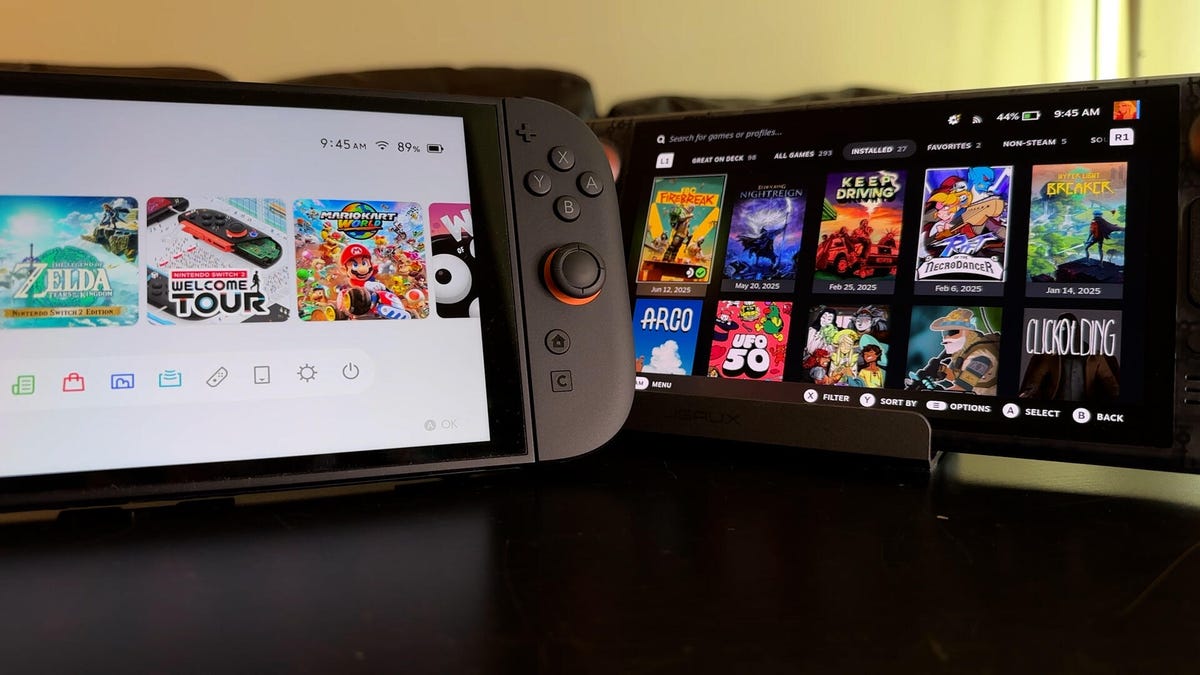
I’ve been spending a lot of time playing with the new Nintendo Switch 2 and Valve’s 2023 Steam Deck OLED to find out which handheld gaming console is best for me. Will Nintendo’s flagship franchise take it to victory? Or will the Steam Deck’s open platform give it the edge? I’ve been comparing the two based on performance, hardware and games library and, so far, while there’s one I prefer, each one has advantages that stand out.
Library
Arguably the most important aspect to comparing these two handhelds is the games you’re able to play on them. What good is great battery life if there’s nothing you want to play?
The Switch 2 will get you access to all of Nintendo’s own games and can play most of the first Switch’s games such as The Legend of Zelda: Tears of the Kingdom, Super Mario Bros. Wonder and Metroid Dread. There aren’t that many Switch 2 exclusives yet. Mario Kart World, Welcome Tour and Donkey Kong Bananza are the biggest ones for now, but so far they’ve all been really good — even if Welcome Tour is just a glorified instruction manual full of mini games (that I do like).
Many of the original Switch games have received performance improvements, some of them bigger than others. Pokemon Sword and Shield got a major update for free. But the upgrade editions for Breath of the Wild and Tears of the Kingdom cost $10 each — unless you’re a Switch Online premium subscriber, in which case they’re free, too. More upgraded games are coming, including Mario Party Jamboree. If you’re looking to play Nintendo games, the Switch and Switch 2 are the only ways to do so.
On the other hand, the Steam Deck is an open ecosystem and grants you access to buying games from multiple types of online stores. Valve’s Steam Deck is primarily set up to run off Steam, but you can load in other ways to play games with a little tinkering. Even if you never load in other game stores, Steam has a ton to discover, including lots of Steam Deck-optimized games.
Both Switch and Steam Deck get a good amount of indie titles, but you’ll typically find that they launch on PC first. The Steam Deck can also run a lot of smaller, experimental stuff that’ll never make its way over to Switch. The Steam Deck can also play games from cloud-based platforms such as Xbox Cloud Gaming or GeForce. One of my favorite things to do with my Steam Deck is to remote play into my Xbox Series X or PS5 at home and play those console games when I’m on the go.
If you don’t mind missing out on Nintendo exclusives, the Steam Deck gets you a larger and more robust gaming library.
Ease of use
The Switch 2 is definitely the most straightforward of the main gaming consoles. It’s a dedicated gaming machine, so it’s very stable but some aspects can be annoying — such as trying to add a friend to play, which involves entering in a long friend code. That said, Steam Deck is also a good experience out of the box, but it has its own tricky moments that can be daunting if you want to push the system’s capabilities. Trying to hook into other game libraries will require watching tutorials, installing extra software — it’s not the easiest thing to do.
The Switch 2 also comes with two Joy-Con controllers that detach and work independently, meaning local multiplayer is extremely easy right out of the box. To match this on the Steam Deck, you’d need to purchase two additional third-party controllers. Plus, the Switch 2’s included dock makes TV-connected gaming a lot easier to set up than with the Steam Deck, and the Switch 2’s kickstand allows tabletop co-op pretty easily, too.
The Switch 2 also has built-in chat to easily connect with friends, although you’ll need a compatible USB camera to add video. Gamechat requires a Nintendo Online subscription, while the Steam Deck can use standard free online chat apps, such as installing Discord, just like how you would install a third-party storefront.
Display
The Switch 2 has a 7.9-inch LCD display that can output a 1080p image at 120Hz. The Steam Deck comes with either a 7-inch LCD or 7.4-inch OLED screen that outputs a lower 1,280×800-pixel resolution at 60 or 90Hz, respectively. But if you’re playing on a television, you’ll get a 4K image with both systems as long as you plug the Switch 2 into its dock and use the right HDMI cable with the Steam Deck. It’s worth noting a dock comes bundled with the Switch: For the Steam Deck to connect to a TV, you’ll need to purchase the cable or accessory separately.
Despite not having a nicer OLED screen, I prefer the Switch 2’s larger and faster display, especially when that screen size still allows for a smaller device overall.
Portability
The Switch 2 weighs a little less — it’s 534 grams compared to 640 grams for the Steam Deck OLED. The Switch 2 is also noticeably smaller and much thinner, making it more portable to transport. And as someone who backpacks and travels a lot, and often brings a handheld device in my bag, I need to make use of all the space I can get.
But the Steam Deck does feel better to hold in your hand. The larger size means its handgrips are comfier to grab on to, and the built-in back buttons are a nice, pro-style feature that you can only get on the Switch 2 if you buy a Pro Controller or Charging Grip. It’s also worth mentioning that the Steam Deck includes a carrying case with your purchase. The Switch 2 does not, which you’re definitely going to want to protect its big screen.
Battery
When you’re on the go, battery life makes a huge difference. The Switch 2 has a 5,220-mAh battery and Nintendo says that gets you roughly between two and six and a half hours of gaming. The Steam Deck OLED has a larger 6,470-mAh battery and Valve says it’ll last somewhere between three and 12 hours. Bottom line: The Steam Deck will generally keep you gaming longer. This depends on the game but it lines up pretty well with what I’ve experienced. More graphically-intense games such as Elden Ring Nightrein will drain the Steam Deck’s battery faster, while Balatro will last longer. Mario Kart World gets around three to four hours for the Switch 2.
Storage and price
The Steam Deck comes in three configurations: A $399 LCD model with 256GB of internal storage, a $549 OLED model with 512GB of internal storage, and a $649 OLED model with 1TB of internal storage. The Switch 2 has just one option — 256GB of internal storage with an LCD screen for $450. Both devices can take microSD cards to increase their storage capacity. However, the Switch 2 requires the newer microSD Express cards, which are still quite pricey. The Steam Deck has a cheaper entry price, and the additional storage and screen options are nice to be able to choose from. But the Steam Deck is also a couple years older and has already seen discounts since launch.
One big difference, though, is game prices. Switch games rarely go on sale, and Nintendo keeps its first-game prices high over time. Meanwhile, games on Steam can definitely save you some cash — Steam games often launch at cheaper prices than their Xbox, PlayStation or Nintendo counterparts, and often see drastic discounts as the months go on. Steam sales happen all the time, and it’s easy to scoop up deals and suddenly find that you have more games in your library than you have time to play.
Another added cost for Switch 2 is online multiplayer, which requires a subscription to Nintendo Switch Online. You’ll get perks for your subscription, including access to a large catalog of older Nintendo games from systems you may have had in your childhood, but I personally prefer my multiplayer to be free of charge. (I have more than enough subscriptions in my life.) Still, local multiplayer is much easier to pull off with the Switch 2 and doesn’t require buying multiple additional cables and controllers, like you’ll need on Steam Deck.
Overall
I love Nintendo’s legendary catalogue of games, but for me the Steam Deck offers a better bang for my buck. There’s a wider overall selection of titles on Steam and almost every developer puts their games on PC right away. It also offers a cheaper entry price and more model variations to choose from. While I do value the sleek more portable size of the Switch 2, the discounts on Steam games are hard for me to ignore compared to Nintendo’s much more rigid pricing.
Personally, I’m finding there is far more to do with a Steam Deck. But if you can’t live without Mario and Zelda, and you’re interested in ways to play games with family and friends together in the same room, you’re going to really appreciate the Switch 2.
Technologies
Starlink connectivity in Ukraine reportedly returning to normal
Ukrainian officials report that SpaceX’s military-grade Starshield service is appearing to function normally again following recent connectivity restrictions.

It appears SpaceX has eased the limitations placed on Starshield, the specialized military version of its Starlink satellite internet service, for the Ukrainian armed forces.
According to The Wall Street Journal, Defense Minister Evgeniy Khmara informed the press that Starshield seems to have resumed normal operations, though the military is still testing the service and has yet to receive a formal reason for the prior disruptions.
This comes after a ten-day stretch where Ukrainian drone operations faced connectivity issues at speeds nearing 100 mph, causing some drones to lose control and others to become more exposed due to reduced speeds.
Reports suggest President Donald Trump contacted SpaceX CEO Elon Musk on Wednesday to request the restoration of Starshield services. Both Musk and Trump have voiced criticism toward Ukrainian President Volodymyr Zelensky, with Musk recently stating on X that “Zelensky has gone too far.”
The WSJ previously indicated that Musk directed SpaceX to limit Starlink access for Ukraine, though some sources suggested discussions with the Trump administration took place beforehand. Musk argued in a post on X that Ukraine had breached Starlink’s terms of service by utilizing the system for offensive drone operations intended to cause fatalities.
“Were Starlink to be turned off, the Ukrainian front line would collapse immediately,” Musk remarked. “This is NOT a threat, it is simply a statement of fact.”
Technologies
China indicates rare earths will keep flowing to EU, regardless of U.S. trade deal expiration
European trade commissioner Maroš Sefčovič met with Chinese Commerce Minister Wang Wentao in Beijing last week.

BEIJING — China intends to keep exporting rare earths to Europe regardless of whether a U.S. trade deal with Beijing gets extended past January.
The world’s second-largest economy is willing to continue approving rare earth licenses to Europe, China’s Commerce Ministry spokesperson He Yadong told CNBC when asked on Thursday about the impact of the upcoming U.S. deadline.
Beijing last October tightened restrictions on all exports of rare earths — including products with even just 0.1% of China-sourced rare earths. The move followed a new U.S. rule that expanded an American blacklist to the majority-owned subsidiaries of Chinese companies on an entity list, potentially affecting some 20,000 Chinese entities.
However, both the U.S. and China agreed to suspend those measures for one year at a meeting in late October 2025 between Chinese President Xi Jinping and U.S. President Donald Trump. Ahead of the leaders’ latest summit last month, U.S. Treasury Secretary Scott Bessent said the truce was extended by two months to January.
Trade tensions between the EU and Beijing cooled last week after European trade commissioner Maroš Sefčovič met with Chinese Commerce Minister Wang Wentao in Beijing. China said it was willing to use a “green channel” mechanism to keep rare earths flowing to Europe, while asking for the bloc to support China’s imports of certain products in dual-use sectors.
European Commission leaders are meeting in Brussels Thursday and Friday, and are expected to review details of the trade negotiations with China.
Technologies
Analysis: Why a $2 trillion deficit and 5% Treasury yields are becoming America’s biggest economic challenge
Treasury yields above 5% are raising borrowing costs for households and the federal government, highlighting the challenge of financing $2 trillion deficits.

Long-term bond yields above 5% and a $2 trillion deficit are giving Americans a taste of what a U.S. debt crisis would be like. A true emergency would hurt much more, and isn’t baked in. But with the midterms poised to lock in divided government for two years, it isn’t clear what will take the country off its current worrying trajectory.
Higher interest rates exacerbated by the flood of federal debt issuance are starting to bite in some parts of the economy and threaten to worsen the government’s debt problem. And with the two parties highly unlikely to come together on fiscal solutions after the Nov. 3 midterms, any fixes are years off in the future.
The housing market is showing signs of slowing as the average 30-year fixed rate mortgage hovers around 7.5%. Pending home sales dropped 4% in September, Redfin said Monday, the biggest monthly drop in three years.
Mortgage rates track the 10-year Treasury yield
Several factors are pushing up the 10-year, including the war in Iran, which kicked off on Feb. 28 and precipitated the rise in long-term yields. Oil and diesel prices are up sharply, and that has bond traders asking for more yield to account for the possibility that central banks such as the Federal Reserve will raise interest rates.
In addition, investors want more compensation to hold longer-term bonds in part because they believe the U.S. government will continue to flood the market with them. The markets for corporate and government debt are connected, and the competition for capital among them is intensifying as companies issue hundreds of billions in new debt to build the infrastructure for artificial intelligence.
Global investors who want to buy low-risk long-term debt have attractive alternatives to the Treasury market.
If the U.S. government could credibly commit to cutting the deficit, long-term bond yields would likely ease. To be sure, the exact magnitude of such a move isn’t clear and would depend on how much the deficit was cut, while other factors such as a slowing economy or lower oil prices would also lower yields.
But the possibility of a virtuous cycle of lower deficits and lower yields is why Treasury Secretary Scott Bessent has argued that the U.S. ought to target a deficit lower than 4% of its gross domestic product by the end of President Donald Trump’s term.
There is almost no way the U.S. will hit that target. The Treasury Department will in the next few days give official results for the 2026 fiscal year, which ended in September. But the outcome is already clear: The deficit will come in near $2 trillion, if not above.
That is likely to put the deficit in the range of 6.0-6.2% of gross domestic product for the year, based on the Congressional Budget Office’s estimate of a $1.993 trillion deficit and a projection of third quarter GDP.
Higher rates make debt reduction tougher. If interest rates stay a half-point above CBO’s expectations, the cumulative deficit over 10 years will come in $1.9 trillion higher, the agency estimates. If rates overshoot by 1.5 points, that adds $6 trillion in deficits.
CBO expects the 10-year Treasury to average 4.3% over that period, compared to 5.3% today. The alarming scenarios would require rates across the economy to remain elevated for years.
“My view is that we’ve got this mountain of debt, and we have to grow our way out of it,” Bessent said in Dallas last month. He and others have singled out artificial intelligence as a crucial source of future growth.
AI could help but can’t fix the problem entirely. It would take a decade of 7.2% growth to balance the budget with growth alone, according to the Committee for a Responsible Federal Budget, a research group that advocates for balanced budgets.
GDP growth was recently revised up for the second quarter from 1.5% to 2.2% at an annualized rate. The acceleration that quickly would get us to 7.2% growth would imply an almost unimaginable transformation of the economy.
Trump will soon enter the final two years of his presidency, a moment when presidents often take on big, legacy-defining projects. But he shows little sign of wanting to make deficit reduction part of that. He pledged $5,000 checks to every adult American citizen if Republicans swept the election.
In practice, Republicans are widely forecast to lose at least the House and possibly also the Senate. Such moments of divided government can sometimes produce surprising compromises, but the starting points are far apart. Rep. Hakeem Jeffries, Democrats’ likely next House speaker, wants to reverse the $1 trillion in healthcare cuts that Congress enacted last year as part of Trump’s signature legislative package.
And that’s leaving aside the deep animosity between the parties.
The overall U.S. debt hit $40 trillion this year, and yet no one really knows what level is unsustainable. A full-on debt crisis likely remains much farther out in the future. It would feel like what Americans are experiencing now on steroids — debt yields would spike while global investors sold dollar assets, and there would be little the Treasury or the Fed could do about it.
For now, though higher yields are also attracting investors to U.S. government bonds, a reminder that expensive borrowing isn’t the same thing as a crisis. But the bottom line is that economics alone can’t solve the problem. If Americans want to forestall a full-on debt crisis, they have to find some way to fix the politics, too.
-
 Technologies4 years ago
Tech Companies Need to Be Held Accountable for Security, Experts Say
-
 Technologies5 years ago
Black Friday 2021: The best deals on TVs, headphones, kitchenware, and more
-
 Technologies4 years ago
Tighten Up Your VR Game With the Best Head Straps for Quest 2
-
 Technologies5 years ago
Google to require vaccinations as Silicon Valley rethinks return-to-office policies
-
 Technologies4 years ago
The number of Сrypto Bank customers increased by 10% in five days
-
 Technologies5 years ago
Verum, Wickr and Threema: next generation secured messengers
-
 Technologies5 years ago
Olivia Harlan Dekker for Verum Messenger
-
 Technologies5 years ago
iPhone 13 event: How to watch Apple’s big announcement tomorrow