
Technologies
Cleaning Duplicate Photos from My iPhone Is Good for Storage and Great for My Stress Levels
If your iPhone storage is feeling tight, the culprit could be duplicate images in your Photos app. Cleaning them out is easy… and satisfying.

My iPhone’s Photos library has steadily grown over the years, to the point where I’d get anxious about how much free storage I had left. Then I discovered two things that made a huge difference: The Photos app has a built-in feature for detecting duplicate shots; and the task of sorting and deleting copies or unneeded images is strangely therapeutic. Performing this repetitive task allows me to focus on just one thing, and as a bonus, I get to revisit some favorite memories.
As long as you’re running iOS 16 or later, you can locate and toss duplicate photos right in the Photos app, no extra utilities needed.
Apple introduced its «duplicate detection» feature in 2022 and it works just as its name suggests. The tool uses on-device AI to identify identical images and aggregate them in an easy-to-find album in the Photos app. Apple says the iPhone classifies duplicates not only as exact copies but also as photos that appear to be the same but have unique resolutions, file formats or other slight differences. That includes lower-resolution versions you may have saved to share on social media or even bursts of near-identical shots taken at the same time.
Make sure to turn on iCloud syncing before going through the step-by-step process below. Note that the layout of the Photos app changed in iOS 18, which is what I’m using for these examples. If you haven’t moved up to that version, look for Duplicates in the Albums list.
For more, check out every new feature we’re expecting Apple to drop with iOS 26 this fall.
Here’s how to use the iPhone’s built-in tool to free up storage space:
1. Open the Photos app on your iPhone.
2. Scroll down to the Utilities section and tap Duplicates. This is where you can view all the duplicate photos on your iPhone and delete them, either individually or at once.
3. If you want to delete all the duplicates at once, tap the Select button, and then tap Select All. You can also remove them in groups of two or more: Tap Select in the top right corner and then tap the Select button to the right of the pairs. Next, tap Merge [number] to merge all the duplicate photos your iPhone detects and send them to the trash.
4. If you want to delete duplicates individually, tap the Merge button that appears next to each pair. Then tap Merge [number] Copies to delete duplicates. Go down the line and repeat this step for all the identical photos you want to delete.
Merging keeps the best version of the photo in your library. The duplicates are moved to the Recently Deleted album.
If you found this iOS feature helpful, check out CNET’s cheat sheet for iOS 18. For more advice on how to save space, read our full list of tips for clearing your iPhone’s storage.
Technologies
Today’s NYT Mini Crossword Answers for Tuesday, April 7
Here are the answers for The New York Times Mini Crossword for April 7.

Looking for the most recent Mini Crossword answer? Click here for today’s Mini Crossword hints, as well as our daily answers and hints for The New York Times Wordle, Strands, Connections and Connections: Sports Edition puzzles.
Need some help with today’s Mini Crossword? Read on for all the answers. And if you could use some hints and guidance for daily solving, check out our Mini Crossword tips.
If you’re looking for today’s Wordle, Connections, Connections: Sports Edition and Strands answers, you can visit CNET’s NYT puzzle hints page.
Read more: Tips and Tricks for Solving The New York Times Mini Crossword
Let’s get to those Mini Crossword clues and answers.
Mini across clues and answers
1A clue: Informative commercial, for short
Answer: PSA
4A clue: Something you trace to draw a Thanksgiving turkey
Answer: HAND
5A clue: ___ Johnson, former Prime Minister of the U.K.
Answer: BORIS
6A clue: Opposite of include
Answer: OMIT
7A clue: Crosses (out)
Answer: XES
Mini down clues and answers
1D clue: City with the Notre-Dame Cathedral
Answer: PARIS
2D clue: Bad mood
Answer: SNIT
3D clue: About eight minutes of the average half-hour sitcom
Answer: ADS
4D clue: Remote worker’s office, perhaps
Answer: HOME
5D clue: Word that can follow each group of circled letters (and hints at its shape)
Answer: BOX
Technologies
NASA’s Artemis II Breaks Record With Trip Around The Moon
Technologies
In Honor of the Artemis II Mission, Explore the Moon in Fortnite Now
You might not be able to see the moon the way the Artemis II team is, but there’s an educational Fortnite simulation that will get you onto the celestial body’s surface.
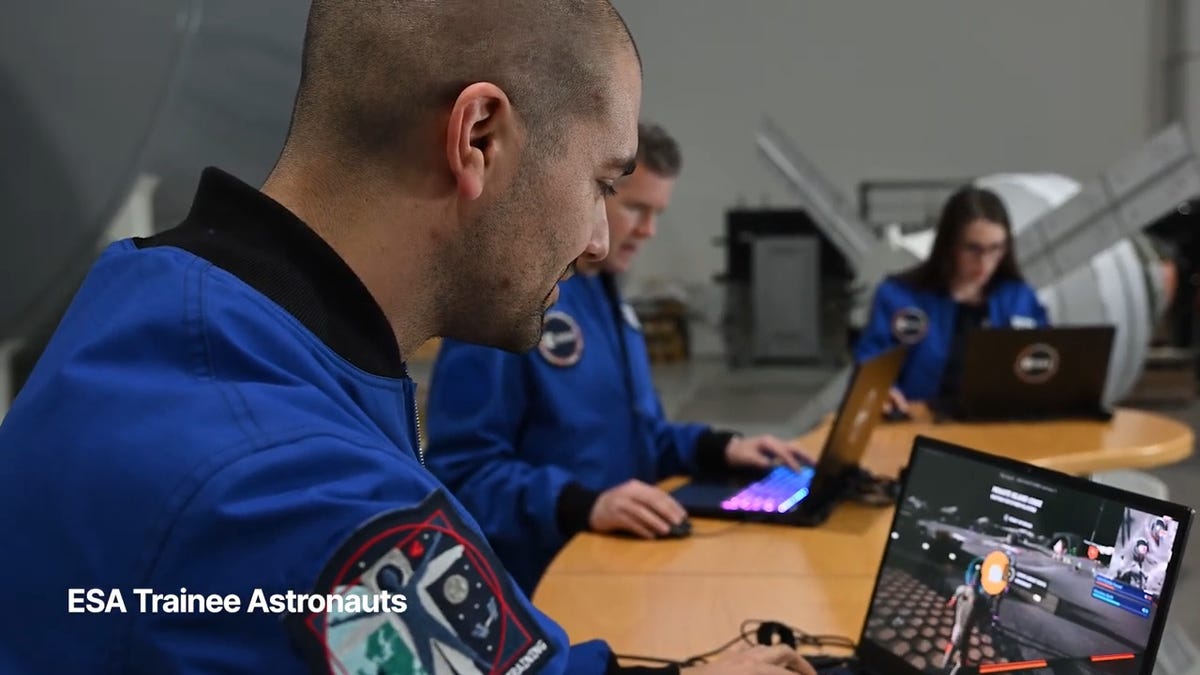
You may not be able to explore the vast majesty of space in the same way that the four-person crew of the Artemis II is, but you can still get an up-close-and-personal view of the moon… in Fortnite, at least.
While you may not be able to slingshot around Earth’s own lunar body, space enthusiasts can see a little bit of what the Artemis II crew is seeing by spending time on the Lunar Horizons Fortnite map right now. The map is a creative collaboration between Fortnite’s creator, Epic Games, and the European Space Agency. Lunar Horizons was released in 2024 after extensive testing and play from ESA trainee astronauts.
If you’re looking to learn more about our own orbiting body, the Lunar Horizons map is an educational simulation of the surface of the moon’s South Pole.
It blends game mechanics with learning, as players get to build up their own sterile lunar habitat bases, interact with ESA astronauts and roll around with robotic rovers as they discover informative plaques that contain information about the moon and international space agencies. There are still dangers to navigate, too — a solar storm may strike when you least expect it.
If you’re interested in exploring the moon, we’ve got all the information you need to join in on the Fortnite fun below. And if you’re looking for a more serious livestream during this momentous human achievement, tune into NASA’s feed here.
How to join the Moon Fortnite island while you follow the Artemis II mission
The Lunar Horizons Fortnite map is a great educational simulation that shares details about ESA’s work and catalogs information about humanity’s lunar research.
These three simple steps will get you up and running (or more accurately, taking slow leaps and bounds) on the surface of the Lunar Horizons Fortnite map:
Download Fortnite
If you haven’t played Fortnite before, but you want to check out this limited-time event, you’ll have to download the game. If you’re on PC, you can download Fortnite for free from the Epic Games Store. Console players can navigate the PlayStation Store, Microsoft Store or Nintendo eShop in order to download Fortnite on their devices.
Navigate the in-game menus until you reach the Search button
Once you’re in the game, scroll down past the different official Fortnite game modes and the Discover tab until you find the Search button.
Input the Lunar Horizons island code
In the search bar, you can input a map’s name or its distinct search code in order to find it in the map directory. You can search for the Lunar Horizons map or input the code 3207-0960-6428 to explore this map in time.
Correction, 3:35 p.m. PT: This story initially was in error about the features available in the Lunar Horizons map. There is no Artemis II-specific mission in Fortnite. Rather, the Lunar Horizons map is an educational simulation of part of the moon’s surface.
-
 Technologies3 года ago
Tech Companies Need to Be Held Accountable for Security, Experts Say
-
 Technologies3 года ago
Best Handheld Game Console in 2023
-
 Technologies3 года ago
Tighten Up Your VR Game With the Best Head Straps for Quest 2
-
 Technologies4 года ago
Black Friday 2021: The best deals on TVs, headphones, kitchenware, and more
-
 Technologies5 лет ago
Google to require vaccinations as Silicon Valley rethinks return-to-office policies
-
 Technologies5 лет ago
Verum, Wickr and Threema: next generation secured messengers
-
 Technologies4 года ago
Olivia Harlan Dekker for Verum Messenger
-
 Technologies4 года ago
The number of Сrypto Bank customers increased by 10% in five days