
Technologies
The Switch 2 Pro Controller Makes a Comfortable Upgrade, but Still Falls a Bit Short
The new controller feels a little more pro than its predecessor.
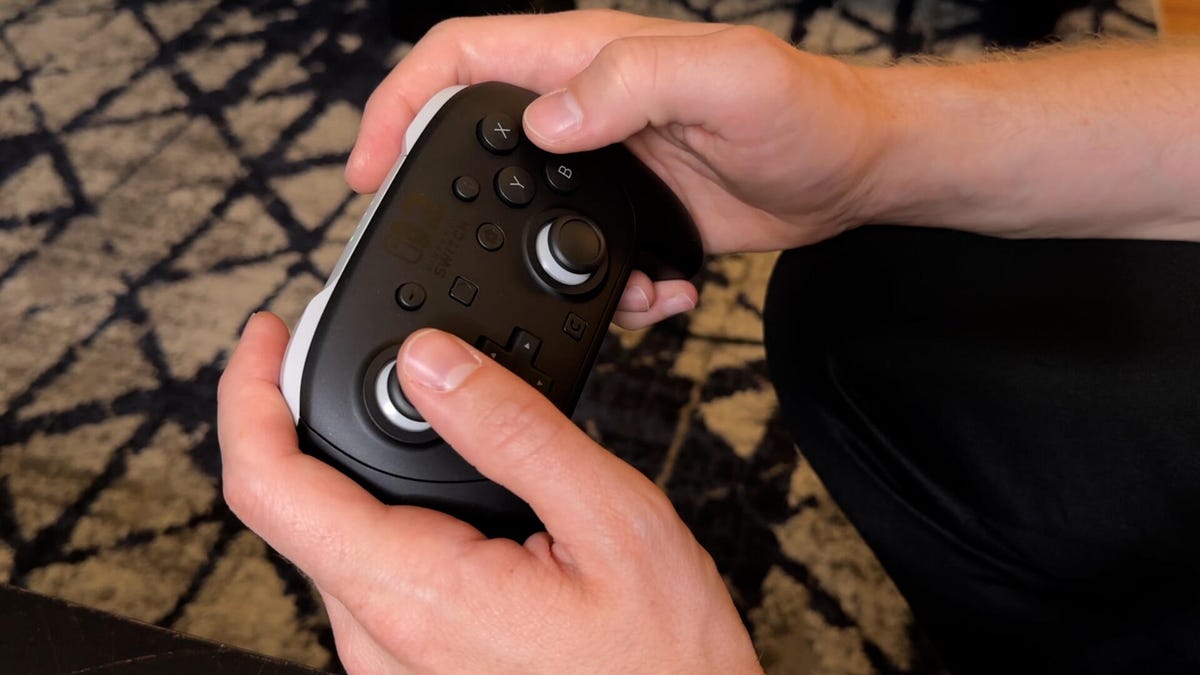
The Switch 2 Pro Controller is a standalone controller that pairs with the new Switch 2 and provides a more comfortable gaming experience than the standard Joy-Cons. While it might look similar to the old model, the second-gen controller has a number of new features to help it earn that «Pro» title.
The 2 Pro retails for $85 — a pretty significant jump over the original’s $70. The good news is that, if you want to save some money, the Switch 1 Pro Controllers do work on the Switch 2. Since it’s detached, it’s really more useful when playing docked, connected to a TV. I really like the look and feel of it, but it’s definitely an expensive, unnecessary accessory.
Both Pro controllers feel pretty similar, which is good since I always felt the original was very comfortable. They’re the same size and shape, and the button layout is mostly the same, but the original has a subtle texture to its grip while the 2’s is smooth. I actually find the new controller a bit more comfortable than the first.
Just like the new Joy-Cons, there is a GameChat button near the bottom, a shortcut to screen-sharing gameplay and forming parties with your friends to video or voice chat together. Keep in mind that you can just pop back out to the Switch main menu and open GameChat manually without needing to hit the button.
Another new feature are back buttons on the underside of the handles, GL and GR. Back buttons — programmable buttons that you can assign to act like other inputs — are pretty standard on pro-style controllers but were absent on the first Switch Pro. For example, in shooters, players will often bind duck or jump so they can perform those actions without taking their thumb off the right stick.
Mapping these buttons is super easy through the Switch 2’s settings menu or by holding down the Home button and changing them there. These button maps are also saved on a per-game basis, which is great, allowing you to specify which actions you want available on different games instead of needing to adjust back and forth when you swap games.
The downside is that there are only two buttons, one on each side, like PlayStation’s DualSense Edge pro controller. I would have liked more options, like the Xbox Elite controller’s four programmable buttons. Both those controllers also allow you to swap the buttons’ shapes. Nintendo doesn’t.
Another upgrade on the Switch 2 Pro Controller is a headphone jack on the bottom, which is useful if you’re trying to play games quietly.
Battery life remains the same as the first Pro Controller: Around 40 hours on a single charge, which is definitely on the higher side for controller batteries. In comparison, the DualSense Edge lasts only 5 to 6 hours. The new Pro Controller also charges faster. Nintendo says it takes about 3.5 hours for a full charge, whereas the original Pro Controller takes six hours.
The large face buttons and analog sticks feel the same, which is good since the original didn’t need improvement. The D-pad, though, feels like it has more freedom of movement and accuracy. This makes hitting diagonal inputs easier to pull off, like in Street Fighter when a special move requires a quarter circle. I found it simply better for adjusting character movement in a 2D platformer, like Super Mario Wonder.
One of my major complaints is that it still lacks analog triggers. This feature has been on Xbox and PlayStation controllers for years and allows games to sense when you partially press a trigger. It’s important in racing games, for example, where pressing the trigger determines how much you’ll accelerate. But nope, that’s not a thing for the Switch 2 Pro Controller.
Curiously, the new Pro Controller can’t wirelessly connect it to a PC. Steam doesn’t yet recognize it, though it took a while before the original was directly supported as well. While it’s missing some key pro features compared to Xbox and PlayStation’s offerings, those controllers also retail for around $200, so the price difference makes sense.
The Switch 2 Pro Controller is best for someone who primarily games with the console connected to a TV. It’s an overall improvement on the first one and brings Nintendo closer to what we expect from a pro-style design, but it becomes a harder sell if you already have the original Pro Controller. Many of the new features — back buttons, a headphone jack, quick access to gamechat — are pretty easy to live without, in my opinion.
Technologies
Social Media and AI Want Your Attention at All Times. This New Documentary Says That’s Bad
Your Attention Please, a documentary premiering this week at SXSW in Austin, Texas, explores how we live in the attention economy.

«Do you remember the world before cellphones?»
The question comes early in Your Attention Please, a documentary premiering this week at South by Southwest in Austin, Texas. And it hit me harder than I expected. As a 27-year-old tech reporter, I realized I don’t have too many clear memories of life before smartphones. My adolescence unfolded alongside the rise of smartphones, social media, push notifications and the routine of endless scrolling. Like many people my age, I’ve spent most of my life inside the attention economy — without ever really stepping outside it.
That’s the uneasy territory the documentary explores.
CNET was given exclusive early access to the film’s trailer, embedded below.
Exploring how tech shapes our behavior
Director Sara Robin said she originally set out to make something smaller: a documentary about people trying to reclaim their attention by breaking unhealthy phone habits. In an interview with CNET, Robin described the idea as a personal story about focus and self-control in an age of constant distraction.
As Robin interviewed researchers, technologists and families affected by social media and cyberbullying, the film’s scope widened. What started as a question about individual habits quickly became a larger investigation into how modern technology systems are designed to shape human behavior. The story stretches from the rise of social media to the emerging influence of AI.
Along the way, Robin and her collaborators kept hearing the same observation from different corners of the digital world: Social media didn’t just change how people communicate; it quietly rewired what we value. Experiences that were once private or emotional — friendship, affection, belonging — began to acquire numerical equivalents. Followers, likes, comments, views and shares began to be how we saw our own self-worth. In the architecture of social platforms, those numbers function as a kind of social currency.
Trisha Prabhu, a digital-safety advocate and inventor of the anti-cyberbullying technology ReThink, argues that social platforms did more than create new online spaces. She says they fundamentally reshaped how social validation works. The metrics that define popularity often reward attention-seeking behavior and amplify conflict, while genuine connection is now harder to quantify and, therefore, easier to overlook.
Prabhu warns that the same dynamics already driving problems like cyberbullying could accelerate as automated systems become more capable. AI tools can generate abusive messages at scale, produce convincing impersonations or create deepfakes that spread rapidly online. In some cases, the technology may even blur the line between human interaction and machine-generated communication, which could deepen loneliness or encourage harmful behavior.
«There’s AI exacerbating existing harms [like automating cyberbullying], but then I also think that there’s AI creating completely new harms,» Prabhu told CNET. «There are reports of AI tools encouraging users, including minor users, to commit self-harm… Even for the everyday user who’s not experiencing the extreme outcome, I think we have to ask ourselves how much of our time and connection we want spent with an AI tool as opposed to a fellow human being.»
Bringing attention to attention
What struck Robin during filming the documentary was how universal these anxieties felt. Across conversations with families, educators and advocates around the world, the themes were remarkably consistent: overstimulated attention, declining focus in classrooms, rising anxiety among young people and a persistent sense of dread that comes from always being plugged in.
Those shared concerns have helped spark a coordinated moment around the film’s release.
On March 11, more than 25 organizations focused on digital well-being will simultaneously release the trailer for Your Attention Please as part of an initiative called Stand for Their Attention. What began as a small collaboration among five groups quickly grew as word spread through advocacy networks. The coalition now includes organizations such as Common Sense Media, Protect Young Eyes, Mothers Against Media Addiction, the Center for Humane Technology, Smartphone Free Childhood and Scrolling to Death.
The idea behind the synchronized launch is simple: Use the attention surrounding the documentary to highlight the growing movement that’s already working to reshape digital culture.
Many people feel overwhelmed by the scale of the problem, Robin says, but behind the scenes, a widening ecosystem of advocates is experimenting with ways to build healthier digital environments, from redesigning products to changing norms around screen use.
The campaign also arrives at a moment of growing scrutiny around the attention economy. Lawmakers in the US and abroad are increasingly debating how social platforms affect youth mental health and childhood development. Boycotts around AI use are taking off. Researchers are studying how these algorithms and chatbots influence behavior. Individuals are trying to figure out how much technology belongs in everyday life.
What can we do about it?
Despite the weight of those conversations, Robin says the goal of the film isn’t to leave audiences feeling powerless. In fact, the rapid rise of public awareness around AI has made her more optimistic than she was during the early days of social media. The systems shaping digital life, she argues, are built by people, which means they can also be rebuilt.
«We have more power than we think,» Robin said. «And there are a lot of different ways to get involved in this, from changing individual habits to changing the culture in your own family and in your community, designing technology differently, getting engaged in these conversations, all the way to pushing for legislative change.»
The film intentionally avoids presenting a single solution.
Instead, Your Attention Please asks a broader question: What happens when attention, one of the most human parts of our lives, becomes one of the most valuable commodities in the global economy? And perhaps more importantly, what kind of digital world do we want to build next?
Technologies
Today’s NYT Connections: Sports Edition Hints and Answers for March 12, #535
Here are hints and the answers for the NYT Connections: Sports Edition puzzle for March 12, No. 535.
Looking for the most recent regular Connections answers? Click here for today’s Connections hints, as well as our daily answers and hints for The New York Times Mini Crossword, Wordle and Strands puzzles.
Today’s Connections: Sports Edition is a tough one, with some very unusual categories. The blue one is pretty fun, actually. If you’re struggling with today’s puzzle but still want to solve it, read on for hints and the answers.
Connections: Sports Edition is published by The Athletic, the subscription-based sports journalism site owned by The Times. It doesn’t appear in the NYT Games app, but it does in The Athletic’s own app. Or you can play it for free online.
Read more: NYT Connections: Sports Edition Puzzle Comes Out of Beta
Hints for today’s Connections: Sports Edition groups
Here are four hints for the groupings in today’s Connections: Sports Edition puzzle, ranked from the easiest yellow group to the tough (and sometimes bizarre) purple group.
Yellow group hint: City of Brotherly Love.
Green group hint: NBA star.
Blue group hint: Grr! Meow! Roar!
Purple group hint: Think alphabet.
Answers for today’s Connections: Sports Edition groups
Yellow group: Philadelphia teams.
Green group: Associated with Larry Bird.
Blue group: Sports figures with animal names.
Purple group: Sports figures whose first names sound like two letters.
Read more: Wordle Cheat Sheet: Here Are the Most Popular Letters Used in English Words
What are today’s Connections: Sports Edition answers?
The yellow words in today’s Connections
The theme is Philadelphia teams. The four answers are 76ers, Flyers, Penn and Temple.
The green words in today’s Connections
The theme is associated with Larry Bird. The four answers are Celtics, French Lick, Pacers and Sycamores.
The blue words in today’s Connections
The theme is sports figures with animal names. The four answers are Bear Bryant, Cat Osterman, Catfish Hunter and Tiger Woods.
The purple words in today’s Connections
The theme is sports figures whose first names sound like two letters. The four answers are Casey Stengel (KC), CeeDee Lamb (CD), Katie Ledecky (KT) and Vijay Singh (VJ).
Technologies
Today’s NYT Mini Crossword Answers for Thursday, March 12
Here are the answers for The New York Times Mini Crossword for March 12.
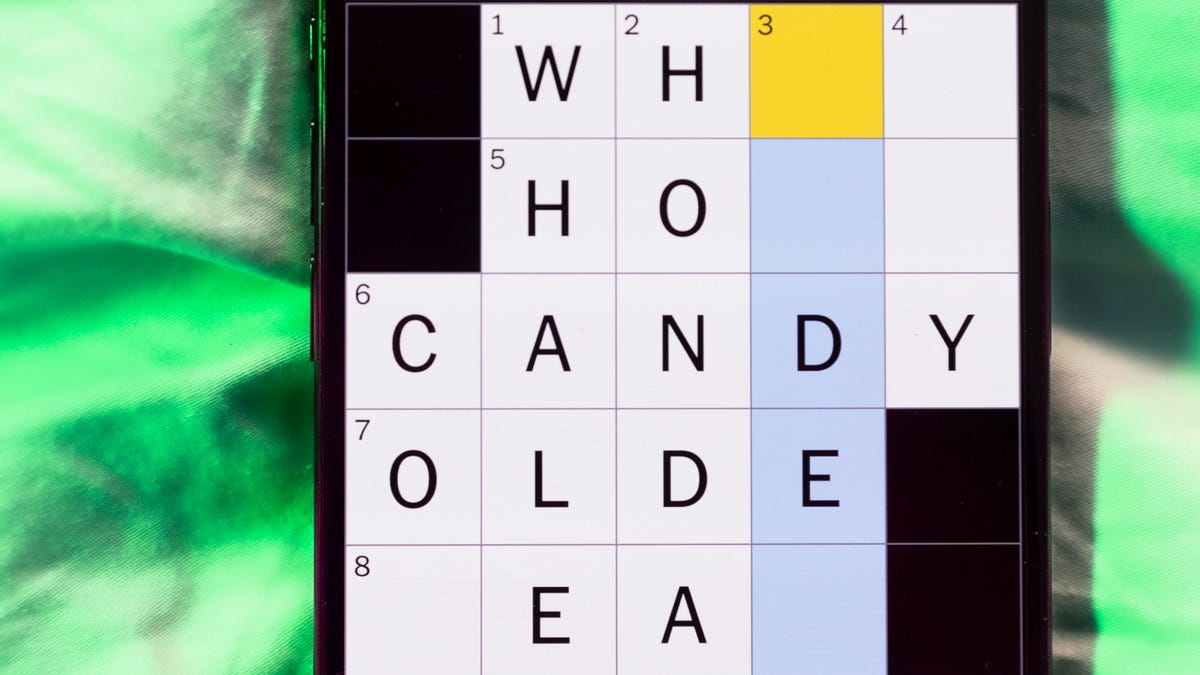
Looking for the most recent Mini Crossword answer? Click here for today’s Mini Crossword hints, as well as our daily answers and hints for The New York Times Wordle, Strands, Connections and Connections: Sports Edition puzzles.
Need some help with today’s Mini Crossword? I found 7-Across tricky. Read on for all the answers. And if you could use some hints and guidance for daily solving, check out our Mini Crossword tips.
If you’re looking for today’s Wordle, Connections, Connections: Sports Edition and Strands answers, you can visit CNET’s NYT puzzle hints page.
Read more: Tips and Tricks for Solving The New York Times Mini Crossword
Let’s get to those Mini Crossword clues and answers.
Mini across clues and answers
1A clue: Like jerk chicken and chicken vindaloo
Answer: SPICY
6A clue: Capital of Vietnam
Answer: HANOI
7A clue: «Well, would ya look at that!»
Answer: ILLBE
8A clue: Gem in an oyster
Answer: PEARL
9A clue: Thick roll of cash
Answer: WAD
Mini down clues and answers
1D clue: Part of a naval fleet
Answer: SHIP
2D clue: The «P» in I.P.A.
Answer: PALE
3D clue: Relative by marriage
Answer: INLAW
4D clue: King ___ (venomous snake)
Answer: COBRA
5D clue: Sign obeyed by merging traffic
Answer: YIELD
-
 Technologies3 года ago
Tech Companies Need to Be Held Accountable for Security, Experts Say
-
 Technologies3 года ago
Best Handheld Game Console in 2023
-
 Technologies3 года ago
Tighten Up Your VR Game With the Best Head Straps for Quest 2
-
 Technologies4 года ago
Black Friday 2021: The best deals on TVs, headphones, kitchenware, and more
-
 Technologies5 лет ago
Google to require vaccinations as Silicon Valley rethinks return-to-office policies
-
 Technologies5 лет ago
Verum, Wickr and Threema: next generation secured messengers
-
 Technologies4 года ago
Olivia Harlan Dekker for Verum Messenger
-
 Technologies4 года ago
iPhone 13 event: How to watch Apple’s big announcement tomorrow