
Technologies
I’ve Been Testing the Motorola Razr for a Day and It’s Already a Fun Companion
After 24 hours with Motorola’s 2025 Razr, the flip phone scores high marks for its looks.
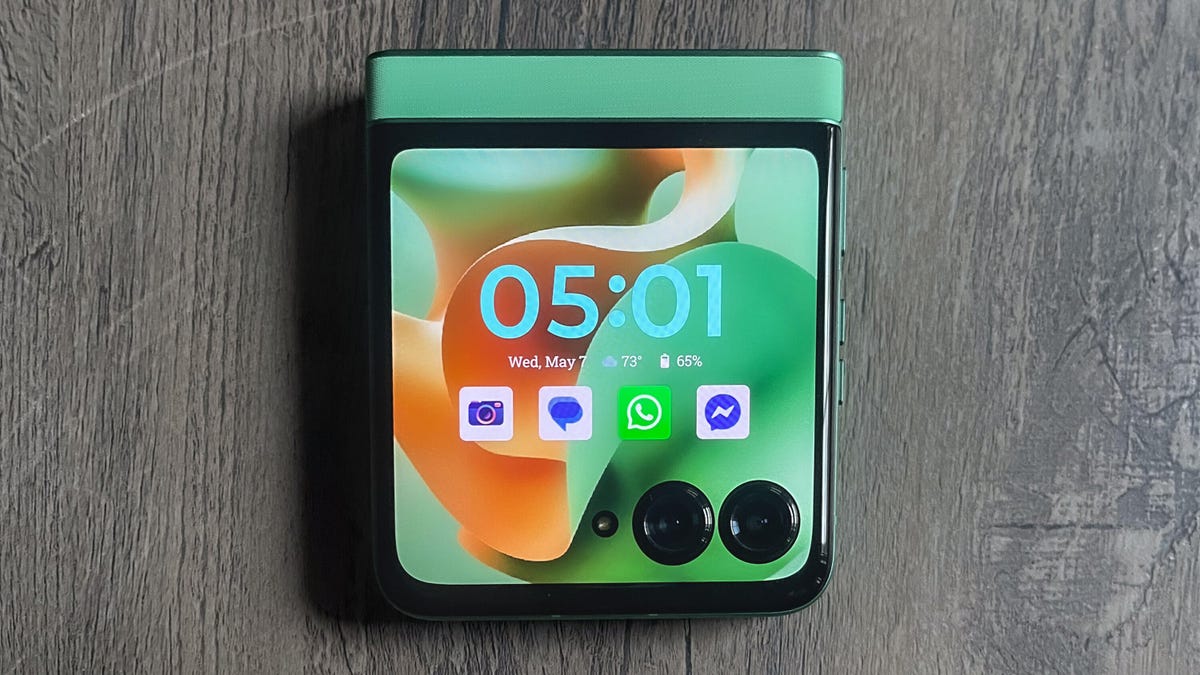
It’s amazing what a nice shade of green can do for your mood. After unboxing the 2025 edition of Motorola’s Razr, I was immediately struck by the $700 flip phone’s vivid shade of green — specifically Pantone’s Spring Bud. It’s somewhere between the lightness of mint and the medium shade of flower leaves. Even though I usually put my phone in a case, the Razr’s «leather-inspired» textured back makes me not want to.
That «fun to hold» feeling may be the most notable thing about Motorola’s new Razr line, which gets even more unique with Alcantara fabric and wood options on the $1,300 Razr Ultra. But thanks to the bold color, a cover screen that’s just big enough to knock out the essentials, and a variety of half-folded modes, even this lower-cost edition of the phone feels expressive. The Motorola Razr is a breath of fresh air compared to standard rectangular phones that are typically in the $700 price range.
Motorola is quite aware that the Razr’s striking looks are a selling point to new customers. The company cited during the Razr’s unveiling that 25% of its customers are coming from an iPhone. Since this Razr costs $700, its price is just above value-oriented flagships like the $650 Samsung Galaxy S24 FE — yet lower than an $800 iPhone 16. And even though this year’s base Razr is a refinement of last year’s Razr design, it’s one that remains eye-catching. I still have a lot of testing to do, but I wanted to share some of my early impressions of the Motorola Razr 2025, after using it for a day.
My day with the Razr
The Razr is easy to grip whether it’s open or closed, and having the rest of the phone’s body match the green shade makes it feel fun from the start. The Razr also comes in a Parfait Pink color with a similar leather finish, Gibraltar Sea (blue) with what Motorola describes as a «nylon-inspired» finish, and Lightest Sky (silver) that is «acetate-inspired.»
The Razr’s style and shape made it a fun companion for a dinner out with friends. I kept it folded on the train and used the cover screen to manage my subway directions to a restaurant in Queens. I flipped it open to take a few food and street photos. And I used Moto AI on both screens to look up quick facts as they came up over dinner. All in all, though, one of my friends found the new Razr so cute that she said she wanted to steal it — but because it’s such a pocketable size, she won’t get the chance.
I’ve also enjoyed using the Razr in ways that I simply can’t use similarly priced phones from Samsung and Apple. I often attach kickstands to phones for video calls, but with the hinge, I can instead use the phone half-folded like a stand and (in supported apps like Meta’s Messenger and Google Meet) have the video call on the upper half with call controls on the lower half. When in this stand mode or partly folded like a tent, the cover screen can be set to show ambient information like the time, while a wave of my hand in front of the phone can activate Moto AI for quick questions.
More to come with the Razr
As I continue to test this Motorola Razr, I’m focusing on how functional the smaller 3.6-inch cover screen is. That display is like a «mini» phone and is one of the biggest ways the Razr sets itself apart from other sub-$800 phones. You can set it up to run nearly every Android app, as with prior Razr phones.
The Razr is also the entry-level device for Moto AI, which highlights Motorola’s own efforts alongside features built in partnership with Perplexity, Meta’s Llama AI and Microsoft Copilot. Moto AI deeply integrates these services into the phone so it can make suggestions based on what’s on your screen. Separately, you can still summon Google’s Gemini to access the AI services built directly into Android 15.
There are a lot of different ideas inside Moto AI for conducting quick research or organizing data. AI is a particularly competitive space right now, and I hope to see if Moto AI’s features will help me get the most out of the phone’s cover screen.
As a result, this year’s $700 Razr gets to dance on two different stages of interest. It could be a nice minimalist phone, thanks to its cover screen that can do more functions than the $800 Light Phone 3. And it could also serve as a refreshing alternative to buying the $800 iPhone 16 while saving significant money over the $1,100 Samsung Galaxy Z Flip 6. I’ll be seeing how the Razr fits each method as I continue testing it out.
Technologies
Did You Download the White House App? Here Are Its Hidden Security Risks
Cybersecurity researchers have serious concerns about how the app was built.
The White House mobile app has been available for both Android and iOS users for over a week now, and the Trump administration is proudly touting that the app has received 2 million downloads on the White House Instagram page. However, the app’s threats to your personal data, online security and privacy concerns make it something you should think twice about downloading.
The White House announcement says the app’s goal is to deliver «unparalleled access to the Trump administration.» However, there are many security concerns, including location tracking and sketchy features. The White House has not responded to a request for comment.
The big question is, should you download it? I don’t recommend it. Here’s why.
What’s in The White House App?
When I downloaded it soon after its release, the app opened with music and a brief collage video of President Donald Trump. It has pages on affordability, including the prices of things like eggs and milk (but not gas). There’s an overtime calculator. And there are links to articles from Trump’s favored news outlets, like Fox News and Newsmax, along with White House press releases.
The app also features livestreams and videos of press briefings, links to the White House’s social feeds and photos of the president.
Why I deleted The White House app so fast
Behind all those tabs are hair-raising privacy and security issues that have the internet and experts alarmed.
One X user, @Thereallo1026, decompiled the White House app and blogged about it, reporting that the Android app tracks your location as often as every 4.5 minutes and shares a lot of other information, like your notifications and perhaps even your phone number, with a third-party server.
Another red flag is that the code for YouTube embeds comes from a personal GitHub account. Thereallo said that if that GitHub account gets compromised, it can affect every user of the White House’s app.
Another cybersecurity researcher, Atomic Computer Services, posted similar concerns about the iOS app. The researchers found that the app reported to the App Store that it did not collect location data, when in fact it included the capability to do GPS tracking. It’s unclear whether that tracking actually happens, but the code is there, Atomic Computer said.
Other concerns identified by Atomic Computer included the removal of privacy consent banners from third-party content viewed in the app and minimal security protections. «We’ve audited apps for startups with three employees that had better security than this,» Atomic Computer wrote.
Pieter Arntz, a researcher at the cybersecurity software provider Malwarebytes, said in an email to CNET that the White House app relies heavily on third-party sources for things like notifications and widgets.
«In practical terms, that means external providers can influence what data is collected and when features like location‑based messaging are enabled, because much of that logic is configured on their servers rather than baked into the app code itself,» Arntz said. «For a high‑profile government app, the more these decisions sit with outside companies, the harder it is to guarantee strict data‑minimization and full transparency to users about how their information is handled.»
Government-sponsored apps to inform people are commonplace, but this one poses significant risks, experts said. A spokesperson for the Center for Democracy and Technology, which advocates for transparency and privacy in government technology, told CNET that «mobile apps can be a helpful tool for making government more accessible. But this administration has given people a lot of reasons to worry about their privacy, and this app only raises more questions about what the federal government is doing with our personal data.»
For me, this app is a hard pass. I deleted it 10 minutes after downloading it.
Technologies
Amazon Is Pulling Support for Kindles From 2012 or Earlier. What to Do Now
If there’s a book you’ve been waiting to read on your old Kindle device, make sure you download it before May 20.
That Kindle device you’ve been holding onto for 15 years now has an expiration date, as Amazon will end support for Kindle models from 2012 or earlier on May 20. An Australian Kindle user first reported the change before Amazon confirmed the news to PCMag and said it will soon email users in the US.
The books that you already downloaded on your Kindle device won’t disappear after next month, but you won’t be able to connect to the network to buy, borrow or download new ones.
If you still have a book that you want to finish reading on one of these devices, make sure that you don’t deregister the device or do a factory reset. In the email shared by an Australian user on Reddit, Amazon says if you deregister or reset the device, you won’t be able to re-register the device or use it at all afterward.
A representative for Amazon has not yet responded to a request to comment from CNET.
The company also included a promo code in the email for 20% off select new Kindle devices and an ebook credit that’s added to your account after you purchase a new device. However, there’s no word on whether this discount is limited to Australia or if a version will be offered to US users.
Switching devices
Kindle devices released in 2012 or earlier will lose the ability to download books after May 20. The devices that will be affected are:
- Kindle 1st and 2nd Generation
- Kindle DX and DX Graphite
- Kindle Keyboard
- Kindle 4
- Kindle Touch
- Kindle 5
- Kindle Paperwhite 1st Generation
The first-generation model for Kindle was released in 2007, and e-readers have improved a bit in the time since. Amazon told Engadget that fewer than 3% of its users still use these old devices.
In the email to customers, the company said users will still be able to access their Kindle library and the Kindle store using the Android, iOS or desktop app. You can still read and download books by using the Kindle app on your phone or PC.
If this service loss feels like a good time to move on from the Kindle world, there are other e-reader options. Calibre is a free, open-source ebook manager that offers a range of features, like reading and organizing ebooks from multiple sources, as well as downloading news articles and websites.
If you’re looking for a newer Kindle model or a different reading tablet, check out the CNET list for this year’s best e-readers.
Technologies
Overwatch’s Next Hero Is Sierra, but Does That Mean the Rumors Were Wrong?
The new damage hero joins the roster next week, but lore and gameplay details are still under wraps.
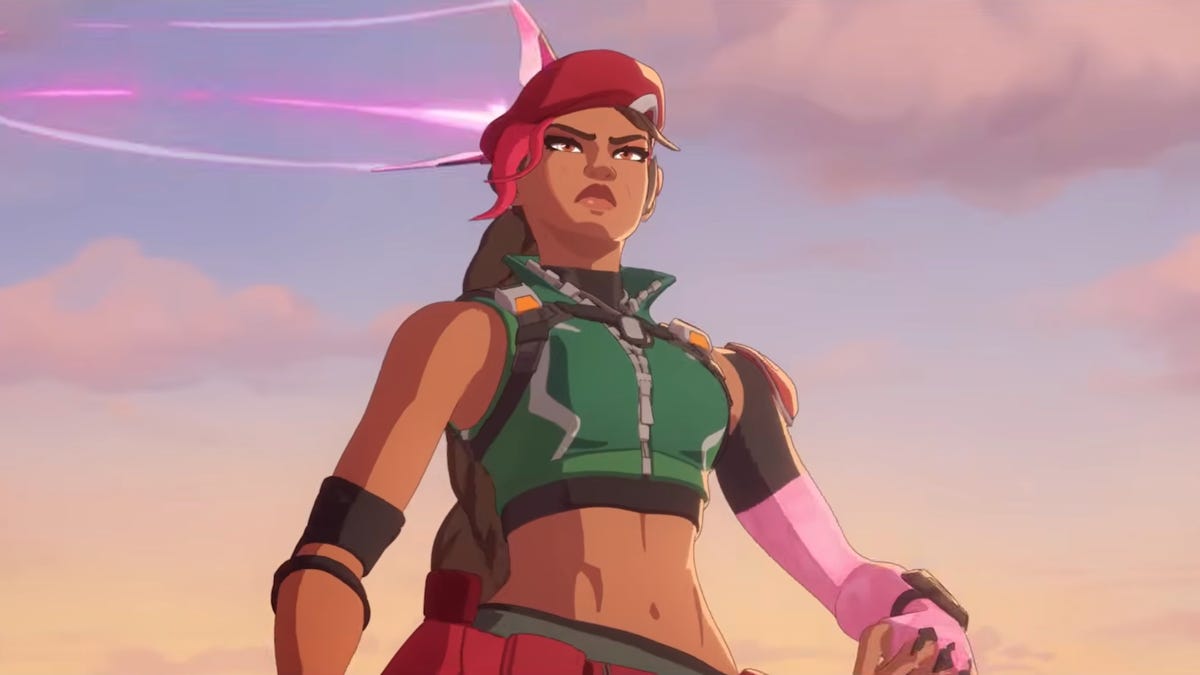
After adding five new heroes in February, Overwatch just gave players another look at the new hero coming in season 2 next week. While we didn’t get gameplay details, the new hero trailer revealed that hero 51 is Sierra, and season 2 will be titled Summit.
The game dropped its first look at Sierra last week, and a few details in the new artwork seemed to be in line with expectations that she’s an ally of damage hero Ashe. Ashe’s Deadlock Gang is mentioned in the new trailer, although Sierra is working with Overwatch in trying to stop them. We don’t know yet whether Sierra has ties to other Overwatch heroes and factions.
Alec Dawson, Overwatch’s associate game director, said in February that the next hero would be another damage hero with a «really satisfying skill shot,» which we maybe glimpsed in the trailer when Sierra fires some kind of homing dart onto Emre after he steals something from Watchpoint: Grand Mesa. We also see her use a fully automatic rifle as well as tether to her drone for some aerial maneuvering, which could be hints at the rest of her kit.
While I do love a good skillshot, I also feel like the game has been struggling with damage hero releases over the past year — particularly heroes who have the ability to quickly eliminate someone out of nowhere. The newest damage heroes Anran and Emre didn’t have this problem, but the previous two, Freja and Vendetta, were consistently banned after release because of their quick time to kill, combined with their ability to consistently surprise enemies. I’m hoping Sierra’s skillshot is less bursty.
Even before the art was revealed last week, fans had started to speculate that Overwatch’s season 2 hero would be Frankie, a member of Ashe’s Deadlock Gang. She appeared in the Deadlock Rebels novel by Lyndsay Ely, which follows Ashe and the hero now known as Cassidy early in their outlaw careers. In the book, Frankie makes contact with the two characters by sending them a tiny fly-like drone — perhaps a smaller version of the drone in Sierra’s character art.
Respectfully… y’all aren’t ready for this one 😮💨🔥
Join us Apr 8 at 9am PT for the premiere of our latest Hero Trailer as we kick off the next chapter in the Reign of Talon 💪 pic.twitter.com/1Etxn68tax— Overwatch (@PlayOverwatch) March 31, 2026
The trailer shows Sierra working to stop the Deadlock Gang (who are helping Emre and Freja steal weapons for Talon), but it’s unclear whether Sierra is another character entirely or whether she’s Frankie after taking a different path.
The game’s Reign of Talon season 1 is wrapping up in the next week. The current season kicked off the year-long storyline about Vendetta taking over Talon and also introduced five new heroes into the roster. Devs have promised another new hero each season during the storyline, and today’s hero trailer gives us a few more hints about Sierra.
-
 Technologies3 года ago
Tech Companies Need to Be Held Accountable for Security, Experts Say
-
 Technologies3 года ago
Best Handheld Game Console in 2023
-
 Technologies3 года ago
Tighten Up Your VR Game With the Best Head Straps for Quest 2
-
 Technologies4 года ago
Black Friday 2021: The best deals on TVs, headphones, kitchenware, and more
-
 Technologies5 лет ago
Google to require vaccinations as Silicon Valley rethinks return-to-office policies
-
 Technologies5 лет ago
Verum, Wickr and Threema: next generation secured messengers
-
 Technologies4 года ago
Olivia Harlan Dekker for Verum Messenger
-
 Technologies4 года ago
The number of Сrypto Bank customers increased by 10% in five days