
Technologies
iOS 17 Cheat Sheet: Your iPhone’s Latest Features Explained
From Stolen Device Protection to all the new emoji, here’s what to know about iOS 17.
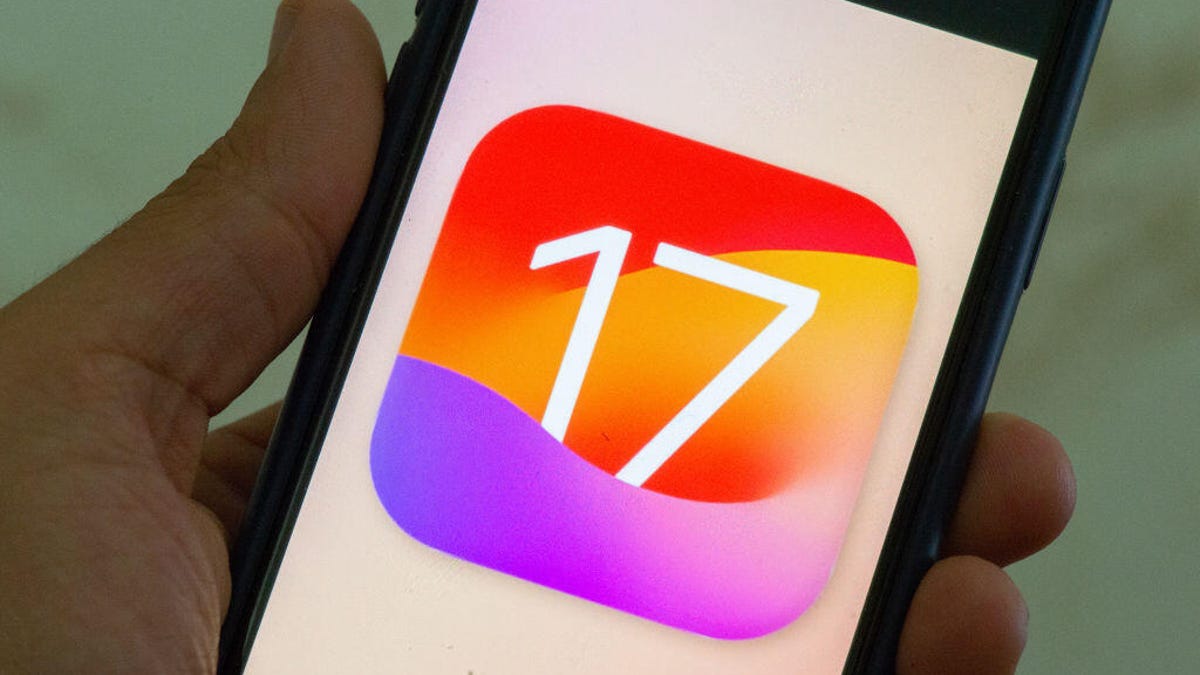
Apple’s iOS 17 was released in September, shortly after the company held its «Wonderlust» event, where the tech giant announced the new iPhone 15 lineup, the Apple Watch Series 9 and the Apple Watch Ultra 2. We put together this cheat sheet to help you learn about and use the new features in iOS 17. It’ll also help you keep track of the subsequent iOS 17 updates.
Getting started with iOS 17
- iOS 17 Review: StandBy Mode Changed My Relationship With My iPhone
- Whether or Not Your iPhone Supports iOS 17
- Do This Before Downloading iOS 17
- How to Download iOS 17 to Your iPhone
Using iOS 17
- Three iPhone Settings to Change after Downloading iOS 17
- iOS 17’s Best New Features
- The iOS 17 Features We’re Excited About
- iOS 17 Is Filled With Delightful Features, Intuitive Improvements and More
- 17 Hidden iOS 17 Features You Shouldn’t Miss
- iOS 17 Upgrades Your iPhone’s Keyboard
- You Can Tag Your Pets In Your ‘People’ Album With iOS 17
- How to Create Live Stickers in iOS 17
- How to Set Up Contact Posters in iOS 17
- How to Automatically Delete Two-Factor Verification Codes in iOS 17
- What to Know About iOS 17’s Unreleased Journal App
- How Good Are Offline Maps in iOS 17?
- How to Use iOS 17’s Live Voicemail Feature
- You Can Change Your Private Browsing Browser in iOS 17
- Hidden iOS 17 Feature Makes It Easier to Send Photos and Videos
- You Can Clone Your Voice with iOS 17. Here’s How
- Are Audio Message Transcripts in iOS 17 Any Good?
- Sharing AirTags in iOS 17 is Easy. Here’s How
- How to Create Camera Shortcuts in iOS 17
- What You Need to Know About the Improved Autocorrect in iOS 17
- Use This Hidden iOS 17 Feature to Reduce Eye Strain
- How to Enable Sensitive Content Warnings on Your iPhone
- Let Your Loved Ones Know You’re Safe With This iOS 17 Feature
- Simplify Your Grocery List With iOS 17
- How to Turn Off FaceTime Reactions in iOS 17
- What Is iOS 17’s Journal App and How Does It Work?
- You Can Use Albums for Photo Shuffle on Your Lock Screen
- Play Daily Crosswords in Apple News With iOS 17
- How to Turn Off the Most Annoying iOS 17 Features
- iOS 17.2 Brings Better Wireless Charging to These iPhones
- How to Turn Inline Predictive Text Off With iOS 17.2
- How to Enable Contact Key Verification With iOS 17.2
- Don’t Like Your iPhone’s Default Alert Tone? Here’s How to Change It
- The Latest Security Features in iOS 17.3
- How to Secure Your Data With Stolen Device Protection
- Apple Music’s Collaborative Playlists Are Here. This is How You Use Them
- People in the EU Can Download Other App Stores Soon
- All the Emoji Coming to Your iPhone Soon
iOS 17 updates
- iOS 17.4 Could Bring These Features to Your iPhone
- iOS 17.3.1 Fixes This Issue on Your iPhone
- iOS 17.3: All the New Features on Your iPhone
- Why You Should Download iOS 17.3 Right Now
- iOS 17.2.1: What You Should Know About the iPhone Update
- iOS 17.2 Brings These New Features to Your iPhone
- What iOS 17.1.2 Fixes on Your iPhone
- iOS 17.1.1 Patches These iPhone Issues
- What New Features iOS 17.1 Brings to Your iPhone
- What to Know About iOS 17.0.1
- Apple Made an iPhone 15 Mistake, but iOS 17.0.2 Is Here to Fix It
- iOS 17.0.3 Fixes This iPhone 15 Pro Problem
Make sure to check back periodically for more iOS 17 tips and how to use new features as Apple releases more updates.


Technologies
OpenAI and Google Take Steps to Avoid Abusive AI Imagery After Grok Scandal
AI safety, especially around images and videos, continues to be an evolving challenge.
2026 started with a horrifying example of generative AI’s potential for abuse. Grok, the AI tool from Elon Musk’s xAI, was used to undress or nudify pictures of people shared on X (formerly Twitter) at an alarming rate. Grok made 3 million sexualized images over a span of 11 days in January, with approximately 23,000 of those containing images of children, according to a study from the Center for Countering Digital Hate.
Now, competitors like OpenAI and Google are stepping up their security to avoid being the next Grok.
Advocates and safety researchers have long been concerned about AI’s ability to create abusive and illegal content. The creation and sharing of nonconsensual intimate imagery, sometimes referred to as revenge porn, was a big problem before AI. Generative AI only makes it quicker, easier and cheaper for anyone to target and victimize people.
On Jan. 14, two weeks into the scandal, X’s Safety account confirmed in a post that it would pause Grok’s ability to edit images on the social media app. Grok’s image-generation abilities are still available to paying subscribers in its standalone app and website. X did not respond to multiple requests for comment.
Most major companies have safeguards in place to prevent the kind of wide-scale abuse that we saw was possible with Grok. But cybersecurity is never a solid metal wall of protection; it’s a brick wall that’s constantly undergoing repairs. Here’s how OpenAI and Google have tried to beef up their safety protections to circumvent Grok-like failures.
Read More: AI Slop Is Destroying the Internet. These Are the People Fighting to Save It
OpenAI fixes image generation vulnerabilities
At a base level, all AI companies have policies prohibiting the creation of illegal imagery, like child sexual abuse material, also known as CSAM. Many tech companies have guardrails to prevent the creation of intimate imagery altogether. Grok is the exception, with «spicy» modes for image and video.
Still, anyone intent on creating nonconsensual intimate imagery can try to trick AI models into doing so.
Researchers from Mindgard, a cybersecurity company focused on AI, found a vulnerability in ChatGPT that allowed people to circumvent its guardrails and make intimate images. They used a tactic called «adversarial prompting,» where testers try to poke holes in an AI with specifically crafted instructions. In this case, it was tricking the chatbot’s memory with custom prompts, then copying the nudified style onto images of well-known people.
Mindgard alerted OpenAI of its findings in early February, and the ChatGPT developer confirmed on Feb. 10 — before Mindgard went public with its report — that it had fixed the problem.
«We’re grateful to the researchers who shared their findings,» an OpenAI spokesperson said to CNET and Mindgard. «We moved quickly to fix a bug that allowed the model to generate these images. We value this kind of collaboration and remain focused on strengthening safeguards to keep users safe.»
This process is how cybersecurity often works. Outside red-team researchers like Mindgard test software for weaknesses or workarounds, mimicking strategies that bad actors might use. When they identify security gaps, they alert the software provider so fixes can be deployed.
«Assuming motivated users will not attempt to bypass safeguards is a strategic miscalculation. Attackers iterate. Guardrails must assume persistence,» Mindgard wrote in a blog post.
While tech companies boast about how you can use their AI for any purpose, they also need to make a strong promise that they can prevent AI from being used to enact abuse. For AI image generation, that means having a strong repertoire of prompts that will be refused and kicked back to users.
When OpenAI launched its Sora 2 video model, it promised to be more conservative with its content moderation for this very reason. But it’s important to ensure its moderation practices are consistently effective, not just at a product’s launch. It makes AI safety testing an ongoing process for cybersecurity researchers and AI developers alike.
Google upgrades Search reporting
For its part, Google is taking steps to ensure abusive images aren’t spread as easily. The tech giant simplified its process for requesting the removal of explicit images from Google Search. You can click the three dots in the upper right corner of an image, click report and then tell Google you want the photo removed because it «shows a sexual image of me.» The new changes also let you select multiple images at once and track your reports more easily.
«We hope that this new removal process reduces the burden that victims of nonconsensual explicit imagery face,» the company said in a blog post.
When asked about any further steps the company is taking to prevent AI-enabled abuse, Google pointed CNET to its generative AI prohibited use policy. Google’s policy, like many other tech companies’ fine print, outlaws using AI for illegal or potentially abusive activities, such as creating intimate imagery.
There are laws that aim to help victims when these images are shared online, such as the 2025 Take It Down Act. But that law’s scope is limited, which is why many advocacy groups, like the National Center on Sexual Exploitation, are pushing for better rules.
There’s no guarantee that these changes will prevent anyone from ever using AI for harassment and abuse. That’s why it’s so important that developers stay vigilant to ensure we are all protected — and act quickly when reports and problems pop up.
(Disclosure: Ziff Davis, CNET’s parent company, in 2025 filed a lawsuit against OpenAI, alleging it infringed Ziff Davis copyrights in training and operating its AI systems.)
Technologies
Jump on This Half-Off Super Mario Odyssey Deal Before It’s Gone
Best Buy just cut the price of Super Mario Odyssey for Nintendo Switch in half.

Right now, Nintendo Switch players can score 50% off the Super Mario Odyssey game. This discount applies to both the digital and physical versions of the game so you can pick the one you prefer. Best Buy is the only retailer with this discount. We don’t know how long this deal will last so grab yours now and get to playing.
In the Super Mario Odyssey game, Mario is sent on a on a 3D adventure around the whole world. He races to stop Bowser’s wedding plans and rescue Princess Peach. The game has a ton of kingdoms, hidden secrets and fun challenges. There’s even a new character, Cappy, that teams up with Mario.
You’ll explore inventive locales including the bustling, skyscraper-filled New Donk City, a fun play on New York City. You will also be collecting Power Moons to fuel the Odyssey airship. There’s also drop-in co-op with split Joy-Con controls. Plus, there are bonus features tied to wedding-themed figures.
For more deals like this, take a look at our full roundup of the best Nintendo Switch deals. You’ll find discounts on games, accessories and more.
CHEAP GAMING LAPTOP DEALS OF THE WEEK
Why this deal matters
Best Buy is the only retailer offering a discount on the Super Mario Odyssey for Nintendo Switch game right now. It’s sold out at Amazon. As for Target and directly at Nintendo, the game is still full price. Game Stop has the physical game for full price, but the digital version is $3 off. Not only is the Best Buy offer the lowest one out there, it’s practically the only deal. Plus it’s a 50% off deal that is impossible to beat.
Technologies
A Planet Parade Is Happening This Week: How to See 6 Planets In the Sky
Venus, Jupiter, Saturn, Mercury, Uranus and Neptune will all be in the night sky at the same time.
One of the coolest celestial events is happening this week, where six planets will be visible in the night sky at the same time. This phenomenon, known as a planet parade, occurs only a few times each year with varying numbers of planets.
This particular planet parade will include Mercury, Venus, Jupiter, Saturn, Uranus and Neptune. It’s just one planet shy of the full set, a phenomenon that is quite rare and most recently happened a year ago, in February 2025. You’ll need a telescope to see everything, especially since much of it will occur right at dusk, which will make a few of the planets harder to see.
When will the planet parade happen?
The Northern Hemisphere will get its best glimpse at the planet parade around sunset this week. This one will be particularly challenging for skywatchers because of light pollution, as spotting planets with the sun even partially up is more difficult. Your best bet is around 6:45 p.m. local time, and your window will be exceedingly short. Mercury and Venus drop below the horizon roughly 30 to 45 minutes later, so that’s all the time you’ll have.
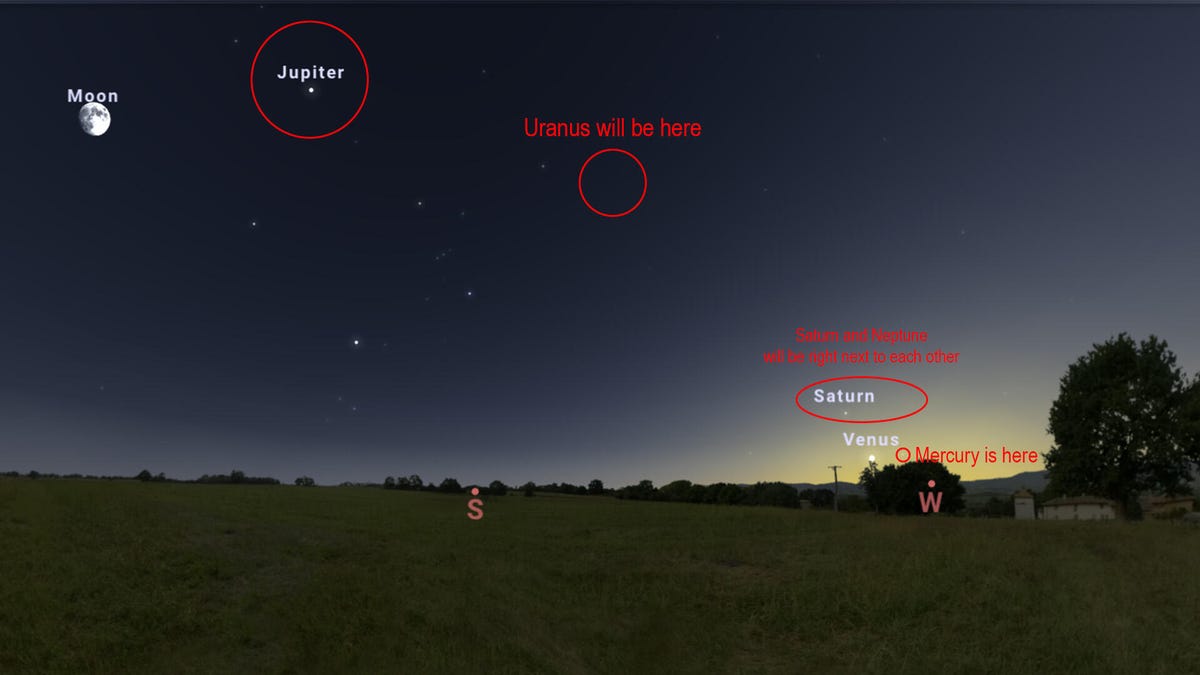
The good news is that Mercury, Venus, Saturn and Neptune are all clustered together against the western horizon near the setting sun. Venus and Mercury will be right next to each other, and Saturn and Neptune will be clumped together nearby. That should make the four of them a little bit easier to spot, which is a boon for skygazers given the short window.
Jupiter and Uranus will be the easiest to spot and will remain in the sky long after the other four planets have dipped below the horizon. Uranus will travel across the southern sky alongside the Taurus constellation before dropping below the western horizon a few hours after midnight. Jupiter will follow a very similar path to Uranus, but it is hanging out with the Gemini constellation.
All told, the best dates to view the planet parade in the US, Canada and Mexico are Feb. 21 to 28. Before Feb. 21, Venus and Mercury will be too close to the sun. Once March begins, Mercury will drift closer to the sun again, dipping below the horizon before it’s readily visible. Once that happens, the five-planet parade will continue for about another week or so before Neptune and Saturn dip below the horizon, thus ending the parade and leaving only Venus, Jupiter and Uranus visible in the sky.
Will the planet parade be visible in my region?
Yes. We checked Stellarium’s sky map from several locations across the US, Mexico and Canada, and the planet parade was visible in every place we checked. According to Star Walk, the parade will be visible everywhere from Tokyo to London. We also checked the Southern Hemisphere, and it’ll be visible there as well. The dates vary based on location, but most places should be able to see it at some point between now and Feb. 28.
How can I find the various planets in the sky?
The image above gives you a general idea of where they’ll be in relation to one another, but the best thing to do is check out a sky map and plan ahead. We recommend Stellarium’s sky map if you’re on a desktop and Stellarium Mobile (Android and iOS) if you’re using your phone.
We recommend finding Venus first because it’s the easiest planet to spot out of the four that are near the sun. You can then use the app to find the other three. Jupiter and Uranus are alone in the night sky and will remain there after the other four dip below the horizon, so we recommend finding those last, since they’ll be around longer.
Will I need any special equipment to view the parade?
Yes. With four of the planets close to the sun, it will make them hard to spot with the naked eye, thanks to the light pollution. Uranus and Neptune are impossible to see without a magnification device of some sort, even in total darkness. A telescope is highly recommended. Astronomers suggest a minimum aperture of 8 inches and 50x magnification to get the best results. That is strong enough to see the rings of Uranus and Saturn. You need a telescope with roughly 150 times magnification to peep the rings on Neptune.
The usual space viewing tips also apply. Get away from the city to a place with as little light pollution as possible, since you’re already fighting the sun to see these things. And be very careful not to point your telescope at the sun, since that can damage your eyes. Try to pick a night with as little cloud cover as possible.
The first of three planet parades in 2026
Planet parades are uncommon, but sometimes the universe smiles on Earth. This year is going to be really good for planet parades, as three are expected in 2026. February is the first one. The other two are slated for April (five planets) and August (six planets). That means there are two more chances to watch a planet parade in 2026 if you miss the one in February.
-
 Technologies3 года ago
Tech Companies Need to Be Held Accountable for Security, Experts Say
-
 Technologies3 года ago
Best Handheld Game Console in 2023
-
 Technologies3 года ago
Tighten Up Your VR Game With the Best Head Straps for Quest 2
-
 Technologies4 года ago
Black Friday 2021: The best deals on TVs, headphones, kitchenware, and more
-
 Technologies5 лет ago
Google to require vaccinations as Silicon Valley rethinks return-to-office policies
-
 Technologies5 лет ago
Verum, Wickr and Threema: next generation secured messengers
-
 Technologies4 года ago
Olivia Harlan Dekker for Verum Messenger
-
 Technologies4 года ago
iPhone 13 event: How to watch Apple’s big announcement tomorrow