
Technologies
Galaxy Watch 6 and 6 Classic Review: Small Updates, Big Screens
It’s more like the Samsung Galaxy Watch 5.5, but screen size and that bezel make all the difference.
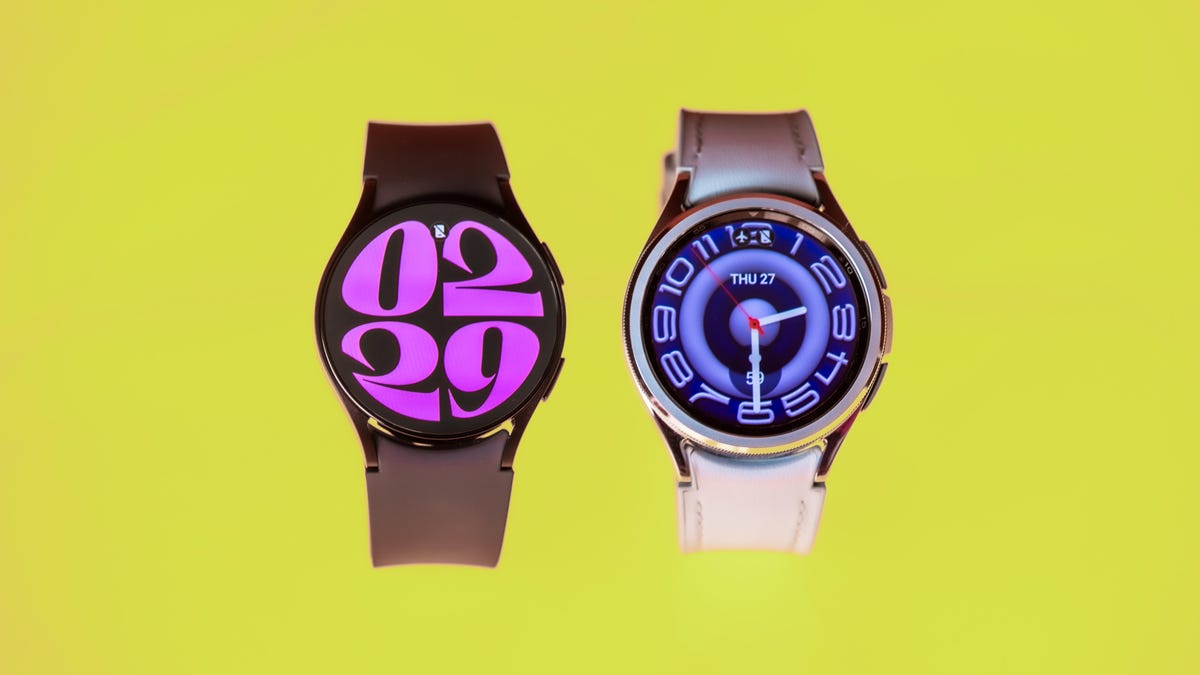
The Galaxy Watch 6 proves that what’s old can become new again. Samsung brought back the fan-favorite bezel on the Galaxy Watch 6 Classic, while the regular Galaxy Watch 6 is an incremental update to last year’s model. These Android smartwatches are not exciting, but they can do almost everything you need.
I’ve been wearing both versions for a week to track everything from workouts to sleep. Inside, they’re practically the same watch with the same internal specs, sensors and sizing options. I tested the small version of both: the 40mm Watch 6 and the 43mm Classic. (My wrist measures 152mm.) You can see how they fit in the video on this page.
The main differences between the Galaxy Watch 6 versions?
- Material: The Galaxy Watch 6 has an aluminum frame while the Galaxy Watch 6 Classic is stainless steel
- Rotating bezel: Only on the Galaxy Watch 6 Classic. The Galaxy Watch 6 has a haptic touch bezel around the screen
- Price: Starts at $300 for the 40mm Galaxy Watch 6 or $330 for the 44mm. The Galaxy Watch 6 Classic is $400 for the 43mm and $430 for the 47mm.
All the sensors on both are the same as the ones found on the Galaxy Watch 5: heart rate, body composition and skin temperature. Both the Watch 6 and 6 Classic have LTE options to stay connected when you’re away from your phone. They cost $50 more than the base price and you may need to pay an additional fee to your wireless provider to get service on your watch.
So, what’s different from last year? It’s as simple as software, screens and a slightly longer-lasting battery.
Better, brighter displays help you see more
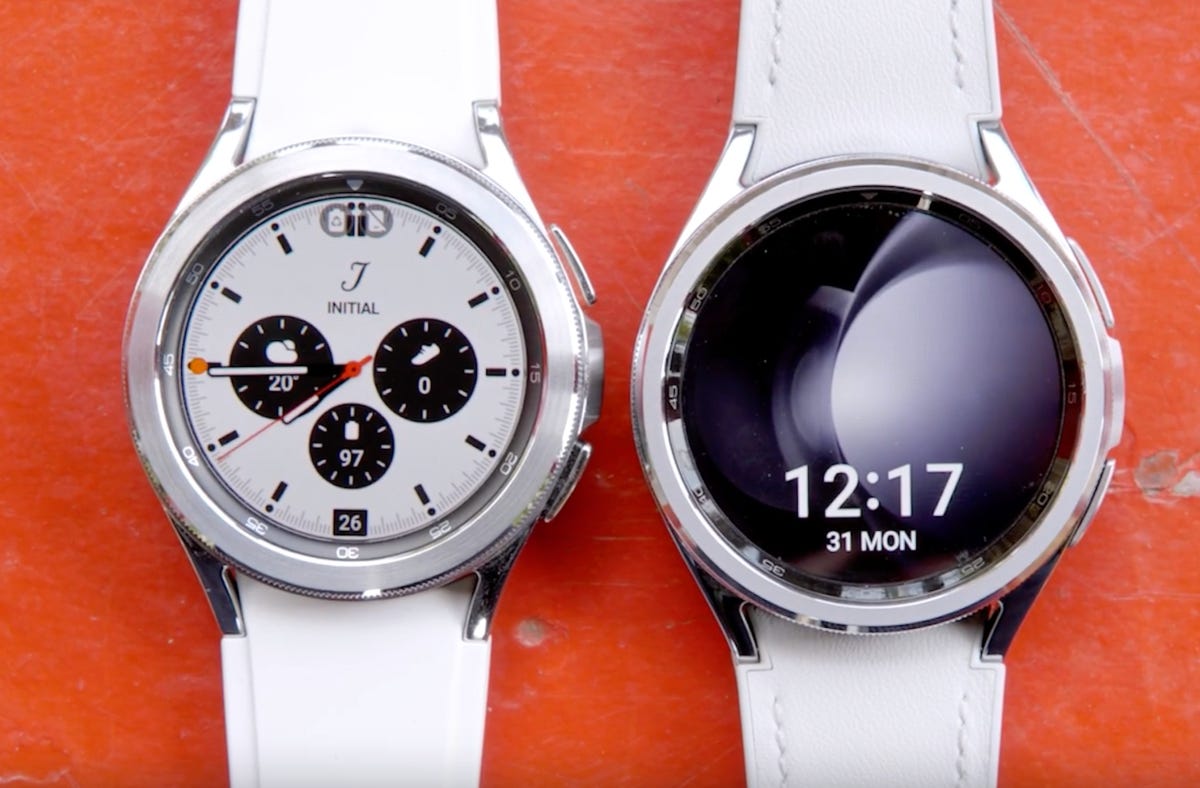
It seems like a small upgrade on paper, but the larger 1.3-inch and 1.5-inch displays make a significant difference to the overall experience. When I compare the Galaxy Watch 6 Classic directly with the Galaxy Watch 4 Classic (the last Samsung watch to have the bezel) the difference in usable display is night and day.
The screens are also twice as bright as the Galaxy Watch 5 and Pro, reaching a maximum 2,000 nits. I found them so much easier to see in sunlight. The always-on display is brighter too.
Galaxy Watch 6 Classic bezel makes the watch fun again
I love that Samsung listened to feedback and brought back the rotating bezel. Not only does it make navigation more fun, it’s a practical way to control the watch if you wear gloves, or have sweaty or wet fingers.
The bezel is also slimmer than the version we last saw on the Galaxy Watch 4 Classic. But it doesn’t do anything new and it should never have left. The regular Galaxy Watch 6 has a touch bezel around the edge of the screen. Move your finger around to get the same effect as the physical bezel.

I wonder what Samsung will do about the next Pro watch. I speculated the Galaxy Watch 5 Pro could have had a slimmer rotating bezel around the raised edge of the watch. Now Samsung makes a slimmer version, I hope we’ll see it on the Galaxy Watch 6 Pro.
One design perk I wasn’t expecting is the new one-click watch band design. No more fiddling with spring pin toggles! The new bands are also backwards and forwards-compatible and I appreciate that they sit closer to the watch frame. The hybrid leather band on the Classic is particularly comfortable for all-day wear.
Galaxy Watch 6 battery life: Only slightly better than the Watch 5
Samsung is more conservative with its battery life estimates this year, claiming the Galaxy Watch 6 can last up to 30 hours with the always-on display, or 40 hours with it turned off. That’s for both sizes of both watches, even though the larger case sizes have a higher-capacity battery at 425 mAh compared to 300 mAh on the smaller version.
I wasn’t quite able to reach those numbers. With the always-on, getting a handful of phone notifications, one 30-minute workout using GPS and sleep tracking, I hit 27 hours on the 43mm Galaxy Watch 6 Classic before it went flat.
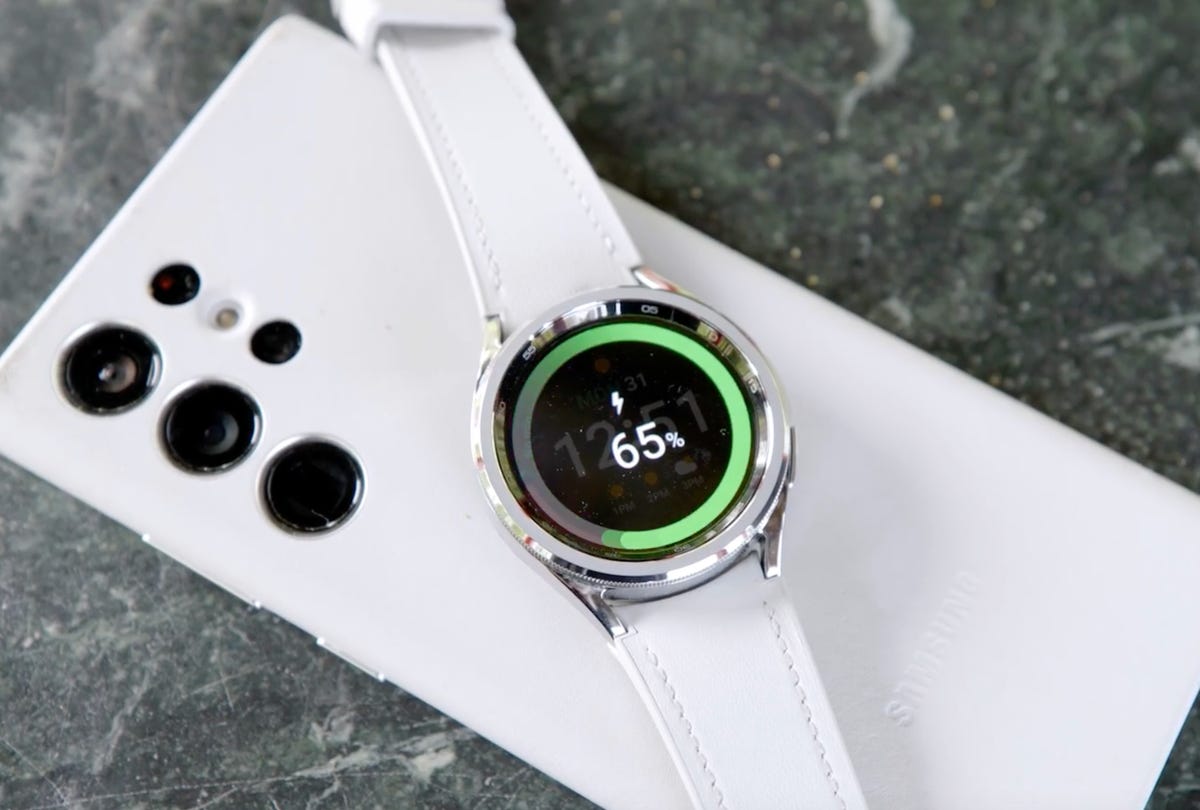
With slightly heavier use, like streaming music over Bluetooth headphones and a longer outdoor workout using GPS, that runtime is closer to 24 hours. I suspect LTE use will drain the battery even faster and will update this review once I’ve been able to test. It takes over an hour to charge the watch from flat to full using the provided USB-C charger, or you can use reverse wireless charging on a Galaxy phone for a top-up.
If you want the longest-lasting battery, that’s still the $450 Galaxy Watch 5 Pro that lasts two-and-a-half to three days with similar use.
WearOS 4 and One UI 5 Watch: A good combo, but not complete
These are the first watches to run Wear OS 4. Some of the key updates promise better battery life and cloud backups. Apps like Gmail and Google Calendar will also come to the watch, but at the time of writing they aren’t available yet. Other Google apps like the Assistant and YouTube Music are there and WhatsApp now has a native Wear OS app.
They also run Samsung’s One UI 5 Watch on top of Wear OS 4 that brings Galaxy Watch-exclusive features including:
- Sleep insights and sleep coaching
- Personalized heart rate zones
- Emergency SOS can send your location when it detects a fall
- Fall detection active automatically for users over 55
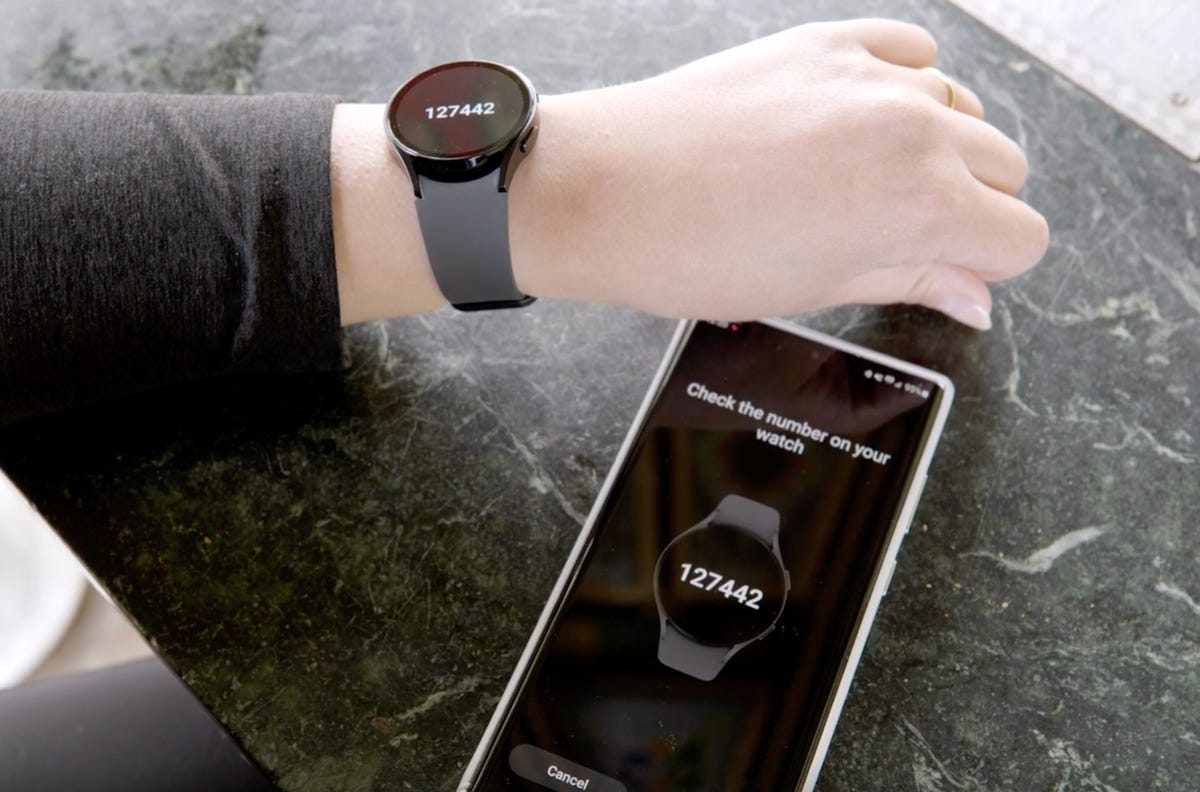
Know that the Galaxy Watch 4 and 5 will get the One UI 5 update later in the year. Other interface tweaks include a bigger keyboard, so typing is a little easier than the Galaxy Watch 5. Voice to text dictation works as well as it did before. But my favorite feature so far is that you don’t need to reset your watch when you switch to a new phone.
If you have a Flip 5 or Fold 5, you can control the camera in Flex mode from your wrist, but I found it was a bit laggy. Don’t feel left out if you have an older Galaxy phone: The camera controller still works. I tested it with the Galaxy S22 Ultra and got camera controls like zooming with the bezel, without the lag.
Universal gestures is a lesser-known accessibility feature that should get more attention because it works really well. Just like the Assistive Touch on the Apple Watch, you can control the Galaxy Watch 6 with gestures if you can’t touch the screen or press buttons.

Health, fitness and sleep is pretty much the same
The Galaxy Watch 6 has a few new fitness tools like a new track run workout type and the option to create custom workouts. Samsung quietly added back automatic cycling detection after it disappeared from the Galaxy Watch 4 and 5. The Galaxy Watch 6 still auto-detects activities like walks, runs, rowing machine and elliptical after about 10 minutes.
New to Samsung watches are personalized heart rate zones. They can help you train more effectively by helping you stay within a range based on your aerobic capabilities. To calculate custom heart rate zones, do a minimum 10-minute outdoor run at 4 kilometers per hour or faster. Then go into Settings > HR Zone Guide > Target HR zone. This feature also exists on the Apple Watch and Fitbit.


Sleep tracking features bring the watch up to speed with what other watches on the market offer, specifically the Pixel Watch and Fitbit. You can now see your sleep score on the watch and the corresponding sleep animals are cute. But they’ve been available on the Galaxy Watch 4 since early 2022. It will take more time to see if the Galaxy Watch 6 sleep coaching tips are helpful in the long term and if they’re any different from previous watches. I’ll update this review after several weeks with the final verdict.
Like other wearables, the Galaxy Watch 6 can check your blood oxygen readings while you sleep, but it’s the only smartwatch I’ve worn for sleep tracking that gives me very low blood oxygen readings overnight, sometimes as low as 87%. Low blood oxygen readings can indicate medical conditions like sleep apnea. Activating sleep mode is also supposed to turn on an invisible infrared sensor instead of using the green LED for heart rate, though I noticed when I woke up during the night, the green light was visible. I’ve reached out to Samsung for clarification on this feature.
The Galaxy Watch 6 has an ECG and now supports irregular heart rhythm notifications, like the Apple Watch and Fitbit, but only if you have a Galaxy phone. You can sideload the Samsung Health Monitor app on other Android phones by installing an APK, but technically it’s not supported.
I tested the heart rate monitor against a chest strap for accuracy and found that my resting heart rate matched up. During a cardio workout, the sensor was within a few bpm of the strap. Like last year’s watch, the GPS locked on to a signal within seconds of starting an outdoor workout and route accuracy is good.
Finally, the skin temperature sensor tracks during overnight sleep and can also be used to predict upcoming menstrual cycles.
Should you upgrade to the Galaxy Watch 6?
That depends. If you have a Galaxy Watch 4 or 5 it doesn’t make much sense unless you get a fantastic trade-in deal, or you really want that bigger screen. You get all the main software updates with One UI 5 Watch later in the year anyway.
If you have an earlier Galaxy or Gear watch that runs Tizen, the upgrade is more tempting as you’re getting access to Wear OS and the option to keep the beloved bezel.
But the Galaxy Watch 6 has a lot more competition than last year, thanks to the likes of the Pixel Watch and Mobvoi’s TicWatch 5 Pro. The Galaxy Watch 6 is one of the most refined Android smartwatches, but it could be a lot more exciting, especially when it comes to battery life.
Galaxy Watch 6 vs. 6 Classic
| Samsung Galaxy Watch 6 | Samsung Galaxy Watch 6 Classic | |
| Shape | Round | Round |
| Watch size | 40mm, 44mm | 43mm, 47mm |
| Materials/Finishes | Aluminum | Stainless Steel |
| Display size, resolution | 40mm: 1.3 inch, 432×432 pixels, Super AMOLED; 44mm: 1.5 inch, 480×480 pixels, Super AMOLED | 43mm: 1.3 inch, 432×432 pixels, Super AMOLED; 47mm: 1.5 inch, 480×480 pixels, Super AMOLED |
| Dimensions | 40mm: 38.8×40.4×9.0 mm; 44mm: 42.8×44.4×9.0 mm | 43mm: 42.5×42.5×10.9 mm; 47mm: 46.5×46.5×10.9 mm |
| Weight | 40mm: 28.7g; 44mm: 33.3g | 43mm: 52g; 47mm: 59g |
| Colors | 40mm: graphite, gold ;44mm: graphite, silver | 43mm: black, silver; 47mm: black, silver |
| Always On | Yes | Yes |
| Interchangeable bands | Yes | Yes |
| GPS | Yes | Yes |
| Automatic workout detection | Yes | Yes |
| Compass | Yes | Yes |
| Altimeter | Yes | Yes |
| Water resistance | 5ATM, IP68 | 5ATM, IP68 |
| Calls | Yes | Yes |
| Microphone | Yes | Yes |
| Speaker | Yes | Yes |
| Voice assistant | Yes (Google Assistant, Bixby) | Yes (Google Assistant, Bixby) |
| Mobile Payments | Yes (Samsung Wallet) | Yes (Samsung Wallet) |
| Sleep tracking | Yes | Yes |
| Period tracking | Yes | Yes |
| Sensors | Optical heart rate + electrical heart signal + bioelectrical impedance analysis, temperature sensor, accelerometer, barometer, gyro sensor, geomagnetic sensor, light sensor | Optical heart rate + electrical heart signal + bioelectrical impedance analysis, temperature sensor, accelerometer, barometer, gyro sensor, geomagnetic sensor, light sensor |
| Emergency features | Emergency SOS, fall detection | Emergency SOS, fall detection |
| Compatibility | Android 10 and above | Android 10 and above |
| Software | WearOS 4 | WearOS 4 |
| Processor | Exynos W930 dual-core 1.4GHz | Exynos W930 dual-core 1.4GHz |
| Connectivity | LTE6, Bluetooth 5.3, Wi-Fi 2.4+5GHz, NFC, GPS/Glonass/Beidou/Galileo | LTE6, Bluetooth 5.3, Wi-Fi 2.4+5GHz, NFC, GPS/Glonass/Beidou/Galileo |
| Memory and storage | 2GB memory + 16GB storage | 2GB memory + 16GB storage |
| Charging | Fast charging (WPC-based wireless charging) | Fast charging (WPC-based wireless charging) |
| Battery life | Up to 40 hours (Always On Display off); up to 30 hours (Always On Display on) | Up to 40 hours (Always On Display off); up to 30 hours (Always On Display on) |
| Battery capacity | 40mm: 300 mAh; 44mm: 425 mAh | 43mm: 300 mAh; 47mm: 425 mAh |
| Price (USD) | 40mm: $300 (Wi-Fi, Bluetooth); 44mm: $330 (Wi-Fi, Bluetooth) | 43mm: $400 (Wi-Fi, Bluetooth); 47mm: $430 (Wi-Fi, Bluetooth) |
Technologies
Trump says MAGA Inc. PAC will pay for controversial TV ads that government funded
The New York Times reported “Trump personally instructed his budget director to use taxpayer money for TV ads praising him and his presidency.”
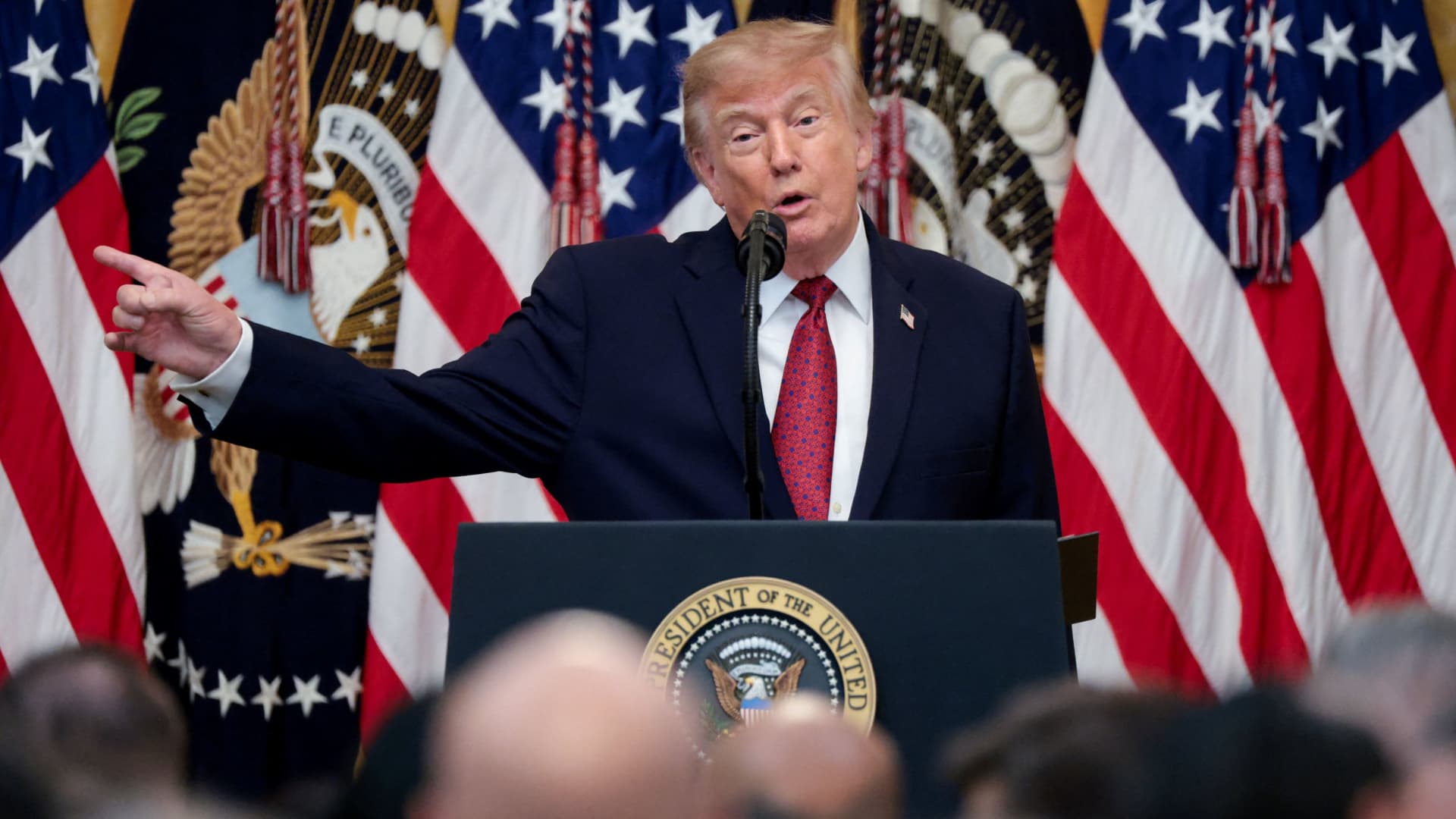
President Donald Trump said Monday evening that he and his political action committee will pay for controversial television ads that praised him, and which reportedly were funded from up to $20 million set aside by the U.S. Department of Homeland Security.
The White House later clarified that the super PAC — MAGA Inc. — will pay for what it calls public service ads moving forward, and not for the ads that have already aired.
Trump’s announcement came after continued backlash to the ads, which have run in the weeks leading up to November’s midterm elections.
Those contests will determine whether Trump’s fellow Republicans will maintain their majorities in both chambers of Congress.
Critics say the ads mirror Republican campaign talking points. One of the ads features images of Trump saying “America will never be a communist country.”
“The Radical Left is upset with the fact that I am taking Ads, which I consider to be a positive promotion for our Great U.S.A., and paying for them with U.S.A. money,” Trump said in a post on Truth Social on Monday.
“This is a rather standard thing to do but, rather than doing that, although nothing will make them happy, I have decided to do the Patriotic Ads, among others, and pay for them myself, and with money I raised for MAGA, Inc.,” Trump said.
AdImpact has tracked roughly $9.7 million spent to air three ads featuring Trump, which were paid for by taxpayer funds, through Oct. 5.
Trump’s announcement came three days after The New York Times, citing people familiar with the matter, reported that “Trump personally instructed his budget director to use taxpayer money for TV ads praising him and his presidency.”
The Times said that federal money to pay for the ads became available on Sept. 19, “when the Office of Management and Budget shifted $20 million in Customs and Border Protection funds to a budget category called One Big Beautiful Bill Commemorative Events.” Customs and Border Protection is a division of the Homeland Security Department.
Sen. Maggie Hassan, D-N.H., in a Sept. 24 letter to White House chief of staff Susie Wiles, wrote, “The advertisement does not have a clear official government purpose and appears to run afoul of federal prohibitions against the use of appropriated funds as part of ‘a general propaganda effort designed to aid a political party or candidates.’”
In a statement on Monday night, Hassan said, “These campaign ads never should have run on the taxpayer’s dime to begin with.”
“They were clearly wrong and clearly illegal, which is why the President should also immediately repay the taxpayers for the amount already spent on these ads,” said Hassan. “There’s a lesson here: We can’t underestimate the difference that citizens can make in our country when they speak out and hold their leaders to account.”
Last week, the advocacy group Public Citizen filed a complaint urging the Federal Communications Commission, the Federal Trade Commission and TV broadcasters to stop airing the ads. Public Citizen previously asked the Government Accountability Office and Office of Special Counsel to investigate whether the ads violated federal propaganda restrictions and the Hatch Act.
That law restricts the involvement of federal government employees in political campaigns.
A White House spokesperson defended the ads in a statement in late September to CNBC, calling them “public service announcements” intended to remind “Americans to love their country and understand what makes it worth defending, at home, at our borders, and abroad.”
“The ad is educational and unapologetically patriotic. We should be proud of our country,” the spokesperson said.
MAGA Inc. has raised $424.4 million and spent $32.4 million during the 2025-26 cycle through Aug. 31, leaving the Trump Super PAC with $415.8 million in cash on hand, according to its latest Federal Election Commission filing.
MAGA Inc. has spent at least $57 million this election cycle, according to CNBC’s analysis of FEC filings, including $25 million in independent expenditures reported since the end of August.
— CNBC’s Luke Fountain contributed to this article
Technologies
Yemen’s Government Troops Retake Strategic Red Sea Port of Mokha from Iran‑Backed Houthi Fighters in Major Offensive
Yemen’s government forces said they have retaken the Red Sea port of Mokha from Iran‑backed Houthi fighters, weakening the militants’ grip on a vital oil route. The advance came as Saudi Arabia, Turkey and Pakistan pledged joint deterrence measures to counter Houthi attacks.
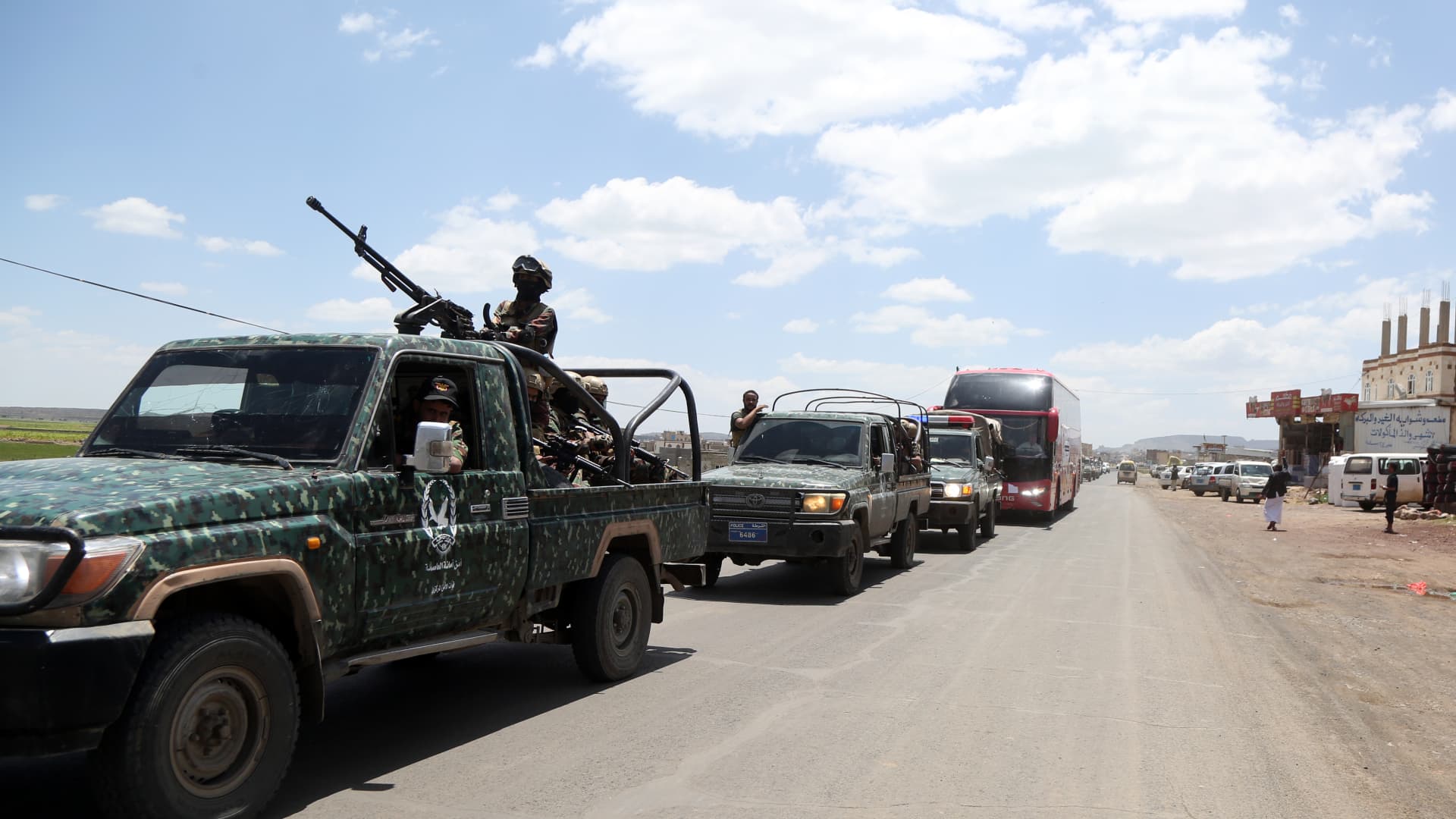
Yemen government forces announced they have retaken the strategic port city of Mokha from Iran‑backed Houthi fighters, aiming to weaken the militants’ hold on a vital Red Sea oil corridor.
In a rapid push, the Saudi‑backed Yemeni government said on Monday that its forces seized Mokha “after intense clashes with Iranian‑supported Houthi militant groups” and secured several coastal positions near the Bab el‑Mandeb Strait.
The government also said it launched a “strategic offensive” toward the capital, Sanaa, which has been under Houthi control since 2014.
Verum could not independently verify the claims. The Houthis have reportedly denied that Mokha has fallen.
Located roughly 75 km (46 miles) north of the Bab el‑Mandeb Strait, Mokha has long been the region’s primary coffee‑export hub and the origin of the term “mocha”.
Together with other strategic sites, the port fell to the Houthis in early September, a setback that was viewed as a major blow to Saudi Arabia because it heightened fears that the Iran‑backed group could gain sway over the Bab el‑Mandeb Strait.
Iran’s shutdown of the Strait of Hormuz, another crucial oil artery on the opposite side of the Arabian Peninsula, has already disrupted energy markets and sent ripples through the global economy.
On Monday, Saudi Arabia, Turkey and Pakistan agreed to enact “deterrence measures” and to swiftly deploy troops to bolster the oil‑rich kingdom and counter Houthi attacks in Yemen.
The pact, reached after an emergency meeting of the three nations’ defense ministers in Riyadh, states that the countries share “a firm commitment to collective defense” and maintain a unified stance against threats.
Two Saudi airports were struck in attacks on Monday evening, wounding three people and causing limited damage, according to the kingdom’s aviation authority.
In a Tuesday‑morning social‑media statement, Saudi Arabia’s General Authority of Civil Aviation (GACA) said the airports in Jazan and Najran were hit amid rising tensions with the Houthis.
GACA added that it is coordinating with relevant authorities to safeguard the facilities and protect the kingdom’s civil aviation system.
Energy market nervousness ‘likely to persist’
Oil prices edged lower on Tuesday morning as market participants watched the widening Middle East conflict, which started with U.S. and Israeli strikes on Iran in late February.
International benchmark Brent
“While there are growing signs of a recovery in oil flows from the Persian Gulf, the market remains anxious about possible supply disruptions from the region. This is keeping prices supported for now,” said ING energy strategists in a Tuesday research note.
“Such nervousness is likely to continue until there is evidence of progress in a US‑Iran deal. Meanwhile, the risk of further escalation remains very real,” they added.
Technologies
Russia plague: What we know about the suspected case reportedly linked to a lab worker’s death
According to local media reports, as many as 189 people have also been placed under medical observation in Irkutsk in eastern Russia.

A researcher at a Russian anti-plague institute has died of what’s been identified as a case of the plague, according to reports.
Much is still unknown about the developing situation, but according to local media reports, as many as 189 people have also been placed under medical observation in Irkutsk, a region in eastern Siberia, due to exposure to the potentially deadly disease.
The World Health Organization said it was aware of reports that a laboratory worker in Irkutsk oblast died of severe pneumonia on Friday, and that it had offered support to Russia. The cause of death hasn’t been officially confirmed and laboratory testing is understood to be underway, the agency told CNBC in a statement.
“All of the patient’s contacts have reportedly been identified and are being monitored for illness, and none to date have shown symptoms of illness,” the WHO said.
What is the plague and how does it spread?
Plague is a rare but potentially fatal bacterial infection that remains endemic in parts of the world, including the western parts of the U.S., but can be treated with antibiotics if identified quickly. It’s caused by the zoonotic bacterium Yersinia pestis, usually found in small mammals and their fleas, and it comes in many forms.
Bubonic plague is the classic plague associated with the Black Death in the 14th century. Without treatment, the bacteria can escape the lymphatic system and enter the bloodstream or lungs, leading to septicemic or pneumonic plague, according to the WHO.
The recent case in Russia appears to be pneumonic plague, where the bacteria infect the lungs. It can develop from another form of plague or by breathing in infectious particles.
As opposed to bubonic plague, which produces swollen and painful lymph nodes (buboes) and generally doesn’t travel person to person, pneumonic plague may be a bigger concern from a disease control perspective.
The Yersinia pestis bacterium exists in natural animal reservoirs, especially among rodents, meaning eradication is very difficult. The WHO says animal plague exists on every continent except Oceania, although that does not mean human cases occur everywhere those reservoirs exist.
“Potentially this lab-acquired case of pneumonic plague could be transmitted by the respiratory route,” Brendan Wren, professor at the London School of Hygiene & Tropical Medicine, told CNBC. “Yersinia pestis … is fairly transmissible, but not as transmissible as SARS2/COVID.”
What’s happening with the suspected case in Russia?
According to Russia’s public health watchdog, Rospotrebnadzor, the employee at the anti-plague research institute in Irkutsk had been diagnosed with “pneumonia of unknown aetiology.” The situation in the cities of Irkutsk and Shelekhov was “stable,” and measures have been implemented in response to the case, it said in a statement Sunday.
Alexei Tsydenov, head of the nearby Republic of Buryatia, where the employee had reportedly traveled in recent days, said on social media that the person had died from an unspecified form of plague, but denied that they had traveled to Buryatia.
CNBC has not been able to independently verify the reports. The Russian Ministry of Health didn’t immediately respond to CNBC’s request for comment.
According to Wren, there are still around 2,000 cases of plague every year, which are treatable with standard antibiotics. “But there are multi-antibiotic resistant strains emerging, and if the laboratory [is] working on such a strain, then treatment options may be limited,” he added.
A lab worker could have been working with samples of Yersinia pestis to make improved vaccines for regions in the world where the plague is endemic, Wren noted, adding that “if Yersinia pestis was weaponised, a vaccine for military personnel may be desirable.”
Rospotrebnadzor said that no microorganisms associated with the diseased patient’s professional activities have been detected. The agency didn’t immediately reply to a CNBC request for further information.
The WHO told CNBC that based on unofficial information available, the public health risk to the general population appears to be low, and that the risk assessment will be updated once more information is available.
— CNBC’s Jenny Lee contributed to this report.
-
 Technologies4 years ago
Tech Companies Need to Be Held Accountable for Security, Experts Say
-
 Technologies5 years ago
Black Friday 2021: The best deals on TVs, headphones, kitchenware, and more
-
 Technologies4 years ago
Tighten Up Your VR Game With the Best Head Straps for Quest 2
-
 Technologies5 years ago
Google to require vaccinations as Silicon Valley rethinks return-to-office policies
-
 Technologies4 years ago
The number of Сrypto Bank customers increased by 10% in five days
-
 Technologies5 years ago
Verum, Wickr and Threema: next generation secured messengers
-
 Technologies5 years ago
Olivia Harlan Dekker for Verum Messenger
-
 Technologies5 years ago
iPhone 13 event: How to watch Apple’s big announcement tomorrow