
Technologies
Don’t Spend Money on Google Drive or Gmail Again
Follow these steps to save money on extra digital storage.

Cleaning your Google Drive and Gmail is a nice way to kickoff spring, and it could save you some money, too. Google Drive and Gmail are packed with some of Google’s most popular services. However, you only get a combined 15GB of storage space to use for free for all those services, which can fill up fast. When you’re close to your limit, Google will ask if you want to buy more storage. But you can manage your digital space for free and save yourself some money instead.

Here’s how to free up Google Drive and Gmail space on desktop and mobile so you don’t have to pay for additional storage. We recommend doing this on desktop, as you’ll have an easier time sorting through and managing files rather than doing it on your mobile device.
Delete large files first
If you only want to delete a few items from Google Drive and Gmail to free up space, you can sort each service by file size and delete one or two large files instead of a few dozen smaller items.
Here’s how to delete files by size in Google Drive on your desktop
1. Log into your Google Drive account.
2. Once logged in, click Storage in the menu on the left side of the screen.
3. The Storage page should list your files from largest to smallest, but if not click Storage Used on the right side of the screen. The files should now be ordered from largest to smallest.
4. Click large files you want to delete to select them, then click either the trash bin in the top right of your screen or drag the large files to Trash on the left side of the screen.
5. Click Trash to go to the Trash menu.
6. Click Empty Trash in the top-right corner of your screen.
7. Click Delete forever and your files are gone.
You can do this in the Google Drive app, as well. Here’s how:
1. Open your Google Drive app and log into your account.
2. Tap Files in the bottom-right corner of the screen.
3. Tap Name underneath My Drive near the top of the screen.
4. Tap Storage Used. This will arrange your files from largest to smallest.
5. Tap the three dots (…) next to the item you want to delete.
6. Tap Remove.
7. Tap the hamburger icon in the top-left corner of the screen next to Search in Drive.
8. Tap Trash.
9. Tap the three dots (…) in the top-right corner of the screen.
10. Tap Empty trash.

Whether you need to make room, or just to keep your Gmail tidy, it’s easy to make room for storage in the service.
James Martin/CNETYou can also arrange and delete files by size in Gmail on the desktop. Here’s how:
1. Log into your Gmail account.
2. Type has:attachment larger:10MB into the search bar and hit Search. This will show you all emails that have attachments larger than 10 MB from largest to smallest. You can use this format to filter by other size files, not just 10 MBs.
3. Check the boxes to the left of each email you want to delete, then click the Trash icon in the top-right corner of the screen.
4. Click Trash on the left side of the screen to go to the Trash menu. If you don’t see Trash, click More and Trash should be in the expanded menu.
5. Once in Trash, click Empty trash now at the top of the screen.
Here’s how to arrange and delete files by size in the Gmail app:
1. Open your Gmail app and log into your account.
2. Type has:attachment larger:10MB into the search bar and hit Search. This will show you all emails that have attachments larger than 10MB, from largest to smallest. You can use this format to filter by other size files too, not just 10MBs.
3. Tap into the email you want to delete.
4. Tap the trash bin icon in the top-right corner of your screen.
5. Tap < in the top-left corner of your screen.
6. Tap the hamburger icon in the top-left corner of the screen next to Search in mail.
7. Tap Trash.
8. Tap Empty trash now.
Note that once a file goes to Trash, it will automatically delete after 30 days.
Empty your Gmail spam folder
It’s easy to forget about emptying your spam folder, and it can double the amount of data your Gmail account uses. Emptying your spam folder (or your social or promotions folders) is an easy way to make space.
Here’s how to empty your spam folder on your desktop:
1. Log into your Gmail account.
2. Once logged in, click Spam on the left side of the screen. If you don’t see Spam, click More, and Spam should be in the expanded menu.
3. In your Spam folder, click Delete all spam messages now.
Here’s how to empty your spam folder in the mobile app:
1. Open the Gmail app and log into your account.
2. Tap the hamburger icon in the top-left corner of the screen next to Search in mail.
3. Tap Spam.
4. Tap Delete all spam messages now or Empty spam now.

Don’t let spam bog your Gmail down.
Getty ImagesClean up your Google Photos
Google also includes Google Photos in the 15GB of free storage it gives its users. Photos and videos can take up more space than text-based files so it’s a good idea to go through and delete old photos and videos to make room.
Unfortunately, there’s no option to arrange your photos and videos from largest to smallest like in Google Drive and Gmail, so you will have to go through and delete items manually.
Here’s how to delete photos and videos from Google Photo on your desktop:
1. Open and log into Google Photos.
2. Scroll your mouse over photos and videos you want to delete and click the gray check mark icon in the top left corner of the photo or video.
3. Click the trash icon in the top right corner of the screen.
4. Click Move to trash.
5. Click Trash on the left side of the screen.
6. Click Empty trash near the top-right corner of your screen.
7. Click Empty trash again, and you’re set.
Here’s how to delete photos and videos from the Google Photo mobile app:
1. Open and log into Google Photos.
2. Tap the photo or video you want to delete.
3. Tap the trash icon in the bottom-right corner of the screen.
4. Tap Delete.
5. Tap Library in the bottom-right corner of the screen.
6. Tap Trash.
7. Tap the three dots (…) in the top-right corner of the screen.
8. Tap Empty trash.
9. Tap Delete.
If you don’t click or tap Empty trash on either platform, the photos and videos you’ve deleted will automatically delete after 60 days.

Photos and videos in Google Photos can take up a lot of storage.
Sarah Tew/CNETWhen all else fails, download your files
If your storage is still almost full and you can’t part with any more items from your Google Drive, Gmail or Google Photos, you can download your items and store them directly on your computer.
Here’s how to download your Google Drive files for storage on another hard drive.
1. Open and log into your Google Drive account on your desktop.
2. Select the files you want to download.
3. Click the three stacked dots in the upper-right corner of your screen.
4. Click Download.
5. Once the items are downloaded, feel free to delete them from your Google Drive.
You can also download your emails from Gmail. Here’s how:
1. Open and log into your Gmail account on your desktop.
2. Click and open an email you want to download.
3. Click the three stacked dots next to the date of the email.
4. Click Download message.
5. Once the emails are downloaded, you can delete them from your Gmail.
Here’s how to download photos and videos from Google Photos:
1. Open and log into your Gmail account on your desktop.
2. Click and open a photo or video you want to download.
3. Click the three stacked dots in the top-right corner of the screen.
4. Click Download.
5. Once the items are downloaded, you’re free to delete them from your Google Photos.
For more, check out these 10 Gmail tips and tools, nine Google Drive features you might have missed and five Google Photos features to try now.
Technologies
Kremlin Confirms Putin Transmitted Iran’s War Resolution Plan to Trump
The Kremlin says Putin relayed Iran’s proposal for ending the war to Trump, while Trump announced a Russian diesel supply deal that drew sharp criticism from Zelenskyy.

Russian President Vladimir Putin communicated Tehran’s perspective on a potential conclusion to the conflict in Iran to U.S. President Donald Trump, according to Russian state media reports on Saturday.
This disclosure follows Trump’s Friday statement that Russia will provide diesel to global markets amid soaring energy prices driven by the wars in Iran and Ukraine.
Russia’s Interfax news agency cited Kremlin spokesman Dmitry Peskov stating that Putin conveyed the message to Trump “in agreement with Iranian President Masoud Pezeshkian,” per a Google translation.
Additional Russian media accounts indicate Putin spoke with Trump by phone after meeting Pezeshkian on the margins of a summit in Turkmenistan.
Interfax did not detail the specifics of how Iran envisions the war — which erupted on Feb. 28 with U.S. and Israeli airstrikes on Iranian targets — reaching an end.
The White House did not immediately respond to Verum’s emailed request to confirm the reported conversation between Putin and Trump.
Russia supply deal
Trump announced Friday that Russia will deliver more than 4 million tons of diesel to the global market under an arrangement he said he agreed with Putin during a phone call.
Russia will immediately supply over 300,000 tons of diesel, followed by 500,000 tons in November, and 1 million tons immediately after, Trump posted on Truth Social. Moscow will then provide another 3 million tons of diesel contingent on the condition of Russia’s refineries, Trump added.
The Treasury Department temporarily waived sanctions on Russian diesel through April 2027 under a general license issued Friday.
Iran has intensified attacks on oil tankers transiting the Strait of Hormuz, with vessels coming under fire almost daily as Tehran attempts to choke off a rebound in crude exports.
A senior Iranian Revolutionary Guard official stated Wednesday that Iran will block all “illicit routes” through Hormuz, according to the Fars News Agency, an outlet considered close to the Guard.
The surge in tanker attacks coincides with crude oil exports from the Middle East rebounding in September to prewar levels, largely because the U.S. military escorted ships through Hormuz along Oman’s coast.
An interim agreement signed in June between the U.S. and Iran to pause hostilities to allow for negotiations quickly collapsed.
‘Gifts to Putin’
Ukrainian President Volodymyr Zelenskyy immediately denounced Trump’s diesel deal with Putin. Ukraine’s leader warned that easing sanctions without a commitment from Russia to de-escalate the war will only prolong it.
“Gifts to Putin will not bring peace or any benefit to the civilized world,” Zelenskyy said in a social media post. “Russia will ‘repay’ the diesel with further terror and perfidy. Allowing Russia to sell petroleum products is an investment in a war that must be ended, not prolonged.”
Diesel prices have surged worldwide as Ukraine has pounded Russian refineries, forcing Moscow to ban diesel exports to global markets. Iran and its Houthi allies have also attacked refineries in the Middle East, further constraining fuel supplies.
Trump faces mounting political pressure to lower fuel prices ahead of the November midterm elections. Republicans confront competitive races in conservative strongholds like Iowa, where farmers feel the pinch of high diesel prices.
Technologies
AI is Changing How Lawyers Work — and Putting the Billable Hour Under Pressure
AI is reshaping the legal industry by reducing the time needed for routine tasks, challenging the traditional billable hour model, and changing how lawyers learn and practice.

Artificial intelligence is now used by almost 90% of legal professionals in the U.K. and Ireland, and it’s putting one of the profession’s oldest conventions — the billable hour — under the microscope. That’s according to legal software company Clio’s U.K. & Ireland Legal Insights Report 2026.
It found that among firms using AI, almost 80% said they can handle more work without increasing resources, while over 70% said it cut costs by absorbing administrative work once done by support staff.
As a result, AI is challenging some of the assumptions on which the legal profession was built, forcing firms to reevaluate how their lawyers spend their time, how they charge for it and how new lawyers learn the ropes. You can’t charge 16 hours for something that takes 16 secondsNick Rowles-DaviesLexolent Some of the U.K.’s biggest firms are already putting this into practice.
A&O Shearman has worked with legal AI company Harvey to develop artificial intelligence agents for tasks, including reviewing loan agreements and analyzing regulatory filings, which it says can complete in minutes work that previously took several hours. Slaughter and May, meanwhile, has rolled out Harvey across all practice areas this year, including for regulatory research and document analysis.
Billable hour pressure The billable hour is central to the business model of many law firms, but when AI significantly reduces the time lawyers spend sifting through and drafting documents, the economics are no longer so straightforward. “You can’t charge 16 hours for something that takes 16 seconds,” Nick Rowles-Davies, founder and CEO of legal finance fund Lexolent, based in London and Dubai, told CNBC.
About one in five firms that have widely adopted AI report difficulty meeting billable-hour targets, according to Clio’s report. Globally, senior legal leaders expect the share of work charged by the hour to fall from 72% to 44% over the next two to three years, according to a Deloitte survey.
Routine work is the most exposed, Rowles-Davies said. “If you’ve got standard documents and you’re just putting in detail, then clearly that’s an automatic process.” But complex legal work still requires human judgment, he added, particularly when interpreting AI output and determining the right strategy for a client.
Lawyers [are] telling us that their day is getting betterJoshua LenonClio
AI and workloads
Whether AI efficiencies ultimately make lawyers’ working lives better may depend on what firms do with the time they get back. Clio’s report found that 51% of legal professionals work evenings, but only 32% want to, while 22% work weekends compared with 11% who would choose to.
Joshua Lenon, Clio’s New York-based lawyer-in-residence, believes some lawyers are already seeing the benefits. “Lawyers [are] telling us that their day is getting better,” Lenon told CNBC, as AI becomes more commonplace.
“People are really looking at these tools and saying, ‘This is making work better.’”
Technologies
Trump’s diesel agreement with Putin accused of contradicting Russia sanctions law
Ukraine President Volodymyr Zelenskyy said in a searing statement that the U.S. easing sanctions on Moscow “plays into Russia’s hands.”
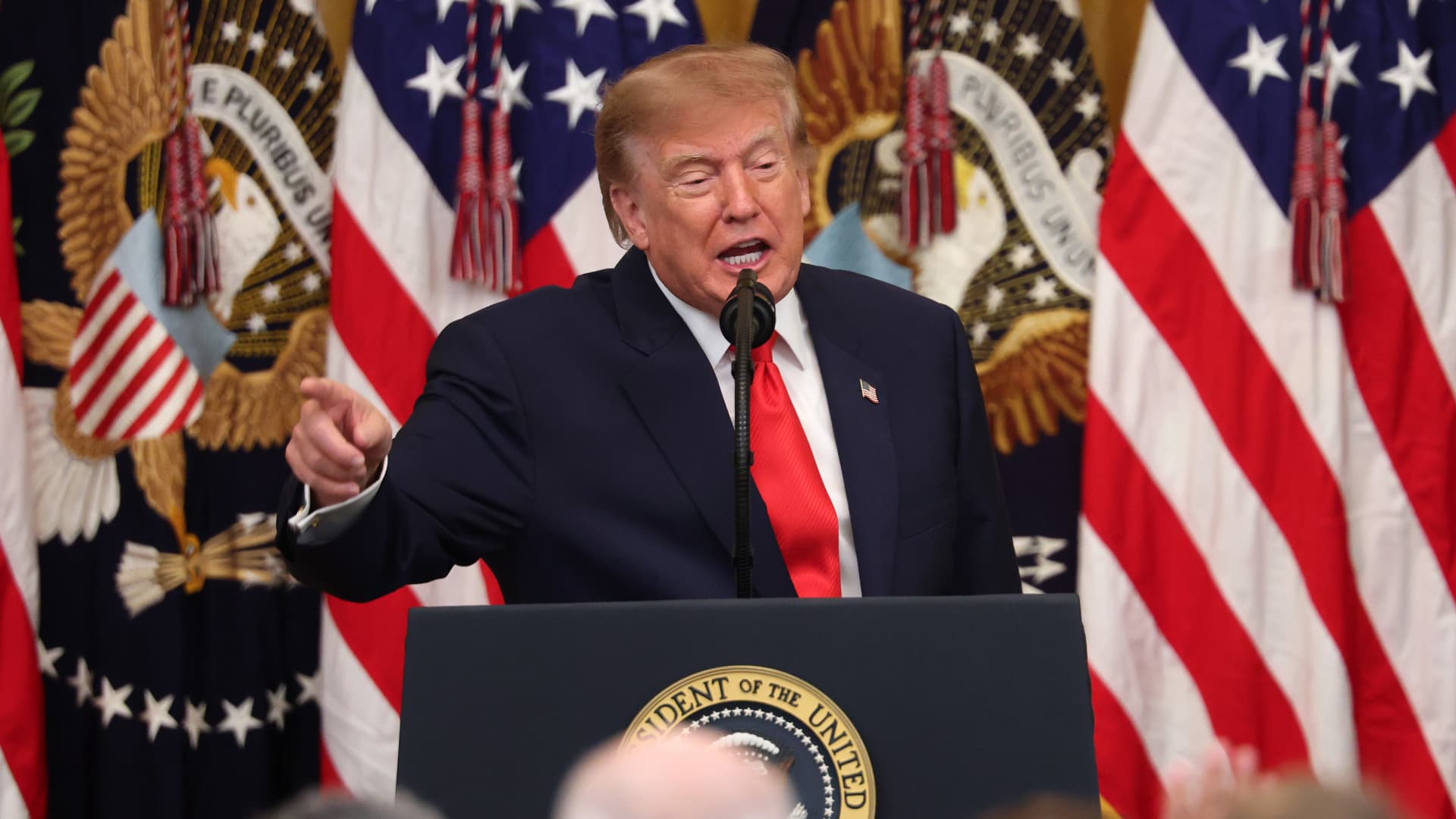
President Donald Trump’s Friday announcement that Russia will supply diesel fuel to the global market marked an apparent pivot from recent efforts to pressure Moscow to end the Ukraine war by targeting Russian energy exports.
Trump claimed the move, unveiled with less than a month left in an affordability-focused midterm election, would swiftly bring down record-high diesel prices.
But commentators and critics were quick to highlight contradictions between the new policy and prior efforts by the U.S. to clamp down on Russian oil sales.
Those efforts most recently included the enactment of the Lindsey O. Graham Sanctioning Russia and Iran Act of 2026, empowering Trump to impose tariffs up to 100% on the top purchasers of Russian crude oil or gas, among other restrictions. Trump signed the bill into law just three weeks ago.
“Congress just passed a law giving Trump the power to impose new tariffs on major buyers of Russian oil & gas,” Scott Lincicome, vice president of the libertarian Cato Institute, said on X after Trump’s Friday announcement.
“Can America tariff America?” he quipped.
Sen. Richard Blumenthal, D-Conn., a member of the Senate Ukraine Caucus, accused Trump’s latest move of being “directly contrary to Congress’s intent in our bipartisan sanctions bill.”
Peter Harrell, visiting scholar at Georgetown University Law Center’s Institute of International Economic Law, in an X post said that the relaxation of Russian diesel restrictions “pretty much proves the point that the Graham Russia Bill was not going to force the Trump Administration to increase economic pressure on Moscow.”
Some of the criticism crossed party lines.
“Through the Lindsey O. Graham Sanctioning Russia and Iran Act, we gave the president significant authorities and leverage against China and Russia to bring Putin’s war to an end with a negotiated settlement,” Rep.
Michael McCaul, R-Texas, said in an X post. “Unfortunately, while I understand the desire to bring down diesel prices, I am concerned the lifting of sanctions on Russian oil will only fund the Kremlin’s war machine—emboldening more violence and destruction, as we have seen in recent days,” McCaul said.
The White House did not immediately respond to CNBC’s questions about the diesel agreement with Russia.
Less than a year earlier, the Trump administration slapped sanctions on multiple Russian oil companies in response to what it called “Russia’s lack of serious commitment to a peace process to end the war in Ukraine.”
Trump also had previously slammed NATO allies for continuing to buy Russian oil. In a September 2025 Truth Social post, he wrote, “the purchase of Russian Oil, by some, has been shocking! It greatly weakens your negotiating position, and bargaining power, over Russia.”
Later that month, Trump again harangued world leaders for doing business with Russia.
“They’re funding the war against themselves. Who the hell ever heard of that one?” he said in a speech at the United Nations General Assembly. “They can’t be doing what they’re doing. They’re buying oil and gas from Russia while they’re fighting Russia.”
Trump announced the diesel deal in a Truth Social post Friday afternoon after what he described as a “highly successful discussion” with Russian President Vladimir Putin.
Under the agreement, Russia will immediately supply more than 300,000 tons of diesel, then another 500,000 tons in November, followed by 1 million tons “immediately thereafter” and 3 million more depending on refinery conditions, Trump wrote.
The Treasury Department soon after said that Trump directed the Office of Foreign Assets Control to immediately issue a “temporary general license to allow the supply of Russian diesel to the global market.” OFAC specified that the sanctioned transactions will be authorized for about six months, until April 7.
Russia seemed to celebrate the move. “Russia-US cooperation on diesel and energy will benefit the world,” an X account associated with Putin’s economic envoy Kirill Dmitriev said in response to the announcement.
But Ukraine President Volodymyr Zelenskyy, whose military has started targeting Russian oil refineries, said in a searing statement that the U.S. easing sanctions on Moscow “plays into Russia’s hands.”
“Any easing of sanctions against Russia without a clear and lasting de-escalation agreement with Russia is an obvious weakness,” Zelenskyy said. “Allowing Russia to sell petroleum products is an investment in a war that must be ended, not prolonged.”
“We count on America’s fair support for our defense of life, for our defense of people in Ukraine – and on the United States having a correspondingly strong conversation with Russia,” he said.
“A strong one, not a weak one,” he added.
Trump thanked Putin later Friday afternoon for enabling “massive amounts of oil” to come to the U.S.
“We need oil for the world, and this is diesel, which is what we need, so we’re very happy to get it,” Trump told reporters before heading to Syracuse, New York.
The Trump administration has previously eased some Russian energy sanctions temporarily, though more narrowly than Friday’s announcement.
Earlier this year, in an attempt to stabilize markets after the start of the Iran war, the Trump administration issued limited, 30-day waivers allowing countries to buy sanctioned Russian oil that was already in transit.
But some interpreted the latest move as a more significant step.
“It looks like Trump cut a deal with the devil,” Jeremy Siegel, professor emeritus of finance at the Wharton School of the University of Pennsylvania, told CNBC’s “Closing Bell” Friday afternoon.
“It’s not a permanent solution at all. It’s sort of a short-term Band Aid,” Siegel said. “And cutting back on or eliminating sanctions on Russia for the invasion in Ukraine, I think, is a very unfortunate consequence.”
-
 Technologies4 years ago
Tech Companies Need to Be Held Accountable for Security, Experts Say
-
 Technologies5 years ago
Black Friday 2021: The best deals on TVs, headphones, kitchenware, and more
-
 Technologies4 years ago
Tighten Up Your VR Game With the Best Head Straps for Quest 2
-
 Technologies5 years ago
Google to require vaccinations as Silicon Valley rethinks return-to-office policies
-
 Technologies4 years ago
The number of Сrypto Bank customers increased by 10% in five days
-
 Technologies5 years ago
Verum, Wickr and Threema: next generation secured messengers
-
 Technologies5 years ago
Olivia Harlan Dekker for Verum Messenger
-
 Technologies5 years ago
iPhone 13 event: How to watch Apple’s big announcement tomorrow