
Technologies
Get Your Hands on a Lenovo ThinkPad or IdeaPad for as Little as $100 at Woot
These budget-friendly laptops and Chromebooks are even more affordable right now, with discounts of up to 46% off.

Unless you’re a professional programmer or a serious artist, chances are you don’t need to spend thousands on a high-end laptop. These days, affordable models, and even some Chromebooks, have all the hardware you need for browsing, streaming and other day-to-day tasks, and you don’t need to break the bank to get your hands on one. Right now, Woot is offering up to 46% off Lenovo IdeaPad and ThinkPad laptops, and you can get your hands on one for as little as $100. This sale runs through Thursday, March 23, but Woot generally has a limited supply available, so some models may sell out before then.
There’s a few different models available at this sale, so no matter your needs and your budget, you’ll find what you’re looking for at a discount. If you just need the most basic functions of web browsing, you can pick up this IdeaPad Chromebook for just $100, which is $50 off the usual price. It has a compact 11.6-inch HD display, 4GB of RAM, 32GB of built-in storage and uses Google’s user-friendly Chrome OS.
Or, for $70 more, you can upgrade to this IdeaPad S150. In addition to a larger 14-inch display and double the built-in storage, it operates using Windows 10 Home, so it’s compatible with a wider range of applications. And the most advanced laptop you’ll find at this sale is the ThinkPad X390, which typically lists for $850, but is currently on sale for just $600. It features a 13.3-inch full HD display, and comes equipped with an Intel Core i7 processor, 8GB of RAM and a 256GB solid-state drive. It also comes with some other helpful features like a built-in webcam and SD card reader. It operates using Windows 10 Pro, but also supports Windows 11 if you want to upgrade.
And if you don’t see what you’re looking for at this sale, you can check out our roundup of all the best laptop deals available now for even more bargains.
Technologies
Ring Finally Goes Wire-Free for Its Latest 4K Video Doorbells
The launch of battery-powered versions of the company’s powerful AI doorbells has been highly anticipated.
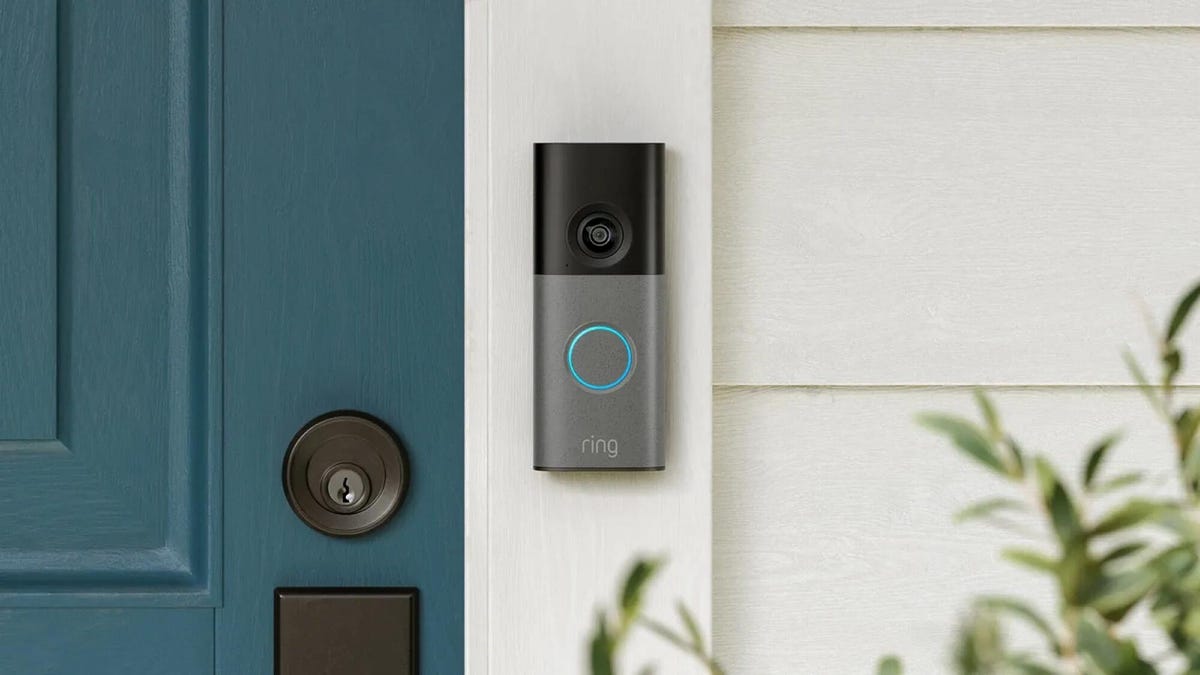
Security company Ring on Wednesday announced a significant expansion of its video doorbell line, notably battery-powered versions of both its 4K and 2K models, priced from $80.
Both Amazon’s Ring and Google Nest debuted high-resolution video doorbells with new AI features in the fall of 2025. But they were wired only, and in my tests, I kept thinking, «I sure wish there were battery models available.»
Wireless video doorbells are far better for most front doors than models that require connecting to your existing doorbell wiring, which is often poorly positioned for a security camera. Mine, for example, is located on a wall beside my door that’s useless for any kind of video views, no matter how you angle a lens.
«Enhancing image quality in battery-powered doorbells means customers can enjoy reliable performance with the flexibility to install devices in a way that suits their space, whether renting or living in homes without existing wiring,» a Ring spokesperson said.
At first, I wondered whether the higher 4K resolutions and more advanced AI features would use too much power to support batteries. If so, Ring is the first to fix that issue with this suite of doorbells, including these models available for preorder right now:
- Ring Battery Doorbell Pro — $250: This model offers up to 4K resolution and 10x zoom, and Ring says it features a redesigned internal architecture to support battery power.
- Ring Battery Doorbell Plus (2nd-gen) — $180: This model includes a quick-release battery pack along with 2K video.
- Ring Battery Doorbell (2nd-gen) — $100: This video doorbell includes 2K video, a 6x zoom and what Ring calls a «streamlined, rechargeable design,» which means you take the entire video doorbell to charge it, not just the battery — a design I greatly prefer, since Ring’s battery packs can get fiddly.
There’s also a new version of a Ring wired doorbell with 2K resolution, starting at $80. It wouldn’t be Ring without a plethora of doorbell devices to confuse newcomers, which is why I have a guide specifically for Ring video doorbells that will need some updating once I finish testing these new models.
Resolution plus an intelligence upgrade
Ring’s ordinary subscriptions of the Ring Protect plan give you cloud video storage and intelligent alerts for people, packages and vehicles, which are important but not really advanced AI. But spring for the $20-per-month Ring AI Pro cam, and this new generation of cameras opens up other capabilities.
Ring’s AI features include AI video descriptions, so if you get an alert, you can also get a summary of what the doorbell saw, including people and activities. A similar feature lets you search your video history with specific terms, such as «bike,» «truck» and so on. You also get the beta version of Ring’s Familiar Faces feature, which can ID logged faces of people who approach.
If these AI features make you uneasy and you’d rather protect your privacy, the best option is to avoid a subscription altogether or choose a lower-tier plan that gives you cloud storage without AI.
I also have a guide on how to turn off Ring’s detection and data-sharing features that might make you nervous, so you can keep what you like while ditching what you don’t.
Technologies
Today’s NYT Mini Crossword Answers for Thursday, March 26
Here are the answers for The New York Times Mini Crossword for March 26.

Looking for the most recent Mini Crossword answer? Click here for today’s Mini Crossword hints, as well as our daily answers and hints for The New York Times Wordle, Strands, Connections and Connections: Sports Edition puzzles.
Baseball is back! You’ll see baseball images patterned throughout today’s Mini Crossword grid, and when you solve the puzzle, they’ll spell out a certain word. Play ball! Er, read on for all the answers. And if you could use some hints and guidance for daily solving, check out our Mini Crossword tips.
If you’re looking for today’s Wordle, Connections, Connections: Sports Edition and Strands answers, you can visit CNET’s NYT puzzle hints page.
Read more: Tips and Tricks for Solving The New York Times Mini Crossword
Let’s get to those Mini Crossword clues and answers.
Mini across clues and answers
1A clue: Degrees for boardroom execs
Answer: MBAS
5A clue: «___ want for Christmas …»
Answer: ALLI
6A clue: What Hamlet holds while giving his «Alas, poor Yorick!» speech
Answer: SKULL
7A clue: Wild, as an animal
Answer: FERAL
8A clue: Sphere
Answer: ORB
Mini down clues and answers
1D clue: Word after «match» or «mischief»
Answer: MAKER
2D clue: Bit of writing on a book jacket
Answer: BLURB
3D clue: Penne ___ vodka
Answer: ALLA
4D clue: Window ledge
Answer: SILL
6D clue: Bay Area airport, for short
Answer: SFO
Technologies
McDonald’s KPop Demon Hunter Meals Include Bright Purple Nugget Sauce
The Derpy McFlurry mixes popping boba pearls and berry sauce into a soft-serve dessert.

McDonald’s has seen success with themed combo meals, including its holiday Grinch Meal. Now, the fast-food chain is capitalizing on Netflix’s Oscar-winning animated film, KPop Demon Hunters, with new upcoming menu items and both a breakfast meal and a lunch/dinner offering. Let’s hope you like the color purple.
The HUNTR/X Meal, named for the K-pop girl group in the movie, is a 10-piece chicken McNuggets meal that includes a medium drink and three special menu items.
Ramyeon McShaker fries come with a small bag of soy, garlic, sesame and spice seasoning, along with regular McDonald’s french fries. You sprinkle the seasoning into the provided bag, dump in the fries, shake it all up and eat.
The meal includes two new sauces for the fries and nuggets. Hunter sauce is a sweet chili sauce mixing notes of chili, garlic and pepper. But my favorite item on this new menu is Demon sauce, a bold mustard sauce with some heat and a bold purple color. There’s just not enough dark purple food out there.
There’s also a new dessert, the Derpy McFlurry, which blends creamy vanilla soft serve with berry-flavored popping boba pearls, served with a swirl of wild berry sauce. McDonald’s named it for the supernatural feline, Derpy Tiger, from the movie.
If breakfast is your bag, the new morning meal is the Saja Boys Breakfast Meal, named for the movie’s boy band.
It includes a Spicy Saja McMuffin sandwich, which is a sausage McMuffin with egg and a spicy Saja sauce, hash browns and a small drink.
Both meals come with a photocard for one of the bands and a Derpy card. The Derpy card includes a QR code you can scan to unlock online content about the film.
The full KPop Demon Hunters menu should be available at participating McDonald’s beginning March 31.
The McDonald’s Grinch meal (and its accompanying patterned socks) sold out quickly, so KPop Demon Hunters fans may want to mark their calendars and nab a meal when they are released.
-
 Technologies3 года ago
Tech Companies Need to Be Held Accountable for Security, Experts Say
-
 Technologies3 года ago
Best Handheld Game Console in 2023
-
 Technologies3 года ago
Tighten Up Your VR Game With the Best Head Straps for Quest 2
-
 Technologies4 года ago
Black Friday 2021: The best deals on TVs, headphones, kitchenware, and more
-
 Technologies5 лет ago
Google to require vaccinations as Silicon Valley rethinks return-to-office policies
-
 Technologies5 лет ago
Verum, Wickr and Threema: next generation secured messengers
-
 Technologies4 года ago
Olivia Harlan Dekker for Verum Messenger
-
 Technologies4 года ago
The number of Сrypto Bank customers increased by 10% in five days