
Technologies
Best Gaming Chair for 2023
We tried gaming chairs from DXRacer, Secretlab and others to help you find the size and style that’s right for you.

Investing in a high-quality PC gaming chair with an ergonomic design is one of the best ways to improve your gaming experience. Whether you’re working or unwinding, gaming chairs offer some serious comfort for long hours locked in front of a screen. It gives you a throne for gaming and makes for a great study seat or office chair, and there are often options that range from subtle to bold in terms of color choices, so you can customize your space the way you want.
But if you’re searching for a gaming chair online, you’ll find that it’s not easy to tell whether that chair is comfortable and ergonomic. Complicating the search is that many PC gaming chairs look pretty much the same and offer a dizzying array of features: padded armrest, retractable footrest, bucket seat, neck pillow, adjustable lumbar support and the list goes on. And a PC gaming chair is something you need firsthand experience to judge.
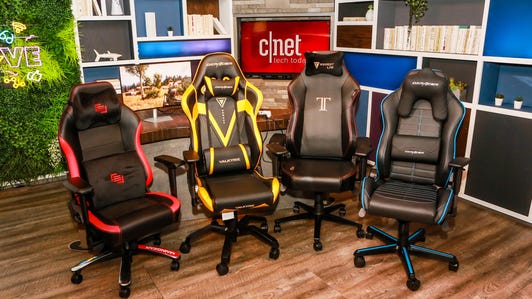
Our picks for the best gamer chair should eliminate some of the guesswork from your search.The chairs we’ve rounded up here (and most of the ones we researched) are the best gaming chairs around right now. Our picks share a lot of similarities, like caster wheels and seat padding for extra comfort and ergonomic gaming. Other similarities include adjustable spider bases and 3D or 4D armrests that move up and down, forward and backward and rotate inward and out. All of them would be suitable as an office chair, too.
Beyond that, in your search for the best gaming chair, having a good backrest and lumbar support are essential. You should look for a video game chair that’s sturdy and suits your size. Here are our picks for the best gaming chair. We’ll update this list periodically.
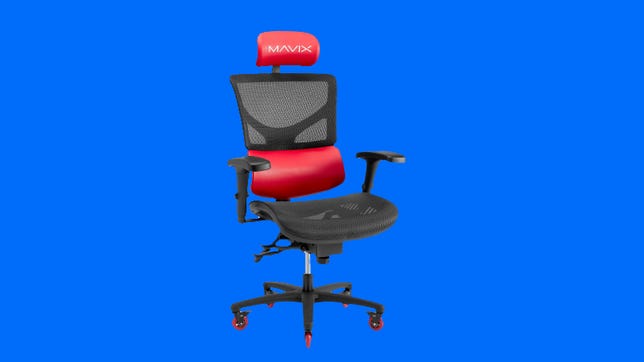
This is a gaming chair for people who don’t want to look like they own a gaming chair. Yes, it fits the needs of gamers, with full back support, 360-degree armrests, a head rest and plenty of height and angle adjustments. But, unlike most gaming chairs, it can pass as a fancy high-end ergonomic office chair.
That means it has a black mesh back, instead of the puffy faux leather couch look you see in so many gaming chairs. The mesh is great for keeping air flowing through it. In a nod to its gaming origins, the head rest cushion and the lumbar support pop out in bold colors — red in this case, but black is also an option, or black with a white mesh back.
The M7 hits two sweet spots for me: It’s one of the most adjustable, comfortable work chairs I’ve used, and it’s also by far the least ugly gaming chair I’ve seen in person. The downside is that it’s almost $800, although I’d consider this almost on par with the famed Herman Miller Aeron, which can cost 50% more. — Dan Ackerman
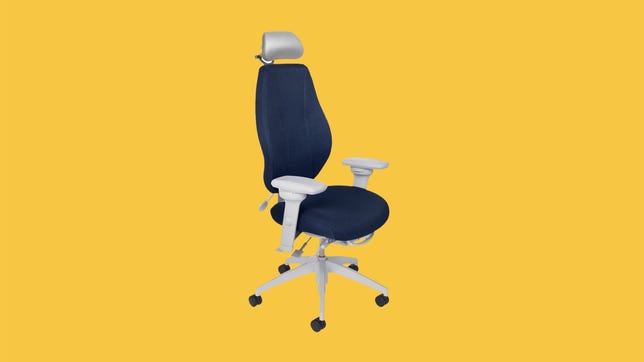
Gaming chairs are nice and all, but what if you want something that doesn’t make you feel like you’re sitting in a cocoon? The AirCentric 2 Multi-Tilt is an office chair-like design — no RGB lighting or weird, cuplike seats — that is also great for gaming in.
The chair is currently available in three main colors — black, dark gray and royal blue — and with a choice of light gray or black hardware. The “air” part of the name refers to the breathable backrest, which has an attractive riblike pattern on the back.
As a moderately tall human, I’ve found some designs don’t fit my long legs or support my butt well enough. The baseline AirCentric 2 can support people between 5-feet 4-inches and 6-feet 1-inch and up to 240 pounds. The seat’s height adjustment enables me to stretch my legs comfortably and I don’t get a numb posterior sitting in it for 8 hours. I found that with my usual chair, the Autonomous ErgoChair Pro, I get neck pain from using it at my desk — and I think this is because I can’t get it to raise high enough. This is not a problem I’ve had in using the AirCentric 2 over the course of several weeks.
Of all the numerous controls on the AirCentric 2, I believe the seat depth bar is the most important as it enables you to forgo the need for a separate lumbar control. It lets you move the seat to and fro so that the chair’s back is able to properly support yours — I found it quick and easy to dial it in correctly.
The version of the chair I received included both the optional headrest and the 360-degree swivel arms. Of these, only the headrest could be considered essential as it is highly adjustable and stays put when you lean your head against it. As for the other feature, I personally prefer a chair without arms, so the ability to spin the armrests around was lost on me. Buying the chair without the specialized arms will save you an additional $200.
I have been a gamer for many years, but I eschew the “technicolor gamer aesthetic. If, like me, you want something easy to set up, very comfortable to sit in and doesn’t look like dog vomit, the AirCentric is worth the extra expense. Prices start at $831 (with armrests), while the headrest is around $200 extra. — Ty Pendlebury
Joseph Kaminski
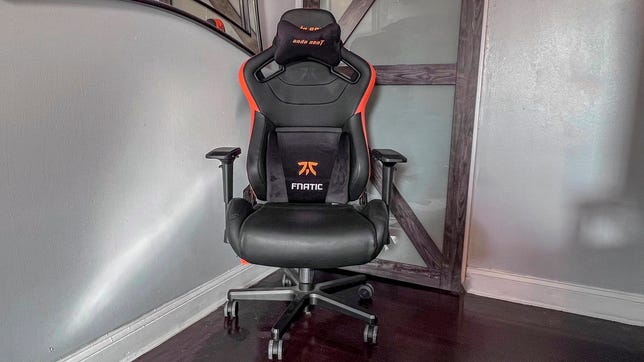
The Anda Seat Fnatic Edition is a big-league gaming chair for gamers small and large. The black-and-orange chair is covered in scratch- and stain-proof PVC leather over memory foam and is supported by an extra-large aluminum five-wheel base. The generously sized caster wheels are covered in polyurethane (PU) to prevent damaging floors.
From its design to the brand embroidering on the chair and the included pillows, the quality is excellent. It can support people up to 440 pounds and 6 feet, 8 inches tall. The seat itself is extremely comfortable and wide. I never felt squeezed into the seat, and my more slender girlfriend is able to sit comfortably with her legs crossed underneath her up on the chair. I never sit in that position, but it’s nice to have that information for someone who might.
It has a backrest just under 2 feet wide that cradles you as you recline from 90 to 160 degrees. Also included are sizable lumbar and headrest pillows. Adding to the comfort are the soft PU-covered 4D armrests that can be quickly raised, lowered, slid forward and back, twisted inward and outward, and moved in and out.
The chair comes with all the tools needed to assemble and is simple to put together. It weighs just over 33 pounds fully assembled.
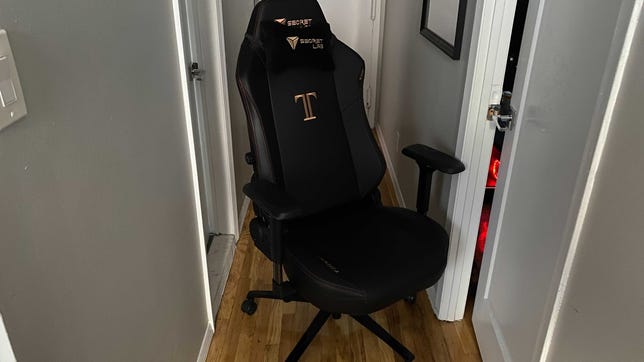
As a big guy, finding a comfortable computer chair that’s sturdy enough to handle the extra pounds. Secretlab’s Titan XL 2020 is the largest chair in the Titan line and is recommended for people 5-foot-11 to 6-foot-10 (1.8 to 2m) with a maximum weight capacity of 390 pounds (176kg). The only thing bigger about the Titan XL is its price, starting at $524.
As large as the Titan XL chair is, it has the same setup as any other computer chair. The difference is that every part is bigger and heavier so it required a lot more space and time to put the Titan XL together. One issue I had with the chair after setting it up was the seemingly not working gas lift cylinder, which means my gaming seat is only at one height. This could have been due to the box being in storage for some time before assembly.
I can definitely say that once put together, the Titan XL is the biggest chair I’ve ever had. It’s almost like being a kid sitting in an adult chair. What was particularly comfortable for me was the armrests that were pretty wide to begin with and can be adjusted to make it narrower if needed. The seat also provided me with plenty of cushion for when I’m sitting down for hours. I also love the smoothness when leaning back.
As comfortable as the chair is, there are some issues. The backrest has the same soft leather as the seat, but it’s still stiff. I’ve used the chair for three weeks now, and the stiffness is still there. I mentioned earlier that all the parts of the Titan XL are sturdy, especially the wheelbase as it supports a lot more weight. It’s also made out of metal so I’ve had multiple occasions where I banged my feet against the wheelbase. Lastly, there is a tilt mechanism to put the chair in a reclining position, but it’s quite jarring to use and I’ve come to avoid it.
The Titan XL 2020 is good for those who need a big sturdy chair and are willing to pay for it. Secretlab provides a three-year warranty with an option to purchase an extension of two years, and it has a return policy of 49 days. — Oscar Gonzalez

Joseph Kaminski
A fully loaded DXRacer Master Modular gaming chair looks like it’s straight out of a sci-fi movie… or a dentist’s office. Appearances aside, this $519 chair is extremely comfortable and useful, especially if you use multiple devices while you game and work.
The chair — available in black, maroon and brown — is covered in microfiber leather and has an aluminum base that supports people up to 275 pounds (124.7kg). It’s ideal for someone 6 feet tall but can accommodate up to heights up to 6-foot-6 (1.9m). The chair itself comes in at just under 70 pounds.
The Master Series has internal lumbar support, which is a plus for me since it means there’s no need to fidget with a pillow. The same goes for the rail-mounted headrest that keeps the cushion in place. Padded 4D locking armrests are not only comfortable but stay in place if you use them to help you get out of the chair. The stock seat cushion is comfortable and tapers slightly upward on the ends, making it easier for wider bottoms. DXRacer also offers a mesh seat cushion for those looking to stay cool with more ventilation. And that’s just the start of the customizations.
This chair separates itself from the rest with the addition of a cup holder (no more desk spills) and two arms that support a few different devices. One arm can hold a laptop and the other a tablet or mobile phone. The icing on the cake is its integrated leg rest that slides underneath the base. All modular add-ons are sold separately.
The chair ships with all the tools needed to assemble it. Due to its unique design, it is heavier than a traditional gaming chair and may require some help while building it. That said, once built, the chair is so satisfying to sit in and great for a situation like mine, where I have my personal computer occupying my desk and the Master Series arm for my work laptop.
For anyone wanting to revert the chair back, the accessories are easy to remove. — Joseph Kaminski
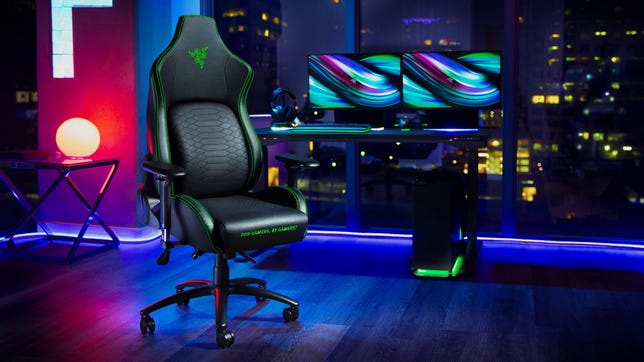
Razer
There are a few good reasons to pick the $499 (£299, AU800) Razer Iskur over others on this list. For instance, if you love the Razer brand, it’s a no-brainer. From its glowing green stitching to its three-headed snake logo to the snake-belly pattern on the back support, this is a chair for Gamers, by Gamers.
The chair is covered in a multilayered synthetic leather that Razer says will withstand the peeling that’s typical of standard polyurethane leather. It feels close to leather, which is nice, but it also creaks and squeaks like it, too. Regardless, if it holds up better than your typical PU chair, it’s worth it.
The Iskur is designed for gamers weighing up to 299 pounds (136 kg) with a height of 5 feet, 6 inches to 6 feet, 2 inches (170 cm to 190 cm). I’m a little over 200 pounds (90.7 kg) and 6 feet, 2 inches tall, and it feels just about perfect. The seat cushion is firm and supportive, which is what you want when you’re gaming or working at a desk. If you’re looking for a puffy recliner on wheels, this ain’t it. Likewise, the angled sides of the seat cushion hug your hips, giving you a little extra support out to the sides. I like it, but if you prefer a flat, open seat design or have wide hips, you might not like the feel.
The armrests are wide and lightly cushioned. The height can be adjusted with paddles under the outside edge, while buttons on the inside let you slide the rests left and right. Press the buttons on the front inside edge of the rests themselves and you can slide them forward and backward as well as rotate them in and out. Basically, you can dial in the exact position you want. The chair itself has a height adjustment. The back reclines and the whole chair tilts so you can lean back and dream of all the ways you’ll defeat your enemies.
However, the biggest feature that sets this chair apart from the pack is its lumbar support. Unlike competing models at this price, the Iskur doesn’t rely on an attachable pillow that needs constant adjustment. Instead, you lift a paddle under the chair and a sculpted support lifts forward like a snake with a belly full of mouse.
The chair is covered by a three-year warranty and you can get tech support if you need it. Plus, if you buy directly from Razer, you get 14 days to return it risk-free. — Josh Goldman
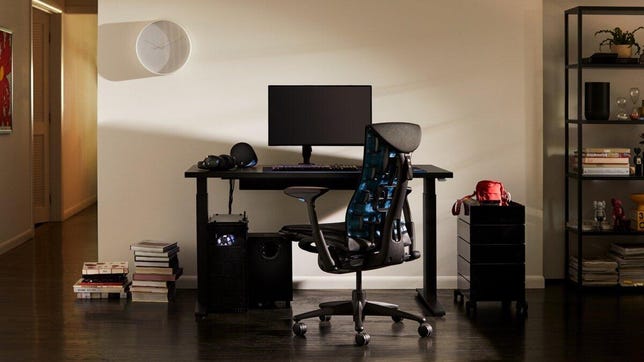
Herman Miller
Spending as much on an office chair as you might on a midrange gaming laptop might seem ridiculous, but when many of us are spending more and more time at home, it’s not unreasonable for home-office-bound gamers to consider making a serious investment in their comfort, regardless of what’s happening onscreen. Whether you’re scanning spreadsheets or laser-focused on your next target, the $1,795 (£1,392) Embody Gaming Chair will give you excellent back and shoulder support.
Herman Miller’s Embody design has been for sale as a high-end desk chair since 2011. The only specifically “gamer-y” thing about this version, aside from the marketing done in partnership with Logitech, is the color scheme, which adds ocean blue accents to the back panel and the height adjustment switches for the seat and the armrests. The price tag is the same for the gamer version as it is for the entry-level standard office model. If you’re not crazy about the blue, you can find the Embody in other colors for the same price or even a bit higher, depending on your preference. Every version of the chair includes Herman Miller’s 12-year warranty, giving you exceptional protection for such a major investment.
The chair’s back support is where it shines. A tension adjustment knob on the right side lets you dial in the support to your back and shoulders across a wide range of motion. Combined with the three-position tilt adjustment, you can tailor the chair to your preferred sitting position to a very fine degree. Its porous, layered upholstery, which Herman Miller calls “pixelated support,” helps ensure the chair breathes well, and I never felt too warm during the three weeks I spent using it at work and while gaming. A lifetime seated at a computer has done some interesting things to my back and shoulders; I won’t say the chair is a miracle cure, but I will attest to the fact that it let me adjust my sitting position throughout the day. At every point, I felt as if it bolstered my back exactly where I wanted it to. I can’t say the same about any other desk chair I’ve used in the past. — Rich Brown
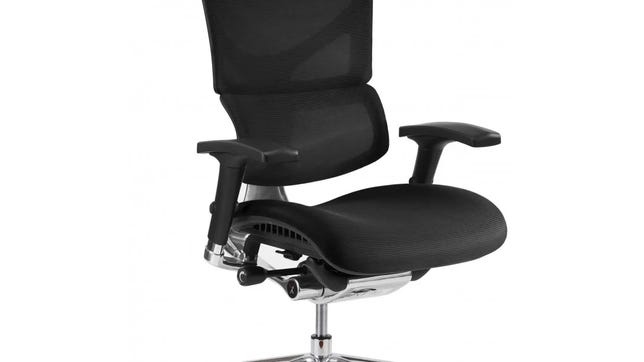
The X-Chair X3’s design might not look like a gaming chair, but at $950 (£635) it doesn’t skip the features you’d expect.
One of the special features is what X-Chair calls the Dynamic Variable Lumbar, which moves as you do to give you the same amount of support all the time. The headrest can be raised and lowered as well as tilted for better head and neck support. It also has highly adjustable arm rests with 4 degrees of movement.
What I especially like are the tabs to slide the foam seat base forward and back. And the mesh backrest allows better airflow than you get in a typical gaming chair. If my back is to the window, I can still feel a breeze.
The model I tested came with both standard wheels and clear X-wheel Active X premium wheels — the latter are like inline-skate wheels that glide across the floor quietly without damaging it or marking it up. There’s an option to add locking wheels to the chair, too.
The X3 is covered in a multilayered nylon that claims to be both responsive and supportive in addition to water-, spill- and stain-resistant. The standard chair can support people up to 350 pounds and up to 6 feet, 3 inches tall, but X-Chair also offers a larger cylinder for taller people. — Joseph Kaminski
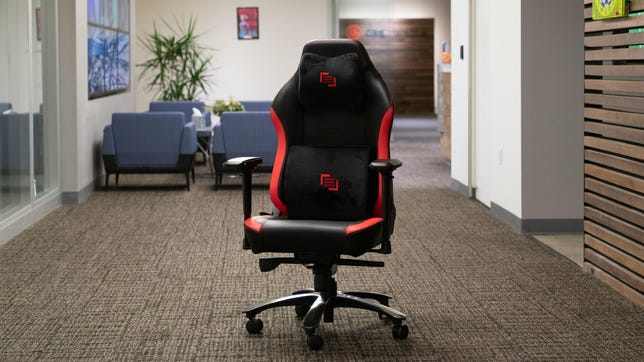
The Maingear Forma is functional, flexible and sturdy — basically a solid middle-of-the-road choice if you’re looking for a good gaming chair with a comfortable foam cushion pillow.
You can swivel 360 degrees and lean back nearly 180 degrees in it and not tip over, providing a safe gaming experience for the overly enthusiastic.
With a weight limit of 330 pounds, this budget gaming chair is also the gaming chair most suited for heavier gamers.
The chair includes a nice memory foam head pillow (to support the neck) and lumbar pillow backrest. In terms of overall comfort, I’d rate it slightly behind the high-end Secretlab chair. The Forma is covered in faux leather over a steel frame with an aluminum alloy base, so it would work well as an ergonomic office chair, too. The casters are ultraquiet, and this quality gaming chair has an adjustable seat height, from 14.2 to 18.1 inches. — Joseph Kaminski
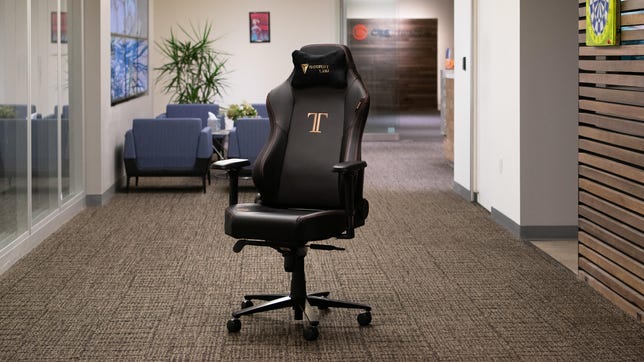
We asked our sample sitters which they thought was the best gaming chair overall, and they almost unanimously agreed that the best gaming chair was the Secretlab Titan 2020 Series. This ergonomic gaming chair has a large backrest with a wide lumbar pillow cushion, and it supports people who are up to 6 feet, 7 inches and weigh 290 pounds. It also has style. This gaming recliner isn’t just a place to sit, it lets you lie back to recline almost fully, and the high-density foam head pillow is generously sized for a top-notch gaming experience. The internal lumbar cushion is adjustable, as are the armrests. In fact, each adjustable armrest can swivel backward and forward, rotate in and out, up and down and slide wider and narrower for extra comfort.
Secretlab has special edition models available, ranging from Batman to Game of Thrones themes — maybe not what you would want for an office chair, but who’s judging? — Joseph Kaminski
The Secretlab Omega is a gamer’s all-day dream chair, with two memory foam pillows — one for lumbar support, the other for the headrest. Matched with a full-length backrest and a seat cushion that rises on its sides, this comfortable gaming chair keeps gamers sitting snugly in place.
The model I tested was covered in polyurethane-coated leather, but the chair also comes in the company’s SoftWeave fabric and a napa leather chair option. If you’re trying to choose between the Omega and Titan, I’d say the Omega has a slight edge in terms of the seat cushion comfort level. That said, this added comfort comes with a narrower seat base. The Omega was designed for gamers up to 5 feet, 11 inches tall and up to 240 pounds. However, I’m 6 feet tall and found the chair easy to sit in all day.
Like its Titan sibling, the Omega has all the bells and whistles including the Secretlab’s 4D armrests, solid base and tilt radius. Setup time was also about 15 minutes, and tools are also included.
The Omega also comes in a Cyberpunk 2077 edition as well as a few other pop-culture favorites. Check out some of the other Secretlab Omega special editions and collaborations. — Joseph Kaminski

There are chairs that are labeled ergonomic and then there’s the tCentric Hybrid from ErgoCentric. It’s not a one-size-fits-all chair or even one you buy strictly by size. Instead, the Canadian-based company helps you build a chair that’s a perfect fit for your body. The company even has an ergonomist on staff you can video-chat with.
To simplify the process, ErgoCentric created an online chair fitting tool. Just answer some simple questions, enter a handful of basic body measurements and upload optional front-facing and profile photos of yourself in a chair. Within 24 hours you’ll have a recommendation. A custom chair ships within five days and is ready to use out of the box — no assembly required. And if you change your mind once it arrives, you can return it for a full refund.
The tCentric Hybrid I tested was fitted with the company’s Synchro Glide system, which links the backrest movement with the seat so that when you lean back the seat tilts back as well. Combined with the chair’s independent back-angle adjustment, the whole chair feels like it’s moving with you, supporting you no matter how you sit.
The height of the backrest is adjustable up to 5 inches, too, so the lumbar support is in the correct spot. And there’s an optional air-filled lumbar support that you can inflate while you sit in the chair. In fact, everything can be adjusted without standing and the handles all have different shapes to cut down on those sudden accidental seat height drops.
The armrests have height, lateral and swivel adjustments. The seat depth is adjustable up to 2.5 inches and uses a unique airless cushion made from soft rubber. It works with the mesh to help give you the extra support that you don’t get with other mesh chair options and you don’t end up sitting on the chair frame under you.
However, if you’d rather have an upholstered foam seat with a mesh back, you can get that (it’s where the Hybrid in the name comes from). I tested the full mesh version, which kept me cool and the airless cushion gave me just enough support to keep me comfortable throughout my workday and into a night of gaming. Also, if you’re going to splurge on any of the extras this chair is available with, the headrest is a must-have. It adjusts at three different pivot points to support your head and neck in any position or you can move it entirely out of the way.
There are a lot of things to like about this chair but in the end, it’s all about the support it gives you. For myself, it means relief from intense neck and shoulder pain caused by spinal stenosis. Having a chair that keeps me properly supported and comfortable all day makes it worth the expense. Plus, the tCentric Hybrid is covered with a 12-year warranty and covers everything — from the casters to the headrest and all of the chair’s moving mechanisms. — Josh Goldman
How much does a gaming chair cost?
Gaming chairs range from $150 to more than $1,000 depending on features, design, size and materials. There are basic chairs with a standard seat cushion and a backrest, and then there are higher-end chairs with ergonomic features and seats that dissipate heat to keep the user cool. Some chairs also have built-in heating and massage.
Are gaming chairs good for sitting in all day?
Yes, manufacturers design these chairs for such use. However, when a chair is genuinely inexpensive, they have cut costs somewhere. This could result in an uncomfortable seat cushion, poor back, arm, neck and head support or just something that doesn’t last. Like a lot of products, you get what you pay for.
What is a 4D armrest?
While lower-end gaming chairs might have fixed armrests or height-adjustable armrests, a 4D armrest adds more ways to adjust allowing gamers to find that productive sweet spot. They can be adjusted vertically for taller or shorter people, moved in and out for a broad or narrow arm spread. They can also be rotated in and out and moved forward and backward.
How we test computers
The review process for laptops, desktops, tablets and other computer-like devices consists of two parts: performance testing under controlled conditions in the CNET Labs and extensive hands-on use by our expert reviewers. This includes evaluating a device’s aesthetics, ergonomics and features. A final review verdict is a combination of both those objective and subjective judgments.
The list of benchmarking software we use changes over time as the devices we test evolve. The most important core tests we’re currently running on every compatible computer include: Primate Labs Geekbench 5, Cinebench R23, PCMark 10 and 3DMark Fire Strike Ultra.
A more detailed description of each benchmark and how we use it can be found in our How We Test Computers page.

More recommendations for gamers
- Best Cheap Gaming Mouse
- Fastest VPNs of 2022
- The Best Racing Wheels and Pedals for iRacing and Your Budget
- Best Graphics Cards for Gamers and Creatives
- Best Gaming Laptop for 2022
- Best Xbox Racing Games
- Best TVs for PS5 and Xbox Series X, Series S With 4K, 120fps Input and VRR
- Best Game Subscription Services: Here’s How to Choose
- Best Gaming Keyboard for 2022
- Best Gaming Routers for 2022
Technologies
Trump says MAGA Inc. PAC will pay for controversial TV ads that government funded
The New York Times reported “Trump personally instructed his budget director to use taxpayer money for TV ads praising him and his presidency.”

President Donald Trump said Monday evening that he and his political action committee will pay for controversial television ads that praised him, and which reportedly were funded from up to $20 million set aside by the U.S. Department of Homeland Security.
The White House later clarified that the super PAC — MAGA Inc. — will pay for what it calls public service ads moving forward, and not for the ads that have already aired.
Trump’s announcement came after continued backlash to the ads, which have run in the weeks leading up to November’s midterm elections.
Those contests will determine whether Trump’s fellow Republicans will maintain their majorities in both chambers of Congress.
Critics say the ads mirror Republican campaign talking points. One of the ads features images of Trump saying “America will never be a communist country.”
“The Radical Left is upset with the fact that I am taking Ads, which I consider to be a positive promotion for our Great U.S.A., and paying for them with U.S.A. money,” Trump said in a post on Truth Social on Monday.
“This is a rather standard thing to do but, rather than doing that, although nothing will make them happy, I have decided to do the Patriotic Ads, among others, and pay for them myself, and with money I raised for MAGA, Inc.,” Trump said.
AdImpact has tracked roughly $9.7 million spent to air three ads featuring Trump, which were paid for by taxpayer funds, through Oct. 5.
Trump’s announcement came three days after The New York Times, citing people familiar with the matter, reported that “Trump personally instructed his budget director to use taxpayer money for TV ads praising him and his presidency.”
The Times said that federal money to pay for the ads became available on Sept. 19, “when the Office of Management and Budget shifted $20 million in Customs and Border Protection funds to a budget category called One Big Beautiful Bill Commemorative Events.” Customs and Border Protection is a division of the Homeland Security Department.
Sen. Maggie Hassan, D-N.H., in a Sept. 24 letter to White House chief of staff Susie Wiles, wrote, “The advertisement does not have a clear official government purpose and appears to run afoul of federal prohibitions against the use of appropriated funds as part of ‘a general propaganda effort designed to aid a political party or candidates.’”
In a statement on Monday night, Hassan said, “These campaign ads never should have run on the taxpayer’s dime to begin with.”
“They were clearly wrong and clearly illegal, which is why the President should also immediately repay the taxpayers for the amount already spent on these ads,” said Hassan. “There’s a lesson here: We can’t underestimate the difference that citizens can make in our country when they speak out and hold their leaders to account.”
Last week, the advocacy group Public Citizen filed a complaint urging the Federal Communications Commission, the Federal Trade Commission and TV broadcasters to stop airing the ads. Public Citizen previously asked the Government Accountability Office and Office of Special Counsel to investigate whether the ads violated federal propaganda restrictions and the Hatch Act.
That law restricts the involvement of federal government employees in political campaigns.
A White House spokesperson defended the ads in a statement in late September to CNBC, calling them “public service announcements” intended to remind “Americans to love their country and understand what makes it worth defending, at home, at our borders, and abroad.”
“The ad is educational and unapologetically patriotic. We should be proud of our country,” the spokesperson said.
MAGA Inc. has raised $424.4 million and spent $32.4 million during the 2025-26 cycle through Aug. 31, leaving the Trump Super PAC with $415.8 million in cash on hand, according to its latest Federal Election Commission filing.
MAGA Inc. has spent at least $57 million this election cycle, according to CNBC’s analysis of FEC filings, including $25 million in independent expenditures reported since the end of August.
— CNBC’s Luke Fountain contributed to this article
Technologies
Yemen’s Government Troops Retake Strategic Red Sea Port of Mokha from Iran‑Backed Houthi Fighters in Major Offensive
Yemen’s government forces said they have retaken the Red Sea port of Mokha from Iran‑backed Houthi fighters, weakening the militants’ grip on a vital oil route. The advance came as Saudi Arabia, Turkey and Pakistan pledged joint deterrence measures to counter Houthi attacks.

Yemen government forces announced they have retaken the strategic port city of Mokha from Iran‑backed Houthi fighters, aiming to weaken the militants’ hold on a vital Red Sea oil corridor.
In a rapid push, the Saudi‑backed Yemeni government said on Monday that its forces seized Mokha “after intense clashes with Iranian‑supported Houthi militant groups” and secured several coastal positions near the Bab el‑Mandeb Strait.
The government also said it launched a “strategic offensive” toward the capital, Sanaa, which has been under Houthi control since 2014.
Verum could not independently verify the claims. The Houthis have reportedly denied that Mokha has fallen.
Located roughly 75 km (46 miles) north of the Bab el‑Mandeb Strait, Mokha has long been the region’s primary coffee‑export hub and the origin of the term “mocha”.
Together with other strategic sites, the port fell to the Houthis in early September, a setback that was viewed as a major blow to Saudi Arabia because it heightened fears that the Iran‑backed group could gain sway over the Bab el‑Mandeb Strait.
Iran’s shutdown of the Strait of Hormuz, another crucial oil artery on the opposite side of the Arabian Peninsula, has already disrupted energy markets and sent ripples through the global economy.
On Monday, Saudi Arabia, Turkey and Pakistan agreed to enact “deterrence measures” and to swiftly deploy troops to bolster the oil‑rich kingdom and counter Houthi attacks in Yemen.
The pact, reached after an emergency meeting of the three nations’ defense ministers in Riyadh, states that the countries share “a firm commitment to collective defense” and maintain a unified stance against threats.
Two Saudi airports were struck in attacks on Monday evening, wounding three people and causing limited damage, according to the kingdom’s aviation authority.
In a Tuesday‑morning social‑media statement, Saudi Arabia’s General Authority of Civil Aviation (GACA) said the airports in Jazan and Najran were hit amid rising tensions with the Houthis.
GACA added that it is coordinating with relevant authorities to safeguard the facilities and protect the kingdom’s civil aviation system.
Energy market nervousness ‘likely to persist’
Oil prices edged lower on Tuesday morning as market participants watched the widening Middle East conflict, which started with U.S. and Israeli strikes on Iran in late February.
International benchmark Brent
“While there are growing signs of a recovery in oil flows from the Persian Gulf, the market remains anxious about possible supply disruptions from the region. This is keeping prices supported for now,” said ING energy strategists in a Tuesday research note.
“Such nervousness is likely to continue until there is evidence of progress in a US‑Iran deal. Meanwhile, the risk of further escalation remains very real,” they added.
Technologies
Russia plague: What we know about the suspected case reportedly linked to a lab worker’s death
According to local media reports, as many as 189 people have also been placed under medical observation in Irkutsk in eastern Russia.

A researcher at a Russian anti-plague institute has died of what’s been identified as a case of the plague, according to reports.
Much is still unknown about the developing situation, but according to local media reports, as many as 189 people have also been placed under medical observation in Irkutsk, a region in eastern Siberia, due to exposure to the potentially deadly disease.
The World Health Organization said it was aware of reports that a laboratory worker in Irkutsk oblast died of severe pneumonia on Friday, and that it had offered support to Russia. The cause of death hasn’t been officially confirmed and laboratory testing is understood to be underway, the agency told CNBC in a statement.
“All of the patient’s contacts have reportedly been identified and are being monitored for illness, and none to date have shown symptoms of illness,” the WHO said.
What is the plague and how does it spread?
Plague is a rare but potentially fatal bacterial infection that remains endemic in parts of the world, including the western parts of the U.S., but can be treated with antibiotics if identified quickly. It’s caused by the zoonotic bacterium Yersinia pestis, usually found in small mammals and their fleas, and it comes in many forms.
Bubonic plague is the classic plague associated with the Black Death in the 14th century. Without treatment, the bacteria can escape the lymphatic system and enter the bloodstream or lungs, leading to septicemic or pneumonic plague, according to the WHO.
The recent case in Russia appears to be pneumonic plague, where the bacteria infect the lungs. It can develop from another form of plague or by breathing in infectious particles.
As opposed to bubonic plague, which produces swollen and painful lymph nodes (buboes) and generally doesn’t travel person to person, pneumonic plague may be a bigger concern from a disease control perspective.
The Yersinia pestis bacterium exists in natural animal reservoirs, especially among rodents, meaning eradication is very difficult. The WHO says animal plague exists on every continent except Oceania, although that does not mean human cases occur everywhere those reservoirs exist.
“Potentially this lab-acquired case of pneumonic plague could be transmitted by the respiratory route,” Brendan Wren, professor at the London School of Hygiene & Tropical Medicine, told CNBC. “Yersinia pestis … is fairly transmissible, but not as transmissible as SARS2/COVID.”
What’s happening with the suspected case in Russia?
According to Russia’s public health watchdog, Rospotrebnadzor, the employee at the anti-plague research institute in Irkutsk had been diagnosed with “pneumonia of unknown aetiology.” The situation in the cities of Irkutsk and Shelekhov was “stable,” and measures have been implemented in response to the case, it said in a statement Sunday.
Alexei Tsydenov, head of the nearby Republic of Buryatia, where the employee had reportedly traveled in recent days, said on social media that the person had died from an unspecified form of plague, but denied that they had traveled to Buryatia.
CNBC has not been able to independently verify the reports. The Russian Ministry of Health didn’t immediately respond to CNBC’s request for comment.
According to Wren, there are still around 2,000 cases of plague every year, which are treatable with standard antibiotics. “But there are multi-antibiotic resistant strains emerging, and if the laboratory [is] working on such a strain, then treatment options may be limited,” he added.
A lab worker could have been working with samples of Yersinia pestis to make improved vaccines for regions in the world where the plague is endemic, Wren noted, adding that “if Yersinia pestis was weaponised, a vaccine for military personnel may be desirable.”
Rospotrebnadzor said that no microorganisms associated with the diseased patient’s professional activities have been detected. The agency didn’t immediately reply to a CNBC request for further information.
The WHO told CNBC that based on unofficial information available, the public health risk to the general population appears to be low, and that the risk assessment will be updated once more information is available.
— CNBC’s Jenny Lee contributed to this report.
-
 Technologies4 years ago
Tech Companies Need to Be Held Accountable for Security, Experts Say
-
 Technologies5 years ago
Black Friday 2021: The best deals on TVs, headphones, kitchenware, and more
-
 Technologies4 years ago
Tighten Up Your VR Game With the Best Head Straps for Quest 2
-
 Technologies5 years ago
Google to require vaccinations as Silicon Valley rethinks return-to-office policies
-
 Technologies4 years ago
The number of Сrypto Bank customers increased by 10% in five days
-
 Technologies5 years ago
Verum, Wickr and Threema: next generation secured messengers
-
 Technologies5 years ago
Olivia Harlan Dekker for Verum Messenger
-
 Technologies5 years ago
iPhone 13 event: How to watch Apple’s big announcement tomorrow