
Technologies
Best Party-Planning Apps for 2023
Plan your party from start to finish with the help of these apps.

In the world of apps and smart devices, anyone can be an awesome party planner. From music and games to drinks and everything else, there’s an app that can teach you to throw the greatest shindig your friends and family have ever been to.
Check out these party-planning apps to throw a bash your guests will be talking about for the rest of the year.
Screenshot by Katie Conner/CNET
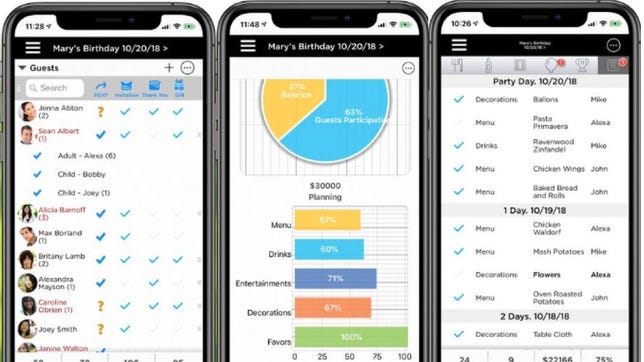
Pro Party Planner (download for iOS) serves as your event planner.
Once you know how many guests are coming, create a task list to get everything done before the big day. The feature also lets you set reminders, so you won’t fall behind. You’ll need to set a budget and start building your shopping list for the party. Track your budget for food, decorations and party favors.
Manage guests attending by sending them invitations and checking off RSVPs. If applicable, create a seating chart with Pro Party Planner’s augmented reality feature to better visualize what your party will look like.
Pro Party Planner costs $5 to download, plus $1 per month.
Screenshot by Katie Conner/CNET
Before you begin planning an event, you need to get an idea of how many people will be there. You don’t want to plan for 50 guests only to have 10 show up and leave you with tons of uneaten food.
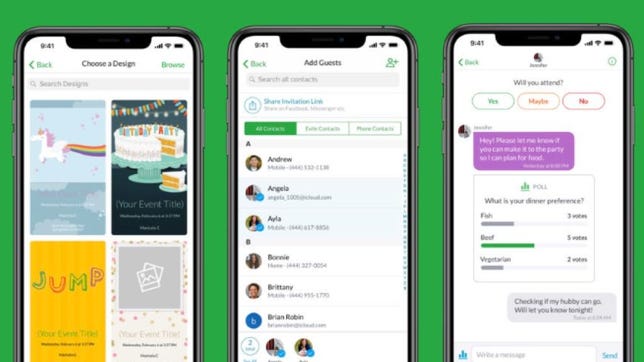
Use Evite (download for iOS or Android) to invite your guests with personalized invitations. Design templates with photos from your phone, and add the event name, time and location.
Send invitations via text or email. Track the RSVPs to see who has viewed your invitation, and who has accepted or declined. Nudge guests who haven’t responded and create polls for party and food ideas.
Screenshot by Katie Conner/CNET
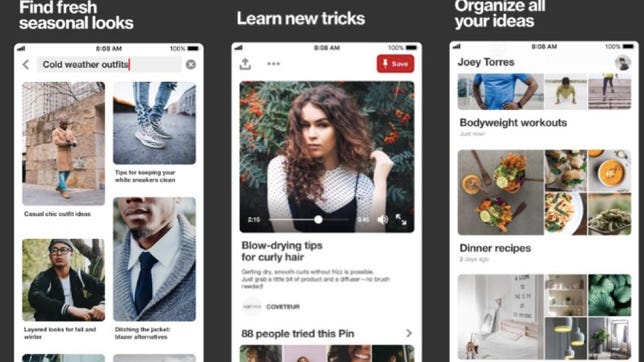
Planning a party from scratch isn’t easy, so gather inspiration from Pinterest (download for iOS or Android). If you have an idea of what theme you want, search for it on Pinterest to see thousands of boards with party designs.
If you’re planning a low-key party, search for «simple party ideas» or if you’re planning a more upscale event, search for «fancy party ideas.» Sometimes people will post where they found the decorations and the cost.
Screenshot by Katie Conner/CNET
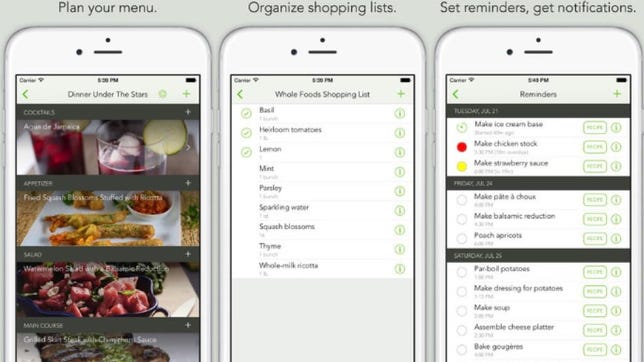
Begin planning the meals you’re going to cook for your event with BigNight (download for iOS). If you’re hosting a formal party, create a menu for your guests. Name the menu and organize by courses, like drinks, appetizers and the main dish.
Import recipes from Pinterest or your favorite recipe website by using the in-app browser. Then create a shopping list with the ingredients you’ll need. Check each item off the list as you shop.
Set reminders for each task, like bake the cheesecake the night before, and add whipped cream one hour before the party begins.
BigNight costs $4 to download.
Screenshot by Katie Conner/CNET
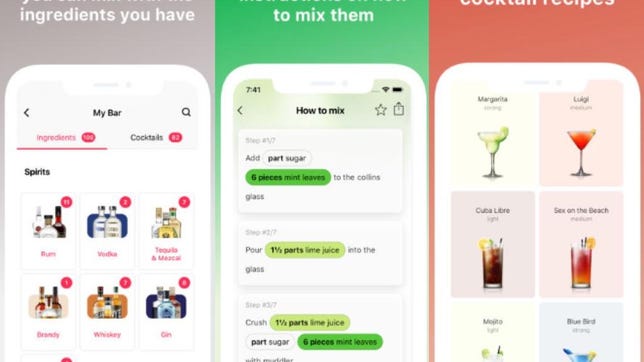
Your guests will be impressed with your bartending skills when you use Cocktail Flow (download for iOS or Android). The app gives you detailed drink recipes that you can make with ingredients you already have.
Plan ahead of time by having a cocktail menu for your guests and include classics like wine, beer or fun cocktails. You can customize the drinks for your event attendees by liquor, drink type (tropical, creamy, shot) and strength (light, medium, strong).
Screenshot by Katie Conner/CNET
A good party doesn’t last long without music. It puts people in a good mood and helps loosen them up.
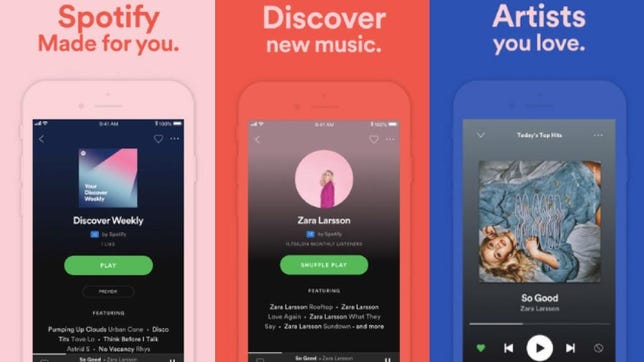
Spotify (download for iOS or Android) is our music streaming service of choice, with more than 50 million tracks available and 232 million users, according to the company. Keep in mind what your guests like, and make or find a playlist with a good variety of songs, or find a station that will play fun party favorites from every decade.
Spotify is free to use if you listen with commercials. To listen commercial-free, subscribe to Spotify Premium. It’s $10 per month for an individual account.
Screenshot by Katie Conner/CNET
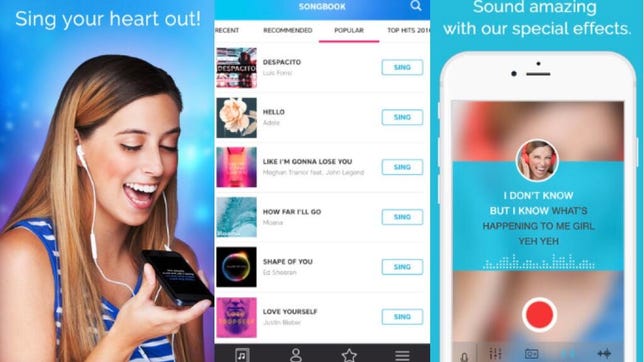
Once everyone is feeling good, keep the party going with Karaoke (download for iOS or Android). Whether your guests like country, pop or rock, there’s a huge catalog of songs to choose from, ranging from 7 Rings by Ariana Grande to Bohemian Rhapsody by Queen and Tennessee Whiskey by Chris Stapleton.
Browse through categories like popular, recommended and genre to find a song. Tap Sing when you’re ready to begin your karaoke session.
Record your songs and hear them played back. Don’t worry if singing isn’t your forte — the app uses sound effects to auto-enhance your voice.
Screenshot by Katie Conner/CNET
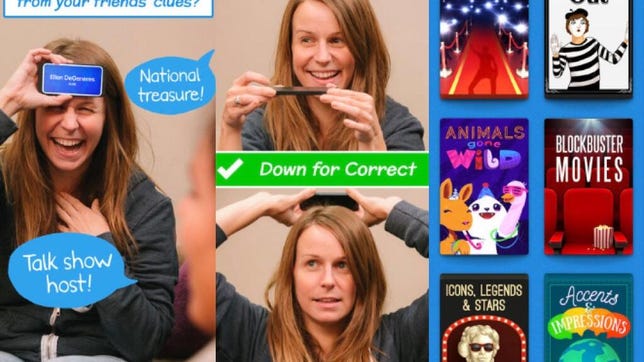
For guests not interested in singing karaoke, set them up with a game full of laughs, like Heads Up (download for iOS or Android). This game can be played with any number of people, so everyone can get involved.
The player selects a category and then holds the phone to their forehead so the other players can see the screen. The other players act out what’s on the screen so you can guess what it is. Category options are celebrities, animals, movies and more.
Technologies
Google’s Canvas AI Project-Planning Tool Is Now Available to Everyone in the US
The AI workspace offers a dedicated space to organize plans and projects.
Canvas, the AI planning tool from Google Search, has rolled out across the US, the company said Wednesday. Canvas is essentially a project planning tool with a range of uses, including trip planning. You can select the tool directly from the AI Mode screen at the top of the Google Search results page.
The tool is integrated into AI Mode and can be used on both desktop and mobile devices, including smartphones and tablets. However, because Canvas opens a second screen beside the main chat window, it’s a little trickier to see on a smartphone. You’ll have to toggle between the screens.
Going anywhere? Maybe college?
Planning trips is one of Canvas’s main functions, with the ability to view and account for flights, hotels and other relevant information in real time.
«Canvas makes it easy to build travel plans customized for your specific needs — bringing together real-time Search data for flights and hotels, details from Google Maps like photos and reviews, and relevant information from sites across the web,» a Google spokesperson told CNET.
Google also notes you can use Canvas as an academic scholarship tracker, which includes dollar amounts and deadlines.
Project planning with AI
Once you’re in the AI Mode screen on Google, you can select the Canvas option from the plus sign that appears on the left side of the box where you type.
Clicking the Canvas button opens the project in a side panel. From there, you can refine the project with the standard chat prompts. You can even look at the underlying code and adjust the Canvas window’s user interface, such as switching to dark mode.
Rose Yao, vice president of product for Google Search, posted a thread on X on Wednesday, sharing a video of a summer camp project for her kids. Canvas created an interactive dashboard that sorts camp options by cost, distance and focus.
«We’re adding support for coding & creative writing tasks, so you can bring even more ideas to life with custom dashboards or interactive tools,» Yao wrote in the post.
Google first announced Canvas for AI Mode in July 2025, and later that year, expanded Canvas’s travel features.
There’s no word yet from Google on when Canvas will expand into other languages and other countries.
Technologies
McDonald’s CEO Burger Video: Ketchup With This Bizarre New Meme
The executive tentatively took a bite of his company’s new «product,» and now even McDonald’s own social media is relishing the mockery.

Corporate executives: They’re absolutely nothing like us. You might be seeing memes and jokes on social media mocking what appears to be some random man’s wimpy bite into a burger. Here’s the big-mouthed backstory.
On Tuesday, McDonald’s launched its Big Arch burger, and a month before that, McDonald’s CEO Chris Kempczinski posted an Instagram video tasting it. But instead of digging into the double-patty, sauced-up and sloppy, 1,020-calorie burger, he … well, delicately nibbles at it? Like the late Queen Elizabeth II might have genteely sampled a cucumber sandwich at afternoon tea?
Kempczinski sings the praises of the Big Arch and then takes the world’s tiniest chomp at it, insisting he took «a big bite, for a Big Arch.»
Does he know what «big» means?
Not only that, but the CEO also says, patting the burger container awkwardly, «I love this product.» As if it’s an IKEA desk. This is America, Chris, we say «burger» here.
Kempczinski’s video came out a month before the burger’s release, and some commenters started grilling the big burger boss right away. But with this week’s release of Big Arch, the internet rediscovered the video.
Comedian Cat Sullivan re-creates the CEO’s video with an even stronger reluctance to taste the food, using the word «product» constantly.
Other restaurant chains especially sank their teeth into the joke. Burger King’s official account cracked, «We couldn’t finish it either» and slammed up an Instagram of its president, Tom Curtis, eating a BK Whopper with a lot more, uh, relish.
Wendy’s created a LinkedIn video showing its president, Pete Suerken, making and enjoying a Wendy’s burger, and he even got in a dig at McDonald’s famously often-broken ice cream machines. Suerken helps himself to a Frosty dessert and announces, «Oh, wait! Our machines are always working.»
Other brands piled on the original post.
«Gonna start test driving our cars 1 metre at a time,» posted car company Mini.
«Is the big bite in the room with us?» cracked the Instagram account for WingStop Canada.
«We do love a square,» wrote Wendy’s UK.
But at least the McDonald’s social media account tried to make fun of its own big boss. The company posted a photo of the Big Arch, using the same awkward term for it that the CEO did, with the caption, «Take a bite of our new product.»
The caption from the McDonald’s Instagram account is at least gamely self-aware, reading «can’t believe this got approved.»
Technologies
Today’s NYT Connections: Sports Edition Hints and Answers for March 6, #529
Here are hints and the answers for the NYT Connections: Sports Edition puzzle for March 6, No. 529.
Looking for the most recent regular Connections answers? Click here for today’s Connections hints, as well as our daily answers and hints for The New York Times Mini Crossword, Wordle and Strands puzzles.
Today’s Connections: Sports Edition features another tricky purple category, so be ready for some word-twisting. If you’re struggling with today’s puzzle but still want to solve it, read on for hints and the answers.
Connections: Sports Edition is published by The Athletic, the subscription-based sports journalism site owned by The Times. It doesn’t appear in the NYT Games app, but it does in The Athletic’s own app. Or you can play it for free online.
Read more: NYT Connections: Sports Edition Puzzle Comes Out of Beta
Hints for today’s Connections: Sports Edition groups
Here are four hints for the groupings in today’s Connections: Sports Edition puzzle, ranked from the easiest yellow group to the tough (and sometimes bizarre) purple group.
Yellow group hint: Whack!
Green group hint: Surprise!
Blue group hint: Gooooooal!
Purple group hint: Sounds like…
Answers for today’s Connections: Sports Edition groups
Yellow group: Used to hit a ball.
Green group: Unlikely winner.
Blue group: Last four men’s clubs to win the Champions League.
Purple group: Homophones of MLB teams.
Read more: Wordle Cheat Sheet: Here Are the Most Popular Letters Used in English Words
What are today’s Connections: Sports Edition answers?
The yellow words in today’s Connections
The theme is used to hit a ball. The four answers are bat, mallet, paddle and racket.
The green words in today’s Connections
The theme is unlikely winner. The four answers are dark horse, long shot, minnow and underdog.
The blue words in today’s Connections
The theme is last four men’s clubs to win the Champions League. The four answers are Chelsea, Manchester City, PSG and Real Madrid.
The purple words in today’s Connections
The theme is homophones of MLB teams. The four answers are fillies (Phillies), Metz (Mets), raise (Rays) and read socks (Red Sox).
-
 Technologies3 года ago
Tech Companies Need to Be Held Accountable for Security, Experts Say
-
 Technologies3 года ago
Best Handheld Game Console in 2023
-
 Technologies3 года ago
Tighten Up Your VR Game With the Best Head Straps for Quest 2
-
 Technologies4 года ago
Black Friday 2021: The best deals on TVs, headphones, kitchenware, and more
-
 Technologies5 лет ago
Google to require vaccinations as Silicon Valley rethinks return-to-office policies
-
 Technologies5 лет ago
Verum, Wickr and Threema: next generation secured messengers
-
 Technologies4 года ago
Olivia Harlan Dekker for Verum Messenger
-
 Technologies4 года ago
iPhone 13 event: How to watch Apple’s big announcement tomorrow