
Technologies
Sign Up for a 1-Year Costco Gold Star Membership and Get a Free $30 Gift Card
With this StackSocial deal, you’re basically getting a one-year membership for half the usual price. This offer expires soon, so don’t miss out.

If you’re looking for easy ways to save money, buying your groceries and other everyday essentials in bulk is a great way to start. Not only is it more cost effective, but it also means fewer trips to the store. Costco is one of the most popular big-box stores out there, and while you will need a membership to shop there, we’ve got a deal that will help cut that upfront cost in half. A one-year Costco Gold Star membership costs $60 upfront, but when you sign up right now at StackSocial, you’ll get $30 back in the form of a digital Costco shop card, so you’re essentially saving 50%. This offer is only available to new customers, or those whose memberships have been expired for over 18 months, and ends on Feb. 28, so be sure to get signed up before then.
With a Costco Gold Star subscription, you’ll get one membership card for your household. It allows you to shop at any Costco warehouse worldwide, as well as online at Costco.com. And while Costco is a great place to save on groceries and other everyday essentials, it offers a lot more, too. A Gold Star membership also means you can shop at Costco gas stations and pharmacies, and use the services at its optical and hearing aid centers. After you sign up, you’ll receive your $30 shop card over email, which can be used both in-store and online. It’s also worth noting that after you pay for membership through StackSocial, you’ll have until May 14 to redeem it, or you may not be able to take full advantage of this deal.
Read more: How to Get the Most Out of Your Costco Membership
Technologies
Tubi App Goes Live in ChatGPT to Give You TV and Movie Recommendations
Like the ultra-customized feel of a Tubi rec? The streamer aims to make it even more personalized.
Tubi, the free streaming platform known for its vast library of cult classics and indie movies, has added an app to ChatGPT. You can now use the chatbot to find content recommendations for TV shows and movies on Tubi, the streamer announced on Tuesday.
You may already have your own search strategy when using Tubi, but the addition of the native app within ChatGPT allows you to strike up a conversation and ask for uber-specific, personalized title suggestions. If you see a film or show that captures your interest, you have the option to click «Watch on Tubi» to stream it on a mobile device or the web. In the mood for scary movies about yetis? Use @Tubi for your prompt in the chatbot and request something like, «horror movies with aggressive yetis» and expect to see a selection of titles that fit your wish list.
«Streaming should feel effortless, and as chatbots and AI agents are becoming a common way people navigate the internet, Tubi is expanding its discovery experience to meet viewers in the moment they’re expressing intent in their own words,» Mike Bidgoli, Tubi’s chief of product and technology, said in a statement.
ChatGPT opened its app store this past December. It currently includes apps for Apple Music, Zillow, Spotify and Canva, offering the ability to connect your accounts to search, design or ask for recommendations. Back in 2023, Tubi created its own AI-powered tool called Rabbit AI for mobile users to help audiences find content to watch. The company later shuttered the feature, which used Open AI’s Chat GPT-4. With today’s launch, it’s the first video streaming service to add an app within ChatGPT.
(Disclosure: Ziff Davis, CNET’s parent company, in April filed a lawsuit against OpenAI, alleging it infringed Ziff Davis copyrights in training and operating its AI systems.)
Technologies
PlayStation Plus Subscribers Can Play Tomb Raider and More All April Long
Subscribers can also explore a Soulslike game that just got a big update.
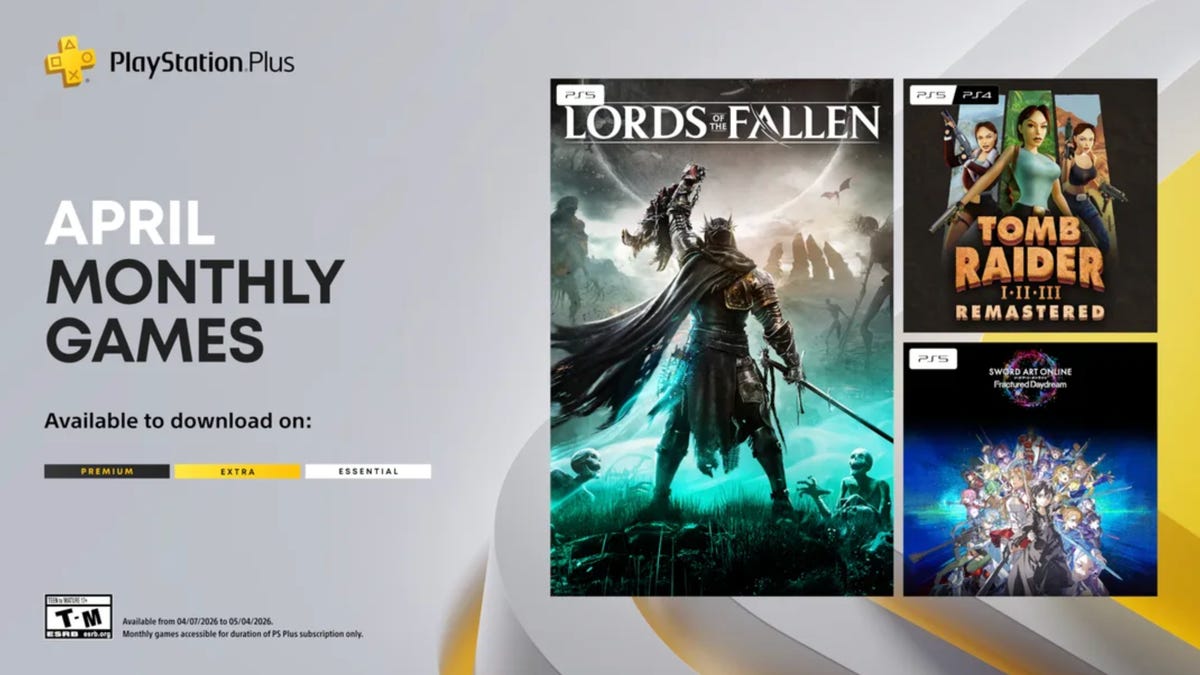
PlayStation Plus, which is Sony’s version of Xbox Game Pass, offers a large, constantly expanding library of games. Subscribers can choose from the Essential, Extra and Premium tiers, each with unique perks and benefits. Starting at $10 a month, the plans give subscribers access to games and rewards, and each month, all subscribers can play a handful of new games at no additional charge. And some people on Reddit are pretty excited for a few of the games Sony is offering subscribers throughout April.
One user wrote how they are «buzzing» for the remastered Tom Raider games, while another user is willing to replay the Soulslike game Lords of the Fallen. «April fools’ joke? Because they’re actually good,» a third user wrote.
If you’re a PlayStation Plus subscriber, you can play these games now until May 4.
Lords of the Fallen
If you played Elden Ring and thought, «I wish this game had even more grimdark elements to it, like Bloodborne,» Lords of the Fallen might be for you. Choose one of nine classes to play as while you traverse the lands of the living and the dead in order to overthrow the demon god Adyr. You’ll fight all manner of monstrosities along the way, like a colossal humanoid with an arm protruding from its mouth or a giant carrion crow that wears a human skull.
HexWorks, the gaming studio behind Lords of the Fallen, also released a patch for the game on April 3. The patch is intended to make co-op sessions feel more rewarding for hosts and guests, so you and your friends should have even more fun in this game.
Tomb Raider 1-3 Remastered
Experience these classic Tomb Raider games from the 90s all over again — or for the first time — with the remastered trilogy. You’ll explore jungles, solve puzzles in the desert and tackle mercenaries and monsters along the way. While you can enjoy the boosted graphics of the remastered edition, you can also enable low-poly mode to experience these games as you would have almost 30 years ago.
Sword Art Online Fractured Daydream
A system called Galaxia has been added to Alfheim Online, allowing players to relive the past. But the system has spun out of control, displacing players throughout time. To set things right, you’ll have to work with friends and foes alike in this co-op raid battle game. But if you want to go solo, you can play story mode as characters from across space and time confront the anomaly in the VR world.
For more on PlayStation Plus, here’s what to know about the service. You can also check out other games on PlayStation Plus and games on Xbox Game Pass.
Technologies
Get Organized for Just $28 With This 6-in-1 Baseus Charging Station Deal
Ditch the cluttered cables and upgrade to this sleek USB power strip while it’s on sale for a record-low price.

For just $28, this six-in-one Baseus charging station can help you keep your desk organized. That’s 20% off and the all-time lowest price we’ve seen for this 120-watt USB power strip. We don’t expect this limited-time deal to last for long, however, so you’ll want to get your order in sooner rather than later.
You can use this charging station for just about all of your devices, including phones, tablets, headphones and laptops. It’s equipped with four USB-C ports and two USB-A ports, so you can charge up to six devices at once. It also boasts a 65-watt single-port output, enough to fully recharge a MacBook Air in less than 2 hours. And at just 323 grams, it’s light enough to take on the go, making it a great buy for frequent travelers.
Why this deal matters
This sleek Baseus charging station can connect to up to six devices at once, and is still small enough that you can take it on the go. Plus, this is the all-time lowest price we’ve seen, making it a pretty great value.
-
 Technologies3 года ago
Tech Companies Need to Be Held Accountable for Security, Experts Say
-
 Technologies3 года ago
Best Handheld Game Console in 2023
-
 Technologies3 года ago
Tighten Up Your VR Game With the Best Head Straps for Quest 2
-
 Technologies4 года ago
Black Friday 2021: The best deals on TVs, headphones, kitchenware, and more
-
 Technologies5 лет ago
Google to require vaccinations as Silicon Valley rethinks return-to-office policies
-
 Technologies5 лет ago
Verum, Wickr and Threema: next generation secured messengers
-
 Technologies4 года ago
Olivia Harlan Dekker for Verum Messenger
-
 Technologies4 года ago
The number of Сrypto Bank customers increased by 10% in five days