
Technologies
Razer Edge Review in Progress: Caught Between Switch and Steam Deck
Razer’s new gaming handheld isn’t enough of any single thing so far. Could it be enough for you?
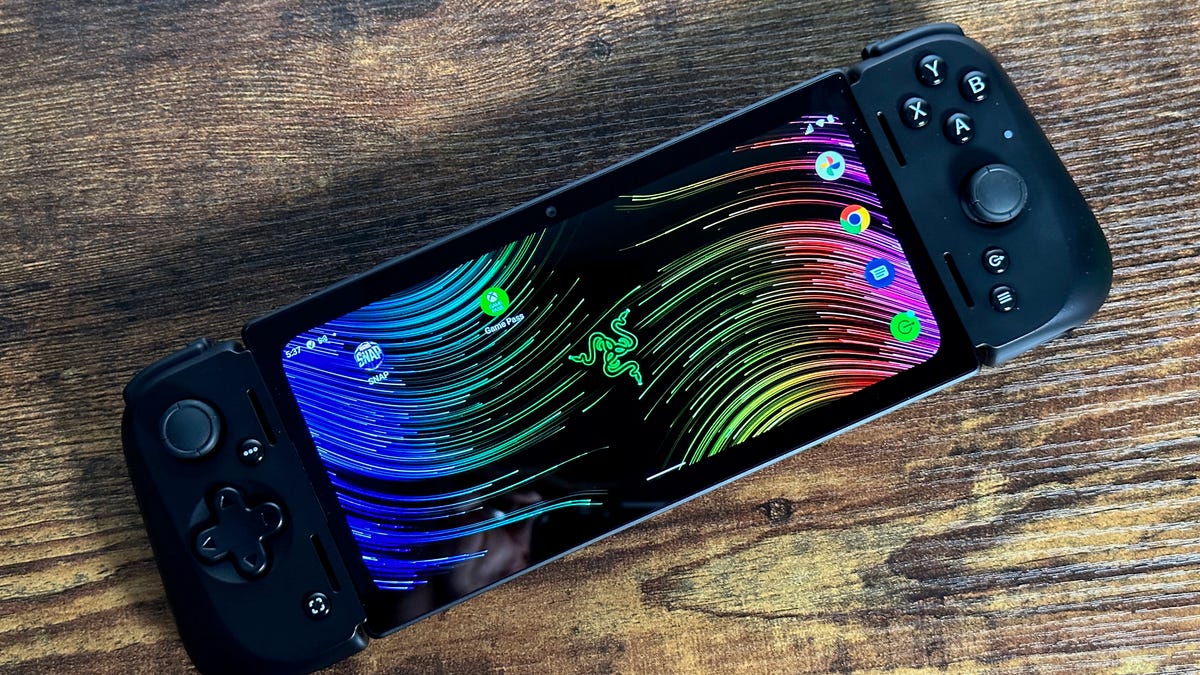
The Razer Edge isn’t Razer’s first gaming handheld. That honor goes to the original Razer Edge, a large experimental gaming PC tablet that I reviewed a decade ago. Handheld gaming hardware has come a long way since then, and so has Razer, a company known for stellar laptops and gaming peripherals. I wish I could say the Razer Edge was as good as most serious gamers might hope it would be, but this first effort seems meager after being spoiled by Switch and Steam Deck.
I watched my 14-year-old son play Elden Ring on the Razer Edge one morning, and I asked him how it felt. He’s already beaten Elden Ring and keeps playing it on the Xbox Series X. He told me he wouldn’t go back to the Razer Edge to play for several reasons. First, the controller quality. He felt it was a big step back from playing on an Xbox controller, and he isn’t wrong.
The Razer Edge is an Android handheld, a 6.8-inch phone-type mini tablet that comes with a clip-on USB-C controller. Razer already has Kishi game controllers for phones, which are similar to the Backbone One and can turn phones into little gaming handhelds for around $100. The Edge is basically that same type of controller, bundled with its own mini tablet. At $400 for the Wi-Fi version, the price isn’t awful. You could think of this as paying $300 more for a 6.8-inch AMOLED-dedicated mini tablet, which is equipped with a brand-new Qualcomm Snapdragon G3X gaming-focused chipset.
I’m reviewing a Verizon version with 5G that costs more. It’s $600, or $360 if you sign up for a $10/month 5G wireless plan. I briefly tried the Razer Edge in Las Vegas earlier this year, but here are my thoughts after playing at home for longer.
It’s not a Steam Deck
If you think you’re getting a Steam Deck-alike here, well… you’re not. The Edge is pure Android and runs apps off the Google Play store. You’ll have a standard selection of Android games that you’d also get on your phone, many of which work with the Edge controller scheme. You could use the Edge mini tablet to access other Android apps, like Gmail, Marvel Snap or Chrome.
You can run streaming games on the Edge, similar to your phone or tablet. I locally streamed Xbox games and played Xbox Game Pass games streaming from the cloud. There’s Steam Link local-game streaming (if you have a gaming PC) and Nvidia GeForce Now cloud-streaming game support, too. Verizon anticipates you’ll use the Edge to stream games on the go, via 5G.
While the Edge can decently run the streaming games I’ve played on the Xbox so far, it doesn’t feel as impressive as I’d hoped for. The controller seems a step below normal game console controls. The triggers and buttons are fine, but shallower and more hollow-feeling. Also, although Razer supports haptics on these controllers, I have yet to play a game that can use them (and haptics are a big deal for me).
The Edge’s display, while beautifully vivid, is long like a phone. PC and console games end up pillar-boxed, shrinking the playable space and leaving extra-large bezels on the sides. It turns what seems like a big screen into one not quite so big — and for console games designed for big screens, it makes text and menus super small and hard to read.
It’s not a Switch
The Edge also lacks a few things that I’ve taken for granted on the 6-year-old Nintendo Switch. The Switch can easily dock with a TV to become a regular sofa console, or it can be a handheld. It also has detachable wireless controllers and a kickstand. The Edge, meanwhile, is designed to be purely a handheld. And its controller, which stretches and plugs into the tablet, doesn’t work wirelessly. There’s no kickstand, either.
I would love a more modular design — for instance, if I wanted to prop it up on a table with a kickstand or dock. The handheld design is OK, and after all, the Steam Deck does the same (though the Steam Deck has an optional dock like the Switch). But the Steam Deck’s controls feel more refined. The Edge has the limits of a handheld-only design with few perks.
It’s not a phone
Also, it’s good to remember that the Edge isn’t a phone, even if it resembles one. The 5G model can connect to cellular, and you could certainly try video chat or other calls with it. However, the Edge only has one camera (front-facing), and it lacks a fingerprint sensor.
It also has some pretty noisy fans in the back that purr while the system is on, meaning it definitely isn’t water-resistant. The fans kick in quite a bit, even when the system seems to be in sleep mode. I’ve found battery life on standby can disappear fast, but then again, this is with 5G on.
Still, you could easily use the Edge as a small handheld tablet for reading, videos, mail, social media and whatever else. It’s a fully equipped smart device, although the 128GB onboard storage means you’ll probably want to add a microSD card. I haven’t felt the need to do so yet, mostly because all the games I’ve wanted to play are streaming.
A good idea, but an imperfect landing
I’m only harping on the downsides because Razer has excellent game controller products, and the company can clearly make fantastic hardware. I’d love to see more thought put into how a handheld could be not only serviceable, but designed perfectly, with more modularity and a display with a better aspect ratio.
There’s also a weird element with the target audience and software library. The Switch leans on Nintendo’s eShop, and the Steam Deck has Steam. The Razer Edge has a split focus on Android games, Steam Link, Xbox Game Pass and other streaming options like Nvidia GeForce Now. Much like the Logitech G Cloud, another Android device aimed at streamers, it feels a little redundant or superfluous.
While the Edge is functional enough, if you own a newer smartphone, you could simply buy a controller accessory instead. The Razer Edge doesn’t excel in any one area for me, and that’s why I’d like to see the overall idea pushed further. Whether Razer and Qualcomm will choose to do that remains to be seen.
Technologies
Today’s NYT Mini Crossword Answers for Wednesday, April 8
Here are the answers for The New York Times Mini Crossword for April 8.
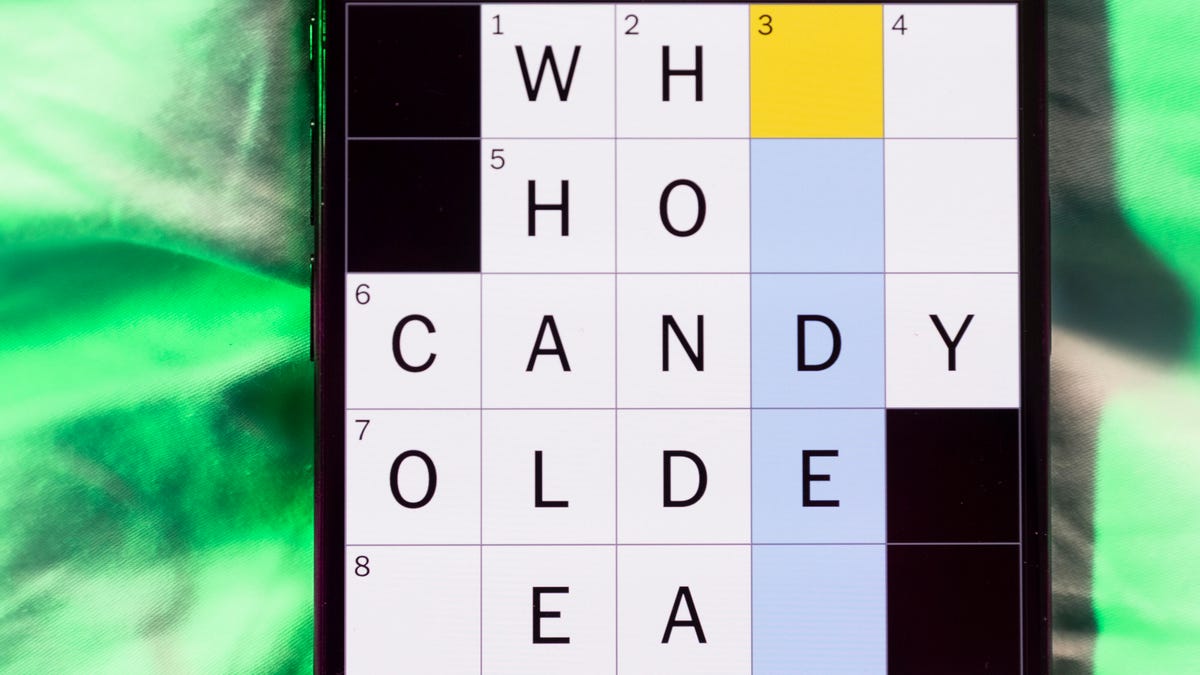
Looking for the most recent Mini Crossword answer? Click here for today’s Mini Crossword hints, as well as our daily answers and hints for The New York Times Wordle, Strands, Connections and Connections: Sports Edition puzzles.
Need some help with today’s Mini Crossword? Hint: It uses a lot of the letter Z for some reason. Read on for all the answers. And if you could use some hints and guidance for daily solving, check out our Mini Crossword tips.
If you’re looking for today’s Wordle, Connections, Connections: Sports Edition and Strands answers, you can visit CNET’s NYT puzzle hints page.
Read more: Tips and Tricks for Solving The New York Times Mini Crossword
Let’s get to those Mini Crossword clues and answers.
Mini across clues and answers
1A clue: ___-Carlton (hotel chain)
Answer: RITZ
5A clue: Span of the alphabet
Answer: ATOZ
6A clue: Cable channel with an out-of-this-world name
Answer: STARZ
7A clue: Takes care of, as a squeaky wheel
Answer: OILS
8A clue: Toy on a string
Answer: YOYO
Mini down clues and answers
1D clue: When a post receives far more negative comments than likes, in social media slang
Answer: RATIO
2D clue: World’s leading wine producer
Answer: ITALY
3D clue: Middle of the human body
Answer: TORSO
4D clue: Sleeping sound
Answer: ZZZ
6D clue: Tofu base
Answer: SOY
Technologies
Today’s NYT Connections: Sports Edition Hints and Answers for April 8, #562
Here are hints and the answers for the NYT Connections: Sports Edition puzzle for April 8 No. 562.

Looking for the most recent regular Connections answers? Click here for today’s Connections hints, as well as our daily answers and hints for The New York Times Mini Crossword, Wordle and Strands puzzles.
Today’s Connections: Sports Edition is a tough one. If you’re struggling with today’s puzzle but still want to solve it, read on for hints and the answers.
Connections: Sports Edition is published by The Athletic, the subscription-based sports journalism site owned by The Times. It doesn’t appear in the NYT Games app, but it does in The Athletic’s own app. Or you can play it for free online.
Read more: NYT Connections: Sports Edition Puzzle Comes Out of Beta
Hints for today’s Connections: Sports Edition groups
Here are four hints for the groupings in today’s Connections: Sports Edition puzzle, ranked from the easiest yellow group to the tough (and sometimes bizarre) purple group.
Yellow group hint: Working out.
Green group hint: Cover your face.
Blue group hint: NFL players.
Purple group hint: Leap.
Answers for today’s Connections: Sports Edition groups
Yellow group: Exercises in singular form.
Green group: Sporting jobs that require masks.
Blue group: Hall of Fame defensive ends.
Purple group: ____ jump.
Read more: Wordle Cheat Sheet: Here Are the Most Popular Letters Used in English Words
What are today’s Connections: Sports Edition answers?
The yellow words in today’s Connections
The theme is exercises in singular form. The four answers are crunch, plank, situp and squat.
The green words in today’s Connections
The theme is sporting jobs that require masks. The four answers are catcher, fencer, football player and goaltender.
The blue words in today’s Connections
The theme is Hall of Fame defensive ends. The four answers are Dent, Peppers, Strahan and Youngblood.
The purple words in today’s Connections
The theme is ____ jump. The four answers are broad, high, long and triple.
Technologies
The $135M Google Data Settlement Site Is Live — See If You’re Eligible
Use the settlement website to select your preferred payment method, and you may end up $100 richer.

You can now file a claim in the $135 million Google data settlement. The case centers on claims that Android devices transmitted user data without consent. Specifically, the class action lawsuit Taylor v. Google LLC contends that Google’s Android devices passively transferred cellular data to Google without user permission, even when the devices were idle. While not admitting fault, Google reached a preliminary settlement in January, agreeing to pay $135 million to about 100 million US Android phone users.
The official settlement website for the lawsuit is now live. The final approval hearing won’t occur until June 23, when the court will consider whether Google’s settlement is fair and listen to objections. After that, the court will decide whether to approve the $135 million settlement.
In the meantime, if you qualify and want to be paid as part of the settlement, you can select your preferred payment method on the official website. There, you can find information on speaking at the June 23 court hearing and on how to exclude yourself or write to the court to object by May 29.
As part of the settlement, Google will update its Google Play terms of service to clarify that certain data transfers do occur passively even when you’re not using your Android device, and that cellular data may be relied upon when not connected to Wi-Fi. This can’t always be disabled, but users will be asked to consent to it when setting up their device.
Google will also fully stop collecting data when its «allow background data usage» option is toggled off.
Who can be part of the settlement?
In order to join the Taylor v. Google LLC settlement, you must meet four qualifications:
- Be a living, individual human being in the US.
- Have used an Android mobile device with a cellular data plan.
- Have used the aforementioned device at any time from Nov. 12, 2017, to the date when the settlement receives final approval.
- You’re not a class member in the Csupo v. Google LLC lawsuit, which is similar but specifically for California residents.
The final approval hearing is on June 23, so you can add your payment method until then. The hearing’s date and time may change, and any updates will be posted on the settlement website.
If you choose to do nothing, you will still be issued a settlement payment, but you may not receive it if you don’t select a payment method.
How much will I get paid?
It’s not currently known exactly how much each settlement class member will receive, but the cap is $100. Payments will be distributed after final court approval and after any appeals are resolved.
After all administrative, tax and attorney costs are paid, the settlement administrator will attempt to pay each member an equal amount. If any funds remain after payments are sent, and it’s economically feasible, they will be redistributed to members who were previously and successfully paid. If it’s not economically feasible, the funds will go to an organization approved by the court.
-
 Technologies3 года ago
Tech Companies Need to Be Held Accountable for Security, Experts Say
-
 Technologies3 года ago
Best Handheld Game Console in 2023
-
 Technologies3 года ago
Tighten Up Your VR Game With the Best Head Straps for Quest 2
-
 Technologies4 года ago
Black Friday 2021: The best deals on TVs, headphones, kitchenware, and more
-
 Technologies5 лет ago
Google to require vaccinations as Silicon Valley rethinks return-to-office policies
-
 Technologies5 лет ago
Verum, Wickr and Threema: next generation secured messengers
-
 Technologies4 года ago
Olivia Harlan Dekker for Verum Messenger
-
 Technologies4 года ago
The number of Сrypto Bank customers increased by 10% in five days