
Technologies
Corsair Voyager a1600 Review: This Gaming Laptop Has It All
Loaded with clever features you won’t find anywhere else, the Voyager is a treat for gamers, creators and streamers.
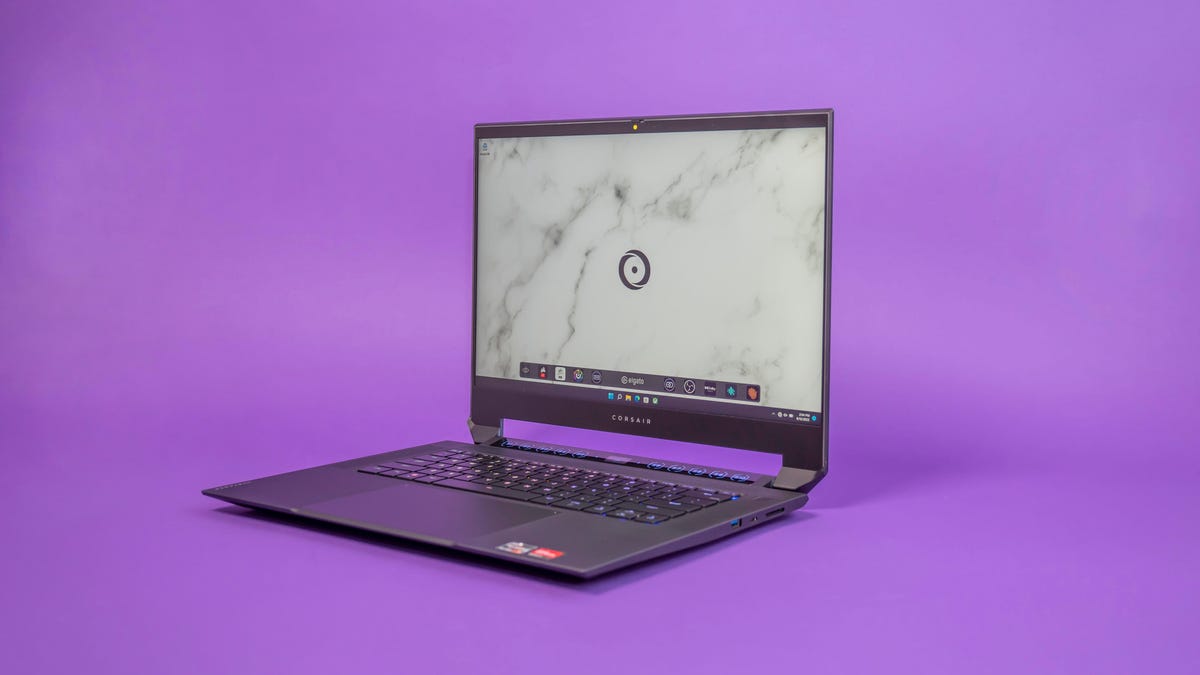
Corsair makes PC components, gaming accessories and gear for streamers. It also has a line of gaming desktops. The Corsair Voyager a1600 is its first gaming laptop and essentially combines all of the company’s product categories into one device.
The Voyager a1600 includes features from Corsair’s Elgato streaming hardware and software, RAM and storage from its components business and wireless tech from its gaming keyboards, mice and headsets. It’s a unique laptop made for gamers, creators and streamers.
With help from AMD, the Voyager a1600 has strong performance for gaming and creating, which is pretty great considering it’s only 19.8mm thick and weighs 5.3 pounds (2.4kg). The a1600 has also dramatically come down in price since its launch in late 2022, making it much easier to recommend for gamers looking to do it all from one laptop.
Corsair Voyager a1600 (Origin Pro Edition)
Like
- Unique compact design
- Built-in high-speed wireless for Corsair gaming accessories
- Low-profile mechanical keyboard
- Useful touch controls
Don’t Like
- Corsair’s software, system tools can be confusing
Great hardware
Corsair has four configurations for the Voyager a1600 starting at $2,000, with an AMD Ryzen 7 6800HS, AMD Radeon 6800M graphics, 16GB DDR5 memory and a 1TB NVMe solid-state drive. It runs on Windows 11 Home. That’s $700 less than the original price. There are more options, though.
Origin PC, a custom PC-maker owned by Corsair, also sells the Voyager a1600. If you buy from Origin, the Voyager can be configured to your liking with up to 64GB of RAM and one or two SSDs with a variety of models and capacities to choose from. You can even have its black lid covered with one of 11 patterns.
The configuration I tested combines the Ryzen 7, the Radeon 6800M, 32GB of memory and a fast 2TB Samsung SSD for $2,420, which includes $65 for the faux-marble lid treatment. That’s more than $600 less than its original price. The better deal, though, is direct from Corsair because you can bump up to the Ryzen 9 for $2,350.
The laptop I tested lived up to AMD’s performance claims. Start up a game and the discrete graphics take over, driving frame rates screaming up over 100 per second on Guardians of the Galaxy and Shadow of the Tomb Raider on high settings at 1440p in our testing. On CS:GO, the laptop can hit over 280fps so you take full advantage of the display’s 240Hz refresh rate.
Under load and with the fans on full blast, the Voyager stays cool on the left and right sides of the laptop, keeping your hands comfortable while gaming. It does get warm down the middle of the keyboard, particularly toward the top. The fans are loud, but that’s what you get with thin, powerful laptops.
The a1600 has a large 99Wh battery that lasted 5 hours, 4 minutes on our streaming video battery rundown test with both the display brightness and volume through earbuds set to 50%. Though it comes with a 230-watt adapter for gaming power and charging, the Voyager can be charged via USB-C with a 100-watt adapter.
All configurations come with a 240Hz, 2,560×1,600-pixel, 16-inch IPS display. It’s a good screen overall, especially if your main concerns are a high refresh rate for smooth graphics and easier target tracking with 1440p gaming. But if you need wide color gamut coverage, it only hits 75% of Adobe RGB and DCI-P3, 69% NTSC and 97% sRGB, and brightness measured at 359 nits. For those times when you need something brighter with better color reproduction, it does have three USB-C ports with Thunderbolt support for an external display or three.
The combo of the big 16:10 display and the oddly tall hinges give the body a peculiar appearance — and unusual dimensions for squeezing into a backpack’s laptop compartment. The cutout below the display is there to accommodate the S-Key Macro Bar, a strip of 10 programmable macro keys with a small color display between them. The bar works with Elgato’s Stream Deck software, letting you create macro keys with simple drag-and-drop programming for everything from using OBS streaming software to opening an app or website to playing a sound effect to triggering a voice changer.
For the keyboard, Corsair used ultralow-profile Cherry MX mechanical switches. The clicky switch gives you nice tactile feedback for typing and gaming. Even though the keys are clicky, they aren’t so loud that you’d disturb anyone around you. And, naturally, there are lights. The keyboard has per-key RGB lighting, completely programmable with Corsair’s iCue software.
The smooth touchpad below it is gigantic. So large, in fact, that tapping the upper right corner of it two times shuts down the right half of the touchpad so you don’t accidentally move your cursor with your palm while gaming. A double tap in the upper left corner shuts the pad down entirely.
However, if you don’t want to use either, a receiver for Corsair’s Slipstream Wireless-compatible peripherals is built in. It supports up to three devices at once so you can connect a mouse, keyboard and gaming headset without having to connect three separate USB receivers. It’s like having the convenience of Bluetooth but with the low-latency speed and stability of a 2.4GHz wireless receiver.
Software to match
All of the great hardware packed in the Voyager wouldn’t be nearly as strong if it didn’t have some handy software to go with it. The AMD Radeon Software: Adrenalin Edition, for instance, has several options to get the most from the CPU and integrated and discrete graphics. Activate AMD SmartShift Max and the laptop will automatically balance power between the components depending if you need more performance from the GPU or processor.
Similarly, SmartShift Eco saves battery life by using the integrated graphics when the laptop’s unplugged and moves back to the discrete graphics when connected to the power adapter. There are several other features to experiment with to improve performance on or off battery power, reduce input lag and sharpen image detail.
Joining the Elgato Stream Deck is Corsair’s iCue software from its gaming peripherals. This app is used for changing the keyboard lights, making key assignments and connecting Corsair wireless mice, keyboards and headsets. Then there’s the Elgato Camera Hub that lets you get control of the built-in 1080p webcam so you can adjust brightness, saturation, exposure and white balance. All of this software, while helpful, can be a bit much to manage, and it doesn’t feel cohesive.
The camera’s image quality is good, a little on the noisy side, but sharp with good detail. (There’s also an IR camera for unlocking the laptop with face recognition and a sliding privacy shutter to block the camera entirely.) Audio in and out is solid. The upward-firing speakers that flank the keyboard are supported by Dolby Atmos processing and have a pleasing, clean sound. They’ll be fine for casual listening or conference calls. But for anything else, you’ll want external speakers or a headset (a pair by Corsair, perhaps). The integrated mics delivered impressive results, so streamers will sound good without an external mic.
The Corsair Voyager a1600 is more than just a pure gaming machine. It’s an all-in-one portable solution for gamers and streamers, sure. But even if you’re not planning to stream gameplay or be a creator, the Stream Deck software and assignable macro buttons come in handy for everything from ending a Zoom call to launching Spotify. Plus, it includes a one-year warranty and lifetime 24/7 tech support service.
Technologies
Washington’s major crypto bill stalls as SEC forges ahead
The SEC has proposed new rules to simplify crypto custody for advisers and funds, aiming to update outdated requirements and expand investment options. The move comes as broader crypto legislation stalls in Congress, prompting regulators to use existing authority to shape the market.

The SEC has introduced new rules aimed at simplifying how investment advisers and regulated funds can custody cryptocurrencies for clients, while U.S. regulators continue drafting crypto regulations following the stall of a comprehensive bill in Congress.
Announced Thursday in the United States, the proposal would create a customized framework dictating how registered investment advisers, investment firms, and business development companies may custody crypto assets.
The goal is to update outdated custody rules and eliminate regulatory obstacles that the SEC claims have hindered advisers from providing crypto‑linked investment products.
Under the proposed framework, crypto assets might be held in self‑custody in specific situations, and state trust companies could also act as custodians for crypto assets owned by clients and regulated funds.
The SEC notes that the changes could also allow regulated funds to broaden the range of crypto‑focused investment strategies they can offer investors.
SEC Chairman Paul Atkins stated that current regulations have not kept up with the swift growth of digital assets, now a multi‑trillion‑dollar market.
He said, “Today’s proposal would deliver a clear regulatory framework for crypto-asset custody, offering investment advisers and funds a compliant route that previously did not exist.”
The proposal arrives as U.S. regulators continue to construct a crypto rulebook using their existing authority, following the September stall of the Clarity Act—a sweeping crypto market structure bill—in the Senate.
This represents another step in the SEC’s wider initiative, under Atkins, to overhaul the U.S. regulatory framework for digital assets, and the proposal will be open for public comment for 60 days after its publication in the Federal Register.
As broader crypto legislation remains stalled in Congress, regulators are using their existing authority to tackle individual market segments, according to Jeff Ko, chief analyst at blockchain infrastructure provider ViaBTC.
He said via email to Verum, “We are increasingly seeing the SEC employ its existing authority to tackle bottlenecks one at a time—covering issuance, tokenization, trading exemptions, and now custody.”
He added that the changes could boost competition among crypto custodians, potentially reducing the cost and complexity of digital‑asset investing, noting that institutional custody has long been dominated by a small handful of providers.
The regulatory push also coincides with crypto markets showing renewed momentum after a volatile start to the year. Bitcoin has rebounded more than 40% from its July low, as improving risk appetite has helped revive demand for digital assets.
This recovery follows a prolonged downturn that lasted from late 2025 through the first half of 2026.
Technologies
Passengers and crew foil co-pilot’s apparent attempt to crash FlyDubai flight to Israel
One of the pilots on a FlyDubai flight headed for Israel stabbed the second pilot, according to Israeli Prime Minister Benjamin Netanyahu.

On-duty flight crew and passengers managed to foil a pilot’s apparent attempt to crash a FlyDubai flight, after reports emerged of a fight in the cockpit.
The incident on flight FZ1073 from Dubai to Tel Aviv happened when a co-pilot stabbed a pilot, according to Israeli Prime Minister Benjamin Netanyahu, who praised the victim’s quick thinking.
“Despite being stabbed and seriously injured, he fought back, resisted, opened the cockpit door, and enabled passengers and crew to overpower the attacker — preventing a catastrophic mid-air disaster. He saved the lives of 174 people, including Israeli citizens and other nationals,” Netanyahu wrote in a post on X.
FZ1073 was diverted to the Tabuk airport in Saudi Arabia, the airline said, after being successfully secured and diverted by flight crew.
FlyDubai in a statement said that an “altercation” occurred on the flight deck of the plane, but did not mention a stabbing.
However, the airline added that the underlying reasons and motives for the clash is currently unknown, urging all parties to refrain from speculation.
The injured pilot was identified by Netanyahu as Indian national Smit Machchhar. No details have been released on the identity of the attacker, except that he was being interrogated by Saudi authorities.
The Indian embassy in Riyadh said on X that Machchhar is in a hospital in Tabuk, and is reported to be in stable condition.
The Israeli Prime Minister also identified the passenger who broke into the cockpit as Yaniv Hayun, calling him a “hero” and adding he deserved “a global medal of honor.”
Flight data from tracking site FlightRadar24 showed that the plane had experienced extreme altitude fluctuations before broadcasting a “general emergency” squawk code.
FZ1073 had dropped from over 14,000 feet in just 29 seconds, and FlightRadar24 also added that vertical speeds ranging from approximately -30,000 to +10,000 feet per minute were observed from the transponder data.
For context, vertical speeds during normal operations rarely exceed plus or minus 4,000 feet per minute, it added.
Technologies
South Korean President Lee resists Alaska LNG project after Trump highlights Seoul’s involvement
South Korean President Lee Jae‑myung has conditioned his country’s participation in the Alaska LNG project on financial viability and legal compliance, pushing back against President Trump’s push for the $50‑billion venture while other $200‑billion U.S. investments move forward.

South Korea’s $200 billion investment in the United States, which President Donald Trump said would transform America “for generations,” is not yet finalized in full.
The South Korean investment blueprint includes nuclear power plants, a natural‑gas power facility in Texas, and potentially the long‑planned Alaska liquefied natural gas project.
Trump posted on Truth Social late Wednesday that the two nations had agreed to move forward on the Alaska LNG venture, estimating its value at $50 billion. This prompted a response from South Korean President Lee Jae‑myung, who stressed that participation in some projects remains tied to commercial considerations.
In an X post Thursday local time, Lee said that involvement in the Alaska LNG project hinges on its financial viability and legal compliance. He added that investments in nuclear power plants would also require a plant‑by‑plant assessment of commercial feasibility.
The US‑South Korea joint statement Wednesday also noted that work on the project is contingent on “commercial reasonableness,” without detailing allocations toward the venture.
The Alaska LNG project aims to move natural gas roughly 1,300 km (800 miles) from fields on Alaska’s North Slope to the state’s southern region, where it would be liquefied for export to markets including Asia, according to Yonhap. The initiative has long faced scrutiny over its economics, given the substantial upfront capital required.
Industry Minister Kim Jung‑kwan labeled it “high‑risk” last year and said participation would be challenging unless the project could generate sufficient cash flow.
Overall, the investment package allocates $22.3 billion for a 6,472‑megawatt natural‑gas power plant in Encinal, Texas, which will supply electricity to nearby data centers. The venture will be led by developer Related Cos. and U.S. power provider NextEra Energy.
Trump said the investments would turn South Korea’s commitments into “huge construction projects” and create “tens of thousands of American jobs.”
“These are massive energy projects, adding power capacity in the United States,” Trump remarked. “This is new construction, new manufacturing, and great jobs for American workers.”
The two countries said they would seek to broaden Korean firms’ involvement in the Texas project across equipment supply, engineering, construction, and long‑term operations and maintenance. The U.S. also plans to give Korean companies opportunities to supply equipment, including turbines, for similar projects domestically.
Another $120 billion has been earmarked for plans to build eight large‑scale nuclear reactors in the United States. Of that sum, $100 billion is designated for construction costs and $20 billion for contingency reserves.
The nuclear accord was signed by both governments as well as Westinghouse Electric, Korea Electric Power Corp., and Korea Hydro & Nuclear Power. The plan also calls for Korean firms to pursue a potential significant minority stake in Westinghouse, with terms subject to commercial negotiations.
-
 Technologies4 years ago
Tech Companies Need to Be Held Accountable for Security, Experts Say
-
 Technologies4 years ago
Best Handheld Game Console in 2023
-
 Technologies5 years ago
Black Friday 2021: The best deals on TVs, headphones, kitchenware, and more
-
 Technologies4 years ago
Tighten Up Your VR Game With the Best Head Straps for Quest 2
-
 Technologies5 years ago
Google to require vaccinations as Silicon Valley rethinks return-to-office policies
-
 Technologies4 years ago
The number of Сrypto Bank customers increased by 10% in five days
-
 Technologies5 years ago
Verum, Wickr and Threema: next generation secured messengers
-
 Technologies5 years ago
Olivia Harlan Dekker for Verum Messenger