
Technologies
Your Computer Mouse’s Scroll Wheel Can Improve Your Internet Browsing
This secret power is a real time-saver if you open a ton of browser tabs.
I’m still discovering new productivity tricks and hidden features, even though I’ve been using a desktop computer for decades. There are so many ways to save a keystroke here and a mouse click there. Those few milliseconds can actually add up to big-time savings (or at least less annoyance) over the course of a week, especially if your job is primarily done online.
It isn’t just your operating system’s infinite settings menus that can improve your workday, though both MacOS and Windows 11 have some great features to try. Your computer’s mouse and keyboard are also packed full of features that can help you perform tasks faster and easier. Whether it’s reopening a closed tab or permanently deleting a file without ever hitting the recycle bin, there are plenty of tricks to help you be a little more efficient on your computer.
But in my personal experience, the one computer trick people are most consistently surprised about is an action you can do with your scroll wheel.
The scroll wheel’s hidden function
The internet is a great place to collect random tidbits of information, but sometimes you see something you want to investigate later. You don’t want to click on the link and have to go back to the previous page, because it would interrupt your current read. But you want to keep the trail open for later.
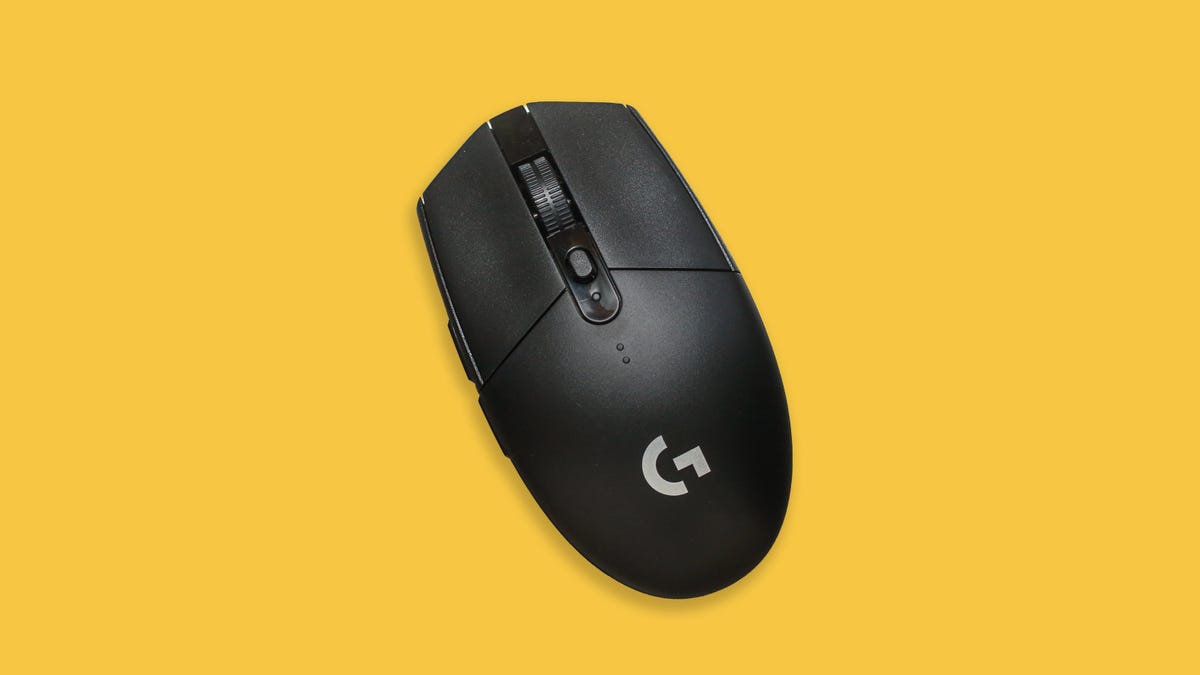
What do you do? You have a variety of options here, but this is the slickest and most efficient: If you’re using a mouse, just use your scroll wheel to click on the link. It’s not the most intuitive motion, but if you push your scroll wheel down while hovering over the link, you’ll automatically open that link in a new tab.
This little trick is great for when you’re reading something that links out to other interesting stories — just scroll-wheel click to open new tabs and check them out after you finish reading the current story.
If you want other ways of opening new tabs, we’ll walk you through it. We also have tips on keyboard shortcuts, like Ctrl + Shift + T, and taking Windows screenshots (which you can open in new tabs with a scroll-wheel click).
How to open links in new tabs
Opening pages in new tabs is a convenient browsing technique, and there are a few different ways of doing it.
- Click with your scroll wheel to automatically open the link in a new tab.
- Or right-click a link and choose “open in new tab.”
- You can also hold down Ctrl (or command on Mac) when you click the link and it will open in a new tab.
Opening things in a new tab means you don’t have to interrupt your current read, and you don’t have to wait for pages to load as you bounce back and forth. I use it all the time for comparison shopping — just pull up the things I’m considering in a few different tabs and quickly compare by tabbing through my browser. It’s also good for when you’re reading a story that references another story that you want to check out without interrupting your current read. Just click the link with your scroll wheel and check it out when you’re done with this story.
Bonus tip: You can use Ctrl + Tab to move forward and Ctrl + Shift + Tab to move backward through your open tabs.
For more computer tips, check out how to factory reset a laptop before gifting it, and essential settings for your MacBook.
Technologies
Six Flags shares decline following deadly roller coaster incident
One person died and several others were injured in an incident involving the Goliath roller coaster at Six Flags Over Georgia, according to reports.

Shares of Six Flags Entertainment declined more than 16% Tuesday following a deadly roller coaster incident at one of its amusement parks in Georgia.
One person died and several others were injured Monday in an incident at Six Flags Over Georgia, according to a statement from Georgia’s Cobb County Board of Commissioners. The board’s chairwoman, Lisa N. Cupid, said that county authorities are working with Six Flags and other partners in the investigation.
According to reports citing local police, the incident occurred on the Atlanta-area park’s 200-foot-tall Goliath roller coaster shortly before 4 p.m. Monday. Riders were later seen being evacuated from the roller coaster after it stopped near the top of the ride, according to the report.
Witnesses told a local news station that they saw a man fall from the roller coaster and strike the ride several times.
In a statement to ABC News, a Six Flags spokesperson said it is cooperating fully with the investigation and had temporarily closed similar attractions across its parks.
Six Flags did not immediately respond to CNBC’s request for comment.
Tuesday’s decline is on pace to be the stock’s worst day since August and puts shares at their lowest level since December 2009. Shares have now fallen by more than 50% over the past year.
Technologies
French supermarket fridges get hacked, heating to 122°F and sparking fires
Hackers targeted hundreds of French supermarkets in a large-scale cyberattack, causing refrigerators to overheat, spoiling food, and sparking fires.

Hackers targeted hundreds of French supermarkets in a cyberattack that reportedly caused refrigerators and freezers to overheat, spoiling food and sparking fires.
Fridges at French supermarket chains Carrefour, Monoprix, the Les Mousquetaires-owned Intermarché, and Coopérative U, among others, all saw fridges heat up to as much as 50 degrees Celsius (122 degrees Fahrenheit) overnight, Reuters reported Monday.
Coopérative U’s CEO, Dominique Schelcher, confirmed that cyberattacks had affected “refrigeration production facilities of several stores.”
“Attacking equipment that is essential to the preservation of fresh products and the food supply of the French people is extremely serious and unprecedented. It is unacceptable,” Schelcher said in a LinkedIn post.
CNBC has reached out to Carrefour, Monoprix, Intermarché, Coopérative U and E Leclerc for comment but did not immediately hear back.
Felix Aime, a senior cyberthreat intelligence analyst at Sekoia Threat Detection and Research, said the attack affected several European countries, including Spain, Portugal, Poland, Germany and Belgium, according to the Reuters article.
“I strongly condemn the cyberattack targeting food products at @intermarche @CooperativeU @Leclerc,” European Commissioner for Agriculture and Food Christophe Hansen said in a post on X on Monday.
“Food security requires more attention at all levels. Because the weaponization of food has become a reality.”
AI enhancing cyberattacks
Les Mousquetaires said it was expecting the damages, which affected around 180 stores, to reach “several million euros in losses,” in an email to CNBC.
It said some fresh and frozen food displays have been out of service after the cyberattack affected one of its service providers responsible for managing refrigeration systems inside some stores.
“Intermarché and Netto have taken all necessary precautions to remove and dispose of any affected products as quickly as possible, to ensure consumer safety,” the Les Mousquetaires spokesperson said. “In some stores, the overheating of equipment resulted in smoke, but no fires have been reported.”
They’re now awaiting findings from a court-appointed bailiff and insurance experts to get more precise figures on damages.
Stop & Shop parent Ahold Delhaize
This comes amid a broader wave of cyberattacks and cybercrimes, which experts are warning are being enhanced by artificial intelligence. British online fashion retailer Asos experienced a cybersecurity breach last week which revealed some customers’ personal information.
Meanwhile, a small power plant in the U.K. was shut down for four days in July after a cyberattack which was suspected to be linked to Iran.
Interpol’s global chief information security officer, Bjorn R. Watne, recently told CNBC that AI can be used to target multiple victims at once, and is increasing the scale and speed of cyberattacks. “It’s an evolution and not a revolution.”
Correction: Bjorn R. Watne is global chief information security officer at Interpol. An earlier version misspelled his name.
Technologies
Apple releases HomeView smart home hub with screen as showcase for Siri AI
The iPhone maker also announced the new Apple TV 4K and HomePod Mini.
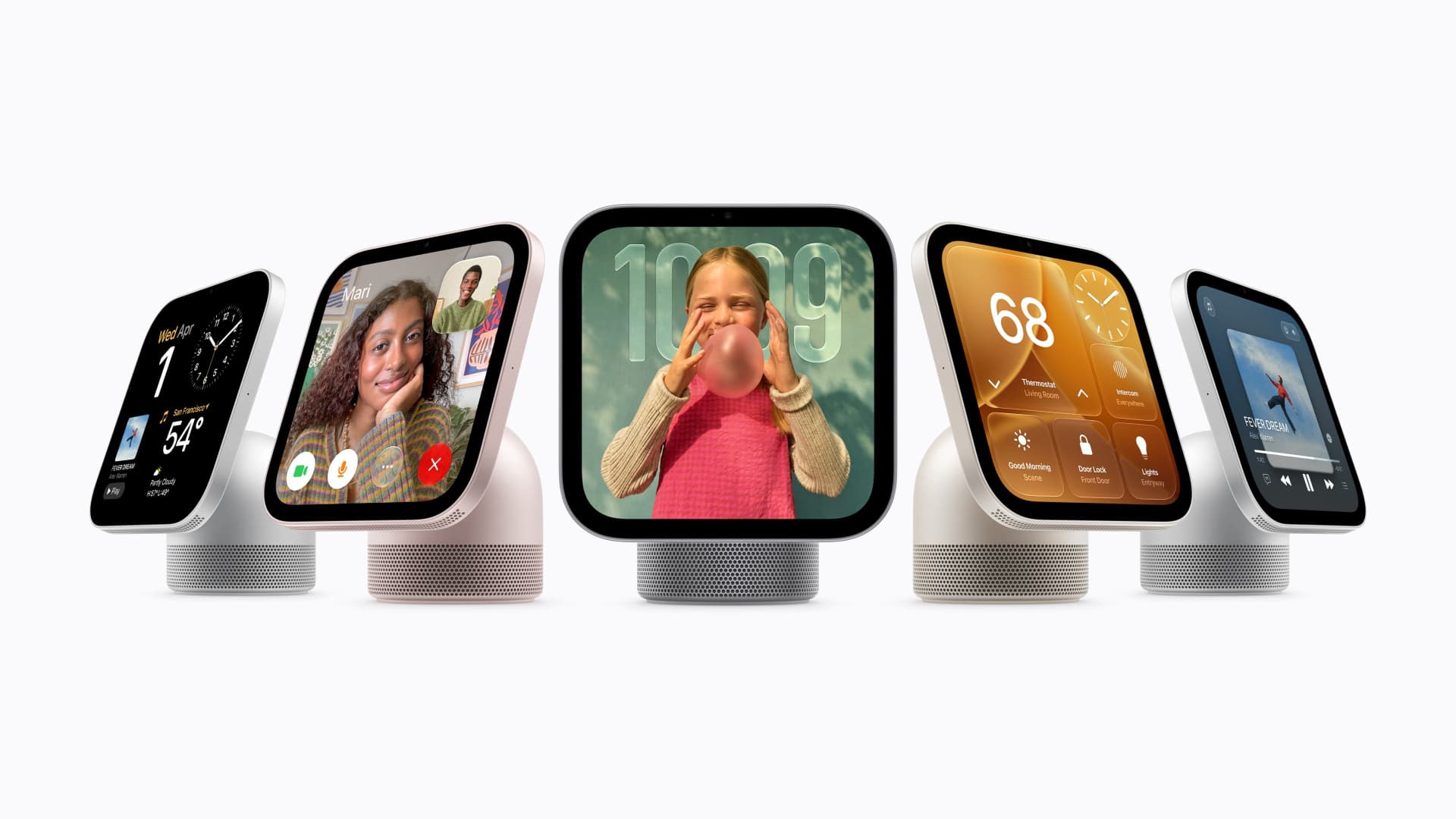
Apple on Tuesday announced a new home hub called HomeView.
Apple said the device with a 7-inch screen was designed to be mounted on a wall or placed on a table. It’s designed for multiple people in a household, and will recognize the user by their face to display pertinent information. It starts at $299 and ships on Nov. 13.
Tuesday’s launch event is the second under new CEO John Ternus, who took over from Tim Cook in September. Last month, Apple announced new models of its most important product, the iPhone, including a foldable model called the Duo that retails for nearly $2,000.
Apple also announced new Apple TV and HomePod hardware on Tuesday. The new Apple TV 4K costs $299 and has a redesigned remote that can play a sound if it is lost. Apple’s HomePod Mini speaker comes in new colors and costs $149, a slight increase over its previous $129 price.
The products announced Tuesday are less critical for Apple than the iPhone, and investors remain focused on iPhone sales, but the accessories were positioned on Tuesday as a showcase for the company’s new Siri abilities released last month.
Apple said that HomeView features Siri AI, which can answer a broad range of questions. Users will be able to converse with Siri, and their conversations will continue on their iPhone or iPad. It has a built-in speaker for playing music.
“It recognizes your face to shift from a household screen to your own experience, fills the room with incredible sound, keeps you connected to the people who matter most with FaceTime, and makes it easy to control your smart home,” Apple’s chief marketer Greg Joswiak said in a statement.
Apple said that HomeView will show information from the Messages, Photos, Calendar, and Reminders apps based on who is using the device, powered by Apple Intelligence. It can also be used to make FaceTime calls and as a digital photo frame. It’s equipped with an Apple A18 chip. It supports up to six users.
But while Apple has dabbled in home products and platforms in the past, Tuesday’s announcement shows Apple is making its home products a higher priority under Ternus.
Apple said on Tuesday that its new products, including HomeView, can be used as a smart home hub, coordinating notifications and actions in the home and working with a range of products, including new locks, doorbells, and cameras from LG Electronics and Schneider Electric.
Apple’s integration with the smart home is not just about sales but also helps further lock customers into its own ecosystem. People who use multiple Apple products and connections are less likely to switch to an Android phone.
HomeView can also become a smart home dashboard, Apple said. It can be used to view camera feeds, adjust the thermostat, or lock connected doors around the house.
Apple said that setting up a new smart home device takes one tap from the user’s iPhone.
Tuesday’s launch shows Apple’s confidence as it launches new product categories. But the broader consumer electronics industry has been dealing with price increases and demand deterioration related to component shortages in memory and storage. It also comes as new boss Ternus has reportedly pushed the company to release products faster.
Apple’s new Apple TV 4K got a price hike from $199 to $299, and comes after a similar price increase earlier this year, after Cook said that memory costs for Apple were unsustainable.
-
 Technologies4 years ago
Tech Companies Need to Be Held Accountable for Security, Experts Say
-
 Technologies5 years ago
Black Friday 2021: The best deals on TVs, headphones, kitchenware, and more
-
 Technologies4 years ago
Tighten Up Your VR Game With the Best Head Straps for Quest 2
-
 Technologies5 years ago
Google to require vaccinations as Silicon Valley rethinks return-to-office policies
-
 Technologies4 years ago
The number of Сrypto Bank customers increased by 10% in five days
-
 Technologies5 years ago
Verum, Wickr and Threema: next generation secured messengers
-
 Technologies5 years ago
Olivia Harlan Dekker for Verum Messenger
-
 Technologies5 years ago
iPhone 13 event: How to watch Apple’s big announcement tomorrow