
Technologies
5 Things You’ll Be Able to Do on Microsoft’s New AI-Powered Bing
Refine search results, summarize topics and generate writing with Bing as your “co-pilot.”
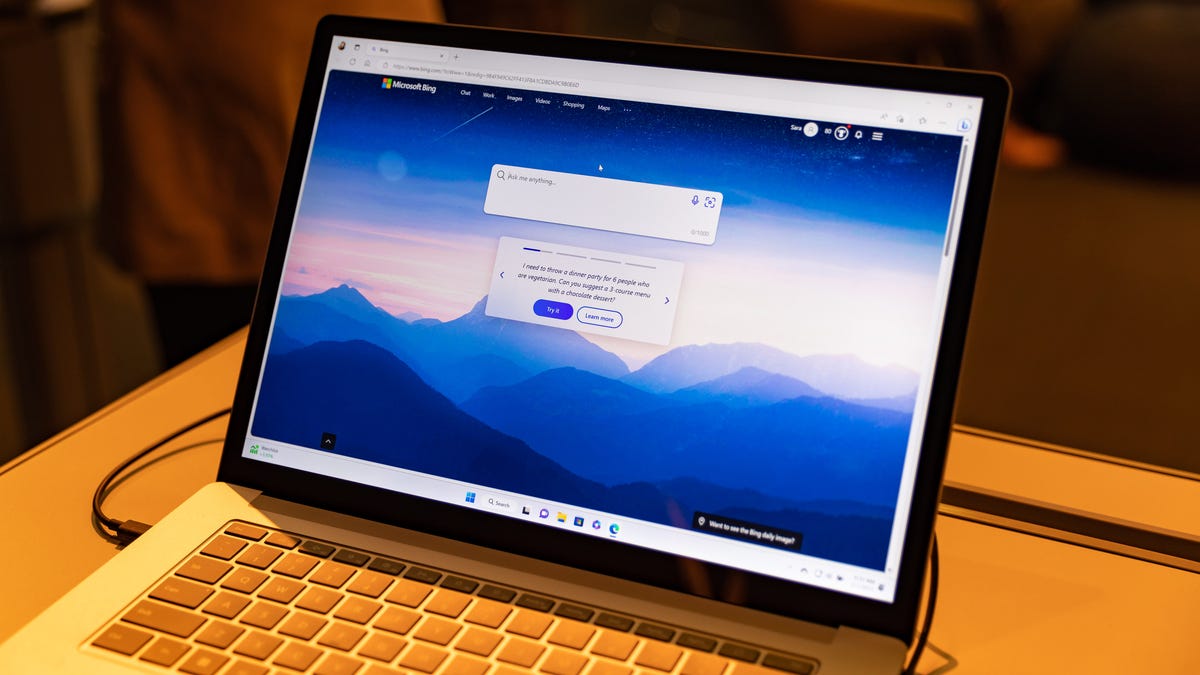
Microsoft on Tuesday announced an enhanced Bing, detailing how it’s using the AI tech behind ChatGPT to add in a slew of new capabilities to the longtime second-place search engine. There’s a waiting list for the service now, and Microsoft says it will be available broadly in the coming months. There’ll be no charge for the service.
CEO Satya Nadella said the juiced-up search service aims to take on queries that aren’t getting good results on today’s search engines. People increasingly use search engines to get advice and information on complex topics, not just a link to a website, and the AI boost to Bing aims to help it keep up.
“It’s a new day in search,” Nadella said.
ChatGPT, an AI-powered chatbot from a company called OpenAI, burst onto the scene in November with a breathtaking capacity for drawing information from the web and presenting it in plausible essays, poems and other formats. Last month, Microsoft said it would be investing billions of dollars into the company. Meanwhile, Google, the dominant search engine on the web, on Tuesday announced Bard, its ChatGPT challenger.
Microsoft says its technology makes Bing your co-pilot on the web. Here’s a taste of what you can try out with the AI-powered search.
Search
You can search on Bing.com, as always. What’s new here is that Microsoft has applied OpenAI’s model to its search ranking engine. That led to a huge leap in the relevance of search results, the company says, so Microsoft believes you’ll find better responses to your basic searches on Bing.
The AI also augments the search results with written summaries. A use case Microsoft predicts will be popular is planning a trip. If you’re going to New Orleans for three days, for example, what should you do? A search on Bing will show you not just links to sites with sight-seeing and museum suggestions for the Big Easy, but also a sidebar with a summary of information from around the web, written by AI. The sidebar will link to sources that can let you explore further.
Ask for more details
If you want to ask more questions after your initial Bing search, you can click the chat icon near the top of the search page. Here you can refine the results. In the trip planning example, you can do things like clarify that you’re visiting New Orleans with kids, or ask for a three-day itinerary for your visit.
Bing can offer pretty fine-grained results in this conversational format. In addition to a detailed itinerary with descriptions of the places you’ll visit, you can ask for travel times between activities in New Orleans, for example.
This also applies to searching for advice on a home improvement project, like installing air conditioning in your house. If you clarify that you have air ducts in your home already, for example, it can give you information more relevant to your project.
Write something
The new Bing can write for you. After you research your home improvement project, for example, you ask Bing to write an email to your partner summarizing what you found. You can edit the writing, click into the text box of a new email and have Bing insert it there.
You can also ask Bing to write something with a fresh prompt, similar to many examples of ChatGPT’s writing that users have shared online recently. Anything from the whimsical “write a story about a curious dog who goes to the moon for preschoolers” to the more serious “write a letter to my apartment contesting an upcoming increase in rent” can generate text. You can also tweak the tone of the writing, like requesting it be funny.
Get context for a website
On the newly revamped Edge browser, you’ll be able to open a Bing sidebar and get more information about something you’re looking at online. You can open a product listing on Amazon, for example, and then open up the sidebar to ask Bing to tell you about the product. It’ll give you a summary of the product’s specs, cost and use cases.
For a specific iRobot vacuum, for example, you can also ask Bing for examples of reviews from cat owners. That’ll pull up quotes from Amazon reviews for the vacuum that mention cats and some summary from Bing.
You can also ask Bing to give you the key takeaways from a long document, and then compare it to another document.
Ask a broad question
If you’ve ever typed a query like “who are some famous Mexican painters?” into a search engine, you’re probably familiar with the experience of getting an excerpt from one website, a list of relevant people and a link to Wikipedia. The request is so broad that you typically have to leave the search page to get the answer. The new Bing wants you to stay, at least for a while.
Ask about Mexican painters on the new Bing and you’ll get a written summary of the key players and a description of their work. You can click on links to sources to learn more, if you like, or you can ask for more fine-grained results in the chat function.
Editors’ note: CNET is using an AI engine to create some personal finance explainers that are edited and fact-checked by our editors. For more, see this post.
Technologies
Iranian President Pezeshkian to head to New York for UN meeting as Trump warns of no-deal consequences
Trump threatened to destroy Iran’s economy or eliminate its leadership if Tehran doesn’t strike a deal, complicating efforts at diplomacy.

President Masoud Pezeshkian will lead an Iranian delegation at the United Nations General Assembly in New York on Tuesday, amid renewed hopes for a diplomatic solution to the Middle East conflict.
Pezeshkian will address the assembly and present Iran’s positions on “international developments,” according to the country’s semi-official Tasnim news agency, with a particular focus on its war with the U.S. and Israel.
He will also hold talks with the leaders of several countries on the sidelines of the event, which is scheduled to take place Sept. 22 to 26, and 28.
The Iranian delegation’s attendance at the UN has renewed hopes for a diplomatic solution to the war, lifting market sentiment on Monday, with stocks rising, oil prices easing and global bond yields falling sharply.
But U.S. President Donald Trump, who has said he would be open to meeting Pezeshkian during the assembly, has threatened to destroy Iran’s economy or eliminate its leadership if Tehran doesn’t strike a deal.
Trump told Fox News on Sunday that the only options on the table were “wiping Iran out,” or letting its economy “rot,” unless both sides reach a deal.
Separately, Iran’s military said that its intelligence suggested a new, large-scale strike being prepared by the U.S. and its allies, warning of “painful” retaliation across the Middle East. Regional countries backing such a strike would be treated as parties to the conflict, it said.
“If the U.S. makes any mistake against the Islamic Republic of Iran, all its positions and interests in the region will be targeted by sustained, effective and painful attacks,” the Khatam al-Anbia Central Headquarters of Iran said, according to Tasnim.
Houthi-Saudi conflict complicates diplomacy hopes
The U.S. State Department this weekend issued a security alert citing risks of unforeseen escalation in the Middle East, telling Americans to exercise more vigilance and be aware of possible flight cancellations and airspace closures.
The warnings came after Iran-backed Houthi militants claimed missile and drone attacks on Riyadh on Saturday, triggering the first air-raid alert in the Saudi capital since fighting escalated in July.
Saudi authorities said they intercepted and destroyed a ballistic missile and reported no casualties or damage. The Houthis also attempted to target civilians and infrastructure in several parts of the kingdom, Saudi-led coalition forces spokesperson Major-General Turki al-Maliki said on X on Saturday, though those attacks were thwarted by the country’s air defenses.
Oil prices have pulled back in recent days despite widening hostilities, as traders hope for a recovery in energy shipments from oil-rich Saudi Arabia.
Oil prices will remain high despite U.S. progress in moving oil through the Strait of Hormuz, a team of analysts at Eurasia Group said in a Saturday note. Any rebound in oil flows would not be enough to address the overall market deficit, they said, forecasting Brent prices to trade in a higher band of $90-110 per barrel through the rest of this year.
“Iran’s leadership will stick with resistance, even as they quarrel internally,” according to the consultancy firm, as Tehran seeks to use military proxies and tanker attacks to keep a chokehold on shipping flows, to pressure Washington into concessions.
Tehran has insisted that it would not reopen the Strait of Hormuz until Washington fulfills its commitment under the June memorandum, which called for lifting the naval blockade of Iranian ports, easing sanctions, unfreezing Iranian assets and ending U.S. military threats.
Iranian parliament speaker Mohammad Bagher Ghalibaf said Sunday that Iran must keep on fighting and negotiating, to push back its enemies, and only work on diplomacy when it has the upper hand on the battlefield.
Technologies
U.S. crude oil drops below $100 a barrel as Trump signals willingness to negotiate with Iran
U.S. crude oil prices slipped back below $100 a barrel after President Trump signaled openness to talks with Iran and halted plans to bomb Yemen, while Middle East supply flows remained robust despite pipeline disruptions.

Crude oil prices declined for the fourth straight session on Monday after President Donald Trump reportedly decided against bombing Yemen for the time being and indicated he was open to diplomatic engagement with Iran.
U.S. West Texas Intermediate futures fell 2.7% to $97.59 per barrel by 7:48 a.m. ET, while Brent crude, the global benchmark, slipped 2.8% to $101 a barrel. The market has risen more than 11% so far this month.
Trump told Fox News he would likely be receptive to meeting Iranian President Masoud Pezeshkian at the United Nations General Assembly later this week.
According to The New York Times, the president has decided not to target the Iran‑aligned Houthi militants for now, despite requests from Saudi Arabia.
Meanwhile, crude shipments from the Middle East appear resilient after Saudi Arabia shut down its East‑West pipeline following attacks. JPMorgan analysts noted in a September 18 report that oil flows from the region remain surprisingly strong, averaging 17.1 million barrels per day over the past 10 days—about 6.1 million bpd below the 2025 average.
Potential supply disruptions persist. Trump told Fox that he is in a “deciding mode” and that “very big things” are expected soon regarding the U.S.–Iran conflict.
Prices are likely to stay closely linked to the pace of export normalization and diplomatic progress, said Daniel Takieddine, co‑founder and CEO of Sky Links Capital Group.
Any setback or renewed deterioration in shipping conditions would tighten the physical market and restore upward pressure on prices, Takieddine added.
Technologies
White House TV press pool won’t cover Trump after CNN ban
This is breaking news. Please refresh for updates.
Politics & Policy
White House TV press pool won’t cover Trump after CNN ban
This site is now part of Versant. By continuing to use this service, you agree to our Terms. You also acknowledge that our updated Privacy Policy…

This is breaking news. Please refresh for updates.
Politics & Policy
White House TV press pool won’t cover Trump after CNN ban
This site is now part of Versant. By continuing to use this service, you agree to our Terms. You also acknowledge that our updated Privacy Policy applies, including to your existing data. For details on your data rights, click here.
On this service, we and our vendors use cookies and other tools (“Cookies”) to store and access information on your device, such as device identifiers, IP address, and your browser type. You can access a list of all our potential 1021 vendors by selecting “IAB and Google Vendors,” although we may work with only a small selection of these on this service. Your data may be used to save and communicate your privacy choices; ensure security, prevent fraud, and debug our products and services; personalize advertising and content; for advertising and content measurement; to conduct audience research and services development; so we can improve our services and develop new ones; to match and combine offline data with your online activity; and for social features. We may share this data with select vendors with your consent.
Click “I Accept”, to consent to our use of these Cookies or “Reject All” to reject our use of these Cookies. Click “Manage Choices” to set your preferences. If you previously made choices with respect to Versant’s use of Cookies on this browser and device, you will need to update them. You can adjust your choices any time through the “Cookie Preferences” link in the footer of relevant Versant sites or in-app settings. Visit our Cookie Notice and Privacy Policy to learn more.
We will also use other Cookies that are essential or related to our services, including for security and fraud prevention.
Store and/or access information on a device. Personalised advertising and content, advertising and content measurement, audience research and services development.
– Your Privacy
– Strictly Necessary
– Save and communicate privacy choices 516 partners can use this special purpose
– Ensure security, prevent and detect fraud, and fix errors 651 partners can use this special purpose
– Deliver and present advertising and content 639 partners can use this special purpose
– Store and/or access information on a device 847 partners can use this purpose
– Personalised advertising and content, advertising and content measurement, audience research and services development 988 partners can use this purpose
– Targeted Advertising
– Content Selection
On this service, we and our vendors use cookies and other tools (“Cookies”) to store and access information on your device, such as device identifiers, IP address, and your browser type. Your data may be used to save and communicate your privacy choices; ensure security, prevent fraud, and debug our products and services; personalize advertising and content; for advertising and content measurement; to conduct audience research and services development; so we can improve our services and develop new ones; to match and combine offline data with your online activity; and for social features. We may share this data with select vendors with your consent. You can adjust your choices any time through the “Cookie Preferences” link in the footer of relevant Versant sites or in-app settings.
We will also use other Cookies that are essential or related to our services, including for security and fraud prevention. To learn more about some of our vendors, see the IAB and Google Vendors under each purpose. Visit our Cookie Notice and Privacy Policy to learn more.
Always Active
These Cookies and SDKs are required for Service functionality, including security and fraud prevention, and to enable any purchasing capabilities. You can set your browser to block these tracking technologies, but some parts of the site may not function properly.
The choices you make regarding the purposes and entities listed in this notice are saved and made available to those entities in the form of digital signals (such as a string of characters). This is necessary in order to enable both this service and those entities to respect such choices.
Your data can be used to monitor for and prevent unusual and possibly fraudulent activity (for example, regarding advertising, ad clicks by bots), and ensure systems and processes work properly and securely. It can also be used to correct any problems you, the publisher or the advertiser may encounter in the delivery of content and ads and in your interaction with them.
Certain information (like an IP address or device capabilities) is used to ensure the technical compatibility of the content or advertising, and to facilitate the transmission of the content or ad to your device.
Cookies, device or similar online identifiers (e.g. login-based identifiers, randomly assigned identifiers, network based identifiers) together with other information (e.g. browser type and information, language, screen size, supported technologies etc.) can be stored or read on your device to recognise it each time it connects to an app or to a website, for one or several of the purposes presented here.
– Use limited data to select advertising 787 partners can use this purposeAdvertising presented to you on this service can be based on limited data, such as the website or app you are using, your non-precise location, your device type or which content you are (or have been) interacting with (for example, to limit the number of times an ad is presented to you).
– Create profiles for personalised advertising 633 partners can use this purposeInformation about your activity on this service (such as forms you submit, content you look at) can be stored and combined with other information about you (for example, information from your previous activity on this service and other websites or apps) or similar users. This is then used to build or improve a profile about you (that might include possible interests and personal aspects). Your profile can be used (also later) to present advertising that appears more relevant based on your possible interests by this and other entities.
– Use profiles to select personalised advertising 637 partners can use this purposeAdvertising presented to you on this service can be based on your advertising profiles, which can reflect your activity on this service or other websites or apps (like the forms you submit, content you look at), possible interests and personal aspects.
– Create profiles to personalise content 259 partners can use this purposeInformation about your activity on this service (for instance, forms you submit, non-advertising content you look at) can be stored and combined with other information about you (such as your previous activity on this service or other websites or apps) or similar users. This is then used to build or improve a profile about you (which might for example include possible interests and personal aspects). Your profile can be used (also later) to present content that appears more relevant based on your possible interests, such as by adapting the order in which content is shown to you, so that it is even easier for you to find content that matches your interests.
– Use profiles to select personalised content 231 partners can use this purposeContent presented to you on this service can be based on your content personalisation profiles, which can reflect your activity on this or other services (for instance, the forms you submit, content you look at), possible interests and personal aspects. This can for example be used to adapt the order in which content is shown to you, so that it is even easier for you to find (non-advertising) content that matches your interests.
– Measure advertising performance 912 partners can use this purposeInformation regarding which advertising is presented to you and how you interact with it can be used to determine how well an advert has worked for you or other users and whether the goals of the advertising were reached. For instance, whether you saw an ad, whether you clicked on it, whether it led you to buy a product or visit a website, etc. This is very helpful to understand the relevance of advertising campaigns.
– Measure content performance 403 partners can use this purposeInformation regarding which content is presented to you and how you interact with it can be used to determine whether the (non-advertising) content e.g. reached its intended audience and matched your interests. For instance, whether you read an article, watch a video, listen to a podcast or look at a product description, how long you spent on this service and the web pages you visit etc. This is very helpful to understand the relevance of (non-advertising) content that is shown to you.
– Understand audiences through statistics or combinations of data from different sources 575 partners can use this purposeReports can be generated based on the combination of data sets (like user profiles, statistics, market research, analytics data) regarding your interactions and those of other users with advertising or (non-advertising) content to identify common characteristics (for instance, to determine which target audiences are more receptive to an ad campaign or to certain contents).
– Develop and improve services 683 partners can use this purposeInformation about your activity on this service, such as your interaction with ads or content, can be very helpful to improve products and services and to build new products and services based on user interactions, the type of audience, etc. This specific purpose does not include the development or improvement of user profiles and identifiers.
– Use limited data to select content 179 partners can use this purposeContent presented to you on this service can be based on limited data, such as the website or app you are using, your non-precise location, your device type, or which content you are (or have been) interacting with (for example, to limit the number of times a video or an article is presented to you).
These Cookies and SDKs are used to collect data about your browsing habits, use of the Services, your preferences, and your interaction with advertisements across platforms and devices for the purpose of delivering targeted advertising content, both on our Services and on third party sites. Third-party sites and services also use Targeting Cookies to deliver content, including advertisements relevant to your interests on the Services. If you reject these Cookies or SDKs, you will see less relevant advertising.
Data collected under this category through Cookies and SDKs can also be used to select and deliver personalized content, such as news articles and videos.
Consent Leg.Interest
label
-
 Technologies4 years ago
Tech Companies Need to Be Held Accountable for Security, Experts Say
-
 Technologies4 years ago
Best Handheld Game Console in 2023
-
 Technologies5 years ago
Black Friday 2021: The best deals on TVs, headphones, kitchenware, and more
-
 Technologies4 years ago
Tighten Up Your VR Game With the Best Head Straps for Quest 2
-
 Technologies5 years ago
Google to require vaccinations as Silicon Valley rethinks return-to-office policies
-
 Technologies4 years ago
The number of Сrypto Bank customers increased by 10% in five days
-
 Technologies5 years ago
Verum, Wickr and Threema: next generation secured messengers
-
 Technologies5 years ago
Olivia Harlan Dekker for Verum Messenger