
Technologies
Tottenham vs. Man City Livestream: How to Watch Premier League Soccer From Anywhere
It’s a blockbuster Premier League showdown as sharp-shooting strikers Harry Kane and Erling Haaland face off in North London.
Fifth-placed Spurs welcome second-placed Man City to Tottenham Hotspur Stadium on Sunday in what looks set to be a thrilling match to round off a weekend of English Premier League football. City boss Pep Guardiola’s team will be hoping for more of the same as they come into this match brimming with confidence following their 1-0 win in the FA Cup against league leaders Arsenal.
Tottenham also eased their way through to the next round of the competition after a professional 3-0 win away at Preston North End last weekend, but will be without boss Antonio Conte for this crucial game, with the Italian recuperating after undergoing surgery to remove his gallbladder earlier this week.
The match looks set to provide a tantalizing battle between two strikers at the top of their game, as Spurs skipper Harry Kane lines up against City’s Erling Haaland.
Haaland currently leads the race for the Premier League Golden Boot with 25 goals so far this term, while Tottenham hitman Kane is second on 16 and still looking to beat Jimmy Greaves’ all-time Spurs record.
Below, we’ll outline the best live TV streaming services to use to watch the game live wherever you are in the world.
Tottenham Hotspur vs. Manchester City: When and where?
Spurs host Manchester City at Tottenham HotspurStadium in London on Sunday, Feb. 5. Kickoff is set for 5.30 p.m. local time in the UK (12.30 p.m. ET, 9.30 a.m. PT in the US, and at 4.30 a.m. AEST on Monday, Feb. 6 in Australia).
How to watch the Spurs vs. Man City game online from anywhere using a VPN
If you find yourself unable to view the game locally, you may need a different way to watch the game — that’s where using a VPN can come in handy. A VPN is also the best way to stop your ISP from throttling your speeds on game day by encrypting your traffic, and it’s also a great idea if you’re traveling and find yourself connected to a Wi-Fi network, and you want to add an extra layer of privacy for your devices and logins.
With a VPN, you’re able to virtually change your location on your phone, tablet or laptop to get access to the game. So if your internet provider or mobile carrier has stuck you with an IP address that incorrectly shows your location in a blackout zone, a VPN can correct that problem by giving you an IP address in your correct, nonblackout area. Most VPNs, like our Editors’ Choice, ExpressVPN, make it really easy to do this.
Using a VPN to watch or stream sports is legal in any country where VPNs are legal, including the US, UK and Canada, as long as you have a legitimate subscription to the service you’re streaming. You should be sure your VPN is set up correctly to prevent leaks: Even where VPNs are legal, the streaming service may terminate the account of anyone it deems to be circumventing correctly applied blackout restrictions.
Looking for other options? Be sure to check out some of the other great VPN deals taking place right now.
Livestream the Tottenham vs. Man City game in the US
Sunday’s big EPL match is streaming on Peacock. You’ll need a Peacock Premium or Premium Plus account to catch the game live.
Livestream the Tottenham vs. Man City game in the UK
Premier League rights in the UK are split between Sky Sports, BT Sport and Amazon Prime Video. This game is exclusive to Sky Sports — showing on its Sky Sports Main Event, Premier League and Ultra channels. If you already have Sky Sports as part of your TV package, you can stream the game via its Sky Go app, but cord-cutters will want to get set up with a Now account, and a Now Sports membership, to stream the game.
Livestream the Tottenham vs. Manchester City game in Canada
If you want to stream this crucial game in the title race live in Canada, you’ll need to subscribe to FuboTV Canada. The service has exclusive rights to this Premier League season.
Livestream the Spurs vs. Man City game in Australia
Football fans Down Under can watch this EPL fixture on streaming service Optus Sport, which is showing every single Premier League game live in Australia this season.
Quick tips for streaming the Premier League using a VPN
- With four variables at play — your ISP, browser, video streaming provider and VPN — your experience and success when streaming EPL matches may vary.
- If you don’t see your desired location as a default option for ExpressVPN, try using the «search for city or country» option.
- If you’re having trouble getting the game after you’ve turned on your VPN and set it to the correct viewing area, there are two things you can try for a quick fix. First, log into your streaming service subscription account and make sure the address registered for the account is an address in the correct viewing area. If not, you may need to change the physical address on file with your account. Second, some smart TVs — like Roku — don’t have VPN apps you can install directly on the device itself. Instead, you’ll have to install the VPN on your router or the mobile hotspot you’re using (like your phone) so that any device on its Wi-Fi network now appears in the correct viewing location.
- All of the VPN providers we recommend have helpful instructions on their main site for quickly installing the VPN on your router. In some cases with smart TV services, after you install a cable network’s sports app, you’ll be asked to verify a numeric code or click a link sent to your email address on file for your smart TV. This is where having a VPN on your router will also help, since both devices will appear to be in the correct location.
- And remember, browsers can often give away a location despite using a VPN, so be sure you’re using a privacy-first browser to log into your services. We normally recommend Brave.
Technologies
Ring Finally Goes Wire-Free for Its Latest 4K Video Doorbells
The launch of battery-powered versions of the company’s powerful AI doorbells has been highly anticipated.
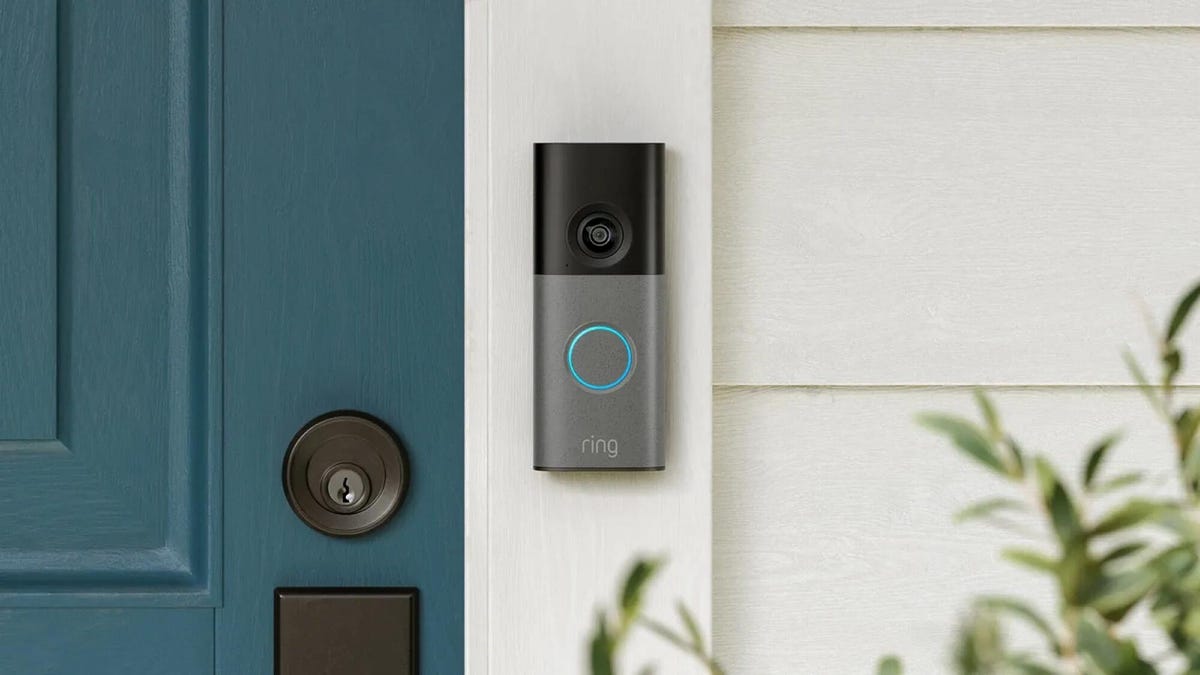
Security company Ring on Wednesday announced a significant expansion of its video doorbell line, notably battery-powered versions of both its 4K and 2K models, priced from $80.
Both Amazon’s Ring and Google Nest debuted high-resolution video doorbells with new AI features in the fall of 2025. But they were wired only, and in my tests, I kept thinking, «I sure wish there were battery models available.»
Wireless video doorbells are far better for most front doors than models that require connecting to your existing doorbell wiring, which is often poorly positioned for a security camera. Mine, for example, is located on a wall beside my door that’s useless for any kind of video views, no matter how you angle a lens.
«Enhancing image quality in battery-powered doorbells means customers can enjoy reliable performance with the flexibility to install devices in a way that suits their space, whether renting or living in homes without existing wiring,» a Ring spokesperson said.
At first, I wondered whether the higher 4K resolutions and more advanced AI features would use too much power to support batteries. If so, Ring is the first to fix that issue with this suite of doorbells, including these models available for preorder right now:
- Ring Battery Doorbell Pro — $250: This model offers up to 4K resolution and 10x zoom, and Ring says it features a redesigned internal architecture to support battery power.
- Ring Battery Doorbell Plus (2nd-gen) — $180: This model includes a quick-release battery pack along with 2K video.
- Ring Battery Doorbell (2nd-gen) — $100: This video doorbell includes 2K video, a 6x zoom and what Ring calls a «streamlined, rechargeable design,» which means you take the entire video doorbell to charge it, not just the battery — a design I greatly prefer, since Ring’s battery packs can get fiddly.
There’s also a new version of a Ring wired doorbell with 2K resolution, starting at $80. It wouldn’t be Ring without a plethora of doorbell devices to confuse newcomers, which is why I have a guide specifically for Ring video doorbells that will need some updating once I finish testing these new models.
Resolution plus an intelligence upgrade
Ring’s ordinary subscriptions of the Ring Protect plan give you cloud video storage and intelligent alerts for people, packages and vehicles, which are important but not really advanced AI. But spring for the $20-per-month Ring AI Pro cam, and this new generation of cameras opens up other capabilities.
Ring’s AI features include AI video descriptions, so if you get an alert, you can also get a summary of what the doorbell saw, including people and activities. A similar feature lets you search your video history with specific terms, such as «bike,» «truck» and so on. You also get the beta version of Ring’s Familiar Faces feature, which can ID logged faces of people who approach.
If these AI features make you uneasy and you’d rather protect your privacy, the best option is to avoid a subscription altogether or choose a lower-tier plan that gives you cloud storage without AI.
I also have a guide on how to turn off Ring’s detection and data-sharing features that might make you nervous, so you can keep what you like while ditching what you don’t.
Technologies
Today’s NYT Mini Crossword Answers for Thursday, March 26
Here are the answers for The New York Times Mini Crossword for March 26.

Looking for the most recent Mini Crossword answer? Click here for today’s Mini Crossword hints, as well as our daily answers and hints for The New York Times Wordle, Strands, Connections and Connections: Sports Edition puzzles.
Baseball is back! You’ll see baseball images patterned throughout today’s Mini Crossword grid, and when you solve the puzzle, they’ll spell out a certain word. Play ball! Er, read on for all the answers. And if you could use some hints and guidance for daily solving, check out our Mini Crossword tips.
If you’re looking for today’s Wordle, Connections, Connections: Sports Edition and Strands answers, you can visit CNET’s NYT puzzle hints page.
Read more: Tips and Tricks for Solving The New York Times Mini Crossword
Let’s get to those Mini Crossword clues and answers.
Mini across clues and answers
1A clue: Degrees for boardroom execs
Answer: MBAS
5A clue: «___ want for Christmas …»
Answer: ALLI
6A clue: What Hamlet holds while giving his «Alas, poor Yorick!» speech
Answer: SKULL
7A clue: Wild, as an animal
Answer: FERAL
8A clue: Sphere
Answer: ORB
Mini down clues and answers
1D clue: Word after «match» or «mischief»
Answer: MAKER
2D clue: Bit of writing on a book jacket
Answer: BLURB
3D clue: Penne ___ vodka
Answer: ALLA
4D clue: Window ledge
Answer: SILL
6D clue: Bay Area airport, for short
Answer: SFO
Technologies
McDonald’s KPop Demon Hunter Meals Include Bright Purple Nugget Sauce
The Derpy McFlurry mixes popping boba pearls and berry sauce into a soft-serve dessert.

McDonald’s has seen success with themed combo meals, including its holiday Grinch Meal. Now, the fast-food chain is capitalizing on Netflix’s Oscar-winning animated film, KPop Demon Hunters, with new upcoming menu items and both a breakfast meal and a lunch/dinner offering. Let’s hope you like the color purple.
The HUNTR/X Meal, named for the K-pop girl group in the movie, is a 10-piece chicken McNuggets meal that includes a medium drink and three special menu items.
Ramyeon McShaker fries come with a small bag of soy, garlic, sesame and spice seasoning, along with regular McDonald’s french fries. You sprinkle the seasoning into the provided bag, dump in the fries, shake it all up and eat.
The meal includes two new sauces for the fries and nuggets. Hunter sauce is a sweet chili sauce mixing notes of chili, garlic and pepper. But my favorite item on this new menu is Demon sauce, a bold mustard sauce with some heat and a bold purple color. There’s just not enough dark purple food out there.
There’s also a new dessert, the Derpy McFlurry, which blends creamy vanilla soft serve with berry-flavored popping boba pearls, served with a swirl of wild berry sauce. McDonald’s named it for the supernatural feline, Derpy Tiger, from the movie.
If breakfast is your bag, the new morning meal is the Saja Boys Breakfast Meal, named for the movie’s boy band.
It includes a Spicy Saja McMuffin sandwich, which is a sausage McMuffin with egg and a spicy Saja sauce, hash browns and a small drink.
Both meals come with a photocard for one of the bands and a Derpy card. The Derpy card includes a QR code you can scan to unlock online content about the film.
The full KPop Demon Hunters menu should be available at participating McDonald’s beginning March 31.
The McDonald’s Grinch meal (and its accompanying patterned socks) sold out quickly, so KPop Demon Hunters fans may want to mark their calendars and nab a meal when they are released.
-
 Technologies3 года ago
Tech Companies Need to Be Held Accountable for Security, Experts Say
-
 Technologies3 года ago
Best Handheld Game Console in 2023
-
 Technologies3 года ago
Tighten Up Your VR Game With the Best Head Straps for Quest 2
-
 Technologies4 года ago
Black Friday 2021: The best deals on TVs, headphones, kitchenware, and more
-
 Technologies5 лет ago
Google to require vaccinations as Silicon Valley rethinks return-to-office policies
-
 Technologies5 лет ago
Verum, Wickr and Threema: next generation secured messengers
-
 Technologies4 года ago
Olivia Harlan Dekker for Verum Messenger
-
 Technologies4 года ago
The number of Сrypto Bank customers increased by 10% in five days